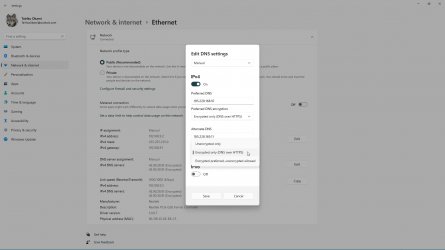
Network and Internet Enable DNS over HTTPS (DoH) in Windows 11

  • Thread starter Thread starter Brink
  • Start date Published: Start date Updated Updated:
  • Tags Tags
    dns

DNS_banner.png

This tutorial will show you how to change your DNS Server address and enable DNS over HTTPS (DoH) in Windows 11.

A DNS (Domain Name System) server is the service that makes it possible for you to open a web browser, type a domain name and load your favorite websites.

DNS over HTTPS (DoH), or Secure DNS, is a protocol for performing remote Domain Name System resolution via the HTTPS protocol. A goal of the method is to increase user privacy and security by preventing eavesdropping and manipulation of DNS data by man-in-the-middle attacks by using the HTTPS protocol to encrypt the data between the DoH client and the DoH-based DNS resolver.

References:
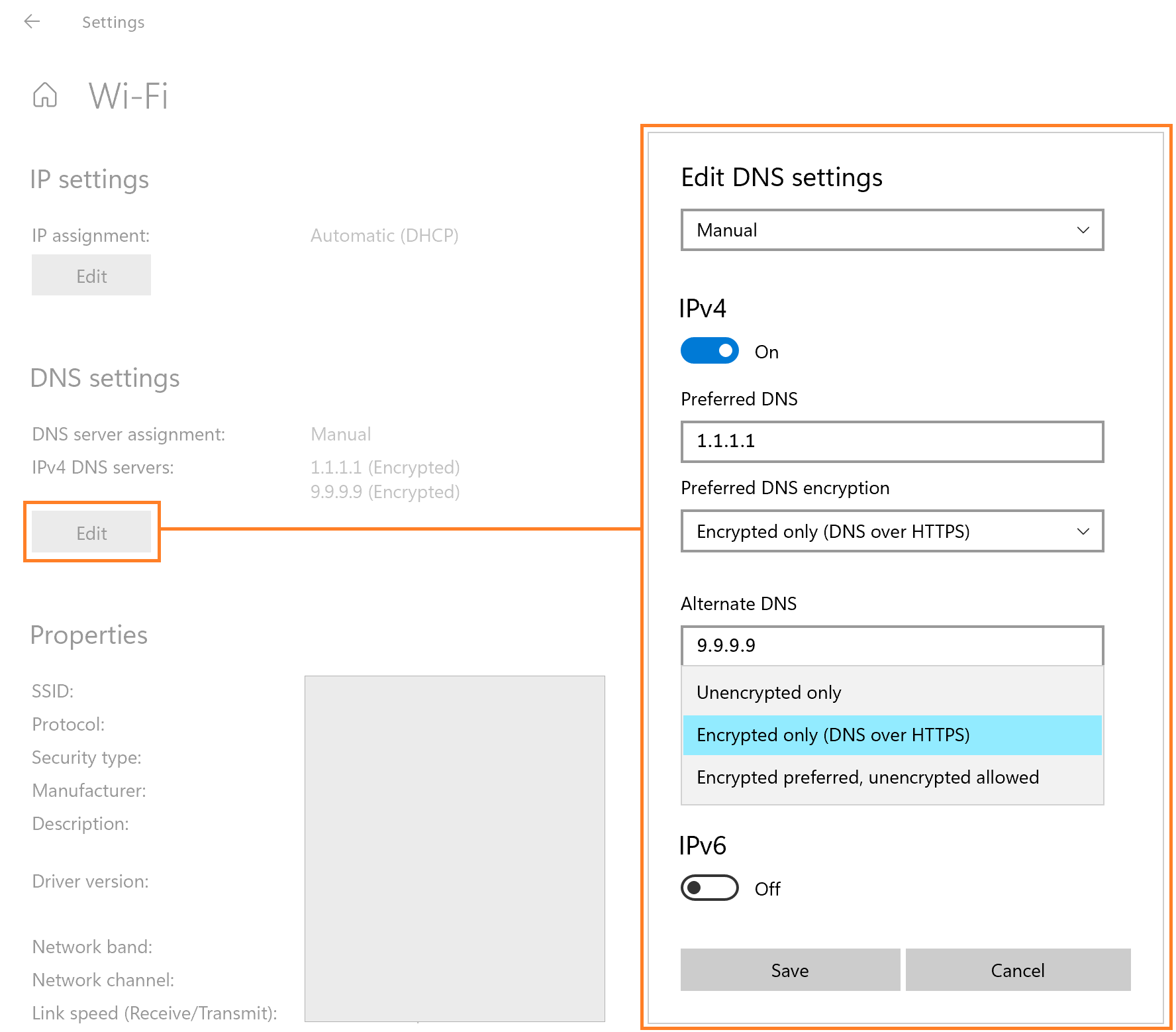

You must be signed in as an administrator to change the DNS server address and enable DoH.


Here's How:

1 Open Settings (Win+I).

2 Click/tap on Network & internet on the left side. (see screenshot below)


DOH-1.png

3 Do step 4 (current), step 5 (specific), or step 6 (all Wi-Fi) below for which network connection or adapter you want to enable DoH for.

4 Enable DNS over HTTPS (DoH) for a Current Network Connection

This will be for a network connection you are currently connected to.


A) Click/tap on Properties of the connected network you want to enable DoH for at the top on the right side. (see screenshot below)​

Current_DOH-1.png

B) Click/tap on the Ethernet or Wi-Fi connection you want to enable DoH for to expand it open. (see screenshots below)​

Current_DOH-2.png
Current_DOH-3.png

C) Click/tap on the Edit button under DNS server assignment on the right side, and go to step 7. (see screenshots below)​

If you have a The DNS settings for all Wi-Fi networks have been set. The settings below won't be saved. type message, then it means you used step 6 that overrides this setting. You can click/tap on the Change DNS settings for all Wi-Fi networks link instead, and then click/tap on the Edit button in step 6.


DoH-2.png
DoH-5.png

5 Enable DNS over HTTPS (DoH) for Specific Network Connection

This will be for a network connection you do not have to be currently connected to.


A) Click/tap on Wi-Fi or Ethernet for the type of network connection you want to enable DoH for. (see screenshot below)​

Specific_DOH-1.png

B) Perform one of the following actions: (see screenshots below)​
  • For Ethernet, click/tap on the connection you want to enable DoH for to expand it open.
  • For Wi-Fi, click/tap on Manage known networks, and click/tap on the known Wi-Fi network connection you want to enable DoH for.
Current_DOH-2.png
Specific_DOH-2.png
Specific_DOH-3.png

C) Click/tap on the Edit button under DNS server assignment on the right side, and go to step 7. (see screenshots below)​

If you have a The DNS settings for all Wi-Fi networks have been set. The settings below won't be saved. type message, then it means you used step 6 that overrides this setting. You can click/tap on the Change DNS settings for all Wi-Fi networks link instead, and then click/tap on the Edit button in step 6.


DoH-2.png
DoH-5.png

6 Enable DNS over HTTPS (DoH) for Wi-Fi Network Adapter

This will include all connections you make from the selected Wi-Fi network adapter.

This will override what is set for a network connection in step 4 and/or step 5.


A) Click/tap on Wi-Fi. (see screenshot below)​

All_DOH-1.png

B) Click/tap on Hardware properties. (see screenshot below)​

All_DOH-2.png

C) Click/tap on the Edit button under DNS server assignment on the right side, and go to step 7. (see screenshot below)​

All_DOH-3.png

7 Select Manual in the drop menu at the top. (see screenshots below step 11)

8 Enable DoH for IPv4

A) Turn on IPv4. (see screenshots below step 11)

B) Type a Preferred DNS you want to use that supports DoH. (see table below)

DoH DNS server​
Preferred DNS for IPv4​
Cloudflare1.1.1.1
Google Public DNS8.8.8.8
Quad99.9.9.9

C) Perform one of the following actions depending on which setting is available to you:
  • If you do not have an Insider Dev build installed, select Encrypted only (DNS over HTTPS) from the Preferred DNS encryption drop menu under IPv4.
  • If you do have an Insider Dev build installed, select On (automatic template) from the DNS over HTTPS drop menu under IPv4. Leave Fallback to paintext turned off.

If you do not have a Preferred DNS encryption drop menu option to select Encrypted only (DNS over HTTPS), then close Settings, change the IPv4 DNS address for this connected network adapter in the Control Panel, and start over at step 1.

You will now have the red The DNS settings for all Wi-Fi networks have been set. The settings below won't be saved. message at step 3.


D) Type an Alternate DNS you want to use that supports DoH. (see table below)

DoH DNS server​
Alternate DNS for IPv4​
Cloudflare1.0.0.1
Google Public DNS8.8.4.4
Quad9149.112.112.112

E) Perform one of the following actions depending on which setting is available to you:
  • If you do not have an Insider Dev build installed, select Encrypted only (DNS over HTTPS) from the Preferred DNS encryption drop menu under IPv4.
  • If you do have an Insider Dev build installed, select On (automatic template) from the DNS over HTTPS drop menu under IPv4. Leave Fallback to paintext turned off.

If you do not have a Alternate DNS encryption drop menu option to select Encrypted only (DNS over HTTPS), then close Settings, change the IPv4 DNS address for this connected network adapter in the Control Panel, and start over at step 1.

You will now have the red The DNS settings for all Wi-Fi networks have been set. The settings below won't be saved. message at step 3.


9 Enable DoH for IPv6

A) Turn on IPv6. (see screenshots below step 11)

B) Type a Preferred DNS you want to use that supports DoH. (see table below)

DoH DNS server​
Preferred DNS for IPv6​
Cloudflare2606:4700:4700::1111
Google Public DNS2001:4860:4860::8888
Quad92620:fe::fe

C) Perform one of the following actions depending on which setting is available to you:
  • If you do not have an Insider Dev build installed, select Encrypted only (DNS over HTTPS) from the Preferred DNS encryption drop menu under IPv6.
  • If you do have an Insider Dev build installed, select On (automatic template) from the DNS over HTTPS drop menu under IPv6. Leave Fallback to paintext turned off.

If you do not have a Preferred DNS encryption drop menu option to select Encrypted only (DNS over HTTPS), then close Settings, change the IPv6 DNS address for this connected network adapter in the Control Panel, and start over at step 1.

You will now have the red The DNS settings for all Wi-Fi networks have been set. The settings below won't be saved. message at step 3.


D) Type an Alternate DNS you want to use that supports DoH. (see table below)

DoH DNS server​
Alternate DNS for IPv6​
Cloudflare2606:4700:4700::1001
Google Public DNS2001:4860:4860::8844
Quad92620:fe::9

E) Perform one of the following actions depending on which setting is available to you:
  • If you do not have an Insider Dev build installed, select Encrypted only (DNS over HTTPS) from the Preferred DNS encryption drop menu under IPv6.
  • If you do have an Insider Dev build installed, select On (automatic template) from the DNS over HTTPS drop menu under IPv6. Leave Fallback to paintext turned off.

If you do not have a Alternate DNS encryption drop menu option to select Encrypted only (DNS over HTTPS), then close Settings, change the IPv4 DNS address for this connected network adapter in the Control Panel, and start over at step 1.

You will now have the red The DNS settings for all Wi-Fi networks have been set. The settings below won't be saved. message at step 3.


10 When finished, click/tap on Save.

11 You can now close Settings if you like.

DoH-3.png
DoH-4.png


DoH-3B.png
DoH-4B.png


That's it,
Shawn Brink


 
Last edited:
I am having Problems trying to do this. Can someone lend me a Hand?
 

My Computers My Computers

  • At a glance

    Windows11 Pro 26200.8894Intel Core i9 14900F (24 -Core, 68 MB Total C...32GB DDR5RTX 4080 Super w/610.74
    OS
    Windows11 Pro 26200.8894
    Computer type
    PC/Desktop
    Manufacturer/Model
    Dell Alienware Aurora R16
    CPU
    Intel Core i9 14900F (24 -Core, 68 MB Total Cache)
    Motherboard
    Dell Alienware
    Memory
    32GB DDR5
    Graphics Card(s)
    RTX 4080 Super w/610.74
    Sound Card
    Realtec
    Monitor(s) Displays
    Corsair XENEON 32QHD165
    Screen Resolution
    2560 X 1440
    Hard Drives
    1-2TB Samsung 990 Pro PCIe NVMe M2 SSD
    1-4TB Samsung 990 Pro PCIe NVMe M2 SSD
    PSU
    1000 Watt Platinum Dell
    Case
    Alienware
    Cooling
    Liquid Closed Loop
    Keyboard
    Corsair Strafe RGB
    Mouse
    Logitech MK270 Wireless
    Internet Speed
    100Gb's Down-20 Up
    Browser
    Firefox 152.0.6
    Antivirus
    Defender
    Other Info
    Very Quiet And Fast
    CyberPower UPS CP1500PFCLCD
  • At a glance

    PClinuxOS Mate (2025.7)13th Gen Inter(R) Core(TM) i3-1315U64 GB DDR4 @3200 MHz.Internal
    Operating System
    PClinuxOS Mate (2025.7)
    Computer type
    PC/Desktop
    Manufacturer/Model
    Intel
    CPU
    13th Gen Inter(R) Core(TM) i3-1315U
    Motherboard
    Intel
    Memory
    64 GB DDR4 @3200 MHz.
    Graphics card(s)
    Internal
    Sound Card
    None
    Monitor(s) Displays
    Dell 2419HGCF
    Screen Resolution
    1920 X 1080
    Hard Drives
    SAMSUNG 980 PRO SSD 2TB, PCIe 4.0 M.2 2280
    PSU
    Chicony 30 Watt
    Case
    Small
    Keyboard
    Dell
    Mouse
    Razor
    Internet Speed
    1GB
    Browser
    Slimjet

My Computers My Computers

  • At a glance

    Windows 11 Pro for WorkstationsIntel i7-8700K 5 GHz64 GB (4x16GB) G.SKILL TridentZ RGB DDR4 3600...ASUS ROG-STRIX-GTX1080TI-O11G-GAMING (11GB GD...
    OS
    Windows 11 Pro for Workstations
    Computer type
    PC/Desktop
    Manufacturer/Model
    Custom self build
    CPU
    Intel i7-8700K 5 GHz
    Motherboard
    ASUS ROG Maximus XI Formula Z390
    Memory
    64 GB (4x16GB) G.SKILL TridentZ RGB DDR4 3600 MHz (F4-3600C18D-32GTZR)
    Graphics Card(s)
    ASUS ROG-STRIX-GTX1080TI-O11G-GAMING (11GB GDDR5X)
    Sound Card
    Integrated Digital Audio (S/PDIF)
    Monitor(s) Displays
    2 x Samsung Odyssey G75 27"
    Screen Resolution
    2560x1440
    Hard Drives
    1TB Samsung 990 PRO M.2,
    4TB Samsung 990 PRO M.2,
    TerraMaster F8 SSD Plus NAS
    PSU
    Seasonic Prime Titanium 850W
    Case
    Thermaltake Core P3 wall mounted
    Cooling
    Corsair Hydro H115i
    Keyboard
    Amazon Basics Wired Full Keyboard MD005
    Mouse
    Logitech MX Master 4
    Internet Speed
    2 Gbps Download and 100 Mbps Upload
    Browser
    Chrome and Edge
    Antivirus
    Microsoft Defender
    Other Info
    Logitech Z625 speaker system,
    Logitech BRIO 4K Pro webcam,
    HP Color LaserJet Pro MFP M477fdn,
    CyberPower CP1500PFCLCD
    Galaxy S23 Plus phone
  • At a glance

    Windows 11 ProSnapdragon X Elite (12 core) 3.42 GHz16 GB LPDDR5x-7467 MHz
    Operating System
    Windows 11 Pro
    Computer type
    Laptop
    Manufacturer/Model
    Surface Laptop 7 Copilot+ PC
    CPU
    Snapdragon X Elite (12 core) 3.42 GHz
    Memory
    16 GB LPDDR5x-7467 MHz
    Monitor(s) Displays
    15" HDR
    Screen Resolution
    2496 x 1664
    Hard Drives
    1 TB SSD
    Internet Speed
    Wi-Fi 7 and Bluetooth 5.4
    Browser
    Chrome and Edge
    Antivirus
    Microsoft Defender
I am having Problems trying to do this. Can someone lend me a Hand?
11 includes 3 DoH DNS services by default, you can add a custom one with a command, for example cleanbrowsing:
Code:
netsh dns add encryption server=185.228.168.10 dohtemplate=https://doh.cleanbrowsing.org/doh/adult-filter autoupgrade=yes udpfallback=no
netsh dns add encryption server=185.228.169.11 dohtemplate=https://doh.cleanbrowsing.org/doh/adult-filter autoupgrade=yes udpfallback=no
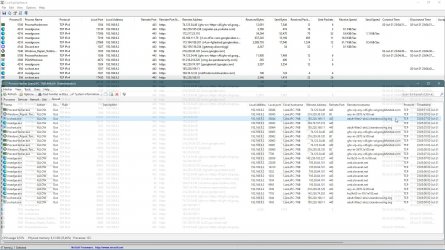
Then you open Ethernet/WiFi settings, add custom IPs and then select Encrypted, UAC can ask you to confirm it (twice at max). Afterwards you can check via a firewall or a network monitor, if svchost is making DNS requests via port 443 to the specified IP.
 

Attachments

  • capture_07022021_230105.jpg
    capture_07022021_230105.jpg
    90.1 KB · Views: 391
  • capture_07022021_230531.jpg
    capture_07022021_230531.jpg
    350.7 KB · Views: 360

My Computer My Computer

At a glance

Home26H2CanAMD Ryzen 5 8600G (07/24)2x32GB Kingston FURY DDR5 5600 MHz CL36 @5200...ASROCK Radeon RX 6600 Challenger D 8G @48FPS ...
OS
Home26H2Can
Computer type
PC/Desktop
CPU
AMD Ryzen 5 8600G (07/24)
Motherboard
ASROCK B650M-HDV/M.2 (07/24) BIOS 4.21 AGESA ComboAM5 1.3.0.1 (04/26)
Memory
2x32GB Kingston FURY DDR5 5600 MHz CL36 @5200 CL36 (07/24)
Graphics Card(s)
ASROCK Radeon RX 6600 Challenger D 8G @48FPS (08/24)
Sound Card
Creative Sound BlasterX AE-5 Plus (05/24)
Monitor(s) Displays
24" Philips 24M1N3200ZS/00 (05/24)
Screen Resolution
1920×1080@165Hz via DP1.4
Hard Drives
Kingston KC3000 NVMe 2TB (05/24)
ADATA XPG GAMMIX S11 Pro 512GB (07/19)
PSU
Seasonic Core GM 550 Gold (04/24)
Case
Fractal Design Define 7 Mini with 3x Noctua NF-P14s/12@555rpm (04/24)
Cooling
Noctua NH-U12S with Noctua NF-P12 (04/24)
Keyboard
HP Pavilion Wired Keyboard 300 (07/24) + Rabalux 76017 Parker (01/24)
Mouse
Logitech M330 Silent Plus (01/26)
Internet Speed
500/100 Mbps via RouterOS (05/21) & TCP Optimizer
Browser
Edge, Brave for YouTube, LibreWolf for FB
Antivirus
NextDNS blocking 1/3 Traffic
Other Info
Phone: Motorola Moto G86 (02/26)
Backup: Hasleo Backup Suite (PreOS)
Headphones: Sennheiser RS170 (09/10)
Chair: Huzaro Force 4.4 Grey Mesh (05/24)
Notifier: Xiaomi Mi Band 9 Milanese (10/24)
FlexCore USB-C 3.2 Gen 1 (M) to LAN (F) (08/25)
I'm also am unable to set the Alternate DNS encryption drop menu. It is greyed out after following instructions to first set DNS settings via Control Panel.

I have set both IPv4 & IPv6 thru the control panel. First just IPv4 and then after no change IPv6. Flushing DNS, renewing IP & adapter also didn't solve. And neither did a simple restart.

Suggestions?
 

My Computer My Computer

At a glance

Windows 11 Pro 23H2Intel i5-13420H16GBIntel UHD
OS
Windows 11 Pro 23H2
Computer type
Laptop
Manufacturer/Model
Acer Swift Go 16
CPU
Intel i5-13420H
Memory
16GB
Graphics Card(s)
Intel UHD
Monitor(s) Displays
16"
Screen Resolution
3200 x 2000 OLED
Hard Drives
2TB NVMe , 500GB NVMe
Internet Speed
1.5 Gbps / 1.0 Gbps
Browser
Brave / Firefox
Antivirus
Window Security
11 includes 3 DoH DNS services by default, you can add a custom one with a command, for example cleanbrowsing:
Code:
netsh dns add encryption server=185.228.168.10 dohtemplate=https://doh.cleanbrowsing.org/doh/adult-filter autoupgrade=yes udpfallback=no
netsh dns add encryption server=185.228.169.11 dohtemplate=https://doh.cleanbrowsing.org/doh/adult-filter autoupgrade=yes udpfallback=no
Then you open Ethernet/WiFi settings, add custom IPs and then select Encrypted, UAC can ask you to confirm it (twice at max). Afterwards you can check via a firewall or a network monitor, if svchost is making DNS requests via port 443 to the specified IP.
Thank You very Much.
 

My Computers My Computers

  • At a glance

    Windows11 Pro 26200.8894Intel Core i9 14900F (24 -Core, 68 MB Total C...32GB DDR5RTX 4080 Super w/610.74
    OS
    Windows11 Pro 26200.8894
    Computer type
    PC/Desktop
    Manufacturer/Model
    Dell Alienware Aurora R16
    CPU
    Intel Core i9 14900F (24 -Core, 68 MB Total Cache)
    Motherboard
    Dell Alienware
    Memory
    32GB DDR5
    Graphics Card(s)
    RTX 4080 Super w/610.74
    Sound Card
    Realtec
    Monitor(s) Displays
    Corsair XENEON 32QHD165
    Screen Resolution
    2560 X 1440
    Hard Drives
    1-2TB Samsung 990 Pro PCIe NVMe M2 SSD
    1-4TB Samsung 990 Pro PCIe NVMe M2 SSD
    PSU
    1000 Watt Platinum Dell
    Case
    Alienware
    Cooling
    Liquid Closed Loop
    Keyboard
    Corsair Strafe RGB
    Mouse
    Logitech MK270 Wireless
    Internet Speed
    100Gb's Down-20 Up
    Browser
    Firefox 152.0.6
    Antivirus
    Defender
    Other Info
    Very Quiet And Fast
    CyberPower UPS CP1500PFCLCD
  • At a glance

    PClinuxOS Mate (2025.7)13th Gen Inter(R) Core(TM) i3-1315U64 GB DDR4 @3200 MHz.Internal
    Operating System
    PClinuxOS Mate (2025.7)
    Computer type
    PC/Desktop
    Manufacturer/Model
    Intel
    CPU
    13th Gen Inter(R) Core(TM) i3-1315U
    Motherboard
    Intel
    Memory
    64 GB DDR4 @3200 MHz.
    Graphics card(s)
    Internal
    Sound Card
    None
    Monitor(s) Displays
    Dell 2419HGCF
    Screen Resolution
    1920 X 1080
    Hard Drives
    SAMSUNG 980 PRO SSD 2TB, PCIe 4.0 M.2 2280
    PSU
    Chicony 30 Watt
    Case
    Small
    Keyboard
    Dell
    Mouse
    Razor
    Internet Speed
    1GB
    Browser
    Slimjet
Well I decided to use my brain and used the solution @TairikuOkami posted and like @Josey Wales I'm sorted.

11 includes 3 DoH DNS services by default, you can add a custom one with a command, for example cleanbrowsing:
Code:
netsh dns add encryption server=185.228.168.10 dohtemplate=https://doh.cleanbrowsing.org/doh/adult-filter autoupgrade=yes udpfallback=no
netsh dns add encryption server=185.228.169.11 dohtemplate=https://doh.cleanbrowsing.org/doh/adult-filter autoupgrade=yes udpfallback=no
Then you open Ethernet/WiFi settings, add custom IPs and then select Encrypted, UAC can ask you to confirm it (twice at max). Afterwards you can check via a firewall or a network monitor, if svchost is making DNS requests via port 443 to the specified IP.

Thank you very much! (again just like JW)
 

My Computer My Computer

At a glance

Windows 11 Pro 23H2Intel i5-13420H16GBIntel UHD
OS
Windows 11 Pro 23H2
Computer type
Laptop
Manufacturer/Model
Acer Swift Go 16
CPU
Intel i5-13420H
Memory
16GB
Graphics Card(s)
Intel UHD
Monitor(s) Displays
16"
Screen Resolution
3200 x 2000 OLED
Hard Drives
2TB NVMe , 500GB NVMe
Internet Speed
1.5 Gbps / 1.0 Gbps
Browser
Brave / Firefox
Antivirus
Window Security
For the record, Windows stores DOH servers at this location.
Code:
HKLM\System\CurrentControlSet\Services\Dnscache\Parameters\DohWellKnownServers
Active interface at this location, you can enable DNS by using a command like that, once DNS is registered.:
Code:
reg add "HKLM\System\CurrentControlSet\Services\Dnscache\InterfaceSpecificParameters\{da9e43ac-0335-4747-a5d1-f645dd7d3a39}\DohInterfaceSettings\Doh\9.9.9.9" /v "DohFlags" /t REG_QWORD /d "1" /f
I think it is only a matter of time till hackers take notice and change it. You will setup 9.9.9.9, but malware will use smthg like:

capture_07032021_173117.jpg
 

My Computer My Computer

At a glance

Home26H2CanAMD Ryzen 5 8600G (07/24)2x32GB Kingston FURY DDR5 5600 MHz CL36 @5200...ASROCK Radeon RX 6600 Challenger D 8G @48FPS ...
OS
Home26H2Can
Computer type
PC/Desktop
CPU
AMD Ryzen 5 8600G (07/24)
Motherboard
ASROCK B650M-HDV/M.2 (07/24) BIOS 4.21 AGESA ComboAM5 1.3.0.1 (04/26)
Memory
2x32GB Kingston FURY DDR5 5600 MHz CL36 @5200 CL36 (07/24)
Graphics Card(s)
ASROCK Radeon RX 6600 Challenger D 8G @48FPS (08/24)
Sound Card
Creative Sound BlasterX AE-5 Plus (05/24)
Monitor(s) Displays
24" Philips 24M1N3200ZS/00 (05/24)
Screen Resolution
1920×1080@165Hz via DP1.4
Hard Drives
Kingston KC3000 NVMe 2TB (05/24)
ADATA XPG GAMMIX S11 Pro 512GB (07/19)
PSU
Seasonic Core GM 550 Gold (04/24)
Case
Fractal Design Define 7 Mini with 3x Noctua NF-P14s/12@555rpm (04/24)
Cooling
Noctua NH-U12S with Noctua NF-P12 (04/24)
Keyboard
HP Pavilion Wired Keyboard 300 (07/24) + Rabalux 76017 Parker (01/24)
Mouse
Logitech M330 Silent Plus (01/26)
Internet Speed
500/100 Mbps via RouterOS (05/21) & TCP Optimizer
Browser
Edge, Brave for YouTube, LibreWolf for FB
Antivirus
NextDNS blocking 1/3 Traffic
Other Info
Phone: Motorola Moto G86 (02/26)
Backup: Hasleo Backup Suite (PreOS)
Headphones: Sennheiser RS170 (09/10)
Chair: Huzaro Force 4.4 Grey Mesh (05/24)
Notifier: Xiaomi Mi Band 9 Milanese (10/24)
FlexCore USB-C 3.2 Gen 1 (M) to LAN (F) (08/25)
I have managed to add mine DNS via reg directly, since netsh command does not work for me anymore.
Code:
reg add "HKLM\SYSTEM\CurrentControlSet\Services\Dnscache\Parameters\DohWellKnownServers\45.90.28.91" /v "Template" /t REG_SZ /d "https://dns.nextdns.io/xxxxxx" /f
reg add "HKLM\SYSTEM\CurrentControlSet\Services\Dnscache\Parameters\DohWellKnownServers\45.90.30.91" /v "Template" /t REG_SZ /d "https://dns.nextdns.io/xxxxxx" /f
 

Attachments

  • capture_07092021_210410.jpg
    capture_07092021_210410.jpg
    97.2 KB · Views: 367

My Computer My Computer

At a glance

Home26H2CanAMD Ryzen 5 8600G (07/24)2x32GB Kingston FURY DDR5 5600 MHz CL36 @5200...ASROCK Radeon RX 6600 Challenger D 8G @48FPS ...
OS
Home26H2Can
Computer type
PC/Desktop
CPU
AMD Ryzen 5 8600G (07/24)
Motherboard
ASROCK B650M-HDV/M.2 (07/24) BIOS 4.21 AGESA ComboAM5 1.3.0.1 (04/26)
Memory
2x32GB Kingston FURY DDR5 5600 MHz CL36 @5200 CL36 (07/24)
Graphics Card(s)
ASROCK Radeon RX 6600 Challenger D 8G @48FPS (08/24)
Sound Card
Creative Sound BlasterX AE-5 Plus (05/24)
Monitor(s) Displays
24" Philips 24M1N3200ZS/00 (05/24)
Screen Resolution
1920×1080@165Hz via DP1.4
Hard Drives
Kingston KC3000 NVMe 2TB (05/24)
ADATA XPG GAMMIX S11 Pro 512GB (07/19)
PSU
Seasonic Core GM 550 Gold (04/24)
Case
Fractal Design Define 7 Mini with 3x Noctua NF-P14s/12@555rpm (04/24)
Cooling
Noctua NH-U12S with Noctua NF-P12 (04/24)
Keyboard
HP Pavilion Wired Keyboard 300 (07/24) + Rabalux 76017 Parker (01/24)
Mouse
Logitech M330 Silent Plus (01/26)
Internet Speed
500/100 Mbps via RouterOS (05/21) & TCP Optimizer
Browser
Edge, Brave for YouTube, LibreWolf for FB
Antivirus
NextDNS blocking 1/3 Traffic
Other Info
Phone: Motorola Moto G86 (02/26)
Backup: Hasleo Backup Suite (PreOS)
Headphones: Sennheiser RS170 (09/10)
Chair: Huzaro Force 4.4 Grey Mesh (05/24)
Notifier: Xiaomi Mi Band 9 Milanese (10/24)
FlexCore USB-C 3.2 Gen 1 (M) to LAN (F) (08/25)
For anyone looking to automatically set DNS servers and enable DoH for every relevant network interface, I wrote the following batch script:

Code:
@echo off

rem Set the DNS servers to be applied to each interface.
set IPv4PrimaryDNS=1.1.1.1
set IPv4SecondaryDNS=1.0.0.1
set IPv6PrimaryDNS=2606:4700:4700::1111
set IPv6SecondaryDNS=2606:4700:4700::1001

rem Checks for administrative permissions.
net.exe session 1>NUL 2>NUL || (echo This script requires administrative permissions. Please run as administrator. & pause & exit /B 1)

echo Using the following DNS servers:
echo IPv4:
echo Primary - %IPv4PrimaryDNS%
echo Secondary - %IPv4SecondaryDNS%
echo/
echo IPv6:
echo Primary - %IPv6PrimaryDNS%
echo Secondary - %IPv6SecondaryDNS%
echo/

rem Clears existing DoH settings.
reg delete "HKLM\System\CurrentControlSet\Services\Dnscache\InterfaceSpecificParameters" /f 1>NUL
echo Cleared any existing DoH settings.
echo/

rem The following for loops get a given interface's InterfaceIndex and GUID. We use the InterfaceIndex to set DNS, and the GUID to set DoH in the registry.
rem We only care about network interfaces that have a GUID.
for /f %%X in ('wmic nic where "GUID!=NULL" Get InterfaceIndex /value') do (
    rem We have to use a second for loop to remove the extra carrige returns from wmic output.
    rem InterfaceIndex is stored at %%I.
    for /f "tokens=1* delims==" %%H in ("%%X") do (
        for /f %%X in ('wmic nic where "InterfaceIndex=%%I" Get GUID /value') do (
            rem GUID is stored at %%G.
            for /f "tokens=1* delims==" %%F in ("%%X") do (

                rem Prints the name of the interface being modified.
                for  /f "tokens=*" %%X in ('wmic nic where "InterfaceIndex=%%I" Get NetConnectionID /value') do (
                    for /f "tokens=1* delims==" %%B in ("%%X") do (
                        for  /f "tokens=*" %%X in ('wmic nic where "InterfaceIndex=%%I" Get Name /value') do (
                            for /f "tokens=1* delims==" %%M in ("%%X") do echo %%C ^(%%N^):
                        )
                    )
                )
                echo/

                rem Clears existing DNS servers.
                netsh interface ipv4 set dnsservers %%I dhcp 1>NUL
                echo Cleared any existing IPv4 DNS servers.
                netsh interface ipv6 set dnsservers %%I dhcp 1>NUL
                echo Cleared any existing IPv6 DNS servers.
                echo/

                netsh interface ipv4 set dnsservers %%I static %IPv4PrimaryDNS% primary no 1>NUL
                echo Set primary IPv4 DNS server to: %IPv4PrimaryDNS%
                netsh interface ipv4 add dnsservers %%I %IPv4SecondaryDNS% index=2 no 1>NUL
                echo Set secondary IPv4 DNS server to: %IPv4SecondaryDNS%
                echo/

                netsh interface ipv6 set dnsservers %%I static %IPv6PrimaryDNS% primary no 1>NUL
                echo Set primary IPv6 DNS server to: %IPv6PrimaryDNS%
                netsh interface ipv6 add dnsservers %%I %IPv6SecondaryDNS% index=2 no 1>NUL
                echo Set secondary IPv6 DNS server to: %IPv6SecondaryDNS%
                echo/

                reg add "HKLM\System\CurrentControlSet\Services\Dnscache\InterfaceSpecificParameters\%%G\DohInterfaceSettings\Doh\%IPv4PrimaryDNS%" /v "DohFlags" /t REG_QWORD /d "1" /f 1>NUL
                reg add "HKLM\System\CurrentControlSet\Services\Dnscache\InterfaceSpecificParameters\%%G\DohInterfaceSettings\Doh\%IPv4SecondaryDNS%" /v "DohFlags" /t REG_QWORD /d "1" /f 1>NUL
                echo Enabled DoH for IPv4.

                reg add "HKLM\System\CurrentControlSet\Services\Dnscache\InterfaceSpecificParameters\%%G\DohInterfaceSettings\Doh6\%IPv6PrimaryDNS%" /v "DohFlags" /t REG_QWORD /d "1" /f 1>NUL
                reg add "HKLM\System\CurrentControlSet\Services\Dnscache\InterfaceSpecificParameters\%%G\DohInterfaceSettings\Doh6\%IPv6SecondaryDNS%" /v "DohFlags" /t REG_QWORD /d "1" /f 1>NUL
                echo Enabled DoH for IPv6.
                echo/
            )
        
        )
    )
)

ipconfig /flushdns 1>NUL
echo Flushed DNS.
echo/

pause

If you want to use a DoH service that's not included with Windows 11, you can of course combine this with what @TairikuOkami provided above.
 

My Computer My Computer

At a glance

Windows 11
OS
Windows 11
Tutorial updated for changes made to DNS over HTTPS settings in Insider Dev Channel builds. :-)
 

My Computers My Computers

  • At a glance

    Windows 11 Pro for WorkstationsIntel i7-8700K 5 GHz64 GB (4x16GB) G.SKILL TridentZ RGB DDR4 3600...ASUS ROG-STRIX-GTX1080TI-O11G-GAMING (11GB GD...
    OS
    Windows 11 Pro for Workstations
    Computer type
    PC/Desktop
    Manufacturer/Model
    Custom self build
    CPU
    Intel i7-8700K 5 GHz
    Motherboard
    ASUS ROG Maximus XI Formula Z390
    Memory
    64 GB (4x16GB) G.SKILL TridentZ RGB DDR4 3600 MHz (F4-3600C18D-32GTZR)
    Graphics Card(s)
    ASUS ROG-STRIX-GTX1080TI-O11G-GAMING (11GB GDDR5X)
    Sound Card
    Integrated Digital Audio (S/PDIF)
    Monitor(s) Displays
    2 x Samsung Odyssey G75 27"
    Screen Resolution
    2560x1440
    Hard Drives
    1TB Samsung 990 PRO M.2,
    4TB Samsung 990 PRO M.2,
    TerraMaster F8 SSD Plus NAS
    PSU
    Seasonic Prime Titanium 850W
    Case
    Thermaltake Core P3 wall mounted
    Cooling
    Corsair Hydro H115i
    Keyboard
    Amazon Basics Wired Full Keyboard MD005
    Mouse
    Logitech MX Master 4
    Internet Speed
    2 Gbps Download and 100 Mbps Upload
    Browser
    Chrome and Edge
    Antivirus
    Microsoft Defender
    Other Info
    Logitech Z625 speaker system,
    Logitech BRIO 4K Pro webcam,
    HP Color LaserJet Pro MFP M477fdn,
    CyberPower CP1500PFCLCD
    Galaxy S23 Plus phone
  • At a glance

    Windows 11 ProSnapdragon X Elite (12 core) 3.42 GHz16 GB LPDDR5x-7467 MHz
    Operating System
    Windows 11 Pro
    Computer type
    Laptop
    Manufacturer/Model
    Surface Laptop 7 Copilot+ PC
    CPU
    Snapdragon X Elite (12 core) 3.42 GHz
    Memory
    16 GB LPDDR5x-7467 MHz
    Monitor(s) Displays
    15" HDR
    Screen Resolution
    2496 x 1664
    Hard Drives
    1 TB SSD
    Internet Speed
    Wi-Fi 7 and Bluetooth 5.4
    Browser
    Chrome and Edge
    Antivirus
    Microsoft Defender
settings -> network and internet -> Wi-Fi -> hardware properties -> DNS server assignment. Then go ahead and edit DNS settings. There are 4 entries for IPv4 and 4 entries for IPv6. A preferred DNS, alternate DNS, and then the preferred encryption for each. I have set my encryption for all DNS servers to Encrypted Only (DNS over HTTPS).

The above steps worked for me flawlessly. I verified that the new DNS servers are working using dns browser leaks. Finally encrypted DNS at the system level. No more messing with alternate programs. Whooaa.
 

My Computer My Computer

At a glance

Windows 11 Pro
OS
Windows 11 Pro
Does this override the DNS servers configured in your router? My router is configured to use the ISP DNS so I'm wondering if the encrypted DNS servers we enter in Windows Ethernet settings override the router?
 

My Computer My Computer

At a glance

Windows 11 - Release Preview channelIntel 13900KCorsair Dominator Platinum RGB 32GB DDR5 6000MHzGigabyte 4090 Gaming OC
OS
Windows 11 - Release Preview channel
Computer type
PC/Desktop
Manufacturer/Model
Kol's custom ROG
CPU
Intel 13900K
Motherboard
Asus ROG Maximus Hero Z790
Memory
Corsair Dominator Platinum RGB 32GB DDR5 6000MHz
Graphics Card(s)
Gigabyte 4090 Gaming OC
Sound Card
SoundBlaster X-AE5
Monitor(s) Displays
Dell Alienware AW3821DW
Screen Resolution
3840x1600 144hz
Hard Drives
Samsung 980 Pro 500GB
860 EVO's
Samsung 990 Pro 2TB
External RAID enclosure - 2x Seagate 3TB HDD
PSU
Seasonic Prime Ultra 1300W Platinum
Case
Phanteks Eclipse P600S
Cooling
Custom water cooling. EK Velocity (CPU), EK Quantum Vector2 (GPU), EK Quantum D5 Pump, 360mm radiator in case + 560mm external radiator
Keyboard
Corsair K100
Mouse
Logitech G502X
Antivirus
Windows Defender, VBS
Does this override the DNS servers configured in your router? My router is configured to use the ISP DNS so I'm wondering if the encrypted DNS servers we enter in Windows Ethernet settings override the router?

Hello mate, :-)

Usually, the DNS set in Windows will override the router.

You can check at the link below for What's my DNS Server to verify the DNS and ISP (ex: "CLOUDFLARENET") is correct.


My Computers My Computers

  • At a glance

    Windows 11 Pro for WorkstationsIntel i7-8700K 5 GHz64 GB (4x16GB) G.SKILL TridentZ RGB DDR4 3600...ASUS ROG-STRIX-GTX1080TI-O11G-GAMING (11GB GD...
    OS
    Windows 11 Pro for Workstations
    Computer type
    PC/Desktop
    Manufacturer/Model
    Custom self build
    CPU
    Intel i7-8700K 5 GHz
    Motherboard
    ASUS ROG Maximus XI Formula Z390
    Memory
    64 GB (4x16GB) G.SKILL TridentZ RGB DDR4 3600 MHz (F4-3600C18D-32GTZR)
    Graphics Card(s)
    ASUS ROG-STRIX-GTX1080TI-O11G-GAMING (11GB GDDR5X)
    Sound Card
    Integrated Digital Audio (S/PDIF)
    Monitor(s) Displays
    2 x Samsung Odyssey G75 27"
    Screen Resolution
    2560x1440
    Hard Drives
    1TB Samsung 990 PRO M.2,
    4TB Samsung 990 PRO M.2,
    TerraMaster F8 SSD Plus NAS
    PSU
    Seasonic Prime Titanium 850W
    Case
    Thermaltake Core P3 wall mounted
    Cooling
    Corsair Hydro H115i
    Keyboard
    Amazon Basics Wired Full Keyboard MD005
    Mouse
    Logitech MX Master 4
    Internet Speed
    2 Gbps Download and 100 Mbps Upload
    Browser
    Chrome and Edge
    Antivirus
    Microsoft Defender
    Other Info
    Logitech Z625 speaker system,
    Logitech BRIO 4K Pro webcam,
    HP Color LaserJet Pro MFP M477fdn,
    CyberPower CP1500PFCLCD
    Galaxy S23 Plus phone
  • At a glance

    Windows 11 ProSnapdragon X Elite (12 core) 3.42 GHz16 GB LPDDR5x-7467 MHz
    Operating System
    Windows 11 Pro
    Computer type
    Laptop
    Manufacturer/Model
    Surface Laptop 7 Copilot+ PC
    CPU
    Snapdragon X Elite (12 core) 3.42 GHz
    Memory
    16 GB LPDDR5x-7467 MHz
    Monitor(s) Displays
    15" HDR
    Screen Resolution
    2496 x 1664
    Hard Drives
    1 TB SSD
    Internet Speed
    Wi-Fi 7 and Bluetooth 5.4
    Browser
    Chrome and Edge
    Antivirus
    Microsoft Defender
Hello mate, :)

Usually, the DNS set in Windows will override the router.

You can check at the link below for What's my DNS Server to verify the DNS and ISP (ex: "CLOUDFLARENET") is correct.

Thanks Shawn. I checked the link and it detected the DNS servers I've configured in Windows. It's Matt from Ten Forums BTW. :)
 

My Computer My Computer

At a glance

Windows 11 - Release Preview channelIntel 13900KCorsair Dominator Platinum RGB 32GB DDR5 6000MHzGigabyte 4090 Gaming OC
OS
Windows 11 - Release Preview channel
Computer type
PC/Desktop
Manufacturer/Model
Kol's custom ROG
CPU
Intel 13900K
Motherboard
Asus ROG Maximus Hero Z790
Memory
Corsair Dominator Platinum RGB 32GB DDR5 6000MHz
Graphics Card(s)
Gigabyte 4090 Gaming OC
Sound Card
SoundBlaster X-AE5
Monitor(s) Displays
Dell Alienware AW3821DW
Screen Resolution
3840x1600 144hz
Hard Drives
Samsung 980 Pro 500GB
860 EVO's
Samsung 990 Pro 2TB
External RAID enclosure - 2x Seagate 3TB HDD
PSU
Seasonic Prime Ultra 1300W Platinum
Case
Phanteks Eclipse P600S
Cooling
Custom water cooling. EK Velocity (CPU), EK Quantum Vector2 (GPU), EK Quantum D5 Pump, 360mm radiator in case + 560mm external radiator
Keyboard
Corsair K100
Mouse
Logitech G502X
Antivirus
Windows Defender, VBS
Some public doh provider does not give IP address for their DOH servers in the instruction.
Web browser such as Edge and Brave only requires the URL of DOH template to connect to DOH server.
If Windows itself is using classical non-encrypted DNS, Windows has to do DNS look up on the URL of DOH template via unencrypted DNS.
Including IP address directly in the configuration can use DOH exclusively without having to refer to unencrypted DNS.
There is a public list of DOH providers used by latest Chrome (Canary) at https://bit.ly/3g1K5yH
Mozilla has a short list of DOH providers at Security/DOH-resolver-policy - MozillaWiki
In both cases, we only see URL of DOH templates for some DOH providers.
It does not mean that they are meant only for browser.
Theoretically, any DOH client, including Windows built-in DNS client, could be configured to connect to them but we do need to look for their associated IP addresses.
The associated IP addresses of a domain name are actually in public record, we only need to know where to look.
There are a couple of free DNS look up web sites.
The one I used was DNS Checker (DNS Lookup - Check DNS All Records)
Take NextDNS as an example.
The URL given by Mozilla is https://firefox.dns.nextdns.io
Do not ping the URL directly as it would point to the IP of nearest server instead of the associated IP in public DNS record.
The DNS query would be sent to different server of different IP depending on your location and the availability of server.
DOH providers may have global network of servers which have different IPs.
Only the associated IP in the DNS record would be able to redirect you the “best” server.
The found IP addresses are:
ipv4
207.246.91.188
162.220.223.23

ipv6
2a00:11c0:46:4::5
2001:19f0:5:663d:5400:2ff:fece:2f14
If you attempt the use netsh command in command prompt to manually add encryption of NextDNS by using the given url of DOH template by Mozilla, it would fail
netsh dnsclient add encryption server="207.246.91.188" dohtemplate="https://firefox.dns.nextdns.io " autoupgrade="yes" udpfallback="no"
The trick here is that some DOH provider deliberately gave none-standard URL, which would not work generally.
The DOH RCF is publicly available at RFC 8484 - DNS Queries over HTTPS (DoH).
Basically, the standard URL template for a DOH server is like:
For NextDNS, it would become:
Yes, Windows would only accept it via netsh command if the URL template is in “standard form”.
The the command would be:
netsh dnsclient add encryption server="207.246.91.188" dohtemplate="https://firefox.dns.nextdns.io/dns-query" autoupgrade="yes" udpfallback="no"
Then, you would see the encryption is added successfully.
Remember to open command prompt as administrator to use netsh command.
You can show the list of configured DOH addresses using this command:
powershell -command (get-dnsclientdohserveraddress)
If you actually visit the web site of NextDNS, it would offer you to register to get IP addresses and url of DOH template even for the free plan.
The official version offers more customization and more features.
However, what it does not tell you is that you do not need to register or even download the official app.
 

My Computer My Computer

At a glance

Windows 11
OS
Windows 11
Tutorial updated to make it easier to follow along for which network connection(s) or adapter you want to enable DoH for. :-)
 

My Computers My Computers

  • At a glance

    Windows 11 Pro for WorkstationsIntel i7-8700K 5 GHz64 GB (4x16GB) G.SKILL TridentZ RGB DDR4 3600...ASUS ROG-STRIX-GTX1080TI-O11G-GAMING (11GB GD...
    OS
    Windows 11 Pro for Workstations
    Computer type
    PC/Desktop
    Manufacturer/Model
    Custom self build
    CPU
    Intel i7-8700K 5 GHz
    Motherboard
    ASUS ROG Maximus XI Formula Z390
    Memory
    64 GB (4x16GB) G.SKILL TridentZ RGB DDR4 3600 MHz (F4-3600C18D-32GTZR)
    Graphics Card(s)
    ASUS ROG-STRIX-GTX1080TI-O11G-GAMING (11GB GDDR5X)
    Sound Card
    Integrated Digital Audio (S/PDIF)
    Monitor(s) Displays
    2 x Samsung Odyssey G75 27"
    Screen Resolution
    2560x1440
    Hard Drives
    1TB Samsung 990 PRO M.2,
    4TB Samsung 990 PRO M.2,
    TerraMaster F8 SSD Plus NAS
    PSU
    Seasonic Prime Titanium 850W
    Case
    Thermaltake Core P3 wall mounted
    Cooling
    Corsair Hydro H115i
    Keyboard
    Amazon Basics Wired Full Keyboard MD005
    Mouse
    Logitech MX Master 4
    Internet Speed
    2 Gbps Download and 100 Mbps Upload
    Browser
    Chrome and Edge
    Antivirus
    Microsoft Defender
    Other Info
    Logitech Z625 speaker system,
    Logitech BRIO 4K Pro webcam,
    HP Color LaserJet Pro MFP M477fdn,
    CyberPower CP1500PFCLCD
    Galaxy S23 Plus phone
  • At a glance

    Windows 11 ProSnapdragon X Elite (12 core) 3.42 GHz16 GB LPDDR5x-7467 MHz
    Operating System
    Windows 11 Pro
    Computer type
    Laptop
    Manufacturer/Model
    Surface Laptop 7 Copilot+ PC
    CPU
    Snapdragon X Elite (12 core) 3.42 GHz
    Memory
    16 GB LPDDR5x-7467 MHz
    Monitor(s) Displays
    15" HDR
    Screen Resolution
    2496 x 1664
    Hard Drives
    1 TB SSD
    Internet Speed
    Wi-Fi 7 and Bluetooth 5.4
    Browser
    Chrome and Edge
    Antivirus
    Microsoft Defender
@Brink

What exactly does the manual template do that's available to insiders?
 

My Computer My Computer

At a glance

Windows 11 - Release Preview channelIntel 13900KCorsair Dominator Platinum RGB 32GB DDR5 6000MHzGigabyte 4090 Gaming OC
OS
Windows 11 - Release Preview channel
Computer type
PC/Desktop
Manufacturer/Model
Kol's custom ROG
CPU
Intel 13900K
Motherboard
Asus ROG Maximus Hero Z790
Memory
Corsair Dominator Platinum RGB 32GB DDR5 6000MHz
Graphics Card(s)
Gigabyte 4090 Gaming OC
Sound Card
SoundBlaster X-AE5
Monitor(s) Displays
Dell Alienware AW3821DW
Screen Resolution
3840x1600 144hz
Hard Drives
Samsung 980 Pro 500GB
860 EVO's
Samsung 990 Pro 2TB
External RAID enclosure - 2x Seagate 3TB HDD
PSU
Seasonic Prime Ultra 1300W Platinum
Case
Phanteks Eclipse P600S
Cooling
Custom water cooling. EK Velocity (CPU), EK Quantum Vector2 (GPU), EK Quantum D5 Pump, 360mm radiator in case + 560mm external radiator
Keyboard
Corsair K100
Mouse
Logitech G502X
Antivirus
Windows Defender, VBS
@Brink

What exactly does the manual template do that's available to insiders?

Hello mate, :-)

Choosing "On (automatic template)" fills in the "DNS over HTTPS template" field automatically based off the entered DNS.

Choosing "On (manual template)" allows you to manually fill in the "DNS over HTTPS template" field. This would only be needed if the DNS server you are using doesn't automatically or correctly has the "DNS over HTTPS template".
 

My Computers My Computers

  • At a glance

    Windows 11 Pro for WorkstationsIntel i7-8700K 5 GHz64 GB (4x16GB) G.SKILL TridentZ RGB DDR4 3600...ASUS ROG-STRIX-GTX1080TI-O11G-GAMING (11GB GD...
    OS
    Windows 11 Pro for Workstations
    Computer type
    PC/Desktop
    Manufacturer/Model
    Custom self build
    CPU
    Intel i7-8700K 5 GHz
    Motherboard
    ASUS ROG Maximus XI Formula Z390
    Memory
    64 GB (4x16GB) G.SKILL TridentZ RGB DDR4 3600 MHz (F4-3600C18D-32GTZR)
    Graphics Card(s)
    ASUS ROG-STRIX-GTX1080TI-O11G-GAMING (11GB GDDR5X)
    Sound Card
    Integrated Digital Audio (S/PDIF)
    Monitor(s) Displays
    2 x Samsung Odyssey G75 27"
    Screen Resolution
    2560x1440
    Hard Drives
    1TB Samsung 990 PRO M.2,
    4TB Samsung 990 PRO M.2,
    TerraMaster F8 SSD Plus NAS
    PSU
    Seasonic Prime Titanium 850W
    Case
    Thermaltake Core P3 wall mounted
    Cooling
    Corsair Hydro H115i
    Keyboard
    Amazon Basics Wired Full Keyboard MD005
    Mouse
    Logitech MX Master 4
    Internet Speed
    2 Gbps Download and 100 Mbps Upload
    Browser
    Chrome and Edge
    Antivirus
    Microsoft Defender
    Other Info
    Logitech Z625 speaker system,
    Logitech BRIO 4K Pro webcam,
    HP Color LaserJet Pro MFP M477fdn,
    CyberPower CP1500PFCLCD
    Galaxy S23 Plus phone
  • At a glance

    Windows 11 ProSnapdragon X Elite (12 core) 3.42 GHz16 GB LPDDR5x-7467 MHz
    Operating System
    Windows 11 Pro
    Computer type
    Laptop
    Manufacturer/Model
    Surface Laptop 7 Copilot+ PC
    CPU
    Snapdragon X Elite (12 core) 3.42 GHz
    Memory
    16 GB LPDDR5x-7467 MHz
    Monitor(s) Displays
    15" HDR
    Screen Resolution
    2496 x 1664
    Hard Drives
    1 TB SSD
    Internet Speed
    Wi-Fi 7 and Bluetooth 5.4
    Browser
    Chrome and Edge
    Antivirus
    Microsoft Defender
22H2 has added policy Configure Discovery of Designated Resolvers (DDR) protocol - "EnableDdr".
A mechanism for DNS client to use DNS records to discover a resolver's encrypted DNS configuration.
 

My Computer My Computer

At a glance

Home26H2CanAMD Ryzen 5 8600G (07/24)2x32GB Kingston FURY DDR5 5600 MHz CL36 @5200...ASROCK Radeon RX 6600 Challenger D 8G @48FPS ...
OS
Home26H2Can
Computer type
PC/Desktop
CPU
AMD Ryzen 5 8600G (07/24)
Motherboard
ASROCK B650M-HDV/M.2 (07/24) BIOS 4.21 AGESA ComboAM5 1.3.0.1 (04/26)
Memory
2x32GB Kingston FURY DDR5 5600 MHz CL36 @5200 CL36 (07/24)
Graphics Card(s)
ASROCK Radeon RX 6600 Challenger D 8G @48FPS (08/24)
Sound Card
Creative Sound BlasterX AE-5 Plus (05/24)
Monitor(s) Displays
24" Philips 24M1N3200ZS/00 (05/24)
Screen Resolution
1920×1080@165Hz via DP1.4
Hard Drives
Kingston KC3000 NVMe 2TB (05/24)
ADATA XPG GAMMIX S11 Pro 512GB (07/19)
PSU
Seasonic Core GM 550 Gold (04/24)
Case
Fractal Design Define 7 Mini with 3x Noctua NF-P14s/12@555rpm (04/24)
Cooling
Noctua NH-U12S with Noctua NF-P12 (04/24)
Keyboard
HP Pavilion Wired Keyboard 300 (07/24) + Rabalux 76017 Parker (01/24)
Mouse
Logitech M330 Silent Plus (01/26)
Internet Speed
500/100 Mbps via RouterOS (05/21) & TCP Optimizer
Browser
Edge, Brave for YouTube, LibreWolf for FB
Antivirus
NextDNS blocking 1/3 Traffic
Other Info
Phone: Motorola Moto G86 (02/26)
Backup: Hasleo Backup Suite (PreOS)
Headphones: Sennheiser RS170 (09/10)
Chair: Huzaro Force 4.4 Grey Mesh (05/24)
Notifier: Xiaomi Mi Band 9 Milanese (10/24)
FlexCore USB-C 3.2 Gen 1 (M) to LAN (F) (08/25)

Latest Support Threads

Back
Top Bottom