Gaming Enable or Disable Fullscreen Optimizations for Games in Windows 11

  • Thread starter Thread starter Brink
  • Start date Published: Start date Updated Updated:

Full_Screen_banner.png

This tutorial will show you how to enable and disable fullscreen optimizations for apps and games for your account or all users in Windows 11.

Microsoft wanted to create the best gaming experience possible, so they enhanced the current Full Screen Exclusive (FSE) mode by creating Fullscreen Optimizations. Fullscreen Optimizations was designed for gamers to experience the best aspects of both FSE and borderless windowed mode, allowing games to take up the entire screen, run at full speed, support fast alt-tab switching, and support for overlays.

When using Fullscreen Optimizations, your game believes that it is running in Fullscreen Exclusive, but behind the scenes, Windows has the game running in borderless windowed mode. When a game is run in borderless windowed mode, the game does not have full control of the display– that overarching control is given back to the Desktop Window Manager (DWM). The DWM manages the composition/organization of the desktop display content from various applications, meaning it controls what is rendered and presented to the front of your display and what is held in the background. However, this control has historically resulted in a slight performance overhead vs FSE, where the game has full control.

To get back this performance overhead, Microsoft enhanced the DWM to recognize when a game is running in a borderless full screen window with no other applications on the screen. In this circumstance, the DWM gives control of the display and almost all the CPU/GPU power to the game. Which in turn allows equivalent performance to running a game in FSE. Fullscreen Optimizations is essentially FSE with the flexibility to go back to DWM composition in a simple manner. This gives us the best of both worlds with performance and other features that require the DWM, such as overlays. When an overlay such as the Game Bar is present, the DWM reassumes control of the display, and a slight performance overhead is incurred so that the overlay can be composited on top of the game in a safe and stable way

Fullscreen Optimizations is enabled by default. Fullscreen Optimizations may lead to better gaming and app performance when they are running in fullscreen mode. However, some people have reported that fullscreen optimizations doesn't always improve gaming and app performance.

Reference:


Contents

  • Option One: Enable or Disable Fullscreen Optimizations for Specific App or Game for Current User
  • Option Two: Enable or Disable Fullscreen Optimizations for Specific App or Game for All Users


Option One

Enable or Disable Fullscreen Optimizations for Specific App or Game for Current User


The registry settings for this is stored as the DISABLEDXMAXIMIZEDWINDOWEDMODE string value per app for current user like in option 3 here.


1 Right click or press and hold on the EXE file of the app or game, and click/tap on Properties.

2 Click/tap on the Compatibility tab. (see screenshot below)

3 Check (disable) or uncheck (enable - default) Disable fullscreen optimizations for what you want.

4 Click/tap on OK.

Fullscreen_optimizations_current_user.png


Option Two

Enable or Disable Fullscreen Optimizations for Specific App or Game for All Users


You must be signed in as an administrator to use this option.

The registry settings for this is stored as the DISABLEDXMAXIMIZEDWINDOWEDMODE string value per app for all users like in option 3 here.


1 Right click or press and hold on the EXE file of the app or game, and click/tap on Properties.

2 Click/tap on the Compatibility tab, and click/tap on Change settings for all users. (see screenshot below)

Fullscreen_optimizations_all_users-1.png

3 Check (disable) or uncheck (enable - default) Disable fullscreen optimizations for what you want, and click/tap on OK. (see screenshot below)

Fullscreen_optimizations_all_users-2.png

4 Click/tap on OK. (see screenshot below)

Fullscreen_optimizations_all_users-3.png


That's it,
Shawn Brink


Last edited:
I;ve followed all the instructions. But somehow it doesnt seem to work. All settings are disabled( reduce latency/VRR/Optimistions for windowed games), but when I start a a game (iRacing) session FPS in the borderless window instantly drop bellow 60. When i select a different window in front of my racing session I can see the frames in the background rise over 250FPS (as it should).

Any suggestions?
 

My Computer My Computer

At a glance

windows11
OS
windows11
I;ve followed all the instructions. But somehow it doesnt seem to work. All settings are disabled( reduce latency/VRR/Optimistions for windowed games), but when I start a a game (iRacing) session FPS in the borderless window instantly drop bellow 60. When i select a different window in front of my racing session I can see the frames in the background rise over 250FPS (as it should).

Any suggestions?

Hello bzt, and welcome. :alien:

If these property settings are not available for the game's EXE file, then you could also check to see if the game itself may have its own in game settings to use instead.
 

My Computers My Computers

  • At a glance

    Windows 11 Pro for WorkstationsIntel i7-8700K 5 GHz64 GB (4x16GB) G.SKILL TridentZ RGB DDR4 3600...ASUS ROG-STRIX-GTX1080TI-O11G-GAMING (11GB GD...
    OS
    Windows 11 Pro for Workstations
    Computer type
    PC/Desktop
    Manufacturer/Model
    Custom self build
    CPU
    Intel i7-8700K 5 GHz
    Motherboard
    ASUS ROG Maximus XI Formula Z390
    Memory
    64 GB (4x16GB) G.SKILL TridentZ RGB DDR4 3600 MHz (F4-3600C18D-32GTZR)
    Graphics Card(s)
    ASUS ROG-STRIX-GTX1080TI-O11G-GAMING (11GB GDDR5X)
    Sound Card
    Integrated Digital Audio (S/PDIF)
    Monitor(s) Displays
    2 x Samsung Odyssey G75 27"
    Screen Resolution
    2560x1440
    Hard Drives
    1TB Samsung 990 PRO M.2,
    4TB Samsung 990 PRO M.2,
    TerraMaster F8 SSD Plus NAS
    PSU
    Seasonic Prime Titanium 850W
    Case
    Thermaltake Core P3 wall mounted
    Cooling
    Corsair Hydro H115i
    Keyboard
    Amazon Basics Wired Full Keyboard MD005
    Mouse
    Logitech MX Master 4
    Internet Speed
    2 Gbps Download and 100 Mbps Upload
    Browser
    Chrome and Edge
    Antivirus
    Microsoft Defender
    Other Info
    Logitech Z625 speaker system,
    Logitech BRIO 4K Pro webcam,
    HP Color LaserJet Pro MFP M477fdn,
    CyberPower CP1500PFCLCD
    Galaxy S23 Plus phone
  • At a glance

    Windows 11 ProSnapdragon X Elite (12 core) 3.42 GHz16 GB LPDDR5x-7467 MHz
    Operating System
    Windows 11 Pro
    Computer type
    Laptop
    Manufacturer/Model
    Surface Laptop 7 Copilot+ PC
    CPU
    Snapdragon X Elite (12 core) 3.42 GHz
    Memory
    16 GB LPDDR5x-7467 MHz
    Monitor(s) Displays
    15" HDR
    Screen Resolution
    2496 x 1664
    Hard Drives
    1 TB SSD
    Internet Speed
    Wi-Fi 7 and Bluetooth 5.4
    Browser
    Chrome and Edge
    Antivirus
    Microsoft Defender
Hello bzt, and welcome. :alien:

If these property settings are not available for the game's EXE file, then you could also check to see if the game itself may have its own in game settings to use instead.

I found out the game's is supported (at least Ive chnged the flag in properties/compatibility). I also have chenged the VRR in windows settings and checked in the registry.... but still it does not work properly.
 

My Computer My Computer

At a glance

windows11
OS
windows11
I found out the game's is supported (at least Ive chnged the flag in properties/compatibility). I also have chenged the VRR in windows settings and checked in the registry.... but still it does not work properly.

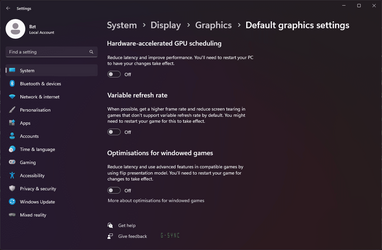
As a test, check the settings below to see if they may help.


My Computers My Computers

  • At a glance

    Windows 11 Pro for WorkstationsIntel i7-8700K 5 GHz64 GB (4x16GB) G.SKILL TridentZ RGB DDR4 3600...ASUS ROG-STRIX-GTX1080TI-O11G-GAMING (11GB GD...
    OS
    Windows 11 Pro for Workstations
    Computer type
    PC/Desktop
    Manufacturer/Model
    Custom self build
    CPU
    Intel i7-8700K 5 GHz
    Motherboard
    ASUS ROG Maximus XI Formula Z390
    Memory
    64 GB (4x16GB) G.SKILL TridentZ RGB DDR4 3600 MHz (F4-3600C18D-32GTZR)
    Graphics Card(s)
    ASUS ROG-STRIX-GTX1080TI-O11G-GAMING (11GB GDDR5X)
    Sound Card
    Integrated Digital Audio (S/PDIF)
    Monitor(s) Displays
    2 x Samsung Odyssey G75 27"
    Screen Resolution
    2560x1440
    Hard Drives
    1TB Samsung 990 PRO M.2,
    4TB Samsung 990 PRO M.2,
    TerraMaster F8 SSD Plus NAS
    PSU
    Seasonic Prime Titanium 850W
    Case
    Thermaltake Core P3 wall mounted
    Cooling
    Corsair Hydro H115i
    Keyboard
    Amazon Basics Wired Full Keyboard MD005
    Mouse
    Logitech MX Master 4
    Internet Speed
    2 Gbps Download and 100 Mbps Upload
    Browser
    Chrome and Edge
    Antivirus
    Microsoft Defender
    Other Info
    Logitech Z625 speaker system,
    Logitech BRIO 4K Pro webcam,
    HP Color LaserJet Pro MFP M477fdn,
    CyberPower CP1500PFCLCD
    Galaxy S23 Plus phone
  • At a glance

    Windows 11 ProSnapdragon X Elite (12 core) 3.42 GHz16 GB LPDDR5x-7467 MHz
    Operating System
    Windows 11 Pro
    Computer type
    Laptop
    Manufacturer/Model
    Surface Laptop 7 Copilot+ PC
    CPU
    Snapdragon X Elite (12 core) 3.42 GHz
    Memory
    16 GB LPDDR5x-7467 MHz
    Monitor(s) Displays
    15" HDR
    Screen Resolution
    2496 x 1664
    Hard Drives
    1 TB SSD
    Internet Speed
    Wi-Fi 7 and Bluetooth 5.4
    Browser
    Chrome and Edge
    Antivirus
    Microsoft Defender
Thnx. I did just that. And checked the settings in the registry and then checked the properties of the .exe file (see screenhots)...


1683904573819.png


1683904621930.png
 

Attachments

  • 1683904487430.png
    1683904487430.png
    113 KB · Views: 231

My Computer My Computer

At a glance

windows11
OS
windows11
Thnx. I did just that. And checked the settings in the registry and then checked the properties of the .exe file (see screenhots)...

Hopefully someone with the same game may know a trick to help and post it. :(
 

My Computers My Computers

  • At a glance

    Windows 11 Pro for WorkstationsIntel i7-8700K 5 GHz64 GB (4x16GB) G.SKILL TridentZ RGB DDR4 3600...ASUS ROG-STRIX-GTX1080TI-O11G-GAMING (11GB GD...
    OS
    Windows 11 Pro for Workstations
    Computer type
    PC/Desktop
    Manufacturer/Model
    Custom self build
    CPU
    Intel i7-8700K 5 GHz
    Motherboard
    ASUS ROG Maximus XI Formula Z390
    Memory
    64 GB (4x16GB) G.SKILL TridentZ RGB DDR4 3600 MHz (F4-3600C18D-32GTZR)
    Graphics Card(s)
    ASUS ROG-STRIX-GTX1080TI-O11G-GAMING (11GB GDDR5X)
    Sound Card
    Integrated Digital Audio (S/PDIF)
    Monitor(s) Displays
    2 x Samsung Odyssey G75 27"
    Screen Resolution
    2560x1440
    Hard Drives
    1TB Samsung 990 PRO M.2,
    4TB Samsung 990 PRO M.2,
    TerraMaster F8 SSD Plus NAS
    PSU
    Seasonic Prime Titanium 850W
    Case
    Thermaltake Core P3 wall mounted
    Cooling
    Corsair Hydro H115i
    Keyboard
    Amazon Basics Wired Full Keyboard MD005
    Mouse
    Logitech MX Master 4
    Internet Speed
    2 Gbps Download and 100 Mbps Upload
    Browser
    Chrome and Edge
    Antivirus
    Microsoft Defender
    Other Info
    Logitech Z625 speaker system,
    Logitech BRIO 4K Pro webcam,
    HP Color LaserJet Pro MFP M477fdn,
    CyberPower CP1500PFCLCD
    Galaxy S23 Plus phone
  • At a glance

    Windows 11 ProSnapdragon X Elite (12 core) 3.42 GHz16 GB LPDDR5x-7467 MHz
    Operating System
    Windows 11 Pro
    Computer type
    Laptop
    Manufacturer/Model
    Surface Laptop 7 Copilot+ PC
    CPU
    Snapdragon X Elite (12 core) 3.42 GHz
    Memory
    16 GB LPDDR5x-7467 MHz
    Monitor(s) Displays
    15" HDR
    Screen Resolution
    2496 x 1664
    Hard Drives
    1 TB SSD
    Internet Speed
    Wi-Fi 7 and Bluetooth 5.4
    Browser
    Chrome and Edge
    Antivirus
    Microsoft Defender
I;ve followed all the instructions. But somehow it doesnt seem to work. All settings are disabled( reduce latency/VRR/Optimistions for windowed games), but when I start a a game (iRacing) session FPS in the borderless window instantly drop bellow 60. When i select a different window in front of my racing session I can see the frames in the background rise over 250FPS (as it should).

Any suggestions?
if you still have issues with iracing
try disable Nvidia gsync and or freesync if its on.
if you want to disable fullscreen optimisations on windows 11 you also need to "overrride high DPI scaling behaviour" and set it to application
and you need to check "disable fullscreen optimisation"
both options best set also for "all users" need to be enabled that way or FSO will still be ON on windows 11
 

My Computer My Computer

At a glance

win11
OS
win11
Thank you Brink for explaining how FO works, I dont think I have come across a single other page on the internet that explains it as specifically as you have done.
 

My Computer My Computer

At a glance

Windows 1013700k32 Gig 3200CL12Nvidia 4800 Super RTX
OS
Windows 10
Computer type
PC/Desktop
CPU
13700k
Motherboard
Asrock Steel Legend D4 Z690
Memory
32 Gig 3200CL12
Graphics Card(s)
Nvidia 4800 Super RTX
Sound Card
Creative AE9
Monitor(s) Displays
LG 27GL850
Screen Resolution
2560x1440
Hard Drives
970 EVO 1TB
SN850X 2TB
DC P4600 2TB
860 EVO 1TB
3 x 3TB WD Red
2 x 4TB WD Red
PSU
Antec HCG 750 Gold
Case
Fractal Define R4
Cooling
Noctua NH-D15S
Internet Speed
1000/1000
Browser
Firefox
Antivirus
Windows Defender
Thank you Brink for explaining how FO works, I dont think I have come across a single other page on the internet that explains it as specifically as you have done.
:shawn:
 

My Computers My Computers

  • At a glance

    Windows 11 Pro for WorkstationsIntel i7-8700K 5 GHz64 GB (4x16GB) G.SKILL TridentZ RGB DDR4 3600...ASUS ROG-STRIX-GTX1080TI-O11G-GAMING (11GB GD...
    OS
    Windows 11 Pro for Workstations
    Computer type
    PC/Desktop
    Manufacturer/Model
    Custom self build
    CPU
    Intel i7-8700K 5 GHz
    Motherboard
    ASUS ROG Maximus XI Formula Z390
    Memory
    64 GB (4x16GB) G.SKILL TridentZ RGB DDR4 3600 MHz (F4-3600C18D-32GTZR)
    Graphics Card(s)
    ASUS ROG-STRIX-GTX1080TI-O11G-GAMING (11GB GDDR5X)
    Sound Card
    Integrated Digital Audio (S/PDIF)
    Monitor(s) Displays
    2 x Samsung Odyssey G75 27"
    Screen Resolution
    2560x1440
    Hard Drives
    1TB Samsung 990 PRO M.2,
    4TB Samsung 990 PRO M.2,
    TerraMaster F8 SSD Plus NAS
    PSU
    Seasonic Prime Titanium 850W
    Case
    Thermaltake Core P3 wall mounted
    Cooling
    Corsair Hydro H115i
    Keyboard
    Amazon Basics Wired Full Keyboard MD005
    Mouse
    Logitech MX Master 4
    Internet Speed
    2 Gbps Download and 100 Mbps Upload
    Browser
    Chrome and Edge
    Antivirus
    Microsoft Defender
    Other Info
    Logitech Z625 speaker system,
    Logitech BRIO 4K Pro webcam,
    HP Color LaserJet Pro MFP M477fdn,
    CyberPower CP1500PFCLCD
    Galaxy S23 Plus phone
  • At a glance

    Windows 11 ProSnapdragon X Elite (12 core) 3.42 GHz16 GB LPDDR5x-7467 MHz
    Operating System
    Windows 11 Pro
    Computer type
    Laptop
    Manufacturer/Model
    Surface Laptop 7 Copilot+ PC
    CPU
    Snapdragon X Elite (12 core) 3.42 GHz
    Memory
    16 GB LPDDR5x-7467 MHz
    Monitor(s) Displays
    15" HDR
    Screen Resolution
    2496 x 1664
    Hard Drives
    1 TB SSD
    Internet Speed
    Wi-Fi 7 and Bluetooth 5.4
    Browser
    Chrome and Edge
    Antivirus
    Microsoft Defender
Actually, I thought you would only explain enable and disable methods, thanks for this detailed guide.
 

My Computer My Computer

At a glance

Windows 11AMD Ryzen 5 55002x Kingston 8GB FURY BeastASUS Dual GeForce RTX 3050 OC Edition 8GB
OS
Windows 11
Computer type
PC/Desktop
Manufacturer/Model
ITOPYA TEKNOHAYAT-11
CPU
AMD Ryzen 5 5500
Motherboard
ASUS PRO B550M-C/CSM
Memory
2x Kingston 8GB FURY Beast
Graphics Card(s)
ASUS Dual GeForce RTX 3050 OC Edition 8GB
Monitor(s) Displays
Lenovo Legion R25i-30
Screen Resolution
1920x1080
Hard Drives
WD 500GB Blue SN570 Gen3x4 M.2 2280 SSD
PSU
GameBooster GB-G3309B 550W 80+
Case
GameBooster GB-G3309B
Cooling
GameBooster GB-G3309B
Keyboard
SteelSeries Apex Pro TKL
Mouse
SteelSeries Prime
Internet Speed
100mbps
Browser
Microsoft Edge

My Computers My Computers

  • At a glance

    Windows 11 Pro for WorkstationsIntel i7-8700K 5 GHz64 GB (4x16GB) G.SKILL TridentZ RGB DDR4 3600...ASUS ROG-STRIX-GTX1080TI-O11G-GAMING (11GB GD...
    OS
    Windows 11 Pro for Workstations
    Computer type
    PC/Desktop
    Manufacturer/Model
    Custom self build
    CPU
    Intel i7-8700K 5 GHz
    Motherboard
    ASUS ROG Maximus XI Formula Z390
    Memory
    64 GB (4x16GB) G.SKILL TridentZ RGB DDR4 3600 MHz (F4-3600C18D-32GTZR)
    Graphics Card(s)
    ASUS ROG-STRIX-GTX1080TI-O11G-GAMING (11GB GDDR5X)
    Sound Card
    Integrated Digital Audio (S/PDIF)
    Monitor(s) Displays
    2 x Samsung Odyssey G75 27"
    Screen Resolution
    2560x1440
    Hard Drives
    1TB Samsung 990 PRO M.2,
    4TB Samsung 990 PRO M.2,
    TerraMaster F8 SSD Plus NAS
    PSU
    Seasonic Prime Titanium 850W
    Case
    Thermaltake Core P3 wall mounted
    Cooling
    Corsair Hydro H115i
    Keyboard
    Amazon Basics Wired Full Keyboard MD005
    Mouse
    Logitech MX Master 4
    Internet Speed
    2 Gbps Download and 100 Mbps Upload
    Browser
    Chrome and Edge
    Antivirus
    Microsoft Defender
    Other Info
    Logitech Z625 speaker system,
    Logitech BRIO 4K Pro webcam,
    HP Color LaserJet Pro MFP M477fdn,
    CyberPower CP1500PFCLCD
    Galaxy S23 Plus phone
  • At a glance

    Windows 11 ProSnapdragon X Elite (12 core) 3.42 GHz16 GB LPDDR5x-7467 MHz
    Operating System
    Windows 11 Pro
    Computer type
    Laptop
    Manufacturer/Model
    Surface Laptop 7 Copilot+ PC
    CPU
    Snapdragon X Elite (12 core) 3.42 GHz
    Memory
    16 GB LPDDR5x-7467 MHz
    Monitor(s) Displays
    15" HDR
    Screen Resolution
    2496 x 1664
    Hard Drives
    1 TB SSD
    Internet Speed
    Wi-Fi 7 and Bluetooth 5.4
    Browser
    Chrome and Edge
    Antivirus
    Microsoft Defender
this disables RTX HDR also and GSYNC/Freesync....
 

My Computer My Computer

At a glance

Windows 117800x3DKINGSTONE DDR5ZOTAC 4090 AMP EXTREME
OS
Windows 11
Computer type
PC/Desktop
Manufacturer/Model
Intel
CPU
7800x3D
Motherboard
MSI X690E TOMHAWK
Memory
KINGSTONE DDR5
Graphics Card(s)
ZOTAC 4090 AMP EXTREME
Sound Card
Creative SXFI AMP
Monitor(s) Displays
Samsung S90C
Screen Resolution
3840x2160
Hard Drives
Nmve WD850N 1TB
SanDisk SDSSDXPS480G
Samsung SSD 840 PRO Series 256Gb
WDC Enterprise Gold 16TB 512MB
WDC Enterprise Gold 6TB 256MB
PSU
ThermalTake ToughPower 1650
Case
Obsidian Series™ 750D Airflow Edition Full Tower ATX Case
Cooling
Arctic Liquid Freezer II 360
Keyboard
SteelSeries APEX PRO
Mouse
SwitPoint Z2
Internet Speed
5000/500
Browser
CHROME
Antivirus
ESET Internet Security

Latest Support Threads

Back
Top Bottom