Apps Enable or Disable OneDrive Files On-Demand in Windows 11

  • Thread starter Thread starter Brink
  • Start date Published: Start date Updated Updated:
  • Tags Tags
    onedrive

OneDrive_header.webp

This tutorial will show you how to turn on or off OneDrive Files On-Demand for your account in Windows 10 and Windows 11.

You can use OneDrive to sync files and folders between your computer and the cloud, so you can get to your files from anywhere - your computer, your mobile device, and even through the OneDrive website at OneDrive.com. If you add, change, or delete a file or folder in your OneDrive folder, the file or folder is added, changed, or deleted on the OneDrive website and vice versa. You can work with your synced files directly in File Explorer and access your files even when you’re offline. Whenever you’re online, any changes that you or others make will sync automatically.

OneDrive Files On-Demand helps you access all your cloud storage in OneDrive without having to download all of them and use file storage space on your Windows device.

When you turn on Files On-Demand, you’ll see all your files in File Explorer and get new information about each file. New files created online or on another device appear as online-only files, which don’t take up space on your device. When you’re connected to the Internet, you’ll be able to use the files like every other file on your device.

You will know that Files On-Demand is turned on if you see the status icons next to your files in File Explorer.

Your files will have these status states in File Explorer:

Online-only
online-only.png
A blue cloud icon next to a OneDrive file or folder indicates that the file is only available online. Online-only files don’t take up space on your computer. You see a cloud icon for each online-only file in File Explorer, but the file doesn’t download to your device until you open it. You can’t open online-only files when your device isn’t connected to the Internet.
Locally available
locally_available.png
When you open an online-only file, it downloads to your device and becomes a locally available file. You can open a locally available file anytime, even without Internet access. If you need more space, you can change the file back to online only. Just right-click the file and select Free up space.

With Storage Sense turned on, these files will become online-only files after the time period you've selected.
Always available
always_available.png
Only files that you mark as Always keep on this device have the green circle with the white check mark. These always available files download to your device and take up space, but they’re always there for you even when you’re offline.

With OneDrive Files On-Demand, you can:
  • Save space on your device by making files online only
  • Set files and folders to be always available locally on your device
  • See important information about files, such as whether they are shared
  • See thumbnails of over 300 different file types even if you don’t have the required application installed to open it
Starting with Windows 11 build 26220.7271 (Dev and Beta 25H2), Microsoft is making a few refinements to the context menu aimed at reducing the space taken by less commonly used actions, while keeping them easy to access. Microsoft is also updated the ordering of actions to group similar tasks. Microsoft moved cloud provider options, like Always Keep on this Device and Free Up Space, into their relevant cloud provider flyout.

Reference:

OneDrive Files On-Demand requires OneDrive running and you signed in to OneDrive with your Microsoft account.


When you turn off (disable) OneDrive Files On-Demand, all OneDrive files and folders will download to your PC.


Here's How:

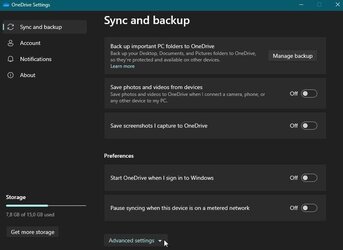
1 Click/tap on the OneDrive icon on the taskbar corner, click/tap on Help & Settings (gear) icon, and click/tap on Settings. (see screenshot below)

OneDrive_Settings.png

2 Do step 3 (on) or step 4 (off) below for what you want.

3 Turn On OneDrive Files On-Demand

This is the default setting.


A) Click/tap on Sync and backup on the left pane. (see screenshots below)​

B) Click/tap on Advanced settings to expand it open.​

C) Perform the available step below:​
  • (Old) Turn on Files On-Demand.
  • (New) Click/tap on Free up disk space under Files On-Demand.
Old_OneDrive_Files_On-Demand.png
New_OneDrive_Files_On-Demand.png

D) Click/tap on Continue (new) to confirm, and go to step 5. (see screenshot below)​

Confirm-3.png

4 Turn Off OneDrive Files On-Demand

A) Click/tap on Sync and backup on the left pane. (see screenshots below)​

B) Click/tap on Advanced settings to expand it open.​

C) Perform the available step below:​
  • (Old) Turn off Files On-Demand.
  • (New) Click/tap on Download all files under Files On-Demand.
Old_OneDrive_Files_On-Demand.png
New_OneDrive_Files_On-Demand.png

D) Click/tap on OK (old) or Continue (new) to confirm, and go to step 5. (see screenshots below)​

Confirm-1.png
Confirm-2.png

5 Your OneDrive folder will now open. You can close it if wanted.


That's it,
Shawn Brink


Last edited:

The new version "hides" it in Advanced setting.

capture_12022022_110446.jpg
 

My Computer My Computer

At a glance

Home26H2CanAMD Ryzen 5 8600G (07/24)2x32GB Kingston FURY DDR5 5600 MHz CL36 @5200...ASROCK Radeon RX 6600 Challenger D 8G @48FPS ...
OS
Home26H2Can
Computer type
PC/Desktop
CPU
AMD Ryzen 5 8600G (07/24)
Motherboard
ASROCK B650M-HDV/M.2 (07/24) BIOS 4.21 AGESA ComboAM5 1.3.0.1 (04/26)
Memory
2x32GB Kingston FURY DDR5 5600 MHz CL36 @5200 CL36 (07/24)
Graphics Card(s)
ASROCK Radeon RX 6600 Challenger D 8G @48FPS (08/24)
Sound Card
Creative Sound BlasterX AE-5 Plus (05/24)
Monitor(s) Displays
24" Philips 24M1N3200ZS/00 (05/24)
Screen Resolution
1920×1080@165Hz via DP1.4
Hard Drives
Kingston KC3000 NVMe 2TB (05/24)
ADATA XPG GAMMIX S11 Pro 512GB (07/19)
PSU
Seasonic Core GM 550 Gold (04/24)
Case
Fractal Design Define 7 Mini with 3x Noctua NF-P14s/12@555rpm (04/24)
Cooling
Noctua NH-U12S with Noctua NF-P12 (04/24)
Keyboard
HP Pavilion Wired Keyboard 300 (07/24) + Rabalux 76017 Parker (01/24)
Mouse
Logitech M330 Silent Plus (01/26)
Internet Speed
500/100 Mbps via RouterOS (05/21) & TCP Optimizer
Browser
Edge, Brave for YouTube, LibreWolf for FB
Antivirus
NextDNS blocking 1/3 Traffic
Other Info
Phone: Motorola Moto G86 (02/26)
Backup: Hasleo Backup Suite (PreOS)
Headphones: Sennheiser RS170 (09/10)
Chair: Huzaro Force 4.4 Grey Mesh (05/24)
Notifier: Xiaomi Mi Band 9 Milanese (10/24)
FlexCore USB-C 3.2 Gen 1 (M) to LAN (F) (08/25)
It appears that "Files on Demand" overrides a users desire to "Always keep on this device".

I set the Onedrive folder to "Always keep on this device" but based on some logic certain folders show as a green circle, white background, and green check mark, so "Files on Demand". Yet if you right click the folder the option to "Always keep on this device" is checked.

Not sure how Files On Demand is set in OneDrive settings but I would have hope when I check marked the Onedrive folder that would have ensured a green dot icon with a white check mark.
 

My Computer My Computer

At a glance

Windows 11 Pro x64 Version V23H2i7-8700KG.Skill Trident Z 3200MHz F4-3200C16D-16GTZ (...Intel UHD Graphics 630
OS
Windows 11 Pro x64 Version V23H2
Computer type
PC/Desktop
Manufacturer/Model
Custom
CPU
i7-8700K
Motherboard
Asus Maximus X Code - Z370
Memory
G.Skill Trident Z 3200MHz F4-3200C16D-16GTZ (2) 32GB
Graphics Card(s)
Intel UHD Graphics 630
Sound Card
Integrated ROG SupremeFX
Monitor(s) Displays
Asus VP279 27", Samsung BX2431 24"
Screen Resolution
1920 x 1080
Hard Drives
Samsung M.2 NVMe 960 EVO 500GB Boot,
Samsung 840 EVO 250GB (System Copy Drive),
Samsung 860 EVO 1TB (Primary Data Drive),
WD Black 500GB (Data Copy Drive)
ICY Dock 5.25 2.5/3.5 Bays MB971SP-B
PSU
Corsair RM 650i +Gold
Case
Phanteks Enthroo Primo
Cooling
Corsair Hydro H150i, 360mm Rad & Five Corsair 140mm Pro ML Case Fans
Keyboard
das Keyboard MX Brown Mechanical Switches Model DASKMKPROSIL-3G7-r1.0
Mouse
Logitech MX Master 3 Wireless & Bluetooth
Internet Speed
500Mb +
Browser
Chrome (Pri), Firefox (Sec)
Antivirus
Malwarebytes Premium, SuperAntiSpyware Pro (Licensed)
Other Info
Microsoft LifeCam HD,
APC Back-UPS Pro 1500,
Macrium (Licensed),
Microsoft 365,
Wise Disk Cleaner,
Crystal Disk Info,
Screenpresso (Licensed),
AnyDesk (Licensed),
It appears that "Files on Demand" overrides a users desire to "Always keep on this device".

I set the Onedrive folder to "Always keep on this device" but based on some logic certain folders show as a green circle, white background, and green check mark, so "Files on Demand". Yet if you right click the folder the option to "Always keep on this device" is checked.

Not sure how Files On Demand is set in OneDrive settings but I would have hope when I check marked the Onedrive folder that would have ensured a green dot icon with a white check mark.
Hello Ken, :alien:

Are the files you want in this folder showing as "Always keep on this device"?
 

My Computers My Computers

  • At a glance

    Windows 11 Pro for WorkstationsIntel i7-8700K 5 GHz64 GB (4x16GB) G.SKILL TridentZ RGB DDR4 3600...ASUS ROG-STRIX-GTX1080TI-O11G-GAMING (11GB GD...
    OS
    Windows 11 Pro for Workstations
    Computer type
    PC/Desktop
    Manufacturer/Model
    Custom self build
    CPU
    Intel i7-8700K 5 GHz
    Motherboard
    ASUS ROG Maximus XI Formula Z390
    Memory
    64 GB (4x16GB) G.SKILL TridentZ RGB DDR4 3600 MHz (F4-3600C18D-32GTZR)
    Graphics Card(s)
    ASUS ROG-STRIX-GTX1080TI-O11G-GAMING (11GB GDDR5X)
    Sound Card
    Integrated Digital Audio (S/PDIF)
    Monitor(s) Displays
    2 x Samsung Odyssey G75 27"
    Screen Resolution
    2560x1440
    Hard Drives
    1TB Samsung 990 PRO M.2,
    4TB Samsung 990 PRO M.2,
    TerraMaster F8 SSD Plus NAS
    PSU
    Seasonic Prime Titanium 850W
    Case
    Thermaltake Core P3 wall mounted
    Cooling
    Corsair Hydro H115i
    Keyboard
    Amazon Basics Wired Full Keyboard MD005
    Mouse
    Logitech MX Master 4
    Internet Speed
    2 Gbps Download and 100 Mbps Upload
    Browser
    Chrome and Edge
    Antivirus
    Microsoft Defender
    Other Info
    Logitech Z625 speaker system,
    Logitech BRIO 4K Pro webcam,
    HP Color LaserJet Pro MFP M477fdn,
    CyberPower CP1500PFCLCD
    Galaxy S23 Plus phone
  • At a glance

    Windows 11 ProSnapdragon X Elite (12 core) 3.42 GHz16 GB LPDDR5x-7467 MHz
    Operating System
    Windows 11 Pro
    Computer type
    Laptop
    Manufacturer/Model
    Surface Laptop 7 Copilot+ PC
    CPU
    Snapdragon X Elite (12 core) 3.42 GHz
    Memory
    16 GB LPDDR5x-7467 MHz
    Monitor(s) Displays
    15" HDR
    Screen Resolution
    2496 x 1664
    Hard Drives
    1 TB SSD
    Internet Speed
    Wi-Fi 7 and Bluetooth 5.4
    Browser
    Chrome and Edge
    Antivirus
    Microsoft Defender
I will have to check. I want the entire folder as "Always keep on machine". The folder itself shows as a green circle with green check mark. I never thought to open folder. ( and I certainly don't want it to revert to online based on Storage Sense setting.)

The folder has lots of subs so I hope I don't have to go through looking. I set "Parent" as always keep.

Thanks for responding Shawn.
 

My Computer My Computer

At a glance

Windows 11 Pro x64 Version V23H2i7-8700KG.Skill Trident Z 3200MHz F4-3200C16D-16GTZ (...Intel UHD Graphics 630
OS
Windows 11 Pro x64 Version V23H2
Computer type
PC/Desktop
Manufacturer/Model
Custom
CPU
i7-8700K
Motherboard
Asus Maximus X Code - Z370
Memory
G.Skill Trident Z 3200MHz F4-3200C16D-16GTZ (2) 32GB
Graphics Card(s)
Intel UHD Graphics 630
Sound Card
Integrated ROG SupremeFX
Monitor(s) Displays
Asus VP279 27", Samsung BX2431 24"
Screen Resolution
1920 x 1080
Hard Drives
Samsung M.2 NVMe 960 EVO 500GB Boot,
Samsung 840 EVO 250GB (System Copy Drive),
Samsung 860 EVO 1TB (Primary Data Drive),
WD Black 500GB (Data Copy Drive)
ICY Dock 5.25 2.5/3.5 Bays MB971SP-B
PSU
Corsair RM 650i +Gold
Case
Phanteks Enthroo Primo
Cooling
Corsair Hydro H150i, 360mm Rad & Five Corsair 140mm Pro ML Case Fans
Keyboard
das Keyboard MX Brown Mechanical Switches Model DASKMKPROSIL-3G7-r1.0
Mouse
Logitech MX Master 3 Wireless & Bluetooth
Internet Speed
500Mb +
Browser
Chrome (Pri), Firefox (Sec)
Antivirus
Malwarebytes Premium, SuperAntiSpyware Pro (Licensed)
Other Info
Microsoft LifeCam HD,
APC Back-UPS Pro 1500,
Macrium (Licensed),
Microsoft 365,
Wise Disk Cleaner,
Crystal Disk Info,
Screenpresso (Licensed),
AnyDesk (Licensed),
I will have to check. I want the entire folder as "Always keep on machine". The folder itself shows as a green circle with green check mark. I never thought to open folder. ( and I certainly don't want it to revert to online based on Storage Sense setting.)

The folder has lots of subs so I hope I don't have to go through looking. I set "Parent" as always keep.

Thanks for responding Shawn.
I'm thinking that if one file in this parent folder isn't "Always keep on this device", it will show the other white circle green check mark icon instead.


My Computers My Computers

  • At a glance

    Windows 11 Pro for WorkstationsIntel i7-8700K 5 GHz64 GB (4x16GB) G.SKILL TridentZ RGB DDR4 3600...ASUS ROG-STRIX-GTX1080TI-O11G-GAMING (11GB GD...
    OS
    Windows 11 Pro for Workstations
    Computer type
    PC/Desktop
    Manufacturer/Model
    Custom self build
    CPU
    Intel i7-8700K 5 GHz
    Motherboard
    ASUS ROG Maximus XI Formula Z390
    Memory
    64 GB (4x16GB) G.SKILL TridentZ RGB DDR4 3600 MHz (F4-3600C18D-32GTZR)
    Graphics Card(s)
    ASUS ROG-STRIX-GTX1080TI-O11G-GAMING (11GB GDDR5X)
    Sound Card
    Integrated Digital Audio (S/PDIF)
    Monitor(s) Displays
    2 x Samsung Odyssey G75 27"
    Screen Resolution
    2560x1440
    Hard Drives
    1TB Samsung 990 PRO M.2,
    4TB Samsung 990 PRO M.2,
    TerraMaster F8 SSD Plus NAS
    PSU
    Seasonic Prime Titanium 850W
    Case
    Thermaltake Core P3 wall mounted
    Cooling
    Corsair Hydro H115i
    Keyboard
    Amazon Basics Wired Full Keyboard MD005
    Mouse
    Logitech MX Master 4
    Internet Speed
    2 Gbps Download and 100 Mbps Upload
    Browser
    Chrome and Edge
    Antivirus
    Microsoft Defender
    Other Info
    Logitech Z625 speaker system,
    Logitech BRIO 4K Pro webcam,
    HP Color LaserJet Pro MFP M477fdn,
    CyberPower CP1500PFCLCD
    Galaxy S23 Plus phone
  • At a glance

    Windows 11 ProSnapdragon X Elite (12 core) 3.42 GHz16 GB LPDDR5x-7467 MHz
    Operating System
    Windows 11 Pro
    Computer type
    Laptop
    Manufacturer/Model
    Surface Laptop 7 Copilot+ PC
    CPU
    Snapdragon X Elite (12 core) 3.42 GHz
    Memory
    16 GB LPDDR5x-7467 MHz
    Monitor(s) Displays
    15" HDR
    Screen Resolution
    2496 x 1664
    Hard Drives
    1 TB SSD
    Internet Speed
    Wi-Fi 7 and Bluetooth 5.4
    Browser
    Chrome and Edge
    Antivirus
    Microsoft Defender
Thanks Shawn.

Before I transferred any data to this laptop I set the OneDrive folder to keep all files on device. It could take a very long time to find this stray files.

I was thinking if I disabled "Files On Demand" by clicking "Download All" they should all go to Solid green.

Your thoughts?
 

My Computer My Computer

At a glance

Windows 11 Pro x64 Version V23H2i7-8700KG.Skill Trident Z 3200MHz F4-3200C16D-16GTZ (...Intel UHD Graphics 630
OS
Windows 11 Pro x64 Version V23H2
Computer type
PC/Desktop
Manufacturer/Model
Custom
CPU
i7-8700K
Motherboard
Asus Maximus X Code - Z370
Memory
G.Skill Trident Z 3200MHz F4-3200C16D-16GTZ (2) 32GB
Graphics Card(s)
Intel UHD Graphics 630
Sound Card
Integrated ROG SupremeFX
Monitor(s) Displays
Asus VP279 27", Samsung BX2431 24"
Screen Resolution
1920 x 1080
Hard Drives
Samsung M.2 NVMe 960 EVO 500GB Boot,
Samsung 840 EVO 250GB (System Copy Drive),
Samsung 860 EVO 1TB (Primary Data Drive),
WD Black 500GB (Data Copy Drive)
ICY Dock 5.25 2.5/3.5 Bays MB971SP-B
PSU
Corsair RM 650i +Gold
Case
Phanteks Enthroo Primo
Cooling
Corsair Hydro H150i, 360mm Rad & Five Corsair 140mm Pro ML Case Fans
Keyboard
das Keyboard MX Brown Mechanical Switches Model DASKMKPROSIL-3G7-r1.0
Mouse
Logitech MX Master 3 Wireless & Bluetooth
Internet Speed
500Mb +
Browser
Chrome (Pri), Firefox (Sec)
Antivirus
Malwarebytes Premium, SuperAntiSpyware Pro (Licensed)
Other Info
Microsoft LifeCam HD,
APC Back-UPS Pro 1500,
Macrium (Licensed),
Microsoft 365,
Wise Disk Cleaner,
Crystal Disk Info,
Screenpresso (Licensed),
AnyDesk (Licensed),

My Computers My Computers

  • At a glance

    Windows 11 ProRyzen 7 5700 X3D64 GB DDR4 3600mhz Gskill Ripjaws VRTX 4070 Super , 12GB VRAM Asus EVO Overclock
    OS
    Windows 11 Pro
    Computer type
    PC/Desktop
    Manufacturer/Model
    Custom Built
    CPU
    Ryzen 7 5700 X3D
    Motherboard
    MSI MPG B550 GAMING PLUS
    Memory
    64 GB DDR4 3600mhz Gskill Ripjaws V
    Graphics Card(s)
    RTX 4070 Super , 12GB VRAM Asus EVO Overclock
    Monitor(s) Displays
    Gigabyte M27Q (rev. 2.0) 2560 x 1440 @ 170hz HDR
    Hard Drives
    2TB Samsung nvme ssd
    4TB Western Digital nvme ssd
    PSU
    CORSAIR RMx SHIFT Series™ RM750x 80 PLUS Gold Fully Modular ATX Power Supply
    Case
    CORSAIR 3500X ARGB Mid-Tower ATX PC Case – Black
    Cooling
    ID-COOLING FROSTFLOW X 240 CPU Water Cooler
    Keyboard
    Logitech G213
    Mouse
    Logitech G203
    Internet Speed
    1.2gbps Fiber 😎
  • At a glance

    Chrome OSIntel Pentium Quad Core4GB LPDDR4
    Operating System
    Chrome OS
    Computer type
    Laptop
    Manufacturer/Model
    HP Chromebook
    CPU
    Intel Pentium Quad Core
    Memory
    4GB LPDDR4
    Monitor(s) Displays
    14 Inch HD SVA anti glare micro edge display
    Hard Drives
    64 GB emmc
Most of my clients have more than 5GB so we would be into immediate "You are out of space" messages.

I try to disable OneDrive immediately if I start a new machine until I can ask if they want it on.
 

My Computer My Computer

At a glance

Windows 11 Pro x64 Version V23H2i7-8700KG.Skill Trident Z 3200MHz F4-3200C16D-16GTZ (...Intel UHD Graphics 630
OS
Windows 11 Pro x64 Version V23H2
Computer type
PC/Desktop
Manufacturer/Model
Custom
CPU
i7-8700K
Motherboard
Asus Maximus X Code - Z370
Memory
G.Skill Trident Z 3200MHz F4-3200C16D-16GTZ (2) 32GB
Graphics Card(s)
Intel UHD Graphics 630
Sound Card
Integrated ROG SupremeFX
Monitor(s) Displays
Asus VP279 27", Samsung BX2431 24"
Screen Resolution
1920 x 1080
Hard Drives
Samsung M.2 NVMe 960 EVO 500GB Boot,
Samsung 840 EVO 250GB (System Copy Drive),
Samsung 860 EVO 1TB (Primary Data Drive),
WD Black 500GB (Data Copy Drive)
ICY Dock 5.25 2.5/3.5 Bays MB971SP-B
PSU
Corsair RM 650i +Gold
Case
Phanteks Enthroo Primo
Cooling
Corsair Hydro H150i, 360mm Rad & Five Corsair 140mm Pro ML Case Fans
Keyboard
das Keyboard MX Brown Mechanical Switches Model DASKMKPROSIL-3G7-r1.0
Mouse
Logitech MX Master 3 Wireless & Bluetooth
Internet Speed
500Mb +
Browser
Chrome (Pri), Firefox (Sec)
Antivirus
Malwarebytes Premium, SuperAntiSpyware Pro (Licensed)
Other Info
Microsoft LifeCam HD,
APC Back-UPS Pro 1500,
Macrium (Licensed),
Microsoft 365,
Wise Disk Cleaner,
Crystal Disk Info,
Screenpresso (Licensed),
AnyDesk (Licensed),
I disabled Storage Sense and Files on Demand. The icon OneDrive icons started to change from a green circle with a white background to green dot with a white check mark. This is what I wanted, all files on devices with copies on OneDrive.
 

My Computer My Computer

At a glance

Windows 11 Pro x64 Version V23H2i7-8700KG.Skill Trident Z 3200MHz F4-3200C16D-16GTZ (...Intel UHD Graphics 630
OS
Windows 11 Pro x64 Version V23H2
Computer type
PC/Desktop
Manufacturer/Model
Custom
CPU
i7-8700K
Motherboard
Asus Maximus X Code - Z370
Memory
G.Skill Trident Z 3200MHz F4-3200C16D-16GTZ (2) 32GB
Graphics Card(s)
Intel UHD Graphics 630
Sound Card
Integrated ROG SupremeFX
Monitor(s) Displays
Asus VP279 27", Samsung BX2431 24"
Screen Resolution
1920 x 1080
Hard Drives
Samsung M.2 NVMe 960 EVO 500GB Boot,
Samsung 840 EVO 250GB (System Copy Drive),
Samsung 860 EVO 1TB (Primary Data Drive),
WD Black 500GB (Data Copy Drive)
ICY Dock 5.25 2.5/3.5 Bays MB971SP-B
PSU
Corsair RM 650i +Gold
Case
Phanteks Enthroo Primo
Cooling
Corsair Hydro H150i, 360mm Rad & Five Corsair 140mm Pro ML Case Fans
Keyboard
das Keyboard MX Brown Mechanical Switches Model DASKMKPROSIL-3G7-r1.0
Mouse
Logitech MX Master 3 Wireless & Bluetooth
Internet Speed
500Mb +
Browser
Chrome (Pri), Firefox (Sec)
Antivirus
Malwarebytes Premium, SuperAntiSpyware Pro (Licensed)
Other Info
Microsoft LifeCam HD,
APC Back-UPS Pro 1500,
Macrium (Licensed),
Microsoft 365,
Wise Disk Cleaner,
Crystal Disk Info,
Screenpresso (Licensed),
AnyDesk (Licensed),
I'm thinking that if one file in this parent folder isn't "Always keep on this device", it will show the other white circle green check mark icon instead.

I am having the same issue. Everything i am mentioning is set to Always when i right click on the folder/file

My Parent folders have a White Check, but when i right click they say Always. Within the parent i went through and located files called "desktop" (config files inside music folders) and .DS_Store and Thumbs. when i deleted these files i got the Green Always check on some parent folders

However, there are some Parent folders with the White circle check and within those folders there are no anomaly files showing. Every folder and file inside the parent folder has a green check, but the parent is still showing a white check. So i went to view and showed hidden files and sure enough there is a hidden .DS_Store file along with hidden mp3 files (example - ._Edwin Starr - War) that when i hover say Excluded. I have no file extensions excluded in my onedrive settings. These files appear to be broken files. FYI I transfers these files over from my macbook

I i went through this and was typing this i realized that having your my Music folder synced with onedrive is where my issues are happening. Something with the files save on a Mac. Also iTunes was inside my Music folder and had the majority of the hidden files issue. I deleted the iTunes folder and it resolved my issue. I am curious how this will play out after i rebuild my iTunes folder on this computer.

I am not sure why OnDrive cant just do what you want it to do. It should be able to backup the folders i have selected.

EDIT i check other random music folders and they also showed hidden files that are excluded and not synced, however the parent folder kept its green check. Removing my iTunes folder allowed my parent to get a green check, but as soon as i rebuilt my iTunes catalog the white check came back. OneDrive does not like iTunes.
 
Last edited:

My Computer My Computer

At a glance

Windows 11
OS
Windows 11
Back
Top Bottom