Apps Enable or Disable OneDrive in Windows 11


OneDrive_header.webp

This tutorial will show you how to enable or disable the OneDrive feature for all users in Windows 10 and Windows 11.

OneDrive is built-in to Windows 11 by default.

With OneDrive, you can sync files and folders between your computer and the cloud, so you can get to your files from anywhere - your computer, your mobile device, and even through the OneDrive website at OneDrive.live.com. If you add, change, or delete a file or folder in your OneDrive folder, the file or folder is added, changed, or deleted on the OneDrive website and vice versa. You can work with your synced files directly in File Explorer and access your files even when you’re offline. Whenever you’re online, any changes that you or others make will sync automatically.

If you like, you can disable OneDrive in Windows 11.

If you disable OneDrive integration:
  • Users can’t open OneDrive.
  • OneDrive will not run at startup for all users.
  • Microsoft Store apps can’t access OneDrive using the WinRT API.
  • OneDrive doesn’t appear in the navigation pane in File Explorer for all users.
  • OneDrive files aren’t kept in sync with the cloud.
  • Users can’t automatically upload photos and videos from the camera roll folder.
Reference:

You must be signed in as an administrator to enable or disable the OneDrive feature in Windows.

Disabling OneDrive in Windows 11 does not delete or remove the C:\Users\<username>\OneDrive folder for users.

Disabling OneDrive in Windows 11 does not prevent users from using OneDrive.com online in their web browser.


To fully disable OneDrive, it is recommend to turn off OneDrive backup for any folders before disabling OneDrive.


Contents

  • Option One: Enable or Disable OneDrive in Local Group Policy Editor
  • Option Two: Enable or Disable OneDrive using REG file


EXAMPLE: OneDrive enabled and disabled in Windows 11

One_Drive_enabled.png

One_Drive_disabled.png


Option One

Enable or Disable OneDrive in Local Group Policy Editor


The Local Group Policy Editor is only available in the Windows 11 Pro, Enterprise, and Education editions.

All editions can use Option Two.


1 Open the Local Group Policy Editor (gpedit.msc).

2 Navigate to the policy location below in the left pane of the Local Group Policy Editor. (see screenshot below)

Computer Configuration > Administrative Templates > Windows Components > OneDrive​

OneDrive_gpedit-1.png

3 In the right pane of OneDrive in the Local Group Policy Editor, double click/tap on the Prevent the usage of OneDrive for file storage policy to edit it. (see screenshot above)

4 Do step 5 (enable) or step 6 (disable) below for what you would like to do.

5 To Enable OneDrive for All Users

This is the default setting.


A) Select (dot) Not Configured, click/tap on OK, and go to step 7 below. (see screenshot below)​

OneDrive_gpedit-2.png

6 To Disable OneDrive for All Users

A) Select (dot) Enabled, click/tap on OK, and go to step 7 below. (see screenshot below)​

OneDrive_gpedit-3.png

7 Close the Local Group Policy Editor if you like.

8 Either sign out and sign in or restart the computer to apply.


Option Two

Enable or Disable OneDrive using REG file


1 Do step 2 (enable) or step 3 (disable) below for what you would like to do.

2 To Enable OneDrive for All Users

This is the default setting.


A) Click/tap on the Download button below to download the file below, and go to step 4 below.​

Enable_OneDrive_for_all_users.reg​


(Contents of REG file for reference)
Code:
Windows Registry Editor Version 5.00

[HKEY_LOCAL_MACHINE\SOFTWARE\Policies\Microsoft\Windows\OneDrive]
"DisableFileSyncNGSC"=-

3 To Disable OneDrive for All Users

A) Click/tap on the Download button below to download the file below, and go to step 4 below.​

Disable_OneDrive_for_all_users.reg​


(Contents of REG file for reference)
Code:
Windows Registry Editor Version 5.00

[HKEY_LOCAL_MACHINE\SOFTWARE\Policies\Microsoft\Windows\OneDrive]
"DisableFileSyncNGSC"=dword:00000001

4 Save the .reg file to your desktop.

5 Double click/tap on the downloaded .reg file to merge it.

6 When prompted, click/tap on Run, Yes (UAC), Yes, and OK to approve the merge.

7 Either sign out and sign in or restart the computer to apply.

8 You could now delete the downloaded .reg file if you like.


That's it,
Shawn Brink


Attachments

Last edited:

@Brink , I can't locate " Local Group Policy Editor" after I disabled One Drive on startup.

Is it cause my laptop is running W11 Home 22H2 OR I disabled it incorrectly?

Your expert views.

Thanks.

​


My Computers My Computers

  • At a glance

    Windows 11 Pro 25H2 (26200.9550).core i7 11th gen16 GB DDR4 @3200 MHz
    OS
    Windows 11 Pro 25H2 (26200.9550).
    Computer type
    Laptop
    Manufacturer/Model
    Dell Inspiron i5 5510
    CPU
    core i7 11th gen
    Memory
    16 GB DDR4 @3200 MHz
    Hard Drives
    1 TB SSD M.2 NVMe
    Keyboard
    Dell Premier Multi-Device Wireless Keyboard and Mouse – KM7321W
    Browser
    Brave.
    Other Info
    Edifier speakers. (Thanks to @Edwin).
  • At a glance

    W11 25H2 (26200.7840)11th Gen Intel® Core i7-11700 processor32 GB, 2 x 16 GB, DDR4, 2933 MHz, dual channelNVIDIA GeForce RTX 3060 12GB GDDR6
    Operating System
    W11 25H2 (26200.7840)
    Computer type
    PC/Desktop
    Manufacturer/Model
    XPS Special Edition
    CPU
    11th Gen Intel® Core i7-11700 processor
    Memory
    32 GB, 2 x 16 GB, DDR4, 2933 MHz, dual channel
    Graphics card(s)
    NVIDIA GeForce RTX 3060 12GB GDDR6
    Hard Drives
    2TB M.2 PCIe NVMe SSD
@Brink , I can't locate " Local Group Policy Editor" after I disabled One Drive on startup.

Is it cause my laptop is running W11 Home 22H2 OR I disabled it incorrectly?

Your expert views.

Thanks.

​

GPE is not available on Home which you state is your OS.
 

My Computer My Computer

At a glance

Windows 11 Pro + Win11 Canary VM.I9 13th gen i9-13900H 2.60 GHZ16 GB solderedIntegrated Intel Iris XE
OS
Windows 11 Pro + Win11 Canary VM.
Computer type
Laptop
Manufacturer/Model
ASUS Zenbook 14
CPU
I9 13th gen i9-13900H 2.60 GHZ
Motherboard
Yep, Laptop has one.
Memory
16 GB soldered
Graphics Card(s)
Integrated Intel Iris XE
Sound Card
Realtek built in
Monitor(s) Displays
laptop OLED screen
Screen Resolution
2880x1800 touchscreen
Hard Drives
1 TB NVME SSD (only weakness is only one slot)
PSU
Internal + 65W thunderbolt USB4 charger
Case
Yep, got one
Cooling
Stella Artois (UK pint cans - 568 ml) - extra cost.
Keyboard
Built in UK keybd
Mouse
Bluetooth , wireless dongled, wired
Internet Speed
900 mbs (ethernet), wifi 6 typical 350-450 mb/s both up and down
Browser
Edge
Antivirus
Defender
Other Info
TPM 2.0, 2xUSB4 thunderbolt, 1xUsb3 (usb a), 1xUsb-c, hdmi out, 3.5 mm audio out/in combo, ASUS backlit trackpad (inc. switchable number pad)

Macrium Reflect Home V8
Office 365 Family (6 users each 1TB onedrive space)
Hyper-V (a vm runs almost as fast as my older laptop)
GPE is not available on Home which you state is your OS.

I had a gut feeling, but was still unsure, so I addressed Shawn. Thanks for the confirmation.
Have a great day!
 

My Computers My Computers

  • At a glance

    Windows 11 Pro 25H2 (26200.9550).core i7 11th gen16 GB DDR4 @3200 MHz
    OS
    Windows 11 Pro 25H2 (26200.9550).
    Computer type
    Laptop
    Manufacturer/Model
    Dell Inspiron i5 5510
    CPU
    core i7 11th gen
    Memory
    16 GB DDR4 @3200 MHz
    Hard Drives
    1 TB SSD M.2 NVMe
    Keyboard
    Dell Premier Multi-Device Wireless Keyboard and Mouse – KM7321W
    Browser
    Brave.
    Other Info
    Edifier speakers. (Thanks to @Edwin).
  • At a glance

    W11 25H2 (26200.7840)11th Gen Intel® Core i7-11700 processor32 GB, 2 x 16 GB, DDR4, 2933 MHz, dual channelNVIDIA GeForce RTX 3060 12GB GDDR6
    Operating System
    W11 25H2 (26200.7840)
    Computer type
    PC/Desktop
    Manufacturer/Model
    XPS Special Edition
    CPU
    11th Gen Intel® Core i7-11700 processor
    Memory
    32 GB, 2 x 16 GB, DDR4, 2933 MHz, dual channel
    Graphics card(s)
    NVIDIA GeForce RTX 3060 12GB GDDR6
    Hard Drives
    2TB M.2 PCIe NVMe SSD
Good morning.
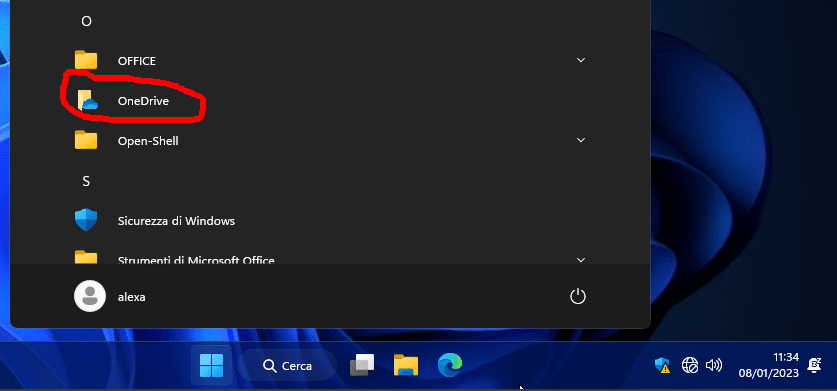
I have run the registry key to both enable OneDrive for all users, but I can't get rid of the icon that appears in the start menu as well.
I am asking if it is possible to also delete the shortcut from the start menu with registry key, as I need to include OneDrive disabling in the ISO.
Thank you very much

Screenshot-001.png
 

My Computer My Computer

At a glance

W11CPU AMD Ryzen 9 7950XG.Skill Flare X5 32GB Kit DDR5-6000 CL32 (F5-...
OS
W11
Computer type
PC/Desktop
CPU
CPU AMD Ryzen 9 7950X
Motherboard
ASUS ROG Strix X670E-F Gaming WiFi
Memory
G.Skill Flare X5 32GB Kit DDR5-6000 CL32 (F5-6000J3238F16GX2-FX5)
Monitor(s) Displays
LG E2381VR
Screen Resolution
1920x1080
Hard Drives
1x Samsung Memorie MZ-V8P1T0B 980 PRO SSD 1TB
2x Western Digital WD Red Nas 4TB
PSU
SEASONIC FOCUS PX-850 Plus Platinum
Case
Corsair 4000D Airflow
Cooling
ARCTIC Liquid Freezer II 280 A-RGB
Keyboard
Logitech G510
Mouse
Logitech G502 HERO
Browser
Firefox
Antivirus
Avg free
Other Info
Download: 90 Mbps
Upload: 20Mbps
Good morning.
I have run the registry key to both enable OneDrive for all users, but I can't get rid of the icon that appears in the start menu as well.
I am asking if it is possible to also delete the shortcut from the start menu with registry key, as I need to include OneDrive disabling in the ISO.
Thank you very much

Screenshot-001.png
Hello DMD, :alien:

You could see if an option below may remove it for you.


My Computers My Computers

  • At a glance

    Windows 11 Pro for WorkstationsIntel i7-8700K 5 GHz64 GB (4x16GB) G.SKILL TridentZ RGB DDR4 3600...ASUS ROG-STRIX-GTX1080TI-O11G-GAMING (11GB GD...
    OS
    Windows 11 Pro for Workstations
    Computer type
    PC/Desktop
    Manufacturer/Model
    Custom self build
    CPU
    Intel i7-8700K 5 GHz
    Motherboard
    ASUS ROG Maximus XI Formula Z390
    Memory
    64 GB (4x16GB) G.SKILL TridentZ RGB DDR4 3600 MHz (F4-3600C18D-32GTZR)
    Graphics Card(s)
    ASUS ROG-STRIX-GTX1080TI-O11G-GAMING (11GB GDDR5X)
    Sound Card
    Integrated Digital Audio (S/PDIF)
    Monitor(s) Displays
    2 x Samsung Odyssey G75 27"
    Screen Resolution
    2560x1440
    Hard Drives
    1TB Samsung 990 PRO M.2,
    4TB Samsung 990 PRO M.2,
    TerraMaster F8 SSD Plus NAS
    PSU
    Seasonic Prime Titanium 850W
    Case
    Thermaltake Core P3 wall mounted
    Cooling
    Corsair Hydro H115i
    Keyboard
    Amazon Basics Wired Full Keyboard MD005
    Mouse
    Logitech MX Master 4
    Internet Speed
    2 Gbps Download and 100 Mbps Upload
    Browser
    Chrome and Edge
    Antivirus
    Microsoft Defender
    Other Info
    Logitech Z625 speaker system,
    Logitech BRIO 4K Pro webcam,
    HP Color LaserJet Pro MFP M477fdn,
    CyberPower CP1500PFCLCD
    Galaxy S23 Plus phone
  • At a glance

    Windows 11 ProSnapdragon X Elite (12 core) 3.42 GHz16 GB LPDDR5x-7467 MHz
    Operating System
    Windows 11 Pro
    Computer type
    Laptop
    Manufacturer/Model
    Surface Laptop 7 Copilot+ PC
    CPU
    Snapdragon X Elite (12 core) 3.42 GHz
    Memory
    16 GB LPDDR5x-7467 MHz
    Monitor(s) Displays
    15" HDR
    Screen Resolution
    2496 x 1664
    Hard Drives
    1 TB SSD
    Internet Speed
    Wi-Fi 7 and Bluetooth 5.4
    Browser
    Chrome and Edge
    Antivirus
    Microsoft Defender
  • Like
Reactions: DMD
To unsophisticated users like me, uninstall/re-install is simpler than disable/re-enable
 

My Computer My Computer

At a glance

Windows 10 Pro
OS
Windows 10 Pro
To unsophisticated users like me, uninstall/re-install is simpler than disable/re-enable

Hello mate, :-)

The method in this tutorial does not uninstall OneDrive. It only enables or disables OneDrive instead.

You can use option 1 below to uninstall OneDrive if wanted though.


My Computers My Computers

  • At a glance

    Windows 11 Pro for WorkstationsIntel i7-8700K 5 GHz64 GB (4x16GB) G.SKILL TridentZ RGB DDR4 3600...ASUS ROG-STRIX-GTX1080TI-O11G-GAMING (11GB GD...
    OS
    Windows 11 Pro for Workstations
    Computer type
    PC/Desktop
    Manufacturer/Model
    Custom self build
    CPU
    Intel i7-8700K 5 GHz
    Motherboard
    ASUS ROG Maximus XI Formula Z390
    Memory
    64 GB (4x16GB) G.SKILL TridentZ RGB DDR4 3600 MHz (F4-3600C18D-32GTZR)
    Graphics Card(s)
    ASUS ROG-STRIX-GTX1080TI-O11G-GAMING (11GB GDDR5X)
    Sound Card
    Integrated Digital Audio (S/PDIF)
    Monitor(s) Displays
    2 x Samsung Odyssey G75 27"
    Screen Resolution
    2560x1440
    Hard Drives
    1TB Samsung 990 PRO M.2,
    4TB Samsung 990 PRO M.2,
    TerraMaster F8 SSD Plus NAS
    PSU
    Seasonic Prime Titanium 850W
    Case
    Thermaltake Core P3 wall mounted
    Cooling
    Corsair Hydro H115i
    Keyboard
    Amazon Basics Wired Full Keyboard MD005
    Mouse
    Logitech MX Master 4
    Internet Speed
    2 Gbps Download and 100 Mbps Upload
    Browser
    Chrome and Edge
    Antivirus
    Microsoft Defender
    Other Info
    Logitech Z625 speaker system,
    Logitech BRIO 4K Pro webcam,
    HP Color LaserJet Pro MFP M477fdn,
    CyberPower CP1500PFCLCD
    Galaxy S23 Plus phone
  • At a glance

    Windows 11 ProSnapdragon X Elite (12 core) 3.42 GHz16 GB LPDDR5x-7467 MHz
    Operating System
    Windows 11 Pro
    Computer type
    Laptop
    Manufacturer/Model
    Surface Laptop 7 Copilot+ PC
    CPU
    Snapdragon X Elite (12 core) 3.42 GHz
    Memory
    16 GB LPDDR5x-7467 MHz
    Monitor(s) Displays
    15" HDR
    Screen Resolution
    2496 x 1664
    Hard Drives
    1 TB SSD
    Internet Speed
    Wi-Fi 7 and Bluetooth 5.4
    Browser
    Chrome and Edge
    Antivirus
    Microsoft Defender
Hello mate, :-)

The method in this tutorial does not uninstall OneDrive. It only enables or disables OneDrive instead.

You can use option 1 below to uninstall OneDrive if wanted though.

Yes, I know, uninstall with Control Panel and re-install from MS Store.

I find that much simpler than working with GPE and REG.
 

My Computer My Computer

At a glance

Windows 10 Pro
OS
Windows 10 Pro
Yes, I know, uninstall with Control Panel and re-install from MS Store.

I find that much simpler than working with GPE and REG.

The main difference is that uninstall/reinstall is only applied to the current user.

Enable/disable is applied to all users, and must be an administrator to enable/disable. Plus, disable doesn't uninstall OneDrive, so it's still available if you should want to enable it again in the future.

It just depends on which method works best for your situation.
 

My Computers My Computers

  • At a glance

    Windows 11 Pro for WorkstationsIntel i7-8700K 5 GHz64 GB (4x16GB) G.SKILL TridentZ RGB DDR4 3600...ASUS ROG-STRIX-GTX1080TI-O11G-GAMING (11GB GD...
    OS
    Windows 11 Pro for Workstations
    Computer type
    PC/Desktop
    Manufacturer/Model
    Custom self build
    CPU
    Intel i7-8700K 5 GHz
    Motherboard
    ASUS ROG Maximus XI Formula Z390
    Memory
    64 GB (4x16GB) G.SKILL TridentZ RGB DDR4 3600 MHz (F4-3600C18D-32GTZR)
    Graphics Card(s)
    ASUS ROG-STRIX-GTX1080TI-O11G-GAMING (11GB GDDR5X)
    Sound Card
    Integrated Digital Audio (S/PDIF)
    Monitor(s) Displays
    2 x Samsung Odyssey G75 27"
    Screen Resolution
    2560x1440
    Hard Drives
    1TB Samsung 990 PRO M.2,
    4TB Samsung 990 PRO M.2,
    TerraMaster F8 SSD Plus NAS
    PSU
    Seasonic Prime Titanium 850W
    Case
    Thermaltake Core P3 wall mounted
    Cooling
    Corsair Hydro H115i
    Keyboard
    Amazon Basics Wired Full Keyboard MD005
    Mouse
    Logitech MX Master 4
    Internet Speed
    2 Gbps Download and 100 Mbps Upload
    Browser
    Chrome and Edge
    Antivirus
    Microsoft Defender
    Other Info
    Logitech Z625 speaker system,
    Logitech BRIO 4K Pro webcam,
    HP Color LaserJet Pro MFP M477fdn,
    CyberPower CP1500PFCLCD
    Galaxy S23 Plus phone
  • At a glance

    Windows 11 ProSnapdragon X Elite (12 core) 3.42 GHz16 GB LPDDR5x-7467 MHz
    Operating System
    Windows 11 Pro
    Computer type
    Laptop
    Manufacturer/Model
    Surface Laptop 7 Copilot+ PC
    CPU
    Snapdragon X Elite (12 core) 3.42 GHz
    Memory
    16 GB LPDDR5x-7467 MHz
    Monitor(s) Displays
    15" HDR
    Screen Resolution
    2496 x 1664
    Hard Drives
    1 TB SSD
    Internet Speed
    Wi-Fi 7 and Bluetooth 5.4
    Browser
    Chrome and Edge
    Antivirus
    Microsoft Defender
Hello DMD, :alien:

You could see if an option below may remove it for you.

Thank you for the suggestion.
Created bat file that removes the link.
Unfortunately if I put it in the ISO the link is recreated,, Evidently you need to uninstall it with some tool in the ISO image.
 

My Computer My Computer

At a glance

W11CPU AMD Ryzen 9 7950XG.Skill Flare X5 32GB Kit DDR5-6000 CL32 (F5-...
OS
W11
Computer type
PC/Desktop
CPU
CPU AMD Ryzen 9 7950X
Motherboard
ASUS ROG Strix X670E-F Gaming WiFi
Memory
G.Skill Flare X5 32GB Kit DDR5-6000 CL32 (F5-6000J3238F16GX2-FX5)
Monitor(s) Displays
LG E2381VR
Screen Resolution
1920x1080
Hard Drives
1x Samsung Memorie MZ-V8P1T0B 980 PRO SSD 1TB
2x Western Digital WD Red Nas 4TB
PSU
SEASONIC FOCUS PX-850 Plus Platinum
Case
Corsair 4000D Airflow
Cooling
ARCTIC Liquid Freezer II 280 A-RGB
Keyboard
Logitech G510
Mouse
Logitech G502 HERO
Browser
Firefox
Antivirus
Avg free
Other Info
Download: 90 Mbps
Upload: 20Mbps
How would you compare using the one-stop-shopping in GPE vs. the multiple steps that Microsoft advocates here:


FWIW, I'm not interested in uninstalling OneDrive, unless it will misbehave when disabled. I'd like to keep it and its set of facilities intact so that I can potentially use them in the future, if I learn something that pushes me that way.

One the other hand, I'd like to disable as much of OneDrive as possible. Apart from stopping syncs, removing OneDrive from File Explorer, and getting rid of the icon in the tray, I'd really like to stop learning every day about a new way I find that it's embedded in Word and Excel. If I was on Office 365, I'd expect that to be hard. But. I'm on Office 2021 Home and Student, which are the one-time license for local installation.
 
Last edited:

My Computer My Computer

At a glance

Windows 11 24H2i5-1240p16gbWhatever comes in it
OS
Windows 11 24H2
Computer type
Laptop
Manufacturer/Model
Lenovo ThinkPad X1 Carbon G10
CPU
i5-1240p
Memory
16gb
Graphics Card(s)
Whatever comes in it
Sound Card
Whatever comes in it
Monitor(s) Displays
No external monitor. Yet.
Screen Resolution
1920 x 1200
Hard Drives
Internal 512 GB SSD
Desktop 6 TB, 1 TB, 225 GB, all HDDs
Portable 4TB SSD, 2TB HDD
A whole army of USB flash memory sticks
Mouse
Logitech M317
Internet Speed
500 mbps Fiber
Browser
Chrome
Antivirus
Windows Defender
Other Info
CalDigit TS4 dock for all my USB stuff, speakers, and connect to Android phone
HP MFP M277dw laser printer/scanner
How would you compare using the one-stop-shopping in GPE vs. the multiple steps that Microsoft advocates here:


FWIW, I'm not interested in uninstalling OneDrive, unless it will misbehave when disabled. I'd like to keep it and its set of facilities intact so that I can potentially use them in the future, if I learn something that pushes me that way.

Hello Buddy, :alien:

You would still want to stop syncing or backing up to OneDrive before disabling it.
 

My Computers My Computers

  • At a glance

    Windows 11 Pro for WorkstationsIntel i7-8700K 5 GHz64 GB (4x16GB) G.SKILL TridentZ RGB DDR4 3600...ASUS ROG-STRIX-GTX1080TI-O11G-GAMING (11GB GD...
    OS
    Windows 11 Pro for Workstations
    Computer type
    PC/Desktop
    Manufacturer/Model
    Custom self build
    CPU
    Intel i7-8700K 5 GHz
    Motherboard
    ASUS ROG Maximus XI Formula Z390
    Memory
    64 GB (4x16GB) G.SKILL TridentZ RGB DDR4 3600 MHz (F4-3600C18D-32GTZR)
    Graphics Card(s)
    ASUS ROG-STRIX-GTX1080TI-O11G-GAMING (11GB GDDR5X)
    Sound Card
    Integrated Digital Audio (S/PDIF)
    Monitor(s) Displays
    2 x Samsung Odyssey G75 27"
    Screen Resolution
    2560x1440
    Hard Drives
    1TB Samsung 990 PRO M.2,
    4TB Samsung 990 PRO M.2,
    TerraMaster F8 SSD Plus NAS
    PSU
    Seasonic Prime Titanium 850W
    Case
    Thermaltake Core P3 wall mounted
    Cooling
    Corsair Hydro H115i
    Keyboard
    Amazon Basics Wired Full Keyboard MD005
    Mouse
    Logitech MX Master 4
    Internet Speed
    2 Gbps Download and 100 Mbps Upload
    Browser
    Chrome and Edge
    Antivirus
    Microsoft Defender
    Other Info
    Logitech Z625 speaker system,
    Logitech BRIO 4K Pro webcam,
    HP Color LaserJet Pro MFP M477fdn,
    CyberPower CP1500PFCLCD
    Galaxy S23 Plus phone
  • At a glance

    Windows 11 ProSnapdragon X Elite (12 core) 3.42 GHz16 GB LPDDR5x-7467 MHz
    Operating System
    Windows 11 Pro
    Computer type
    Laptop
    Manufacturer/Model
    Surface Laptop 7 Copilot+ PC
    CPU
    Snapdragon X Elite (12 core) 3.42 GHz
    Memory
    16 GB LPDDR5x-7467 MHz
    Monitor(s) Displays
    15" HDR
    Screen Resolution
    2496 x 1664
    Hard Drives
    1 TB SSD
    Internet Speed
    Wi-Fi 7 and Bluetooth 5.4
    Browser
    Chrome and Edge
    Antivirus
    Microsoft Defender
Thanks, Shawn. I've already done that.

I was busy revising my post while you were replying - thanks for the quick comment. :-)(y)

Can you add anything based on the new last paragraph that I added?
 

My Computer My Computer

At a glance

Windows 11 24H2i5-1240p16gbWhatever comes in it
OS
Windows 11 24H2
Computer type
Laptop
Manufacturer/Model
Lenovo ThinkPad X1 Carbon G10
CPU
i5-1240p
Memory
16gb
Graphics Card(s)
Whatever comes in it
Sound Card
Whatever comes in it
Monitor(s) Displays
No external monitor. Yet.
Screen Resolution
1920 x 1200
Hard Drives
Internal 512 GB SSD
Desktop 6 TB, 1 TB, 225 GB, all HDDs
Portable 4TB SSD, 2TB HDD
A whole army of USB flash memory sticks
Mouse
Logitech M317
Internet Speed
500 mbps Fiber
Browser
Chrome
Antivirus
Windows Defender
Other Info
CalDigit TS4 dock for all my USB stuff, speakers, and connect to Android phone
HP MFP M277dw laser printer/scanner
Thanks, Shawn. I've already done that.

I was busy revising my post while you were replying - thanks for the quick comment. :-)(y)

Can you add anything based on the new last paragraph that I added?
One the other hand, I'd like to disable as much of OneDrive as possible. Apart from stopping syncs, removing OneDrive from File Explorer, and getting rid of the icon in the tray, I'd really like to stop learning every day about a new way I find that it's embedded in Word and Excel. If I was on Office 365, I'd expect that to be hard. But. I'm on Office 2021 Home and Student, which are the one-time license for local installation.

Actually, disabling OneDrive by policy will remove its notification icon on the taskbar system tray and remove it from the navigation pane in File Explorer.

I'm afraid there's nothing you can do about it being embedded in Office though.
 

My Computers My Computers

  • At a glance

    Windows 11 Pro for WorkstationsIntel i7-8700K 5 GHz64 GB (4x16GB) G.SKILL TridentZ RGB DDR4 3600...ASUS ROG-STRIX-GTX1080TI-O11G-GAMING (11GB GD...
    OS
    Windows 11 Pro for Workstations
    Computer type
    PC/Desktop
    Manufacturer/Model
    Custom self build
    CPU
    Intel i7-8700K 5 GHz
    Motherboard
    ASUS ROG Maximus XI Formula Z390
    Memory
    64 GB (4x16GB) G.SKILL TridentZ RGB DDR4 3600 MHz (F4-3600C18D-32GTZR)
    Graphics Card(s)
    ASUS ROG-STRIX-GTX1080TI-O11G-GAMING (11GB GDDR5X)
    Sound Card
    Integrated Digital Audio (S/PDIF)
    Monitor(s) Displays
    2 x Samsung Odyssey G75 27"
    Screen Resolution
    2560x1440
    Hard Drives
    1TB Samsung 990 PRO M.2,
    4TB Samsung 990 PRO M.2,
    TerraMaster F8 SSD Plus NAS
    PSU
    Seasonic Prime Titanium 850W
    Case
    Thermaltake Core P3 wall mounted
    Cooling
    Corsair Hydro H115i
    Keyboard
    Amazon Basics Wired Full Keyboard MD005
    Mouse
    Logitech MX Master 4
    Internet Speed
    2 Gbps Download and 100 Mbps Upload
    Browser
    Chrome and Edge
    Antivirus
    Microsoft Defender
    Other Info
    Logitech Z625 speaker system,
    Logitech BRIO 4K Pro webcam,
    HP Color LaserJet Pro MFP M477fdn,
    CyberPower CP1500PFCLCD
    Galaxy S23 Plus phone
  • At a glance

    Windows 11 ProSnapdragon X Elite (12 core) 3.42 GHz16 GB LPDDR5x-7467 MHz
    Operating System
    Windows 11 Pro
    Computer type
    Laptop
    Manufacturer/Model
    Surface Laptop 7 Copilot+ PC
    CPU
    Snapdragon X Elite (12 core) 3.42 GHz
    Memory
    16 GB LPDDR5x-7467 MHz
    Monitor(s) Displays
    15" HDR
    Screen Resolution
    2496 x 1664
    Hard Drives
    1 TB SSD
    Internet Speed
    Wi-Fi 7 and Bluetooth 5.4
    Browser
    Chrome and Edge
    Antivirus
    Microsoft Defender
Actually, disabling OneDrive by policy will remove its notification icon on the taskbar system tray and remove it from the navigation pane in File Explorer.

I'm afraid there's nothing you can do about it being embedded in Office though.
Thanks again for the help. I've found and cleared out quite a bit in the Word and Excel customizations under File/Options. We'll see what else crops up.
 

My Computer My Computer

At a glance

Windows 11 24H2i5-1240p16gbWhatever comes in it
OS
Windows 11 24H2
Computer type
Laptop
Manufacturer/Model
Lenovo ThinkPad X1 Carbon G10
CPU
i5-1240p
Memory
16gb
Graphics Card(s)
Whatever comes in it
Sound Card
Whatever comes in it
Monitor(s) Displays
No external monitor. Yet.
Screen Resolution
1920 x 1200
Hard Drives
Internal 512 GB SSD
Desktop 6 TB, 1 TB, 225 GB, all HDDs
Portable 4TB SSD, 2TB HDD
A whole army of USB flash memory sticks
Mouse
Logitech M317
Internet Speed
500 mbps Fiber
Browser
Chrome
Antivirus
Windows Defender
Other Info
CalDigit TS4 dock for all my USB stuff, speakers, and connect to Android phone
HP MFP M277dw laser printer/scanner
Thanks again for the help. I've found and cleared out quite a bit in the Word and Excel customizations under File/Options. We'll see what else crops up.
:shawn:
 

My Computers My Computers

  • At a glance

    Windows 11 Pro for WorkstationsIntel i7-8700K 5 GHz64 GB (4x16GB) G.SKILL TridentZ RGB DDR4 3600...ASUS ROG-STRIX-GTX1080TI-O11G-GAMING (11GB GD...
    OS
    Windows 11 Pro for Workstations
    Computer type
    PC/Desktop
    Manufacturer/Model
    Custom self build
    CPU
    Intel i7-8700K 5 GHz
    Motherboard
    ASUS ROG Maximus XI Formula Z390
    Memory
    64 GB (4x16GB) G.SKILL TridentZ RGB DDR4 3600 MHz (F4-3600C18D-32GTZR)
    Graphics Card(s)
    ASUS ROG-STRIX-GTX1080TI-O11G-GAMING (11GB GDDR5X)
    Sound Card
    Integrated Digital Audio (S/PDIF)
    Monitor(s) Displays
    2 x Samsung Odyssey G75 27"
    Screen Resolution
    2560x1440
    Hard Drives
    1TB Samsung 990 PRO M.2,
    4TB Samsung 990 PRO M.2,
    TerraMaster F8 SSD Plus NAS
    PSU
    Seasonic Prime Titanium 850W
    Case
    Thermaltake Core P3 wall mounted
    Cooling
    Corsair Hydro H115i
    Keyboard
    Amazon Basics Wired Full Keyboard MD005
    Mouse
    Logitech MX Master 4
    Internet Speed
    2 Gbps Download and 100 Mbps Upload
    Browser
    Chrome and Edge
    Antivirus
    Microsoft Defender
    Other Info
    Logitech Z625 speaker system,
    Logitech BRIO 4K Pro webcam,
    HP Color LaserJet Pro MFP M477fdn,
    CyberPower CP1500PFCLCD
    Galaxy S23 Plus phone
  • At a glance

    Windows 11 ProSnapdragon X Elite (12 core) 3.42 GHz16 GB LPDDR5x-7467 MHz
    Operating System
    Windows 11 Pro
    Computer type
    Laptop
    Manufacturer/Model
    Surface Laptop 7 Copilot+ PC
    CPU
    Snapdragon X Elite (12 core) 3.42 GHz
    Memory
    16 GB LPDDR5x-7467 MHz
    Monitor(s) Displays
    15" HDR
    Screen Resolution
    2496 x 1664
    Hard Drives
    1 TB SSD
    Internet Speed
    Wi-Fi 7 and Bluetooth 5.4
    Browser
    Chrome and Edge
    Antivirus
    Microsoft Defender
Hello. I'm completely new with Windows 11, and have never before been involved with onecloud. I don't want anything sent to a cloud. After spending hours getting programs set up, and shortcuts set up on my desktop, I turned off onecloud. All but a few of the items on my desktop disappeared! I signed in again to use one cloud, and my desktop items came back. How can I keep what I want on my desktop, but unlink, or turn off onecloud? Am I being held hostage? Any help is appreciated. I'll be happy to move folders, if it helps.
 

My Computer My Computer

At a glance

Windows 11 proOptiplex 70001 T
OS
Windows 11 pro
Computer type
PC/Desktop
Manufacturer/Model
Dell
CPU
Optiplex 7000
Memory
1 T
I'm sorry. I wrote "onecloud" instead of "onedrive"
 

My Computer My Computer

At a glance

Windows 11 proOptiplex 70001 T
OS
Windows 11 pro
Computer type
PC/Desktop
Manufacturer/Model
Dell
CPU
Optiplex 7000
Memory
1 T
Hello. I'm completely new with Windows 11, and have never before been involved with onecloud. I don't want anything sent to a cloud. After spending hours getting programs set up, and shortcuts set up on my desktop, I turned off onecloud. All but a few of the items on my desktop disappeared! I signed in again to use one cloud, and my desktop items came back. How can I keep what I want on my desktop, but unlink, or turn off onecloud? Am I being held hostage? Any help is appreciated. I'll be happy to move folders, if it helps.

When folders below are set to be backed up to OneDrive, the files in those folders are moved to your OneDrive folder.


When you stop backing up a folder, the files that were already backed up by OneDrive stay in the OneDrive folder, and will no longer appear in your device folder.

In the folder that you stopped backing up, you’ll see an icon titled Where are my files that’s a shortcut to your folders in OneDrive. To access your files, click/tap on the shortcut to open the folder in OneDrive.

If you want those files back in your device folder and not in OneDrive, move them manually from the OneDrive folder back to your device folder. Note that any new files you add to that folder on your device won't be backed up by OneDrive after you stop the backup.

To move the files, click/tap on the Where are my files shortcut to open the folder in OneDrive, then select the files that you want to move to your device folder, and drag them to that location.
 

My Computers My Computers

  • At a glance

    Windows 11 Pro for WorkstationsIntel i7-8700K 5 GHz64 GB (4x16GB) G.SKILL TridentZ RGB DDR4 3600...ASUS ROG-STRIX-GTX1080TI-O11G-GAMING (11GB GD...
    OS
    Windows 11 Pro for Workstations
    Computer type
    PC/Desktop
    Manufacturer/Model
    Custom self build
    CPU
    Intel i7-8700K 5 GHz
    Motherboard
    ASUS ROG Maximus XI Formula Z390
    Memory
    64 GB (4x16GB) G.SKILL TridentZ RGB DDR4 3600 MHz (F4-3600C18D-32GTZR)
    Graphics Card(s)
    ASUS ROG-STRIX-GTX1080TI-O11G-GAMING (11GB GDDR5X)
    Sound Card
    Integrated Digital Audio (S/PDIF)
    Monitor(s) Displays
    2 x Samsung Odyssey G75 27"
    Screen Resolution
    2560x1440
    Hard Drives
    1TB Samsung 990 PRO M.2,
    4TB Samsung 990 PRO M.2,
    TerraMaster F8 SSD Plus NAS
    PSU
    Seasonic Prime Titanium 850W
    Case
    Thermaltake Core P3 wall mounted
    Cooling
    Corsair Hydro H115i
    Keyboard
    Amazon Basics Wired Full Keyboard MD005
    Mouse
    Logitech MX Master 4
    Internet Speed
    2 Gbps Download and 100 Mbps Upload
    Browser
    Chrome and Edge
    Antivirus
    Microsoft Defender
    Other Info
    Logitech Z625 speaker system,
    Logitech BRIO 4K Pro webcam,
    HP Color LaserJet Pro MFP M477fdn,
    CyberPower CP1500PFCLCD
    Galaxy S23 Plus phone
  • At a glance

    Windows 11 ProSnapdragon X Elite (12 core) 3.42 GHz16 GB LPDDR5x-7467 MHz
    Operating System
    Windows 11 Pro
    Computer type
    Laptop
    Manufacturer/Model
    Surface Laptop 7 Copilot+ PC
    CPU
    Snapdragon X Elite (12 core) 3.42 GHz
    Memory
    16 GB LPDDR5x-7467 MHz
    Monitor(s) Displays
    15" HDR
    Screen Resolution
    2496 x 1664
    Hard Drives
    1 TB SSD
    Internet Speed
    Wi-Fi 7 and Bluetooth 5.4
    Browser
    Chrome and Edge
    Antivirus
    Microsoft Defender
Back
Top Bottom