Virtualization Enable or Disable Virtual Machine Platform in Windows 11

  • Thread starter Thread starter Brink
  • Start date Published: Start date Updated Updated:

virtualization_header.webp

This tutorial will show you how to enable or disable the Virtual Machine Platform for all users in Windows 10 and Windows 11.

The Virtual Machine Platform enables virtualization support in Windows.

Virtualization lets your Windows device emulate a different operating system, like Windows Subsystem for Linux (WSL). Enabling virtualization gives you access to a larger library of apps (ex: WSL distros) to use and install on your device.

Reference:

You must be signed in as an administrator to enable or disable the Virtual Machine Platform.

Virtual Machine Platform requires Intel ("Intel VT" or "VT-x") or AMD ("AMD-V") CPU virtualization enabled in BIOS/UEFI


Contents

  • Option One: Enable or Disable Virtual Machine Platform in Settings
  • Option Two: Enable or Disable Virtual Machine Platform in Windows Features
  • Option Three: Enable or Disable Virtual Machine Platform in PowerShell
  • Option Four: Enable or Disable Virtual Machine Platform in Command Prompt


Option One

Enable or Disable Virtual Machine Platform in Settings


This option is currently only available in Windows 11 build 26100.7309 (24H2) and build 26200.7309 (25H2).


1 Open Settings (Win+I).

2 Click/tap on System on the left side, and click/tap on Advanced on the right side. (see screenshot below)


Virtual_Machine_Platform_Settings-1.webp

3 Click/tap on Virtual Workspaces. (see screenshot below)

Virtual_Machine_Platform_Settings-2.webp

4 Turn on or off (default) Virtual Machine Platform for what you want. (see screenshot below)

Virtual_Machine_Platform_Settings-3.webp

5 When finished, click/tap on Restart now to restart the computer to apply. (see screenshot below)

This will immediately restart the computer, be sure to save and close everything else first.


Virtual_Machine_Platform_Settings-4.webp


Option Two

Enable or Disable Virtual Machine Platform in Windows Features


1 Open Windows Features (OptionalFeatures.exe).

2 Check (enable) or uncheck (disable - default) Virtual Machine Platform for what you want, and click/tap on OK. (see screenshot below)

Virtual_Machine_Platform_Control_Panel-1.webp

3 Click/tap on Restart when ready to apply. (see screenshot below)

This will immediately restart the computer, be sure to save and close everything else first.


Virtual_Machine_Platform_Control_Panel-2.webp


Option Three

Enable or Disable Virtual Machine Platform in PowerShell


1 Open Windows Terminal (Admin), and select Windows PowerShell.

2 Copy and paste the command below you want to use into Windows Terminal (Admin), and press Enter. (see screenshots below)

(Enable Virtual Machine Platform)
Enable-WindowsOptionalFeature -Online -FeatureName "VirtualMachinePlatform"

OR​

(Disable Virtual Machine Platform)

This is the default setting.


Disable-WindowsOptionalFeature -Online -FeatureName "VirtualMachinePlatform"


Enable_Virtual_Machine_Platform_PowerShell.webp

Disable_Virtual_Machine_Platform_PowerShell.webp


Option Four

Enable or Disable Virtual Machine Platform in Command Prompt


1 Open Windows Terminal (Admin), and select Command Prompt.

2 Copy and paste the command below you want to use into Windows Terminal (Admin), and press Enter. (see screenshots below)

(Enable Virtual Machine Platform)
DISM /Online /Enable-Feature /FeatureName:"VirtualMachinePlatform"

OR​

(Disable Virtual Machine Platform)

This is the default setting.


DISM /Online /Disable-Feature /FeatureName:"VirtualMachinePlatform"


Enable_Virtual_Machine_Platform_command.webp

Disable_Virtual_Machine_Platform_command.webp


That's it,
Shawn Brink


Last edited:
At the back of my mind, I thought Defender needed virtual machine platform to be on to provide the best level of security (VBS)?
 

My Computer

System One

  • OS
    Windows 11 Pro + Win11 Canary VM.
    Computer type
    Laptop
    Manufacturer/Model
    ASUS Zenbook 14
    CPU
    I9 13th gen i9-13900H 2.60 GHZ
    Motherboard
    Yep, Laptop has one.
    Memory
    16 GB soldered
    Graphics Card(s)
    Integrated Intel Iris XE
    Sound Card
    Realtek built in
    Monitor(s) Displays
    laptop OLED screen
    Screen Resolution
    2880x1800 touchscreen
    Hard Drives
    1 TB NVME SSD (only weakness is only one slot)
    PSU
    Internal + 65W thunderbolt USB4 charger
    Case
    Yep, got one
    Cooling
    Stella Artois (UK pint cans - 568 ml) - extra cost.
    Keyboard
    Built in UK keybd
    Mouse
    Bluetooth , wireless dongled, wired
    Internet Speed
    900 mbs (ethernet), wifi 6 typical 350-450 mb/s both up and down
    Browser
    Edge
    Antivirus
    Defender
    Other Info
    TPM 2.0, 2xUSB4 thunderbolt, 1xUsb3 (usb a), 1xUsb-c, hdmi out, 3.5 mm audio out/in combo, ASUS backlit trackpad (inc. switchable number pad)

    Macrium Reflect Home V8
    Office 365 Family (6 users each 1TB onedrive space)
    Hyper-V (a vm runs almost as fast as my older laptop)
At the back of my mind, I thought Defender needed virtual machine platform to be on to provide the best level of security (VBS)?

Might be thinking about Memory Integrity that requires CPU Virtualization enabled.


My Computers

System One System Two

  • OS
    Windows 11 Pro for Workstations
    Computer type
    PC/Desktop
    Manufacturer/Model
    Custom self build
    CPU
    Intel i7-8700K 5 GHz
    Motherboard
    ASUS ROG Maximus XI Formula Z390
    Memory
    64 GB (4x16GB) G.SKILL TridentZ RGB DDR4 3600 MHz (F4-3600C18D-32GTZR)
    Graphics Card(s)
    ASUS ROG-STRIX-GTX1080TI-O11G-GAMING (11GB GDDR5X)
    Sound Card
    Integrated Digital Audio (S/PDIF)
    Monitor(s) Displays
    2 x Samsung Odyssey G75 27"
    Screen Resolution
    2560x1440
    Hard Drives
    1TB Samsung 990 PRO M.2,
    4TB Samsung 990 PRO M.2,
    TerraMaster F8 SSD Plus NAS
    PSU
    Seasonic Prime Titanium 850W
    Case
    Thermaltake Core P3 wall mounted
    Cooling
    Corsair Hydro H115i
    Keyboard
    Amazon Basics Wired Full Keyboard MD005
    Mouse
    Logitech MX Master 4
    Internet Speed
    2 Gbps Download and 100 Mbps Upload
    Browser
    Chrome and Edge
    Antivirus
    Microsoft Defender
    Other Info
    Logitech Z625 speaker system,
    Logitech BRIO 4K Pro webcam,
    HP Color LaserJet Pro MFP M477fdn,
    CyberPower CP1500PFCLCD
    Galaxy S23 Plus phone
  • Operating System
    Windows 11 Pro
    Computer type
    Laptop
    Manufacturer/Model
    Surface Laptop 7 Copilot+ PC
    CPU
    Snapdragon X Elite (12 core) 3.42 GHz
    Memory
    16 GB LPDDR5x-7467 MHz
    Monitor(s) Displays
    15" HDR
    Screen Resolution
    2496 x 1664
    Hard Drives
    1 TB SSD
    Internet Speed
    Wi-Fi 7 and Bluetooth 5.4
    Browser
    Chrome and Edge
    Antivirus
    Microsoft Defender
Might be thinking about Memory Integrity that requires CPU Virtualization enabled.

Yeah - that's it. You might want to put a warnimg in your thread that this security feature is removed.

I also have it at the back of my mind that Windows Sandbox does not work if this is turned off as well but without testing, not certain.
 

My Computer

System One

  • OS
    Windows 11 Pro + Win11 Canary VM.
    Computer type
    Laptop
    Manufacturer/Model
    ASUS Zenbook 14
    CPU
    I9 13th gen i9-13900H 2.60 GHZ
    Motherboard
    Yep, Laptop has one.
    Memory
    16 GB soldered
    Graphics Card(s)
    Integrated Intel Iris XE
    Sound Card
    Realtek built in
    Monitor(s) Displays
    laptop OLED screen
    Screen Resolution
    2880x1800 touchscreen
    Hard Drives
    1 TB NVME SSD (only weakness is only one slot)
    PSU
    Internal + 65W thunderbolt USB4 charger
    Case
    Yep, got one
    Cooling
    Stella Artois (UK pint cans - 568 ml) - extra cost.
    Keyboard
    Built in UK keybd
    Mouse
    Bluetooth , wireless dongled, wired
    Internet Speed
    900 mbs (ethernet), wifi 6 typical 350-450 mb/s both up and down
    Browser
    Edge
    Antivirus
    Defender
    Other Info
    TPM 2.0, 2xUSB4 thunderbolt, 1xUsb3 (usb a), 1xUsb-c, hdmi out, 3.5 mm audio out/in combo, ASUS backlit trackpad (inc. switchable number pad)

    Macrium Reflect Home V8
    Office 365 Family (6 users each 1TB onedrive space)
    Hyper-V (a vm runs almost as fast as my older laptop)
Yeah - that's it. You might want to put a warnimg in your thread that this security feature is removed.

I also have it at the back of my mind that Windows Sandbox does not work if this is turned off as well but without testing, not certain.

Will do there, but both are not related to the Virtual Machine Platform.
 

My Computers

System One System Two

  • OS
    Windows 11 Pro for Workstations
    Computer type
    PC/Desktop
    Manufacturer/Model
    Custom self build
    CPU
    Intel i7-8700K 5 GHz
    Motherboard
    ASUS ROG Maximus XI Formula Z390
    Memory
    64 GB (4x16GB) G.SKILL TridentZ RGB DDR4 3600 MHz (F4-3600C18D-32GTZR)
    Graphics Card(s)
    ASUS ROG-STRIX-GTX1080TI-O11G-GAMING (11GB GDDR5X)
    Sound Card
    Integrated Digital Audio (S/PDIF)
    Monitor(s) Displays
    2 x Samsung Odyssey G75 27"
    Screen Resolution
    2560x1440
    Hard Drives
    1TB Samsung 990 PRO M.2,
    4TB Samsung 990 PRO M.2,
    TerraMaster F8 SSD Plus NAS
    PSU
    Seasonic Prime Titanium 850W
    Case
    Thermaltake Core P3 wall mounted
    Cooling
    Corsair Hydro H115i
    Keyboard
    Amazon Basics Wired Full Keyboard MD005
    Mouse
    Logitech MX Master 4
    Internet Speed
    2 Gbps Download and 100 Mbps Upload
    Browser
    Chrome and Edge
    Antivirus
    Microsoft Defender
    Other Info
    Logitech Z625 speaker system,
    Logitech BRIO 4K Pro webcam,
    HP Color LaserJet Pro MFP M477fdn,
    CyberPower CP1500PFCLCD
    Galaxy S23 Plus phone
  • Operating System
    Windows 11 Pro
    Computer type
    Laptop
    Manufacturer/Model
    Surface Laptop 7 Copilot+ PC
    CPU
    Snapdragon X Elite (12 core) 3.42 GHz
    Memory
    16 GB LPDDR5x-7467 MHz
    Monitor(s) Displays
    15" HDR
    Screen Resolution
    2496 x 1664
    Hard Drives
    1 TB SSD
    Internet Speed
    Wi-Fi 7 and Bluetooth 5.4
    Browser
    Chrome and Edge
    Antivirus
    Microsoft Defender
Hey mate, just a suggestion. Should you not mention to users to check Virtualisation is enabled in the BIOS / UEFI?
This can be hidden and phrased as various menu options in the UEFI / BIOS depending on the manufacturer, etc etc etc.

Also, may I suggest adding a few examples of what you can do by enabling this feature.

And perhaps move #1 to #4 given the menus don't exist anymore. ;)
Flipper

ps. your MVP link in signature doesn't work.
 

My Computers

System One System Two

  • OS
    w11
    Computer type
    Laptop
    Manufacturer/Model
    Gigabyte Aero 17
    CPU
    i7-12700H
    Memory
    64GB DDR4
    Graphics Card(s)
    Something big I will never take advantage of!
    Monitor(s) Displays
    17.3" 4K UHD
    Browser
    Yandex Browser (10x better than Chrome!) or Brave
    Antivirus
    MBAM + ESET + WFC + KTS
  • Operating System
    W7
Hey mate, just a suggestion. Should you not mention to users to check Virtualisation is enabled in the BIOS / UEFI?
This can be hidden and phrased as various menu options in the UEFI / BIOS depending on the manufacturer, etc etc etc.

Also, may I suggest adding a few examples of what you can do by enabling this feature.

And perhaps move #1 to #4 given the menus don't exist anymore. ;)
Flipper

ps. your MVP link in signature doesn't work.

Hello Flipper,

All that is already mentioned in the info at the top of the tutorial.

#1 exists only for Insider builds currently, but will soon be available for public builds.

Yeah, since Microsoft discontinued the WIMVP program at the end of 2023, they wiped all the sites for it causing the link to no longer work.
 

My Computers

System One System Two

  • OS
    Windows 11 Pro for Workstations
    Computer type
    PC/Desktop
    Manufacturer/Model
    Custom self build
    CPU
    Intel i7-8700K 5 GHz
    Motherboard
    ASUS ROG Maximus XI Formula Z390
    Memory
    64 GB (4x16GB) G.SKILL TridentZ RGB DDR4 3600 MHz (F4-3600C18D-32GTZR)
    Graphics Card(s)
    ASUS ROG-STRIX-GTX1080TI-O11G-GAMING (11GB GDDR5X)
    Sound Card
    Integrated Digital Audio (S/PDIF)
    Monitor(s) Displays
    2 x Samsung Odyssey G75 27"
    Screen Resolution
    2560x1440
    Hard Drives
    1TB Samsung 990 PRO M.2,
    4TB Samsung 990 PRO M.2,
    TerraMaster F8 SSD Plus NAS
    PSU
    Seasonic Prime Titanium 850W
    Case
    Thermaltake Core P3 wall mounted
    Cooling
    Corsair Hydro H115i
    Keyboard
    Amazon Basics Wired Full Keyboard MD005
    Mouse
    Logitech MX Master 4
    Internet Speed
    2 Gbps Download and 100 Mbps Upload
    Browser
    Chrome and Edge
    Antivirus
    Microsoft Defender
    Other Info
    Logitech Z625 speaker system,
    Logitech BRIO 4K Pro webcam,
    HP Color LaserJet Pro MFP M477fdn,
    CyberPower CP1500PFCLCD
    Galaxy S23 Plus phone
  • Operating System
    Windows 11 Pro
    Computer type
    Laptop
    Manufacturer/Model
    Surface Laptop 7 Copilot+ PC
    CPU
    Snapdragon X Elite (12 core) 3.42 GHz
    Memory
    16 GB LPDDR5x-7467 MHz
    Monitor(s) Displays
    15" HDR
    Screen Resolution
    2496 x 1664
    Hard Drives
    1 TB SSD
    Internet Speed
    Wi-Fi 7 and Bluetooth 5.4
    Browser
    Chrome and Edge
    Antivirus
    Microsoft Defender

My Computers

System One System Two

  • OS
    w11
    Computer type
    Laptop
    Manufacturer/Model
    Gigabyte Aero 17
    CPU
    i7-12700H
    Memory
    64GB DDR4
    Graphics Card(s)
    Something big I will never take advantage of!
    Monitor(s) Displays
    17.3" 4K UHD
    Browser
    Yandex Browser (10x better than Chrome!) or Brave
    Antivirus
    MBAM + ESET + WFC + KTS
  • Operating System
    W7
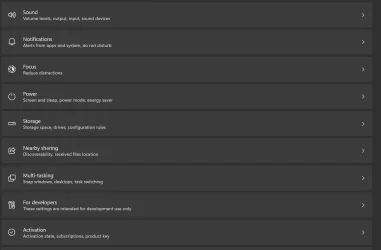
Not got Option 1 in Release preview, I don't even have 'Advanced'
 

Attachments

  • Screenshot 2025-08-24 071504.webp
    Screenshot 2025-08-24 071504.webp
    30.7 KB · Views: 38

My Computer

System One

  • OS
    Windows 11 Pro 25H2 (RP channel)
    Computer type
    PC/Desktop
    Manufacturer/Model
    MSI
    CPU
    AMD Ryzen 7 9800X3D 8-core
    Motherboard
    MEG X870E Godlike
    Memory
    64GB Corsair Titanium 6000/CL30
    Graphics Card(s)
    MSI Suprim 5080 SOC
    Sound Card
    Soundblaster AE-9
    Monitor(s) Displays
    ASUS TUF Gaming VG289Q
    Screen Resolution
    3840x2160
    Hard Drives
    Samsung 9100 Pro 4TB (gen 5 x4, system drive/games)
    Samsung 990 Pro 2TB
    Samsung 980 Pro 2TB
    Samsung 870 Evo 4TB
    Samsung 870 Evo 2TB
    Samsung T9 4TB
    PSU
    Seasonic PX-2200
    Case
    Bequiet! Dark Base Pro 901
    Cooling
    Noctua NH-D15S Chromax black
    Keyboard
    Logitech G915 X (wired)
    Mouse
    Logitech G903 with PowerPlay charger
    Internet Speed
    900Mb/sec
    Browser
    Microsoft Edge
    Antivirus
    Windows Defender
⚠️ Option Four (using Dism)
  • /all ensures that any other features that rely on Virtual Machine Platform will also be disabled. Without /all, Dism might leave dependent features enabled, which could cause errors or leave your system in an inconsistent state. To be more specific: Windows Subsystem for Linux (WSL) 2, Windows Subsystem for Android (WSA), some container technologies and Windows Sandbox environments, Hyper-V (in some configurations), and some third-party virtualization tools like Docker Desktop (on Windows) which often rely on WSL 2—which in turn requires Virtual Machine Platform. Using /all is a cleaner way to ensure everything tied to that feature is properly turned off.
  • /norestart prevents the system from automatically rebooting after the operation.
To enable Virtual Machine Platform:
dism /online /enable-feature /featurename:VirtualMachinePlatform /all /norestart

To disable Virtual Machine Platform:
dism /online /disable-feature /featurename:VirtualMachinePlatform /all /norestart
 

My Computers

System One System Two

  • OS
    11 Home
    Computer type
    Laptop
    Manufacturer/Model
    Asus TUF Gaming F16 (2024)
    CPU
    i7 13650HX
    Memory
    16GB DDR5
    Graphics Card(s)
    GeForce RTX 4060 Mobile
    Sound Card
    Eastern Electric MiniMax DAC Supreme; Emotiva UMC-200; Astell & Kern AK240
    Monitor(s) Displays
    Sony Bravia XR-55X90J
    Screen Resolution
    3840×2160
    Hard Drives
    512GB SSD internal
    37TB external
    PSU
    Li-ion
    Cooling
    2× Arc Flow Fans, 4× exhaust vents, 5× heatpipes
    Keyboard
    Logitech K800
    Mouse
    Logitech G402
    Internet Speed
    30Mbit/s up, 500Mbit/s down
    Browser
    FF
    Antivirus
    What's an antivirus?
  • Operating System
    11 Home
    Computer type
    Laptop
    Manufacturer/Model
    Medion S15450
    CPU
    i5 1135G7
    Memory
    16GB DDR4
    Graphics card(s)
    Intel Iris Xe
    Sound Card
    Eastern Electric MiniMax DAC Supreme; Emotiva UMC-200; Astell & Kern AK240
    Monitor(s) Displays
    Sony Bravia XR-55X90J
    Screen Resolution
    3840×2160
    Hard Drives
    2TB SSD internal
    37TB external
    PSU
    Li-ion
    Keyboard
    Logitech K800
    Mouse
    Logitech G402
    Internet Speed
    30Mbit/s up, 500Mbit/s down
    Browser
    FF
⚠️ Option Four (using Dism)
  • /all ensures that any other features that rely on Virtual Machine Platform will also be disabled. Without /all, Dism might leave dependent features enabled, which could cause errors or leave your system in an inconsistent state. To be more specific: Windows Subsystem for Linux (WSL) 2, Windows Subsystem for Android (WSA), some container technologies and Windows Sandbox environments, Hyper-V (in some configurations), and some third-party virtualization tools like Docker Desktop (on Windows) which often rely on WSL 2—which in turn requires Virtual Machine Platform. Using /all is a cleaner way to ensure everything tied to that feature is properly turned off.
  • /norestart prevents the system from automatically rebooting after the operation.
To enable Virtual Machine Platform:
dism /online /enable-feature /featurename:VirtualMachinePlatform /all /norestart

To disable Virtual Machine Platform:
dism /online /disable-feature /featurename:VirtualMachinePlatform /all /norestart

Hello mate, :alien:

I don't code as often as you, but doesn't the "/all" parameter usually only applies to when you add/enable a feature? I don't see any reference to it for remove/disable.

"Enables all parent features of the specified feature. If a parent feature is required for the specified feature to be enabled in the image, All will enable the parent and all of its default dependencies."


My Computers

System One System Two

  • OS
    Windows 11 Pro for Workstations
    Computer type
    PC/Desktop
    Manufacturer/Model
    Custom self build
    CPU
    Intel i7-8700K 5 GHz
    Motherboard
    ASUS ROG Maximus XI Formula Z390
    Memory
    64 GB (4x16GB) G.SKILL TridentZ RGB DDR4 3600 MHz (F4-3600C18D-32GTZR)
    Graphics Card(s)
    ASUS ROG-STRIX-GTX1080TI-O11G-GAMING (11GB GDDR5X)
    Sound Card
    Integrated Digital Audio (S/PDIF)
    Monitor(s) Displays
    2 x Samsung Odyssey G75 27"
    Screen Resolution
    2560x1440
    Hard Drives
    1TB Samsung 990 PRO M.2,
    4TB Samsung 990 PRO M.2,
    TerraMaster F8 SSD Plus NAS
    PSU
    Seasonic Prime Titanium 850W
    Case
    Thermaltake Core P3 wall mounted
    Cooling
    Corsair Hydro H115i
    Keyboard
    Amazon Basics Wired Full Keyboard MD005
    Mouse
    Logitech MX Master 4
    Internet Speed
    2 Gbps Download and 100 Mbps Upload
    Browser
    Chrome and Edge
    Antivirus
    Microsoft Defender
    Other Info
    Logitech Z625 speaker system,
    Logitech BRIO 4K Pro webcam,
    HP Color LaserJet Pro MFP M477fdn,
    CyberPower CP1500PFCLCD
    Galaxy S23 Plus phone
  • Operating System
    Windows 11 Pro
    Computer type
    Laptop
    Manufacturer/Model
    Surface Laptop 7 Copilot+ PC
    CPU
    Snapdragon X Elite (12 core) 3.42 GHz
    Memory
    16 GB LPDDR5x-7467 MHz
    Monitor(s) Displays
    15" HDR
    Screen Resolution
    2496 x 1664
    Hard Drives
    1 TB SSD
    Internet Speed
    Wi-Fi 7 and Bluetooth 5.4
    Browser
    Chrome and Edge
    Antivirus
    Microsoft Defender
Not got Option 1 in Release preview, I don't even have 'Advanced'

Hello mate, :alien:

"Advanced" settings (replaced "For developers") is still currently listed under "Gradual rollout" for RP builds, so you should be getting it eventually.


My Computers

System One System Two

  • OS
    Windows 11 Pro for Workstations
    Computer type
    PC/Desktop
    Manufacturer/Model
    Custom self build
    CPU
    Intel i7-8700K 5 GHz
    Motherboard
    ASUS ROG Maximus XI Formula Z390
    Memory
    64 GB (4x16GB) G.SKILL TridentZ RGB DDR4 3600 MHz (F4-3600C18D-32GTZR)
    Graphics Card(s)
    ASUS ROG-STRIX-GTX1080TI-O11G-GAMING (11GB GDDR5X)
    Sound Card
    Integrated Digital Audio (S/PDIF)
    Monitor(s) Displays
    2 x Samsung Odyssey G75 27"
    Screen Resolution
    2560x1440
    Hard Drives
    1TB Samsung 990 PRO M.2,
    4TB Samsung 990 PRO M.2,
    TerraMaster F8 SSD Plus NAS
    PSU
    Seasonic Prime Titanium 850W
    Case
    Thermaltake Core P3 wall mounted
    Cooling
    Corsair Hydro H115i
    Keyboard
    Amazon Basics Wired Full Keyboard MD005
    Mouse
    Logitech MX Master 4
    Internet Speed
    2 Gbps Download and 100 Mbps Upload
    Browser
    Chrome and Edge
    Antivirus
    Microsoft Defender
    Other Info
    Logitech Z625 speaker system,
    Logitech BRIO 4K Pro webcam,
    HP Color LaserJet Pro MFP M477fdn,
    CyberPower CP1500PFCLCD
    Galaxy S23 Plus phone
  • Operating System
    Windows 11 Pro
    Computer type
    Laptop
    Manufacturer/Model
    Surface Laptop 7 Copilot+ PC
    CPU
    Snapdragon X Elite (12 core) 3.42 GHz
    Memory
    16 GB LPDDR5x-7467 MHz
    Monitor(s) Displays
    15" HDR
    Screen Resolution
    2496 x 1664
    Hard Drives
    1 TB SSD
    Internet Speed
    Wi-Fi 7 and Bluetooth 5.4
    Browser
    Chrome and Edge
    Antivirus
    Microsoft Defender
Hello mate, :alien:

"Advanced" settings (replaced "For developers") is still currently listed under "Gradual rollout" for RP builds, so you should be getting it eventually.

Maybe once 25H2 enablement pack arrives!
 

My Computer

System One

  • OS
    Windows 11 Pro 25H2 (RP channel)
    Computer type
    PC/Desktop
    Manufacturer/Model
    MSI
    CPU
    AMD Ryzen 7 9800X3D 8-core
    Motherboard
    MEG X870E Godlike
    Memory
    64GB Corsair Titanium 6000/CL30
    Graphics Card(s)
    MSI Suprim 5080 SOC
    Sound Card
    Soundblaster AE-9
    Monitor(s) Displays
    ASUS TUF Gaming VG289Q
    Screen Resolution
    3840x2160
    Hard Drives
    Samsung 9100 Pro 4TB (gen 5 x4, system drive/games)
    Samsung 990 Pro 2TB
    Samsung 980 Pro 2TB
    Samsung 870 Evo 4TB
    Samsung 870 Evo 2TB
    Samsung T9 4TB
    PSU
    Seasonic PX-2200
    Case
    Bequiet! Dark Base Pro 901
    Cooling
    Noctua NH-D15S Chromax black
    Keyboard
    Logitech G915 X (wired)
    Mouse
    Logitech G903 with PowerPlay charger
    Internet Speed
    900Mb/sec
    Browser
    Microsoft Edge
    Antivirus
    Windows Defender

My Computers

System One System Two

  • OS
    Windows 11 Pro for Workstations
    Computer type
    PC/Desktop
    Manufacturer/Model
    Custom self build
    CPU
    Intel i7-8700K 5 GHz
    Motherboard
    ASUS ROG Maximus XI Formula Z390
    Memory
    64 GB (4x16GB) G.SKILL TridentZ RGB DDR4 3600 MHz (F4-3600C18D-32GTZR)
    Graphics Card(s)
    ASUS ROG-STRIX-GTX1080TI-O11G-GAMING (11GB GDDR5X)
    Sound Card
    Integrated Digital Audio (S/PDIF)
    Monitor(s) Displays
    2 x Samsung Odyssey G75 27"
    Screen Resolution
    2560x1440
    Hard Drives
    1TB Samsung 990 PRO M.2,
    4TB Samsung 990 PRO M.2,
    TerraMaster F8 SSD Plus NAS
    PSU
    Seasonic Prime Titanium 850W
    Case
    Thermaltake Core P3 wall mounted
    Cooling
    Corsair Hydro H115i
    Keyboard
    Amazon Basics Wired Full Keyboard MD005
    Mouse
    Logitech MX Master 4
    Internet Speed
    2 Gbps Download and 100 Mbps Upload
    Browser
    Chrome and Edge
    Antivirus
    Microsoft Defender
    Other Info
    Logitech Z625 speaker system,
    Logitech BRIO 4K Pro webcam,
    HP Color LaserJet Pro MFP M477fdn,
    CyberPower CP1500PFCLCD
    Galaxy S23 Plus phone
  • Operating System
    Windows 11 Pro
    Computer type
    Laptop
    Manufacturer/Model
    Surface Laptop 7 Copilot+ PC
    CPU
    Snapdragon X Elite (12 core) 3.42 GHz
    Memory
    16 GB LPDDR5x-7467 MHz
    Monitor(s) Displays
    15" HDR
    Screen Resolution
    2496 x 1664
    Hard Drives
    1 TB SSD
    Internet Speed
    Wi-Fi 7 and Bluetooth 5.4
    Browser
    Chrome and Edge
    Antivirus
    Microsoft Defender
I just updated a VM with the latest RP (24H2), and it had "Advanced". Hopefully, you'll get it soon.
I'm on the latest RP build too.
 

My Computer

System One

  • OS
    Windows 11 Pro 25H2 (RP channel)
    Computer type
    PC/Desktop
    Manufacturer/Model
    MSI
    CPU
    AMD Ryzen 7 9800X3D 8-core
    Motherboard
    MEG X870E Godlike
    Memory
    64GB Corsair Titanium 6000/CL30
    Graphics Card(s)
    MSI Suprim 5080 SOC
    Sound Card
    Soundblaster AE-9
    Monitor(s) Displays
    ASUS TUF Gaming VG289Q
    Screen Resolution
    3840x2160
    Hard Drives
    Samsung 9100 Pro 4TB (gen 5 x4, system drive/games)
    Samsung 990 Pro 2TB
    Samsung 980 Pro 2TB
    Samsung 870 Evo 4TB
    Samsung 870 Evo 2TB
    Samsung T9 4TB
    PSU
    Seasonic PX-2200
    Case
    Bequiet! Dark Base Pro 901
    Cooling
    Noctua NH-D15S Chromax black
    Keyboard
    Logitech G915 X (wired)
    Mouse
    Logitech G903 with PowerPlay charger
    Internet Speed
    900Mb/sec
    Browser
    Microsoft Edge
    Antivirus
    Windows Defender
Hello mate, :alien:

I don't code as often as you, but doesn't the "/all" parameter usually only applies to when you add/enable a feature? I don't see any reference to it for remove/disable.

"Enables all parent features of the specified feature. If a parent feature is required for the specified feature to be enabled in the image, All will enable the parent and all of its default dependencies."


You are right. Sorry about the confusion. /all is only supported with /enable-feature, not with /disable-feature.

Also, /enable-feature with /all does not enable the feature you specify in the command plus the features that this feature depends on. Rather, it enables the feature plus the parent features thereof. So, even though it's true that (for example) WSL2 depends on VMP—so VMP is a dependency of WSL2,
dism /online /enable-feature /featurename:Microsoft-Windows-Subsystem-Linux /all does not automatically enable VMP,
as VMP is not a parent of WSL2. I only figured this out a few moments ago. Another thing I learned just now is, in spite of the fact that I am running Windows 11 Home (version 24H2 build 26100.4946), I enabled WSL2, and I also verified that it works. 😯
 

My Computers

System One System Two

  • OS
    11 Home
    Computer type
    Laptop
    Manufacturer/Model
    Asus TUF Gaming F16 (2024)
    CPU
    i7 13650HX
    Memory
    16GB DDR5
    Graphics Card(s)
    GeForce RTX 4060 Mobile
    Sound Card
    Eastern Electric MiniMax DAC Supreme; Emotiva UMC-200; Astell & Kern AK240
    Monitor(s) Displays
    Sony Bravia XR-55X90J
    Screen Resolution
    3840×2160
    Hard Drives
    512GB SSD internal
    37TB external
    PSU
    Li-ion
    Cooling
    2× Arc Flow Fans, 4× exhaust vents, 5× heatpipes
    Keyboard
    Logitech K800
    Mouse
    Logitech G402
    Internet Speed
    30Mbit/s up, 500Mbit/s down
    Browser
    FF
    Antivirus
    What's an antivirus?
  • Operating System
    11 Home
    Computer type
    Laptop
    Manufacturer/Model
    Medion S15450
    CPU
    i5 1135G7
    Memory
    16GB DDR4
    Graphics card(s)
    Intel Iris Xe
    Sound Card
    Eastern Electric MiniMax DAC Supreme; Emotiva UMC-200; Astell & Kern AK240
    Monitor(s) Displays
    Sony Bravia XR-55X90J
    Screen Resolution
    3840×2160
    Hard Drives
    2TB SSD internal
    37TB external
    PSU
    Li-ion
    Keyboard
    Logitech K800
    Mouse
    Logitech G402
    Internet Speed
    30Mbit/s up, 500Mbit/s down
    Browser
    FF
You are right. Sorry about the confusion. /all is only supported with /enable-feature, not with /disable-feature.

Also, /enable-feature with /all does not enable the feature you specify in the command plus the features that this feature depends on. Rather, it enables the feature plus the parent features thereof. So, even though it's true that (for example) WSL2 depends on VMP—so VMP is a dependency of WSL2,
dism /online /enable-feature /featurename:Microsoft-Windows-Subsystem-Linux /all does not automatically enable VMP,
as VMP is not a parent of WSL2. I only figured this out a few moments ago. Another thing I learned just now is, In spite of the fact that I am running Windows 11 Home (version 24H2 build 26100.4946), I enabled WSL2, and I also verified that it works. 😯

No worries mate. I was just thinking if I was missing something. :shawn:
 

My Computers

System One System Two

  • OS
    Windows 11 Pro for Workstations
    Computer type
    PC/Desktop
    Manufacturer/Model
    Custom self build
    CPU
    Intel i7-8700K 5 GHz
    Motherboard
    ASUS ROG Maximus XI Formula Z390
    Memory
    64 GB (4x16GB) G.SKILL TridentZ RGB DDR4 3600 MHz (F4-3600C18D-32GTZR)
    Graphics Card(s)
    ASUS ROG-STRIX-GTX1080TI-O11G-GAMING (11GB GDDR5X)
    Sound Card
    Integrated Digital Audio (S/PDIF)
    Monitor(s) Displays
    2 x Samsung Odyssey G75 27"
    Screen Resolution
    2560x1440
    Hard Drives
    1TB Samsung 990 PRO M.2,
    4TB Samsung 990 PRO M.2,
    TerraMaster F8 SSD Plus NAS
    PSU
    Seasonic Prime Titanium 850W
    Case
    Thermaltake Core P3 wall mounted
    Cooling
    Corsair Hydro H115i
    Keyboard
    Amazon Basics Wired Full Keyboard MD005
    Mouse
    Logitech MX Master 4
    Internet Speed
    2 Gbps Download and 100 Mbps Upload
    Browser
    Chrome and Edge
    Antivirus
    Microsoft Defender
    Other Info
    Logitech Z625 speaker system,
    Logitech BRIO 4K Pro webcam,
    HP Color LaserJet Pro MFP M477fdn,
    CyberPower CP1500PFCLCD
    Galaxy S23 Plus phone
  • Operating System
    Windows 11 Pro
    Computer type
    Laptop
    Manufacturer/Model
    Surface Laptop 7 Copilot+ PC
    CPU
    Snapdragon X Elite (12 core) 3.42 GHz
    Memory
    16 GB LPDDR5x-7467 MHz
    Monitor(s) Displays
    15" HDR
    Screen Resolution
    2496 x 1664
    Hard Drives
    1 TB SSD
    Internet Speed
    Wi-Fi 7 and Bluetooth 5.4
    Browser
    Chrome and Edge
    Antivirus
    Microsoft Defender
Back
Top Bottom