Enabling Intel Virtualization on MSI board causes Win 11 Pro to not boot


Secure Boot can be disabled from BIOS.
 

My Computer My Computer

At a glance

Windows 11AMD Ryzen 7 5700GMicron Technology DDR4-3200 16GBNVIDIA GeForce RTX 3060
OS
Windows 11
Computer type
PC/Desktop
Manufacturer/Model
HP Pavilion
CPU
AMD Ryzen 7 5700G
Motherboard
Erica6
Memory
Micron Technology DDR4-3200 16GB
Graphics Card(s)
NVIDIA GeForce RTX 3060
Sound Card
Realtek ALC671
Monitor(s) Displays
Samsung SyncMaster U28E590
Screen Resolution
3840 x 2160
Hard Drives
SAMSUNG MZVLQ1T0HALB-000H1
@Marie SWE, not sure how to disable secure boot. In Core Isolation I don't have the option to disable it.
i dont know either... But i do know one who does :-)
@Bree do you know any tutorials to point too? :-)
There's no option in Windows Settings to turn secure boot on or off. This is something you can only do in the BIOS.

For abgtr's MSI motherboard it should look something like this:


My Computers My Computers

  • At a glance

    Windows 11 HomeAMD Athlon Silver 3050U8GBRadeon Graphics
    OS
    Windows 11 Home
    Computer type
    Laptop
    Manufacturer/Model
    Acer Aspire 3 A315-23-R9VY
    CPU
    AMD Athlon Silver 3050U
    Memory
    8GB
    Graphics Card(s)
    Radeon Graphics
    Monitor(s) Displays
    laptop screen
    Screen Resolution
    1366x768 native resolution, up to 2560x1440 with Radeon Virtual Super Resolution
    Hard Drives
    1TB Samsung EVO 870 SSD (from April 2026: 250GB EVO 850)
    Internet Speed
    150 Mbps
    Browser
    Edge, Firefox
    Antivirus
    Defender
    Other Info
    UPDATE - 11 April 2026: due to lid hinges starting to break up this laptop has been retired from active duty. The OS with all software and files has been migrated to my System Seven in 'Other systems' to carry on as my general purpose 'main machine'.

    I've now clean installed 25H2 and used Garlin's scripts to update Secure Boot to CA 2023 and revoke the PCA 2011 certificates. It's new role is to test secure boot issues.

    Info for 2021-2026:
    fully 'Windows 11 ready' laptop. Windows 10 C: partition migrated from my old unsupported 'main machine' then upgraded to 11. A test migration ran Insider builds for 2 months. When 11 was released on 5th October 2021 it was re-imaged back to 10 and was offered the upgrade in Windows Update on 20th October. Windows Update offered the 22H2 Feature Update on 20th September 2022. It got the 23H2 Feature Update on 4th November 2023 through Windows Update, 24H2 on 3rd October 2024 through Windows Update by setting the Target Release Version for 24H2, and 25H2 on 30th September 2025 through Windows Update by setting the Target Release Version for 25H2.
  • At a glance

    Windows 11 ProIntel® Core™ i5-520M8GB(integrated graphics) Intel HD Graphics
    Operating System
    Windows 11 Pro
    Computer type
    Laptop
    Manufacturer/Model
    Dell Latitude E4310
    CPU
    Intel® Core™ i5-520M
    Motherboard
    0T6M8G
    Memory
    8GB
    Graphics card(s)
    (integrated graphics) Intel HD Graphics
    Screen Resolution
    1366x768
    Hard Drives
    500GB Crucial MX500 SSD
    Browser
    Firefox, Edge
    Antivirus
    Defender
    Other Info
    unsupported machine: Legacy bios, MBR, TPM 1.2, upgraded from W10 to W11 using W10/W11 hybrid install media workaround.

    In-place upgrade to 22H2 using ISO and a workaround.
    Feature Update to 23H2 by manually installing the Enablement Package.
    In-place upgrade to 24H2 using hybrid 23H2/24H2 install media.
    Upgraded to 25H2 by Enablement Package.

    Also running Insider Dev, and Canary builds and Windows 10 as native boot .vhdx.
  • My SYSTEM THREE is a Dell Latitude 5410, i7-10610U, 32GB RAM, 512GB NVMe ssd, supported device running Windows 11 Pro.

    My SYSTEM FOUR was a 2-in-1 convertible Lenovo Yoga 11e (1st gen) type 20DA, Celeron N2930, 8GB RAM, 256GB ssd. Unsupported device. This has now been sold. It has been replaced by my System Eight.

    My SYSTEM FIVE is a Dell Latitude 3190 2-in-1, Pentium Silver N5030, 8GB RAM, 1TB NVMe ssd, supported device running Windows 11 Pro, plus Insider Beta, Dev, and Canary builds (and a few others) as a native boot .vhdx.

    My SYSTEM SIX is a Dell Latitude 5550, Core Ultra 7 165H, 64GB RAM, 1TB NVMe SSD, supported device, Windows 11 Pro 24H2, Hyper-V host machine. Updated to 25H2 on 30th September 2025.

    My SYSTEM SEVEN is a Lenovo Thinkpad T580, 1920x1080 touchscreen, Intel Core i7-8650U, 16GB RAM, 512GB NVMe SSD + 2nd 512GB NVMe SSD, a supported device for Windows 11. This is my current general purpose 'main machine'. The installed Windows 11 Home from my System One has been migrated to this machine.

    My SYSTEM EIGHT is a 2-in-1 convertible Lenovo Yoga 11e (5th gen) type 20LN, Celeron N4120, 8GB RAM, 512GB NVMe ssd, a supported device for Windows 11. Currently running Windows 11 Pro, plus Insider Dev, Beta, and Canary builds as native boot vhdx.
There's no option in Windows Settings to turn secure boot on or off. This is something you can only do in the BIOS.

For abgtr's MSI motherboard it should look something like this:

i was also thinking about other security features in win11 that might effect the boot procedure.
my old windows logic and from my Linux logic i have a feeling that disable security features and then reboot.. then reboot again and enable VT.. then boot again and then enable everything creates new configs in registry and config files when enabled again after changes are made.
It seems as this is a win11 bug as i never heard of an OS that refuses to boot after just enabling VT :-)
 

My Computers My Computers

  • At a glance

    Linux: Debian, Kali-linux, Alma, Win:7,10IoT,...i3, i5 and i7 From 2gen to 9th gen... Server ...
    OS
    Linux: Debian, Kali-linux, Alma, Win:7,10IoT,2012R
    Manufacturer/Model
    HP Elitebook 840, AsusX53, Aspire E1-572. AsusUX32A, HP Pro3130mt+3010mt, HP Proliant ML150, 3xCustom-PC, i3, i5, i7
    CPU
    i3, i5 and i7 From 2gen to 9th gen... Server dual Xenon
    Hard Drives
    Sata, M.2, SAS
  • At a glance

    Retro: 2003server.XPpro, Win2000, Win98SE, Wi...Oldest intel 8088 up to P4 dual core
    Operating System
    Retro: 2003server.XPpro, Win2000, Win98SE, Win95, Win3.11, MS-DOS, IBM-DOS
    Manufacturer/Model
    Commodore, AST, Fujitsu, Compaq, etc etc. etc Around 15 desktops and 20 laptops in the collection
    CPU
    Oldest intel 8088 up to P4 dual core
    Hard Drives
    MFM, IDE, SCSI
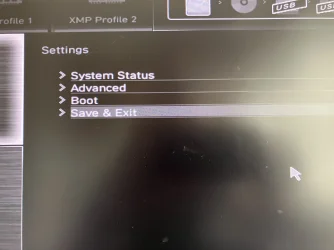
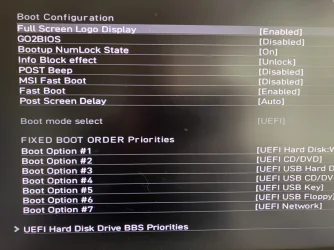
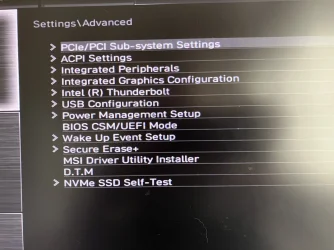
@Bree, @Marie SWE, @FreeBooter. My Bios does not have these options. Screen shots attached. No Windows entry, no Secure Boot entry.
 

Attachments

  • IMG_3001.webp
    IMG_3001.webp
    1.2 MB · Views: 1
  • IMG_3002.webp
    IMG_3002.webp
    1.4 MB · Views: 1
  • IMG_2999.webp
    IMG_2999.webp
    1.5 MB · Views: 1

My Computer My Computer

At a glance

Windows 11 Pro12th Gen Intel(R) Core(TM) i5-12600K (3.70 GHz)32GBNVIDIA GeForce GT 1030 (4 GB)
OS
Windows 11 Pro
Computer type
PC/Desktop
Manufacturer/Model
Custom build
CPU
12th Gen Intel(R) Core(TM) i5-12600K (3.70 GHz)
Motherboard
MSI Pro Z690-P DDR4
Memory
32GB
Graphics Card(s)
NVIDIA GeForce GT 1030 (4 GB)
Sound Card
Focusrite USB Interface
Monitor(s) Displays
Dell, Viewsonic
Screen Resolution
Mixed
Hard Drives
Samsung SSD 870 Evo 1TB (boot), Samsung SSD 870 Qvo 2TB (data_
Case
Fractal
Mouse
Wacom tablet (wired) and Logitech wired mouse
Internet Speed
U/L and D/L: 900Mbps
Browser
Chrome, Firefox
Antivirus
Eset

My Computers My Computers

  • At a glance

    Linux: Debian, Kali-linux, Alma, Win:7,10IoT,...i3, i5 and i7 From 2gen to 9th gen... Server ...
    OS
    Linux: Debian, Kali-linux, Alma, Win:7,10IoT,2012R
    Manufacturer/Model
    HP Elitebook 840, AsusX53, Aspire E1-572. AsusUX32A, HP Pro3130mt+3010mt, HP Proliant ML150, 3xCustom-PC, i3, i5, i7
    CPU
    i3, i5 and i7 From 2gen to 9th gen... Server dual Xenon
    Hard Drives
    Sata, M.2, SAS
  • At a glance

    Retro: 2003server.XPpro, Win2000, Win98SE, Wi...Oldest intel 8088 up to P4 dual core
    Operating System
    Retro: 2003server.XPpro, Win2000, Win98SE, Win95, Win3.11, MS-DOS, IBM-DOS
    Manufacturer/Model
    Commodore, AST, Fujitsu, Compaq, etc etc. etc Around 15 desktops and 20 laptops in the collection
    CPU
    Oldest intel 8088 up to P4 dual core
    Hard Drives
    MFM, IDE, SCSI
We don't even know if Secure Boot causing the problem that is why i asked for log file of Startup Repair tool.
 

My Computer My Computer

At a glance

Windows 11AMD Ryzen 7 5700GMicron Technology DDR4-3200 16GBNVIDIA GeForce RTX 3060
OS
Windows 11
Computer type
PC/Desktop
Manufacturer/Model
HP Pavilion
CPU
AMD Ryzen 7 5700G
Motherboard
Erica6
Memory
Micron Technology DDR4-3200 16GB
Graphics Card(s)
NVIDIA GeForce RTX 3060
Sound Card
Realtek ALC671
Monitor(s) Displays
Samsung SyncMaster U28E590
Screen Resolution
3840 x 2160
Hard Drives
SAMSUNG MZVLQ1T0HALB-000H1

Latest Support Threads

Back
Top Bottom