Enlarging text in Outlook 2016 header . . .


archfoto

Well-known member
Member
VIP
Local time
2:05 PM
Posts
176
OS
Windows 11 Pro Version 25H2 (OS Build 26200.8655)
Hi -
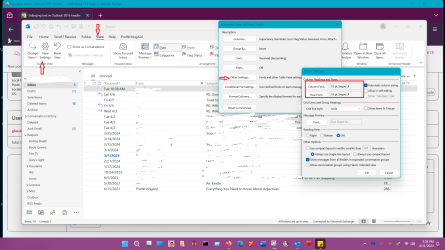
Does anyone know how to enlarge the text in the header (addresses & subject line) in a new email to send out in Outlook 2016 on a Windows 11 Pro Dell PC with a 4K monitor? I can enlarge the text in the body, but nowhere can I find out how to enlarge the text in the header. And it is tiny!

I have searched in Google, and Edge, and the instructions are just plain wrong: It says to go to the "View" menu tab, open view settings and go to "Mail." In the dialog box, but there is no "Mail" in my version!

Help!
 
Windows Build/Version
Version 23H2 (OS Build 22621.3447)

My Computers My Computers

  • At a glance

    Windows 11 Pro Version 25H2 (OS Build 26200.8...i9 12th Generation64GBPNY 3060 12GB
    OS
    Windows 11 Pro Version 25H2 (OS Build 26200.8655)
    Computer type
    PC/Desktop
    Manufacturer/Model
    Dell 8950
    CPU
    i9 12th Generation
    Memory
    64GB
    Graphics Card(s)
    PNY 3060 12GB
    Monitor(s) Displays
    NEC EA27IU
    Screen Resolution
    3840X2160
    Hard Drives
    SSD internal, external drives
    Cooling
    Advanced Air Cooling
    Keyboard
    Microsoft
    Mouse
    Logitech
    Internet Speed
    High-Speed
    Browser
    MS Edge
    Antivirus
    Norton 360
  • At a glance

    Win 11 Pro 25H2 (OS Build 26200.8655)Intel Ultra 7 265 (20 cores) processor32GB DDR5 RamBuilt-in Intel UHD Graphics
    Operating System
    Win 11 Pro 25H2 (OS Build 26200.8655)
    Computer type
    PC/Desktop
    Manufacturer/Model
    Dell Tower ECT1250
    CPU
    Intel Ultra 7 265 (20 cores) processor
    Memory
    32GB DDR5 Ram
    Graphics card(s)
    Built-in Intel UHD Graphics
    Sound Card
    Built-in
    Screen Resolution
    1920X1080
    Hard Drives
    2TB internal SSD
    Case
    Tower
Everything I find is for changing the font size, but not just one section. You can try experimenting with your monitor settings or try zoom.
 

My Computer My Computer

At a glance

Windows 11 Homei7-13700k(2 x 16 GB) 32 GBNVIDIA FOUNDERS EDITION GEFORCE RTX 4060-Ti
OS
Windows 11 Home
Computer type
PC/Desktop
Manufacturer/Model
DELL XPS 8960
CPU
i7-13700k
Motherboard
GENUINE DELL XPS 8960 DESKTOP MOTHERBOARD INTEL SOCKET LGA1700 XD433
Memory
(2 x 16 GB) 32 GB
Graphics Card(s)
NVIDIA FOUNDERS EDITION GEFORCE RTX 4060-Ti
Sound Card
ON BOARD 7.1 CHANNEL AUDIO
Monitor(s) Displays
DELL 27 MONITOR - P2722H
Screen Resolution
FULL HD (1080p) 1920 x 1080 at 60 Hz
Hard Drives
512 GB, M.2, PCIe NVMe, SSD (boot) + 1 TB, 7200 RPM, SATA, HDD (storage)
PSU
750W
Case
DELL
Cooling
DELL PERFORMANCE CPU LIQUID COOLING
Keyboard
AZIO
Mouse
LOGITECH M650
Internet Speed
INTERNET SPEED 100 MBPS
Browser
MICROSOFT EDGE AND GOOGLE CHROME
Antivirus
NORTON 360
Other Info
ALTEC LANSING SPEAKERS
Everything I find is for changing the font size, but not just one section. You can try experimenting with your monitor settings or try zoom.
Hi AmericanPharaoh -

Thanks.

I have tried all that, to no avail. Changing monitor settings and/or Windows font settings is out, as it screws up other programs, and zoom isn't available in a new email being sent in my version!
 

My Computers My Computers

  • At a glance

    Windows 11 Pro Version 25H2 (OS Build 26200.8...i9 12th Generation64GBPNY 3060 12GB
    OS
    Windows 11 Pro Version 25H2 (OS Build 26200.8655)
    Computer type
    PC/Desktop
    Manufacturer/Model
    Dell 8950
    CPU
    i9 12th Generation
    Memory
    64GB
    Graphics Card(s)
    PNY 3060 12GB
    Monitor(s) Displays
    NEC EA27IU
    Screen Resolution
    3840X2160
    Hard Drives
    SSD internal, external drives
    Cooling
    Advanced Air Cooling
    Keyboard
    Microsoft
    Mouse
    Logitech
    Internet Speed
    High-Speed
    Browser
    MS Edge
    Antivirus
    Norton 360
  • At a glance

    Win 11 Pro 25H2 (OS Build 26200.8655)Intel Ultra 7 265 (20 cores) processor32GB DDR5 RamBuilt-in Intel UHD Graphics
    Operating System
    Win 11 Pro 25H2 (OS Build 26200.8655)
    Computer type
    PC/Desktop
    Manufacturer/Model
    Dell Tower ECT1250
    CPU
    Intel Ultra 7 265 (20 cores) processor
    Memory
    32GB DDR5 Ram
    Graphics card(s)
    Built-in Intel UHD Graphics
    Sound Card
    Built-in
    Screen Resolution
    1920X1080
    Hard Drives
    2TB internal SSD
    Case
    Tower
There isn’t one that I’ve ever known about. It isn't a formattable element, it’s hardcoded.
 
Last edited:

My Computers My Computers

  • At a glance

    Windows 11 Pro 25H2 Build 26200.8655Intel(R) Core(TM) i7-4770K CPU @ 3.50GHz32.0 GB of I forget and the box is in storage.Gigabyte nVidia GeForce GTX 1660 Super OC 6GB
    OS
    Windows 11 Pro 25H2 Build 26200.8655
    Computer type
    PC/Desktop
    Manufacturer/Model
    Sin-built 2013
    CPU
    Intel(R) Core(TM) i7-4770K CPU @ 3.50GHz
    Motherboard
    ASUS ROG Maximus VI Formula
    Memory
    32.0 GB of I forget and the box is in storage.
    Graphics Card(s)
    Gigabyte nVidia GeForce GTX 1660 Super OC 6GB
    Sound Card
    ROG SupremeFX Formula 8-Channel High Definition Audio
    Monitor(s) Displays
    5 x LG 25MS500-B - 1 x 24MK430H-B - 1 x Wacom Pro 22" Touch Screen Tablet
    Screen Resolution
    All over the place
    Hard Drives
    Too many to list. OS on Samsung 1TB 870 QVO SATA
    PSU
    Silverstone 1500
    Case
    NZXT Phantom 820 Full-Tower Case
    Cooling
    Noctua NH-D15 Elite Class Dual Tower CPU Cooler / 6 x EziDIY 120mm / 2 x Corsair 140mm somethings / 1 x 140mm Thermaltake something / 2 x 200mm Corsair.
    Keyboard
    Corsair K95 / Logitech diNovo Edge Wireless
    Mouse
    Logitech: G402 / G502 / Mx Masters / Mx Air Cordless
    Internet Speed
    2000/500Mbps
    Browser
    All sorts
    Antivirus
    Kaspersky Premium
    Other Info
    ㅤㅤㅤㅤㅤㅤㅤㅤㅤㅤㅤㅤㅤㅤㅤㅤㅤㅤㅤㅤㅤㅤㅤㅤㅤㅤㅤㅤㅤㅤㅤㅤㅤㅤㅤㅤㅤㅤㅤㅤ⠀⠀⠀⠀⠀⠀⠀⠀⠀⠀
    TP-Link BE9300 WiFi 7 Bluetooth 5.4 (Archer TBE550E)
    TP-Link TX201 V1 2.5GB Lan

    Grandstream HT812 - VoIP
    ASUS DSL-AX82U - Mesh
    ASUS RT-AC68U - Mesh
    ASUS RT-BE88U Router

    Brother MFC-L2880DW Printer

    I’m on a horse.
  • At a glance

    Windows 11 Pro 25H2 Build 26200.8655 (Wifes)13th Generation Intel® Core™ i5-1340P Process...16GB LPDDR5-52001x Intel® Iris® Xe Graphics
    Operating System
    Windows 11 Pro 25H2 Build 26200.8655 (Wifes)
    Computer type
    Laptop
    Manufacturer/Model
    LENOVO Yoga 7 14IRL8 - Type 82YL
    CPU
    13th Generation Intel® Core™ i5-1340P Processor(Core™ i5-1340P)
    Memory
    16GB LPDDR5-5200
    Graphics card(s)
    1x Intel® Iris® Xe Graphics
    Sound Card
    Optimized with Dolby Atmos®
    Screen Resolution
    QHD 2880 x 1800 OLED
    Hard Drives
    M.2 512 GB SSD PCIe
    Mouse
    Logiteck MX Master 3S
    Internet Speed
    2000/500
    Antivirus
    Defender / Malwarebytes
    Other Info
    …still on a horse.


    Wireless Network: Wi-Fi 6E 2x2 AX; Bluetooth® 5.1 or above
    Ports: 1x 1 Novo button; 2 in 1 Audio Combo jack; Micro SD Card Reader; HDMI 1.4b; 2 x USB Type-C (TBT4)
    USB 3.2 Gen 2 DP 1.4a
    PD 3.0); 1 x USB 3.2 Gen1 Type A
    Camera
    1x 1080P FHD IR/RGB Hybrid with Privacy Shutter and Dual Array Microphone
    Graphics
    1x Intel® Iris® Xe Graphics
    Monitor
    14" WUXGA
    Form Factor
    Convertible Notebook
  • Windows 11 Pro 25H2 Build 26200.8655 (Wifes)

    Yoga 7 2-in-1 14IML9 - Type 83DJ

    Processor: Intel® Core™ Ultra 7 155H Processor(Core™ Ultra 7 155H)

    Memory: 32GB LPD5X-7467

    Hard Drive: 1 TB SSD PCIe

    Wireless Network: 1x Wi-Fi 6E 2x2 AX; Bluetooth® 5.1 or above

    Ports: 1 x HDMI 2.1 TMDS; 1 x Novo Button; 1 x Combo Audio Jack
    2 x USB-C (USB 4.0)
    1 x USB-A 3.2 Gen 1

    Camera: 1080P FHD IR Hybrid with Dual Microphone

    Graphics: Intel® Arc™ Graphics

    Monitor: 14" 2.8K

    ...Where's my horse?
There isn’t one that I’ve ever known about. It isn't a formattable element, it’s hardcoded.
Thanks, Antspants -

I was just wondering if it was something that could be changed, like in the registry. You'd think that MS, who wants to make everything accessible to everyone, would have made this adjustable.

Oh, well!
 

My Computers My Computers

  • At a glance

    Windows 11 Pro Version 25H2 (OS Build 26200.8...i9 12th Generation64GBPNY 3060 12GB
    OS
    Windows 11 Pro Version 25H2 (OS Build 26200.8655)
    Computer type
    PC/Desktop
    Manufacturer/Model
    Dell 8950
    CPU
    i9 12th Generation
    Memory
    64GB
    Graphics Card(s)
    PNY 3060 12GB
    Monitor(s) Displays
    NEC EA27IU
    Screen Resolution
    3840X2160
    Hard Drives
    SSD internal, external drives
    Cooling
    Advanced Air Cooling
    Keyboard
    Microsoft
    Mouse
    Logitech
    Internet Speed
    High-Speed
    Browser
    MS Edge
    Antivirus
    Norton 360
  • At a glance

    Win 11 Pro 25H2 (OS Build 26200.8655)Intel Ultra 7 265 (20 cores) processor32GB DDR5 RamBuilt-in Intel UHD Graphics
    Operating System
    Win 11 Pro 25H2 (OS Build 26200.8655)
    Computer type
    PC/Desktop
    Manufacturer/Model
    Dell Tower ECT1250
    CPU
    Intel Ultra 7 265 (20 cores) processor
    Memory
    32GB DDR5 Ram
    Graphics card(s)
    Built-in Intel UHD Graphics
    Sound Card
    Built-in
    Screen Resolution
    1920X1080
    Hard Drives
    2TB internal SSD
    Case
    Tower
Biggest issue is the size of the monitor, the defaults appear to be intended for several sizes and their appearance such as on my 12" Notebook shows pretty much the same amount of data as my Desktops connected to a 24" monitor. The Resolution setting can help as well as the Scaling. Whatever you see may not get through to the recipient's view.
 

My Computers My Computers

  • At a glance

    Win11 Pro RTM Version 24H2 Build 26100.4202Intel Core i5 11th Gen. 2.40GHz12GB
    OS
    Win11 Pro RTM Version 24H2 Build 26100.4202
    Computer type
    Laptop
    Manufacturer/Model
    Dell Vostro 3400
    CPU
    Intel Core i5 11th Gen. 2.40GHz
    Memory
    12GB
    Hard Drives
    256GB SSD NVMe M.2
  • At a glance

    Win11 Pro RTM Version 24H2 Build 26100.4202Intel Core i5 10th Gen. 2.90GHz16GBOnboard, no VGA, using a DisplayPort-to-VGA a...
    Operating System
    Win11 Pro RTM Version 24H2 Build 26100.4202
    Computer type
    PC/Desktop
    Manufacturer/Model
    Dell Vostro 5890
    CPU
    Intel Core i5 10th Gen. 2.90GHz
    Memory
    16GB
    Graphics card(s)
    Onboard, no VGA, using a DisplayPort-to-VGA adapter
    Monitor(s) Displays
    24" Dell
    Hard Drives
    512GB SSD NVMe, 4TB Seagate HDD
    Browser
    Firefox, Edge
    Antivirus
    Windows Defender/Microsoft Security
I can't speak for 2016 but here's the way to do it 2021. You might have to poke around in 2016 to find similar settings.
On the menu bar select VIEW
In toolbar select VIEW SETTINGS
Advanced view settings window pops up. Select OTHER SETTINGS
Click Column Font and Row Font radio buttons. I've found for a 27 in monitor 10 pt works for me.
 

Attachments

  • Screenshot 2024-04-11 152941.png
    Screenshot 2024-04-11 152941.png
    172.6 KB · Views: 1

My Computers My Computers

  • At a glance

    Windows 11 Pro 25H2 26200.8655i9-10900 10 core 20 threads32 gbnone-Intel UHD Graphics 630
    OS
    Windows 11 Pro 25H2 26200.8655
    Computer type
    PC/Desktop
    Manufacturer/Model
    Dell Optiplex 7080
    CPU
    i9-10900 10 core 20 threads
    Motherboard
    DELL 0J37VM
    Memory
    32 gb
    Graphics Card(s)
    none-Intel UHD Graphics 630
    Sound Card
    Integrated Realtek
    Monitor(s) Displays
    Benq 27
    Screen Resolution
    2560x1440
    Hard Drives
    2x1tb Solidigm m.2 nvme /External drives 512gb Samsung m.2 sata+2tb Kingston m2.nvme
    PSU
    500w
    Case
    MT
    Cooling
    Dell Premium
    Keyboard
    Logitech wired
    Mouse
    Logitech wireless
    Internet Speed
    so slow I'm too embarrassed to tell
    Browser
    #1 Edge #2 Firefox
    Antivirus
    Defender+MWB Premium
  • At a glance

    Windows 11 Pro 24H2 26200.8457AMD Ryzen 7 6800U32 gbintegrated
    Operating System
    Windows 11 Pro 24H2 26200.8457
    Computer type
    PC/Desktop
    Manufacturer/Model
    Beelink Mini PC SER5
    CPU
    AMD Ryzen 7 6800U
    Memory
    32 gb
    Graphics card(s)
    integrated
    Sound Card
    integrated
    Monitor(s) Displays
    Benq 27
    Screen Resolution
    2560x1440
    Hard Drives
    1TB Crucial nvme
    Keyboard
    Logitech wired
    Mouse
    Logitech wireless
    Internet Speed
    still too embarrassed to tell
    Browser
    Firefox
    Antivirus
    Defender
    Other Info
    System 3 is non compliant Dell 9020 i7-4770/24gb ram Win11 PRO 26200.8457
Biggest issue is the size of the monitor, the defaults appear to be intended for several sizes and their appearance such as on my 12" Notebook shows pretty much the same amount of data as my Desktops connected to a 24" monitor. The Resolution setting can help as well as the Scaling. Whatever you see may not get through to the recipient's view.
Thanks, Berton -
The monitor is a 27" 4K NEC editing monitor. I am not concerned about the recipient's view, as I am about mine. It looks to be about a #6 font on my screen. Apparently, MS didn't think about 4K monitors too much back in 2016. Some other companies like Adobe allow you to "supersize" the fonts, etc. with a larger monitor thru a property in the .exe file. No such luck with Outlook.exe!
 

My Computers My Computers

  • At a glance

    Windows 11 Pro Version 25H2 (OS Build 26200.8...i9 12th Generation64GBPNY 3060 12GB
    OS
    Windows 11 Pro Version 25H2 (OS Build 26200.8655)
    Computer type
    PC/Desktop
    Manufacturer/Model
    Dell 8950
    CPU
    i9 12th Generation
    Memory
    64GB
    Graphics Card(s)
    PNY 3060 12GB
    Monitor(s) Displays
    NEC EA27IU
    Screen Resolution
    3840X2160
    Hard Drives
    SSD internal, external drives
    Cooling
    Advanced Air Cooling
    Keyboard
    Microsoft
    Mouse
    Logitech
    Internet Speed
    High-Speed
    Browser
    MS Edge
    Antivirus
    Norton 360
  • At a glance

    Win 11 Pro 25H2 (OS Build 26200.8655)Intel Ultra 7 265 (20 cores) processor32GB DDR5 RamBuilt-in Intel UHD Graphics
    Operating System
    Win 11 Pro 25H2 (OS Build 26200.8655)
    Computer type
    PC/Desktop
    Manufacturer/Model
    Dell Tower ECT1250
    CPU
    Intel Ultra 7 265 (20 cores) processor
    Memory
    32GB DDR5 Ram
    Graphics card(s)
    Built-in Intel UHD Graphics
    Sound Card
    Built-in
    Screen Resolution
    1920X1080
    Hard Drives
    2TB internal SSD
    Case
    Tower
I can't speak for 2016 but here's the way to do it 2021. You might have to poke around in 2016 to find similar settings.
On the menu bar select VIEW
In toolbar select VIEW SETTINGS
Advanced view settings window pops up. Select OTHER SETTINGS
Click Column Font and Row Font radio buttons. I've found for a 27 in monitor 10 pt works for me.
Thanks, Glasskuter -
I already tried those changes, to no avail. It did make the left ribbon text bigger, though. I tried Arial 10 and it was too big, so I settled on 9.
 

My Computers My Computers

  • At a glance

    Windows 11 Pro Version 25H2 (OS Build 26200.8...i9 12th Generation64GBPNY 3060 12GB
    OS
    Windows 11 Pro Version 25H2 (OS Build 26200.8655)
    Computer type
    PC/Desktop
    Manufacturer/Model
    Dell 8950
    CPU
    i9 12th Generation
    Memory
    64GB
    Graphics Card(s)
    PNY 3060 12GB
    Monitor(s) Displays
    NEC EA27IU
    Screen Resolution
    3840X2160
    Hard Drives
    SSD internal, external drives
    Cooling
    Advanced Air Cooling
    Keyboard
    Microsoft
    Mouse
    Logitech
    Internet Speed
    High-Speed
    Browser
    MS Edge
    Antivirus
    Norton 360
  • At a glance

    Win 11 Pro 25H2 (OS Build 26200.8655)Intel Ultra 7 265 (20 cores) processor32GB DDR5 RamBuilt-in Intel UHD Graphics
    Operating System
    Win 11 Pro 25H2 (OS Build 26200.8655)
    Computer type
    PC/Desktop
    Manufacturer/Model
    Dell Tower ECT1250
    CPU
    Intel Ultra 7 265 (20 cores) processor
    Memory
    32GB DDR5 Ram
    Graphics card(s)
    Built-in Intel UHD Graphics
    Sound Card
    Built-in
    Screen Resolution
    1920X1080
    Hard Drives
    2TB internal SSD
    Case
    Tower
I can't speak for 2016 but here's the way to do it 2021. You might have to poke around in 2016 to find similar settings.
On the menu bar select VIEW
In toolbar select VIEW SETTINGS
Advanced view settings window pops up. Select OTHER SETTINGS
Click Column Font and Row Font radio buttons. I've found for a 27 in monitor 10 pt works for me.
For the Email address and Subject line when “Sending” an email? I don’t think so, are you sure? I can’t find anything that changes those two things in Outlook 2021.

Also, Linda, your email address in your image, are you OK with that?
 

My Computers My Computers

  • At a glance

    Windows 11 Pro 25H2 Build 26200.8655Intel(R) Core(TM) i7-4770K CPU @ 3.50GHz32.0 GB of I forget and the box is in storage.Gigabyte nVidia GeForce GTX 1660 Super OC 6GB
    OS
    Windows 11 Pro 25H2 Build 26200.8655
    Computer type
    PC/Desktop
    Manufacturer/Model
    Sin-built 2013
    CPU
    Intel(R) Core(TM) i7-4770K CPU @ 3.50GHz
    Motherboard
    ASUS ROG Maximus VI Formula
    Memory
    32.0 GB of I forget and the box is in storage.
    Graphics Card(s)
    Gigabyte nVidia GeForce GTX 1660 Super OC 6GB
    Sound Card
    ROG SupremeFX Formula 8-Channel High Definition Audio
    Monitor(s) Displays
    5 x LG 25MS500-B - 1 x 24MK430H-B - 1 x Wacom Pro 22" Touch Screen Tablet
    Screen Resolution
    All over the place
    Hard Drives
    Too many to list. OS on Samsung 1TB 870 QVO SATA
    PSU
    Silverstone 1500
    Case
    NZXT Phantom 820 Full-Tower Case
    Cooling
    Noctua NH-D15 Elite Class Dual Tower CPU Cooler / 6 x EziDIY 120mm / 2 x Corsair 140mm somethings / 1 x 140mm Thermaltake something / 2 x 200mm Corsair.
    Keyboard
    Corsair K95 / Logitech diNovo Edge Wireless
    Mouse
    Logitech: G402 / G502 / Mx Masters / Mx Air Cordless
    Internet Speed
    2000/500Mbps
    Browser
    All sorts
    Antivirus
    Kaspersky Premium
    Other Info
    ㅤㅤㅤㅤㅤㅤㅤㅤㅤㅤㅤㅤㅤㅤㅤㅤㅤㅤㅤㅤㅤㅤㅤㅤㅤㅤㅤㅤㅤㅤㅤㅤㅤㅤㅤㅤㅤㅤㅤㅤ⠀⠀⠀⠀⠀⠀⠀⠀⠀⠀
    TP-Link BE9300 WiFi 7 Bluetooth 5.4 (Archer TBE550E)
    TP-Link TX201 V1 2.5GB Lan

    Grandstream HT812 - VoIP
    ASUS DSL-AX82U - Mesh
    ASUS RT-AC68U - Mesh
    ASUS RT-BE88U Router

    Brother MFC-L2880DW Printer

    I’m on a horse.
  • At a glance

    Windows 11 Pro 25H2 Build 26200.8655 (Wifes)13th Generation Intel® Core™ i5-1340P Process...16GB LPDDR5-52001x Intel® Iris® Xe Graphics
    Operating System
    Windows 11 Pro 25H2 Build 26200.8655 (Wifes)
    Computer type
    Laptop
    Manufacturer/Model
    LENOVO Yoga 7 14IRL8 - Type 82YL
    CPU
    13th Generation Intel® Core™ i5-1340P Processor(Core™ i5-1340P)
    Memory
    16GB LPDDR5-5200
    Graphics card(s)
    1x Intel® Iris® Xe Graphics
    Sound Card
    Optimized with Dolby Atmos®
    Screen Resolution
    QHD 2880 x 1800 OLED
    Hard Drives
    M.2 512 GB SSD PCIe
    Mouse
    Logiteck MX Master 3S
    Internet Speed
    2000/500
    Antivirus
    Defender / Malwarebytes
    Other Info
    …still on a horse.


    Wireless Network: Wi-Fi 6E 2x2 AX; Bluetooth® 5.1 or above
    Ports: 1x 1 Novo button; 2 in 1 Audio Combo jack; Micro SD Card Reader; HDMI 1.4b; 2 x USB Type-C (TBT4)
    USB 3.2 Gen 2 DP 1.4a
    PD 3.0); 1 x USB 3.2 Gen1 Type A
    Camera
    1x 1080P FHD IR/RGB Hybrid with Privacy Shutter and Dual Array Microphone
    Graphics
    1x Intel® Iris® Xe Graphics
    Monitor
    14" WUXGA
    Form Factor
    Convertible Notebook
  • Windows 11 Pro 25H2 Build 26200.8655 (Wifes)

    Yoga 7 2-in-1 14IML9 - Type 83DJ

    Processor: Intel® Core™ Ultra 7 155H Processor(Core™ Ultra 7 155H)

    Memory: 32GB LPD5X-7467

    Hard Drive: 1 TB SSD PCIe

    Wireless Network: 1x Wi-Fi 6E 2x2 AX; Bluetooth® 5.1 or above

    Ports: 1 x HDMI 2.1 TMDS; 1 x Novo Button; 1 x Combo Audio Jack
    2 x USB-C (USB 4.0)
    1 x USB-A 3.2 Gen 1

    Camera: 1080P FHD IR Hybrid with Dual Microphone

    Graphics: Intel® Arc™ Graphics

    Monitor: 14" 2.8K

    ...Where's my horse?
Thanks, Berton -
The monitor is a 27" 4K NEC editing monitor. I am not concerned about the recipient's view, as I am about mine. It looks to be about a #6 font on my screen. Apparently, MS didn't think about 4K monitors too much back in 2016. Some other companies like Adobe allow you to "supersize" the fonts, etc. with a larger monitor thru a property in the .exe file. No such luck with Outlook.exe!
Take a look at this, see if it helps. I don't use Outlook or use a 4K monitor, so I'm kind of blind here.

 
Last edited:

My Computer My Computer

At a glance

Windows 11 Homei7-13700k(2 x 16 GB) 32 GBNVIDIA FOUNDERS EDITION GEFORCE RTX 4060-Ti
OS
Windows 11 Home
Computer type
PC/Desktop
Manufacturer/Model
DELL XPS 8960
CPU
i7-13700k
Motherboard
GENUINE DELL XPS 8960 DESKTOP MOTHERBOARD INTEL SOCKET LGA1700 XD433
Memory
(2 x 16 GB) 32 GB
Graphics Card(s)
NVIDIA FOUNDERS EDITION GEFORCE RTX 4060-Ti
Sound Card
ON BOARD 7.1 CHANNEL AUDIO
Monitor(s) Displays
DELL 27 MONITOR - P2722H
Screen Resolution
FULL HD (1080p) 1920 x 1080 at 60 Hz
Hard Drives
512 GB, M.2, PCIe NVMe, SSD (boot) + 1 TB, 7200 RPM, SATA, HDD (storage)
PSU
750W
Case
DELL
Cooling
DELL PERFORMANCE CPU LIQUID COOLING
Keyboard
AZIO
Mouse
LOGITECH M650
Internet Speed
INTERNET SPEED 100 MBPS
Browser
MICROSOFT EDGE AND GOOGLE CHROME
Antivirus
NORTON 360
Other Info
ALTEC LANSING SPEAKERS

My Computers My Computers

  • At a glance

    Windows 11 Pro 25H2 26200.8655i9-10900 10 core 20 threads32 gbnone-Intel UHD Graphics 630
    OS
    Windows 11 Pro 25H2 26200.8655
    Computer type
    PC/Desktop
    Manufacturer/Model
    Dell Optiplex 7080
    CPU
    i9-10900 10 core 20 threads
    Motherboard
    DELL 0J37VM
    Memory
    32 gb
    Graphics Card(s)
    none-Intel UHD Graphics 630
    Sound Card
    Integrated Realtek
    Monitor(s) Displays
    Benq 27
    Screen Resolution
    2560x1440
    Hard Drives
    2x1tb Solidigm m.2 nvme /External drives 512gb Samsung m.2 sata+2tb Kingston m2.nvme
    PSU
    500w
    Case
    MT
    Cooling
    Dell Premium
    Keyboard
    Logitech wired
    Mouse
    Logitech wireless
    Internet Speed
    so slow I'm too embarrassed to tell
    Browser
    #1 Edge #2 Firefox
    Antivirus
    Defender+MWB Premium
  • At a glance

    Windows 11 Pro 24H2 26200.8457AMD Ryzen 7 6800U32 gbintegrated
    Operating System
    Windows 11 Pro 24H2 26200.8457
    Computer type
    PC/Desktop
    Manufacturer/Model
    Beelink Mini PC SER5
    CPU
    AMD Ryzen 7 6800U
    Memory
    32 gb
    Graphics card(s)
    integrated
    Sound Card
    integrated
    Monitor(s) Displays
    Benq 27
    Screen Resolution
    2560x1440
    Hard Drives
    1TB Crucial nvme
    Keyboard
    Logitech wired
    Mouse
    Logitech wireless
    Internet Speed
    still too embarrassed to tell
    Browser
    Firefox
    Antivirus
    Defender
    Other Info
    System 3 is non compliant Dell 9020 i7-4770/24gb ram Win11 PRO 26200.8457
For the Email address and Subject line when “Sending” an email?
Guess I misunderstood. I thought the poster wanted to enlarge font in the email list (sender and subject)
 

My Computers My Computers

  • At a glance

    Windows 11 Pro 25H2 26200.8655i9-10900 10 core 20 threads32 gbnone-Intel UHD Graphics 630
    OS
    Windows 11 Pro 25H2 26200.8655
    Computer type
    PC/Desktop
    Manufacturer/Model
    Dell Optiplex 7080
    CPU
    i9-10900 10 core 20 threads
    Motherboard
    DELL 0J37VM
    Memory
    32 gb
    Graphics Card(s)
    none-Intel UHD Graphics 630
    Sound Card
    Integrated Realtek
    Monitor(s) Displays
    Benq 27
    Screen Resolution
    2560x1440
    Hard Drives
    2x1tb Solidigm m.2 nvme /External drives 512gb Samsung m.2 sata+2tb Kingston m2.nvme
    PSU
    500w
    Case
    MT
    Cooling
    Dell Premium
    Keyboard
    Logitech wired
    Mouse
    Logitech wireless
    Internet Speed
    so slow I'm too embarrassed to tell
    Browser
    #1 Edge #2 Firefox
    Antivirus
    Defender+MWB Premium
  • At a glance

    Windows 11 Pro 24H2 26200.8457AMD Ryzen 7 6800U32 gbintegrated
    Operating System
    Windows 11 Pro 24H2 26200.8457
    Computer type
    PC/Desktop
    Manufacturer/Model
    Beelink Mini PC SER5
    CPU
    AMD Ryzen 7 6800U
    Memory
    32 gb
    Graphics card(s)
    integrated
    Sound Card
    integrated
    Monitor(s) Displays
    Benq 27
    Screen Resolution
    2560x1440
    Hard Drives
    1TB Crucial nvme
    Keyboard
    Logitech wired
    Mouse
    Logitech wireless
    Internet Speed
    still too embarrassed to tell
    Browser
    Firefox
    Antivirus
    Defender
    Other Info
    System 3 is non compliant Dell 9020 i7-4770/24gb ram Win11 PRO 26200.8457
Take a look at this, see if it helps. I don't use Outlook or use a 4K monitor, so I'm kind of blind here.

Hi AmericanPharaoh -

Thanks. That makes the outgoing email body more manageable, but there's still no joy for the sender and subject lines. They stubbornly remain the same tiny font and size! A 4K monitor has 4 times the number of pixels as an HD monitor. If you put a 1080p HD video at 100% resolution onto a 4K monitor screen without interpolating it, it will take up only 1/4th of the space on the monitor. The same thing happens to text. I need a 4K screen, as I edit large photos and 4K videos as well as HD.
 

My Computers My Computers

  • At a glance

    Windows 11 Pro Version 25H2 (OS Build 26200.8...i9 12th Generation64GBPNY 3060 12GB
    OS
    Windows 11 Pro Version 25H2 (OS Build 26200.8655)
    Computer type
    PC/Desktop
    Manufacturer/Model
    Dell 8950
    CPU
    i9 12th Generation
    Memory
    64GB
    Graphics Card(s)
    PNY 3060 12GB
    Monitor(s) Displays
    NEC EA27IU
    Screen Resolution
    3840X2160
    Hard Drives
    SSD internal, external drives
    Cooling
    Advanced Air Cooling
    Keyboard
    Microsoft
    Mouse
    Logitech
    Internet Speed
    High-Speed
    Browser
    MS Edge
    Antivirus
    Norton 360
  • At a glance

    Win 11 Pro 25H2 (OS Build 26200.8655)Intel Ultra 7 265 (20 cores) processor32GB DDR5 RamBuilt-in Intel UHD Graphics
    Operating System
    Win 11 Pro 25H2 (OS Build 26200.8655)
    Computer type
    PC/Desktop
    Manufacturer/Model
    Dell Tower ECT1250
    CPU
    Intel Ultra 7 265 (20 cores) processor
    Memory
    32GB DDR5 Ram
    Graphics card(s)
    Built-in Intel UHD Graphics
    Sound Card
    Built-in
    Screen Resolution
    1920X1080
    Hard Drives
    2TB internal SSD
    Case
    Tower
Hi AmericanPharaoh -

Thanks. That makes the outgoing email body more manageable, but there's still no joy for the sender and subject lines. They stubbornly remain the same tiny font and size! A 4K monitor has 4 times the number of pixels as an HD monitor. If you put a 1080p HD video at 100% resolution onto a 4K monitor screen without interpolating it, it will take up only 1/4th of the space on the monitor. The same thing happens to text. I need a 4K screen, as I edit large photos and 4K videos as well as HD.
I see, since you're using a 4k monitor you must also have a high-end GPU installed with multiple monitor ports, if you connected a second 1080p monitor and used it for Outlook email, wouldn't that be a temporary solution for now.

UPDATE: I just checked your system specs and see you're using an RTX 3060 GPU, that is a classic in the gaming community. I have a RTX 4060 installed in case I decide to go with a 1440p monitor in the future. I know a bit about 4K gaming, I've be a member of PCPartPicker for several years.
OutputsDisplayPort 1.4a (x3), HDMI 2.1
 
Last edited:

My Computer My Computer

At a glance

Windows 11 Homei7-13700k(2 x 16 GB) 32 GBNVIDIA FOUNDERS EDITION GEFORCE RTX 4060-Ti
OS
Windows 11 Home
Computer type
PC/Desktop
Manufacturer/Model
DELL XPS 8960
CPU
i7-13700k
Motherboard
GENUINE DELL XPS 8960 DESKTOP MOTHERBOARD INTEL SOCKET LGA1700 XD433
Memory
(2 x 16 GB) 32 GB
Graphics Card(s)
NVIDIA FOUNDERS EDITION GEFORCE RTX 4060-Ti
Sound Card
ON BOARD 7.1 CHANNEL AUDIO
Monitor(s) Displays
DELL 27 MONITOR - P2722H
Screen Resolution
FULL HD (1080p) 1920 x 1080 at 60 Hz
Hard Drives
512 GB, M.2, PCIe NVMe, SSD (boot) + 1 TB, 7200 RPM, SATA, HDD (storage)
PSU
750W
Case
DELL
Cooling
DELL PERFORMANCE CPU LIQUID COOLING
Keyboard
AZIO
Mouse
LOGITECH M650
Internet Speed
INTERNET SPEED 100 MBPS
Browser
MICROSOFT EDGE AND GOOGLE CHROME
Antivirus
NORTON 360
Other Info
ALTEC LANSING SPEAKERS
I see, since you're using a 4k monitor you must also have a high-end GPU installed with multiple monitor ports, if you connected a second 1080p monitor and used it for Outlook email, wouldn't that be a temporary solution for now.

UPDATE: I just checked your system specs and see you're using an RTX 3060 GPU, that is a classic in the gaming community. I have a RTX 4060 installed in case I decide to go with a 1440p monitor in the future. I know a bit about 4K gaming, I've be a member of PCPartPicker for several years.
OutputsDisplayPort 1.4a (x3), HDMI 2.1
Hi American Pharaoh -

Thanks for the suggestion, but I barely have enough room on my desk for the 27" monitor by itself. I guess, for now, I just have to get closer to the monitor when sending out emails to make sure I spell everything properly in the header. :-)
 

My Computers My Computers

  • At a glance

    Windows 11 Pro Version 25H2 (OS Build 26200.8...i9 12th Generation64GBPNY 3060 12GB
    OS
    Windows 11 Pro Version 25H2 (OS Build 26200.8655)
    Computer type
    PC/Desktop
    Manufacturer/Model
    Dell 8950
    CPU
    i9 12th Generation
    Memory
    64GB
    Graphics Card(s)
    PNY 3060 12GB
    Monitor(s) Displays
    NEC EA27IU
    Screen Resolution
    3840X2160
    Hard Drives
    SSD internal, external drives
    Cooling
    Advanced Air Cooling
    Keyboard
    Microsoft
    Mouse
    Logitech
    Internet Speed
    High-Speed
    Browser
    MS Edge
    Antivirus
    Norton 360
  • At a glance

    Win 11 Pro 25H2 (OS Build 26200.8655)Intel Ultra 7 265 (20 cores) processor32GB DDR5 RamBuilt-in Intel UHD Graphics
    Operating System
    Win 11 Pro 25H2 (OS Build 26200.8655)
    Computer type
    PC/Desktop
    Manufacturer/Model
    Dell Tower ECT1250
    CPU
    Intel Ultra 7 265 (20 cores) processor
    Memory
    32GB DDR5 Ram
    Graphics card(s)
    Built-in Intel UHD Graphics
    Sound Card
    Built-in
    Screen Resolution
    1920X1080
    Hard Drives
    2TB internal SSD
    Case
    Tower

Latest Support Threads

Back
Top Bottom