Enter key behaving strangely in all browsers (MSI GT73-VR)


QuicktellPro

Well-known member
Member
Local time
2:49 PM
Posts
297
OS
Windows 11
In Word and Notepad, pressing Enter drops a single line as it should, but in any browser it drops 4 lines and I can find no setting that can correct this. It does the same when logged into another profile. Any ideas, please?
 

My Computer My Computer

At a glance

Windows 11Intel(R) Core(TM) i9-10900K CPU @ 3.70GHz32,0 GBNvidia GeForce RTX2080 Super
OS
Windows 11
Computer type
Laptop
Manufacturer/Model
Alienware A51M R2
CPU
Intel(R) Core(TM) i9-10900K CPU @ 3.70GHz
Memory
32,0 GB
Graphics Card(s)
Nvidia GeForce RTX2080 Super
Sound Card
Realtek
Screen Resolution
4K
Hard Drives
2TB (2x 1TB PCle M.2 SSD) RAID 0 [Boot] + 2TB (2x 1TB
PCle M.2 SSD) Non-Raid [Storage]
in any browser it drops 4 lines and I can find no setting that can correct this. It does the same when logged into another profile
Suggestions to try, in no particular order, testing after each one.

1. activate the on-screen keyboard and see if the issue still happens. Settings>accessibility>keyboard>and toggle on the On-Screen Keyboard option. Alternatively, press Windows Key + Ctrl + O to quickly enable it. If OSK Enter key behaves normally, your physical keyboard is the culprit. You may have a stuck modifier key (ctrl, alt, fn)
Browsers intepret the enter key differently if modifiers are pressed.

2. If you are using a mouse, disconnect mouse temporarily and test. If problem disappears, a mouse macro or driver is the problem.

3. try anothr keyboard, preferably a wired usb one. If it works normally, your laptop KB matrix or controller is the problem.

4. disable browser extensions. If problem goes away enable one at a time until you find the culprit

5. Try clean boot. If it doesn't happen in a clean boot, you have some software conflicting with Windows. You have to use process of elimination to find which one. Perform a Clean Boot in Windows 11 to Troubleshoot Software Conflicts Tutorial[/HEADING]

6. Try safe mode with networking if your wireless adapter works in safe mode, (Some do not) If everything works as expected, you have a misbehaving
driver

7. Make sure you have no corrupt system files that is causing this problem. Open a command prompt as administrator and type dism /online /cleanup-image /restorehealth
When complete restart. Then open command prompt as admin again and run sfc /scannow
Pay attention to the scan results to see if SFC found anything it could not repair

 

My Computers My Computers

  • At a glance

    Windows 11 Pro 25H2 26200.8655i9-10900 10 core 20 threads32 gbnone-Intel UHD Graphics 630
    OS
    Windows 11 Pro 25H2 26200.8655
    Computer type
    PC/Desktop
    Manufacturer/Model
    Dell Optiplex 7080
    CPU
    i9-10900 10 core 20 threads
    Motherboard
    DELL 0J37VM
    Memory
    32 gb
    Graphics Card(s)
    none-Intel UHD Graphics 630
    Sound Card
    Integrated Realtek
    Monitor(s) Displays
    Benq 27
    Screen Resolution
    2560x1440
    Hard Drives
    2x1tb Solidigm m.2 nvme /External drives 512gb Samsung m.2 sata+2tb Kingston m2.nvme
    PSU
    500w
    Case
    MT
    Cooling
    Dell Premium
    Keyboard
    Logitech wired
    Mouse
    Logitech wireless
    Internet Speed
    so slow I'm too embarrassed to tell
    Browser
    #1 Edge #2 Firefox
    Antivirus
    Defender+MWB Premium
  • At a glance

    Windows 11 Pro 24H2 26200.8457AMD Ryzen 7 6800U32 gbintegrated
    Operating System
    Windows 11 Pro 24H2 26200.8457
    Computer type
    PC/Desktop
    Manufacturer/Model
    Beelink Mini PC SER5
    CPU
    AMD Ryzen 7 6800U
    Memory
    32 gb
    Graphics card(s)
    integrated
    Sound Card
    integrated
    Monitor(s) Displays
    Benq 27
    Screen Resolution
    2560x1440
    Hard Drives
    1TB Crucial nvme
    Keyboard
    Logitech wired
    Mouse
    Logitech wireless
    Internet Speed
    still too embarrassed to tell
    Browser
    Firefox
    Antivirus
    Defender
    Other Info
    System 3 is non compliant Dell 9020 i7-4770/24gb ram Win11 PRO 26200.8457
After opening the on-screen keyboard, the problem instantly stopped.
As soon as I closed it again, the problem resumed. It also does it with the mouse disconnected. I will try your other suggestions now and then update this thread.
 
Last edited:

My Computer My Computer

At a glance

Windows 11Intel(R) Core(TM) i9-10900K CPU @ 3.70GHz32,0 GBNvidia GeForce RTX2080 Super
OS
Windows 11
Computer type
Laptop
Manufacturer/Model
Alienware A51M R2
CPU
Intel(R) Core(TM) i9-10900K CPU @ 3.70GHz
Memory
32,0 GB
Graphics Card(s)
Nvidia GeForce RTX2080 Super
Sound Card
Realtek
Screen Resolution
4K
Hard Drives
2TB (2x 1TB PCle M.2 SSD) RAID 0 [Boot] + 2TB (2x 1TB
PCle M.2 SSD) Non-Raid [Storage]
No errors found, even after a health restore and clean boot.
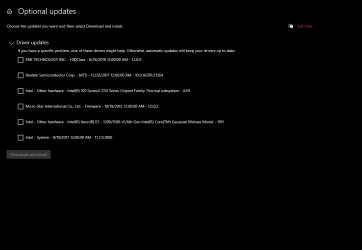
Which driver do I need to replace? I don't think that any of these apply to my Steel Series keyboard.

updates.webp
 

My Computer My Computer

At a glance

Windows 11Intel(R) Core(TM) i9-10900K CPU @ 3.70GHz32,0 GBNvidia GeForce RTX2080 Super
OS
Windows 11
Computer type
Laptop
Manufacturer/Model
Alienware A51M R2
CPU
Intel(R) Core(TM) i9-10900K CPU @ 3.70GHz
Memory
32,0 GB
Graphics Card(s)
Nvidia GeForce RTX2080 Super
Sound Card
Realtek
Screen Resolution
4K
Hard Drives
2TB (2x 1TB PCle M.2 SSD) RAID 0 [Boot] + 2TB (2x 1TB
PCle M.2 SSD) Non-Raid [Storage]
After opening the on-screen keyboard, the problem instantly stopped.
If everything works properly with OSK, This points the problem to be directly at your keyboard matrix rather than browser extensions or installed software. I'll bet a dollar to a donut, you won't have a problem with another external KB either.

Concentrate on a stuck or locked Ctrl, FN, or Alt modifier key.
Check your device manual to see if one of the F keys is used as a special function key for locking one of the 3 modifier keys. If it does, maybe you have accidentially selected it.
Maybe there is a piece of debris causing one of these modifier keys to be stuck. Use canned air to blow it out.

Something else to try - In some MSI laptops you can power off and hold down power button for 15 seconds which resets the embedded controller (EC) which controls hardware functions independent of windows. Some of those functions affect KB behavior. I'd normally say Check for an update to MSI EC firmware + keyboard drivers, but the latest EC firmware for that laptop was in 2016.

If still no joy, I'd say you're looking at replacing your KB
 

My Computers My Computers

  • At a glance

    Windows 11 Pro 25H2 26200.8655i9-10900 10 core 20 threads32 gbnone-Intel UHD Graphics 630
    OS
    Windows 11 Pro 25H2 26200.8655
    Computer type
    PC/Desktop
    Manufacturer/Model
    Dell Optiplex 7080
    CPU
    i9-10900 10 core 20 threads
    Motherboard
    DELL 0J37VM
    Memory
    32 gb
    Graphics Card(s)
    none-Intel UHD Graphics 630
    Sound Card
    Integrated Realtek
    Monitor(s) Displays
    Benq 27
    Screen Resolution
    2560x1440
    Hard Drives
    2x1tb Solidigm m.2 nvme /External drives 512gb Samsung m.2 sata+2tb Kingston m2.nvme
    PSU
    500w
    Case
    MT
    Cooling
    Dell Premium
    Keyboard
    Logitech wired
    Mouse
    Logitech wireless
    Internet Speed
    so slow I'm too embarrassed to tell
    Browser
    #1 Edge #2 Firefox
    Antivirus
    Defender+MWB Premium
  • At a glance

    Windows 11 Pro 24H2 26200.8457AMD Ryzen 7 6800U32 gbintegrated
    Operating System
    Windows 11 Pro 24H2 26200.8457
    Computer type
    PC/Desktop
    Manufacturer/Model
    Beelink Mini PC SER5
    CPU
    AMD Ryzen 7 6800U
    Memory
    32 gb
    Graphics card(s)
    integrated
    Sound Card
    integrated
    Monitor(s) Displays
    Benq 27
    Screen Resolution
    2560x1440
    Hard Drives
    1TB Crucial nvme
    Keyboard
    Logitech wired
    Mouse
    Logitech wireless
    Internet Speed
    still too embarrassed to tell
    Browser
    Firefox
    Antivirus
    Defender
    Other Info
    System 3 is non compliant Dell 9020 i7-4770/24gb ram Win11 PRO 26200.8457
I don't have an external keyboard because I only run a couple of laptops.
I have discovered however, that if I use the enter key on the RHS of the numerical tablet, it behaves normally, so I guess the keyboard must be defective and I will need to use the other enter key.

Thanks for all your suggestions.
 

My Computer My Computer

At a glance

Windows 11Intel(R) Core(TM) i9-10900K CPU @ 3.70GHz32,0 GBNvidia GeForce RTX2080 Super
OS
Windows 11
Computer type
Laptop
Manufacturer/Model
Alienware A51M R2
CPU
Intel(R) Core(TM) i9-10900K CPU @ 3.70GHz
Memory
32,0 GB
Graphics Card(s)
Nvidia GeForce RTX2080 Super
Sound Card
Realtek
Screen Resolution
4K
Hard Drives
2TB (2x 1TB PCle M.2 SSD) RAID 0 [Boot] + 2TB (2x 1TB
PCle M.2 SSD) Non-Raid [Storage]

Latest Support Threads

Back
Top Bottom