error 0xc1900101 and 0x8007045b during Windows 11 Insider Preview 27695.1000 install


Gunther

New member
Local time
2:27 AM
Posts
9
OS
Windows 11
Hi there
Both errors appeared while tried to install the Windows 11 Insider Preview 27695.1000. One of them solved by Windows the 0x8007045b.
The second one still subsists, since last friday. The UDP works ok, downloads the update, unpacks, but doesn´t do any upgrade into files and gives the error 0xc1900101.
Space available around 50 Gb. Enough for install. Memory 16 Gb.
If some ones has a solution will be great.
Thanks
 

My Computer My Computer

At a glance

Windows 11Ryzen 7 AMD16
OS
Windows 11
Computer type
PC/Desktop
CPU
Ryzen 7 AMD
Motherboard
ASUS
Memory
16
Hard Drives
SSD
Antivirus
Kaspersky
0x8007045b (WIN32: 1115 ERROR_SHUTDOWN_IN_PROGRESS) -- 2147943515 (-2147023781)
Error message text: A system shutdown is in progress.
CertUtil: -error command completed successfully.
 

My Computer My Computer

At a glance

Windows 11AMD Ryzen 7 5700GMicron Technology DDR4-3200 16GBNVIDIA GeForce RTX 3060
OS
Windows 11
Computer type
PC/Desktop
Manufacturer/Model
HP Pavilion
CPU
AMD Ryzen 7 5700G
Motherboard
Erica6
Memory
Micron Technology DDR4-3200 16GB
Graphics Card(s)
NVIDIA GeForce RTX 3060
Sound Card
Realtek ALC671
Monitor(s) Displays
Samsung SyncMaster U28E590
Screen Resolution
3840 x 2160
Hard Drives
SAMSUNG MZVLQ1T0HALB-000H1

My Computer My Computer

At a glance

Windows 11AMD Ryzen 7 5700GMicron Technology DDR4-3200 16GBNVIDIA GeForce RTX 3060
OS
Windows 11
Computer type
PC/Desktop
Manufacturer/Model
HP Pavilion
CPU
AMD Ryzen 7 5700G
Motherboard
Erica6
Memory
Micron Technology DDR4-3200 16GB
Graphics Card(s)
NVIDIA GeForce RTX 3060
Sound Card
Realtek ALC671
Monitor(s) Displays
Samsung SyncMaster U28E590
Screen Resolution
3840 x 2160
Hard Drives
SAMSUNG MZVLQ1T0HALB-000H1
Ok but how can I fix the error related 0xc1900101?
Perhaps something is corrupted?
Again downloaded the version and no way...instalation seems to be good, but conserves the prior version.
Also freezed the screen, waited an hour, and forced to shutdown...
Thanks
 

My Computer My Computer

At a glance

Windows 11Ryzen 7 AMD16
OS
Windows 11
Computer type
PC/Desktop
CPU
Ryzen 7 AMD
Motherboard
ASUS
Memory
16
Hard Drives
SSD
Antivirus
Kaspersky
Microsoft website gives you clues on how to fix the error message you are getting.
 

My Computer My Computer

At a glance

Windows 11AMD Ryzen 7 5700GMicron Technology DDR4-3200 16GBNVIDIA GeForce RTX 3060
OS
Windows 11
Computer type
PC/Desktop
Manufacturer/Model
HP Pavilion
CPU
AMD Ryzen 7 5700G
Motherboard
Erica6
Memory
Micron Technology DDR4-3200 16GB
Graphics Card(s)
NVIDIA GeForce RTX 3060
Sound Card
Realtek ALC671
Monitor(s) Displays
Samsung SyncMaster U28E590
Screen Resolution
3840 x 2160
Hard Drives
SAMSUNG MZVLQ1T0HALB-000H1
We do not know what version of Windows you currently run, nor what update you are attempting to apply.

WINDOWS UPDATE PROBLEMS General steps

1. Run troubleshooter-settings-system-troubleshoot-other troubleshooters-windows update-RUN.

2. Reset Windows update using Brink's tutorial Reset Windows Update in Windows 11 Tutorial

3. Run sfc after resetting update components. Open a command prompt as administrator and type sfc /scannow
Pay attention to the scan results to see if SFC found anything it could not repair. If it found corruption it could not fix followup with this command (note the spaces)
dism /online /cleanup-image /restorehealth
Restart computer

4. CLEAN UP COMPONENT STORE - dism /online /cleanup-image /startcomponentcleanup
Analyze and Clean Up Component Store (WinSxS folder) in Windows 11 Tutorial

5. Do a repair install. Repair Install Windows 11 with an In-place Upgrade Tutorial
 

My Computers My Computers

  • At a glance

    Windows 11 Pro 25H2 26200.8875i9-10900 10 core 20 threads32 gbnone-Intel UHD Graphics 630
    OS
    Windows 11 Pro 25H2 26200.8875
    Computer type
    PC/Desktop
    Manufacturer/Model
    Dell Optiplex 7080
    CPU
    i9-10900 10 core 20 threads
    Motherboard
    DELL 0J37VM
    Memory
    32 gb
    Graphics Card(s)
    none-Intel UHD Graphics 630
    Sound Card
    Integrated Realtek
    Monitor(s) Displays
    Benq 27
    Screen Resolution
    2560x1440
    Hard Drives
    2x1tb Solidigm m.2 nvme /External drives 512gb Samsung m.2 sata+2tb Kingston m2.nvme
    PSU
    500w
    Case
    MT
    Cooling
    Dell Premium
    Keyboard
    Logitech wired
    Mouse
    Logitech wireless
    Internet Speed
    so slow I'm too embarrassed to tell
    Browser
    #1 Edge #2 Firefox
    Antivirus
    Defender+MWB Premium
  • At a glance

    Windows 11 Pro 24H2 26200.8875AMD Ryzen 7 6800U32 gbintegrated
    Operating System
    Windows 11 Pro 24H2 26200.8875
    Computer type
    PC/Desktop
    Manufacturer/Model
    Beelink Mini PC SER5
    CPU
    AMD Ryzen 7 6800U
    Memory
    32 gb
    Graphics card(s)
    integrated
    Sound Card
    integrated
    Monitor(s) Displays
    Benq 27
    Screen Resolution
    2560x1440
    Hard Drives
    1TB Crucial nvme
    Keyboard
    Logitech wired
    Mouse
    Logitech wireless
    Internet Speed
    still too embarrassed to tell
    Browser
    Firefox
    Antivirus
    Defender
    Other Info
    System 3 is non compliant Dell 9020 i7-4770/24gb ram Win11 PRO 26200.8875
Make the procedures descripted by FreeBooster, downloading the image, using ARM64 ISO download
You have an AMD Ryzen, pick the amd64 ISO.
 

My Computer My Computer

At a glance

Windows 7
OS
Windows 7
1726423923179.png
 

My Computer My Computer

At a glance

Windows 11Ryzen 7 AMD16
OS
Windows 11
Computer type
PC/Desktop
CPU
Ryzen 7 AMD
Motherboard
ASUS
Memory
16
Hard Drives
SSD
Antivirus
Kaspersky
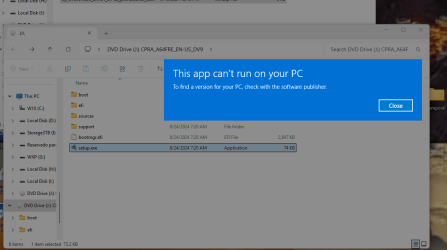
This is what´s happening after the ISO Download, and when tried to install it... used the amd64 ISO.

Any idea??

Winver 27686.1000 (PRO).
 

My Computer My Computer

At a glance

Windows 11Ryzen 7 AMD16
OS
Windows 11
Computer type
PC/Desktop
CPU
Ryzen 7 AMD
Motherboard
ASUS
Memory
16
Hard Drives
SSD
Antivirus
Kaspersky
Your ISO's volume label doesn't have X64 in the name. Therefore it's probably ARM64 architecture.
 

My Computer My Computer

At a glance

Windows 7
OS
Windows 7

My Computer My Computer

At a glance

Windows 10Intel(R) Core(TM) i7-4800MQ CPU @ 2.70GHz16 GB Total: Manufacturer : Samsung MemoryTyp...NVIDIA Quadro K3100M; Intel(R) HD Graphics 4600
OS
Windows 10
Computer type
Laptop
Manufacturer/Model
HP
CPU
Intel(R) Core(TM) i7-4800MQ CPU @ 2.70GHz
Motherboard
Product : 190A Version : KBC Version 94.56
Memory
16 GB Total: Manufacturer : Samsung MemoryType : DDR3 FormFactor : SODIMM Capacity : 8GB Speed : 1600
Graphics Card(s)
NVIDIA Quadro K3100M; Intel(R) HD Graphics 4600
Sound Card
IDT High Definition Audio CODEC; PNP Device ID HDAUDIO\FUNC_01&VEN_111D&DEV_76E0
Hard Drives
Model Hitachi HTS727575A9E364
Antivirus
Microsoft Defender
Other Info
Mobile Workstation
1726750786490.png
 

My Computer My Computer

At a glance

Windows 11Ryzen 7 AMD16
OS
Windows 11
Computer type
PC/Desktop
CPU
Ryzen 7 AMD
Motherboard
ASUS
Memory
16
Hard Drives
SSD
Antivirus
Kaspersky
That was the latest error.. searched everywhere and nothing. Microsoft doesn´t provide help as it is a prerelease...
If someone knows how to fix it .. answer please.
Regards
 

My Computer My Computer

At a glance

Windows 11Ryzen 7 AMD16
OS
Windows 11
Computer type
PC/Desktop
CPU
Ryzen 7 AMD
Motherboard
ASUS
Memory
16
Hard Drives
SSD
Antivirus
Kaspersky
Please run the V2 log collector > post a share link


My Computer My Computer

At a glance

Windows 10Intel(R) Core(TM) i7-4800MQ CPU @ 2.70GHz16 GB Total: Manufacturer : Samsung MemoryTyp...NVIDIA Quadro K3100M; Intel(R) HD Graphics 4600
OS
Windows 10
Computer type
Laptop
Manufacturer/Model
HP
CPU
Intel(R) Core(TM) i7-4800MQ CPU @ 2.70GHz
Motherboard
Product : 190A Version : KBC Version 94.56
Memory
16 GB Total: Manufacturer : Samsung MemoryType : DDR3 FormFactor : SODIMM Capacity : 8GB Speed : 1600
Graphics Card(s)
NVIDIA Quadro K3100M; Intel(R) HD Graphics 4600
Sound Card
IDT High Definition Audio CODEC; PNP Device ID HDAUDIO\FUNC_01&VEN_111D&DEV_76E0
Hard Drives
Model Hitachi HTS727575A9E364
Antivirus
Microsoft Defender
Other Info
Mobile Workstation
Ok, so I noticed that this is called out in the release notes.


  • [ADDED 9/5] We’re investigating reports that starting with Build 27686, when upgrading to a newer Canary Channel build some Insiders experience a hang at the boot screen and their PC rolls back with error 0xC1900101.

Has anyone solved this problem?

I'm also having issues with my keyboard being recognized (Razor Huntsman) on boot. Rebooting does not fix it. I have to physically move the usb plugs to a different port. Also, strangely, the on screen keyboard doesn't show up. I click the toggle and it just does nothing and goes back to off.

Weird that it's been almost a month and no new canary build.
 

My Computer My Computer

At a glance

Windows 11
OS
Windows 11
Back
Top Bottom