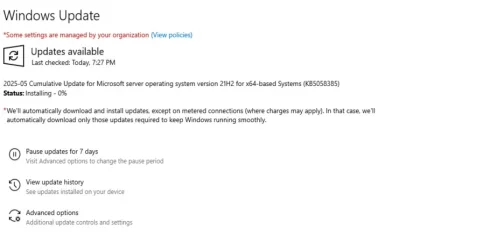
ERROR_SXS_ASSEMBLY_MISSING (0x80073701) and CBS_E_STORE_CORRUPTION (0x800f0831) on Windows Server 2022


HUMBL3B33

New member
Local time
4:28 AM
Posts
4
OS
Windows 11
Hello Everyone,

As the title suggests, I have the following issue on some of our servers, which is stopping me from successfully patching the machine. I'm attaching the CBS log for one of the servers and would greatly appreciate any help if possible.
 
Windows Build/Version
Windows Server 2022 (21H2)

Attachments
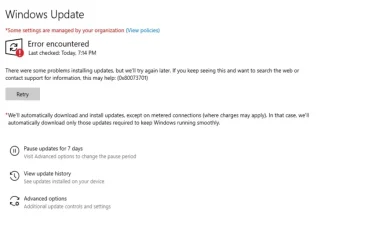
  • FailedUpdate.webp
    FailedUpdate.webp
    25.1 KB · Views: 2
  • FailingUpdate.webp
    FailingUpdate.webp
    24 KB · Views: 2

My Computer My Computer

At a glance

Windows 11
OS
Windows 11
Computer type
PC/Desktop
Make sure to execute below commands one at a time.

Code:
Sfc /scannow


Dism /online /cleanup-image /restorehealth


Use Windows Update Troubleshooter.


  • Right-click on Start button and pick Settings
  • Go to System > Troubleshoot
  • Click on Other Troubleshooters > Windows Update and click Run button.


Download Windows updates manually.


  • Go to the official Microsoft update catalog;
  • Enter a specific update code, for example, KB4481031
  • Select the correct version and click Download
  • Click on the link and Windows will update your computer


Resetting the Windows Update components can usually solve these types of issues.


If nothing works perform in-place upgrade.
 

My Computer My Computer

At a glance

Windows 11AMD Ryzen 7 5700GMicron Technology DDR4-3200 16GBNVIDIA GeForce RTX 3060
OS
Windows 11
Computer type
PC/Desktop
Manufacturer/Model
HP Pavilion
CPU
AMD Ryzen 7 5700G
Motherboard
Erica6
Memory
Micron Technology DDR4-3200 16GB
Graphics Card(s)
NVIDIA GeForce RTX 3060
Sound Card
Realtek ALC671
Monitor(s) Displays
Samsung SyncMaster U28E590
Screen Resolution
3840 x 2160
Hard Drives
SAMSUNG MZVLQ1T0HALB-000H1
Hey @FreeBooter,

Apologies for my naive question, I am a bit new to Windows Administration.

Thanks a lot for helping me. I am aware of these steps and have already gone through the same. I am a bit sceptical about doing an in-place upgrade because these machines are client machines with actual data that they use to work with and have complex permissions set up on these machines. If I do an in-place upgrade, wouldn't it more or less remove the installed 3rd party applications and what happens to the user profiles?
 

My Computer My Computer

At a glance

Windows 11
OS
Windows 11
Computer type
PC/Desktop
If I do an in-place upgrade, wouldn't it more or less remove the installed 3rd party applications and what happens to the user profiles?

no, HUMBL3B33
3rd party apps & existing user profiles should be preserved during an "in-place" upgrade {I know from experience as I usually do in-place upgrades for Win10/Win11 once a year}

only way 3rd party apps & user profiles are removed is when doing a "clean" install


edit - see this MS page
 

My Computer My Computer

At a glance

windows 10 ltsc
OS
windows 10 ltsc
Hey @erpster4,
I tried to do what you shared but it seems like i am not getting the option to keep any of the files for some reason. Key thing to note is i am running this directly through the file explorer while the machine is active. Not that i think that would make any difference but just wanted to be sure. Any idea what could be the reason?
 

Attachments

  • whattokeep.webp
    whattokeep.webp
    24.6 KB · Views: 1

My Computer My Computer

At a glance

Windows 11
OS
Windows 11
Computer type
PC/Desktop
Maybe it could be downloaded ISO language, it needs to be same as the installed OS.
 

My Computer My Computer

At a glance

Windows 11AMD Ryzen 7 5700GMicron Technology DDR4-3200 16GBNVIDIA GeForce RTX 3060
OS
Windows 11
Computer type
PC/Desktop
Manufacturer/Model
HP Pavilion
CPU
AMD Ryzen 7 5700G
Motherboard
Erica6
Memory
Micron Technology DDR4-3200 16GB
Graphics Card(s)
NVIDIA GeForce RTX 3060
Sound Card
Realtek ALC671
Monitor(s) Displays
Samsung SyncMaster U28E590
Screen Resolution
3840 x 2160
Hard Drives
SAMSUNG MZVLQ1T0HALB-000H1
Maybe it could be downloaded ISO language, it needs to be same as the installed OS.
Hey FreeBooter,

Any idea how can i make sure of the same? How do I compare them both, the ISO and installed OS?
 

My Computer My Computer

At a glance

Windows 11
OS
Windows 11
Computer type
PC/Desktop
You can use dism /online /Get-Intl command.
 

My Computer My Computer

At a glance

Windows 11AMD Ryzen 7 5700GMicron Technology DDR4-3200 16GBNVIDIA GeForce RTX 3060
OS
Windows 11
Computer type
PC/Desktop
Manufacturer/Model
HP Pavilion
CPU
AMD Ryzen 7 5700G
Motherboard
Erica6
Memory
Micron Technology DDR4-3200 16GB
Graphics Card(s)
NVIDIA GeForce RTX 3060
Sound Card
Realtek ALC671
Monitor(s) Displays
Samsung SyncMaster U28E590
Screen Resolution
3840 x 2160
Hard Drives
SAMSUNG MZVLQ1T0HALB-000H1
Back
Top Bottom