JavaScript is disabled. For a better experience, please enable JavaScript in your browser before proceeding.
You are using an out of date browser. It may not display this or other websites correctly.
You should upgrade or use an
alternative browser .
Event Viewer - "The backing-file for the real-time session "PCA Registry tracing session" has reached its maximum size"
I have never seen this kernel event tracing error before, but seems it's been happening quite a lot!
Don't know what to do about it, appreciate some help.
I can only assume 'PCA' means 'Program Compatibility Assistant', that was the best search result I could find - not one single internet post about this issue, which makes me think it's a new Win 11 quirk.
Here's the full error:
"The backing-file for the real-time session "PCA Registry tracing session" has reached its maximum size. As a result, new events will not be logged to this session until space becomes available. This error is often caused by starting a trace session in real-time mode without having any real-time consumers."
[ Name ] Microsoft-Windows-Kernel-EventTracing
[ Guid ] {b675ec37-bdb6-4648-bc92-f3fdc74d3ca2}
Keywords 0x8000000000000010
[ SystemTime ] 2021-12-15T09:14:26.2655380Z
Channel Microsoft-Windows-Kernel-EventTracing/Admin
SessionName PCA Registry tracing session
Win 11 23H2 Enterprise Ryzen 9800X3D G.Skill Trident Z RGB 6200MT CL30 MSI RTX 5090 Suprim SoC Win 11 23H2 Enterprise PC/Desktop Self-Built Ryzen 9800X3D MSI MAG X870 Tomahawk WiFi G.Skill Trident Z RGB 6200MT CL30 MSI RTX 5090 Suprim SoC Sound Blaster G8 LG C2 42 Main Desktop, 3x Gigabyte FI32Q in a triple array for gaming simulations 3840x2160, 2560x1440 (3) WD SN850X 2TB M.2 NVME (OS Drive), WD SN850X 2TB M.2 NVME, 2x Crucial 2TB SSD, Crucial 1TB SSD, Seagate Barracuda 2TB HDD NZXT C1200 Gold ATX 3.1-Fully Modular/Low-Noise-1200 Watts-12V-2x6 Connector-Zero Fan Mode-100% Japanese Capacitors NZXT H7 EK AIO Elite 360mm Elite Razer Huntsman V3 Pro Logitech G502X 1GB Edge Chromium Windows Defender
Well-known member
Guru
VIP
I suggest that you just increase the size of the log file and forget about the error.Windows and R keys together.[/COLOR]eventvwr,msc and press enter.Enable logging Overwrite events as needed . Maximum log size .
Windows 11 AMD Ryzen 7 5700G Micron Technology DDR4-3200 16GB NVIDIA GeForce RTX 3060 Windows 11 PC/Desktop HP Pavilion AMD Ryzen 7 5700G Erica6 Micron Technology DDR4-3200 16GB NVIDIA GeForce RTX 3060 Realtek ALC671 Samsung SyncMaster U28E590 3840 x 2160 SAMSUNG MZVLQ1T0HALB-000H1
Well-known member
Member
Thread Starter
Thanks for the reply.eventvwr,msc in a run command errors, so not sure if you misspelt?
Win 11 23H2 Enterprise Ryzen 9800X3D G.Skill Trident Z RGB 6200MT CL30 MSI RTX 5090 Suprim SoC Win 11 23H2 Enterprise PC/Desktop Self-Built Ryzen 9800X3D MSI MAG X870 Tomahawk WiFi G.Skill Trident Z RGB 6200MT CL30 MSI RTX 5090 Suprim SoC Sound Blaster G8 LG C2 42 Main Desktop, 3x Gigabyte FI32Q in a triple array for gaming simulations 3840x2160, 2560x1440 (3) WD SN850X 2TB M.2 NVME (OS Drive), WD SN850X 2TB M.2 NVME, 2x Crucial 2TB SSD, Crucial 1TB SSD, Seagate Barracuda 2TB HDD NZXT C1200 Gold ATX 3.1-Fully Modular/Low-Noise-1200 Watts-12V-2x6 Connector-Zero Fan Mode-100% Japanese Capacitors NZXT H7 EK AIO Elite 360mm Elite Razer Huntsman V3 Pro Logitech G502X 1GB Edge Chromium Windows Defender
Microsoft 365 Basic
Pro User
VIP
eventvwr.msc (dot not comma), but you can also right click Start and select Even Viewer.
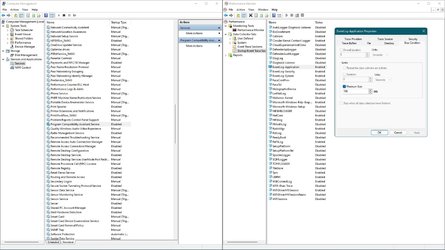
I have PCA disabled, I guess that is why it does not show up in my
perfmon tracing list.
Home2FH2Can AMD Ryzen 5 8600G (07/24) 2x32GB Kingston FURY DDR5 5600 MHz CL36 @5200... ASROCK Radeon RX 6600 Challenger D 8G @48FPS ... Home2FH2Can PC/Desktop AMD Ryzen 5 8600G (07/24) ASROCK B650M-HDV/M.2 (07/24) BIOS 4.43 AGESA ComboAM5 1.3.0.1b Patch A (07/26) 2x32GB Kingston FURY DDR5 5600 MHz CL36 @5200 CL40 (07/24) ASROCK Radeon RX 6600 Challenger D 8G @48FPS (08/24) Creative Sound BlasterX AE-5 Plus (05/24) 24" Philips 24M1N3200ZS/00 (05/24) 1920×1080@165Hz via DP1.4 Kingston KC3000 NVMe 2TB (05/24) Seasonic Core GM 550 Gold (04/24) Fractal Design Define 7 Mini with 3x Noctua NF-P14s/12@555rpm (04/24) Noctua NH-U12S with Noctua NF-P12 (04/24) HP Pavilion Wired Keyboard 300 (07/24) + Rabalux 76017 Parker (01/24) Logitech M330 Silent Plus (07/26) 500/100 Mbps via RouterOS (05/21) & TCP Optimizer Edge, Brave for YouTube, LibreWolf for FB NextDNS blocking 50% Traffic Phone: Motorola Moto G86 (02/26)
Well-known member
Member
Thread Starter
Thanks. Still doesn't allow me to set limits/overwrite.
Last edited: Dec 15, 2021
Win 11 23H2 Enterprise Ryzen 9800X3D G.Skill Trident Z RGB 6200MT CL30 MSI RTX 5090 Suprim SoC Win 11 23H2 Enterprise PC/Desktop Self-Built Ryzen 9800X3D MSI MAG X870 Tomahawk WiFi G.Skill Trident Z RGB 6200MT CL30 MSI RTX 5090 Suprim SoC Sound Blaster G8 LG C2 42 Main Desktop, 3x Gigabyte FI32Q in a triple array for gaming simulations 3840x2160, 2560x1440 (3) WD SN850X 2TB M.2 NVME (OS Drive), WD SN850X 2TB M.2 NVME, 2x Crucial 2TB SSD, Crucial 1TB SSD, Seagate Barracuda 2TB HDD NZXT C1200 Gold ATX 3.1-Fully Modular/Low-Noise-1200 Watts-12V-2x6 Connector-Zero Fan Mode-100% Japanese Capacitors NZXT H7 EK AIO Elite 360mm Elite Razer Huntsman V3 Pro Logitech G502X 1GB Edge Chromium Windows Defender
Well-known member
Guru
VIP
Windows 11 AMD Ryzen 7 5700G Micron Technology DDR4-3200 16GB NVIDIA GeForce RTX 3060 Windows 11 PC/Desktop HP Pavilion AMD Ryzen 7 5700G Erica6 Micron Technology DDR4-3200 16GB NVIDIA GeForce RTX 3060 Realtek ALC671 Samsung SyncMaster U28E590 3840 x 2160 SAMSUNG MZVLQ1T0HALB-000H1