Exclamation Mark On Blue Circle Appearing On Top Of OneDrive Taskbar Icon


The unwanted overlay is on a taskbar icon not in file explorer.
Yep, that’s what the thread says.

Anyways, I tracked down what each of those numbered keys are since posting and only one crosses over from the tray icon to the file explorer overlays and that’s the sync circular arrows.

As far as I can tell any thread on the internet relating to this i overlay is tied to personal vault.

EDIT:
Apparently this can disable it, but I assume you all have already tried this. Almost seems too simple

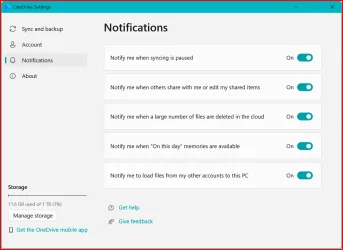
Right click tray icon > settings > notifications tab > uncheck “Show me OneDrive notifications for tips, feature announcements, and suggestions”
 
Last edited:

My Computer My Computer

At a glance

Windows 11 Pro
OS
Windows 11 Pro
EDIT:
Apparently this can disable it, but I assume you all have already tried this. Almost seems too simple

Right click tray icon > settings > notifications tab > uncheck “Show me OneDrive notifications for tips, feature announcements, and suggestions”

I don't have that option in OneDrive version: Build 25.194.1005.0002 (64-bit):

OneDrive Notification options.webp
 

My Computer My Computer

At a glance

Windows 11
OS
Windows 11
Computer type
Laptop
Go figure... After powering up my machine this morning and bringing up Windows 11 the "i" overlay was present as usual on the Onedrive icon on my tray, Sometime a little later I did a restart of Windows for some other reason and was surprised that the "i" overlay was no longer present. I haven't a clue why it is gone now. No changes made between powering on and restarting. Onedrive is at the same version number.

However, something tells me the "i" will rear it's ugly head again. Either a restart or unlocking/locking my Personal Vault will trigger it. We will see. For now I'll enjoy a normal Onedrive tray icon.
 

My Computer My Computer

At a glance

Windows 1113th Gen Intel(R) Core(TM) i9-13900KCorsair 2x32GB @ 6600PNY RTX3080 TI
OS
Windows 11
Computer type
PC/Desktop
Manufacturer/Model
Home Built
CPU
13th Gen Intel(R) Core(TM) i9-13900K
Motherboard
ASUS Maximus Hero Z790
Memory
Corsair 2x32GB @ 6600
Graphics Card(s)
PNY RTX3080 TI
Sound Card
Realtek on motherboard.
Monitor(s) Displays
Corsair 4k, BenQ 4k.
Screen Resolution
3840x2160
I don't have that option in OneDrive version: Build 25.194.1005.0002 (64-bit):
try adding the disable via reg:

Code:
HKEY_CURRENT_USER\Software\Microsoft\OneDrive
Dword "UserNotifications" value "0"

restart onedrive completely.

create what is necessary in reg.
 

My Computer My Computer

At a glance

Windows 11 Pro
OS
Windows 11 Pro
Go figure... After powering up my machine this morning and bringing up Windows 11 the "i" overlay was present as usual on the Onedrive icon on my tray, Sometime a little later I did a restart of Windows for some other reason and was surprised that the "i" overlay was no longer present. I haven't a clue why it is gone now. No changes made between powering on and restarting. Onedrive is at the same version number.

However, something tells me the "i" will rear it's ugly head again. Either a restart or unlocking/locking my Personal Vault will trigger it. We will see. For now I'll enjoy a normal Onedrive tray icon.
When the i disappears, can you then right click on the idrive cloud. open settings and select to unlink this pc? (I seem to remember settings appeared like that from a right click, once the i had gone.
 

My Computers My Computers

  • At a glance

    Windows 11 Home 25H2Core i5-1035G132gb
    OS
    Windows 11 Home 25H2
    Computer type
    Laptop
    Manufacturer/Model
    HP Pavilion 14-ce3606sa
    CPU
    Core i5-1035G1
    Memory
    32gb
    Hard Drives
    Samsung 870 evo sata ssd
    Cooling
    Could be better
    Internet Speed
    50 mbps Starlink
    Browser
    Firefox
    Other Info
    Originally came installed with a 500gb H10 Optane ssd
  • At a glance

    Windows 11 HomeIntel Core i5-1035G116gb
    Operating System
    Windows 11 Home
    Computer type
    Laptop
    Manufacturer/Model
    HP Pavilion ce3606sa
    CPU
    Intel Core i5-1035G1
    Memory
    16gb
    Hard Drives
    Hynix Gold P31 2TB
    Internet Speed
    200mbps Starlink
    Browser
    Firefox
    Antivirus
    Defender
Thanks to everyone for all of the comments, I feel sure that at least a few user's of the operating system has reported this issue to the feedback hub but that doesn't mean that the developers will actually address the issue. Microsoft of course isn't a 'perfect' company by any means but they do indeed fix quite a few of the issues that get reported to them but I think on some kind of priority type of scale.
 

My Computers My Computers

  • At a glance

    Windows11Pro (x64)Intel(R) Core(TM) i5-3470 CPU @ 3.20GHz 3.20 GHz8.00 GB (7.88 GB usable)
    OS
    Windows11Pro (x64)
    Computer type
    PC/Desktop
    Manufacturer/Model
    HP/HP8300EliteSFF
    CPU
    Intel(R) Core(TM) i5-3470 CPU @ 3.20GHz 3.20 GHz
    Memory
    8.00 GB (7.88 GB usable)
  • At a glance

    Windows11Pro(x64)Intel(R) Core(TM) i5-3320M CPU @ 2.60GHz 2.60...8.00 GB (7.82 GB usable)Intel (R) HD Graphics 4000
    Operating System
    Windows11Pro(x64)
    Computer type
    Laptop
    Manufacturer/Model
    Lenovo/T430
    CPU
    Intel(R) Core(TM) i5-3320M CPU @ 2.60GHz 2.60 GHz
    Motherboard
    Lenovo 2349KB7
    Memory
    8.00 GB (7.82 GB usable)
    Graphics card(s)
    Intel (R) HD Graphics 4000
    Sound Card
    Realtek High Definition Audio
    Hard Drives
    SSD 222.79 GB
So far no more i overlay. It's been a few days. I still have no idea what removed the overlay. I don't remember changing anything Onedrive related. I just restarted Windows for whatever reason and 'poof' the i was gone.

Hazel123

As far as unlinking goes I don't want to do this only to have the i come back. I'm sure you understand.
 

My Computer My Computer

At a glance

Windows 1113th Gen Intel(R) Core(TM) i9-13900KCorsair 2x32GB @ 6600PNY RTX3080 TI
OS
Windows 11
Computer type
PC/Desktop
Manufacturer/Model
Home Built
CPU
13th Gen Intel(R) Core(TM) i9-13900K
Motherboard
ASUS Maximus Hero Z790
Memory
Corsair 2x32GB @ 6600
Graphics Card(s)
PNY RTX3080 TI
Sound Card
Realtek on motherboard.
Monitor(s) Displays
Corsair 4k, BenQ 4k.
Screen Resolution
3840x2160
1761911755916.webp
 

My Computer My Computer

At a glance

Windows 11, 24H2Intel(R) Core(TM) i9-14900K 3.20 GHzCorsair Vengeance RGB DDR5, 128GB (4x32GB)ASUS ProArt GeForce RTX 4060 Ti, PCIe 4.0, 16GB
OS
Windows 11, 24H2
Computer type
PC/Desktop
Manufacturer/Model
My Build
CPU
Intel(R) Core(TM) i9-14900K 3.20 GHz
Motherboard
ASUS ROG Maximus Z790 Hero
Memory
Corsair Vengeance RGB DDR5, 128GB (4x32GB)
Graphics Card(s)
ASUS ProArt GeForce RTX 4060 Ti, PCIe 4.0, 16GB
Sound Card
Integrated
Monitor(s) Displays
DELL P2719HC, QTY 3
Screen Resolution
1920 x 1080
Hard Drives
Inland 2TB SSD Gaming Performance Plus, M2 Mount, QTY 2
PSU
ROG Thor 1200W Platinum II, Fully Modular
Case
Thermaltake MK-1
Cooling
Thermalright PS120SE CPU Air Cooler
Keyboard
Logitech MK850 Wireless Keyboard & Mouse
Mouse
Logitech MK850 Wireless Keyboard & Mouse
Antivirus
Norton 360
So far no more i overlay. It's been a few days. I still have no idea what removed the overlay. I don't remember changing anything Onedrive related. I just restarted Windows for whatever reason and 'poof' the i was gone.

Hazel123

As far as unlinking goes I don't want to do this only to have the i come back. I'm sure you understand.
Don't really understand no :-) Unless you actually want to keep one drive which is a different thing. The main reason to unlink it is to then uninstall it. No one drive, no i! Once it's unlinked and uninstalled it won't come back - unless you install office. Then it needs unlinking and uninstalling again.
 
Last edited:

My Computers My Computers

  • At a glance

    Windows 11 Home 25H2Core i5-1035G132gb
    OS
    Windows 11 Home 25H2
    Computer type
    Laptop
    Manufacturer/Model
    HP Pavilion 14-ce3606sa
    CPU
    Core i5-1035G1
    Memory
    32gb
    Hard Drives
    Samsung 870 evo sata ssd
    Cooling
    Could be better
    Internet Speed
    50 mbps Starlink
    Browser
    Firefox
    Other Info
    Originally came installed with a 500gb H10 Optane ssd
  • At a glance

    Windows 11 HomeIntel Core i5-1035G116gb
    Operating System
    Windows 11 Home
    Computer type
    Laptop
    Manufacturer/Model
    HP Pavilion ce3606sa
    CPU
    Intel Core i5-1035G1
    Memory
    16gb
    Hard Drives
    Hynix Gold P31 2TB
    Internet Speed
    200mbps Starlink
    Browser
    Firefox
    Antivirus
    Defender
try adding the disable via reg:

Code:
HKEY_CURRENT_USER\Software\Microsoft\OneDrive
Dword "UserNotifications" value "0"

restart onedrive completely.

create what is necessary in reg.
Thanks for this suggestion, my only question is upon selecting a new Dword value I'm presented with two choices: (1) 32-bit or (2) 64-bit , which one should I choose ? Since windows 11 is a 64-bit based operating system I would assume that I should choose the Dword 64-bit value.
 

My Computers My Computers

  • At a glance

    Windows11Pro (x64)Intel(R) Core(TM) i5-3470 CPU @ 3.20GHz 3.20 GHz8.00 GB (7.88 GB usable)
    OS
    Windows11Pro (x64)
    Computer type
    PC/Desktop
    Manufacturer/Model
    HP/HP8300EliteSFF
    CPU
    Intel(R) Core(TM) i5-3470 CPU @ 3.20GHz 3.20 GHz
    Memory
    8.00 GB (7.88 GB usable)
  • At a glance

    Windows11Pro(x64)Intel(R) Core(TM) i5-3320M CPU @ 2.60GHz 2.60...8.00 GB (7.82 GB usable)Intel (R) HD Graphics 4000
    Operating System
    Windows11Pro(x64)
    Computer type
    Laptop
    Manufacturer/Model
    Lenovo/T430
    CPU
    Intel(R) Core(TM) i5-3320M CPU @ 2.60GHz 2.60 GHz
    Motherboard
    Lenovo 2349KB7
    Memory
    8.00 GB (7.82 GB usable)
    Graphics card(s)
    Intel (R) HD Graphics 4000
    Sound Card
    Realtek High Definition Audio
    Hard Drives
    SSD 222.79 GB
no, 64bit is QWord
 

My Computer My Computer

At a glance

Windows 11 Pro
OS
Windows 11 Pro
I entered the following into my registry:
try adding the disable via reg:

Code:
HKEY_CURRENT_USER\Software\Microsoft\OneDrive
Qword "UserNotifications" value "0"
I entered this value into the registry, but so far that didn't correct my issue, so I chose stop syncing & the uninstalled one drive. I pay extra for additional storage so now I'll be paying for something that has no value to me.
 

My Computers My Computers

  • At a glance

    Windows11Pro (x64)Intel(R) Core(TM) i5-3470 CPU @ 3.20GHz 3.20 GHz8.00 GB (7.88 GB usable)
    OS
    Windows11Pro (x64)
    Computer type
    PC/Desktop
    Manufacturer/Model
    HP/HP8300EliteSFF
    CPU
    Intel(R) Core(TM) i5-3470 CPU @ 3.20GHz 3.20 GHz
    Memory
    8.00 GB (7.88 GB usable)
  • At a glance

    Windows11Pro(x64)Intel(R) Core(TM) i5-3320M CPU @ 2.60GHz 2.60...8.00 GB (7.82 GB usable)Intel (R) HD Graphics 4000
    Operating System
    Windows11Pro(x64)
    Computer type
    Laptop
    Manufacturer/Model
    Lenovo/T430
    CPU
    Intel(R) Core(TM) i5-3320M CPU @ 2.60GHz 2.60 GHz
    Motherboard
    Lenovo 2349KB7
    Memory
    8.00 GB (7.82 GB usable)
    Graphics card(s)
    Intel (R) HD Graphics 4000
    Sound Card
    Realtek High Definition Audio
    Hard Drives
    SSD 222.79 GB
you need to create a dword
 

My Computer My Computer

At a glance

Windows 11 Pro
OS
Windows 11 Pro
you need to create a dword
In your previous post you posted a different answer " no, 64bit is QWord " so which is it as one is a 32-bit & the other is a 64-bit ?
 

My Computers My Computers

  • At a glance

    Windows11Pro (x64)Intel(R) Core(TM) i5-3470 CPU @ 3.20GHz 3.20 GHz8.00 GB (7.88 GB usable)
    OS
    Windows11Pro (x64)
    Computer type
    PC/Desktop
    Manufacturer/Model
    HP/HP8300EliteSFF
    CPU
    Intel(R) Core(TM) i5-3470 CPU @ 3.20GHz 3.20 GHz
    Memory
    8.00 GB (7.88 GB usable)
  • At a glance

    Windows11Pro(x64)Intel(R) Core(TM) i5-3320M CPU @ 2.60GHz 2.60...8.00 GB (7.82 GB usable)Intel (R) HD Graphics 4000
    Operating System
    Windows11Pro(x64)
    Computer type
    Laptop
    Manufacturer/Model
    Lenovo/T430
    CPU
    Intel(R) Core(TM) i5-3320M CPU @ 2.60GHz 2.60 GHz
    Motherboard
    Lenovo 2349KB7
    Memory
    8.00 GB (7.82 GB usable)
    Graphics card(s)
    Intel (R) HD Graphics 4000
    Sound Card
    Realtek High Definition Audio
    Hard Drives
    SSD 222.79 GB
In your previous post you posted a different answer " no, 64bit is QWord " so which is it as one is a 32-bit & the other is a 64-bit ?
i didn't...

try adding the disable via reg:

HKEY_CURRENT_USER\Software\Microsoft\OneDrive
Dword "UserNotifications" value "0"
upon selecting a new Dword value I'm presented with two choices: (1) 32-bit or (2) 64-bit , which one should I choose
no, 64bit is QWord
 

My Computer My Computer

At a glance

Windows 11 Pro
OS
Windows 11 Pro
Since I got tired of messing the one drive issue of seeing the red (i) on top of the one drive taskbar icon I uninstalled one drive completely. At some point I really hope the the developers will offer a solution to this issue. Since I'm currently paying for extra storage space on one drive I would think that the company would at least offer a product that functions properly.
 
Last edited:

My Computers My Computers

  • At a glance

    Windows11Pro (x64)Intel(R) Core(TM) i5-3470 CPU @ 3.20GHz 3.20 GHz8.00 GB (7.88 GB usable)
    OS
    Windows11Pro (x64)
    Computer type
    PC/Desktop
    Manufacturer/Model
    HP/HP8300EliteSFF
    CPU
    Intel(R) Core(TM) i5-3470 CPU @ 3.20GHz 3.20 GHz
    Memory
    8.00 GB (7.88 GB usable)
  • At a glance

    Windows11Pro(x64)Intel(R) Core(TM) i5-3320M CPU @ 2.60GHz 2.60...8.00 GB (7.82 GB usable)Intel (R) HD Graphics 4000
    Operating System
    Windows11Pro(x64)
    Computer type
    Laptop
    Manufacturer/Model
    Lenovo/T430
    CPU
    Intel(R) Core(TM) i5-3320M CPU @ 2.60GHz 2.60 GHz
    Motherboard
    Lenovo 2349KB7
    Memory
    8.00 GB (7.82 GB usable)
    Graphics card(s)
    Intel (R) HD Graphics 4000
    Sound Card
    Realtek High Definition Audio
    Hard Drives
    SSD 222.79 GB
Back
Top Bottom