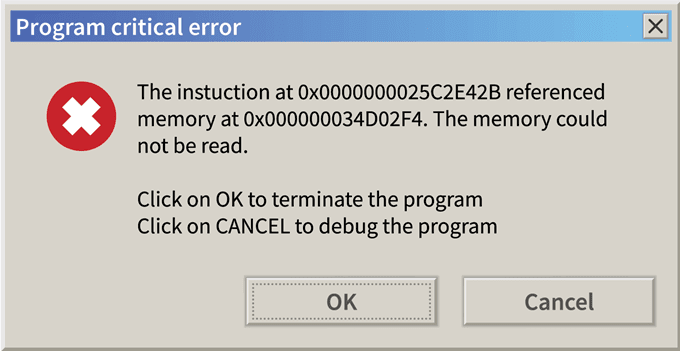
explorer.exe - The memory could not be read. On shutdown/reboot


xxx123

Member
Member
Local time
5:58 AM
Posts
77
OS
w11
I plugged this pc and formatted disk in uefi.

13900K stock

2x16 GB DDR5 GSKILL 6800

Rtx 4090 Gigabyte Gaming

Aorus Elite Z790 AX

SSD KINGSTON 2TB

Seasonic 1300W PX ATX 3.0 PCIE 5.


Today i rebooted pc by shutdown button in start menu and this popped:


explorer.exe - application error

The instruction at 0x00007FFD4938C34B referenced memory at

0x0000000000000008. The memory could not be read.


Is my pc stable? I dont oc pc,all stock.Should i check RAM BY KARHU RAMTEST? I have win 11
 
Last edited:

My Computer My Computer

At a glance

w11
OS
w11
Since it's a new machine, for peace of mind I would definitely test the ram. I know nothing about KARHU as most everyone here uses Memtest86 with 4 passes. However, this error could could also be related to other causes as well such as graphics card/driver. I would use these instructions to gather the necessary logs and dump files. Zip the files and upload the zipped file to any cloud provider (Onedrive, dropbox, googledrive, etc) Provide a shared link in this post so @zbook or one of the other guys experienced in analyzing logs can check them out for you.
 

My Computers My Computers

  • At a glance

    Windows 11 Pro 25H2 26200.8875i9-10900 10 core 20 threads32 gbnone-Intel UHD Graphics 630
    OS
    Windows 11 Pro 25H2 26200.8875
    Computer type
    PC/Desktop
    Manufacturer/Model
    Dell Optiplex 7080
    CPU
    i9-10900 10 core 20 threads
    Motherboard
    DELL 0J37VM
    Memory
    32 gb
    Graphics Card(s)
    none-Intel UHD Graphics 630
    Sound Card
    Integrated Realtek
    Monitor(s) Displays
    Benq 27
    Screen Resolution
    2560x1440
    Hard Drives
    2x1tb Solidigm m.2 nvme /External drives 512gb Samsung m.2 sata+2tb Kingston m2.nvme
    PSU
    500w
    Case
    MT
    Cooling
    Dell Premium
    Keyboard
    Logitech wired
    Mouse
    Logitech wireless
    Internet Speed
    so slow I'm too embarrassed to tell
    Browser
    #1 Edge #2 Firefox
    Antivirus
    Defender+MWB Premium
  • At a glance

    Windows 11 Pro 24H2 26200.8875AMD Ryzen 7 6800U32 gbintegrated
    Operating System
    Windows 11 Pro 24H2 26200.8875
    Computer type
    PC/Desktop
    Manufacturer/Model
    Beelink Mini PC SER5
    CPU
    AMD Ryzen 7 6800U
    Memory
    32 gb
    Graphics card(s)
    integrated
    Sound Card
    integrated
    Monitor(s) Displays
    Benq 27
    Screen Resolution
    2560x1440
    Hard Drives
    1TB Crucial nvme
    Keyboard
    Logitech wired
    Mouse
    Logitech wireless
    Internet Speed
    still too embarrassed to tell
    Browser
    Firefox
    Antivirus
    Defender
    Other Info
    System 3 is non compliant Dell 9020 i7-4770/24gb ram Win11 PRO 26200.8875
I closed all background programs and then shutdown/reboot no more that error. Maybe it was some conflict or i have bad hardware?
 

My Computer My Computer

At a glance

w11
OS
w11
Before jumping to the worst case scenario I would like to point out that we very recently had a few Windows updates that could as well be the cause.
I saw the exact same message on shutdown/ restart last night (first restart since the configuration update), I had left MSI Afterburner running when I shutdown.
I ran some tests and found that with no other software running the message didn't appear once in 5 shutdown/ restarts, with Afterburner left running the message occured 3 out of 5 other shutdown/ restarts.
This machine is used for some pretty memory/ graphics intensive workloads and has been/ still is perfectly stable.
 

My Computer My Computer

At a glance

Windows 11 Pro 22H2, build: 22621.521Intel i7-12700K 3.6GHz Base (5.0GHz Turbo)64GB DDR 3600MhzAsus Tuff RTX 3080 10GB OC
OS
Windows 11 Pro 22H2, build: 22621.521
Computer type
PC/Desktop
Manufacturer/Model
Scan 3XS Custom 1700
CPU
Intel i7-12700K 3.6GHz Base (5.0GHz Turbo)
Motherboard
Asus ProArt Creator B660 D4
Memory
64GB DDR 3600Mhz
Graphics Card(s)
Asus Tuff RTX 3080 10GB OC
Sound Card
Onboard Realtek
Monitor(s) Displays
Gigabyte G32QC 32inch 16:9 curved @2560 x 1440p 165Hz Freesync Premium Pro/ Dell SE2422H 24inch 16:9 1920 x 1080p 75Hz Freesync
Screen Resolution
2560 x 1440p & 1920 x 1080p
Hard Drives
WD SN570 1TB NVME (Boot), Samsung 870QVO 1TB (SSD), SanDisk 3D Ultra 500Gb (SSD) x2, Seagate 3Tb Expansion Desk (Ext HDD), 2x Toshiba 1Tb P300 (Ext HDD)
PSU
Corsair RM1000X Modular
Case
Corsair 4000D Airflow Desktop
Cooling
Corsair Hydro H150i RGB Pro XT 360mm Liquid Cooler, 3 x 120mm fans, 1x Exhaust
Keyboard
Microsoft Ergonomic
Mouse
Logitech G402
Internet Speed
800Mbs
Browser
Edge Chromium
Antivirus
Defender, Malwarebytes

My Computer My Computer

At a glance

Windows 10Intel(R) Core(TM) i7-4800MQ CPU @ 2.70GHz16 GB Total: Manufacturer : Samsung MemoryTyp...NVIDIA Quadro K3100M; Intel(R) HD Graphics 4600
OS
Windows 10
Computer type
Laptop
Manufacturer/Model
HP
CPU
Intel(R) Core(TM) i7-4800MQ CPU @ 2.70GHz
Motherboard
Product : 190A Version : KBC Version 94.56
Memory
16 GB Total: Manufacturer : Samsung MemoryType : DDR3 FormFactor : SODIMM Capacity : 8GB Speed : 1600
Graphics Card(s)
NVIDIA Quadro K3100M; Intel(R) HD Graphics 4600
Sound Card
IDT High Definition Audio CODEC; PNP Device ID HDAUDIO\FUNC_01&VEN_111D&DEV_76E0
Hard Drives
Model Hitachi HTS727575A9E364
Antivirus
Microsoft Defender
Other Info
Mobile Workstation
Ah ok thank you.It happened once just.
 

My Computer My Computer

At a glance

w11
OS
w11

Latest Support Threads

Back
Top Bottom