External drive errors


Tasmania Green

Well-known member
Member
Local time
10:42 PM
Posts
556
OS
Windows 11 Pro - version 24H2
I plugged my external drive into my pc for the first time since the beginning of the year. It's an SSD that I put into an external case. I put it together after building my first pc and used it to backup the computer using the Hasleo Backup Suite. I found Hasleo to be too confusing so today I installed IDrive. I would like to use my external drive as a local backup my pc.

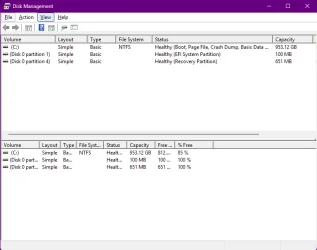
Unfortunately, my computer is not recognising my external drive and says there is an error. I think I should reformat the external drive. However, since I consider myself still very new to tinkering with pc's I wanted to get the opinion of the people here since most of you have more computer experience than I do.

1- The first screenshot is the error message I received when I connected the external drive.
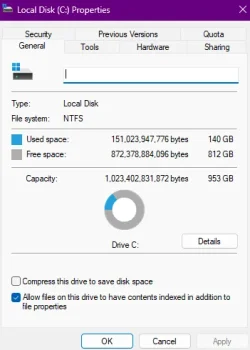
2- The second screenshot is the information from Disk Management.
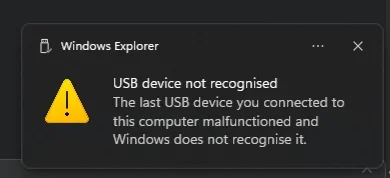
3- The third screenshot is of my internal C drive. I'm including this to help ensure I don't erase it. That would be, in technical terms, "bad." lol.


What are your thoughts?
 

Attachments
  • 1 - Error message.webp
    1 - Error message.webp
    6.7 KB · Views: 2
  • 2 - Disk Manager.webp
    2 - Disk Manager.webp
    27.7 KB · Views: 2
  • 3 - internal C drive .webp
    3 - internal C drive .webp
    18.7 KB · Views: 2

My Computer My Computer

At a glance

Windows 11 Pro - version 24H2AMD Ryzen 5 7600X 6 Core AM5 5.3GHz CPUSilicon Power XPOWER Zenith 32GB (16GBx2) CL3...MSI GeForce RTX 4060 Ventus 2X Black 8G OC Gr...
OS
Windows 11 Pro - version 24H2
Computer type
PC/Desktop
CPU
AMD Ryzen 5 7600X 6 Core AM5 5.3GHz CPU
Motherboard
2024 MSI MAG B650 GAMING PLUS WIFI
Memory
Silicon Power XPOWER Zenith 32GB (16GBx2) CL30,1.35V UDIMM 6000MHz DDR5 RAM
Graphics Card(s)
MSI GeForce RTX 4060 Ventus 2X Black 8G OC Graphics Card
Monitor(s) Displays
Asus ROG Strix XG32WCS - 32in HDR VA 180Hz USB Type-C FreeSync Curved Gaming Monitor
Screen Resolution
2560 x 1440
Hard Drives
1) Silicon Power 1TB P34A60 Gen3x4 TLC R/W up to 2,200/1,600 MB/s PCIe M.2 NVMe SSD

2) Crucial 1TB E100 CT1000E100SSD8 Gen4 M.2 NVMe SSD
PSU
MSI 750W MAG A750GL 80+ Gold PCIe 5 ATX 3.0 Modular Power Supply
Case
SilverStone Fara R1 Pro V2 Tempered Glass ATX Case - Black
Cooling
Thermalright Peerless Assassin 120 SE ARGB Dual Loop CPU Cooler, 120mm Fan
Antivirus
Microsoft Defender
Have you tried a different USB port and a different cable?
 

My Computers My Computers

  • At a glance

    Windows 11 Pro x64i9 14900K P/E 5.8/4.5 GHz, cache 5.0 GHz96GB (2x48) G.skill Ripjaws 6800 MT/sAsus ROG Strix 4070 Ti OC
    OS
    Windows 11 Pro x64
    Computer type
    PC/Desktop
    Manufacturer/Model
    📷🔈🎧 🪛 DIY Photoshop/Audio/Game/tinker
    CPU
    i9 14900K P/E 5.8/4.5 GHz, cache 5.0 GHz
    Motherboard
    Asus ROG Maximus Z790 Dark Hero
    Memory
    🐏 96GB (2x48) G.skill Ripjaws 6800 MT/s
    Graphics Card(s)
    Asus ROG Strix 4070 Ti OC
    Sound Card
    🔊Bowers & Wilkins 606 S3 speakers; Audiolabs 7000a integrated amp; RSL 10S Mk2 sub; Creative Pebble Pro Minimilist
    Monitor(s) Displays
    🖥️🖥️ Eizo CG2730 ColorEdge, ViewSonic VP2768
    Screen Resolution
    🖥️🖥️ 2560 x 1440p x 2
    Hard Drives
    💾 WDC SN850X 4TB nvme, SN850 1TB nvme, SK-Hynix 2 TB P41 nvme,. Sabrent USB-C DS-SC5B 5-bay docking station: 6TB WDC Black, 6TB Ironwolf Pro; 2x 2TB WDC Black HDD
    PSU
    ⚡️ 850W Seasonic Vertex PX-850 ATX 3.0/PCI-E 5.0
    Case
    Fractal Design North XL Mesh, Black Walnut
    Cooling
    ❄️ EK Nucleus black 360 AIO w/Phanteks T30-120 fans, 2 Noctua NF-A14 Chromax case fan, 1 T30-120 fan cooling memory
    Keyboard
    ⌨️ Keychron Q3 Max TKL with custom GMK Redsuns Red Samuri keycaps, TX Stabs
    Mouse
    🖱️ Logitech G305 wireless gaming
    Internet Speed
    ⬇️ 500 Mb/s ⬆️ 12 Mb/s
    Browser
    🔥🦊 Firefox
    Antivirus
    🦺 Defender, Macrium Reflect X 🏆
    Other Info
    Phangkey Amaterasu V2 Desk Mat
  • At a glance

    Apple M1
    Computer type
    Laptop
    Manufacturer/Model
    💻 Apple 13" Macbook Pro 2020 (m1)
    CPU
    Apple M1
    Screen Resolution
    2560x1600
    Browser
    Firefox

My Computer My Computer

At a glance

Windows 11 Pro - version 24H2AMD Ryzen 5 7600X 6 Core AM5 5.3GHz CPUSilicon Power XPOWER Zenith 32GB (16GBx2) CL3...MSI GeForce RTX 4060 Ventus 2X Black 8G OC Gr...
OS
Windows 11 Pro - version 24H2
Computer type
PC/Desktop
CPU
AMD Ryzen 5 7600X 6 Core AM5 5.3GHz CPU
Motherboard
2024 MSI MAG B650 GAMING PLUS WIFI
Memory
Silicon Power XPOWER Zenith 32GB (16GBx2) CL30,1.35V UDIMM 6000MHz DDR5 RAM
Graphics Card(s)
MSI GeForce RTX 4060 Ventus 2X Black 8G OC Graphics Card
Monitor(s) Displays
Asus ROG Strix XG32WCS - 32in HDR VA 180Hz USB Type-C FreeSync Curved Gaming Monitor
Screen Resolution
2560 x 1440
Hard Drives
1) Silicon Power 1TB P34A60 Gen3x4 TLC R/W up to 2,200/1,600 MB/s PCIe M.2 NVMe SSD

2) Crucial 1TB E100 CT1000E100SSD8 Gen4 M.2 NVMe SSD
PSU
MSI 750W MAG A750GL 80+ Gold PCIe 5 ATX 3.0 Modular Power Supply
Case
SilverStone Fara R1 Pro V2 Tempered Glass ATX Case - Black
Cooling
Thermalright Peerless Assassin 120 SE ARGB Dual Loop CPU Cooler, 120mm Fan
Antivirus
Microsoft Defender

My Computer My Computer

At a glance

Microsoft Windows 11 HomeIntel Core i5-13490F2 x 16 Patriot Memory (PDP Systems) PSD516G56...GIGABYTE GeForce RTX 4070 WINDFORCE OC 12G (G...
OS
Microsoft Windows 11 Home
Computer type
PC/Desktop
Manufacturer/Model
MSI MS-7D98
CPU
Intel Core i5-13490F
Motherboard
MSI B760 GAMING PLUS WIFI
Memory
2 x 16 Patriot Memory (PDP Systems) PSD516G560081 6400MT (32-37-37-74); 1.35V)
Graphics Card(s)
GIGABYTE GeForce RTX 4070 WINDFORCE OC 12G (GV-N4070WF3OC-12GD)
Sound Card
Bluetooth Аудио
Monitor(s) Displays
INNOCN 15K1F
Screen Resolution
1920 x 1080
Hard Drives
WD_BLACK SN770 250GB
KINGSTON SNV2S1000G (ELFK0S.6)
PSU
Thermaltake Toughpower GF3 1000W
Case
CG560 - DeepCool
Cooling
ID-COOLING SE-224-XTS / 2 x 140Mm Fan - rear and top; 3 x 120Mm - front
Keyboard
Corsair K70 RGB TKL
Mouse
Corsair KATAR PRO XT
Internet Speed
100 Mbps
Browser
Firefox
Antivirus
Microsoft Defender Antivirus
Other Info
https://www.userbenchmark.com/UserRun/66553205
If you installed idrive before this issue occured, try u installing it.
 

My Computers My Computers

  • At a glance

    Windows 11 Pro x64i9 14900K P/E 5.8/4.5 GHz, cache 5.0 GHz96GB (2x48) G.skill Ripjaws 6800 MT/sAsus ROG Strix 4070 Ti OC
    OS
    Windows 11 Pro x64
    Computer type
    PC/Desktop
    Manufacturer/Model
    📷🔈🎧 🪛 DIY Photoshop/Audio/Game/tinker
    CPU
    i9 14900K P/E 5.8/4.5 GHz, cache 5.0 GHz
    Motherboard
    Asus ROG Maximus Z790 Dark Hero
    Memory
    🐏 96GB (2x48) G.skill Ripjaws 6800 MT/s
    Graphics Card(s)
    Asus ROG Strix 4070 Ti OC
    Sound Card
    🔊Bowers & Wilkins 606 S3 speakers; Audiolabs 7000a integrated amp; RSL 10S Mk2 sub; Creative Pebble Pro Minimilist
    Monitor(s) Displays
    🖥️🖥️ Eizo CG2730 ColorEdge, ViewSonic VP2768
    Screen Resolution
    🖥️🖥️ 2560 x 1440p x 2
    Hard Drives
    💾 WDC SN850X 4TB nvme, SN850 1TB nvme, SK-Hynix 2 TB P41 nvme,. Sabrent USB-C DS-SC5B 5-bay docking station: 6TB WDC Black, 6TB Ironwolf Pro; 2x 2TB WDC Black HDD
    PSU
    ⚡️ 850W Seasonic Vertex PX-850 ATX 3.0/PCI-E 5.0
    Case
    Fractal Design North XL Mesh, Black Walnut
    Cooling
    ❄️ EK Nucleus black 360 AIO w/Phanteks T30-120 fans, 2 Noctua NF-A14 Chromax case fan, 1 T30-120 fan cooling memory
    Keyboard
    ⌨️ Keychron Q3 Max TKL with custom GMK Redsuns Red Samuri keycaps, TX Stabs
    Mouse
    🖱️ Logitech G305 wireless gaming
    Internet Speed
    ⬇️ 500 Mb/s ⬆️ 12 Mb/s
    Browser
    🔥🦊 Firefox
    Antivirus
    🦺 Defender, Macrium Reflect X 🏆
    Other Info
    Phangkey Amaterasu V2 Desk Mat
  • At a glance

    Apple M1
    Computer type
    Laptop
    Manufacturer/Model
    💻 Apple 13" Macbook Pro 2020 (m1)

    CPU
    Apple M1
    Screen Resolution
    2560x1600
    Browser
    Firefox

My Computer My Computer

At a glance

Windows 11 Pro - version 24H2AMD Ryzen 5 7600X 6 Core AM5 5.3GHz CPUSilicon Power XPOWER Zenith 32GB (16GBx2) CL3...MSI GeForce RTX 4060 Ventus 2X Black 8G OC Gr...
OS
Windows 11 Pro - version 24H2
Computer type
PC/Desktop
CPU
AMD Ryzen 5 7600X 6 Core AM5 5.3GHz CPU
Motherboard
2024 MSI MAG B650 GAMING PLUS WIFI
Memory
Silicon Power XPOWER Zenith 32GB (16GBx2) CL30,1.35V UDIMM 6000MHz DDR5 RAM
Graphics Card(s)
MSI GeForce RTX 4060 Ventus 2X Black 8G OC Graphics Card
Monitor(s) Displays
Asus ROG Strix XG32WCS - 32in HDR VA 180Hz USB Type-C FreeSync Curved Gaming Monitor
Screen Resolution
2560 x 1440
Hard Drives
1) Silicon Power 1TB P34A60 Gen3x4 TLC R/W up to 2,200/1,600 MB/s PCIe M.2 NVMe SSD

2) Crucial 1TB E100 CT1000E100SSD8 Gen4 M.2 NVMe SSD
PSU
MSI 750W MAG A750GL 80+ Gold PCIe 5 ATX 3.0 Modular Power Supply
Case
SilverStone Fara R1 Pro V2 Tempered Glass ATX Case - Black
Cooling
Thermalright Peerless Assassin 120 SE ARGB Dual Loop CPU Cooler, 120mm Fan
Antivirus
Microsoft Defender

My Computers My Computers

  • At a glance

    W10Ryzen3-2200G16 GB Kingston HyperX DDR4Integrated
    OS
    W10
    Computer type
    PC/Desktop
    Manufacturer/Model
    Home brew
    CPU
    Ryzen3-2200G
    Motherboard
    GA-A320M-S2H
    Memory
    16 GB Kingston HyperX DDR4
    Graphics Card(s)
    Integrated
    Sound Card
    Integrated
    Monitor(s) Displays
    LG W2246
    Screen Resolution
    1920x1080
    Hard Drives
    Intel 760p 256GB NVMe M.2
    Seagate Barracuda 7200 1TB
    Gash Seagate ST31608
    PSU
    2006-vintage no-name
    Case
    Acer Aspire 2006
    Cooling
    Air (fan-assist)
    Keyboard
    HP SK-2885
    Mouse
    wireless
    Internet Speed
    32 mbps
    Browser
    FF latest
    Antivirus
    MS Defender
  • At a glance

    W10Ryzen 5 3500U8 GBon-board
    Operating System
    W10
    Computer type
    Laptop
    Manufacturer/Model
    HP 255 G8
    CPU
    Ryzen 5 3500U
    Memory
    8 GB
    Graphics card(s)
    on-board
    Monitor(s) Displays
    16"
    Screen Resolution
    1920x1080
    Hard Drives
    Samsung SSD 512GB Nvme
    Browser
    FF + Edge
    Antivirus
    MS Defender
Go to the Device Manager > View > Show hidden devices > Disk drives.

You should see signs of the drive greyed out.
Once you are 100% it is the correct drive right click > uninstall device.

Then scan for Hardware changes, and hope...
 

My Computer My Computer

At a glance

Windows 11
OS
Windows 11
Since the external drive is not recognized, all those partitions you see in disk management are your system drive partitions. As was suggested, connect the external drive to another computer to see if that computer recognizes the drive.

If it is NOT recognized by another computer,
either the drive itself OR the enclosure has a problem. To prove which it is, you would have to remove the drive from the enclosure and do one of 2 things - connect the drive internally to test the validity of the drive itself OR put it into another enclosure to prove whether its the enclosure causing the problem.

If it IS recognized by another computer,
then you would look inward to it being an issue with this computer.
 

My Computers My Computers

  • At a glance

    Windows 11 Pro 25H2 26200.8655i9-10900 10 core 20 threads32 gbnone-Intel UHD Graphics 630
    OS
    Windows 11 Pro 25H2 26200.8655
    Computer type
    PC/Desktop
    Manufacturer/Model
    Dell Optiplex 7080
    CPU
    i9-10900 10 core 20 threads
    Motherboard
    DELL 0J37VM
    Memory
    32 gb
    Graphics Card(s)
    none-Intel UHD Graphics 630
    Sound Card
    Integrated Realtek
    Monitor(s) Displays
    Benq 27
    Screen Resolution
    2560x1440
    Hard Drives
    2x1tb Solidigm m.2 nvme /External drives 512gb Samsung m.2 sata+2tb Kingston m2.nvme
    PSU
    500w
    Case
    MT
    Cooling
    Dell Premium
    Keyboard
    Logitech wired
    Mouse
    Logitech wireless
    Internet Speed
    so slow I'm too embarrassed to tell
    Browser
    #1 Edge #2 Firefox
    Antivirus
    Defender+MWB Premium
  • At a glance

    Windows 11 Pro 24H2 26200.8457AMD Ryzen 7 6800U32 gbintegrated
    Operating System
    Windows 11 Pro 24H2 26200.8457
    Computer type
    PC/Desktop
    Manufacturer/Model
    Beelink Mini PC SER5
    CPU
    AMD Ryzen 7 6800U
    Memory
    32 gb
    Graphics card(s)
    integrated
    Sound Card
    integrated
    Monitor(s) Displays
    Benq 27
    Screen Resolution
    2560x1440
    Hard Drives
    1TB Crucial nvme
    Keyboard
    Logitech wired
    Mouse
    Logitech wireless
    Internet Speed
    still too embarrassed to tell
    Browser
    Firefox
    Antivirus
    Defender
    Other Info
    System 3 is non compliant Dell 9020 i7-4770/24gb ram Win11 PRO 26200.8457
Remove the SSD from the Enclosure, and you should be seeing something like this with just the Enclosure in Disk Management and Device Manager.
I do not have a spare SSD to put in my enclosure.

View attachment 143205View attachment 143206
 

My Computer My Computer

At a glance

Windows 11
OS
Windows 11
It looks like a bad external drive even a second computer wasn’t reading it.

I’ll have to get another external drive. May want to make one myself after I read up on how to do it.
 

My Computer My Computer

At a glance

Windows 11 Pro - version 24H2AMD Ryzen 5 7600X 6 Core AM5 5.3GHz CPUSilicon Power XPOWER Zenith 32GB (16GBx2) CL3...MSI GeForce RTX 4060 Ventus 2X Black 8G OC Gr...
OS
Windows 11 Pro - version 24H2
Computer type
PC/Desktop
CPU
AMD Ryzen 5 7600X 6 Core AM5 5.3GHz CPU
Motherboard
2024 MSI MAG B650 GAMING PLUS WIFI
Memory
Silicon Power XPOWER Zenith 32GB (16GBx2) CL30,1.35V UDIMM 6000MHz DDR5 RAM
Graphics Card(s)
MSI GeForce RTX 4060 Ventus 2X Black 8G OC Graphics Card
Monitor(s) Displays
Asus ROG Strix XG32WCS - 32in HDR VA 180Hz USB Type-C FreeSync Curved Gaming Monitor
Screen Resolution
2560 x 1440
Hard Drives
1) Silicon Power 1TB P34A60 Gen3x4 TLC R/W up to 2,200/1,600 MB/s PCIe M.2 NVMe SSD

2) Crucial 1TB E100 CT1000E100SSD8 Gen4 M.2 NVMe SSD
PSU
MSI 750W MAG A750GL 80+ Gold PCIe 5 ATX 3.0 Modular Power Supply
Case
SilverStone Fara R1 Pro V2 Tempered Glass ATX Case - Black
Cooling
Thermalright Peerless Assassin 120 SE ARGB Dual Loop CPU Cooler, 120mm Fan
Antivirus
Microsoft Defender
It looks like a bad external drive even a second computer wasn’t reading it.

I’ll have to get another external drive. May want to make one myself after I read up on how to do it.
Not so fast. Since you are using a desktop here's a possible fix:

1. Open your case.
2. Make certain your PC is shut down.
3. Open your external drive enclosure and remove the drive.
4. Connect the drive directly inside your case.
5. Boot up your PC and check Disk Management for the drive.

Sadly, Sabrent enclosures are notorious for bad bridges. Your drive might be fine or it may just need reformatting but we can proceed on nothing until we can get the drive to show. Now clearly it won't be drive 'C' as this is your main drive running your operating system. It might need a drive letter or it may need initialization. If it doesn't show at all after this then there is a good chance that drive is finished. You could proceed at a later time to try a different drive in your Sabrent enclosure to further validate.

I hope this helps
 

My Computer My Computer

At a glance

WIN 11, WIN 10, WIN 8.1, WIN 7 U, WIN 7 PRO, ...Intel i7 6900K and i9-7960X / AMD 3800X (8 core)128 GB CORSAIR DOMINATOR PLATINUM (B DIE)NVIDIA 1070 and RTX 3070
OS
WIN 11, WIN 10, WIN 8.1, WIN 7 U, WIN 7 PRO, WIN 7 HOME (32 Bit), LINUX MINT
Computer type
PC/Desktop
Manufacturer/Model
DIY, ASUS, and DELL
CPU
Intel i7 6900K and i9-7960X / AMD 3800X (8 core)
Motherboard
ASUS X99E-WS USB 3.1 and ASUS X299 SAGE
Memory
128 GB CORSAIR DOMINATOR PLATINUM (B DIE)
Graphics Card(s)
NVIDIA 1070 and RTX 3070
Sound Card
Crystal Sound (onboard)
Monitor(s) Displays
single Samsung 30" 4K and 8" aux monitor
Screen Resolution
4K and something equally attrocious. I'll be working on this.
Hard Drives
A, B, C, D, E, F, G, H, I, J, K, L, M, N, O, P, Q, R, S, T, U, V, W

Ports X, Y, and Z are reserved for USB access and removable drives.

Drive types consist of the following: Various mechanical hard drives bearing the brand names, Seagate, Toshiba, and Western Digital. Various NVMe drives bearing the brand names Kingston, Intel, Silicon Power, Crucial, Western Digital, and Team Group. Various SATA SSDs bearing various different brand names.

RAID arrays included:

LSI RAID 10 (WD Velociraptors) 1115.72 GB
LSI RAID 10 (WD SSDS) 463.80 GB

INTEL RAID 0 (KINGSTON HYPER X) System 447.14 GB
INTEL RAID 1 TOSHIBA ENTERPRIZE class Data 2794.52 GB
INTEL RAID 1 SEAGATE HYBRID 931.51 GB
PSU
SEVERAL. I prefer my Corsair Platinum HX1000i but I also like EVGA power supplies
Case
ThermalTake Level 10 GT (among others)
Cooling
Noctua is my favorite and I use it in my main. I also own various other coolers.
Keyboard
all kinds.
Mouse
all kinds
Internet Speed
360 mbps - 1 gbps (depending)
Browser
FIREFOX
Antivirus
KASPERSKY (no apologies)
Other Info
Gave Dell touch screen with Windows 11 to daughter and got me an OTVOC. Being a PC builder I own many desktop PCs as well. I am a father of five providing PCs, laptops, and tablets for all my family, most of which I have modified, rebuilt, or simply built from scratch. I do not own a cell phone, never have, never will.
Not so fast. Since you are using a desktop here's a possible fix:

1. Open your case.
2. Make certain your PC is shut down.
3. Open your external drive enclosure and remove the drive.
4. Connect the drive directly inside your case.
5. Boot up your PC and check Disk Management for the drive.

Sadly, Sabrent enclosures are notorious for bad bridges. Your drive might be fine or it may just need reformatting but we can proceed on nothing until we can get the drive to show. Now clearly it won't be drive 'C' as this is your main drive running your operating system. It might need a drive letter or it may need initialization. If it doesn't show at all after this then there is a good chance that drive is finished. You could proceed at a later time to try a different drive in your Sabrent enclosure to further validate.

I hope this helps
After further checking, the drive is indeed bad. Well, at least I know now. I’m backing up my pc with IDrive so at least I have some backup. I would like to have a local backup as well, but that’s not necessary right this moment.
 

My Computer My Computer

At a glance

Windows 11 Pro - version 24H2AMD Ryzen 5 7600X 6 Core AM5 5.3GHz CPUSilicon Power XPOWER Zenith 32GB (16GBx2) CL3...MSI GeForce RTX 4060 Ventus 2X Black 8G OC Gr...
OS
Windows 11 Pro - version 24H2
Computer type
PC/Desktop
CPU
AMD Ryzen 5 7600X 6 Core AM5 5.3GHz CPU
Motherboard
2024 MSI MAG B650 GAMING PLUS WIFI
Memory
Silicon Power XPOWER Zenith 32GB (16GBx2) CL30,1.35V UDIMM 6000MHz DDR5 RAM
Graphics Card(s)
MSI GeForce RTX 4060 Ventus 2X Black 8G OC Graphics Card
Monitor(s) Displays
Asus ROG Strix XG32WCS - 32in HDR VA 180Hz USB Type-C FreeSync Curved Gaming Monitor
Screen Resolution
2560 x 1440
Hard Drives
1) Silicon Power 1TB P34A60 Gen3x4 TLC R/W up to 2,200/1,600 MB/s PCIe M.2 NVMe SSD

2) Crucial 1TB E100 CT1000E100SSD8 Gen4 M.2 NVMe SSD
PSU
MSI 750W MAG A750GL 80+ Gold PCIe 5 ATX 3.0 Modular Power Supply
Case
SilverStone Fara R1 Pro V2 Tempered Glass ATX Case - Black
Cooling
Thermalright Peerless Assassin 120 SE ARGB Dual Loop CPU Cooler, 120mm Fan
Antivirus
Microsoft Defender
Considering I can restore a full system image stored locally and be back in business in 4 minutes, I cannot see how a cloud restore could come anywhere close to that.
 

My Computers My Computers

  • At a glance

    Windows 11 Pro 25H2 26200.8655i9-10900 10 core 20 threads32 gbnone-Intel UHD Graphics 630
    OS
    Windows 11 Pro 25H2 26200.8655
    Computer type
    PC/Desktop
    Manufacturer/Model
    Dell Optiplex 7080
    CPU
    i9-10900 10 core 20 threads
    Motherboard
    DELL 0J37VM
    Memory
    32 gb
    Graphics Card(s)
    none-Intel UHD Graphics 630
    Sound Card
    Integrated Realtek
    Monitor(s) Displays
    Benq 27
    Screen Resolution
    2560x1440
    Hard Drives
    2x1tb Solidigm m.2 nvme /External drives 512gb Samsung m.2 sata+2tb Kingston m2.nvme
    PSU
    500w
    Case
    MT
    Cooling
    Dell Premium
    Keyboard
    Logitech wired
    Mouse
    Logitech wireless
    Internet Speed
    so slow I'm too embarrassed to tell
    Browser
    #1 Edge #2 Firefox
    Antivirus
    Defender+MWB Premium
  • At a glance

    Windows 11 Pro 24H2 26200.8457AMD Ryzen 7 6800U32 gbintegrated
    Operating System
    Windows 11 Pro 24H2 26200.8457
    Computer type
    PC/Desktop
    Manufacturer/Model
    Beelink Mini PC SER5
    CPU
    AMD Ryzen 7 6800U
    Memory
    32 gb
    Graphics card(s)
    integrated
    Sound Card
    integrated
    Monitor(s) Displays
    Benq 27
    Screen Resolution
    2560x1440
    Hard Drives
    1TB Crucial nvme
    Keyboard
    Logitech wired
    Mouse
    Logitech wireless
    Internet Speed
    still too embarrassed to tell
    Browser
    Firefox
    Antivirus
    Defender
    Other Info
    System 3 is non compliant Dell 9020 i7-4770/24gb ram Win11 PRO 26200.8457
Ah, so it is a complete packaged USB SSD drive so no possibility of separating out the components.

Nothing you can do about it.
 

My Computer My Computer

At a glance

Windows 11
OS
Windows 11
Ah, so it is a complete packaged USB SSD drive so no possibility of separating out the components.

Nothing you can do about it.
Surprisingly it is often a controller chip that goes and frequently SSDs are saved by technicians who essentially make their livings in data recovery. So depending on how valued the data on the drive is there is still a chance that it can be recovered. BUT who wants to pay two thousand bucks to recover a $200 hard drive that no longer works?
 

My Computer My Computer

At a glance

WIN 11, WIN 10, WIN 8.1, WIN 7 U, WIN 7 PRO, ...Intel i7 6900K and i9-7960X / AMD 3800X (8 core)128 GB CORSAIR DOMINATOR PLATINUM (B DIE)NVIDIA 1070 and RTX 3070
OS
WIN 11, WIN 10, WIN 8.1, WIN 7 U, WIN 7 PRO, WIN 7 HOME (32 Bit), LINUX MINT
Computer type
PC/Desktop
Manufacturer/Model
DIY, ASUS, and DELL
CPU
Intel i7 6900K and i9-7960X / AMD 3800X (8 core)
Motherboard
ASUS X99E-WS USB 3.1 and ASUS X299 SAGE
Memory
128 GB CORSAIR DOMINATOR PLATINUM (B DIE)
Graphics Card(s)
NVIDIA 1070 and RTX 3070
Sound Card
Crystal Sound (onboard)
Monitor(s) Displays
single Samsung 30" 4K and 8" aux monitor
Screen Resolution
4K and something equally attrocious. I'll be working on this.
Hard Drives
A, B, C, D, E, F, G, H, I, J, K, L, M, N, O, P, Q, R, S, T, U, V, W

Ports X, Y, and Z are reserved for USB access and removable drives.

Drive types consist of the following: Various mechanical hard drives bearing the brand names, Seagate, Toshiba, and Western Digital. Various NVMe drives bearing the brand names Kingston, Intel, Silicon Power, Crucial, Western Digital, and Team Group. Various SATA SSDs bearing various different brand names.

RAID arrays included:

LSI RAID 10 (WD Velociraptors) 1115.72 GB
LSI RAID 10 (WD SSDS) 463.80 GB

INTEL RAID 0 (KINGSTON HYPER X) System 447.14 GB
INTEL RAID 1 TOSHIBA ENTERPRIZE class Data 2794.52 GB
INTEL RAID 1 SEAGATE HYBRID 931.51 GB
PSU
SEVERAL. I prefer my Corsair Platinum HX1000i but I also like EVGA power supplies
Case
ThermalTake Level 10 GT (among others)
Cooling
Noctua is my favorite and I use it in my main. I also own various other coolers.
Keyboard
all kinds.
Mouse
all kinds
Internet Speed
360 mbps - 1 gbps (depending)
Browser
FIREFOX
Antivirus
KASPERSKY (no apologies)
Other Info
Gave Dell touch screen with Windows 11 to daughter and got me an OTVOC. Being a PC builder I own many desktop PCs as well. I am a father of five providing PCs, laptops, and tablets for all my family, most of which I have modified, rebuilt, or simply built from scratch. I do not own a cell phone, never have, never will.
Irrelevant the OP is doing a backups, data recovery is not going to be required.

The OP also said "It's an SSD that I put into an external case."
That reads as an M.2 enclosure with an M.2 SSD plugged in, hence the comments, but apparently it is a packaged USB SSD. Thus my earlier comments seem to be irrelevant.
 

My Computer My Computer

At a glance

Windows 11
OS
Windows 11
Thanks to everyone who added to this chat. I'm still new to building computers and working with tech and I appreciate learning from you.
 

My Computer My Computer

At a glance

Windows 11 Pro - version 24H2AMD Ryzen 5 7600X 6 Core AM5 5.3GHz CPUSilicon Power XPOWER Zenith 32GB (16GBx2) CL3...MSI GeForce RTX 4060 Ventus 2X Black 8G OC Gr...
OS
Windows 11 Pro - version 24H2
Computer type
PC/Desktop
CPU
AMD Ryzen 5 7600X 6 Core AM5 5.3GHz CPU
Motherboard
2024 MSI MAG B650 GAMING PLUS WIFI
Memory
Silicon Power XPOWER Zenith 32GB (16GBx2) CL30,1.35V UDIMM 6000MHz DDR5 RAM
Graphics Card(s)
MSI GeForce RTX 4060 Ventus 2X Black 8G OC Graphics Card
Monitor(s) Displays
Asus ROG Strix XG32WCS - 32in HDR VA 180Hz USB Type-C FreeSync Curved Gaming Monitor
Screen Resolution
2560 x 1440
Hard Drives
1) Silicon Power 1TB P34A60 Gen3x4 TLC R/W up to 2,200/1,600 MB/s PCIe M.2 NVMe SSD

2) Crucial 1TB E100 CT1000E100SSD8 Gen4 M.2 NVMe SSD
PSU
MSI 750W MAG A750GL 80+ Gold PCIe 5 ATX 3.0 Modular Power Supply
Case
SilverStone Fara R1 Pro V2 Tempered Glass ATX Case - Black
Cooling
Thermalright Peerless Assassin 120 SE ARGB Dual Loop CPU Cooler, 120mm Fan
Antivirus
Microsoft Defender
Irrelevant the OP is doing a backups, data recovery is not going to be required.

The OP also said "It's an SSD that I put into an external case."
That reads as an M.2 enclosure with an M.2 SSD plugged in, hence the comments, but apparently it is a packaged USB SSD. Thus my earlier comments seem to be irrelevant.
I'm assuming little here but allowing for the possibility that the drive could have been salvaged. Evidently the OP has concluded that this isn't the case. I can't say how many "packaged" enclosures I've cracked open and rescued the drives from but I've never done it with an enclosure using NVMe. If it were a SATA connection inside the drive there might have been a way to determine for certain that the drive was salvageable or not. I would imagine it could be done with a SATA M.2 drive as well. I was about to ask for pictures. The old Sabrent enclosures used to be especially known for weak USB bridges. I have no idea what sort of enclosure the OP was using nor do I have any idea if they were using a Sabrent enclosure. Western Digital "My Book" was another nasty in this regard. The old Seagates used to be somewhat more reliable. It would have been nice to see some pictures of the drive.
 
Last edited:

My Computer My Computer

At a glance

WIN 11, WIN 10, WIN 8.1, WIN 7 U, WIN 7 PRO, ...Intel i7 6900K and i9-7960X / AMD 3800X (8 core)128 GB CORSAIR DOMINATOR PLATINUM (B DIE)NVIDIA 1070 and RTX 3070
OS
WIN 11, WIN 10, WIN 8.1, WIN 7 U, WIN 7 PRO, WIN 7 HOME (32 Bit), LINUX MINT
Computer type
PC/Desktop
Manufacturer/Model
DIY, ASUS, and DELL
CPU
Intel i7 6900K and i9-7960X / AMD 3800X (8 core)
Motherboard
ASUS X99E-WS USB 3.1 and ASUS X299 SAGE
Memory
128 GB CORSAIR DOMINATOR PLATINUM (B DIE)
Graphics Card(s)
NVIDIA 1070 and RTX 3070
Sound Card
Crystal Sound (onboard)
Monitor(s) Displays
single Samsung 30" 4K and 8" aux monitor
Screen Resolution
4K and something equally attrocious. I'll be working on this.
Hard Drives
A, B, C, D, E, F, G, H, I, J, K, L, M, N, O, P, Q, R, S, T, U, V, W

Ports X, Y, and Z are reserved for USB access and removable drives.

Drive types consist of the following: Various mechanical hard drives bearing the brand names, Seagate, Toshiba, and Western Digital. Various NVMe drives bearing the brand names Kingston, Intel, Silicon Power, Crucial, Western Digital, and Team Group. Various SATA SSDs bearing various different brand names.

RAID arrays included:

LSI RAID 10 (WD Velociraptors) 1115.72 GB
LSI RAID 10 (WD SSDS) 463.80 GB

INTEL RAID 0 (KINGSTON HYPER X) System 447.14 GB
INTEL RAID 1 TOSHIBA ENTERPRIZE class Data 2794.52 GB
INTEL RAID 1 SEAGATE HYBRID 931.51 GB
PSU
SEVERAL. I prefer my Corsair Platinum HX1000i but I also like EVGA power supplies
Case
ThermalTake Level 10 GT (among others)
Cooling
Noctua is my favorite and I use it in my main. I also own various other coolers.
Keyboard
all kinds.
Mouse
all kinds
Internet Speed
360 mbps - 1 gbps (depending)
Browser
FIREFOX
Antivirus
KASPERSKY (no apologies)
Other Info
Gave Dell touch screen with Windows 11 to daughter and got me an OTVOC. Being a PC builder I own many desktop PCs as well. I am a father of five providing PCs, laptops, and tablets for all my family, most of which I have modified, rebuilt, or simply built from scratch. I do not own a cell phone, never have, never will.

Latest Support Threads

Back
Top Bottom