- Local time
- 8:36 AM
- Posts
- 5,855
- Location
- Hafnarfjörður IS
- OS
- Windows XP,11 Linux Fedora Rawhide pre-release 45
Hi folks
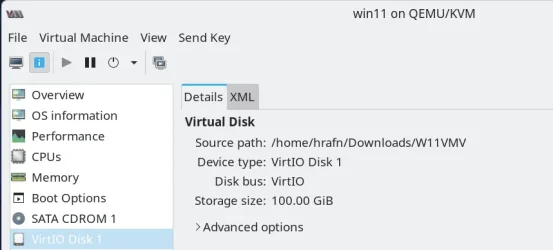
Running Fedora pre release 45 (current release is 44) with latest kernel 7.2 rc 3 on KVM/QEMU using network bridge and HDD's as virtio rather than native SATA the latest W11 26H2 experimental build just FLIES now. I added new virtual HDD type virtio and changed the NIC to virtio and cloned the original SATA virtual disk to the new virtio one using the old Free macrium , removed the SATA disk and rebooted the virt ual machine. Absolutely fine. !!!
Note to get the virtio drivers if you are using KVM/QEMU just download from the FEDORA site and install on your Windows VM. You don't need to use a fedora distro to install these drivers. !!! Note also you can use emulated TPM (it's IBM version) by installing swtpm or equivalent on your distro.
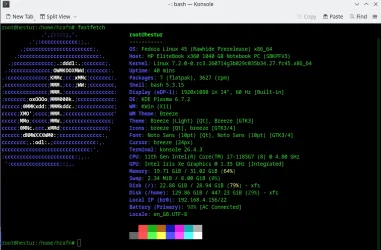
Host system :
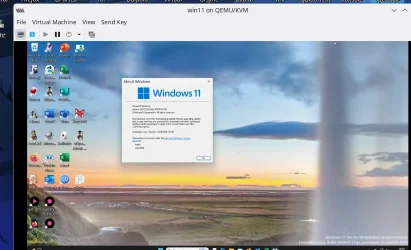
W11 VM
Hint for people wanting to run Windows VM's -- If you can learn a bit of Linux setting up efficient Windows VM's is so much easier than messing around with HYPER-V, the VM's also are much more flexible , can have devices dynamically attached to them and can connect other hardware than just USB drives. A lot of Linux distros have decent Windows like GUI's these days and you can run "Live distros" so you can run the whole thing plus the W11 VM's from external devices not touchiung your running system. The VM's also run far better than when using Virtual Box or VmWare player etc --KVM/QEMU is a genuine hypervisor so extremely efficient on good hardware.
Added -- Hint also for "Linux Technophobes"
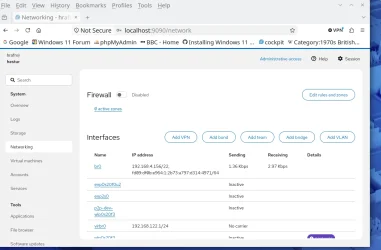
To make things even easier just install cockpit on your distro, start the service and then point your browser to localhost:9090
Then using for example the networking slot on the side pane you can at a strolke create / delete / modify etc network bridge without ANY complex command klines at all -- it's even EASIER than on Native Windows trying to do create a network bridge !!!!
If the "remote" computer isn't on the same machine replace the localhost with ip or machine id .
Currently the W11 VM is idle so the network traffic is zilch but full network speed available when active.
Cheers
jimbo
Running Fedora pre release 45 (current release is 44) with latest kernel 7.2 rc 3 on KVM/QEMU using network bridge and HDD's as virtio rather than native SATA the latest W11 26H2 experimental build just FLIES now. I added new virtual HDD type virtio and changed the NIC to virtio and cloned the original SATA virtual disk to the new virtio one using the old Free macrium , removed the SATA disk and rebooted the virt ual machine. Absolutely fine. !!!
Note to get the virtio drivers if you are using KVM/QEMU just download from the FEDORA site and install on your Windows VM. You don't need to use a fedora distro to install these drivers. !!! Note also you can use emulated TPM (it's IBM version) by installing swtpm or equivalent on your distro.
Host system :
W11 VM
Hint for people wanting to run Windows VM's -- If you can learn a bit of Linux setting up efficient Windows VM's is so much easier than messing around with HYPER-V, the VM's also are much more flexible , can have devices dynamically attached to them and can connect other hardware than just USB drives. A lot of Linux distros have decent Windows like GUI's these days and you can run "Live distros" so you can run the whole thing plus the W11 VM's from external devices not touchiung your running system. The VM's also run far better than when using Virtual Box or VmWare player etc --KVM/QEMU is a genuine hypervisor so extremely efficient on good hardware.
Added -- Hint also for "Linux Technophobes"
To make things even easier just install cockpit on your distro, start the service and then point your browser to localhost:9090
Then using for example the networking slot on the side pane you can at a strolke create / delete / modify etc network bridge without ANY complex command klines at all -- it's even EASIER than on Native Windows trying to do create a network bridge !!!!
If the "remote" computer isn't on the same machine replace the localhost with ip or machine id .
Currently the W11 VM is idle so the network traffic is zilch but full network speed available when active.
Cheers
jimbo
Last edited:
My Computer
At a glance
Windows XP,11 Linux Fedora Rawhide pre-releas...2 X Intel i7
- OS
- Windows XP,11 Linux Fedora Rawhide pre-release 45
- Computer type
- PC/Desktop
- CPU
- 2 X Intel i7
- Screen Resolution
- 4KUHD X 2