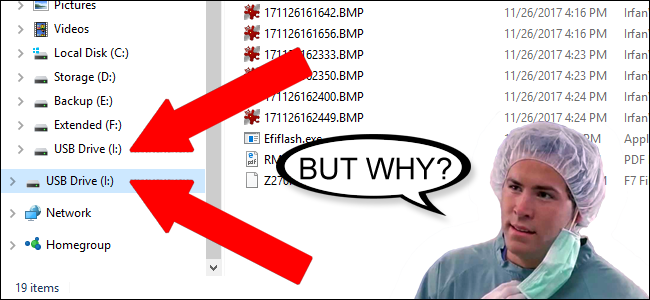
I received a bad preview update that I had to reset my laptop to get rid of it. Then I got a second surprise a old quirk appeared with file explorer I thought would have been fixed a long time ago. the double external drive appeared then a new twist two file explorer in task manger I can not unplugging drive except by restarting lap top cable on restart. I spent a lot of time and money trying to put things back the way they were could someone give me a suggested on file explorer
I received a bad preview update that I had to reset my laptop to get rid of it. Then I got a second surprise a old quirk appeared with file explorer I thought would have been fixed a long time ago. the double external drive appeared
then a new twist two file explorer in task manger I can not unplugging drive except by restarting lap top cable on restart. I spent a lot of time and money trying to put things back the way they were could someone give me a suggested on file explorer
This is also normal. You can have as many instances of File Explorer running as you want. I started 3 (three) instances of File Explorer to illustrate this and here they are in Task Manager:
What you are experiencing is completely normal and there are no errors or bugs to fix.
Windows 11 ProIntel Series 3 Core Ultra X9 388H64GB LPDDR5x 9600 MT/sIntel Arc graphics B390 Panther Lake
OS
Windows 11 Pro
Computer type
Laptop
Manufacturer/Model
Dell XPS 16 DA16260
CPU
Intel Series 3 Core Ultra X9 388H
Memory
64GB LPDDR5x 9600 MT/s
Graphics Card(s)
Intel Arc graphics B390 Panther Lake
Monitor(s) Displays
16" 3.2K Tandem OLED Infinity Edge
Screen Resolution
3200 x 2000 16:10 236 PPI
Hard Drives
1 Terabyte M.2 PCIe NVMe SSD
Case
Black Anodized Aluminum
Cooling
Vapor Chamber Cooling
Mouse
None
Internet Speed
942 Mbps Netgear Mesh + 2 Satellites
Browser
Microsoft Edge (Chromium)
Antivirus
Windows Security (Defender)
Other Info
NPU delivering 67 TOPS
Microsoft 365 subscription
Microsoft Office 365
Microsoft OneDrive 1TB Cloud
Microsoft Visual Studio
Microsoft Visual Studio Code
Microsoft Sysinternals Suite
Microsoft BitLocker
Microsoft Copilot
Dell Support Assist
Dell Command | Update
Macrium Reflect X subscription
1Password Password Manager
Amazon Kindle for PC
Lightroom/Photoshop subscription
Interactive Brokers Trader Workstation
At a glance
Windows 11 ProSnapdragon® X Elite (12 Core) with Hexagon NP...32GB LPDDR5x 8448 MT/sIntegrated Adreno GPU
Operating System
Windows 11 Pro
Computer type
Laptop
Manufacturer/Model
Microsoft Surface Laptop 7
CPU
Snapdragon® X Elite (12 Core) with Hexagon NPU delivering 45 TOPS
Memory
32GB LPDDR5x 8448 MT/s
Graphics card(s)
Integrated Adreno GPU
Sound Card
Omnisonic speakers with Dolby Atmos spatial sound
Monitor(s) Displays
13.8″ PixelSense Flow touchscreen 120 Hz 600 NIT
Screen Resolution
2304 × 1536 (201 PPI), 3:2 aspect ratio
Hard Drives
1 TB PCIe NVMe Gen 4 SSD
Case
Black Anodized Aluminum
Cooling
Vapor Chamber Cooling
Mouse
None
Internet Speed
942 Mbps Netgear Mesh + 2 Satellites
Browser
Microsoft Edge (Chromium)
Antivirus
Windows Security (Defender)
Other Info
Microsoft 365 subscription (Office)
Microsoft Office 365
Microsoft OneDrive 1TB Cloud
Microsoft Visual Studio 2026
Microsoft Visual Studio Code
Lightroom/Photoshop subscription
1Password Password Manager
Microsoft Sysinternals Suite
Amazon Kindle for PC
Microsoft BitLocker
Microsoft Copilot
Interactive Brokers Trader Workstation
I hadn't understood what you were talking about regarding removing a cable.
My cable that is attached to my portable SSD can be unplugged when the drive LED is no longer showing activity. I don't have to restart my PC to do that. Is that what you were talking about?
Windows 11 ProIntel Series 3 Core Ultra X9 388H64GB LPDDR5x 9600 MT/sIntel Arc graphics B390 Panther Lake
OS
Windows 11 Pro
Computer type
Laptop
Manufacturer/Model
Dell XPS 16 DA16260
CPU
Intel Series 3 Core Ultra X9 388H
Memory
64GB LPDDR5x 9600 MT/s
Graphics Card(s)
Intel Arc graphics B390 Panther Lake
Monitor(s) Displays
16" 3.2K Tandem OLED Infinity Edge
Screen Resolution
3200 x 2000 16:10 236 PPI
Hard Drives
1 Terabyte M.2 PCIe NVMe SSD
Case
Black Anodized Aluminum
Cooling
Vapor Chamber Cooling
Mouse
None
Internet Speed
942 Mbps Netgear Mesh + 2 Satellites
Browser
Microsoft Edge (Chromium)
Antivirus
Windows Security (Defender)
Other Info
NPU delivering 67 TOPS
Microsoft 365 subscription
Microsoft Office 365
Microsoft OneDrive 1TB Cloud
Microsoft Visual Studio
Microsoft Visual Studio Code
Microsoft Sysinternals Suite
Microsoft BitLocker
Microsoft Copilot
Dell Support Assist
Dell Command | Update
Macrium Reflect X subscription
1Password Password Manager
Amazon Kindle for PC
Lightroom/Photoshop subscription
Interactive Brokers Trader Workstation
At a glance
Windows 11 ProSnapdragon® X Elite (12 Core) with Hexagon NP...32GB LPDDR5x 8448 MT/sIntegrated Adreno GPU
Operating System
Windows 11 Pro
Computer type
Laptop
Manufacturer/Model
Microsoft Surface Laptop 7
CPU
Snapdragon® X Elite (12 Core) with Hexagon NPU delivering 45 TOPS
Memory
32GB LPDDR5x 8448 MT/s
Graphics card(s)
Integrated Adreno GPU
Sound Card
Omnisonic speakers with Dolby Atmos spatial sound
Monitor(s) Displays
13.8″ PixelSense Flow touchscreen 120 Hz 600 NIT
Screen Resolution
2304 × 1536 (201 PPI), 3:2 aspect ratio
Hard Drives
1 TB PCIe NVMe Gen 4 SSD
Case
Black Anodized Aluminum
Cooling
Vapor Chamber Cooling
Mouse
None
Internet Speed
942 Mbps Netgear Mesh + 2 Satellites
Browser
Microsoft Edge (Chromium)
Antivirus
Windows Security (Defender)
Other Info
Microsoft 365 subscription (Office)
Microsoft Office 365
Microsoft OneDrive 1TB Cloud
Microsoft Visual Studio 2026
Microsoft Visual Studio Code
Lightroom/Photoshop subscription
1Password Password Manager
Microsoft Sysinternals Suite
Amazon Kindle for PC
Microsoft BitLocker
Microsoft Copilot
Interactive Brokers Trader Workstation
Windows 11 ProIntel Series 3 Core Ultra X9 388H64GB LPDDR5x 9600 MT/sIntel Arc graphics B390 Panther Lake
OS
Windows 11 Pro
Computer type
Laptop
Manufacturer/Model
Dell XPS 16 DA16260
CPU
Intel Series 3 Core Ultra X9 388H
Memory
64GB LPDDR5x 9600 MT/s
Graphics Card(s)
Intel Arc graphics B390 Panther Lake
Monitor(s) Displays
16" 3.2K Tandem OLED Infinity Edge
Screen Resolution
3200 x 2000 16:10 236 PPI
Hard Drives
1 Terabyte M.2 PCIe NVMe SSD
Case
Black Anodized Aluminum
Cooling
Vapor Chamber Cooling
Mouse
None
Internet Speed
942 Mbps Netgear Mesh + 2 Satellites
Browser
Microsoft Edge (Chromium)
Antivirus
Windows Security (Defender)
Other Info
NPU delivering 67 TOPS
Microsoft 365 subscription
Microsoft Office 365
Microsoft OneDrive 1TB Cloud
Microsoft Visual Studio
Microsoft Visual Studio Code
Microsoft Sysinternals Suite
Microsoft BitLocker
Microsoft Copilot
Dell Support Assist
Dell Command | Update
Macrium Reflect X subscription
1Password Password Manager
Amazon Kindle for PC
Lightroom/Photoshop subscription
Interactive Brokers Trader Workstation
At a glance
Windows 11 ProSnapdragon® X Elite (12 Core) with Hexagon NP...32GB LPDDR5x 8448 MT/sIntegrated Adreno GPU
Operating System
Windows 11 Pro
Computer type
Laptop
Manufacturer/Model
Microsoft Surface Laptop 7
CPU
Snapdragon® X Elite (12 Core) with Hexagon NPU delivering 45 TOPS
Memory
32GB LPDDR5x 8448 MT/s
Graphics card(s)
Integrated Adreno GPU
Sound Card
Omnisonic speakers with Dolby Atmos spatial sound
Monitor(s) Displays
13.8″ PixelSense Flow touchscreen 120 Hz 600 NIT
Screen Resolution
2304 × 1536 (201 PPI), 3:2 aspect ratio
Hard Drives
1 TB PCIe NVMe Gen 4 SSD
Case
Black Anodized Aluminum
Cooling
Vapor Chamber Cooling
Mouse
None
Internet Speed
942 Mbps Netgear Mesh + 2 Satellites
Browser
Microsoft Edge (Chromium)
Antivirus
Windows Security (Defender)
Other Info
Microsoft 365 subscription (Office)
Microsoft Office 365
Microsoft OneDrive 1TB Cloud
Microsoft Visual Studio 2026
Microsoft Visual Studio Code
Lightroom/Photoshop subscription
1Password Password Manager
Microsoft Sysinternals Suite
Amazon Kindle for PC
Microsoft BitLocker
Microsoft Copilot
Interactive Brokers Trader Workstation