

Windows 11 23H2 Build 22631.4602
StartAllBack v3.8.13 is installed.
Maybe I am imagining it but does anyone else think File Explorer takes longer to show folder contents in the right-hand pane than it used to, say 8 months ago? I say 8 months, which is just a guess as to how long I have been seeing this but I am only just now asking the question.
The left-hand Explorer folder tree expands very quick to show sub-folders but clicking on a folder and waiting to see the folder contents in right-hand pane is where it seems slow. The time from clicking on a folder to seeing the contents of that folder in the right-hand pane can be from 2 to 9 seconds. I am sure it used to be almost instant (no more than 2 seconds) around 8 months or more ago.
Or, is my memory wrong and 2 to 9 seconds is normal?
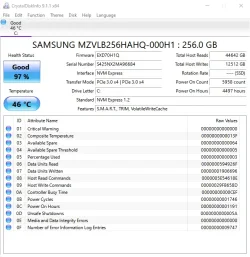
The drive is an SSD and CrystalDiskInfo shows the drive as healthy. See photo.
I have run the tuneup.bat file and everything reports as okay. No integrity violations and no component store corruption. No disk errors from chkdsk.
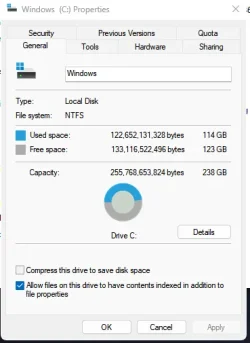
There is plenty free space on the drive. Compression is turned off and file indexing is turned on. See photo.
Thanks in advance.
StartAllBack v3.8.13 is installed.
Maybe I am imagining it but does anyone else think File Explorer takes longer to show folder contents in the right-hand pane than it used to, say 8 months ago? I say 8 months, which is just a guess as to how long I have been seeing this but I am only just now asking the question.
The left-hand Explorer folder tree expands very quick to show sub-folders but clicking on a folder and waiting to see the folder contents in right-hand pane is where it seems slow. The time from clicking on a folder to seeing the contents of that folder in the right-hand pane can be from 2 to 9 seconds. I am sure it used to be almost instant (no more than 2 seconds) around 8 months or more ago.
Or, is my memory wrong and 2 to 9 seconds is normal?
The drive is an SSD and CrystalDiskInfo shows the drive as healthy. See photo.
I have run the tuneup.bat file and everything reports as okay. No integrity violations and no component store corruption. No disk errors from chkdsk.
There is plenty free space on the drive. Compression is turned off and file indexing is turned on. See photo.
Thanks in advance.
Attachments
Last edited:
My Computers
-
At a glance
Windows 11 ProAMD Ryzen 9 8945HS32GB DDR5 SO-DIMMIntegrated AMD Radeon 780M (4.00 GHz)- OS
- Windows 11 Pro
- Computer type
- PC/Desktop
- Manufacturer/Model
- GMKtec K11
- CPU
- AMD Ryzen 9 8945HS
- Memory
- 32GB DDR5 SO-DIMM
- Graphics Card(s)
- Integrated AMD Radeon 780M (4.00 GHz)
- Monitor(s) Displays
- Benq 2250HM
- Screen Resolution
- 1920 x 1080
- Hard Drives
- 1 TB PCIe 4.0 NVMe M.2 SSD
- Antivirus
- Bit Defender Total Security
-
At a glance
Windows 11 HomeIntel® Core™ Ultra 7 - 255H processor16 GB LPDDR5 SDRAMIntel Arc 140T onboard graphics- Operating System
- Windows 11 Home
- Computer type
- Laptop
- Manufacturer/Model
- ASUS Zenbook 14 OLED 14" Laptop - UX3405CA-QL192W
- CPU
- Intel® Core™ Ultra 7 - 255H processor
- Memory
- 16 GB LPDDR5 SDRAM
- Graphics card(s)
- Intel Arc 140T onboard graphics
- Screen Resolution
- 1920 x 1200 (16:10 WUXGA resolution) OLED Touchscreen
- Hard Drives
- 1TB SSD
- Antivirus
- Bit Defender Total Security






