File History - The Latest Saga - Currently Down For The Count


bmbell4040

New member
Local time
8:59 PM
Posts
2
OS
Windows 11
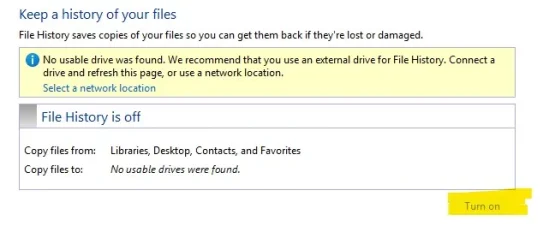
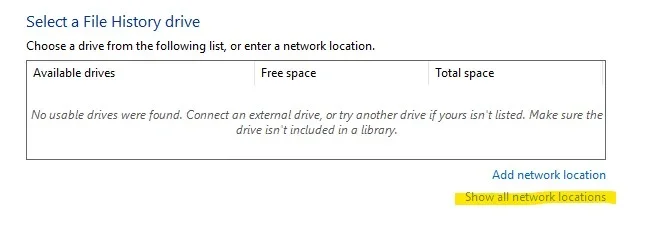
First time caller, long time fan. File History...where to begin. It worked (mostly) alright in Windows 10. And now it's virtually useless in Windows 11. Lots of symptoms and behaviors to cover. In no particular order, for starters, it will not recognize any local USB drive as a storage option. And the same goes for network locations. In fact, "show all network locations" is grayed out. My share settings seem to be allowable for LAN backups, or so I think. And last but not least, I can't even toggle File History off or on. It's off now and seems to be stuck as such. Like I said, it wasn't perfect in Windows 10. But it worked. Not it's bricked. I do have OneDrive, but I prefer/enjoy local backups as well.
 
Windows Build/Version
Windows 11 Home 24H2

Attachments

  • File History 1.webp
    File History 1.webp
    18.7 KB · Views: 2
  • File History .webp
    File History .webp
    12.8 KB · Views: 2

My Computer

System One

  • OS
    Windows 11
    Computer type
    Laptop
    Manufacturer/Model
    HP Laptop 15
i had similar problems with file history after upgrading from 23H2 to 24H2
it was only after a clean install of 24H2 that file history became available.

you could try opening a CMD prompt as admin
and running > sfc /scannow < to correct any system errors.

best of luck, Steve ..
 

My Computers

System One System Two

  • OS
    Windows 11 Home
    Computer type
    PC/Desktop
    Manufacturer/Model
    HP 24" AiO
    CPU
    Ryzen 7 5825u
    Motherboard
    HP
    Memory
    64GB DDR4 3200
    Graphics Card(s)
    Ryzen 7 5825u
    Sound Card
    RealTek
    Monitor(s) Displays
    24" HP AiO
    Screen Resolution
    1920 x 1080 @60 Hz
    Hard Drives
    1TB WD Blue SN580 M2 SSD Partitioned.
    2x 1TB USB HDD External Backup/Storage.
    PSU
    90W external power brick
    Case
    24" All in One
    Cooling
    Default Air Cooling
    Keyboard
    HP WiFi UK extended
    Mouse
    HP WiFi 3 Button
    Internet Speed
    1GB full fibre
    Browser
    Edge & Firefox
    Antivirus
    AVG Internet Security/Windows Defender
    Other Info
    Mainly Open Source Software
  • Operating System
    Ubuntu 22.04.5 LTS
    Computer type
    Laptop
    Manufacturer/Model
    Dell 13" Latitude 2017
    CPU
    i5 7200u
    Motherboard
    Dell
    Memory
    16GB DDR4
    Graphics card(s)
    Intel
    Sound Card
    Intel
    Monitor(s) Displays
    13" Dell Laptop
    Hard Drives
    250GB Crucial 2.5" SSD
    Mouse
    Generic WiFi 3 button
    Internet Speed
    WiFi only
    Browser
    Firefox
    Antivirus
    ClamAV TK
    Other Info
    Mainly Open Source Software
I have used File History from way back in Windows 8.1 (2014) and Windows 10.
Not set it up in Windows 11 home 24H2, but it does show both networked NAS Drives, all shared folders on them and USB drives in the list.

In your 2nd image that is correct, mine has "Show all network locations" greyed out, you add them with the Add link above that.
The Network locations can be seen in File Explorer as well.

No location so cannot turn it on I would think.

I do the DISM and SFC checks now and again, never do clean installs or system mods.
 

My Computer

System One

  • OS
    Windows 11
I'm still wondering if there is something "off" about my permission settings somewhere. My access to local or network locations may be restricted, for some reason or another.
 

My Computer

System One

  • OS
    Windows 11
    Computer type
    Laptop
    Manufacturer/Model
    HP Laptop 15

Latest Support Threads

Back
Top Bottom