JavaScript is disabled. For a better experience, please enable JavaScript in your browser before proceeding.
You are using an out of date browser. It may not display this or other websites correctly.
You should upgrade or use an
alternative browser .
'Files and Settings' Wizard for migrating from old W10 device to new W11 device
Well-known member
Power User
VIP
Will MS provide the wizard by EOL of W10 (or earlier) ?
To help the many people who need to buy a new W11 computer?
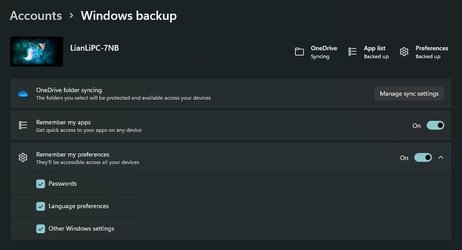
How about moving apps (including their user configurations and settings) from the old W10 device to the new W11 device for total service
Microsoft 365 Basic
Pro User
VIP
How about moving apps (including their user configurations and settings) from the old W10 device to the new W11 device for total service
You wish, the option is there, but I have everything synced and upon reinstall, Windows does not even restore a wallpaper.
Home26H2Can AMD Ryzen 5 8600G (07/24) 2x32GB Kingston FURY DDR5 5600 MHz CL36 @5200... ASROCK Radeon RX 6600 Challenger D 8G @48FPS ... OSHome26H2Can Computer typePC/Desktop CPUAMD Ryzen 5 8600G (07/24) MotherboardASROCK B650M-HDV/M.2 (07/24) BIOS 4.43 AGESA ComboAM5 1.3.0.1b Patch A (07/26) Memory2x32GB Kingston FURY DDR5 5600 MHz CL36 @5200 CL36 (07/24) Graphics Card(s)ASROCK Radeon RX 6600 Challenger D 8G @48FPS (08/24) Sound CardCreative Sound BlasterX AE-5 Plus (05/24) Monitor(s) Displays24" Philips 24M1N3200ZS/00 (05/24) Screen Resolution1920×1080@165Hz via DP1.4 Hard DrivesKingston KC3000 NVMe 2TB (05/24)
ADATA XPG GAMMIX S11 Pro 512GB (07/19) PSUSeasonic Core GM 550 Gold (04/24) CaseFractal Design Define 7 Mini with 3x Noctua NF-P14s/12@555rpm (04/24) CoolingNoctua NH-U12S with Noctua NF-P12 (04/24) KeyboardHP Pavilion Wired Keyboard 300 (07/24) + Rabalux 76017 Parker (01/24) MouseLogitech M330 Silent Plus (07/26) Internet Speed500/100 Mbps via RouterOS (05/21) & TCP Optimizer BrowserEdge, Brave for YouTube, LibreWolf for FB AntivirusNextDNS blocking 1/3 Traffic Other InfoPhone: Motorola Moto G86 (02/26)
Backup: Hasleo Backup Suite (PreOS)
Headphones: Sennheiser RS170 (09/10)
Chair: Huzaro Force 4.4 Grey Mesh (05/24)
Notifier: Xiaomi Mi Band 9 Milanese (10/24)
FlexCore USB-C 3.2 Gen 1 (M) to LAN (F) (08/25)
Well-known member
Power User
VIP
Thread Starter
With W11 increasing the pressure on hardware churn, one would think that it would be in MS' interest (rapid uptake of W11) to put more effort in easing the migration pain from W10 to W11.
Well-known member
Pro User
VIP
Your best bet will be to make a system image of your current Windows 10 with a program such as Macrium Reflect Free. Restore the image to the new Windows 11 computer, and then upgrade it to Windows 11.
Windows 11 AMD Ryzen 7 3800XT 32GB EVGA GeForce GTX 1080 Ti
OSWindows 11 Computer typePC/Desktop Manufacturer/ModelHomebuilt CPUAMD Ryzen 7 3800XT MotherboardASUS ROG Crosshair VII Hero (WiFi) Memory32GB Graphics Card(s)EVGA GeForce GTX 1080 Ti
Windows 11 Education Intel i7-8550U 32GB Nvidia Geforce MX150
Operating SystemWindows 11 Education Computer typeLaptop Manufacturer/ModelDell Inspiron 7773 CPUIntel i7-8550U Memory32GB Graphics card(s)Nvidia Geforce MX150 Sound CardRealtek Monitor(s) Displays17" Screen Resolution1920 x 1080 Hard DrivesToshiba 512GB NVMe SSD
SK Hynix 512GB SATA SSD Internet SpeedFast!
Well-known member
Power User
VIP
Thread Starter
What I meant was that MS ought to make upgrading Windows computers as easy as upgrading phones.
MS did make attempts in the past like the Files and Settings Wizard, Windows Easy Transfer, etc. but they were still not as easy as:
connect your new W11 laptop to WiFi
connect your old W10 laptop to WiFi
push a button
> ala kazam your new W11 laptop is just like your old W10 laptop
Well-known member
Guru
VIP
Your best bet will be to make a system image of your current Windows 10 with a program such as Macrium Reflect Free. Restore the image to the new Windows 11 computer, and then upgrade it to Windows 11.
I have done that a few times myself. It's surprising at how forgiving Windows is to transfer from one device to another. I would add, backup the drivers on the new computer first. A new computer also means new hardware.
Windows 11 Pro 25H2 Intel Core i7-10700K 16GB (8GB PC4-19200 DDR4 SDRAM x2) NVIDIA GeForce GTX 1050 TI
OSWindows 11 Pro 25H2 Computer typePC/Desktop Manufacturer/ModelPowerSpec B746 CPUIntel Core i7-10700K MotherboardASRock Z490 Phantom Gaming 4/ax Memory16GB (8GB PC4-19200 DDR4 SDRAM x2) Graphics Card(s)NVIDIA GeForce GTX 1050 TI Sound CardRealtek Audio Monitor(s) Displays#1. LG ULTRAWIDE 34" #2. AOC Q32G2WG3 32" Screen Resolution#1. 3440 X 1440 #2. 1920 x 1080 Hard DrivesNVMe WDC WDS100T2B0C-00PXH0 1TB
Samsung SSD 860 EVO 1TB PSU750 Watts (62.5A) CasePowerSpec/Lian Li ATX 205 KeyboardLogitech K270 MouseLogitech M185 BrowserMicrosoft Edge and Firefox AntivirusWebroot SecureAnywhere CE 26.1
Windows 11 Canary Channel Intel Core i5-8400 CPU @ 2.80GHz 16 MB DDR 4-2666
Operating SystemWindows 11 Canary Channel Computer typePC/Desktop Manufacturer/ModelPowerSpec G156 CPUIntel Core i5-8400 CPU @ 2.80GHz MotherboardAsusTeK Prime B360M-A Memory16 MB DDR 4-2666 Monitor(s) Displays23" Speptre HDMI 75Hz Screen Resolution1920x1080 Hard DrivesSamsung 970 EVO 500GB NVMe KeyboardLogitek K270 MouseLogitek M185 BrowserFirefox, Edge and Edge Canary AntivirusWindows Defender
𝐒𝐩𝐞𝐚𝐤𝐬 𝐀𝐧𝐜𝐢𝐞𝐧𝐭 𝐆𝐞𝐞𝐤
Guru
VIP
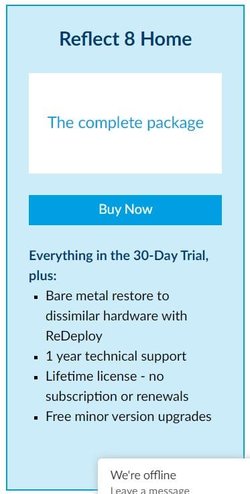
Have any of you tried this feature of the paid version (Baremetal Restore to Dissimilar Hardware)?
Looks mighty interesting. I'm just wondering how well it works.
11 Pro 24H2 26100.2454 i7-9700 @ 3.00GHz 32GBDDR4 @ 2666MHz Intel HD 630 Graphics onboard
OS11 Pro 24H2 26100.2454 Computer typePC/Desktop Manufacturer/ModelLenovo ThinkCentre M920S SFF CPUi7-9700 @ 3.00GHz MotherboardLenovo 3132 Memory32GBDDR4 @ 2666MHz Graphics Card(s)Intel HD 630 Graphics onboard Sound CardRealtek HD Audio Monitor(s) DisplaysLG E2442 Screen Resolution1920x1080 Hard Drives1 x Samsung 970 EVO PLUS 500GB NVMe SSD, 1 x WD_BLACK SN770
250GB NVMe SSD (OS and programs), 1 x WD_BLACK SN770
500GB NVMe SSD (Data) CaseLenovo SFF KeyboardCherry Stream TKL JK-8600US-2 Wired MouseLogiTech M510 wireless Internet SpeedFast (for fixed wireless!) BrowserChrome, sometimes Firefox AntivirusMalwarebytes Premium & Defender (working together beautifully!)
11 Pro 24H2 26100.2454 i5-8400 @ 2.80GHz 32GB DDR4 @ 2600MHz Intel HD 630 Graphics onboard
Operating System11 Pro 24H2 26100.2454 Computer typePC/Desktop Manufacturer/ModelLenovo ThinkCentre M920S SFF CPUi5-8400 @ 2.80GHz MotherboardLenovo 3132 Memory32GB DDR4 @ 2600MHz Graphics card(s)Intel HD 630 Graphics onboard Sound CardRealtek High Definition Audio onboard Monitor(s) DisplaysLG FULL HD (1920x1080@59Hz) Screen Resolution1920 x 1080 Hard Drives1 x Samsung 970 EVO PLUS NVMe; 1 x Samsung 980 NVMe SSD CaseLenovo Think Centre SFF KeyboardCherry Stream TKL JK-8600US-2 Wired MouseLogiTech M510 wireless Internet SpeedFast (for fixed wireless!) BrowserChrome AntivirusMalwarebytes Premium and MS Defender, beautiful together
Well-known member
Guru
VIP
Have any of you tried this feature of the paid version (Baremetal Restore to Dissimilar Hardware)?
View attachment 13032
Looks mighty interesting. I'm just wondering how well it works.
Is it really necessary? I have used Macrium images to go from my old desktops to my new desktops and from my old laptops to my new laptops without any problems. I do backup the drivers on the new devices first. I didn't use an image when I setup this desktop because I decided I wanted to do a fresh start. It was a pain though. I still have some of my programs on my old desktop because if I move them, I lose them. Someone can correct me if I'm wrong but I think it became easy to transfer to a new device with Win 10.
Windows 11 Pro 25H2 Intel Core i7-10700K 16GB (8GB PC4-19200 DDR4 SDRAM x2) NVIDIA GeForce GTX 1050 TI
OSWindows 11 Pro 25H2 Computer typePC/Desktop Manufacturer/ModelPowerSpec B746 CPUIntel Core i7-10700K MotherboardASRock Z490 Phantom Gaming 4/ax Memory16GB (8GB PC4-19200 DDR4 SDRAM x2) Graphics Card(s)NVIDIA GeForce GTX 1050 TI Sound CardRealtek Audio Monitor(s) Displays#1. LG ULTRAWIDE 34" #2. AOC Q32G2WG3 32" Screen Resolution#1. 3440 X 1440 #2. 1920 x 1080 Hard DrivesNVMe WDC WDS100T2B0C-00PXH0 1TB
Samsung SSD 860 EVO 1TB PSU750 Watts (62.5A) CasePowerSpec/Lian Li ATX 205 KeyboardLogitech K270 MouseLogitech M185 BrowserMicrosoft Edge and Firefox AntivirusWebroot SecureAnywhere CE 26.1
Windows 11 Canary Channel Intel Core i5-8400 CPU @ 2.80GHz 16 MB DDR 4-2666
Operating SystemWindows 11 Canary Channel Computer typePC/Desktop Manufacturer/ModelPowerSpec G156 CPUIntel Core i5-8400 CPU @ 2.80GHz MotherboardAsusTeK Prime B360M-A Memory16 MB DDR 4-2666 Monitor(s) Displays23" Speptre HDMI 75Hz Screen Resolution1920x1080 Hard DrivesSamsung 970 EVO 500GB NVMe KeyboardLogitek K270 MouseLogitek M185 BrowserFirefox, Edge and Edge Canary AntivirusWindows Defender