Mozilla Blog:
People feel differently about AI, and here at Firefox, we think that is completely reasonable. Something else that is completely reasonable: deciding for yourself how and when you engage with AI features.
For some of you, AI is part of your everyday life, whether you are using it to summarize a large amount of information, brainstorm ideas for work, or research trips and personal purchases. Some of you interact with AI as little as possible, and prefer to keep it that way. And a lot of you are somewhere in between: curious, but exploring on your own terms and at your own pace.
Your personal use of AI is just that, personal. Firefox offers various levels of AI integration into your browser, and the choice between them is entirely yours.
Block new and current AI features in a single switch
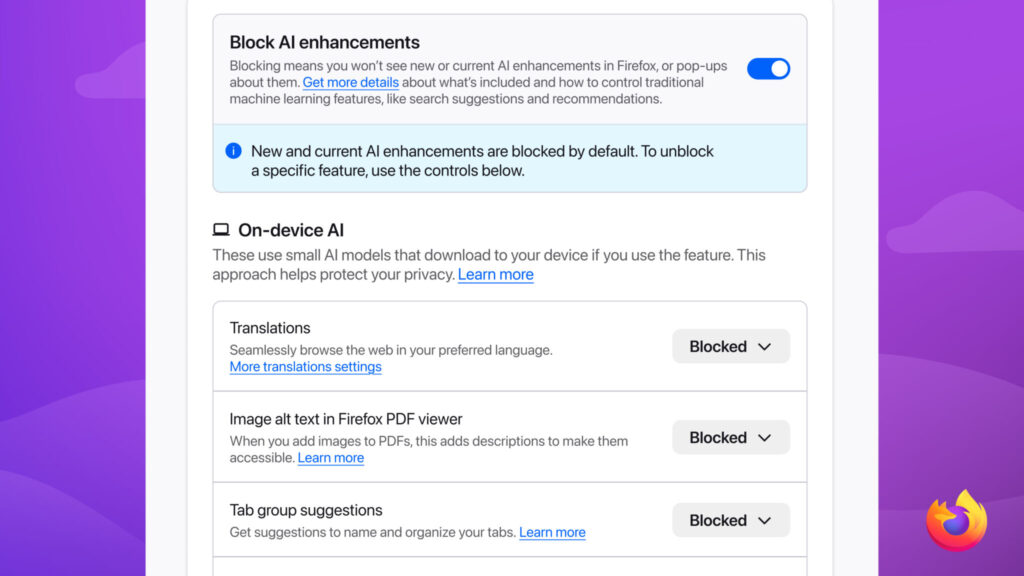
Opting out of upcoming and current AI features on your browser should not require endless navigation through multiple Settings pages. That’s why Firefox offers an AI controls section within its General Settings panel. A single, easily located place where you can block current and future AI features and related pop-ups with the swipe of a toggle.
Not only do we want people to have the choice to remove certain AI features from their Firefox browsing experience, we make sure doing so is as easy and accessible as possible.
Choose the features that work for you
For the many people who sit in the middle of the AI usage spectrum, we made sure you can opt in and out of specific features in line with your preferences. Capabilities like AI translations, image alt text in Firefox PDF viewer, tab group suggestions, and key points in link previews can all be individually switched on and off, ensuring you can enjoy such offerings on a case by case basis as it suits your needs.In addition, if there is an AI chatbot provider you already trust or pay for, you can use it directly inside Firefox’s built-in desktop sidebar. This means you can use your chatbot of choice and browse side by side without ping-ponging between tabs.
While some browsers integrate a singular AI model or chatbot into their system, this can restrict flexibility and concentrate data sharing. Firefox prioritizes transparency and user control by letting you select from multiple providers, allowing you to review each option’s policies before you engage with them.
You can turn on AI chatbot providers in the AI controls section of browser settings and select one of the following: Anthropic Claude, ChatGPT, Google Gemini, and Le Chat Mistral. Once this feature is turned on, you can switch between chatbots within the sidebar itself based on your preferences and task at hand.
Smart Window, for when you want help finishing what you started

Smart Window is Firefox’s most integrated AI experience, but that doesn’t mean it compromises our commitment to choice, privacy, and transparency. Our newest window type, which we’ve been polishing and testing in beta, uses only the context you share with it to help you move work forward and across the finish line.
When permitted by you, its built-in, AI-powered assistant can work directly with your open tabs and browsing history to connect the dots. This means comparing information, generating recommendations, summarizing pages, and planning projects without having to feed every crumb of context from your previous and current browsing activity each time you enter a new prompt.
As we’ve built out Smart Window, we’ve added a few additional features to align its design with how people actually browse. These include the ability to group related tabs together – so you can make sense of what’s open without spending time organizing everything yourself – and visual history previews that help you spot a page you visited earlier when you can’t remember the exact URL or phrase searched. In addition, a new partnership with Exa enables Smart Window to not only locate current web information to include in responses, but also display the sources behind these responses so you can verify what you’re seeing, without breaking your flow.
We understand people use different Firefox windows for different reasons, and often switch between options based on the task at hand. Smart Window is the window you reach for when your browsing turns into a project. When your quick search becomes inspo for the girls’ trip you’ve been meaning to plan, or finding the perfect gift for your partner becomes a dozen tabs comparing prices and reviews, turn the window you’re already using into a Smart Window. Your tabs and progress stay in place while Smart Window helps organize the task and move it forward. Use it for one complex project, use it all the time, or switch it back when you’re done.
Smart Window remains in beta as we continue to learn and improve from our community’s feedback. At present, it’s available in English to people in the U.S. and Canada.
To try Smart Window, visit: Smart Window
Always your call
Your opinions and preferences on AI usage are individual to you.We don’t think there is one right answer for how and when to engage with AI, and we’re not going to pretend there is one. What we can do is make sure that whatever level of engagement is right for you, Firefox supports it well. Because the only person telling you how much AI you need should be you.
Source:

Choose the level of AI integration in your browser with Firefox | The Mozilla Blog
People feel differently about AI, and here at Firefox, we think that is completely reasonable. Something else that is completely reasonable: deciding for y
 blog.mozilla.org