Firewall rule


Windsurfer

New member
Local time
5:47 AM
Posts
6
OS
win 11 PRO 22H2
I have 2 desktop and 1 laptop all running latest win 11 22H2
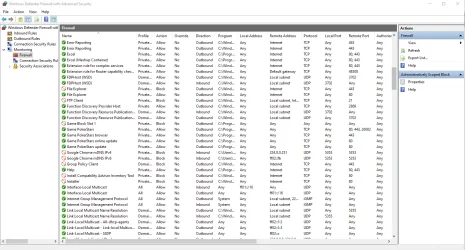
I am unable to add a rule to any one of them, they all show the same result as in the attached image.
Any suggestions ?
 

Attachments

  • Screenshot_3.webp
    Screenshot_3.webp
    11.1 KB · Views: 2

My Computer My Computer

At a glance

win 11 PRO 22H2
OS
win 11 PRO 22H2
Computer type
PC/Desktop
Manufacturer/Model
HP Pavillion Elite HPE
We can help if we don't know how you setup the firewall rule.
 

My Computer My Computer

At a glance

Windows 11AMD Ryzen 7 5700GMicron Technology DDR4-3200 16GBNVIDIA GeForce RTX 3060
OS
Windows 11
Computer type
PC/Desktop
Manufacturer/Model
HP Pavilion
CPU
AMD Ryzen 7 5700G
Motherboard
Erica6
Memory
Micron Technology DDR4-3200 16GB
Graphics Card(s)
NVIDIA GeForce RTX 3060
Sound Card
Realtek ALC671
Monitor(s) Displays
Samsung SyncMaster U28E590
Screen Resolution
3840 x 2160
Hard Drives
SAMSUNG MZVLQ1T0HALB-000H1
New rule: Program
Program path: C:\Windows\System32\notepad.exe
Action: Block the connection
Profile: All checked
Name: Notepad
Finish
 

My Computer My Computer

At a glance

win 11 PRO 22H2
OS
win 11 PRO 22H2
Computer type
PC/Desktop
Manufacturer/Model
HP Pavillion Elite HPE
Notepad does not make network connections, why block it also you already block the Notepad there is no problem.
 

My Computer My Computer

At a glance

Windows 11AMD Ryzen 7 5700GMicron Technology DDR4-3200 16GBNVIDIA GeForce RTX 3060
OS
Windows 11
Computer type
PC/Desktop
Manufacturer/Model
HP Pavilion
CPU
AMD Ryzen 7 5700G
Motherboard
Erica6
Memory
Micron Technology DDR4-3200 16GB
Graphics Card(s)
NVIDIA GeForce RTX 3060
Sound Card
Realtek ALC671
Monitor(s) Displays
Samsung SyncMaster U28E590
Screen Resolution
3840 x 2160
Hard Drives
SAMSUNG MZVLQ1T0HALB-000H1
That is not the issue, the problem is that no matter which program i choose that does use a network connection such as Adobe the result is the same.
 

My Computer My Computer

At a glance

win 11 PRO 22H2
OS
win 11 PRO 22H2
Computer type
PC/Desktop
Manufacturer/Model
HP Pavillion Elite HPE
The icon of the Firewall show the Notepad blocked network connection i don't know what else to tell you, maybe block network connection using Host file.
 

My Computer My Computer

At a glance

Windows 11AMD Ryzen 7 5700GMicron Technology DDR4-3200 16GBNVIDIA GeForce RTX 3060
OS
Windows 11
Computer type
PC/Desktop
Manufacturer/Model
HP Pavilion
CPU
AMD Ryzen 7 5700G
Motherboard
Erica6
Memory
Micron Technology DDR4-3200 16GB
Graphics Card(s)
NVIDIA GeForce RTX 3060
Sound Card
Realtek ALC671
Monitor(s) Displays
Samsung SyncMaster U28E590
Screen Resolution
3840 x 2160
Hard Drives
SAMSUNG MZVLQ1T0HALB-000H1
I have tried that with Adobe but that doesn't work
 

My Computer My Computer

At a glance

win 11 PRO 22H2
OS
win 11 PRO 22H2
Computer type
PC/Desktop
Manufacturer/Model
HP Pavillion Elite HPE
Is it incoming connections?
 

My Computer My Computer

At a glance

Windows 11AMD Ryzen 7 5700GMicron Technology DDR4-3200 16GBNVIDIA GeForce RTX 3060
OS
Windows 11
Computer type
PC/Desktop
Manufacturer/Model
HP Pavilion
CPU
AMD Ryzen 7 5700G
Motherboard
Erica6
Memory
Micron Technology DDR4-3200 16GB
Graphics Card(s)
NVIDIA GeForce RTX 3060
Sound Card
Realtek ALC671
Monitor(s) Displays
Samsung SyncMaster U28E590
Screen Resolution
3840 x 2160
Hard Drives
SAMSUNG MZVLQ1T0HALB-000H1
This happens on both inbound and outbound and to mention again, i have 2 desktop and 1 laptop computers with the same win 11 installed and they all show that problem
 

My Computer My Computer

At a glance

win 11 PRO 22H2
OS
win 11 PRO 22H2
Computer type
PC/Desktop
Manufacturer/Model
HP Pavillion Elite HPE
I had no problems Firewall works for me.
 

My Computer My Computer

At a glance

Windows 11AMD Ryzen 7 5700GMicron Technology DDR4-3200 16GBNVIDIA GeForce RTX 3060
OS
Windows 11
Computer type
PC/Desktop
Manufacturer/Model
HP Pavilion
CPU
AMD Ryzen 7 5700G
Motherboard
Erica6
Memory
Micron Technology DDR4-3200 16GB
Graphics Card(s)
NVIDIA GeForce RTX 3060
Sound Card
Realtek ALC671
Monitor(s) Displays
Samsung SyncMaster U28E590
Screen Resolution
3840 x 2160
Hard Drives
SAMSUNG MZVLQ1T0HALB-000H1
You can add a rule and it doesn't show that circle with the stripe ?
 

My Computer My Computer

At a glance

win 11 PRO 22H2
OS
win 11 PRO 22H2
Computer type
PC/Desktop
Manufacturer/Model
HP Pavillion Elite HPE
In this video, i will show you how to block internet access to specific apps in Windows 10 and Windows 11.


My Computer My Computer

At a glance

Windows 11AMD Ryzen 7 5700GMicron Technology DDR4-3200 16GBNVIDIA GeForce RTX 3060
OS
Windows 11
Computer type
PC/Desktop
Manufacturer/Model
HP Pavilion
CPU
AMD Ryzen 7 5700G
Motherboard
Erica6
Memory
Micron Technology DDR4-3200 16GB
Graphics Card(s)
NVIDIA GeForce RTX 3060
Sound Card
Realtek ALC671
Monitor(s) Displays
Samsung SyncMaster U28E590
Screen Resolution
3840 x 2160
Hard Drives
SAMSUNG MZVLQ1T0HALB-000H1
We can help if we don't know how you setup the firewall rule.
I have to chuckle at that obviously improperly worded response, which leaves me to wonder if you cannot help if you do know how the setup was used.
 

My Computer My Computer

At a glance

Windows 11 PRO 25H2 (OS Build 26200.6725)Intel Core i7-13700 2.10GHz32 GBNVidia GetForce RTX 4060 Ti
OS
Windows 11 PRO 25H2 (OS Build 26200.6725)
Computer type
PC/Desktop
Manufacturer/Model
Dell XPS 8960
CPU
Intel Core i7-13700 2.10GHz
Motherboard
Dell
Memory
32 GB
Graphics Card(s)
NVidia GetForce RTX 4060 Ti
Sound Card
Realtec
Monitor(s) Displays
Dell U2722D
Screen Resolution
2560 x 1440
Hard Drives
1024GB SSD boot drive; 2TB Internal Mechanical Hard Disc; WD My Passport (1Tb) external; My Passport Ultra (2Tb) external
Keyboard
Dell
Mouse
MX Master 3
Internet Speed
40Mbps (Bonded DSL)
Browser
Firefox (default)
Antivirus
Malwarebytes, MS Defender AV

Probably something like this

$program = "C:\Windows\notepad.exe"
$name = "NotePad"
# Outbound
New-NetFirewallRule -DisplayName $name -Name $name -Program $program -Direction Outbound -Action Block -Profile Any
 

My Computer My Computer

At a glance

Microsoft Windows 11 HomeIntel Core i5-13490F2 x 16 Patriot Memory (PDP Systems) PSD516G56...GIGABYTE GeForce RTX 4070 WINDFORCE OC 12G (G...
OS
Microsoft Windows 11 Home
Computer type
PC/Desktop
Manufacturer/Model
MSI MS-7D98
CPU
Intel Core i5-13490F
Motherboard
MSI B760 GAMING PLUS WIFI
Memory
2 x 16 Patriot Memory (PDP Systems) PSD516G560081 6400MT (32-37-37-74); 1.35V)
Graphics Card(s)
GIGABYTE GeForce RTX 4070 WINDFORCE OC 12G (GV-N4070WF3OC-12GD)
Sound Card
Bluetooth Аудио
Monitor(s) Displays
INNOCN 15K1F
Screen Resolution
1920 x 1080
Hard Drives
WD_BLACK SN770 250GB
KINGSTON SNV2S1000G (ELFK0S.6)
PSU
Thermaltake Toughpower GF3 1000W
Case
CG560 - DeepCool
Cooling
ID-COOLING SE-224-XTS / 2 x 140Mm Fan - rear and top; 3 x 120Mm - front
Keyboard
Corsair K70 RGB TKL
Mouse
Corsair KATAR PRO XT
Internet Speed
100 Mbps
Browser
Firefox
Antivirus
Microsoft Defender Antivirus
Other Info
https://www.userbenchmark.com/UserRun/66553205
This happens on both inbound and outbound
How do you figure there is a problem? DNS bypasses application block, so if it resolves ads or something, that might be it.
 

My Computer My Computer

At a glance

Home26H2CanAMD Ryzen 5 8600G (07/24)2x32GB Kingston FURY DDR5 5600 MHz CL36 @5200...ASROCK Radeon RX 6600 Challenger D 8G @48FPS ...
OS
Home26H2Can
Computer type
PC/Desktop
CPU
AMD Ryzen 5 8600G (07/24)
Motherboard
ASROCK B650M-HDV/M.2 (07/24) BIOS 4.21 AGESA ComboAM5 1.3.0.1 (04/26)
Memory
2x32GB Kingston FURY DDR5 5600 MHz CL36 @5200 CL36 (07/24)
Graphics Card(s)
ASROCK Radeon RX 6600 Challenger D 8G @48FPS (08/24)
Sound Card
Creative Sound BlasterX AE-5 Plus (05/24)
Monitor(s) Displays
24" Philips 24M1N3200ZS/00 (05/24)
Screen Resolution
1920×1080@165Hz via DP1.4
Hard Drives
Kingston KC3000 NVMe 2TB (05/24)
ADATA XPG GAMMIX S11 Pro 512GB (07/19)
PSU
Seasonic Core GM 550 Gold (04/24)
Case
Fractal Design Define 7 Mini with 3x Noctua NF-P14s/12@555rpm (04/24)
Cooling
Noctua NH-U12S with Noctua NF-P12 (04/24)
Keyboard
HP Pavilion Wired Keyboard 300 (07/24) + Rabalux 76017 Parker (01/24)
Mouse
Logitech M330 Silent Plus (01/26)
Internet Speed
500/100 Mbps via RouterOS (05/21) & TCP Optimizer
Browser
Edge, Brave for YouTube, LibreWolf for FB
Antivirus
NextDNS blocking 1/3 Traffic
Other Info
Phone: Motorola Moto G86 (02/26)
Backup: Hasleo Backup Suite (PreOS)
Headphones: Sennheiser RS170 (09/10)
Chair: Huzaro Force 4.4 Grey Mesh (05/24)
Notifier: Xiaomi Mi Band 9 Milanese (10/24)
FlexCore USB-C 3.2 Gen 1 (M) to LAN (F) (08/25)
You can add a rule and it doesn't show that circle with the stripe ?
When you provide a new rule to ALLOW traffic which isn't permitted by other existing rules, you get a Green Check symbol.
When you BLOCK traffic which isn't specified by existing rules, you get a Red Banned symbol.


For example:

ControlFirewall.webp
 

My Computer My Computer

At a glance

Windows 7
OS
Windows 7

Latest Support Threads

Back
Top Bottom