Solved Fixing Win11 without reformat/reinstall?


Yes, but not when 'booting' from the USB stick.

Well, dang.

You can clean install Windows 11 when booting from a USB stick.

Double dang. I guess that's what I'll be doing this evening. 🙁🙁
 

My Computers My Computers

  • At a glance

    Windows 11 Pro 25H2 (OS Build 26200.8524)AMD Ryzen AI 9 HX 370 w/Radeon 890M32GBNVIDIA GeForce RTX 4050 (and IGP Radeon 890M)
    OS
    Windows 11 Pro 25H2 (OS Build 26200.8524)
    Computer type
    Laptop
    Manufacturer/Model
    ASUS - ProArt PX13
    CPU
    AMD Ryzen AI 9 HX 370 w/Radeon 890M
    Motherboard
    AMI HN7306WU
    Memory
    32GB
    Graphics Card(s)
    NVIDIA GeForce RTX 4050 (and IGP Radeon 890M)
    Monitor(s) Displays
    external 24" Dell P2415Q
    Screen Resolution
    3840 x 2160 on external Dell, 2880 x 1800 on laptop screen
    Hard Drives
    1TB WD SSD
    Browser
    Vivaldi, Brave, Edge
    Antivirus
    Avast (free version)
  • At a glance

    Windows 11 Pro, 21H2 (Build 22000.376)i7-8650U16 GBiGPU (Intel® UHD Graphics 620)
    Operating System
    Windows 11 Pro, 21H2 (Build 22000.376)
    Computer type
    Tablet
    Manufacturer/Model
    Surface Pro 6
    CPU
    i7-8650U
    Memory
    16 GB
    Graphics card(s)
    iGPU (Intel® UHD Graphics 620)
    Monitor(s) Displays
    Dell P2415Q
    Screen Resolution
    3840 x 2160 on external Dell, 2736 x 1824 on SP6 screen
    Hard Drives
    512GB PCIe Gen 3 x2 SSD
    Browser
    Vivaldi, Comodo Dragon, Edge
    Antivirus
    Avast (free edition)
Please boot to the BIOS > check menu settings for RAID / ACHI > temporarily modify to AHCI > report findings

Whenever possible take pictures > post images or share links
 

My Computer My Computer

At a glance

Windows 10Intel(R) Core(TM) i7-4800MQ CPU @ 2.70GHz16 GB Total: Manufacturer : Samsung MemoryTyp...NVIDIA Quadro K3100M; Intel(R) HD Graphics 4600
OS
Windows 10
Computer type
Laptop
Manufacturer/Model
HP
CPU
Intel(R) Core(TM) i7-4800MQ CPU @ 2.70GHz
Motherboard
Product : 190A Version : KBC Version 94.56
Memory
16 GB Total: Manufacturer : Samsung MemoryType : DDR3 FormFactor : SODIMM Capacity : 8GB Speed : 1600
Graphics Card(s)
NVIDIA Quadro K3100M; Intel(R) HD Graphics 4600
Sound Card
IDT High Definition Audio CODEC; PNP Device ID HDAUDIO\FUNC_01&VEN_111D&DEV_76E0
Hard Drives
Model Hitachi HTS727575A9E364
Antivirus
Microsoft Defender
Other Info
Mobile Workstation
It all sounds a lot to hw disk or RAM problems. The easiest to do is a surface test to the disk. It's a laptop which I have no experience with, in a desktop I'd detach RAM modules trying to isolate a bad one. I think your issue isn't "bad luck with bits statistics". Even stable computers do "reverse bits", say one per 10^15 or such things, if one of those "bad lotteries" falls in something critical it can cause a big problem although normally it's a blue screen etc in the worst case. My MiniPC has had a bad age this spring with several random memory dumps, but since months ago it's okay. I don't mean that, I think you have a permanently bad and unusable component. The most similar I've experienced is in Windows 95 b/c some mobo solderings were touching the chassis. It was stable in DOS but the Windows installs lasted ten days or so. It wasn't so bad the times I've had defective RAM. To summarize a complex subject I've always been extremely lucky with my disks.
 

My Computer My Computer

At a glance

Windows 11Celeron J4125 (10th gen)8GB DDR4
OS
Windows 11
Manufacturer/Model
MeLE Quieter 2Q (fanless miniPC)
CPU
Celeron J4125 (10th gen)
Memory
8GB DDR4
Monitor(s) Displays
Samsung SyncMaster T260
Screen Resolution
1920x1200
Hard Drives
256GB eMMC (Windows)
2TB USB3 HDD Toshiba (Data)
When available please update the progress with the steps in posts #17 and #22.
 

My Computer My Computer

At a glance

Windows 10Intel(R) Core(TM) i7-4800MQ CPU @ 2.70GHz16 GB Total: Manufacturer : Samsung MemoryTyp...NVIDIA Quadro K3100M; Intel(R) HD Graphics 4600
OS
Windows 10
Computer type
Laptop
Manufacturer/Model
HP
CPU
Intel(R) Core(TM) i7-4800MQ CPU @ 2.70GHz
Motherboard
Product : 190A Version : KBC Version 94.56
Memory
16 GB Total: Manufacturer : Samsung MemoryType : DDR3 FormFactor : SODIMM Capacity : 8GB Speed : 1600
Graphics Card(s)
NVIDIA Quadro K3100M; Intel(R) HD Graphics 4600
Sound Card
IDT High Definition Audio CODEC; PNP Device ID HDAUDIO\FUNC_01&VEN_111D&DEV_76E0
Hard Drives
Model Hitachi HTS727575A9E364
Antivirus
Microsoft Defender
Other Info
Mobile Workstation
Please boot to the BIOS > check menu settings for RAID / ACHI > temporarily modify to AHCI > report findings

Whenever possible take pictures > post images or share links
I don't see anything like that in the BIOS/UEFI screens:

Opening screen "Dashboard":
1767488704962.webp

The entirety of the Advanced settings:
1767488728478.webp

Boot settings:
1767488768414.webp
 

My Computers My Computers

  • At a glance

    Windows 11 Pro 25H2 (OS Build 26200.8524)AMD Ryzen AI 9 HX 370 w/Radeon 890M32GBNVIDIA GeForce RTX 4050 (and IGP Radeon 890M)
    OS
    Windows 11 Pro 25H2 (OS Build 26200.8524)
    Computer type
    Laptop
    Manufacturer/Model
    ASUS - ProArt PX13
    CPU
    AMD Ryzen AI 9 HX 370 w/Radeon 890M
    Motherboard
    AMI HN7306WU
    Memory
    32GB
    Graphics Card(s)
    NVIDIA GeForce RTX 4050 (and IGP Radeon 890M)
    Monitor(s) Displays
    external 24" Dell P2415Q
    Screen Resolution
    3840 x 2160 on external Dell, 2880 x 1800 on laptop screen
    Hard Drives
    1TB WD SSD
    Browser
    Vivaldi, Brave, Edge
    Antivirus
    Avast (free version)
  • At a glance

    Windows 11 Pro, 21H2 (Build 22000.376)i7-8650U16 GBiGPU (Intel® UHD Graphics 620)
    Operating System
    Windows 11 Pro, 21H2 (Build 22000.376)
    Computer type
    Tablet
    Manufacturer/Model
    Surface Pro 6
    CPU
    i7-8650U
    Memory
    16 GB
    Graphics card(s)
    iGPU (Intel® UHD Graphics 620)
    Monitor(s) Displays
    Dell P2415Q
    Screen Resolution
    3840 x 2160 on external Dell, 2736 x 1824 on SP6 screen
    Hard Drives
    512GB PCIe Gen 3 x2 SSD
    Browser
    Vivaldi, Comodo Dragon, Edge
    Antivirus
    Avast (free edition)
When available please update the progress with the steps in posts #17 and #22.
Darn. Somehow totally skipped over post 17. If/when I can boot again, I'll revisit post 17.
 

My Computers My Computers

  • At a glance

    Windows 11 Pro 25H2 (OS Build 26200.8524)AMD Ryzen AI 9 HX 370 w/Radeon 890M32GBNVIDIA GeForce RTX 4050 (and IGP Radeon 890M)
    OS
    Windows 11 Pro 25H2 (OS Build 26200.8524)
    Computer type
    Laptop
    Manufacturer/Model
    ASUS - ProArt PX13
    CPU
    AMD Ryzen AI 9 HX 370 w/Radeon 890M
    Motherboard
    AMI HN7306WU
    Memory
    32GB
    Graphics Card(s)
    NVIDIA GeForce RTX 4050 (and IGP Radeon 890M)
    Monitor(s) Displays
    external 24" Dell P2415Q
    Screen Resolution
    3840 x 2160 on external Dell, 2880 x 1800 on laptop screen
    Hard Drives
    1TB WD SSD
    Browser
    Vivaldi, Brave, Edge
    Antivirus
    Avast (free version)
  • At a glance

    Windows 11 Pro, 21H2 (Build 22000.376)i7-8650U16 GBiGPU (Intel® UHD Graphics 620)
    Operating System
    Windows 11 Pro, 21H2 (Build 22000.376)
    Computer type
    Tablet
    Manufacturer/Model
    Surface Pro 6
    CPU
    i7-8650U
    Memory
    16 GB
    Graphics card(s)
    iGPU (Intel® UHD Graphics 620)
    Monitor(s) Displays
    Dell P2415Q
    Screen Resolution
    3840 x 2160 on external Dell, 2736 x 1824 on SP6 screen
    Hard Drives
    512GB PCIe Gen 3 x2 SSD
    Browser
    Vivaldi, Comodo Dragon, Edge
    Antivirus
    Avast (free edition)
You can have several Anti-Virus apps on computer, but only the last one installed will be Active. Each Anti-Virus disables Windows Security and any other AV previously installed. (ie) if you had Comodo AV installed, it disabled Windows Security, If you install Avast, it Disables Comodo. These apps do this to avoid conflicts.
Just uninstalling the AV app in Settings does not fully Remove it. To fully remove it, you have use the manufactures Clean or Uninstall program.
This may solve your problem, you can always install One or the Other AV app. if you like but not both. If you uninstall all 3rd party AV security apps, Windows Security (Defender) will re-enable, which is all you need.
 

My Computer My Computer

At a glance

Windows 11 Pro Insider 64 bit 25H2 26200.5742Intel Core i7 9700K 3.6016 GBnVidia GEForce RTX 2060 Super
OS
Windows 11 Pro Insider 64 bit 25H2 26200.5742
Computer type
PC/Desktop
Manufacturer/Model
Gigabyte Z390 UD
CPU
Intel Core i7 9700K 3.60
Motherboard
Gigabyte Z390 UD
Memory
16 GB
Graphics Card(s)
nVidia GEForce RTX 2060 Super
Sound Card
onboard
Monitor(s) Displays
Two 27" Dell 4K monitors
Screen Resolution
3840 x 2160
Hard Drives
M.2 NVME SSD, 500 GB; Two 2TB Mechanical HDD's
PSU
850w PSU
Case
Cyberpower PC
Cooling
Water cooled
Keyboard
Backlit Cyberpower gaming keyboard
Mouse
Backlit Cyberpower gaming mouse
Internet Speed
1 GB mbps
Browser
Brave
Antivirus
Windows Security
You can have several Anti-Virus apps on computer, but only the last one installed will be Active. Each Anti-Virus disables Windows Security and any other AV previously installed. (ie) if you had Comodo AV installed, it disabled Windows Security, If you install Avast, it Disables Comodo. These apps do this to avoid conflicts.
Just uninstalling the AV app in Settings does not fully Remove it. To fully remove it, you have use the manufactures Clean or Uninstall program.
This may solve your problem, you can always install One or the Other AV app. if you like but not both. If you uninstall all 3rd party AV security apps, Windows Security (Defender) will re-enable, which is all you need.
I did use AvastClean to remove Avast. I didn't know of any such "clean remover" for Comodo, but honestly I didn't look today. I (incorrectly?) assumed that by disabling all the Comodo services and startup items, and uninstalling it in Windows add/remove programs, it would take Comodo Firewall out of the equation. (I did not have Comodo Antivirus installed.)

I'm also not a guy with an abundance of patience. I'll wait a little while to see if anybody appears with a magic potion to let me boot up again, but if not, I'll go nuclear and boot with the bootable USB drive I just made with Rufus for Win11 x64.
 

My Computers My Computers

  • At a glance

    Windows 11 Pro 25H2 (OS Build 26200.8524)AMD Ryzen AI 9 HX 370 w/Radeon 890M32GBNVIDIA GeForce RTX 4050 (and IGP Radeon 890M)
    OS
    Windows 11 Pro 25H2 (OS Build 26200.8524)
    Computer type
    Laptop
    Manufacturer/Model
    ASUS - ProArt PX13
    CPU
    AMD Ryzen AI 9 HX 370 w/Radeon 890M
    Motherboard
    AMI HN7306WU
    Memory
    32GB
    Graphics Card(s)
    NVIDIA GeForce RTX 4050 (and IGP Radeon 890M)
    Monitor(s) Displays
    external 24" Dell P2415Q
    Screen Resolution
    3840 x 2160 on external Dell, 2880 x 1800 on laptop screen
    Hard Drives
    1TB WD SSD
    Browser
    Vivaldi, Brave, Edge
    Antivirus
    Avast (free version)
  • At a glance

    Windows 11 Pro, 21H2 (Build 22000.376)i7-8650U16 GBiGPU (Intel® UHD Graphics 620)
    Operating System
    Windows 11 Pro, 21H2 (Build 22000.376)
    Computer type
    Tablet
    Manufacturer/Model
    Surface Pro 6
    CPU
    i7-8650U
    Memory
    16 GB
    Graphics card(s)
    iGPU (Intel® UHD Graphics 620)
    Monitor(s) Displays
    Dell P2415Q
    Screen Resolution
    3840 x 2160 on external Dell, 2736 x 1824 on SP6 screen
    Hard Drives
    512GB PCIe Gen 3 x2 SSD
    Browser
    Vivaldi, Comodo Dragon, Edge
    Antivirus
    Avast (free edition)

My Computers My Computers

  • At a glance

    Win 11 Home ♦♦♦26200.9168 ♦♦♦♦♦♦♦25H2AMD Ryzen 7 3700XG.Skill (F4-3200C14D-16GTZKW)EVGA RTX 2070 (08G-P4-2171-KR)
    OS
    Win 11 Home ♦♦♦26200.9168 ♦♦♦♦♦♦♦25H2
    Computer type
    PC/Desktop
    Manufacturer/Model
    Built by Ghot® [May 2020]
    CPU
    AMD Ryzen 7 3700X
    Motherboard
    Asus Pro WS X570-ACE (BIOS 5302)
    Memory
    G.Skill (F4-3200C14D-16GTZKW)
    Graphics Card(s)
    EVGA RTX 2070 (08G-P4-2171-KR)
    Sound Card
    Realtek ALC1220P / ALC S1220A
    Monitor(s) Displays
    Dell U3011 30"
    Screen Resolution
    2560 x 1600
    Hard Drives
    2x Samsung 860 EVO 500GB,
    WD 4TB Black FZBX - SATA III,
    WD 8TB Black FZBX - SATA III,
    DRW-24B1ST CD/DVD Burner
    PSU
    PC Power & Cooling 750W Quad EPS12V
    Case
    Cooler Master ATCS 840 Tower
    Cooling
    CM Hyper 212 EVO (push/pull)
    Keyboard
    Ducky DK9008 Shine II Blue LED
    Mouse
    Logitech Optical M-100
    Internet Speed
    300/300
    Browser
    Firefox (latest)
    Antivirus
    Bitdefender Total Security
    Other Info
    Speakers: Klipsch Pro Media 2.1
  • At a glance

    Windows XP Pro 32bit w/SP3AMD Athlon 64 X2 5000+ (OC'd @ 3.2Ghz)TWIN2X2048-6400C4DHX (2 x 1GB, DDR2 800)EVGA 256-P2-N758-TR GeForce 8600GT SSC
    Operating System
    Windows XP Pro 32bit w/SP3
    Computer type
    PC/Desktop
    Manufacturer/Model
    Built by Ghot® (not in use)
    CPU
    AMD Athlon 64 X2 5000+ (OC'd @ 3.2Ghz)
    Motherboard
    ASUS M2N32-SLI Deluxe Wireless Edition
    Memory
    TWIN2X2048-6400C4DHX (2 x 1GB, DDR2 800)
    Graphics card(s)
    EVGA 256-P2-N758-TR GeForce 8600GT SSC
    Sound Card
    Onboard
    Monitor(s) Displays
    ViewSonic G90FB Black 19" Professional (CRT)
    Screen Resolution
    up to 2048 x 1536
    Hard Drives
    WD 36GB 10,000rpm Raptor SATA
    Seagate 80GB 7200rpm SATA
    Lite-On LTR-52246S CD/RW
    Lite-On LH-18A1P CD/DVD Burner
    PSU
    PC Power & Cooling Silencer 750 Quad EPS12V
    Case
    Generic Beige case, 80mm fans
    Cooling
    ZALMAN 9500A 92mm CPU Cooler
    Keyboard
    Logitech Classic Keybooard 200
    Mouse
    Logitech Optical M-BT96a
    Internet Speed
    300/300
    Browser
    Firefox 3.x ??
    Antivirus
    Symantec (Norton)
    Other Info
    Still assembled, still runs. Haven't turned it on for 15 years?
At the very least I'd do a surface test.
 

My Computer My Computer

At a glance

Windows 11Celeron J4125 (10th gen)8GB DDR4
OS
Windows 11
Manufacturer/Model
MeLE Quieter 2Q (fanless miniPC)
CPU
Celeron J4125 (10th gen)
Memory
8GB DDR4
Monitor(s) Displays
Samsung SyncMaster T260
Screen Resolution
1920x1200
Hard Drives
256GB eMMC (Windows)
2TB USB3 HDD Toshiba (Data)

My Computers My Computers

  • At a glance

    Windows 11 Pro 25H2 (OS Build 26200.8524)AMD Ryzen AI 9 HX 370 w/Radeon 890M32GBNVIDIA GeForce RTX 4050 (and IGP Radeon 890M)
    OS
    Windows 11 Pro 25H2 (OS Build 26200.8524)
    Computer type
    Laptop
    Manufacturer/Model
    ASUS - ProArt PX13
    CPU
    AMD Ryzen AI 9 HX 370 w/Radeon 890M
    Motherboard
    AMI HN7306WU
    Memory
    32GB
    Graphics Card(s)
    NVIDIA GeForce RTX 4050 (and IGP Radeon 890M)
    Monitor(s) Displays
    external 24" Dell P2415Q
    Screen Resolution
    3840 x 2160 on external Dell, 2880 x 1800 on laptop screen
    Hard Drives
    1TB WD SSD
    Browser
    Vivaldi, Brave, Edge
    Antivirus
    Avast (free version)
  • At a glance

    Windows 11 Pro, 21H2 (Build 22000.376)i7-8650U16 GBiGPU (Intel® UHD Graphics 620)
    Operating System
    Windows 11 Pro, 21H2 (Build 22000.376)
    Computer type
    Tablet
    Manufacturer/Model
    Surface Pro 6
    CPU
    i7-8650U
    Memory
    16 GB
    Graphics card(s)
    iGPU (Intel® UHD Graphics 620)
    Monitor(s) Displays
    Dell P2415Q
    Screen Resolution
    3840 x 2160 on external Dell, 2736 x 1824 on SP6 screen
    Hard Drives
    512GB PCIe Gen 3 x2 SSD
    Browser
    Vivaldi, Comodo Dragon, Edge
    Antivirus
    Avast (free edition)
I've got to be able to boot first, no?
You can do it from a bootable USB stick, using the one boot menu the laptop doesn't try to boot from the main disk. I have here a file called

USBbootSetup-SeaToolsBootable.zip

SeaTools is the name of the tool.
 

My Computer My Computer

At a glance

Windows 11Celeron J4125 (10th gen)8GB DDR4
OS
Windows 11
Manufacturer/Model
MeLE Quieter 2Q (fanless miniPC)
CPU
Celeron J4125 (10th gen)
Memory
8GB DDR4
Monitor(s) Displays
Samsung SyncMaster T260
Screen Resolution
1920x1200
Hard Drives
256GB eMMC (Windows)
2TB USB3 HDD Toshiba (Data)

My Computer My Computer

At a glance

Windows 10Intel(R) Core(TM) i7-4800MQ CPU @ 2.70GHz16 GB Total: Manufacturer : Samsung MemoryTyp...NVIDIA Quadro K3100M; Intel(R) HD Graphics 4600
OS
Windows 10
Computer type
Laptop
Manufacturer/Model
HP
CPU
Intel(R) Core(TM) i7-4800MQ CPU @ 2.70GHz
Motherboard
Product : 190A Version : KBC Version 94.56
Memory
16 GB Total: Manufacturer : Samsung MemoryType : DDR3 FormFactor : SODIMM Capacity : 8GB Speed : 1600
Graphics Card(s)
NVIDIA Quadro K3100M; Intel(R) HD Graphics 4600
Sound Card
IDT High Definition Audio CODEC; PNP Device ID HDAUDIO\FUNC_01&VEN_111D&DEV_76E0
Hard Drives
Model Hitachi HTS727575A9E364
Antivirus
Microsoft Defender
Other Info
Mobile Workstation
I decided to just wipe the Windows partition (data is on a separate partition) and do a new install with a bootable Win11 installation thumb drive.

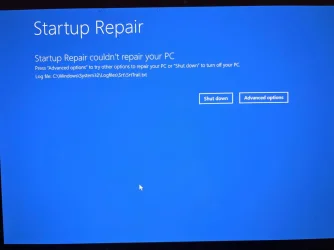
Saw the "Repair" option and chose it:
1767494172176.webp


Advanced options:
1767494263440.webp


Tried Startup Repar. Failed:
1767494196352.webp

Tried System Restore. At least it was able to find a restore point:
1767494423894.webp

It failed and gave me options:
1767494231188.webp

Troubleshoot led to the Advanced Option (see above), so I tried Uninstall Updates. Failed.:
1767494514572.webp

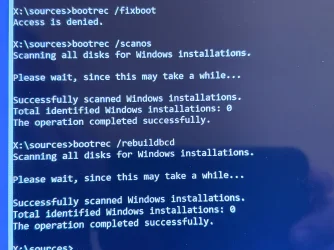
It failed so I went to Command Prompt in Advanced Options and was able to read the HDD partitions and thumb drive. I copied the DumpStack.log to the thumb drive and transferred it to my old computer and am attaching it to this forum post.

1767494548895.webp

It seems like the file structure on the C: drive is intact, but since the computer won't boot, something is wrong with the boot partitions? Is there any way to reconstruct the boot partition(s) and keep everything on the C: partition intact? Based on the time of the file, it was created during one of the several attempts to do an in-place update, but not the one that killed the boot-up ability.

1767496013262.webp

Any idea why bootrec /fixboot access was denied?

It looks like all the partitions are on the drive. Partition 3 is the Windows partition and Partition 4 is the data file partition:

1767496503167.webp

Could the existence of two Recovery partitions be a problem? I'm guessing a second one was created during today's episodes?
 

Attachments

  • DumpStack.log
    DumpStack.log
    12 KB · Views: 2
  • 1767494315038.webp
    1767494315038.webp
    60.6 KB · Views: 1
  • 1767495898357.webp
    1767495898357.webp
    164.4 KB · Views: 1
Last edited:

My Computers My Computers

  • At a glance

    Windows 11 Pro 25H2 (OS Build 26200.8524)AMD Ryzen AI 9 HX 370 w/Radeon 890M32GBNVIDIA GeForce RTX 4050 (and IGP Radeon 890M)
    OS
    Windows 11 Pro 25H2 (OS Build 26200.8524)
    Computer type
    Laptop
    Manufacturer/Model
    ASUS - ProArt PX13
    CPU
    AMD Ryzen AI 9 HX 370 w/Radeon 890M
    Motherboard
    AMI HN7306WU
    Memory
    32GB
    Graphics Card(s)
    NVIDIA GeForce RTX 4050 (and IGP Radeon 890M)
    Monitor(s) Displays
    external 24" Dell P2415Q
    Screen Resolution
    3840 x 2160 on external Dell, 2880 x 1800 on laptop screen
    Hard Drives
    1TB WD SSD
    Browser
    Vivaldi, Brave, Edge
    Antivirus
    Avast (free version)
  • At a glance

    Windows 11 Pro, 21H2 (Build 22000.376)i7-8650U16 GBiGPU (Intel® UHD Graphics 620)
    Operating System
    Windows 11 Pro, 21H2 (Build 22000.376)
    Computer type
    Tablet
    Manufacturer/Model
    Surface Pro 6
    CPU
    i7-8650U
    Memory
    16 GB
    Graphics card(s)
    iGPU (Intel® UHD Graphics 620)
    Monitor(s) Displays
    Dell P2415Q
    Screen Resolution
    3840 x 2160 on external Dell, 2736 x 1824 on SP6 screen
    Hard Drives
    512GB PCIe Gen 3 x2 SSD
    Browser
    Vivaldi, Comodo Dragon, Edge
    Antivirus
    Avast (free edition)
The dump log did not report 7B.

Avast drivers were present.


Had you found:

srttrail.txt

BIOS menu options under storage


Code:
Dump stack initialized at UTC: 2026/01/03 22:13:49, local time: 2026/01/03 16:13:49.
#BugCheckCode 0x0000000000000139
#BugCheckP1 0x000000000000001D
#BugCheckP2 0xFFFFFC8F45C1DF00
#BugCheckP3 0xFFFFFC8F45C1DE58
#BugCheckP4 0x0000000000000000


Code:
Calling aswSP secondary callback.
Return from aswSP secondary callback.
Writing aswSP secondary callback data.
Writing aswSP secondary callback data done.
 

My Computer My Computer

At a glance

Windows 10Intel(R) Core(TM) i7-4800MQ CPU @ 2.70GHz16 GB Total: Manufacturer : Samsung MemoryTyp...NVIDIA Quadro K3100M; Intel(R) HD Graphics 4600
OS
Windows 10
Computer type
Laptop
Manufacturer/Model
HP
CPU
Intel(R) Core(TM) i7-4800MQ CPU @ 2.70GHz
Motherboard
Product : 190A Version : KBC Version 94.56
Memory
16 GB Total: Manufacturer : Samsung MemoryType : DDR3 FormFactor : SODIMM Capacity : 8GB Speed : 1600
Graphics Card(s)
NVIDIA Quadro K3100M; Intel(R) HD Graphics 4600
Sound Card
IDT High Definition Audio CODEC; PNP Device ID HDAUDIO\FUNC_01&VEN_111D&DEV_76E0
Hard Drives
Model Hitachi HTS727575A9E364
Antivirus
Microsoft Defender
Other Info
Mobile Workstation

My Computers My Computers

  • At a glance

    Windows 11 Pro 25H2 (OS Build 26200.8524)AMD Ryzen AI 9 HX 370 w/Radeon 890M32GBNVIDIA GeForce RTX 4050 (and IGP Radeon 890M)
    OS
    Windows 11 Pro 25H2 (OS Build 26200.8524)
    Computer type
    Laptop
    Manufacturer/Model
    ASUS - ProArt PX13
    CPU
    AMD Ryzen AI 9 HX 370 w/Radeon 890M
    Motherboard
    AMI HN7306WU
    Memory
    32GB
    Graphics Card(s)
    NVIDIA GeForce RTX 4050 (and IGP Radeon 890M)
    Monitor(s) Displays
    external 24" Dell P2415Q
    Screen Resolution
    3840 x 2160 on external Dell, 2880 x 1800 on laptop screen
    Hard Drives
    1TB WD SSD
    Browser
    Vivaldi, Brave, Edge
    Antivirus
    Avast (free version)
  • At a glance

    Windows 11 Pro, 21H2 (Build 22000.376)i7-8650U16 GBiGPU (Intel® UHD Graphics 620)
    Operating System
    Windows 11 Pro, 21H2 (Build 22000.376)
    Computer type
    Tablet
    Manufacturer/Model
    Surface Pro 6
    CPU
    i7-8650U
    Memory
    16 GB
    Graphics card(s)
    iGPU (Intel® UHD Graphics 620)
    Monitor(s) Displays
    Dell P2415Q
    Screen Resolution
    3840 x 2160 on external Dell, 2736 x 1824 on SP6 screen
    Hard Drives
    512GB PCIe Gen 3 x2 SSD
    Browser
    Vivaldi, Comodo Dragon, Edge
    Antivirus
    Avast (free edition)
It’s gone from bad to worse.

I now cannot boot. Onscreen message:

”Your device ran into a problem and needs to restart. We’ restart for you.” [spoiler alert: it doesn’t]

“Stop code: INACCESSIBLE_BOOT_DEVICE (0x7B)”


[edited to add, now that I've got my old computer up & running:]

These are my steps to disabling my computer:

- uninstalled Avast Antivirus (using Avast Clear)
- rebooted
- uninstalled Comodo Firewall (using Windows add/remove programs)
- disabled all non-Microsoft services (via msconfig)
- disabled all startup items in Task Scheduler
- rebooted (or, tried to...)

I did do something that I hadn't done prior: the second reboot was prior to trying to mount the .ISO file to do an in-place update. My rationale: while I had disabled items in Task Manager > Startup, those items were, in fact, still running, so I rebooted thinking maybe if any of those items were the problem, they would not be after a reboot. (Mistake???)

I booted into BIOS/UEFI on the ASUS notebook to make sure the SSD is detected and set as the boot device. It is.


Can I do an in-place update if I make a win11 x64 boot USB thumb drive (on my old computer) and boot off of it (in the new ASUS computer)?


My mind is spinning. Remind me what 7B is again, and why it could/should be in the dump log?


From the earlier report:

Code:
“Stop code: INACCESSIBLE_BOOT_DEVICE (0x7B)”


Do you know were srtrail.txt would be? i.e. What directory/folder?


c:\windows\system32\logfiles\srt\srttrail.txt

%windir%\system32\logfiles\srt\srttrail.txt


See if you can find BIOS options similar to this ASUS video:


What were the steps that you made to find and the create the Dump stack text?
(please list each step)
 
Last edited:

My Computer My Computer

At a glance

Windows 10Intel(R) Core(TM) i7-4800MQ CPU @ 2.70GHz16 GB Total: Manufacturer : Samsung MemoryTyp...NVIDIA Quadro K3100M; Intel(R) HD Graphics 4600
OS
Windows 10
Computer type
Laptop
Manufacturer/Model
HP
CPU
Intel(R) Core(TM) i7-4800MQ CPU @ 2.70GHz
Motherboard
Product : 190A Version : KBC Version 94.56
Memory
16 GB Total: Manufacturer : Samsung MemoryType : DDR3 FormFactor : SODIMM Capacity : 8GB Speed : 1600
Graphics Card(s)
NVIDIA Quadro K3100M; Intel(R) HD Graphics 4600
Sound Card
IDT High Definition Audio CODEC; PNP Device ID HDAUDIO\FUNC_01&VEN_111D&DEV_76E0
Hard Drives
Model Hitachi HTS727575A9E364
Antivirus
Microsoft Defender
Other Info
Mobile Workstation
From the earlier report:

Code:
“Stop code: INACCESSIBLE_BOOT_DEVICE (0x7B)”
Ah. That 7B. No idea what that "boot device" even is .

Looking at the Windows partition I see c:\windows\logs and c:\windows\log directories. The latter is a list of .log files mostly dated 04/26/2025. Nothing dated today. I suspect that is from when ASUS configured the machine, since I didn't buy it until November 2025. The former is a series of directories, most with today's date:

1767498259002.webp

Before I go down that rabbit hole (anticipating nested sub-directories), does any of them pop out as a likely home for a srttrail.txt file?
 

My Computers My Computers

  • At a glance

    Windows 11 Pro 25H2 (OS Build 26200.8524)AMD Ryzen AI 9 HX 370 w/Radeon 890M32GBNVIDIA GeForce RTX 4050 (and IGP Radeon 890M)
    OS
    Windows 11 Pro 25H2 (OS Build 26200.8524)
    Computer type
    Laptop
    Manufacturer/Model
    ASUS - ProArt PX13
    CPU
    AMD Ryzen AI 9 HX 370 w/Radeon 890M
    Motherboard
    AMI HN7306WU
    Memory
    32GB
    Graphics Card(s)
    NVIDIA GeForce RTX 4050 (and IGP Radeon 890M)
    Monitor(s) Displays
    external 24" Dell P2415Q
    Screen Resolution
    3840 x 2160 on external Dell, 2880 x 1800 on laptop screen
    Hard Drives
    1TB WD SSD
    Browser
    Vivaldi, Brave, Edge
    Antivirus
    Avast (free version)
  • At a glance

    Windows 11 Pro, 21H2 (Build 22000.376)i7-8650U16 GBiGPU (Intel® UHD Graphics 620)
    Operating System
    Windows 11 Pro, 21H2 (Build 22000.376)
    Computer type
    Tablet
    Manufacturer/Model
    Surface Pro 6
    CPU
    i7-8650U
    Memory
    16 GB
    Graphics card(s)
    iGPU (Intel® UHD Graphics 620)
    Monitor(s) Displays
    Dell P2415Q
    Screen Resolution
    3840 x 2160 on external Dell, 2736 x 1824 on SP6 screen
    Hard Drives
    512GB PCIe Gen 3 x2 SSD
    Browser
    Vivaldi, Comodo Dragon, Edge
    Antivirus
    Avast (free edition)
If you're able to perform recurrent startup repairs then you may be able to create a new srttrail.txt.


Had you been able to get these files:

C:\windows\minidump
C:\windows\memory.dmp
setupdiag


See the prior edited thread.
 

My Computer My Computer

At a glance

Windows 10Intel(R) Core(TM) i7-4800MQ CPU @ 2.70GHz16 GB Total: Manufacturer : Samsung MemoryTyp...NVIDIA Quadro K3100M; Intel(R) HD Graphics 4600
OS
Windows 10
Computer type
Laptop
Manufacturer/Model
HP
CPU
Intel(R) Core(TM) i7-4800MQ CPU @ 2.70GHz
Motherboard
Product : 190A Version : KBC Version 94.56
Memory
16 GB Total: Manufacturer : Samsung MemoryType : DDR3 FormFactor : SODIMM Capacity : 8GB Speed : 1600
Graphics Card(s)
NVIDIA Quadro K3100M; Intel(R) HD Graphics 4600
Sound Card
IDT High Definition Audio CODEC; PNP Device ID HDAUDIO\FUNC_01&VEN_111D&DEV_76E0
Hard Drives
Model Hitachi HTS727575A9E364
Antivirus
Microsoft Defender
Other Info
Mobile Workstation
What menu options were seen for storage?
Sorry. I just saw this message. There is *nothing* about storage in the UEFI/BIOS screens except identifying the drives and setting the boot order.
 

My Computers My Computers

  • At a glance

    Windows 11 Pro 25H2 (OS Build 26200.8524)AMD Ryzen AI 9 HX 370 w/Radeon 890M32GBNVIDIA GeForce RTX 4050 (and IGP Radeon 890M)
    OS
    Windows 11 Pro 25H2 (OS Build 26200.8524)
    Computer type
    Laptop
    Manufacturer/Model
    ASUS - ProArt PX13
    CPU
    AMD Ryzen AI 9 HX 370 w/Radeon 890M
    Motherboard
    AMI HN7306WU
    Memory
    32GB
    Graphics Card(s)
    NVIDIA GeForce RTX 4050 (and IGP Radeon 890M)
    Monitor(s) Displays
    external 24" Dell P2415Q
    Screen Resolution
    3840 x 2160 on external Dell, 2880 x 1800 on laptop screen
    Hard Drives
    1TB WD SSD
    Browser
    Vivaldi, Brave, Edge
    Antivirus
    Avast (free version)
  • At a glance

    Windows 11 Pro, 21H2 (Build 22000.376)i7-8650U16 GBiGPU (Intel® UHD Graphics 620)
    Operating System
    Windows 11 Pro, 21H2 (Build 22000.376)
    Computer type
    Tablet
    Manufacturer/Model
    Surface Pro 6
    CPU
    i7-8650U
    Memory
    16 GB
    Graphics card(s)
    iGPU (Intel® UHD Graphics 620)
    Monitor(s) Displays
    Dell P2415Q
    Screen Resolution
    3840 x 2160 on external Dell, 2736 x 1824 on SP6 screen
    Hard Drives
    512GB PCIe Gen 3 x2 SSD
    Browser
    Vivaldi, Comodo Dragon, Edge
    Antivirus
    Avast (free edition)

Latest Support Threads

Back
Top Bottom