- Local time
- 3:50 AM
- Posts
- 520
- OS
- Windows 11
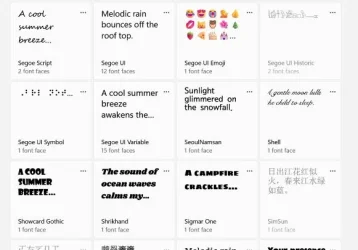
I noticed that several fonts in "Settings" are greyed out and not available for use. They are "system fonts" as they can't be uninstalled. Is this normal and the result of personalization settings or other display factors (resolution, refresh rate, etc.)? If not, can I force delete them and replace in the Windows folder to try and get them available? Thanks.
My Computers
-
At a glance
Windows 11Intel i7-7700K32GB 2666Mhz (Kingston Hyper X Fury)Powercolor RX6600XT- OS
- Windows 11
- Computer type
- PC/Desktop
- Manufacturer/Model
- Custom
- CPU
- Intel i7-7700K
- Motherboard
- Asus Prime Z-270A
- Memory
- 32GB 2666Mhz (Kingston Hyper X Fury)
- Graphics Card(s)
- Powercolor RX6600XT
- Sound Card
- N/A
- Monitor(s) Displays
- KTC
- Screen Resolution
- 2560 x 1440
- Hard Drives
- 1TB Western Digital SN770 (System) and 2TB Western Digital SN770 (Storage)
- Antivirus
- Windows Security
-
At a glance
Windows 11 Homei9-11900H32GBIntegrated Intel and Nvidia 3050Ti- Operating System
- Windows 11 Home
- Computer type
- Laptop
- Manufacturer/Model
- Dell/XPS 15 9510
- CPU
- i9-11900H
- Motherboard
- Unknown
- Memory
- 32GB
- Graphics card(s)
- Integrated Intel and Nvidia 3050Ti
- Sound Card
- Integrated (Realtek)
- Monitor(s) Displays
- None
- Screen Resolution
- 1920 x 1200 (non-Touch)
- Hard Drives
- 2TB SK Hynix P41 Platinum
- Antivirus
- Windows Security