For a whole year, Frequent BSODs / Freezes, Even After Fresh Windows Install


AsaeDawn

Member
Local time
5:51 AM
Posts
8
OS
Microsoft Windows 11 Home Single Language
Hello,

I’ve been dealing with recurring issues on my laptop since April last year. The problem shows up as either:
  • A random Blue Screen of Death (BSOD), or
  • A complete black screen freeze, which forces me to restart manually.

These crashes happen every couple of days, and despite many attempts, I haven’t been able to fix it. :(

Two days ago, I even reinstalled Windows completely (fresh install, no leftover files or settings), but the crashes are still happening.

At this point, I really want to get to the bottom of it and solve it once and for all. I don’t have much technical knowledge outside of coding, so I’d really appreciate clear, step-by-step guidance.

I have uploaded the v2 log file in googledrive, as told in the intstructions.
Drive

Thank you in advance for any help! :)
 
Windows Build/Version
Windows 11 - version 24H2 (OSBuild 26100.6584) - windows 11 home single language

My Computer

System One

  • OS
    Microsoft Windows 11 Home Single Language
    Computer type
    Laptop
    Manufacturer/Model
    Asus/ASUS TUF Gaming A17 FA706IC_FA706IC
    CPU
    AMD Ryzen 7 4800H with Radeon Graphics, 2901 Mhz, 8 Cor
    Motherboard
    ASUSTeK COMPUTER INC - FA706IC
    Memory
    Physical Memory (RAM) 16.0 GB
    Graphics Card(s)
    amd radeon(tm) AND graphics nvidia geforce rtx 3050 laptop gpu
    Sound Card
    Realtek High Definition Audio / AMD High Definition Audio Device / NVIDIA High Definition Audio

Well just after like 12 mins of writing this, i got another BSOD, here is the new minidump, if it helps

Minidump
 

My Computer

System One

  • OS
    Microsoft Windows 11 Home Single Language
    Computer type
    Laptop
    Manufacturer/Model
    Asus/ASUS TUF Gaming A17 FA706IC_FA706IC
    CPU
    AMD Ryzen 7 4800H with Radeon Graphics, 2901 Mhz, 8 Cor
    Motherboard
    ASUSTeK COMPUTER INC - FA706IC
    Memory
    Physical Memory (RAM) 16.0 GB
    Graphics Card(s)
    amd radeon(tm) AND graphics nvidia geforce rtx 3050 laptop gpu
    Sound Card
    Realtek High Definition Audio / AMD High Definition Audio Device / NVIDIA High Definition Audio
Is the laptop using Ethernet or Wifi?


Please perform the following steps:


1) Add WMIC:

Administrative command prompt:

Code:
DISM /Online /Add-Capability /CapabilityName:WMIC~~~~


2) Run Tuneup plus > post a share link


3) Create a new restore point


4) Run Memtest86+ for 8 or more passes > take pictures > post images or share links

Memtest86+ | The Open-Source Memory Testing Tool

Just 1 error is a test fail and testing can be aborted.

The more the passes the better the testing conditions.

It sometimes takes passes into the 20's to detect malfunctioning RAM.

The RAM can be tested all at one time or one at a time in the same DIMM.

Memtest86+ | The Open-Source Memory Testing Tool

MemTest86+ - Test RAM


5) Reinstall:

rt68cx21 Realtek NetAdapter Driver c:\windows\system32\driverstore\filerepository\rt68cx21x64.inf_amd64_72550ea126b8df03\rt68cx21x64.sys


6) For new BSOD run V2 instead of posting dump files


Code:
Event[2704]
  Log Name: System
  Source: rt68cx21
  Date: 2025-09-21T07:34:40.4910000Z
  Event ID: 2
  Task: None
  Level: Error
  Opcode: N/A
  Keyword: Classic,
  User: N/A
  User Name: N/A
  Computer: Kaori
  Description:
Realtek PCIe GbE Family Controller has a Hardware IO error.

Event[2705]
  Log Name: System
  Source: rt68cx21
  Date: 2025-09-21T07:34:40.4910000Z
  Event ID: 2
  Task: None
  Level: Error
  Opcode: N/A
  Keyword: Classic,
  User: N/A
  User Name: N/A
  Computer: Kaori
  Description:
Realtek PCIe GbE Family Controller has a Hardware IO error.

Event[2706]
  Log Name: System
  Source: rt68cx21
  Date: 2025-09-21T07:35:03.0780000Z
  Event ID: 2
  Task: None
  Level: Error
  Opcode: N/A
  Keyword: Classic,
  User: N/A
  User Name: N/A
  Computer: Kaori
  Description:
Realtek PCIe GbE Family Controller has a Hardware IO error.

Event[2707]
  Log Name: System
  Source: rt68cx21
  Date: 2025-09-21T07:35:03.0780000Z
  Event ID: 2
  Task: None
  Level: Error
  Opcode: N/A
  Keyword: Classic,
  User: N/A
  User Name: N/A
  Computer: Kaori
  Description:
Realtek PCIe GbE Family Controller has a Hardware IO error.

Event[2708]
  Log Name: System
  Source: rt68cx21
  Date: 2025-09-21T07:49:24.4450000Z
  Event ID: 2
  Task: None
  Level: Error
  Opcode: N/A
  Keyword: Classic,
  User: N/A
  User Name: N/A
  Computer: Kaori
  Description:
Realtek PCIe GbE Family Controller has a Hardware IO error.

Event[2709]
  Log Name: System
  Source: rt68cx21
  Date: 2025-09-21T07:49:24.4450000Z
  Event ID: 2
  Task: None
  Level: Error
  Opcode: N/A
  Keyword: Classic,
  User: N/A
  User Name: N/A
  Computer: Kaori
  Description:
Realtek PCIe GbE Family Controller has a Hardware IO error.


Code:
Name    [00000001] Realtek PCIe GbE Family Controller
Adapter Type    Ethernet 802.3
Product Type    Realtek PCIe GbE Family Controller
Installed    Yes
PNP Device ID    PCI\VEN_10EC&DEV_8168&SUBSYS_208F1043&REV_15\01000000684CE00000
Last Reset    21-09-2025 01:47 PM
Index    1
Service Name    rt68cx21
IP Address    Not Available
IP Subnet    Not Available
Default IP Gateway    Not Available
DHCP Enabled    Yes
DHCP Server    Not Available
DHCP Lease Expires    Not Available
DHCP Lease Obtained    Not Available
MAC Address    ‪50:EB:F6:E5:C8:27‬
Memory Address    0x00000000FC804000-0x00000000FC804FFF
Memory Address    0x00000000FC800000-0x00000000FC803FFF
IRQ Channel    IRQ 4294967245
Driver    C:\WINDOWS\SYSTEM32\DRIVERSTORE\FILEREPOSITORY\RT68CX21X64.INF_AMD64_72550EA126B8DF03\RT68CX21X64.SYS (1168.2.909.2021, 498.38 KB (510,344 bytes), 21-09-2025 06:36 AM)
 

My Computer

System One

  • OS
    Windows 10
    Computer type
    Laptop
    Manufacturer/Model
    HP
    CPU
    Intel(R) Core(TM) i7-4800MQ CPU @ 2.70GHz
    Motherboard
    Product : 190A Version : KBC Version 94.56
    Memory
    16 GB Total: Manufacturer : Samsung MemoryType : DDR3 FormFactor : SODIMM Capacity : 8GB Speed : 1600
    Graphics Card(s)
    NVIDIA Quadro K3100M; Intel(R) HD Graphics 4600
    Sound Card
    IDT High Definition Audio CODEC; PNP Device ID HDAUDIO\FUNC_01&VEN_111D&DEV_76E0
    Hard Drives
    Model Hitachi HTS727575A9E364
    Antivirus
    Microsoft Defender
    Other Info
    Mobile Workstation
Hi, the laptop is using Wifi

step1) done

step2)
here is the file from step 2
Tunelog

step 3,4,5) doing them

step 6) here is the new V2 zip including the new bsod
new_v2

will update when done with step 3,4,5


Code:
 Microsoft Windows 11 Home Single Language  Version 24H2 (OS Build 26100.6584)
 
==================================================================

    Started on 21-09-2025 at 16:30:19.83
    
        [SFC /ScanNow]
    
Beginning system scan.  This process will take some time.

Results:
 
Windows Resource Protection did not find any integrity violations.
 
==================================================================

    Started on 21-09-2025 at 16:31:42.03

        [DISM /online /cleanup-image /ScanHealth]

Deployment Image Servicing and Management tool
Version: 10.0.26100.5074

Image Version: 10.0.26100.6584
 
No component store corruption detected.

The operation completed successfully.
 
==================================================================

    Started on 21-09-2025 at 16:33:40.62

        [DISM /online /cleanup-image /RestoreHealth]

Deployment Image Servicing and Management tool
Version: 10.0.26100.5074

Image Version: 10.0.26100.6584
 
The restore operation completed successfully.

The operation completed successfully.
 
==================================================================

The second "SFC /ScanNow" was skipped, as the first output the following:

Windows Resource Protection did not find any integrity violations.
 
==================================================================

    Started on 21-09-2025 at 16:35:31.28

        [ChkDsk /Scan] 
 
The type of the file system is NTFS.
 
Stage 1: Examining basic file system structure ...
529408 file records processed.                                                       
File verification completed.
Phase duration (File record verification): 2.98 seconds.
12328 large file records processed.                                   
Phase duration (Orphan file record recovery): 6.06 milliseconds.
0 bad file records processed.                                     
Phase duration (Bad file record checking): 0.04 milliseconds.
 
Stage 2: Examining file name linkage ...
196 reparse records processed.                                     
646144 index entries processed.                                                       
Index verification completed.
Phase duration (Index verification): 6.24 seconds.
0 unindexed files scanned.                                       
Phase duration (Orphan reconnection): 1.02 seconds.
0 unindexed files recovered to lost and found.                   
Phase duration (Orphan recovery to lost and found): 0.15 milliseconds.
196 reparse records processed.                                     
Phase duration (Reparse point and Object ID verification): 2.31 milliseconds.
 
Stage 3: Examining security descriptors ...
Security descriptor verification completed.
Phase duration (Security descriptor verification): 31.30 milliseconds.
58369 data files processed.                                           
Phase duration (Data attribute verification): 0.05 milliseconds.
CHKDSK is verifying Usn Journal...
37877776 USN bytes processed.                                                           
Usn Journal verification completed.
Phase duration (USN journal verification): 97.18 milliseconds.

Windows has scanned the file system and found no problems.

No further action is required.
 
499069951 KB total disk space.
87390644 KB in 183860 files.
156268 KB in 58370 indexes.
0 KB in bad sectors.
652471 KB in use by the system.
65536 KB occupied by the log file.
410870568 KB available on disk.
 
4096 bytes in each allocation unit.
124767487 total allocation units on disk.
102717642 allocation units available on disk.
Total duration: 10.38 seconds (10383 ms).
 
==================================================================
 
    Started on 21-09-2025 at 16:35:48.95
 
AutoReboot   
 
TRUE       
 
==================================================================
 
        [Set AutoReboot = False]
 
Updating property(s) of '\\KAORI\ROOT\CIMV2:Win32_OSRecoveryConfiguration.Name="Microsoft Windows 11 Home Single Language|C:\\WINDOWS|\\Device\\Harddisk1\\Partition3"'
Property(s) update successful.
==================================================================
 
AutoReboot   
 
FALSE       
 
==================================================================
 
DebugInfoType   
 
3             
 
==================================================================

        [Set DebugInfoType = 7]

Updating property(s) of '\\KAORI\ROOT\CIMV2:Win32_OSRecoveryConfiguration.Name="Microsoft Windows 11 Home Single Language|C:\\WINDOWS|\\Device\\Harddisk1\\Partition3"'
Property(s) update successful.
==================================================================
 
DebugInfoType   
 
7             
 
==================================================================

        [WMIC PageFile list]

AllocatedBaseSize=2944
CurrentUsage=72
Description=C:\pagefile.sys
InstallDate=20250921062301.845839+330
Name=C:\pagefile.sys
PeakUsage=81
Status=
TempPageFile=FALSE
 
==================================================================
 
AutomaticManagedPagefile   
 
TRUE                     
 
==================================================================

        [Set AutomaticManagedPagefile = True]

Updating property(s) of '\\KAORI\ROOT\CIMV2:Win32_ComputerSystem.Name="KAORI"'
Property(s) update successful.
==================================================================
 
AutomaticManagedPagefile   
 
TRUE                     
 
==================================================================

        [BcdEdit /enum {badmemory}]

RAM Defects
-----------
identifier              {badmemory}
isolatedcontext         Yes
 
==================================================================

    Finished on 21-09-2025 at 16:35:50.83
    It took 5 minutes and 31 seconds to complete the operations.
 

My Computer

System One

  • OS
    Microsoft Windows 11 Home Single Language
    Computer type
    Laptop
    Manufacturer/Model
    Asus/ASUS TUF Gaming A17 FA706IC_FA706IC
    CPU
    AMD Ryzen 7 4800H with Radeon Graphics, 2901 Mhz, 8 Cor
    Motherboard
    ASUSTeK COMPUTER INC - FA706IC
    Memory
    Physical Memory (RAM) 16.0 GB
    Graphics Card(s)
    amd radeon(tm) AND graphics nvidia geforce rtx 3050 laptop gpu
    Sound Card
    Realtek High Definition Audio / AMD High Definition Audio Device / NVIDIA High Definition Audio
Tuneup plus results were all good.
 

My Computer

System One

  • OS
    Windows 10
    Computer type
    Laptop
    Manufacturer/Model
    HP
    CPU
    Intel(R) Core(TM) i7-4800MQ CPU @ 2.70GHz
    Motherboard
    Product : 190A Version : KBC Version 94.56
    Memory
    16 GB Total: Manufacturer : Samsung MemoryType : DDR3 FormFactor : SODIMM Capacity : 8GB Speed : 1600
    Graphics Card(s)
    NVIDIA Quadro K3100M; Intel(R) HD Graphics 4600
    Sound Card
    IDT High Definition Audio CODEC; PNP Device ID HDAUDIO\FUNC_01&VEN_111D&DEV_76E0
    Hard Drives
    Model Hitachi HTS727575A9E364
    Antivirus
    Microsoft Defender
    Other Info
    Mobile Workstation
Check Reliability History for entries,in particular red flagged ones.
To access the tool,start typing ---reliability ---in the Search box.
 

My Computer

System One

  • OS
    win 10
    Computer type
    PC/Desktop
    Manufacturer/Model
    home built
    CPU
    amd ryzen 5-2600
    Motherboard
    gigabyte b450m-ds3h
    Memory
    ng skill sniper x 16gb
    Graphics Card(s)
    nvidea gtx 1050
    Monitor(s) Displays
    benq fp 92
    Hard Drives
    samsung 860 evo 500gb m2 ssd
    PSU
    antec ea550g
    Case
    nzxt noctis 450
    Browser
    edge
Tuneup plus results were all good.
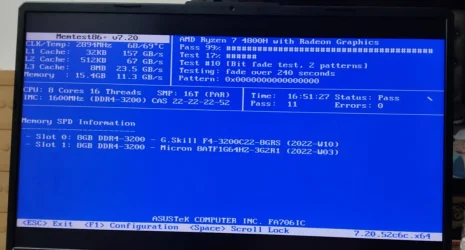
result of the memtest: 11 passes 0 errors

image result of memtest86+

should i stop the memtest?

ill re-install "rt68cx21 Realtek NetAdapter Driver" after this
(before starting the memtest i tried to re-install it from my laptop's driver website, but it didnt matter (i crashed after an hour or two), i'll try again or maybe ill try from realtek's website)


Check Reliability History for entries,in particular red flagged ones.
To access the tool,start typing ---reliability ---in the Search box.
ill check into that
 

Attachments

  • ramtest.webp
    ramtest.webp
    65.2 KB · Views: 3

My Computer

System One

  • OS
    Microsoft Windows 11 Home Single Language
    Computer type
    Laptop
    Manufacturer/Model
    Asus/ASUS TUF Gaming A17 FA706IC_FA706IC
    CPU
    AMD Ryzen 7 4800H with Radeon Graphics, 2901 Mhz, 8 Cor
    Motherboard
    ASUSTeK COMPUTER INC - FA706IC
    Memory
    Physical Memory (RAM) 16.0 GB
    Graphics Card(s)
    amd radeon(tm) AND graphics nvidia geforce rtx 3050 laptop gpu
    Sound Card
    Realtek High Definition Audio / AMD High Definition Audio Device / NVIDIA High Definition Audio

another V2 log, with more crashes
v2 log

did installed new "rt68cx21 Realtek NetAdapter Driver" from the realtek website, didnt seem to help.


Check Reliability History for entries,in particular red flagged ones.
To access the tool,start typing ---reliability ---in the Search box.
i checked couldnt really found anything secific, just says "unexpected shutdown" and the error code
 

My Computer

System One

  • OS
    Microsoft Windows 11 Home Single Language
    Computer type
    Laptop
    Manufacturer/Model
    Asus/ASUS TUF Gaming A17 FA706IC_FA706IC
    CPU
    AMD Ryzen 7 4800H with Radeon Graphics, 2901 Mhz, 8 Cor
    Motherboard
    ASUSTeK COMPUTER INC - FA706IC
    Memory
    Physical Memory (RAM) 16.0 GB
    Graphics Card(s)
    amd radeon(tm) AND graphics nvidia geforce rtx 3050 laptop gpu
    Sound Card
    Realtek High Definition Audio / AMD High Definition Audio Device / NVIDIA High Definition Audio
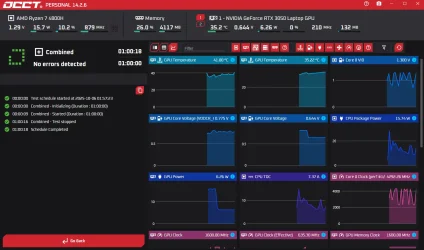
Well, after a complete reinstall and still having the same issue, I'd have to say that I'd suspect hardware somewhere.

You can get the Personal Edition of OCBASE that will do an overall test.

OCCT.webp
 

My Computers

System One System Two

  • OS
    Win 11 Pro 25H2, Build 26200.8655
    Computer type
    PC/Desktop
    Manufacturer/Model
    Home Brew
    CPU
    Intel Core i5 14500
    Motherboard
    Gigabyte B760M G P WIFI
    Memory
    64GB DDR4
    Graphics Card(s)
    GeForce RTX 4060
    Sound Card
    Chipset Realtek
    Monitor(s) Displays
    LG 45" Ultragear, Acer 24" 1080p
    Screen Resolution
    5120x1440, 1920x1080
    Hard Drives
    Crucial P310 2TB 2280 PCIe Gen4 3D NAND NVMe M.2 SSD (O/S)
    Silicon Power 2TB US75 NVMe PCIe Gen4 M.2 2280 SSD (backup)
    Crucial BX500 2TB 3D NAND (2nd backup)
    Seagate 4TB Ironwolf, rotating HDD archive files
    External off-line backup Drives: 2 NVMe 4TB drives in external enclosures
    PSU
    Thermaltake Toughpower GF3 750W
    Case
    LIAN LI LANCOOL 216 E-ATX PC Case
    Cooling
    Lots of fans!
    Keyboard
    Microsoft Comfort Curve 2000
    Mouse
    Logitech G305
    Internet Speed
    Verizon FiOS 1GB
    Browser
    Firefox
    Antivirus
    Malware Bytes & Windows Defender Security
  • Operating System
    Win 11 Pro 25H2, Build 26200.8524
    Computer type
    PC/Desktop
    Manufacturer/Model
    Home Brew
    CPU
    Intel Core i5 14400
    Motherboard
    Gigabyte B760M DS3H AX
    Memory
    32GB DDR5
    Graphics card(s)
    Intel 700 Embedded GPU
    Sound Card
    Realtek Embedded
    Monitor(s) Displays
    27" HP 1080p
    Screen Resolution
    1920x1080
    Hard Drives
    Crucial P310 2TB 2280 PCIe Gen4 eD NAND PCIe SSD
    Samsung EVO 990 2TB NVMe Gen4 SSD
    Samsung 2TB SATA SSD
    PSU
    Thermaltake Smart BM3 650W
    Case
    Okinos Micro ATX Case
    Cooling
    Fans
    Keyboard
    Microsoft Comfort Curve 2000
    Mouse
    Logitech G305
    Internet Speed
    Verizon FiOS 1GB
    Browser
    Firefox
    Antivirus
    Malware Bytes & Windows Defender Security
1) Please clean install the AMD GPU driver amdkmdag.sys

amdwddmg amdwddmg c:\windows\system32\driverstore\filerepository\u0382030.inf_amd64_c27c1f19988d7c7e\b381533\amdkmdag.sys


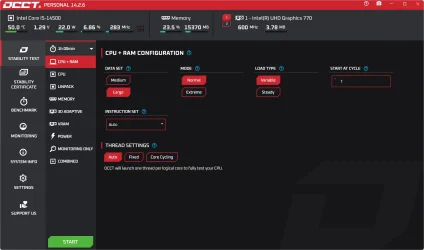
2) As gunrunnerjohn commented please run OCCT

They have multiple one hour software tests that stress test hardware.

Please run each > take pictures > post images or share links


Code:
Name    AMD Radeon(TM) Graphics
PNP Device ID    PCI\VEN_1002&DEV_1636&SUBSYS_120C1043&REV_C6\4&12C9051D&0&0041
Adapter Type    AMD Radeon Graphics Processor (0x1636), Advanced Micro Devices, Inc. compatible
Adapter Description    AMD Radeon(TM) Graphics
Adapter RAM    512.00 MB (536,870,912 bytes)
Installed Drivers    C:\WINDOWS\System32\DriverStore\FileRepository\u0382030.inf_amd64_c27c1f19988d7c7e\B381533\aticfx64.dll,C:\WINDOWS\System32\DriverStore\FileRepository\u0382030.inf_amd64_c27c1f19988d7c7e\B381533\aticfx64.dll,C:\WINDOWS\System32\DriverStore\FileRepository\u0382030.inf_amd64_c27c1f19988d7c7e\B381533\aticfx64.dll,C:\WINDOWS\System32\DriverStore\FileRepository\u0382030.inf_amd64_c27c1f19988d7c7e\B381533\amdxc64.dll
Driver Version    31.0.12014.6
INF File    oem12.inf (ati2mtag_Renoir section)
Driver    C:\WINDOWS\SYSTEM32\DRIVERSTORE\FILEREPOSITORY\U0382030.INF_AMD64_C27C1F19988D7C7E\B381533\AMDKMDAG.SYS (31.0.12014.6, 90.00 MB (94,371,744 bytes), 21-09-2025 06:42 AM)


Code:
amdkmdag.sys Tue Jul 12 18:10:48 2022 (62CDFF78)
 

My Computer

System One

  • OS
    Windows 10
    Computer type
    Laptop
    Manufacturer/Model
    HP
    CPU
    Intel(R) Core(TM) i7-4800MQ CPU @ 2.70GHz
    Motherboard
    Product : 190A Version : KBC Version 94.56
    Memory
    16 GB Total: Manufacturer : Samsung MemoryType : DDR3 FormFactor : SODIMM Capacity : 8GB Speed : 1600
    Graphics Card(s)
    NVIDIA Quadro K3100M; Intel(R) HD Graphics 4600
    Sound Card
    IDT High Definition Audio CODEC; PNP Device ID HDAUDIO\FUNC_01&VEN_111D&DEV_76E0
    Hard Drives
    Model Hitachi HTS727575A9E364
    Antivirus
    Microsoft Defender
    Other Info
    Mobile Workstation
Hi, i am sorry, have been busy with work last week.

anyways here are new logs
new_v2_files

and yes i did used OCCT and run almost all of their tests,
nothing came out of them, no errors and nothing

and i did installed fresh new amd driver using DDU and safe boot. didnt stop the bsod.

i was looking at some forums and thought maybe it could be the mediatek wifi bluetooth card??
i have disabled the driver and bluetooth driver but even after that it crashed.
so i tried disabling realtek pcle driver too from device manager.

but anyways, whats next, what can be done?


1) Please clean install the AMD GPU driver amdkmdag.sys

amdwddmg amdwddmg c:\windows\system32\driverstore\filerepository\u0382030.inf_amd64_c27c1f19988d7c7e\b381533\amdkmdag.sys


2) As gunrunnerjohn commented please run OCCT

They have multiple one hour software tests that stress test hardware.

Please run each > take pictures > post images or share links


Code:
Name    AMD Radeon(TM) Graphics
PNP Device ID    PCI\VEN_1002&DEV_1636&SUBSYS_120C1043&REV_C6\4&12C9051D&0&0041
Adapter Type    AMD Radeon Graphics Processor (0x1636), Advanced Micro Devices, Inc. compatible
Adapter Description    AMD Radeon(TM) Graphics
Adapter RAM    512.00 MB (536,870,912 bytes)
Installed Drivers    C:\WINDOWS\System32\DriverStore\FileRepository\u0382030.inf_amd64_c27c1f19988d7c7e\B381533\aticfx64.dll,C:\WINDOWS\System32\DriverStore\FileRepository\u0382030.inf_amd64_c27c1f19988d7c7e\B381533\aticfx64.dll,C:\WINDOWS\System32\DriverStore\FileRepository\u0382030.inf_amd64_c27c1f19988d7c7e\B381533\aticfx64.dll,C:\WINDOWS\System32\DriverStore\FileRepository\u0382030.inf_amd64_c27c1f19988d7c7e\B381533\amdxc64.dll
Driver Version    31.0.12014.6
INF File    oem12.inf (ati2mtag_Renoir section)
Driver    C:\WINDOWS\SYSTEM32\DRIVERSTORE\FILEREPOSITORY\U0382030.INF_AMD64_C27C1F19988D7C7E\B381533\AMDKMDAG.SYS (31.0.12014.6, 90.00 MB (94,371,744 bytes), 21-09-2025 06:42 AM)


Code:
amdkmdag.sys Tue Jul 12 18:10:48 2022 (62CDFF78)
Well, after a complete reinstall and still having the same issue, I'd have to say that I'd suspect hardware somewhere.

You can get the Personal Edition of OCBASE that will do an overall test.
 

My Computer

System One

  • OS
    Microsoft Windows 11 Home Single Language
    Computer type
    Laptop
    Manufacturer/Model
    Asus/ASUS TUF Gaming A17 FA706IC_FA706IC
    CPU
    AMD Ryzen 7 4800H with Radeon Graphics, 2901 Mhz, 8 Cor
    Motherboard
    ASUSTeK COMPUTER INC - FA706IC
    Memory
    Physical Memory (RAM) 16.0 GB
    Graphics Card(s)
    amd radeon(tm) AND graphics nvidia geforce rtx 3050 laptop gpu
    Sound Card
    Realtek High Definition Audio / AMD High Definition Audio Device / NVIDIA High Definition Audio
1) How come the settings were reset?


2) Please return to post #2 > rerun steps #2 and #3 > post share links


3) List all devices attached to computer ports.


4) When available post images or share links for post #10 step #2.


5) Perform Windows, antivirus updates


6) Reinstall these older drivers directly from the Asus website: (Chipset , GPU, Networking)


Code:
amdfendr    AMD Crash Defender Driver    c:\windows\system32\driverstore\filerepository\amdfendr.inf_amd64_5f2cd636dbc40dd2\amdfendr.sys

Code:
amdwddmg    amdwddmg    c:\windows\system32\driverstore\filerepository\u0417877.inf_amd64_8b2c2b61b3f8a9e5\b417004\amdkmdag.sys

Code:
nvlddmkm    nvlddmkm    c:\windows\system32\driverstore\filerepository\nvam.inf_amd64_4ae7e10b45473e65\nvlddmkm.sys

Code:
mtkwlex    Mediatek PCI LE Extensible Wireless LAN Card Driver    c:\windows\system32\driverstore\filerepository\mtkwl6ex.inf_amd64_f698a1260525f27b\mtkwl6ex.sys


7) Create a new restore point


8) Read this link on Windows Driver Verifier (WDV):

Enable and Disable Driver Verifier in Windows 10


9) Learn the methods to recover from BSOD caused by WDV by booting into safe mode and running one or more of these commands:

verifier /reset

verifier /bootmode resetonbootfail


(option nine and seven)


10) Plan to run the tool with various customized test settings.

a) Test all non-Microsoft drivers

b) Test no Microsoft drivers

c) For the first run of WDV select the 3 customized tests displayed in the TF tutorial


11) Whenever the WDV tool is started if there is no immediate BSOD then open administrative command prompt and copy and paste:

verifier /querysettings

Post a share link.


Customized tests will then be posted for the next run of WDV.


WDV can run continuously during the testing.


For any BSOD post a new V2 share link into the newest post.


Code:
Name    AMD Radeon(TM) Graphics
PNP Device ID    PCI\VEN_1002&DEV_1636&SUBSYS_120C1043&REV_C6\4&12C9051D&0&0041
Adapter Type    AMD Radeon Graphics Processor (0x1636), Advanced Micro Devices, Inc. compatible
Adapter Description    AMD Radeon(TM) Graphics
Adapter RAM    512.00 MB (536,870,912 bytes)
Installed Drivers    C:\WINDOWS\System32\DriverStore\FileRepository\u0417877.inf_amd64_8b2c2b61b3f8a9e5\B417004\aticfx64.dll,C:\WINDOWS\System32\DriverStore\FileRepository\u0417877.inf_amd64_8b2c2b61b3f8a9e5\B417004\aticfx64.dll,C:\WINDOWS\System32\DriverStore\FileRepository\u0417877.inf_amd64_8b2c2b61b3f8a9e5\B417004\aticfx64.dll,C:\WINDOWS\System32\DriverStore\FileRepository\u0417877.inf_amd64_8b2c2b61b3f8a9e5\B417004\amdxc64.dll
Driver Version    31.0.21923.11000
INF File    oem12.inf (ati2mtag_Renoir section)
Driver    C:\WINDOWS\SYSTEM32\DRIVERSTORE\FILEREPOSITORY\U0417877.INF_AMD64_8B2C2B61B3F8A9E5\B417004\AMDKMDAG.SYS (31.0.21923.11000, 101.66 MB (106,595,712 bytes), 28-09-2025 09:13 PM)
   
Name    NVIDIA GeForce RTX 3050 Laptop GPU
PNP Device ID    PCI\VEN_10DE&DEV_25A2&SUBSYS_120C1043&REV_A1\4&2B1A879F&0&0009
Adapter Type    NVIDIA GeForce RTX 3050 Laptop GPU, NVIDIA compatible
Adapter Description    NVIDIA GeForce RTX 3050 Laptop GPU
Adapter RAM    (1,048,576) bytes
Installed Drivers    C:\WINDOWS\System32\DriverStore\FileRepository\nvam.inf_amd64_4ae7e10b45473e65\nvldumdx.dll,C:\WINDOWS\System32\DriverStore\FileRepository\nvam.inf_amd64_4ae7e10b45473e65\nvldumdx.dll,C:\WINDOWS\System32\DriverStore\FileRepository\nvam.inf_amd64_4ae7e10b45473e65\nvldumdx.dll,C:\WINDOWS\System32\DriverStore\FileRepository\nvam.inf_amd64_4ae7e10b45473e65\nvldumdx.dll
Driver Version    32.0.15.6607
INF File    oem23.inf (Section170 section)
Driver    C:\WINDOWS\SYSTEM32\DRIVERSTORE\FILEREPOSITORY\NVAM.INF_AMD64_4AE7E10B45473E65\NVLDDMKM.SYS (32.0.15.6607, 72.77 MB (76,301,472 bytes), 21-09-2025 06:47 AM)


Code:
Name    [00000010] MediaTek Wi-Fi 6 MT7921 Wireless LAN Card
Adapter Type    Not Available
Product Type    MediaTek Wi-Fi 6 MT7921 Wireless LAN Card
Installed    Yes
PNP Device ID    PCI\VEN_14C3&DEV_7961&SUBSYS_46801A3B&REV_00\4&6E6882A&0&0012
Last Reset    05-10-2025 08:53 PM
Index    10
Service Name    mtkwlex
Driver    C:\WINDOWS\SYSTEM32\DRIVERSTORE\FILEREPOSITORY\MTKWL6EX.INF_AMD64_F698A1260525F27B\MTKWL6EX.SYS (3.0.1.1325, 1.39 MB (1,461,912 bytes), 21-09-2025 06:35 AM)


Code:
amdfendr.sys Fri Apr 19 14:11:53 2024 (6622C1F9)
Code:
amdkmdag.sys Tue Jun 17 14:42:42 2025 (6851C532)
Code:
nvlddmkm.sys Sun Oct 20 09:46:16 2024 (671517B8)
Code:
mtkwl6ex.sys Tue Apr 30 04:40:33 2024 (6630BC91)
 

My Computer

System One

  • OS
    Windows 10
    Computer type
    Laptop
    Manufacturer/Model
    HP
    CPU
    Intel(R) Core(TM) i7-4800MQ CPU @ 2.70GHz
    Motherboard
    Product : 190A Version : KBC Version 94.56
    Memory
    16 GB Total: Manufacturer : Samsung MemoryType : DDR3 FormFactor : SODIMM Capacity : 8GB Speed : 1600
    Graphics Card(s)
    NVIDIA Quadro K3100M; Intel(R) HD Graphics 4600
    Sound Card
    IDT High Definition Audio CODEC; PNP Device ID HDAUDIO\FUNC_01&VEN_111D&DEV_76E0
    Hard Drives
    Model Hitachi HTS727575A9E364
    Antivirus
    Microsoft Defender
    Other Info
    Mobile Workstation
1) not sure

2) tuneup plus? ok done4

tuneup log

3)
a) power cord
b) wireless mouse dongle
c) headphone using aux (sometimes)

C:\Windows\System32>powershell "Get-PnpDevice -PresentOnly | Where-Object { $_.InstanceId -match '^USB' }"

Status Class FriendlyName InstanceId
------ ----- ------------ ----------
OK HIDClass USB Input Device USB\VID_...
OK Camera USB2.0 HD UVC WebCam USB\VID_...
OK HIDClass USB Input Device USB\VID_...
OK USB USB Root Hub (USB 3.0) USB\ROOT...
OK USB USB Composite Device USB\VID_...
OK USB USB Root Hub (USB 3.0) USB\ROOT...
OK Bluetooth MediaTek Bluetooth Adapter USB\VID_...
OK USB USB Composite Device USB\VID_...

4) ok: this is the combined test, i did them 1 by 1 too, no error detected
OCCT-25106-090917.webp

5) done

6) done

7) done, made the restore point

8,9,10) did the first 3 customized tests displayed in the TF tutorial, after restarting, laptop went complete black(had to hard force restart using power button) and then it went into the diagnozed screen, didnt do anything and continued to boot, now its running fine even tho driver verifier is ON, no bsods yet.

11) here it is

Verifier Result


here is new V2 for new crashes

V2 logs
 

My Computer

System One

  • OS
    Microsoft Windows 11 Home Single Language
    Computer type
    Laptop
    Manufacturer/Model
    Asus/ASUS TUF Gaming A17 FA706IC_FA706IC
    CPU
    AMD Ryzen 7 4800H with Radeon Graphics, 2901 Mhz, 8 Cor
    Motherboard
    ASUSTeK COMPUTER INC - FA706IC
    Memory
    Physical Memory (RAM) 16.0 GB
    Graphics Card(s)
    amd radeon(tm) AND graphics nvidia geforce rtx 3050 laptop gpu
    Sound Card
    Realtek High Definition Audio / AMD High Definition Audio Device / NVIDIA High Definition Audio
1) Please turn off WDV


2) Uninstall Riot Vanguard


3) Uninstall Riot Vanguard again using the manual commands > post share links


4) Create a new restore point


5) Restart WDV with these groups of customized tests:


Group a
Code:
    [ ] 0x00000001 Special pool.
    [ ] 0x00000010 I/O verification.
    [ ] 0x00000200 Force pending I/O requests.
    [ ] 0x00000400 IRP logging.
    [ ] 0x00002000 Invariant MDL checking for stack.
    [ ] 0x00004000 Invariant MDL checking for driver.
    [ ] 0x00008000 Power framework delay fuzzing.
    [ ] 0x00010000 Port/miniport interface checking.


Group b
Code:
    [ ] 0x02000000 Code integrity checks.
    [ ] 0x00020000 DDI compliance checking.
    [ ] 0x00080000 DDI compliance checking (additional).
    [ ] 0x00000008 Pool tracking.
    [ ] 0x00000100 Security checks.
    [ ] 0x00000002 Force IRQL checking.


Group c
Code:
    [ ] 0x00040000 Systematic low resources simulation.
    [ ] 0x00200000 NDIS/WIFI verification.
    [ ] 0x00800000 Kernel synchronization delay fuzzing.
    [ ] 0x01000000 VM switch verification.
    [ ] 0x00000020 Deadlock detection.
    [ ] 0x00000080 DMA checking.
    [ ] 0x00000800 Miscellaneous checks.


For each group if there is no immediate BSOD then open administrative command prompt and copy and paste:

verifier /querysettings

Post a share link.


For any BSOD post a new V2 share link into the newest post.


Code:
vgk    vgk    \??\c:\program files\riot vanguard\vgk.sys

Code:
vgk.sys      Fri Sep 19 15:49:34 2025 (68CDC1DE)
 
Last edited:

My Computer

System One

  • OS
    Windows 10
    Computer type
    Laptop
    Manufacturer/Model
    HP
    CPU
    Intel(R) Core(TM) i7-4800MQ CPU @ 2.70GHz
    Motherboard
    Product : 190A Version : KBC Version 94.56
    Memory
    16 GB Total: Manufacturer : Samsung MemoryType : DDR3 FormFactor : SODIMM Capacity : 8GB Speed : 1600
    Graphics Card(s)
    NVIDIA Quadro K3100M; Intel(R) HD Graphics 4600
    Sound Card
    IDT High Definition Audio CODEC; PNP Device ID HDAUDIO\FUNC_01&VEN_111D&DEV_76E0
    Hard Drives
    Model Hitachi HTS727575A9E364
    Antivirus
    Microsoft Defender
    Other Info
    Mobile Workstation
hi, so i uninstalled riot vanguard, created new restore point and did all the 3 WDV tests, i got no BSODs, in those tests.
here are the verifier /querysettings for each of those


group setting a

group setting b

group setting c
 

My Computer

System One

  • OS
    Microsoft Windows 11 Home Single Language
    Computer type
    Laptop
    Manufacturer/Model
    Asus/ASUS TUF Gaming A17 FA706IC_FA706IC
    CPU
    AMD Ryzen 7 4800H with Radeon Graphics, 2901 Mhz, 8 Cor
    Motherboard
    ASUSTeK COMPUTER INC - FA706IC
    Memory
    Physical Memory (RAM) 16.0 GB
    Graphics Card(s)
    amd radeon(tm) AND graphics nvidia geforce rtx 3050 laptop gpu
    Sound Card
    Realtek High Definition Audio / AMD High Definition Audio Device / NVIDIA High Definition Audio
Please restart WDV with all customized tests except:

Code:
    [ ] 0x00000004 Randomized low resources simulation.

Run for 24 hours.


If there is no immediate BSOD then open administrative command prompt and copy and paste:

verifier /querysettings

Post a share link.


For any BSOD post a new V2 share link into the newest post.


If there are no BSODs during the 24 hour WDV test then turn off WDV.


Monitor for three days using:


My Computer

System One

  • OS
    Windows 10
    Computer type
    Laptop
    Manufacturer/Model
    HP
    CPU
    Intel(R) Core(TM) i7-4800MQ CPU @ 2.70GHz
    Motherboard
    Product : 190A Version : KBC Version 94.56
    Memory
    16 GB Total: Manufacturer : Samsung MemoryType : DDR3 FormFactor : SODIMM Capacity : 8GB Speed : 1600
    Graphics Card(s)
    NVIDIA Quadro K3100M; Intel(R) HD Graphics 4600
    Sound Card
    IDT High Definition Audio CODEC; PNP Device ID HDAUDIO\FUNC_01&VEN_111D&DEV_76E0

    Hard Drives
    Model Hitachi HTS727575A9E364
    Antivirus
    Microsoft Defender
    Other Info
    Mobile Workstation

Latest Support Threads

Back
Top Bottom