Game at above 60fps on 60hz monitor


vsub

Active member
Member
VIP
Local time
6:47 PM
Posts
207
OS
Windows 11
Can running a game at above 60fps on a 60hz case any problems,maybe some delays
I am using fast vsync from the nvidia control panel and I don't have any tearing issues but the game if it does not have a fps limit may make the gpu render hundreds of frames(increasing power consumption,heat and noise)but I will see only 60 of them

If I can limit the fps,what what will be best if I allow it to be more than 60
 

My Computer

System One

  • OS
    Windows 11
    Computer type
    Laptop
    Manufacturer/Model
    MSI Sword 17 HX
    CPU
    14700HX
    Memory
    64GB
    Graphics Card(s)
    RTX 4070
I would limit fps to 60 fps to save the processing load on the GPU
 

My Computer

System One

  • OS
    Windows 11 Pro
    Computer type
    PC/Desktop
    Manufacturer/Model
    Self build
    CPU
    Core i7-13700K
    Motherboard
    Asus TUF Gaming Plus WiFi Z790
    Memory
    64 GB Kingston Fury Beast DDR5
    Graphics Card(s)
    Gigabyte GeForce RTX 2060 Super Gaming OC 8G
    Sound Card
    Realtek S1200A
    Monitor(s) Displays
    Viewsonic VP2770 & Dell (secondary)
    Screen Resolution
    2560 x 1440
    Hard Drives
    Kingston KC3000 2TB NVME SSD & SATA HDDs & SSD
    PSU
    EVGA SuperNova G2 850W
    Case
    Nanoxia Deep Silence 1
    Cooling
    Noctua NH-D14
    Keyboard
    Microsoft Digital Media Pro
    Mouse
    Logitech Wireless
    Internet Speed
    80 Mb / s
    Browser
    Chrome
    Antivirus
    Defender, Malwarebytes Free & AdwCleaner

My Computer

System One

  • OS
    Microsoft Windows 11 Home
    Computer type
    PC/Desktop
    Manufacturer/Model
    MSI MS-7D98
    CPU
    Intel Core i5-13490F
    Motherboard
    MSI B760 GAMING PLUS WIFI
    Memory
    2 x 16 Patriot Memory (PDP Systems) PSD516G560081 6400MT (32-37-37-74); 1.35V)
    Graphics Card(s)
    GIGABYTE GeForce RTX 4070 WINDFORCE OC 12G (GV-N4070WF3OC-12GD)
    Sound Card
    Bluetooth Аудио
    Monitor(s) Displays
    INNOCN 15K1F
    Screen Resolution
    1920 x 1080
    Hard Drives
    WD_BLACK SN770 250GB
    KINGSTON SNV2S1000G (ELFK0S.6)
    PSU
    Thermaltake Toughpower GF3 1000W
    Case
    CG560 - DeepCool
    Cooling
    ID-COOLING SE-224-XTS / 2 x 140Mm Fan - rear and top; 3 x 120Mm - front
    Keyboard
    Corsair K70 RGB TKL
    Mouse
    Corsair KATAR PRO XT
    Internet Speed
    100 Mbps
    Browser
    Firefox
    Antivirus
    Microsoft Defender Antivirus
    Other Info
    https://www.userbenchmark.com/UserRun/66553205
They are not really related.

60Hz is how fast the "screen" is refreshed.
60fps is how fast the graphics card redraws the "picture" that's ON the screen.


Now some folk have problems with 60Hz screens, but not too many.
A screen at lower Hz, the screen shows more blurring in fast motion scenes, like maybe a flying or car race game.
But that will happen no matter what fps the game or whatever is running at.
You can eliminate the blurring with a screen running at say... 120Hz or 240Hz.
But the blurring has nothing to do with the fps.

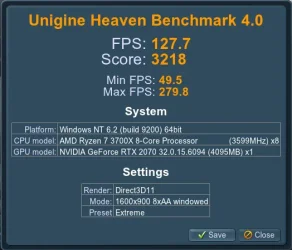
You can test this with something like the "old" Heaven graphics benchmark.
On your 4070 graphics card, you should get a range of fps, and some very high fps...
And, it's a fairly pretty Benchmark. :-)

Use the GREEN download button.
Install Heaven, double click the desktop shortcut, don't change any settings and click RUN.
Then hit the Esc key to open the Menu. Then click on Benchmark (top left).

My results on an RTX 2070...
Image1.webp

I use REVO Uninstaller to uninstall the Heaven Benchmark.


I have a 60Hz screen. It doesn't bother me at all.
But I had a friend that complained of headaches after using my screen.
Even when just browsing on static web pages.
 
Last edited:

My Computers

System One System Two

  • OS
    Win 11 Home ♦♦♦26200.8655 ♦♦♦♦♦♦♦25H2
    Computer type
    PC/Desktop
    Manufacturer/Model
    Built by Ghot® [May 2020]
    CPU
    AMD Ryzen 7 3700X
    Motherboard
    Asus Pro WS X570-ACE (BIOS 5302)
    Memory
    G.Skill (F4-3200C14D-16GTZKW)
    Graphics Card(s)
    EVGA RTX 2070 (08G-P4-2171-KR)
    Sound Card
    Realtek ALC1220P / ALC S1220A
    Monitor(s) Displays
    Dell U3011 30"
    Screen Resolution
    2560 x 1600
    Hard Drives
    2x Samsung 860 EVO 500GB,
    WD 4TB Black FZBX - SATA III,
    WD 8TB Black FZBX - SATA III,
    DRW-24B1ST CD/DVD Burner
    PSU
    PC Power & Cooling 750W Quad EPS12V
    Case
    Cooler Master ATCS 840 Tower
    Cooling
    CM Hyper 212 EVO (push/pull)
    Keyboard
    Ducky DK9008 Shine II Blue LED
    Mouse
    Logitech Optical M-100
    Internet Speed
    300/300
    Browser
    Firefox (latest)
    Antivirus
    Bitdefender Total Security
    Other Info
    Speakers: Klipsch Pro Media 2.1
  • Operating System
    Windows XP Pro 32bit w/SP3
    Computer type
    PC/Desktop
    Manufacturer/Model
    Built by Ghot® (not in use)
    CPU
    AMD Athlon 64 X2 5000+ (OC'd @ 3.2Ghz)
    Motherboard
    ASUS M2N32-SLI Deluxe Wireless Edition
    Memory
    TWIN2X2048-6400C4DHX (2 x 1GB, DDR2 800)
    Graphics card(s)
    EVGA 256-P2-N758-TR GeForce 8600GT SSC
    Sound Card
    Onboard
    Monitor(s) Displays
    ViewSonic G90FB Black 19" Professional (CRT)
    Screen Resolution
    up to 2048 x 1536
    Hard Drives
    WD 36GB 10,000rpm Raptor SATA
    Seagate 80GB 7200rpm SATA
    Lite-On LTR-52246S CD/RW
    Lite-On LH-18A1P CD/DVD Burner
    PSU
    PC Power & Cooling Silencer 750 Quad EPS12V
    Case
    Generic Beige case, 80mm fans
    Cooling
    ZALMAN 9500A 92mm CPU Cooler
    Keyboard
    Logitech Classic Keybooard 200
    Mouse
    Logitech Optical M-BT96a
    Internet Speed
    300/300
    Browser
    Firefox 3.x ??
    Antivirus
    Symantec (Norton)
    Other Info
    Still assembled, still runs. Haven't turned it on for 15 years?
Can running a game at above 60fps on a 60hz case any problems,maybe some delays
I am using fast vsync from the nvidia control panel and I don't have any tearing issues but the game if it does not have a fps limit may make the gpu render hundreds of frames(increasing power consumption,heat and noise)but I will see only 60 of them

If I can limit the fps,what what will be best if I allow it to be more than 60

No, it won’t cause delays by itself - but uncapped FPS is usually pointless/inefficient on a 60 Hz screen. By uncapped - i don't mean you should cap it to 60 FPS. That too can be useful for poorly optimized games - where the FPS scales considerably - from one zone/room to next, as in... now it runs at 38 FPS, you make couple of steps and it jumps to 98 FPS, then shortly after - drops to 63 FPS and so on and so forth... In this case 60 FPS could be ideal. RTS and Turn Based games in particular - could also benefit from a 60 FPS capping. On the other hand - for MOBA games and Online Shooters - which are usually well optimized, so you might get even above 200+ FPS - capping it to max 120 FPS (everything above is a waste on a 60 Hz screen - would be recommended for the sake of responsiveness (even tho, you won't actually see more than 60 FPS - since the extra FPS are discarded or partially sampled). 60 FPS with "Fast" Vsync is ok-ish too (considerably less latency than the old Vsync - but Vsync off - still feels smoother for some - tho again, can help with tearing - "if the game is poorly optimized").

Truth be told - the brain usually... adapts - even to less than ideal conditions. Just don't make the mistake - of playing a particular game at high FPS on a 120 Hz - 320 Hz screen long enough, cause switching back to a 60 Hz screen - "the difference will really stand out (you might find said game unplayable)."
 

My Computer

System One

  • OS
    WinDOS 25H2
    Computer type
    Laptop
    CPU
    Intel & AMD
    Memory
    SO-DIMM SK Hynix 15.8 GB Dual-Channel DDR4-2666 (2 x 8 GB) 1329MHz (19-19-19-43)
    Graphics Card(s)
    nVidia RTX 2060 6GB Mobile GPU (TU106M)
    Sound Card
    Onbord Realtek ALC1220
    Screen Resolution
    1920 x 1080
    Hard Drives
    1x Samsung PM981 NVMe PCIe M.2 512GB / 1x Seagate Expansion ST1000LM035 1TB
Try
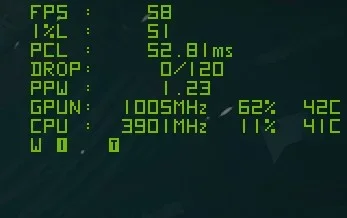
58-60FPS in Nvidia Control Panel (Max Frame Rate)
and
120FPS in Game

+ Frame Generation

1.webp
 
Last edited:

My Computer

System One

  • OS
    Microsoft Windows 11 Home
    Computer type
    PC/Desktop
    Manufacturer/Model
    MSI MS-7D98
    CPU
    Intel Core i5-13490F
    Motherboard
    MSI B760 GAMING PLUS WIFI
    Memory
    2 x 16 Patriot Memory (PDP Systems) PSD516G560081 6400MT (32-37-37-74); 1.35V)
    Graphics Card(s)
    GIGABYTE GeForce RTX 4070 WINDFORCE OC 12G (GV-N4070WF3OC-12GD)
    Sound Card
    Bluetooth Аудио
    Monitor(s) Displays
    INNOCN 15K1F
    Screen Resolution
    1920 x 1080
    Hard Drives
    WD_BLACK SN770 250GB
    KINGSTON SNV2S1000G (ELFK0S.6)
    PSU
    Thermaltake Toughpower GF3 1000W
    Case
    CG560 - DeepCool
    Cooling
    ID-COOLING SE-224-XTS / 2 x 140Mm Fan - rear and top; 3 x 120Mm - front
    Keyboard
    Corsair K70 RGB TKL
    Mouse
    Corsair KATAR PRO XT
    Internet Speed
    100 Mbps
    Browser
    Firefox
    Antivirus
    Microsoft Defender Antivirus
    Other Info
    https://www.userbenchmark.com/UserRun/66553205

Latest Support Threads

Back
Top Bottom