Game at above 60fps on 60hz monitor


vsub

Active member
Member
VIP
Local time
4:52 PM
Posts
233
OS
Windows 11
Can running a game at above 60fps on a 60hz case any problems,maybe some delays
I am using fast vsync from the nvidia control panel and I don't have any tearing issues but the game if it does not have a fps limit may make the gpu render hundreds of frames(increasing power consumption,heat and noise)but I will see only 60 of them

If I can limit the fps,what what will be best if I allow it to be more than 60
 

My Computer My Computer

At a glance

Windows 1114700HX64GBRTX 4070
OS
Windows 11
Computer type
Laptop
Manufacturer/Model
MSI Sword 17 HX
CPU
14700HX
Memory
64GB
Graphics Card(s)
RTX 4070
I would limit fps to 60 fps to save the processing load on the GPU
 

My Computer My Computer

At a glance

Windows 11 ProCore i7-13700K64 GB Kingston Fury Beast DDR5Gigabyte GeForce RTX 2060 Super Gaming OC 8G
OS
Windows 11 Pro
Computer type
PC/Desktop
Manufacturer/Model
Self build
CPU
Core i7-13700K
Motherboard
Asus TUF Gaming Plus WiFi Z790
Memory
64 GB Kingston Fury Beast DDR5
Graphics Card(s)
Gigabyte GeForce RTX 2060 Super Gaming OC 8G
Sound Card
Realtek S1200A
Monitor(s) Displays
Viewsonic VP2770 & Dell (secondary)
Screen Resolution
2560 x 1440
Hard Drives
Kingston KC3000 2TB NVME SSD & SATA HDDs & SSD
PSU
EVGA SuperNova G2 850W
Case
Nanoxia Deep Silence 1
Cooling
Noctua NH-D14
Keyboard
Microsoft Digital Media Pro
Mouse
Logitech Wireless
Internet Speed
80 Mb / s
Browser
Chrome
Antivirus
Defender, Malwarebytes Free & AdwCleaner

My Computer My Computer

At a glance

Microsoft Windows 11 HomeIntel Core i5-13490F2 x 16 Patriot Memory (PDP Systems) PSD516G56...GIGABYTE GeForce RTX 4070 WINDFORCE OC 12G (G...
OS
Microsoft Windows 11 Home
Computer type
PC/Desktop
Manufacturer/Model
MSI MS-7D98
CPU
Intel Core i5-13490F
Motherboard
MSI B760 GAMING PLUS WIFI
Memory
2 x 16 Patriot Memory (PDP Systems) PSD516G560081 6400MT (32-37-37-74); 1.35V)
Graphics Card(s)
GIGABYTE GeForce RTX 4070 WINDFORCE OC 12G (GV-N4070WF3OC-12GD)
Sound Card
Bluetooth Аудио
Monitor(s) Displays
INNOCN 15K1F
Screen Resolution
1920 x 1080
Hard Drives
WD_BLACK SN770 250GB
KINGSTON SNV2S1000G (ELFK0S.6)
PSU
Thermaltake Toughpower GF3 1000W
Case
CG560 - DeepCool
Cooling
ID-COOLING SE-224-XTS / 2 x 140Mm Fan - rear and top; 3 x 120Mm - front
Keyboard
Corsair K70 RGB TKL
Mouse
Corsair KATAR PRO XT
Internet Speed
100 Mbps
Browser
Firefox
Antivirus
Microsoft Defender Antivirus
Other Info
https://www.userbenchmark.com/UserRun/66553205
They are not really related.

60Hz is how fast the "screen" is refreshed.
60fps is how fast the graphics card redraws the "picture" that's ON the screen.


Now some folk have problems with 60Hz screens, but not too many.
A screen at lower Hz, the screen shows more blurring in fast motion scenes, like maybe a flying or car race game.
But that will happen no matter what fps the game or whatever is running at.
You can eliminate the blurring with a screen running at say... 120Hz or 240Hz.
But the blurring has nothing to do with the fps.

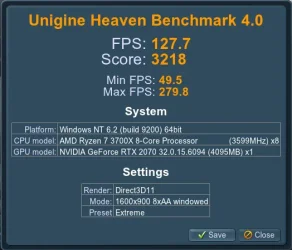
You can test this with something like the "old" Heaven graphics benchmark.
On your 4070 graphics card, you should get a range of fps, and some very high fps...
And, it's a fairly pretty Benchmark. :-)

Use the GREEN download button.
Install Heaven, double click the desktop shortcut, don't change any settings and click RUN.
Then hit the Esc key to open the Menu. Then click on Benchmark (top left).

My results on an RTX 2070...
Image1.webp

I use REVO Uninstaller to uninstall the Heaven Benchmark.


I have a 60Hz screen. It doesn't bother me at all.
But I had a friend that complained of headaches after using my screen.
Even when just browsing on static web pages.
 
Last edited:

My Computers My Computers

  • At a glance

    Win 11 Home ♦♦♦26300.9445 ♦♦♦♦♦♦♦26H2AMD Ryzen 7 3700XG.Skill (F4-3200C14D-16GTZKW)EVGA RTX 2070 (08G-P4-2171-KR)
    OS
    Win 11 Home ♦♦♦26300.9445 ♦♦♦♦♦♦♦26H2
    Computer type
    PC/Desktop
    Manufacturer/Model
    Built by Ghot® [May 2020]
    CPU
    AMD Ryzen 7 3700X
    Motherboard
    Asus Pro WS X570-ACE (BIOS 5302)
    Memory
    G.Skill (F4-3200C14D-16GTZKW)
    Graphics Card(s)
    EVGA RTX 2070 (08G-P4-2171-KR)
    Sound Card
    Realtek ALC1220P / ALC S1220A
    Monitor(s) Displays
    Dell U3011 30"
    Screen Resolution
    2560 x 1600
    Hard Drives
    2x Samsung 860 EVO 500GB,
    WD 4TB Black FZBX - SATA III,
    WD 8TB Black FZBX - SATA III,
    DRW-24B1ST CD/DVD Burner
    PSU
    PC Power & Cooling 750W Quad EPS12V
    Case
    Cooler Master ATCS 840 Tower
    Cooling
    CM Hyper 212 EVO (push/pull)
    Keyboard
    Ducky DK9008 Shine II Blue LED
    Mouse
    Logitech Optical M-100
    Internet Speed
    300/300
    Browser
    Firefox (latest)
    Antivirus
    Bitdefender Total Security
    Other Info
    Speakers: Klipsch Pro Media 2.1
  • At a glance

    Windows XP Pro 32bit w/SP3AMD Athlon 64 X2 5000+ (OC'd @ 3.2Ghz)TWIN2X2048-6400C4DHX (2 x 1GB, DDR2 800)EVGA 256-P2-N758-TR GeForce 8600GT SSC
    Operating System
    Windows XP Pro 32bit w/SP3
    Computer type
    PC/Desktop
    Manufacturer/Model
    Built by Ghot® (not in use)
    CPU
    AMD Athlon 64 X2 5000+ (OC'd @ 3.2Ghz)
    Motherboard
    ASUS M2N32-SLI Deluxe Wireless Edition
    Memory
    TWIN2X2048-6400C4DHX (2 x 1GB, DDR2 800)
    Graphics card(s)
    EVGA 256-P2-N758-TR GeForce 8600GT SSC
    Sound Card
    Onboard
    Monitor(s) Displays
    ViewSonic G90FB Black 19" Professional (CRT)
    Screen Resolution
    up to 2048 x 1536
    Hard Drives
    WD 36GB 10,000rpm Raptor SATA
    Seagate 80GB 7200rpm SATA
    Lite-On LTR-52246S CD/RW
    Lite-On LH-18A1P CD/DVD Burner
    PSU
    PC Power & Cooling Silencer 750 Quad EPS12V
    Case
    Generic Beige case, 80mm fans
    Cooling
    ZALMAN 9500A 92mm CPU Cooler
    Keyboard
    Logitech Classic Keybooard 200
    Mouse
    Logitech Optical M-BT96a
    Internet Speed
    300/300
    Browser
    Firefox 3.x ??
    Antivirus
    Symantec (Norton)
    Other Info
    Still assembled, still runs. Haven't turned it on for 15 years?
Can running a game at above 60fps on a 60hz case any problems,maybe some delays
I am using fast vsync from the nvidia control panel and I don't have any tearing issues but the game if it does not have a fps limit may make the gpu render hundreds of frames(increasing power consumption,heat and noise)but I will see only 60 of them

If I can limit the fps,what what will be best if I allow it to be more than 60

No, it won’t cause delays by itself - but uncapped FPS is usually pointless/inefficient on a 60 Hz screen. By uncapped - i don't mean you should cap it to 60 FPS. That too can be useful for poorly optimized games - where the FPS scales considerably - from one zone/room to next, as in... now it runs at 38 FPS, you make couple of steps and it jumps to 98 FPS, then shortly after - drops to 63 FPS and so on and so forth... In this case 60 FPS could be ideal. RTS and Turn Based games in particular - could also benefit from a 60 FPS capping. On the other hand - for MOBA games and Online Shooters - which are usually well optimized, so you might get even above 200+ FPS - capping it to max 120 FPS (everything above is a waste on a 60 Hz screen - would be recommended for the sake of responsiveness (even tho, you won't actually see more than 60 FPS - since the extra FPS are discarded or partially sampled). 60 FPS with "Fast" Vsync is ok-ish too (considerably less latency than the old Vsync - but Vsync off - still feels smoother for some - tho again, can help with tearing - "if the game is poorly optimized").

Truth be told - the brain usually... adapts - even to less than ideal conditions. Just don't make the mistake - of playing a particular game at high FPS on a 120 Hz - 320 Hz screen long enough, cause switching back to a 60 Hz screen - "the difference will really stand out (you might find said game unplayable)."
 

My Computer My Computer

At a glance

WinDOS 25H2Intel & AMDSO-DIMM SK Hynix 15.8 GB Dual-Channel DDR4-26...nVidia RTX 2060 6GB Mobile GPU (TU106M)
OS
WinDOS 25H2
Computer type
Laptop
CPU
Intel & AMD
Memory
SO-DIMM SK Hynix 15.8 GB Dual-Channel DDR4-2666 (2 x 8 GB) 1329MHz (19-19-19-43)
Graphics Card(s)
nVidia RTX 2060 6GB Mobile GPU (TU106M)
Sound Card
Onbord Realtek ALC1220
Screen Resolution
1920 x 1080
Hard Drives
1x Samsung PM981 NVMe PCIe M.2 512GB / 1x Seagate Expansion ST1000LM035 1TB
Try
58-60FPS in Nvidia Control Panel (Max Frame Rate)
and
120FPS in Game

+ Frame Generation

1.webp
 
Last edited:

My Computer My Computer

At a glance

Microsoft Windows 11 HomeIntel Core i5-13490F2 x 16 Patriot Memory (PDP Systems) PSD516G56...GIGABYTE GeForce RTX 4070 WINDFORCE OC 12G (G...
OS
Microsoft Windows 11 Home
Computer type
PC/Desktop
Manufacturer/Model
MSI MS-7D98
CPU
Intel Core i5-13490F
Motherboard
MSI B760 GAMING PLUS WIFI
Memory
2 x 16 Patriot Memory (PDP Systems) PSD516G560081 6400MT (32-37-37-74); 1.35V)
Graphics Card(s)
GIGABYTE GeForce RTX 4070 WINDFORCE OC 12G (GV-N4070WF3OC-12GD)
Sound Card
Bluetooth Аудио
Monitor(s) Displays
INNOCN 15K1F
Screen Resolution
1920 x 1080
Hard Drives
WD_BLACK SN770 250GB
KINGSTON SNV2S1000G (ELFK0S.6)
PSU
Thermaltake Toughpower GF3 1000W
Case
CG560 - DeepCool
Cooling
ID-COOLING SE-224-XTS / 2 x 140Mm Fan - rear and top; 3 x 120Mm - front
Keyboard
Corsair K70 RGB TKL
Mouse
Corsair KATAR PRO XT
Internet Speed
100 Mbps
Browser
Firefox
Antivirus
Microsoft Defender Antivirus
Other Info
https://www.userbenchmark.com/UserRun/66553205
Back
Top Bottom