Solved garlin's PowerShell scripts for updating Secure Boot CA 2023


Hello,
Just out of curiosity:
Following Microsoft's latest update yesterday, the Secure Boot status message changed from "more data needed" to "High Confidence."
I wonder how this is possible, given that the last available BIOS update for my old Dell XPS 13 9360 was released in 2021, and i needed performed the update using @garlin's scripts, even having to set the BIOS to "Custom Mode," and leave it that way as the PC wouldn't boot otherwise.
I'm updated thanks to @garlin but how would Microsoft have performed the update if I required manual BIOS intervention to carry it out?

Best regards ;-)
 

My Computer My Computer

At a glance

Windows 11 Pro 25H2Intel(R) Core(TM) i7-7500U CPU @ 2.70GHz8 GB
OS
Windows 11 Pro 25H2
Computer type
Laptop
Manufacturer/Model
Dell XPS 13 9360
CPU
Intel(R) Core(TM) i7-7500U CPU @ 2.70GHz
Memory
8 GB
Your BIOS has all of the CA 2023 certs installed, but CA 2011 has not been revoked (it's still optional for now). This PC is good for now.

Someone mentioned that a recent Beelink BIOS update added CA 2023 support. So it's always important to check for recent BIOS updates, in case your OEM has already added the CA 2023 certs into the firmware.
Very appreciative of your review and details .
 

My Computers My Computers

  • At a glance

    25H2 > to 10.0.26200 26200.8875AMD Ryzen 7 8845HSDDR5-5600 / PC5-44800 DDR5 SDRAM SO-DIMM32GAMD Radeon 780M
    OS
    25H2 > to 10.0.26200 26200.8875
    Computer type
    PC/Desktop
    Manufacturer/Model
    Beelink SER8 Mini
    CPU
    AMD Ryzen 7 8845HS
    Motherboard
    AZW SER8 AMD Promontory/Bixby FCH
    Memory
    DDR5-5600 / PC5-44800 DDR5 SDRAM SO-DIMM32G
    Graphics Card(s)
    AMD Radeon 780M
    Sound Card
    AMD Zen - Audio Processor - HD Audio Controller
    Monitor(s) Displays
    1 LG HDR 32"
    Screen Resolution
    2560x1440
    Hard Drives
    1TB Crucial NVMe
    2TB Crucial NVME
    WD 1TB SSD SATA to USB3
    1 Seagate BUP Slim 2TB SATA to USB3
    1 Seagate BUP Slim 4TB SATA to USB3
    Samsung SSD 1TB SATA to USB3
    Samsung 500G SATA to USB3
    500G Crucial SSD to USB3
    PSU
    Beelink Proprietary
    Case
    Beelink Proprietary
    Cooling
    Beelink Proprietary
    Keyboard
    Logitech Backlit USB
    Mouse
    Logitech M510
    Internet Speed
    T-Mobile 5G 500 T-Mobile Home Internet -Asus ZenWifi AX Mesh
    Browser
    Edge, Firefox, Chrome
    Antivirus
    Microsoft Security 1.451.235.0 version created 6-2-2026
    Other Info
    Macrium X Build 10.0.8843
    Minitool Pro Ultimate 13.6
    REVO Pro 5.5.0.0 Portable
    JAM Treesize 9.7.2.2203 Perpetual Outdated.
    JAM Ultrasearch Pro 4.9.1.1204 Perpetual Outdated.
    Malwarebytes Pro 5.5.7.255 Update 1.0.110434 Component 157.0.5633
    Screenpresso Pro 2.2.12.3 beta (.Net 4.8) 2026-5-026
    Hamrick Vue Scan Pro 9.8.51.13
    Visio 2021 Pro 2021 MSO (Version 2605 Build 16.0.20026.20076) 64-bit
    Droid Transfer-Android 26.2.26.0
    Thunderbird 151.0.1
    em Client 10.4.5326
    Affinity Suite 3.2.1
    Microsoft 365 MSO (Version 2605 Build 16.0.20026.20076) 64-bit
    Adobe Creative cloud Version 6911 Apps 6.9.0.618 CCLibrary 4.16.2 (Photo subscription)
    HXD Hex Editor Version 2.5.0.0
    DAW Software Reaper-Izotope Plugins
    TGRMN Software ViceVersa Pro Build 6015 and VVEngine 3 Build 3000
    ISOBuster Pro 5.8.0.0
    Microsoft Visio Pro 2021 Version 2605 Build 16.0.20026.20076
    Many Other free and paid applications
    WYSIWYG Web Builder 21.07
    Filezilla 3.70.5
    Putty .83 and Putty Gen .83
    System Informer 4.0.26144.416 Stable
    O&O Regedit Version12 Build 2172
    WINRAR 7.22
    Lockhunter 3.4.3.146. x64
    Advanced IP Scanner 2.5.1
    Epson Eco Tank Printers and Epson Scanners.
    Bluestacks for Ring Cameras
    PEAK DCA Transistor Graphical USB Interface for Viewing Transistor Operational Curves. Win 10 Version and has functioneded on Win11 perfectly. Version 1.1.1963.
    Games - Card Games -Microsoft FSX "Pro Gold Flight Sim with add ons. Still works perfectly.
    Still run a few older onese successfully on win11 as well with no graphic issue.
  • At a glance

    Win11 Pro OEM 25H2 OS Build 26200.7019AMD Ryzen 7 8845HSDDR5 32GBeelink SER7
    Operating System
    Win11 Pro OEM 25H2 OS Build 26200.7019
    Computer type
    PC/Desktop
    Manufacturer/Model
    Beelink
    CPU
    AMD Ryzen 7 8845HS
    Motherboard
    AMD
    Memory
    DDR5 32G
    Graphics card(s)
    Beelink SER7
    Sound Card
    Beelink SER7
    Monitor(s) Displays
    Dell
    Screen Resolution
    Native
    Hard Drives
    1TB Crucial NVMe SSD 2G SATA
    PSU
    Beelink Proprietary
    Case
    Beelink Proprietary
    Cooling
    Beelink Proprietary
    Keyboard
    gaming keyboard
    Mouse
    MS
    Internet Speed
    T-Mobile 5G
    Antivirus
    Defender Malwarebytes
    Other Info
    Microsoft 365 Family Office
    Macrium X Subscription1 Version 10
    Mini-Tool Ultimate 13.0 Lifetime
    Malwarebytes Premium w/VPN 5
    Revo Pro Portable Pro 5
    Roboform 9.7.7.
    Others. (All legit)
Following Microsoft's latest update yesterday, the Secure Boot status message changed from "more data needed" to "High Confidence."
I wonder how this is possible, given that the last available BIOS update for my old Dell XPS 13 9360 was released in 2021, and i needed performed the update using @garlin's scripts, even having to set the BIOS to "Custom Mode," and leave it that way as the PC wouldn't boot otherwise.
I'm updated thanks to @garlin but how would Microsoft have performed the update if I required manual BIOS intervention to carry it out?
MS could have changed the status on their end, if they were informed either a newer BIOS was released (less likely on a 2021 PC), or Dell submitted a signed KEK instead of a BIOS update (more likely).

A BIOS update is always preferred, since any factory reset means you still have the CA 2023 certs installed. But a signed KEK file effectively does the same thing, and the update process can be repeated.

But honestly the whole Confidence Bucket thing is a black box, because MS refuses to divulge any statistics on their collected data. Other than sharing a giant list of unique combinations of PC motherboards & BIOS versions they've observed in the wild. And they won't inform you why they suddenly decided your PC is now in High Confidence after months of being in More Data Needed.

IMO it's better just to update a PC using whatever means works, and if the vendor catches up later... great.
 

My Computer My Computer

At a glance

Windows 7
OS
Windows 7
To prevent attackers from rolling back to an earlier file version, Windows has two different checks:

SVN -> Windows boot manager's SVN
SkuSiPolicy.p7b -> winload.efi's file version

If you have a SkuSiPolicy file deployed, this means you will have to rebuild your WinRE-based boot media (again). This is the price of keeping up with Windows boot security.

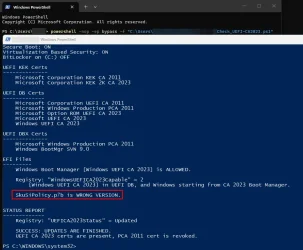
Hi Garlin, after installing this month's WU and then running the Check UEFI CA2023 script - verbose, I got "SkuSiPolicy.p7b Version: 3.0.0.15 and that was not matching. So, I ran the update script and got this below and it changed it to 3.0.0.16. Now all is good.

Is this what you mean when saying "we" will be required to rebuild the WinRE-based boot media "ourselves"? And that this will need to be done with each WU, (if the SkuSiPolicy.p7b Version changes)? Microsoft, in the future, will not do this automatically? 🤷‍♂️

Thanks...


EFI Files
---------
Windows Boot Manager [Windows UEFI CA 2023] is ALLOWED.
\\.\HarddiskVolume1\EFI\Microsoft\Boot\bootmgfw.efi
File Version: 28000.352, SVN 9.0

Registry: "WindowsUEFICA2023Capable" = 2
[Windows UEFI CA 2023] in UEFI DB, and Windows starting from CA 2023 Boot Manager.

SkuSiPolicy.p7b is CURRENT.
\\.\HarddiskVolume1\EFI\Microsoft\Boot\SkuSiPolicy.p7b
Version: 3.0.0.16
 

My Computers My Computers

  • At a glance

    Windows 11 Pro 25H2 26200.8875Intel® Core™ Ultra 7 265 1.8GHz to 5.3GHz (Ar...SK Hynix 32GB DDR5 5600 Desktop RAM UDIMM Non...Dell NVIDIA® GeForce RTX™ 4060 8GB GDDR6 & (i...
    OS
    Windows 11 Pro 25H2 26200.8875
    Computer type
    PC/Desktop
    Manufacturer/Model
    Dell Tower Plus EBT2250, DOB: 06/15/2025
    CPU
    Intel® Core™ Ultra 7 265 1.8GHz to 5.3GHz (Arrow Lake)
    Motherboard
    Dell Inc. 02D3NT A00 (U3E1)
    Memory
    SK Hynix 32GB DDR5 5600 Desktop RAM UDIMM Non-ECC PC5-5600B
    Graphics Card(s)
    Dell NVIDIA® GeForce RTX™ 4060 8GB GDDR6 & (iGPU) Integrated Intel® UHD Graphics
    Sound Card
    Chipset Realtek High-Definition Audio with Dolby Atmos
    Monitor(s) Displays
    Dell Ultra Sharp U2515H 25-Inch Screen LED-Lit
    Screen Resolution
    2560 X 1440
    Hard Drives
    Samsung (NVMe PM9C1a 1024GB) M.2 PCIe NVMe Solid State Drive (OS), with Samsung Piccolo (S4LY022) 6-Core 4 Channel Controller.

    Samsung T7 500GB SSD, USB-C External Drive
    PSU
    Dell 460W
    Case
    Dell Tower Plus EBT 2250
    Cooling
    Fan
    Keyboard
    Dell Wired Keyboard - KB216
    Mouse
    Logitech M510
    Internet Speed
    Intel Killer E3100G 2.5 Gigabit Ethernet Controller
    Browser
    Microsoft Edge
    Antivirus
    Microsoft Windows Security
    Other Info
    The Samsung NVMe PM9C1a 1024GB SSD does not use a Phison NAND controller. Instead, it uses Samsung's in-house developed Piccolo (S4LY022) 6-Core 4 Channel Controller. The PM9C1a utilizes a controller built using Samsung's 5-nanometer process and seventh-generation V-NAND technology. 🤔
  • At a glance

    Windows 11 Pro 25H2 26200.865510th Generation Intel Core i7-10510U Processo...16GB DDR4 RAMNVIDIA® GeForce® MX250 with 2GB GDDR5 graphic...
    Operating System
    Windows 11 Pro 25H2 26200.8655
    Computer type
    Laptop
    Manufacturer/Model
    Dell Inspiron 15 7000 (7591) 2-in-1, DOB: 11/30/2019
    CPU
    10th Generation Intel Core i7-10510U Processor (8MB Cache, up to 4.9 GHz) Comet Lake
    Motherboard
    Dell 0NNW5N
    Memory
    16GB DDR4 RAM
    Graphics card(s)
    NVIDIA® GeForce® MX250 with 2GB GDDR5 graphics memory
    Sound Card
    Chipset Realtek ALC3254 🤔
    Monitor(s) Displays
    Dell 15.6-inch UHD Truelife Touch Narrow Border WVA Display with Active Pen support
    Screen Resolution
    3840 x 2160
    Hard Drives
    Intel NVME 512GB SSD with 32GB Intel Optane Memory, M.2 80mm PCIe 3.0 RAID

    SanDisk 256GB Extreme microSDXC UHS-I Memory Card
    PSU
    Dell 4-Cell Battery, 68 Whr (Integrated), 90 Watt AC Adapter
    Case
    Dell Inspiron 15 7000 2-in-1 (7591)
    Cooling
    Standard Dell Case Fan & Havit HV-F2056 USB Powered (3 Fans) Laptop Cooling Pad.
    Keyboard
    Dell
    Mouse
    Logitech Wireless Mouse M650L
    Internet Speed
    Wireless/Wired connectivity (WiFi 6 - 802.11 ax)
    Browser
    Microsoft Edge
    Antivirus
    Microsoft Windows Security
    Other Info
    From Dell: 512GB NVME Solid State Drive accelerated by 32GB Intel Optane Memory are the fastest as compared to NAND SSDs. Intel Optane H10 with SSD offers speedy storage and accelerates opening your programs.
Hi Garlin, after installing this month's WU and then running the Check UEFI CA2023 script - verbose, I got "SkuSiPolicy.p7b Version: 3.0.0.15 and that was not matching. So, I ran the update script and got this below and it changed it to 3.0.0.16. Now all is good.
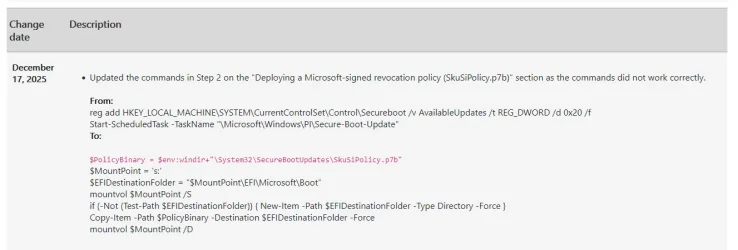
I don't know if the Secure Boot task has responsibility for pushing a new SkuSiPolicy, whenever a new version appears. There's a hidden AvailableUpdates value (0x20) that manually controls that behavior, but Windows may not do this update automatically.

As I've highlighted before, forcing a new SkuSiPolicy before you're ready has bad consequences

Is this what you mean when saying "we" will be required to rebuild the WinRE-based boot media "ourselves"? And that this will need to be done with each WU, (if the SkuSiPolicy.p7b Version changes)? Microsoft, in the future, will not do this automatically? 🤷‍♂️
Why would MS update your boot media? It's not something created by MS, nor would it be expected that your boot drives are always plugged in. Also you could have an USB drive that's intended for another PC, which hasn't been updated in the same way.

Does updating your drives suck? Yes. But I've said this many times, Macrium and Hasleo (plus whoever else) has to get off their butts and adapt to the new world order. Rufus is already aware of SVN and SkuSiPolicy.

The backup vendors need to update their products to check once a day (in case you've just installed a new Monthly Update), and confirm if the SVN or SkuSiPolicy has changed since the last time you created a recovery drive. If either of them have changed, they should provide a courtesy notification to make a new recovery drive. And after you've recreated the drive, reset the check until the next time either one gets updated again.

None of this is MS's problem. The only major MS app that creates a bootable USB is MCT.
 

My Computer My Computer

At a glance

Windows 7
OS
Windows 7
I'm sorry - I did a poor posting of what I am wondering about. I got "my" boot media part all straighten out, and that is not a problem for me. I check and do that easily enough when needed.

I guess what I was trying to ask about is the SkuSiPolicy version changing with this month's WU and then displaying as not being current in the -Verbose output I ran after the WU, requiring me to run the update SkuSiPolicy script once again to make the WU version match what is on my system after the WU update. This what I am not clear on. Will I need to update the policy version myself with each WU from now on out, that is my question. Thanks.
 

My Computers My Computers

  • At a glance

    Windows 11 Pro 25H2 26200.8875Intel® Core™ Ultra 7 265 1.8GHz to 5.3GHz (Ar...SK Hynix 32GB DDR5 5600 Desktop RAM UDIMM Non...Dell NVIDIA® GeForce RTX™ 4060 8GB GDDR6 & (i...
    OS
    Windows 11 Pro 25H2 26200.8875
    Computer type
    PC/Desktop
    Manufacturer/Model
    Dell Tower Plus EBT2250, DOB: 06/15/2025
    CPU
    Intel® Core™ Ultra 7 265 1.8GHz to 5.3GHz (Arrow Lake)
    Motherboard
    Dell Inc. 02D3NT A00 (U3E1)
    Memory
    SK Hynix 32GB DDR5 5600 Desktop RAM UDIMM Non-ECC PC5-5600B
    Graphics Card(s)
    Dell NVIDIA® GeForce RTX™ 4060 8GB GDDR6 & (iGPU) Integrated Intel® UHD Graphics
    Sound Card
    Chipset Realtek High-Definition Audio with Dolby Atmos
    Monitor(s) Displays
    Dell Ultra Sharp U2515H 25-Inch Screen LED-Lit
    Screen Resolution
    2560 X 1440
    Hard Drives
    Samsung (NVMe PM9C1a 1024GB) M.2 PCIe NVMe Solid State Drive (OS), with Samsung Piccolo (S4LY022) 6-Core 4 Channel Controller.

    Samsung T7 500GB SSD, USB-C External Drive
    PSU
    Dell 460W
    Case
    Dell Tower Plus EBT 2250
    Cooling
    Fan
    Keyboard
    Dell Wired Keyboard - KB216
    Mouse
    Logitech M510
    Internet Speed
    Intel Killer E3100G 2.5 Gigabit Ethernet Controller
    Browser
    Microsoft Edge
    Antivirus
    Microsoft Windows Security
    Other Info
    The Samsung NVMe PM9C1a 1024GB SSD does not use a Phison NAND controller. Instead, it uses Samsung's in-house developed Piccolo (S4LY022) 6-Core 4 Channel Controller. The PM9C1a utilizes a controller built using Samsung's 5-nanometer process and seventh-generation V-NAND technology. 🤔
  • At a glance

    Windows 11 Pro 25H2 26200.865510th Generation Intel Core i7-10510U Processo...16GB DDR4 RAMNVIDIA® GeForce® MX250 with 2GB GDDR5 graphic...
    Operating System
    Windows 11 Pro 25H2 26200.8655
    Computer type
    Laptop
    Manufacturer/Model
    Dell Inspiron 15 7000 (7591) 2-in-1, DOB: 11/30/2019
    CPU
    10th Generation Intel Core i7-10510U Processor (8MB Cache, up to 4.9 GHz) Comet Lake
    Motherboard
    Dell 0NNW5N
    Memory
    16GB DDR4 RAM
    Graphics card(s)
    NVIDIA® GeForce® MX250 with 2GB GDDR5 graphics memory
    Sound Card
    Chipset Realtek ALC3254 🤔
    Monitor(s) Displays
    Dell 15.6-inch UHD Truelife Touch Narrow Border WVA Display with Active Pen support
    Screen Resolution
    3840 x 2160
    Hard Drives
    Intel NVME 512GB SSD with 32GB Intel Optane Memory, M.2 80mm PCIe 3.0 RAID

    SanDisk 256GB Extreme microSDXC UHS-I Memory Card
    PSU
    Dell 4-Cell Battery, 68 Whr (Integrated), 90 Watt AC Adapter
    Case
    Dell Inspiron 15 7000 2-in-1 (7591)
    Cooling
    Standard Dell Case Fan & Havit HV-F2056 USB Powered (3 Fans) Laptop Cooling Pad.
    Keyboard
    Dell
    Mouse
    Logitech Wireless Mouse M650L
    Internet Speed
    Wireless/Wired connectivity (WiFi 6 - 802.11 ax)
    Browser
    Microsoft Edge
    Antivirus
    Microsoft Windows Security
    Other Info
    From Dell: 512GB NVME Solid State Drive accelerated by 32GB Intel Optane Memory are the fastest as compared to NAND SSDs. Intel Optane H10 with SSD offers speedy storage and accelerates opening your programs.
I believe the Secure Boot task is cautious, and doesn't automatically push the newer file unless you use a specific AvailableUpdate value of 0x20.
 

My Computer My Computer

At a glance

Windows 7
OS
Windows 7
That might explain it, I missed that warning from the Dec 2025 release notes. Sigh, why can't a MS-written tool do this?

It's also interesting that MS's example tries to create a "\EFI\Microsoft\Boot" folder if needed. That would imply the original bcdboot action to provision the active EFI volume failed, or something clobbered it.

So you would have a worse problem on your hands than just have no (updated) SkuSiPolicy in place.
 

My Computer My Computer

At a glance

Windows 7
OS
Windows 7
Back
Top Bottom