Solved garlin's PowerShell scripts for updating Secure Boot CA 2023


I'll try a few tests tomorrow, I am concerned if someone actually does get a localized error message. Which I should fix anyway.
Thanks again for your interest.

By the way, it wouldn't be relevant if the BIOS has a "Reset to Setup Mode" option in the security settings.
 

My Computer

System One

  • OS
    Windows 11
    Computer type
    Laptop
    Manufacturer/Model
    Lenovo LOQ 17IRX10 - Type 83JH
    CPU
    i7-13650HX (Raptor Lake-HX)
    Motherboard
    Lenovo LOQ 17IRX10 (Intel Raptor Lake-HX IMC / Raptor Point-S HM770)
    Memory
    32 Gb (16x2)
    Graphics Card(s)
    RTX 5060 Laptop
    Monitor(s) Displays
    17"
    Hard Drives
    1 Tb NVMe (WD PC SN7100S SDFPMSL-1T00-1101)
That is true, you can continue booting from CA 2011 certs unless MS gets a report of a new security hole in the boot manager. In that case, they would be forced to ship a replacement boot file, and the CA 2011 cert would no longer be valid to sign it (since it expired after 2026).

But the "OPTION 1:" message indicates HP has worked with MS to guarantee the CA 2023 updates can be applied to your model without any troubles.
I like the do nothing option!
 

My Computer

System One

  • OS
    Windows 11 Pro
    Computer type
    PC/Desktop
    Manufacturer/Model
    Self build
    CPU
    Core i7-13700K
    Motherboard
    Asus TUF Gaming Plus WiFi Z790
    Memory
    64 GB Kingston Fury Beast DDR5
    Graphics Card(s)
    Gigabyte GeForce RTX 2060 Super Gaming OC 8G
    Sound Card
    Realtek S1200A
    Monitor(s) Displays
    Viewsonic VP2770 & Dell (secondary)
    Screen Resolution
    2560 x 1440
    Hard Drives
    Kingston KC3000 2TB NVME SSD & SATA HDDs & SSD
    PSU
    EVGA SuperNova G2 850W
    Case
    Nanoxia Deep Silence 1
    Cooling
    Noctua NH-D14
    Keyboard
    Microsoft Digital Media Pro
    Mouse
    Logitech Wireless
    Internet Speed
    80 Mb / s
    Browser
    Chrome
    Antivirus
    Defender, Malwarebytes Free & AdwCleaner
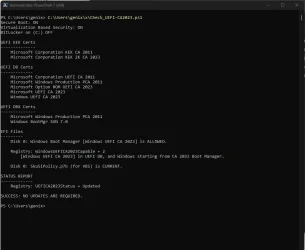
Ran the "Check_UEFI-CA2023.ps1" script from @garlin and this is my result.
I have the missing "SkuSiPolicy.p7b" too, as per @Genix and @Steve C above.
I tried the 2 suggested commands, rebooted but same result.
I am using the EnglishUK version of Windows and I think @Genix said he was using the Spanish version and @Steve C appears to be in the UK so is it possible that non US versions are throwing up this error?
1767271117170.webp
 

My Computer

System One

  • OS
    Windows 11 Pro 25H2
    Computer type
    Laptop
    Manufacturer/Model
    HP 15s-fq5xxx
    CPU
    12th Gen Intel(R) Core(TM) i7-1255U (1.70 GHz
    Memory
    16.0 GB
    Graphics Card(s)
    Intel iRIS Xe
    Screen Resolution
    1920 x 1080
    Hard Drives
    Samsung SSD 512 GB
    Mouse
    Logitech Pebble
    Internet Speed
    500/50 Mb/sec
    Browser
    Chrome
    Antivirus
    Defender
No luck, but thank you nevertheless! I think it may be because I'm running an older version of 24H2.
try .\Check_UEFI-CA2023.ps1 and not ./
 

My Computers

System One System Two

  • OS
    Windows 11 build 26200.7296 / WSL 2 running Ubuntu
    Computer type
    Laptop
    Manufacturer/Model
    Dell Inspiron 14 5430
    CPU
    Intel i7-1355U
    Motherboard
    Dell 0GMW80
    Memory
    16GB
    Graphics Card(s)
    Intel Iris XE
    Sound Card
    Realtek
    Monitor(s) Displays
    Dell 14", LG 32" Curved Wide screen monitor and LG Ultrawide 26"
    Screen Resolution
    1920 x 1200 @ 60Hz, 1920 x 1080 @ 100Hz and 2560 x 1080 @ 60Hz
    Hard Drives
    Samsung 990 Pro 1TB NVME Gen 4 M.2 SSD
    PSU
    Dell
    Case
    Dell
    Cooling
    Dell
    Keyboard
    Dell KM3322W
    Mouse
    Dell Trackpad or Dell KM3322W
    Internet Speed
    900mb down / 400mb up FTTP
    Browser
    Edge 142.0.3595.90
    Antivirus
    Windows Defender
    Other Info
    Windows 365
    1TB OneDrive
    Outlook Classic
    Visual Studio Code running in WSL
    Python 3.14
    Samsung Magician
    Garmin Express
    Dell TB16 Thunderbolt dock
    WSL
    WEI Score: 8.3
  • Operating System
    Windows 11
    Computer type
    Tablet
    Manufacturer/Model
    Microsoft Surface Pro 7
    CPU
    Core i5 - 1035G4
    Motherboard
    Microsoft
    Memory
    8GB
    Graphics card(s)
    Intel Iris Plus
    Monitor(s) Displays
    Surface touch
    Screen Resolution
    2736 x 1824
    Hard Drives
    128GB
    PSU
    Microsoft
    Case
    Microsoft Keyboard
    Cooling
    None
    Keyboard
    Microsoft Surface Keyboard
    Mouse
    Microsoft Arc Intellimouse
    Internet Speed
    900mb / 400mb FTTP
    Browser
    Edge
    Antivirus
    Windows Defender
Thank you for confirming it worked! I wasn't sure before, since I don't have a PC with one of the older BIOS'es in my home.
For reference, the system I’m dealing with right now is an ancient ASUS X99

I'm in the UK using English GB on 25H2 26200.7462
 

My Computers

System One System Two

  • OS
    Windows 11 Enterprise 25H2 26200 7462
    Computer type
    PC/Desktop
    Manufacturer/Model
    Custom Build
    CPU
    Intel XEON E5-2699 v3
    Motherboard
    ASUS X99-A
    Memory
    64GB Teamgroup UD4-3600
    Graphics Card(s)
    NVIDIA GeForce GTX 1080 Ti
    Sound Card
    Integrated
    Monitor(s) Displays
    ACER X34 Predator
    Screen Resolution
    3440 x 1440
    Hard Drives
    Crucial CT1000P 3P SSD8 1TB
    Crucial CT1000 BX500 SSD 1TB
    PSU
    GameMax Pro
    Case
    Fractal Design
    Cooling
    Corsair H110iGT + 6 140mm Fans
    Keyboard
    Corsair K4
    Mouse
    G-Skill G502
    Internet Speed
    300MBs
    Browser
    Chrome
    Antivirus
    OEM
    Other Info
    ASUS RT-AC87U Router
  • Operating System
    25H2 26200.5074
    Computer type
    Laptop
    Manufacturer/Model
    ASUS X555LA
    Memory
    8GB
    Browser
    Chrome
    Antivirus
    OEM
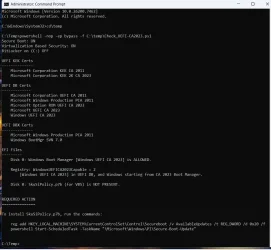
I appended the text from the previous powershell check scripts so it looks like this:
PS C:\Users\theislands> powershell -nop -ep bypass -f C:\temp\Check_UEFI-CA2023.ps1
as I have the scripts copied to the temp folder in Windows root.
I got it to work using your command, but can you explain why I couldn't simply right click on it and open it with PowerShell. Again, thank you!Check UEFI 2023.webp
 
Last edited:

My Computer

System One

  • OS
    Windows 11
My PC was already updated to comply with MS new CA certificates. After running Check_UEFI-CA2023.ps1, I got a recommendation to install SkuSiPolicy.p7b in the REQUIRED ACTION section. Then I ran the commands to install SkuSiPolicy.p7b.

After re-checking, I saw to my surprise that I still had the recommendation to install SkuSiPolicy.p7b. Does that mean my old motherboard does not accept SkuSiPolicy ?

This screenshot is what I got after re-running the Check_UEFI-CA2023.ps1 command.

SB.webp

What am I missing ?
 

My Computers

System One System Two

  • OS
    Windows 11 Pro build 26200.8524
    Computer type
    PC/Desktop
    Manufacturer/Model
    Home Built
    CPU
    Intel i7-4790
    Motherboard
    Asus H97 Pro Gamer with add-on TPM1.2 module
    Memory
    Teams DDR3-1600 4x4 GB
    Graphics Card(s)
    MSI Nvidia GeForce GTX 1050Ti
    Sound Card
    Realtek ALC1150
    Monitor(s) Displays
    Dell P2425D
    Screen Resolution
    2560 by 1440 pixels
    Hard Drives
    Corsair NVMe M.2 Core XT 1000 GB (Windows 11 v.25H2); Samsung SATA Evo 870 500 GB (Windows 11 v.25H2);
    PSU
    Corsair HX850
    Case
    Gigabyte Solo 210
    Cooling
    Zalman CNPS7X Tower
    Keyboard
    Microsoft AIO Wireless (includes touchpad)
    Mouse
    HP S1000 Plus Wireless
    Internet Speed
    500 Mb fiber optic
    Browser
    Chrome; MS Edge
    Antivirus
    Windows Defender
  • Operating System
    MacOS 12 Monterey
    Computer type
    Laptop
    Manufacturer/Model
    Apple Macbook Air
    CPU
    Intel Core i5
    Memory
    8 GB
    Graphics card(s)
    Intel integrated
    Screen Resolution
    1440 by 900 pixels
    Hard Drives
    128 GB
    Keyboard
    Built-in
    Mouse
    Microsoft Wireless
    Internet Speed
    802.11 ac
    Browser
    Chrome; Safari
    Antivirus
    N/A
I got it to work using your command, but can you explain why I couldn't simply right click on it and open it with PowerShell. Again, thank you!
Permission to run the powershell script, I guess.
 

My Computers

System One System Two

  • OS
    Windows 11 Pro build 26200.8524
    Computer type
    PC/Desktop
    Manufacturer/Model
    Home Built
    CPU
    Intel i7-4790
    Motherboard
    Asus H97 Pro Gamer with add-on TPM1.2 module
    Memory
    Teams DDR3-1600 4x4 GB
    Graphics Card(s)
    MSI Nvidia GeForce GTX 1050Ti
    Sound Card
    Realtek ALC1150
    Monitor(s) Displays
    Dell P2425D
    Screen Resolution
    2560 by 1440 pixels
    Hard Drives
    Corsair NVMe M.2 Core XT 1000 GB (Windows 11 v.25H2); Samsung SATA Evo 870 500 GB (Windows 11 v.25H2);
    PSU
    Corsair HX850
    Case
    Gigabyte Solo 210
    Cooling
    Zalman CNPS7X Tower
    Keyboard
    Microsoft AIO Wireless (includes touchpad)
    Mouse
    HP S1000 Plus Wireless
    Internet Speed
    500 Mb fiber optic
    Browser
    Chrome; MS Edge
    Antivirus
    Windows Defender
  • Operating System
    MacOS 12 Monterey
    Computer type
    Laptop
    Manufacturer/Model
    Apple Macbook Air
    CPU
    Intel Core i5
    Memory
    8 GB
    Graphics card(s)
    Intel integrated
    Screen Resolution
    1440 by 900 pixels
    Hard Drives
    128 GB
    Keyboard
    Built-in
    Mouse
    Microsoft Wireless
    Internet Speed
    802.11 ac
    Browser
    Chrome; Safari
    Antivirus
    N/A

My Computer

System One

  • OS
    Windows 11 Intel i5 10400 HD630 graphics chip
    Computer type
    PC/Desktop
    Manufacturer/Model
    HP
    CPU
    i5-10400
    Memory
    12 gb
    Graphics Card(s)
    HD630 chipset
    Monitor(s) Displays
    LG 24inch
    Hard Drives
    SSD, external usb drive 1tb for files/backups
    Keyboard
    wireless Logi
    Mouse
    ms 4000 wireless mouse
    Internet Speed
    10meg
    Browser
    Firefox
    Antivirus
    Defender
    Other Info
    Win11 Home 25h2 26200.8524 05/26/2026
Would you say I need to change the permissions?View attachment 158560
When you run the script with "powershell -nop -ep bypass" prefix, you bypass the restriction to run the script for one time and the poweshell script runs. Otherwise, the script is blocked.
 

My Computers

System One System Two

  • OS
    Windows 11 Pro build 26200.8524
    Computer type
    PC/Desktop
    Manufacturer/Model
    Home Built
    CPU
    Intel i7-4790
    Motherboard
    Asus H97 Pro Gamer with add-on TPM1.2 module
    Memory
    Teams DDR3-1600 4x4 GB
    Graphics Card(s)
    MSI Nvidia GeForce GTX 1050Ti
    Sound Card
    Realtek ALC1150
    Monitor(s) Displays
    Dell P2425D
    Screen Resolution
    2560 by 1440 pixels
    Hard Drives
    Corsair NVMe M.2 Core XT 1000 GB (Windows 11 v.25H2); Samsung SATA Evo 870 500 GB (Windows 11 v.25H2);
    PSU
    Corsair HX850
    Case
    Gigabyte Solo 210
    Cooling
    Zalman CNPS7X Tower
    Keyboard
    Microsoft AIO Wireless (includes touchpad)
    Mouse
    HP S1000 Plus Wireless
    Internet Speed
    500 Mb fiber optic
    Browser
    Chrome; MS Edge
    Antivirus
    Windows Defender
  • Operating System
    MacOS 12 Monterey
    Computer type
    Laptop
    Manufacturer/Model
    Apple Macbook Air
    CPU
    Intel Core i5
    Memory
    8 GB
    Graphics card(s)
    Intel integrated
    Screen Resolution
    1440 by 900 pixels
    Hard Drives
    128 GB
    Keyboard
    Built-in
    Mouse
    Microsoft Wireless
    Internet Speed
    802.11 ac
    Browser
    Chrome; Safari
    Antivirus
    N/A
Ran the "Check_UEFI-CA2023.ps1" script from @garlin and this is my result.
I have the missing "SkuSiPolicy.p7b" too, as per @Genix and @Steve C above.
I tried the 2 suggested commands, rebooted but same result.
I am using the EnglishUK version of Windows and I think @Genix said he was using the Spanish version and @Steve C appears to be in the UK so is it possible that non US versions are throwing up this error?
View attachment 158541
Run the following commands in an elevated Windows PowerShell prompt to install skuSipolicy manually if the script is having trouble (line by line)


Powershell:
$PolicyBinary = $env:windir+"\System32\SecureBootUpdates\SkuSiPolicy.p7b"
$MountPoint = 's:'
$EFIDestinationFolder = "$MountPoint\EFI\Microsoft\Boot"
mountvol $MountPoint /S
if (-Not (Test-Path $EFIDestinationFolder)) { New-Item -Path $EFIDestinationFolder -Type Directory -Force }
Copy-Item -Path $PolicyBinary -Destination $EFIDestinationFolder -Force
mountvol $MountPoint /D

From MS Guidance for blocking rollback of Virtualization-based Security (VBS) related security updates - Microsoft Support
 

My Computer

System One

  • OS
    Windows 11 Pro
    Computer type
    PC/Desktop
    CPU
    Ryzen 5 5800X
    Motherboard
    Asus B550 Strix gaming
    Memory
    32Gb Corsair 3200
    Graphics Card(s)
    Gigabyte RTX4070-Super
    Screen Resolution
    2x 1440, 1x 1080
I'm not entirely sure how I did it, but with the help of "copilot" I managed to update and now it's working correctly. Thanks

I forgot to mention, I did a "Reset Setup Keys" in the BIOS.
 

Attachments

  • 9.webp
    9.webp
    46.1 KB · Views: 8

My Computer

System One

  • OS
    Windows 11
    Computer type
    Laptop
    Manufacturer/Model
    Lenovo LOQ 17IRX10 - Type 83JH
    CPU
    i7-13650HX (Raptor Lake-HX)
    Motherboard
    Lenovo LOQ 17IRX10 (Intel Raptor Lake-HX IMC / Raptor Point-S HM770)
    Memory
    32 Gb (16x2)
    Graphics Card(s)
    RTX 5060 Laptop
    Monitor(s) Displays
    17"
    Hard Drives
    1 Tb NVMe (WD PC SN7100S SDFPMSL-1T00-1101)
My PC was already updated to comply with MS new CA certificates. After running Check_UEFI-CA2023.ps1, I got a recommendation to install SkuSiPolicy.p7b in the REQUIRED ACTION section. Then I ran the commands to install SkuSiPolicy.p7b.

After re-checking, I saw to my surprise that I still had the recommendation to install SkuSiPolicy.p7b. Does that mean my old motherboard does not accept SkuSiPolicy ?
Back in 2023, MS made the first recommendation to copy SkuSiPolicy.p7b, whenever Windows is running VBS.

cjee21's GitHub suggests AvailableUpdates = 0x20 will force the scheduled task to copy the file. But in reviewing the MS docs, there isn't confirmation of that. I found online comments from 2023 that suggest using a 0x10 (enable policy enforcement) or 0x30 value (0x10 + 0x20).

All we have right now are instructions to simply copy the file, without making other changes. Since MS hasn't indicated you should be using AvailableUpdates to push SkuSiPolicy.p7b, I will change the script's output to suggest you use the update script.
 

My Computer

System One

  • OS
    Windows 7
This was about as far as I was able to get. In the end, like Mosby, I couldn't get out of Setup Mode in order to turn Secure Boot back on without Resetting Factory Keys. I'm not disappointed, it was an interesting experience and I'm happy it's working for others. I have to say that I'm still impressed with what @garlin was able to achieve.


Screenshot 2026-01-01 133351.webpScreenshot 2026-01-01 135903.webpScreenshot 2026-01-01 140145.webpScreenshot 2026-01-01 143202.webp
 
Last edited:

My Computer

System One

  • OS
    Windows 11
I give up.. can't get the syntax or something right, I'm just not understanding
The argument 'C:\users\username\desktop\secureboot-ca-2023-updates\check_uefi-2023.ps1' to the -File parameter does not exist. Provide the path to an existing '.ps1' file as an argument to the -File parameter
 

My Computer

System One

  • OS
    Windows 11 Intel i5 10400 HD630 graphics chip
    Computer type
    PC/Desktop
    Manufacturer/Model
    HP
    CPU
    i5-10400
    Memory
    12 gb
    Graphics Card(s)
    HD630 chipset
    Monitor(s) Displays
    LG 24inch
    Hard Drives
    SSD, external usb drive 1tb for files/backups
    Keyboard
    wireless Logi
    Mouse
    ms 4000 wireless mouse
    Internet Speed
    10meg
    Browser
    Firefox
    Antivirus
    Defender
    Other Info
    Win11 Home 25h2 26200.8524 05/26/2026
I give up.. can't get the syntax or something right, I'm just not understanding
The argument 'C:\users\username\desktop\secureboot-ca-2023-updates\check_uefi-2023.ps1' to the -File parameter does not exist. Provide the path to an existing '.ps1' file as an argument to the -File parameter
Let me try helping you out. I created a folder under C called Temp, essentially called C/Temp. I then put both the Check and Update commands into that folder. Next step, open PowerShell as an Administrator. To run the commands, they would look like this:

powershell -nop -ep bypass -f C:\Temp\Check_UEFI-CA2023.ps1

powershell -nop -ep bypass -f C:\Temp\Update_UEFI-CA2023.ps1
 

My Computer

System One

  • OS
    Windows 11
This looks like a great resource for managing Secure Boot CA updates! The automation approach with PowerShell is definitely the way to go - it eliminates a lot of the manual guesswork that comes with following various guides.

Have you tested these scripts on both traditional BIOS and UEFI systems? I'm curious about the compatibility across different motherboard manufacturers, especially with some of the older hardware that might still be running Windows 11.
 

My Computer

System One

  • OS
    windows 11
Back
Top Bottom