Solved garlin's PowerShell scripts for updating Secure Boot CA 2023


Instead of changing the Execution Policy (not everyone wants to), you can use a longer command line to run the script:
Code:
powershell -ep bypass -f \folder\name\Update_UEFI-CA2023.ps1

If you got a "Failed to append" error, the normal (safe) method failed and you need to try the "Delete All Keys" from the BIOS menu. Then re-run the update script.
 

My Computer

System One

  • OS
    Windows 7
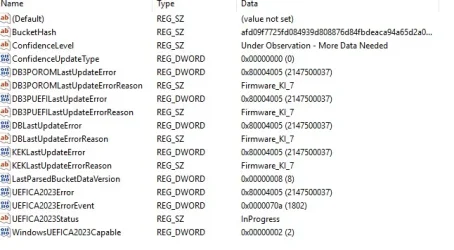
@garlin - Is the ConfidenceLevel or the ConfidenceUpdateType a problem for either of these 2 PCs? Your scripts run successfully on both PCs. I'm just trying to understand why the Registry values are different and if either one is an issue.

Lenovo M83 Desktop:
Lenovo M83 Desktop.webp

Lenovo T490 Laptop:
Lenovo T490 Laptop.webp
 

My Computers

System One System Two

  • OS
    Windows 11 Pro 25H2
    Computer type
    Laptop
    Manufacturer/Model
    Lenovo T490 (2020 Hardware)
    CPU
    i7-8565U
    Motherboard
    20N20028US
    Memory
    16GB
    Graphics Card(s)
    Intel UHD Graphics 620
    Sound Card
    Realtec Audio
    Monitor(s) Displays
    ASUS VE248
    Screen Resolution
    1920 X 1080
    Hard Drives
    Samsung SSD 970 PRO 512GB NVMe
    Internet Speed
    Frontier fiber 1GB
    Browser
    Chrome, Firefox, Edge
    Antivirus
    Norton 360 Deluxe Plus
    Other Info
    Supported hardware, upgraded from Windows 10 Pro to Windows 11 Pro version 24H2 on 06/01/2025 using the Windows 11 ISO file. Used the enablement package to upgrade to version 25H2 on 10/07/2025. Secure boot enabled. Secure Boot CA 2023 updated.
  • Operating System
    Windows 11 Pro 25H2
    Computer type
    PC/Desktop
    Manufacturer/Model
    Lenovo ThinkCentre M83 (2014 Hardware)
    CPU
    i7-4770 (with SSE4.2, and POPCNT)
    Motherboard
    10AL000GUS
    Memory
    16GB
    Graphics card(s)
    Intel HD Graphics 4600
    Sound Card
    Realtec High Definition Audio
    Monitor(s) Displays
    ASUS VE248
    Screen Resolution
    1920 X 1080
    Hard Drives
    Samsung SSD 860 PRO 1TB SATA
    Internet Speed
    Frontier fiber 1GB
    Browser
    Chrome, Firefox, Edge
    Antivirus
    Norton 360 Deluxe Plus
    Other Info
    Unsupported hardware, upgraded from Windows 10 Pro (TPM 1.2 & unsupported CPU, but does have SSE4.2, and POPCNT) to Windows 11 Pro version 24H2 on 06/15/2025. Added Registry Key HKEY_LOCAL_MACHINE\SYSTEM\Setup\MoSetup – AllowUpgradesWithUnsupportedTPMOrCPU=1 to allow installation using the Windows 11 ISO file. Used the enablement package to upgrade to version 25H2 on 10/08/2025. Secure boot enabled. Secure Boot CA 2023 updated.
I would ignore all of the Confidence or Bucket keys. That is telemetry data shared with MS, so everyone who owns the exact same PC model/BIOS version can be grouped in data "buckets".

The idea is if you have the same setup as someone else, if their Secure Boot upgrade succeeds or fails, then it's most likely the same fate will happen to you. By allowing some users to be early adopters, MS can predict how well the update will work for you.

Since we're manually pushing the process, we can proceed without needing the Confidence Bucket info. Everyone else who is waiting for Windows, is stuck by whatever the Confidence data provides.

"High Confidence" - Everybody who owns this PC/BIOS updated fine, green light
"More Data Needed" - This bucket set doesn't have enough samples for a reliable prediction, pause Secure Boot updates for now

Translation: There's still a lot of M83 desktops out there. Not so much for T490's.
 

My Computer

System One

  • OS
    Windows 7
The T490 hardware is newer (2020) than the M83 hardware (2014) but apparently not as many T490s were sold. I do see T480s talked about much more than T490s on tech forums. They must have been more popular.
 

My Computers

System One System Two

  • OS
    Windows 11 Pro 25H2
    Computer type
    Laptop
    Manufacturer/Model
    Lenovo T490 (2020 Hardware)
    CPU
    i7-8565U
    Motherboard
    20N20028US
    Memory
    16GB
    Graphics Card(s)
    Intel UHD Graphics 620
    Sound Card
    Realtec Audio
    Monitor(s) Displays
    ASUS VE248
    Screen Resolution
    1920 X 1080
    Hard Drives
    Samsung SSD 970 PRO 512GB NVMe
    Internet Speed
    Frontier fiber 1GB
    Browser
    Chrome, Firefox, Edge
    Antivirus
    Norton 360 Deluxe Plus
    Other Info
    Supported hardware, upgraded from Windows 10 Pro to Windows 11 Pro version 24H2 on 06/01/2025 using the Windows 11 ISO file. Used the enablement package to upgrade to version 25H2 on 10/07/2025. Secure boot enabled. Secure Boot CA 2023 updated.
  • Operating System
    Windows 11 Pro 25H2
    Computer type
    PC/Desktop
    Manufacturer/Model
    Lenovo ThinkCentre M83 (2014 Hardware)
    CPU
    i7-4770 (with SSE4.2, and POPCNT)
    Motherboard
    10AL000GUS
    Memory
    16GB
    Graphics card(s)
    Intel HD Graphics 4600
    Sound Card
    Realtec High Definition Audio
    Monitor(s) Displays
    ASUS VE248
    Screen Resolution
    1920 X 1080
    Hard Drives
    Samsung SSD 860 PRO 1TB SATA
    Internet Speed
    Frontier fiber 1GB
    Browser
    Chrome, Firefox, Edge
    Antivirus
    Norton 360 Deluxe Plus
    Other Info
    Unsupported hardware, upgraded from Windows 10 Pro (TPM 1.2 & unsupported CPU, but does have SSE4.2, and POPCNT) to Windows 11 Pro version 24H2 on 06/15/2025. Added Registry Key HKEY_LOCAL_MACHINE\SYSTEM\Setup\MoSetup – AllowUpgradesWithUnsupportedTPMOrCPU=1 to allow installation using the Windows 11 ISO file. Used the enablement package to upgrade to version 25H2 on 10/08/2025. Secure boot enabled. Secure Boot CA 2023 updated.
The T490 hardware is newer (2020) than the M83 hardware (2014) but apparently not as many T490s were sold. I do see T480s talked about much more than T490s on tech forums. They must have been more popular.
Yes, both the 480 and 480s were very popular and still today on the used market. They tend to be overpriced used due to their cult like following. The 490 is a great device, not so much the 490s that only has soldered RAM.
 

My Computer

System One

  • OS
    Windows 11
Your last BIOS is Jan 2019, so it's unsupported. Using Setup Mode might work after you've Reset All Keys from the BIOS menu.

To much hassle, most people are scared to do that from BIOS menu - and for a good reason. Only mandatory BIOS option (for some, for other - not even this) - is to set the Secure Keys to "Custom" instead of "Standard (which in some cases locks the Factory Keys - and only a BIOS update can change that automatically)". And should work from Windows - even for a BIOS released in 2019 (talking from experience).
 

My Computer

System One

  • OS
    WinDOS 25H2
    Computer type
    Laptop
    CPU
    Intel & AMD
    Memory
    SO-DIMM SK Hynix 15.8 GB Dual-Channel DDR4-2666 (2 x 8 GB) 1329MHz (19-19-19-43)
    Graphics Card(s)
    nVidia RTX 2060 6GB Mobile GPU (TU106M)
    Sound Card
    Onbord Realtek ALC1220
    Screen Resolution
    1920 x 1080
    Hard Drives
    1x Samsung PM981 NVMe PCIe M.2 512GB / 1x Seagate Expansion ST1000LM035 1TB
The blocking factor in all cases is whether your OEM has provided a signed KEK CA 2023 cert, which underpins the entire migration.

Newer BIOS'es will have it pre-installed, or a recent firmware update will get you the KEK CA 2023 cert.
For older BIOS'es (like 9 years old), HP isn't going to do that. So you will have to test if replacing all the keys in Setup Mode is possible.
Thanks, this is what happened when i ran the powershell on the HP.

Secure Boot: ON
Virtualization Based Security: OFF
BitLocker on (C:) OFF

UEFI KEK Certs
--------------
Microsoft Corporation KEK CA 2011
Microsoft Corporation KEK 2K CA 2023

UEFI DB Certs
-------------
Microsoft Corporation UEFI CA 2011
Microsoft Windows Production PCA 2011
Microsoft UEFI CA 2023
Windows UEFI CA 2023

UEFI DBX Certs
--------------
Microsoft Windows Production PCA 2011
Windows BootMgr SVN 7.0

EFI Files
---------
Disk 1: Windows Boot Manager [Windows UEFI CA 2023] is ALLOWED.

Registry: WindowsUEFICA2023Capable = 2
[Windows UEFI CA 2023] in UEFI DB, and Windows starting from CA 2023 Boot Manager.


REQUIRED ACTION
===============

To install [UEFI CA 2023] certs, run the commands:

reg add HKEY_LOCAL_MACHINE\SYSTEM\CurrentControlSet\Control\Secureboot /v AvailableUpdates /t REG_DWORD /d 0x4800 /f
powershell Start-ScheduledTask -TaskName "\Microsoft\Windows\PI\Secure-Boot-Update"
 

My Computers

System One System Two

  • OS
    11
    Computer type
    Laptop
    Manufacturer/Model
    ASUS
    CPU
    Ryzen 5900HX
    Motherboard
    Built In
    Memory
    32GB
    Graphics Card(s)
    RTX 3080 16GB
    Sound Card
    Onboard
    Monitor(s) Displays
    Built in
    Screen Resolution
    1920x1080
    Hard Drives
    Samsung 1TB
    Sabrent 2TB
    PSU
    240W Poorly Designed Asus Charger
    Case
    Built In
    Cooling
    Liquid Metal
    Keyboard
    Built in RGB
  • Operating System
    Windows 11
    Computer type
    PC/Desktop
    Manufacturer/Model
    Home Made
    CPU
    9900K
    Motherboard
    Asus Z390-P
    Memory
    32GB
    Graphics card(s)
    2080 TI
    Sound Card
    Onboard
    Monitor(s) Displays
    25 Inch
    Screen Resolution
    1920x1080
    Hard Drives
    256gb Crucial SSD
    1 TB WD SSD
    8 TB Samsung SSD
    PSU
    750W
    Case
    Corsair
    Cooling
    Corsair H100I
    Keyboard
    HyperX
    Mouse
    Razer Death Adder 2021 (Not full price lol)
Not sure about every Brand, but got confirmation from MSI - that they dropped support for all systems up-to Intel 11th Gen - despite being labeled as officially supported by Microsoft. They'll offer updates only for 12th Gen and above (and AMD equivalent) - and claimed we should count on Microsoft alone for certificate updates.

The elephant in the room - is the huge trillions of $ profit - which corporate OEMs and Microsoft is hopping to gain from this vulnerability, so... wouldn't be surprised - if one of this brands are actually the ones who engineered and spread this known vulnerabilities (taking into account - how much they have to gain). Even tho, Microsoft is still updating the certificates on their end. I mean, older tech is still good enough - for most people and A.I. didn't become as trendy on a consumer level as they would like, so.... the desperation - driving them into making a immoral move like that seems quite likely - while aiming to clean their stocks of 12th gen based systems and anything released after. Not to mention - the A.I. Ram BS which made the RAM so overpriced. So, now they can even sell those systems at a far higher price - compared to times when RAM prices were stable.

But again, MSI made this public this month - so don't know about every brand.
 

My Computer

System One

  • OS
    WinDOS 25H2
    Computer type
    Laptop
    CPU
    Intel & AMD
    Memory
    SO-DIMM SK Hynix 15.8 GB Dual-Channel DDR4-2666 (2 x 8 GB) 1329MHz (19-19-19-43)
    Graphics Card(s)
    nVidia RTX 2060 6GB Mobile GPU (TU106M)
    Sound Card
    Onbord Realtek ALC1220
    Screen Resolution
    1920 x 1080
    Hard Drives
    1x Samsung PM981 NVMe PCIe M.2 512GB / 1x Seagate Expansion ST1000LM035 1TB
Not sure about every Brand, but got confirmation from MSI - that they dropped support for all systems up-to Intel 11th Gen - despite being labeled as officially supported by Microsoft. They'll offer updates only for 12th Gen and above (and AMD equivalent) - and claimed we should count on Microsoft alone for certificate updates.

The elephant in the room - is the huge trillions of $ profit - which corporate OEMs and Microsoft is hopping to gain from this vulnerability, so... wouldn't be surprised - if one of this brands are actually the ones who engineered and spread this known vulnerabilities (taking into account - how much they have to gain). Even tho, Microsoft is still updating the certificates on their end. I mean, older tech is still good enough - for most people and A.I. didn't become as trendy on a consumer level as they would like, so.... the desperation - driving them into making a immoral move like that seems quite likely - while aiming to clean their stocks of 12th gen based systems and anything released after. Not to mention - the A.I. Ram BS which made the RAM so overpriced. So, now they can even sell those systems at a far higher price - compared to times when RAM prices were stable.

But again, MSI made this public this month - so don't know about every brand.
Similar to the movie "The Net"
 

My Computer

System One

  • OS
    win 11
    Computer type
    Laptop
    Manufacturer/Model
    Dell Precision M4800
    CPU
    Intell Core i7 4900 MQ
    Motherboard
    Dell QT3YTY A00
    Memory
    DDR3 16 GB
UEFI DB Certs
-------------
Microsoft Corporation UEFI CA 2011
Microsoft Windows Production PCA 2011
Microsoft UEFI CA 2023
Windows UEFI CA 2023
You're only missing the Option ROM, which may be needed for some graphics cards or storage controllers if they have signed firmware.
Otherwise you're finished.

If you want the Option ROM cert installed:
To install [UEFI CA 2023] certs, run the commands:

reg add HKEY_LOCAL_MACHINE\SYSTEM\CurrentControlSet\Control\Secureboot /v AvailableUpdates /t REG_DWORD /d 0x4800 /f
powershell Start-ScheduledTask -TaskName "\Microsoft\Windows\PI\Secure-Boot-Update"
 

My Computer

System One

  • OS
    Windows 7
You're only missing the Option ROM, which may be needed for some graphics cards or storage controllers if they have signed firmware.
Otherwise you're finished.

If you want the Option ROM cert installed:
I did run the suggested command rebooted a couple of times but stlil get the same message, however this is an ex business machine with only in intel 620 graphics so i guess it will probably ok.
 

My Computers

System One System Two

  • OS
    11
    Computer type
    Laptop
    Manufacturer/Model
    ASUS
    CPU
    Ryzen 5900HX
    Motherboard
    Built In
    Memory
    32GB
    Graphics Card(s)
    RTX 3080 16GB
    Sound Card
    Onboard
    Monitor(s) Displays
    Built in
    Screen Resolution
    1920x1080
    Hard Drives
    Samsung 1TB
    Sabrent 2TB
    PSU
    240W Poorly Designed Asus Charger
    Case
    Built In
    Cooling
    Liquid Metal
    Keyboard
    Built in RGB
  • Operating System
    Windows 11
    Computer type
    PC/Desktop
    Manufacturer/Model
    Home Made
    CPU
    9900K
    Motherboard
    Asus Z390-P
    Memory
    32GB
    Graphics card(s)
    2080 TI
    Sound Card
    Onboard
    Monitor(s) Displays
    25 Inch
    Screen Resolution
    1920x1080
    Hard Drives
    256gb Crucial SSD
    1 TB WD SSD
    8 TB Samsung SSD
    PSU
    750W
    Case
    Corsair
    Cooling
    Corsair H100I
    Keyboard
    HyperX
    Mouse
    Razer Death Adder 2021 (Not full price lol)
Change AvailableUpdates from 0x4800 to 0x800. The extra value of 4000 is probably confusing the Secure Boot task.
 

My Computer

System One

  • OS
    Windows 7
Change AvailableUpdates from 0x4800 to 0x800. The extra value of 4000 is probably confusing the Secure Boot task.
Done, rebooted a couple of times, still get the same feedback from check update script.
this is registry dont know if thasts relevant to anything.
 

Attachments

  • Screenshot 2026-03-23 185751.webp
    Screenshot 2026-03-23 185751.webp
    42.9 KB · Views: 4

My Computers

System One System Two

  • OS
    11
    Computer type
    Laptop
    Manufacturer/Model
    ASUS
    CPU
    Ryzen 5900HX
    Motherboard
    Built In
    Memory
    32GB
    Graphics Card(s)
    RTX 3080 16GB
    Sound Card
    Onboard
    Monitor(s) Displays
    Built in
    Screen Resolution
    1920x1080
    Hard Drives
    Samsung 1TB
    Sabrent 2TB
    PSU
    240W Poorly Designed Asus Charger
    Case
    Built In
    Cooling
    Liquid Metal
    Keyboard
    Built in RGB
  • Operating System
    Windows 11
    Computer type
    PC/Desktop
    Manufacturer/Model
    Home Made
    CPU
    9900K
    Motherboard
    Asus Z390-P
    Memory
    32GB
    Graphics card(s)
    2080 TI
    Sound Card
    Onboard
    Monitor(s) Displays
    25 Inch
    Screen Resolution
    1920x1080
    Hard Drives
    256gb Crucial SSD
    1 TB WD SSD
    8 TB Samsung SSD
    PSU
    750W
    Case
    Corsair
    Cooling
    Corsair H100I
    Keyboard
    HyperX
    Mouse
    Razer Death Adder 2021 (Not full price lol)
Hey Garlin has there been any news or information regarding Get-SecureBootSVN reporting the wrong FirmwareSVN Value? 2.0 instead of 7.0?

Thanks.
 

My Computers

System One System Two

  • OS
    Windows 11 Pro
    Computer type
    PC/Desktop
    Manufacturer/Model
    Me
    CPU
    Intel Core i5-12600K 3.7 GHz 10-Core Processor
    Motherboard
    Gigabyte B760M H DDR4 Micro ATX LGA1700 Motherboard
    Memory
    Corsair Vengeance LPX 64 GB (2 x 32 GB) DDR4-3200 CL16 Memory
    Graphics Card(s)
    Integrated Intel UHD Graphics 770
    Sound Card
    Realtek
    Monitor(s) Displays
    LG
    Hard Drives
    Samsung 990 Pro 1 TB M.2-2280 PCIe 4.0 X4 NVME Solid State Drive
    Samsung 990 Pro 2 TB M.2-2280 PCIe 4.0 X4 NVME Solid State Drive
    PSU
    NZXT 850w ATX 3.1 Gold Fully Modular Power Supply
    Case
    Thermaltake Versa H25 ATX Mid Tower Case
    Cooling
    CPU Cooler Thermalright Assassin Spirit 120 EVO ARGB (ARGB Disabled) - Case Fans BlackThermalright TL-C12C-S X3 66.17 CFM 120 mm Fans 3-Pack (ARGB disabled)
    Internet Speed
    1 Gbps
    Other Info
    I hate ARGB.
  • Operating System
    Windows 11 Pro
    Computer type
    Laptop
    Manufacturer/Model
    Lenovo ThinkBook 14 G2 ITL
Done, rebooted a couple of times, still get the same feedback from check update script.
this is registry dont know if thasts relevant to anything.
That's not a normal looking registry. It looks like the Secure Boot scheduled task barfed while trying to update things.
What model PC is this from?
 

My Computer

System One

  • OS
    Windows 7
Hey Garlin has there been any news or information regarding Get-SecureBootSVN reporting the wrong FirmwareSVN Value? 2.0 instead of 7.0?
I thought you weren't going to worry about it. Seriously doubt my GitHub and Feedback Hub report are going to generate any interest. Might have to ping a friend who works in MS to get someone's attention.

Of course if a major enterprise customer notices the same bug, well then it'll probably get escalated to Windows dev.
 

My Computer

System One

  • OS
    Windows 7
That's not a normal looking registry. It looks like the Secure Boot scheduled task barfed while trying to update things.
What model PC is this from?
Thats the HP Elitebook 820 G4
 

My Computers

System One System Two

  • OS
    11
    Computer type
    Laptop
    Manufacturer/Model
    ASUS
    CPU
    Ryzen 5900HX
    Motherboard
    Built In
    Memory
    32GB
    Graphics Card(s)
    RTX 3080 16GB
    Sound Card
    Onboard
    Monitor(s) Displays
    Built in
    Screen Resolution
    1920x1080
    Hard Drives
    Samsung 1TB
    Sabrent 2TB
    PSU
    240W Poorly Designed Asus Charger
    Case
    Built In
    Cooling
    Liquid Metal
    Keyboard
    Built in RGB
  • Operating System
    Windows 11
    Computer type
    PC/Desktop
    Manufacturer/Model
    Home Made
    CPU
    9900K
    Motherboard
    Asus Z390-P
    Memory
    32GB
    Graphics card(s)
    2080 TI
    Sound Card
    Onboard
    Monitor(s) Displays
    25 Inch
    Screen Resolution
    1920x1080
    Hard Drives
    256gb Crucial SSD
    1 TB WD SSD
    8 TB Samsung SSD
    PSU
    750W
    Case
    Corsair
    Cooling
    Corsair H100I
    Keyboard
    HyperX
    Mouse
    Razer Death Adder 2021 (Not full price lol)
Might have to ping a friend who works in MS to get someone's attention.

Well, while you are banging on doors there, would you please ask your contact there to please bring back Microsoft Money? :zany:
 

My Computers

System One System Two

  • OS
    Windows 11 Pro 25H2 26200.8457
    Computer type
    PC/Desktop
    Manufacturer/Model
    Dell Tower Plus EBT2250, DOB: 06/15/2025
    CPU
    Intel® Core™ Ultra 7 265 1.8GHz to 5.3GHz (Arrow Lake)
    Motherboard
    Dell Inc. 02D3NT A00 (U3E1)
    Memory
    SK Hynix 32GB DDR5 5600 Desktop RAM UDIMM Non-ECC PC5-5600B
    Graphics Card(s)
    Dell NVIDIA® GeForce RTX™ 4060 8GB GDDR6 & (iGPU) Integrated Intel® UHD Graphics
    Sound Card
    Chipset Realtek High-Definition Audio with Dolby Atmos
    Monitor(s) Displays
    Dell Ultra Sharp U2515H 25-Inch Screen LED-Lit
    Screen Resolution
    2560 X 1440
    Hard Drives
    Samsung (NVMe PM9C1a 1024GB) M.2 PCIe NVMe Solid State Drive (OS), with Samsung Piccolo (S4LY022) 6-Core 4 Channel Controller.

    Samsung T7 500GB SSD, USB-C External Drive
    PSU
    Dell 460W
    Case
    Dell Tower Plus EBT 2250
    Cooling
    Fan
    Keyboard
    Dell Wired Keyboard - KB216
    Mouse
    Logitech M510
    Internet Speed
    Intel Killer E3100G 2.5 Gigabit Ethernet Controller
    Browser
    Microsoft Edge
    Antivirus
    Microsoft Windows Security
    Other Info
    The Samsung NVMe PM9C1a 1024GB SSD does not use a Phison NAND controller. Instead, it uses Samsung's in-house developed Piccolo (S4LY022) 6-Core 4 Channel Controller. The PM9C1a utilizes a controller built using Samsung's 5-nanometer process and seventh-generation V-NAND technology. 🤔
  • Operating System
    Windows 11 Pro 25H2 26200.8457
    Computer type
    Laptop
    Manufacturer/Model
    Dell Inspiron 15 7000 (7591) 2-in-1, DOB: 11/30/2019
    CPU
    10th Generation Intel Core i7-10510U Processor (8MB Cache, up to 4.9 GHz) Comet Lake
    Motherboard
    Dell 0NNW5N
    Memory
    16GB DDR4 RAM
    Graphics card(s)
    NVIDIA® GeForce® MX250 with 2GB GDDR5 graphics memory
    Sound Card
    Chipset Realtek ALC3254 🤔🤣
    Monitor(s) Displays
    Dell 15.6-inch UHD Truelife Touch Narrow Border WVA Display with Active Pen support
    Screen Resolution
    3840 x 2160
    Hard Drives
    Intel NVME 512GB SSD with 32GB Intel Optane Memory, M.2 80mm PCIe 3.0 RAID

    SanDisk 256GB Extreme microSDXC UHS-I Memory Card
    PSU
    Dell 4-Cell Battery, 68 Whr (Integrated), 90 Watt AC Adapter
    Case
    Dell Inspiron 15 7000 2-in-1 (7591)
    Cooling
    Standard Dell Case Fan & Havit HV-F2056 USB Powered (3 Fans) Laptop Cooling Pad.
    Keyboard
    Dell
    Mouse
    Logitech Wireless Mouse M650L
    Internet Speed
    Wireless/Wired connectivity (WiFi 6 - 802.11 ax)
    Browser
    Microsoft Edge
    Antivirus
    Microsoft Windows Security
    Other Info
    From Dell: 512GB NVME Solid State Drive accelerated by 32GB Intel Optane Memory are the fastest as compared to NAND SSDs. Intel Optane H10 with SSD offers speedy storage and accelerates opening your programs.
I thought you weren't going to worry about it. Seriously doubt my GitHub and Feedback Hub report are going to generate any interest. Might have to ping a friend who works in MS to get someone's attention.

Of course if a major enterprise customer notices the same bug, well then it'll probably get escalated to Windows dev.

I was just checking in with you. I thought someone might have reached out. I assume you will keep us updated?

Thanks.
 

My Computers

System One System Two

  • OS
    Windows 11 Pro
    Computer type
    PC/Desktop
    Manufacturer/Model
    Me
    CPU
    Intel Core i5-12600K 3.7 GHz 10-Core Processor
    Motherboard
    Gigabyte B760M H DDR4 Micro ATX LGA1700 Motherboard
    Memory
    Corsair Vengeance LPX 64 GB (2 x 32 GB) DDR4-3200 CL16 Memory
    Graphics Card(s)
    Integrated Intel UHD Graphics 770
    Sound Card
    Realtek
    Monitor(s) Displays
    LG
    Hard Drives
    Samsung 990 Pro 1 TB M.2-2280 PCIe 4.0 X4 NVME Solid State Drive
    Samsung 990 Pro 2 TB M.2-2280 PCIe 4.0 X4 NVME Solid State Drive
    PSU
    NZXT 850w ATX 3.1 Gold Fully Modular Power Supply
    Case
    Thermaltake Versa H25 ATX Mid Tower Case
    Cooling
    CPU Cooler Thermalright Assassin Spirit 120 EVO ARGB (ARGB Disabled) - Case Fans BlackThermalright TL-C12C-S X3 66.17 CFM 120 mm Fans 3-Pack (ARGB disabled)
    Internet Speed
    1 Gbps
    Other Info
    I hate ARGB.
  • Operating System
    Windows 11 Pro
    Computer type
    Laptop
    Manufacturer/Model
    Lenovo ThinkBook 14 G2 ITL
Back
Top Bottom