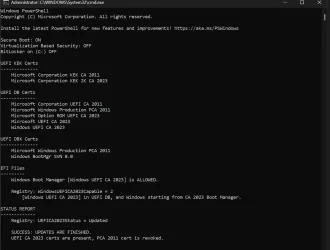
Solved garlin's PowerShell scripts for updating Secure Boot CA 2023


Run this command.
Code:
Update_UEFI-CA2023.ps1 -SkuSiPolicy
Thanks for the help, ran your code and now everything is ok.
 

Attachments

  • Capture.webp
    Capture.webp
    78.7 KB · Views: 2

My Computers

System One System Two

  • OS
    Win 11 Pro 25H2
    Computer type
    PC/Desktop
    Manufacturer/Model
    User Built
    CPU
    Intel Ultra i7 270K Plus
    Motherboard
    Asrock Taichi Z890 OCF
    Memory
    Kingston Fury Renegrade 2x24 8400 M/tu
    Graphics Card(s)
    MSI - GeForce RTX 5070 12 GB GAMING TRIO OC
    Sound Card
    Headphone DAC
    Monitor(s) Displays
    AOC QD OLED 4K 32" + Eizo 32" FlexScan 4K
    Screen Resolution
    3840x2160
    Hard Drives
    1x 9100 Pro 2TB Nvme 1x 990 Pro 2TB 1X 1TB 990 Pro
    PSU
    Be Quiet Pure Power 13 1K Watt ATX 3.1
    Case
    Corsair 5000T Air Flow
    Cooling
    Arctic Freezer 3 360 Pro
    Keyboard
    Cherry G80-3000N
    Mouse
    Corsair
    Internet Speed
    500Mbps
    Browser
    Firefox x64
    Antivirus
    Defender
    Other Info
    Backup software MR ver 10
  • Operating System
    Win 11 Pro 25H2
    Computer type
    PC/Desktop
    Manufacturer/Model
    User Built
    CPU
    Ultra i7 270K Plus
    Motherboard
    Asus Z890 Strix - F
    Memory
    Kingston Fury 2x16 7200 M/tu
    Graphics card(s)
    MSI RTX 4070 Super OC 12 GB
    Sound Card
    Onboard
    Monitor(s) Displays
    KVM switch to AOC 4K 32" QD OLED
    Screen Resolution
    3840x2160
    Hard Drives
    Samsung 990 Pro 4TB+990 Pro 2TB +990 Pro 1TB
    PSU
    Super Flower Ledex 3 ATX 3.1 850 Watts
    Case
    Corsair 500d
    Cooling
    Noctua D15 Cromax
The Secure Boot security model works like this:
Dell's Platform Key (PK) validates the KEK key, which in turn validates a DB key, which validates your boot file.

Without a KEK CA 2023, those new UEFI CA 2023 certs aren't validated. And by inference, a CA 2023-signed boot file isn't either.

The only method to install a KEK CA 2023 on these Dells is to wipe their certs (keys). When the PK is removed, UEFI security is disabled and we're allowed to replace the certs and install a reference KEK CA 2023 signed by MS. This process is still secure, because the only method for deleting all keys is to be physically in front of the PC at the BIOS screen. When the replacement PK is installed, normal security is restored.

1. Shutdown Windows.
2. Disable Secure Boot mode.
3. Chose Custom Mode.
4. Delete all Secure Boot keys.
5. Restart Windows. Secure Boot is ready to be configured by the update script.
6. Assuming we're successfully, you can re-enable Secure Boot mode.

Thank you so much for the concise explanation and instructions!

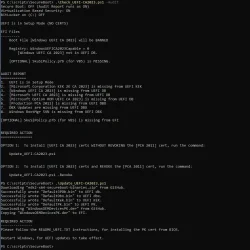
I followed steps #1 through #5. The Check and Update scripts ran correctly, and I have attached their output.

QUESTION:
Do I still need to "follow the README_UEFI.TXT instructions, for installing the PK cert from BIOS" (which is what the Update script said was the required action)? Or is that already taken care of by the script? You did not include a step of manually installing the PK cert from BIOS before step #6, re-enabling Secure Boot.

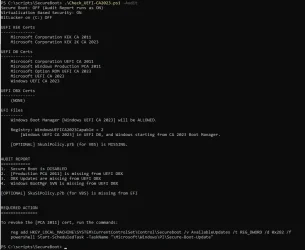
I reran the Check script with -Audit (before shutting down and re-entering the BIOS) and attached the output (second attachment). I'll let the machine sit in this state and wait for now. Based on my reading of this thread, all looks good to me except that the SkuSiPolicy still needs to be updated.
 

Attachments

  • Check and Update scripts in Setup Mode.webp
    Check and Update scripts in Setup Mode.webp
    83.9 KB · Views: 2
  • Output of Check after Update in Setup Mode.webp
    Output of Check after Update in Setup Mode.webp
    63.1 KB · Views: 2

My Computer

System One

  • OS
    Windows 11
    Computer type
    Laptop
    Manufacturer/Model
    Dell Latitude E5470
    CPU
    Core i7-6820HQ
    Motherboard
    Dell 06DNG5 version A00
    Memory
    16GB DDR4
    Graphics Card(s)
    Intel HD Graphics 530
Do I still need to "follow the README_UEFI.TXT instructions, for installing the PK cert from BIOS" (which is what the Update script said was the required action)? Or is that already taken care of by the script? You did not include a step of manually installing the PK cert from BIOS before step #6, re-enabling Secure Boot.
No, if you've executed Setup Mode then you don't need to follow the PK instructions. I should make the README more clear to skip the second section, if you finished the Setup Mode part.

I reran the Check script with -Audit (before shutting down and re-entering the BIOS) and attached the output (second attachment). I'll let the machine sit in this state and wait for now. Based on my reading of this thread, all looks good to me except that the SkuSiPolicy still needs to be updated.
Your CA 2023 is updated, but CA 2011 is not revoked (which is still optional for now).

SkuSiPolicy can be added for more security, but if you like to play around with dual-booting or use bootable Macrium recovery drives. Sometimes the policy can lock out other bootable devices because their boot files are not in compliance (wrong version).
 

My Computer

System One

  • OS
    Windows 7
No, if you've executed Setup Mode then you don't need to follow the PK instructions. I should make the README more clear to skip the second section, if you finished the Setup Mode part.

Thank you! That's what I thought, and this clarification should help others. You were right; it worked seamlessly.

Your CA 2023 is updated, but CA 2011 is not revoked (which is still optional for now).

I ran the Update script with -Revoke, and CA 2011 is now revoked.

SkuSiPolicy can be added for more security, but if you like to play around with dual-booting or use bootable Macrium recovery drives, sometimes the policy can lock out other bootable devices because their boot files are not in compliance (wrong version).

Those considerations are not applicable to me, but thanks again for clarifying. I ran the Update script with -SkuSiPolicy. That also worked; after rebooting, now "SkuSiPolicy.p7b is CURRENT". (I don't need to attach the latest Check script output because all is clean and "UPDATES ARE FINISHED"!)

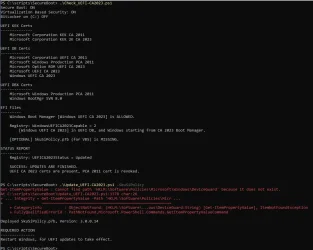
But there is one last little wrinkle: although it did work and the policy is now current, the Update script with -SkuSiPolicy reported an error. Attached is the output, in case it is helpful to you. (The scripts I'm running are the updated versions you provided here this week after the 2026.04.24 release.)

It is amazing that you have made these updates work on an 8-year-old machine whose BIOS will no longer be updated by Dell, and I don't have to learn Mosby. This is a perfectly good Windows 11 machine for now (i5-7600, 16GB RAM). Once again, thank you SO MUCH for all of your hard work on this.
 

Attachments

  • Check and Update -SkuSiPolicy outputs for garlin.webp
    Check and Update -SkuSiPolicy outputs for garlin.webp
    75.6 KB · Views: 2

My Computer

System One

  • OS
    Windows 11
    Computer type
    Laptop
    Manufacturer/Model
    Dell Latitude E5470
    CPU
    Core i7-6820HQ
    Motherboard
    Dell 06DNG5 version A00
    Memory
    16GB DDR4
    Graphics Card(s)
    Intel HD Graphics 530
But there is one last little wrinkle: although it did work and the policy is now current, the Update script with -SkuSiPolicy reported an error. Attached is the output, in case it is helpful to you. (The scripts I'm running are the updated versions you provided here this week after the 2026.04.24 release.)
Thanks. That's part of an upcoming update to determine whether you have an UEFI lock on SkuSiPolicy (sometimes know as DeviceGuard).

It is amazing that you have made these updates work on an 8-year-old machine whose BIOS will no longer be updated by Dell, and I don't have to learn Mosby. This is a perfectly good Windows 11 machine for now (i5-7600, 16GB RAM). Once again, thank you SO MUCH for all of your hard work on this.
Great that you're taken care of.
 

My Computer

System One

  • OS
    Windows 7
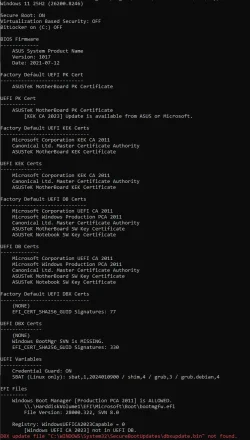
Hi Garlin, I was having similar 2 system disk problem to cydrone, so I ran your previous (2026.04.24) Check script and now I get an error dbxupdate.bin not found:

powershell -nop -ep bypass -f .\Check_UEFI-CA2023.ps1 -Audit -Verbose -Log

1777543425876.webp

from here, perhaps: (?)

if (($dbx_BytesCount -eq 0) -or -not (Match-DBXSignatureData "$env:SystemRoot\System32\SecureBootUpdates\dbxupdate.bin")) {
$CheckList += "{0,-3} DBX Updates are missing from UEFI DBX`n" -f ('{0}.' -f $index++)
$script:RevokeFlags = $script:RevokeFlags -bor 0x2
}

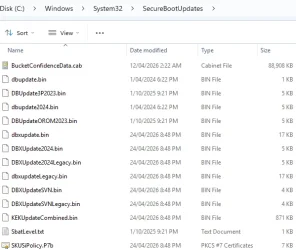
But seems that the file is there:

1777543674879.webp

Please let me know if you have any suggestions, thanks.
 

My Computer

System One

  • OS
    Windows 11
Hi Garlin, I was having similar 2 system disk problem to cydrone, so I ran your previous (2026.04.24) Check script and now I get an error dbxupdate.bin not found:
But seems that the file is there:
I've seen this problem before with two different users. They report different DB or DBX files in the SecureBootUpdates folder cannot be "opened", even though they're listed in File Explorer. I have never figured out why their Windows are different.

Let's try this:
1. Do you run any 3rd-party anti-virus or security software? I'm wondering if file access is being blocked.

2. Run this test command:
Code:
powershell -C "try { $bytes = [System.IO.File]::ReadAllBytes('C:\Windows\System32\SecureBootUpdates\dbxupdate.bin') } catch { $_.Exception }"

If successful, there should be no output. Only if there's a read error.
 

My Computer

System One

  • OS
    Windows 7
@garlin I've got a question for you. Just updated to the release preview and wanted to test a Macrium v8.0 Rescue Media USB and it failed to boot. Error on the screen was SVN is 8 and USB is 7. How do I update the SVN on the USB to 8. The USB worked fine on the public release from 14 April and on the 28000 26H1 preview that also came out today. Both devices are on SVN 8.0 with the Rescue Media working on one device, but not the other. A bit weird, tried manually copy/pasting the EX bootloader from C, it didn't make any difference, but still booted on the 26H1 device. In the end, I turned off secure boot on the 25H2 device and it booted fine. I recreated the Rescue Media USB on the 26H1 device as the software is installed on it. Maybe I should install Macrium on the 25H2 device and rebuild the Rescue Media using that device?

Edit: I did run the BootMedia script.
 
Last edited:

My Computer

System One

  • OS
    Windows 11
@garlin I've got a question for you. Just updated to the release preview and wanted to test a Macrium v8.0 Rescue Media USB and it failed to boot. Error on the screen was SVN is 8 and USB is 7. How do I update the SVN on the USB to 8. The USB worked fine on the public release from 14 April and on the 28000 26H1 preview that also came out today. Both devices are on SVN 8.0 with the Rescue Media working on one device, but not the other. A bit weird, tried manually copy/pasting the EX bootloader from C, it didn't make any difference, but still booted on the 26H1 device. In the end, I turned off secure boot on the 25H2 device and it booted fine. I recreated the Rescue Media USB on the 26H1 device as the software is installed on it. Maybe I should install Macrium on the 25H2 device and rebuild the Rescue Media using that device?
Normally the SVN is stored in two places:
- one copy in the UEFI DBX variable, which is enforced​
- one copy as part of the boot manager file​

The boot manager runs and performs a self-check against the DBX's version. If the boot manager's SVN is lower than the DBX's SVN, then the boot manager voluntarily exits. So the boot file decides whether to run or not.

The UEFI only enforces if the file's signing cert is CA 2011 (banned) or CA 2023 (allowed).

What the problem boils down to is do you have the right boot file? Some devices are WinPE-style (\EFI\Boot) and WinRE-style (\EFI\Microsoft\Boot). In the WinRE format, you're essentially copying the whole bcdboot folder.

If you run "Check_UEFI-CA2023.ps1 -BootMedia", it should report:
- bootmfgw.efi for the WinRE style​
- bootx64.efi for WinPE style​

I'm presuming there's no mixing & matching of the two formats.
 

My Computer

System One

  • OS
    Windows 7
I've seen this problem before with two different users. They report different DB or DBX files in the SecureBootUpdates folder cannot be "opened", even though they're listed in File Explorer. I have never figured out why their Windows are different.

Let's try this:
1. Do you run any 3rd-party anti-virus or security software? I'm wondering if file access is being blocked.

2. Run this test command:
Code:
powershell -C "try { $bytes = [System.IO.File]::ReadAllBytes('C:\Windows\System32\SecureBootUpdates\dbxupdate.bin') } catch { $_.Exception }"

If successful, there should be no output. Only if there's a read error.

thanks

(1) so I turned off ESET for 10 min, and your CHECK script gave the same dbxupdate.bin not found error

(2) also, try-catch statement was run (adding write-host ?):

powershell -C "try { $bytes = [System.IO.File]::ReadAllBytes('C:\Windows\System32\SecureBootUpdates\dbxupdate.bin') } catch { write-host $_.Exception }"
.Exception

thanks
 

My Computer

System One

  • OS
    Windows 11
Powershell:
Windows 11 25H2 (26200.8328)

Secure Boot: ON
Virtualization Based Security: OFF
BitLocker on (C:) OFF

BIOS Firmware
-------------
    HP HP Pavilion Laptop 15-eh3xxx
    Version: F.09
    Date: 2025-11-24

Factory Default UEFI PK Cert
----------------------------
    HP UEFI Secure Boot PK 2017

UEFI PK Cert
------------
    HP UEFI Secure Boot PK 2017

Factory Default UEFI KEK Certs
------------------------------
    Microsoft Corporation KEK CA 2011
    HP UEFI Secure Boot KEK 2017
    Microsoft Corporation KEK 2K CA 2023

UEFI KEK Certs
--------------
    Microsoft Corporation KEK CA 2011
    HP UEFI Secure Boot KEK 2017
    Microsoft Corporation KEK 2K CA 2023

Factory Default UEFI DB Certs
-----------------------------
    Microsoft Corporation UEFI CA 2011
    Microsoft Windows Production PCA 2011
    HP UEFI Secure Boot DB 2017
    Microsoft Option ROM UEFI CA 2023
    Microsoft UEFI CA 2023
    Windows UEFI CA 2023

UEFI DB Certs
-------------
    Microsoft Corporation UEFI CA 2011
    Microsoft Windows Production PCA 2011
    HP UEFI Secure Boot DB 2017
    Microsoft Option ROM UEFI CA 2023
    Microsoft UEFI CA 2023
    Windows UEFI CA 2023

Factory Default UEFI DBX Certs
------------------------------
    Debian Secure Boot Signer
    Canonical Ltd. Secure Boot Signing
    EFI_CERT_SHA256_GUID Signatures: 190

UEFI DBX Certs
--------------
    Microsoft Windows Production PCA 2011
    Windows BootMgr SVN 8.0
    EFI_CERT_SHA256_GUID Signatures: 480

EFI Files
---------
    Windows Boot Manager [Windows UEFI CA 2023] is ALLOWED.
        \\.\HarddiskVolume1\EFI\Microsoft\Boot\bootmgfw.efi
        File Version: 28000.322, SVN 8.0

    Registry: WindowsUEFICA2023Capable = 2
        [Windows UEFI CA 2023] in UEFI DB, and Windows starting from CA 2023 Boot Manager.


AUDIT REPORT
============


STATUS REPORT
-------------
    Registry: UEFICA2023Status = Updated

    SUCCESS: UPDATES ARE FINISHED.
    UEFI CA 2023 certs are present, PCA 2011 cert is revoked.

Powershell:
Windows 11 25H2 (26200.8328)

Secure Boot: ON
Virtualization Based Security: OFF
BitLocker on (C:) OFF

BIOS Firmware
-------------
    Micro-Star International Co. MS-7C95
    Version: 2.O1
    Date: 2025-09-15

Factory Default UEFI PK Cert
----------------------------
    MSI SHIP PK

UEFI PK Cert
------------
    MSI SHIP PK

Factory Default UEFI KEK Certs
------------------------------
    Microsoft Corporation KEK CA 2011
    Microsoft Corporation KEK 2K CA 2023
    MSI SHIP KEK

UEFI KEK Certs
--------------
    Microsoft Corporation KEK CA 2011
    Microsoft Corporation KEK 2K CA 2023
    MSI SHIP KEK

Factory Default UEFI DB Certs
-----------------------------
    Microsoft Corporation UEFI CA 2011
    Microsoft Windows Production PCA 2011
    Microsoft Option ROM UEFI CA 2023
    Microsoft UEFI CA 2023
    Windows UEFI CA 2023
    MSI SHIP DB

UEFI DB Certs
-------------
    Microsoft Corporation UEFI CA 2011
    Microsoft Windows Production PCA 2011
    Microsoft Option ROM UEFI CA 2023
    Microsoft UEFI CA 2023
    Windows UEFI CA 2023
    MSI SHIP DB

Factory Default UEFI DBX Certs
------------------------------
    (NONE)
    EFI_CERT_SHA256_GUID Signatures: 416

UEFI DBX Certs
--------------
    Microsoft Windows Production PCA 2011
    Windows BootMgr SVN 8.0
    EFI_CERT_SHA256_GUID Signatures: 439

UEFI Variable
-------------
    SBAT (Linux only): sbat,1,2024010900 / shim,4 / grub,3 / grub.debian,4

EFI Files
---------
    Windows Boot Manager [Windows UEFI CA 2023] is ALLOWED.
        \\.\HarddiskVolume1\EFI\Microsoft\Boot\bootmgfw.efi
        File Version: 28000.322, SVN 8.0

    Registry: WindowsUEFICA2023Capable = 2
        [Windows UEFI CA 2023] in UEFI DB, and Windows starting from CA 2023 Boot Manager.


AUDIT REPORT
============


STATUS REPORT
-------------
    Registry: UEFICA2023Status = Updated

    SUCCESS: UPDATES ARE FINISHED.
    UEFI CA 2023 certs are present, PCA 2011 cert is revoked.

While the SBAT error persists in the console for the HP (which honestly, I can't care less if its just for Linux systems, after all I just opted out for the SBAT thing), I finally ran Windows Update to get the latest Preview Update (They fixed RDP, so we are alive lol) and did what the bat file told me when it audited the system, reboot, voila! SVN 8.0. I also updated my Macrium USB and tested, boots properly and no security violations.

Again, if it wasn't because of you, I can't see any of us having a good season with all this. You have made it so easy even I can do this!

Thanks a ton!
 

My Computers

System One System Two

  • OS
    Windows 11 Pro 25H2
    Computer type
    PC/Desktop
    Manufacturer/Model
    Built PC
    CPU
    AMD Ryzen 5 5600G @ 3.9/4.4Ghz
    Motherboard
    MSI B550M-PRO-WiFi Ver. 1.4
    Memory
    2 x 16 GB DDR4 Kingston Fury Beast 3200 Mhz
    Graphics Card(s)
    AMD Radeon RX 6600 XT MSI Mech 2X OC Edition 8 GB
    Sound Card
    Realtek High Definition Audio (Integrated)
    Monitor(s) Displays
    Samsung C50Rx 27" LED / HP S2031 20" LCD
    Screen Resolution
    1920 x 1080 px / 1600 x 900 px
    Hard Drives
    WD Blue SN570 NVME M.2 SSD [1 TB] -- External Drives: - WD Scorpion Blue 250 GB 5400 RPM (Data Backup) - Hitachi 500 GB 5400 RPM (Software / ISOs Backup) - Toshiba MQ01ABD100 1 TB 5400 RPM (OS Images) - HGST TravelStar 7K1000 1 TB, 7200 RPM USB 3.0 - ADATA SU800 2TB SSD USB 3.0
    PSU
    Corsair RM750e 750W Fully Modular
    Case
    Naceb Hydra NA-1602
    Cooling
    Naceb Orpheus x 3 (Front) + Naceb Cepheus 1200 RPM Max (Rear) + ThemalRight Assasin X 90 SE (CPU)
    Keyboard
    Logitech MK470 Wireless
    Mouse
    Logitech MK470 Wireless
    Internet Speed
    120 MB Symetrical
    Browser
    Firefox / Brave / Edge
    Antivirus
    Windows Defender
    Other Info
    - VMs: WMware Player - Windows 8.1 Pro x64 / Windows 11 Pro
    - Wacom Intuos Pro Small Tablet PTH-460
  • Operating System
    Windows 11 Pro 25H2
    Computer type
    Laptop
    Manufacturer/Model
    HP Pavilion 15-eh3000la (80M53LA)
    CPU
    AMD Ryzen 7 7730U @ 2.0/4.5 Ghz
    Motherboard
    HP 8BC7
    Memory
    2 x 16 GB Kingston Fury Impact DDR4 3200 Mhz
    Graphics card(s)
    Radeon (tm) Graphics Vega 8 (512 MB)
    Sound Card
    Realtek High Definition Audio (Integrated)
    Monitor(s) Displays
    AU Optronics
    Screen Resolution
    1920 x 1080 px (125% size)
    Hard Drives
    WD Blue SN570 1TB NVME M.2 Drive
    PSU
    45 Watt Charger
    Cooling
    Laptop Cooling Pad
    Keyboard
    Free Wolf Foldable Portable Keyboard
    Mouse
    Free Wolf Wireless Mouse
    Internet Speed
    120 MB Symetrical
    Browser
    Firefox / Brave / Edge
    Antivirus
    Windows Defender
    Other Info
    - 41mWh battery.
    - Wacom Intuos Pro Small Tablet PTH-460
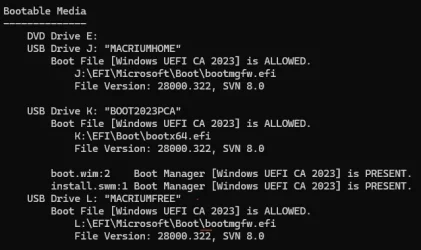
If you run "Check_UEFI-CA2023.ps1 -BootMedia", it should report:
- bootmfgw.efi for the WinRE style- bootx64.efi for WinPE style

I had to add -verbose to the command to see that info.

1777624373589.webp
 

My Computers

System One System Two

  • OS
    Win 11 Pro 25H2 26200.8655
    Computer type
    PC/Desktop
    Manufacturer/Model
    Self Built
    CPU
    Intel® Core™ i7-14700K
    Motherboard
    ASUS TUF Z690-PLUS WIFI BIOS 4505 11/29/25
    Memory
    G.SKILL Ripjaws S5 Series 64GB (2 x 32GB) DDR5
    Graphics Card(s)
    ASUS GeForce RTX 4070 Super 12GB
    Sound Card
    Sound Blaster AE-5 Plus
    Monitor(s) Displays
    ASUS TUF Gaming 27" 2K HDR Gaming
    Screen Resolution
    2560 x 1440
    Hard Drives
    Samsung 990 Pro 1TB NVMe (Win 11 25H2)
    SK hynix P41 500GB NVMe 25H2 DEV/Games
    SK hynix P41 2TB NVMe (x3)
    Crucial P3 Plus 4TB
    PSU
    Corsair RM850x Shift
    Case
    Antec Dark Phantom DP502 FLUX
    Cooling
    Corsair Nautilus 360 RS AIO
    Keyboard
    Logitech MK 320
    Mouse
    Razer Basilisk V3
    Internet Speed
    350Mbs
    Browser
    Firefox
    Antivirus
    Winows Security
    Other Info
    MR 8.1 Home

    System 3 Specs
    Win 11 Pro 25H2 26200.8655
    ASUS PRIME Z370-P II BIOS 3004 7/12/21
    Intel Core i7-8700 CPU @ 3.20GHz
    32GB DDR4 RAM (4x8)
    iGPU Intel UHD Graphics 630
  • Operating System
    Win 11 Pro 25H2 26200.8655
    Computer type
    PC/Desktop
    Manufacturer/Model
    Self Built
    CPU
    Intel Core i7-11700F
    Motherboard
    Asus TUF Gaming Z590 Plus WiFi (BIOS 2803)
    Memory
    64 GB DDR4
    Graphics card(s)
    MSI GeForce RTX 3060 Ventus 2X 12GB
    Sound Card
    SoundBlaster Audigy Fx V2
    Monitor(s) Displays
    Samsung F27T350
    Screen Resolution
    1920x1080
    Hard Drives
    Samsung 980 Pro 1TB
    Samsung 970 EVO Plus 2TB
    Samsung 870 EVO 500GB SSD
    PSU
    Corsair HX750
    Case
    Cougar MX330-G Window
    Cooling
    Thermalright Frozen Edge 240 Black AIO
    Internet Speed
    350Mbps
    Browser
    Firefox
    Antivirus
    Windows Security
(2) also, try-catch statement was run (adding write-host ?):

powershell -C "try { $bytes = [System.IO.File]::ReadAllBytes('C:\Windows\System32\SecureBootUpdates\dbxupdate.bin') } catch { write-host $_.Exception }"
.Exception
The idea is if the try {} block fails, then you get the $_.Exception printed out. If you don't get a failed call, nothing gets dumped out.
Since you didn't see any output, then the file read worked.

Code:
C:\Windows\System32>powershell -C "try { $bytes = [System.IO.File]::ReadAllBytes('C:\no\such\file\exists') } catch { $_.Exception }"
Exception calling "ReadAllBytes" with "1" argument(s): "Could not find a part of the path 'C:\no\such\file\exists'."
Code:
C:\Windows\System32>powershell -C "try { $bytes = [System.IO.File]::ReadAllBytes('C:\no\such\file\exists') } catch { Write-host $_.Exception }"
System.Management.Automation.MethodInvocationException: Exception calling "ReadAllBytes" with "1" argument(s): "Could not find a part of the path 'C:\no\such\file\exists'." ---> System.IO.DirectoryNotFoundException: Could not find a part of the path 'C:\no\such\file\exists'.
   at System.IO.__Error.WinIOError(Int32 errorCode, String maybeFullPath)
   at System.IO.FileStream.Init(String path, FileMode mode, FileAccess access, Int32 rights, Boolean useRights, FileShare share, Int32 bufferSize, FileOptions options, SECURITY_ATTRIBUTES secAttrs, String msgPath, Boolean bFromProxy, Boolean useLongPath, Boolean checkHost)
   at System.IO.FileStream..ctor(String path, FileMode mode, FileAccess access, FileShare share, Int32 bufferSize, FileOptions options, String msgPath, Boolean bFromProxy, Boolean useLongPath, Boolean checkHost)
   at System.IO.File.InternalReadAllBytes(String path, Boolean checkHost)
   at CallSite.Target(Closure , CallSite , Type , String )
   --- End of inner exception stack trace ---
   at System.Management.Automation.ExceptionHandlingOps.CheckActionPreference(FunctionContext funcContext, Exception exception)
   at System.Management.Automation.Interpreter.ActionCallInstruction`2.Run(InterpretedFrame frame)
   at System.Management.Automation.Interpreter.EnterTryCatchFinallyInstruction.Run(InterpretedFrame frame)

   at System.Management.Automation.Interpreter.EnterTryCatchFinallyInstruction.Run(InterpretedFrame frame)
 

My Computer

System One

  • OS
    Windows 7
The idea is if the try {} block fails, then you get the $_.Exception printed out. If you don't get a failed call, nothing gets dumped out.
Since you didn't see any output, then the file read worked.

Code:
C:\Windows\System32>powershell -C "try { $bytes = [System.IO.File]::ReadAllBytes('C:\no\such\file\exists') } catch { $_.Exception }"
Exception calling "ReadAllBytes" with "1" argument(s): "Could not find a part of the path 'C:\no\such\file\exists'."
Code:
C:\Windows\System32>powershell -C "try { $bytes = [System.IO.File]::ReadAllBytes('C:\no\such\file\exists') } catch { Write-host $_.Exception }"
System.Management.Automation.MethodInvocationException: Exception calling "ReadAllBytes" with "1" argument(s): "Could not find a part of the path 'C:\no\such\file\exists'." ---> System.IO.DirectoryNotFoundException: Could not find a part of the path 'C:\no\such\file\exists'.
   at System.IO.__Error.WinIOError(Int32 errorCode, String maybeFullPath)
   at System.IO.FileStream.Init(String path, FileMode mode, FileAccess access, Int32 rights, Boolean useRights, FileShare share, Int32 bufferSize, FileOptions options, SECURITY_ATTRIBUTES secAttrs, String msgPath, Boolean bFromProxy, Boolean useLongPath, Boolean checkHost)
   at System.IO.FileStream..ctor(String path, FileMode mode, FileAccess access, FileShare share, Int32 bufferSize, FileOptions options, String msgPath, Boolean bFromProxy, Boolean useLongPath, Boolean checkHost)
   at System.IO.File.InternalReadAllBytes(String path, Boolean checkHost)
   at CallSite.Target(Closure , CallSite , Type , String )
   --- End of inner exception stack trace ---
   at System.Management.Automation.ExceptionHandlingOps.CheckActionPreference(FunctionContext funcContext, Exception exception)
   at System.Management.Automation.Interpreter.ActionCallInstruction`2.Run(InterpretedFrame frame)
   at System.Management.Automation.Interpreter.EnterTryCatchFinallyInstruction.Run(InterpretedFrame frame)
   at System.Management.Automation.Interpreter.EnterTryCatchFinallyInstruction.Run(InterpretedFrame frame)

Thanks.

(first) I ran the original and got the following. Does this mean the catch statement was executed? Or is this OK?

powershell -C "try { $bytes = [System.IO.File]::ReadAllBytes('C:\Windows\System32\SecureBootUpdates\dbxupdate.bin') } catch { $_.Exception }"

.Exception : The term '.Exception' is not recognized as the name of a cmdlet, function, script file, or operable program. Check the spelling of the name, or if a path was included, verify that the path is
correct and try again.
At line:1 char:106
+ ... ows\System32\SecureBootUpdates\dbxupdate.bin') } catch { .Exception }
+ ~~~~~~~~~~
+ CategoryInfo : ObjectNotFound: (.Exception:String) [], CommandNotFoundException
+ FullyQualifiedErrorId : CommandNotFoundException


(second) I ran your 2 tests on my machine:

powershell -C "try { $bytes = [System.IO.File]::ReadAllBytes('C:\no\such\file\exists') } catch { $_.Exception }"

.Exception : The term '.Exception' is not recognized as the name of a cmdlet, function, script file, or operable program. Check the spelling of the name, or if a path was included, verify that the path is
correct and try again.
At line:1 char:77
+ ... .File]::ReadAllBytes('C:\no\such\file\exists') } catch { .Exception }
+ ~~~~~~~~~~
+ CategoryInfo : ObjectNotFound: (.Exception:String) [], CommandNotFoundException
+ FullyQualifiedErrorId : CommandNotFoundException

... and then:

powershell -C "try { $bytes = [System.IO.File]::ReadAllBytes('C:\no\such\file\exists') } catch { Write-host $_.Exception }"

.Exception

Not sure what all this means ... (I'm running Windows PowerShell (x86))
 

My Computer

System One

  • OS
    Windows 11
Are you running this command inside PowerShell or CMD? This command was intended for CMD, since PS "eats" double-quotes that were intended for running outside of PS.

If you're already inside PS, run this:
Code:
try { $bytes = [System.IO.File]::ReadAllBytes('C:\Windows\System32\SecureBootUpdates\dbxupdate.bin') } catch { $_.Exception }
 

My Computer

System One

  • OS
    Windows 7
Now on 25H2 build 8328, thankfully no change to the boot manager this update.
 

My Computer

System One

  • OS
    Windows 11 Pro 25H2
    Computer type
    PC/Desktop
    Manufacturer/Model
    custom
    CPU
    AMD Ryzen 9 3950X
    Motherboard
    ASUS ROG Strix X570-E (first gen)
    Memory
    64 GB DDR4-3600 CL18 (2x32 GB)
    Graphics Card(s)
    MSI Ventus RTX 2060 Super
    Sound Card
    Audient iD4 Mk.I
    Monitor(s) Displays
    2x AOC 24G1 / 1x XP-Pen Artist Pro 16 Gen 2 2.5K
    Screen Resolution
    1080p / 2560x1600
    Hard Drives
    1TB WD/SanDisk SN850X (main) / 2TB Sabrent Rocket 4 / 6TB WD MyBook EE
    PSU
    Corsair RM850X 850W Gold (2019)
    Case
    Lian-Li O11-D
    Cooling
    EKWB EK-AIO 360 RGB
    Keyboard
    wooting Two HE fullsize
    Mouse
    some old mouse from an older PC
    Internet Speed
    Gigabit symmetric (fibre); Bell Fibe
    Browser
    Firefox
    Antivirus
    ol' reliable Windows Defender
    Other Info
    Other peripherals:

    - Shure SM7B (Mexico)
    - AKG K 240 Studio (calibrated flat)
    - PDP FaceOff wired Switch gamepad
Yes, I'm running from inside a PowerShell window. Here's what you suggest:

try { $bytes = [System.IO.File]::ReadAllBytes('C:\Windows\System32\SecureBootUpdates\dbxupdate.bin') } catch { $_.Exception }

Exception calling "ReadAllBytes" with "1" argument(s): "Could not find a part of the path 'C:\Windows\System32\SecureBootUpdates\dbxupdate.bin'."
 

My Computer

System One

  • OS
    Windows 11
Now on 25H2 build 8328, thankfully no change to the boot manager this update.
There is no defined schedule for when the boot manager changes. If someone reports a new security hole, then a new version will eventually roll. This whole process is inconvenient, but you know MS is trying to protect your PC.
 

My Computer

System One

  • OS
    Windows 7
Yes, I'm running from inside a PowerShell window. Here's what you suggest:

try { $bytes = [System.IO.File]::ReadAllBytes('C:\Windows\System32\SecureBootUpdates\dbxupdate.bin') } catch { $_.Exception }

Exception calling "ReadAllBytes" with "1" argument(s): "Could not find a part of the path 'C:\Windows\System32\SecureBootUpdates\dbxupdate.bin'."

You're officially the 3rd person with this problem. Please try this experiment:
Code:
copy C:\Windows\System32\SecureBootUpdates\dbxupdate.bin C:\Users\Fred123\Downloads
try { $bytes = [System.IO.File]::ReadAllBytes('C:\Users\Fred123\Downloads\dbxupdate.bin') } catch { $_.Exception }

It will be the same DBX file, but in a different folder path. If reading the copied file works, it means there's some hidden security issue with the SecureBootUpdates folder (or somewhere above it).
 

My Computer

System One

  • OS
    Windows 7
Yes, I'm running inside a PowerShell window. Here's your latest test:

try { $bytes = [System.IO.File]::ReadAllBytes('C:\Windows\System32\SecureBootUpdates\dbxupdate.bin') } catch { $_.Exception }
Exception calling "ReadAllBytes" with "1" argument(s): "Could not find a part of the path 'C:\Windows\System32\SecureBootUpdates\dbxupdate.bin'."
PS C:\Users\ ... >

Also, Windows Update updated to the latest: 2026-04 Preview Update (KB5083631) (26200.8328)

After 2 or 3 restarts, I find that Windows Security says all is up to date for Secure Boot and certificates. Here's your CHECK script output:

Also, the running your Check_UEFI-CA2023.ps1 script (inside a PS window) now gives

powershell -nop -ep bypass -f .\Check_UEFI-CA2023.ps1 -Audit -Verbose -Log
Windows 11 25H2 (26200.8328)

Secure Boot: ON
Virtualization Based Security: OFF
BitLocker on (C:) OFF

BIOS Firmware
-------------
ASUS System Product Name
Version: 1017
Date: 2021-07-12

Factory Default UEFI PK Cert
----------------------------
ASUSTeK MotherBoard PK Certificate

UEFI PK Cert
------------
ASUSTeK MotherBoard PK Certificate

Factory Default UEFI KEK Certs
------------------------------
Microsoft Corporation KEK CA 2011
Canonical Ltd. Master Certificate Authority
ASUSTeK MotherBoard KEK Certificate

UEFI KEK Certs
--------------
Microsoft Corporation KEK CA 2011
Microsoft Corporation KEK 2K CA 2023
Canonical Ltd. Master Certificate Authority
ASUSTeK MotherBoard KEK Certificate

Factory Default UEFI DB Certs
-----------------------------
Microsoft Corporation UEFI CA 2011
Microsoft Windows Production PCA 2011
Canonical Ltd. Master Certificate Authority
ASUSTeK MotherBoard SW Key Certificate
ASUSTeK Notebook SW Key Certificate

UEFI DB Certs
-------------
Microsoft Corporation UEFI CA 2011
Microsoft Windows Production PCA 2011
Microsoft Option ROM UEFI CA 2023
Microsoft UEFI CA 2023
Windows UEFI CA 2023
Canonical Ltd. Master Certificate Authority
ASUSTeK MotherBoard SW Key Certificate
ASUSTeK Notebook SW Key Certificate

Factory Default UEFI DBX Certs
------------------------------
(NONE)
EFI_CERT_SHA256_GUID Signatures: 77

UEFI DBX Certs
--------------
(NONE)
Windows BootMgr SVN is MISSING.
EFI_CERT_SHA256_GUID Signatures: 330

UEFI Variables
--------------
Credential Guard: ON
SBAT (Linux only): sbat,1,2024010900 / shim,4 / grub,3 / grub.debian,4

EFI Files
---------
Windows Boot Manager [Windows UEFI CA 2023] is ALLOWED.
\\.\HarddiskVolume1\EFI\Microsoft\Boot\bootmgfw.efi
File Version: 28000.322, SVN 8.0

Registry: WindowsUEFICA2023Capable = 2
[Windows UEFI CA 2023] in UEFI DB, and Windows starting from CA 2023 Boot Manager.
DBX update file "C:\WINDOWS\System32\SecureBootUpdates\dbxupdate.bin" not found.

Does the above, the mean that all needed updates are applied and Secure Boot and certificates are all OK ???

What about, the DBX update file ... dbxupdate.bin not found message? Is this a problem?

Thanks
 

My Computer

System One

  • OS
    Windows 11
Back
Top Bottom