Solved garlin's PowerShell scripts for updating Secure Boot CA 2023


Looks like a problem with the folder. I cannot "cd" into it from within the PS window, as follows:

PS C:\Users\...> cd C:\Windows

PS C:\Windows> cd .\System32

PS C:\Windows\System32> cd .\SecureBootUpdates

cd : Cannot find path 'C:\Windows\System32\SecureBootUpdates' because it does not exist.
At line:1 char:1
+ cd .\SecureBootUpdates
+ ~~~~~~~~~~~~~~~~~~~~~~
+ CategoryInfo : ObjectNotFound: (C:\Windows\System32\SecureBootUpdates:String) [Set-Location], ItemNotFoundException
+ FullyQualifiedErrorId : PathNotFound,Microsoft.PowerShell.Commands.SetLocationCommand

PS C:\Windows\System32>

From an Explorer window I can see:

1777653482728.webp

And from the PS> window I see:

PS C:\Windows\System32> ls -Directory


Directory: C:\Windows\System32


Mode LastWriteTime Length Name
---- ------------- ------ ----
d----- 1/04/2024 7:00 PM 0409
d----- 1/10/2025 9:25 PM AdvancedInstallers
d----- 3/04/2026 1:16 AM af-ZA
...
d----- 1/04/2024 6:26 PM restore
d----- 3/04/2026 1:16 AM ro-RO
d----- 3/04/2026 1:16 AM ru-RU
d----- 1/05/2026 5:56 PM setup
d----- 1/04/2024 6:26 PM ShellExperiences
d----- 3/04/2026 1:16 AM sk-SK
d----- 3/04/2026 1:16 AM sl-SI
d----- 1/04/2024 7:00 PM slmgr
d----- 1/04/2024 6:34 PM SMI
...

The details match those from Explorer (eg, here for af_ZA):

1777654353026.webp

Not sure what all this means for the Windows running on my PC?

Thanks.
 

My Computer My Computer

At a glance

Windows 11
OS
Windows 11
When I copy the file via Explorer to another dir, looks like I can read it from PS>

PS C:\dir> try { $bytes = [System.IO.File]::ReadAllBytes('C:\Users\Fred123\Garlin\Updated_scripts_30apr26a\dbxupdate.bin') } catch { $_.Exception }
PS C:\dir>

where ls gives:

Mode LastWriteTime Length Name
---- ------------- ------ ----
-a---- 24/04/2026 8:48 PM 16632 dbxupdate.bin

so no read error here

Still not sure what all this means for the Windows running on my PC?

Thanks.
 

My Computer My Computer

At a glance

Windows 11
OS
Windows 11
Something seriously messed up the inheritance permissions on your Windows folders.

I would try the old trick of repairing Windows. DISM might take a while, but you can leave it running in the background and do other things.
Code:
DISM /Online /Cleanup-Image /RestoreHealth
sfc /scannow

Restart Windows
 

My Computer My Computer

At a glance

Windows 7
OS
Windows 7
Something seriously messed up the inheritance permissions on your Windows folders.

I would try the old trick of repairing Windows. DISM might take a while, but you can leave it running in the background and do other things.
Code:
DISM /Online /Cleanup-Image /RestoreHealth
sfc /scannow

Restart Windows

Thanks.
I ran DSIM and sfc and both completed successfully.
Then I restarted the PC, and ran your CHECK script.
The problem accessing dbxupdate.bin still happens.

Not sure what this means, or if it needs more fixing, and how?
Do you think it's safe to keep going with this system the way it is?

Thanks again for all your help.


Here's the repair output:

Microsoft Windows [Version 10.0.26200.8328]
(c) Microsoft Corporation. All rights reserved.

C:\Windows\System32>DISM /Online /Cleanup-Image /RestoreHealth

Deployment Image Servicing and Management tool
Version: 10.0.26100.5074

Image Version: 10.0.26200.8328
[==========================100.0%==========================]
The restore operation completed successfully.
The operation completed successfully.

C:\Windows\System32>sfc /scannow

Beginning system scan. This process will take some time.

Beginning verification phase of system scan.
Verification 100% complete.

Windows Resource Protection found corrupt files and successfully repaired them.
For online repairs, details are included in the CBS log file located at
windir\Logs\CBS\CBS.log. For example C:\Windows\Logs\CBS\CBS.log. For offline
repairs, details are included in the log file provided by the /OFFLOGFILE flag.

C:\Windows\System32>


Here's the output from your CHECK script, which looks OK until the failed READ at which it terminated:

powershell -nop -ep bypass -f .\Check_UEFI-CA2023.ps1 -Audit -Verbose -Log
Windows 11 25H2 (26200.8328)

Secure Boot: ON
Virtualization Based Security: OFF
BitLocker on (C:) OFF

BIOS Firmware
-------------
ASUS System Product Name
Version: 1017
Date: 2021-07-12

Factory Default UEFI PK Cert
----------------------------
ASUSTeK MotherBoard PK Certificate

UEFI PK Cert
------------
ASUSTeK MotherBoard PK Certificate

Factory Default UEFI KEK Certs
------------------------------
Microsoft Corporation KEK CA 2011
Canonical Ltd. Master Certificate Authority
ASUSTeK MotherBoard KEK Certificate

UEFI KEK Certs
--------------
Microsoft Corporation KEK CA 2011
Microsoft Corporation KEK 2K CA 2023
Canonical Ltd. Master Certificate Authority
ASUSTeK MotherBoard KEK Certificate

Factory Default UEFI DB Certs
-----------------------------
Microsoft Corporation UEFI CA 2011
Microsoft Windows Production PCA 2011
Canonical Ltd. Master Certificate Authority
ASUSTeK MotherBoard SW Key Certificate
ASUSTeK Notebook SW Key Certificate

UEFI DB Certs
-------------
Microsoft Corporation UEFI CA 2011
Microsoft Windows Production PCA 2011
Microsoft Option ROM UEFI CA 2023
Microsoft UEFI CA 2023
Windows UEFI CA 2023
Canonical Ltd. Master Certificate Authority
ASUSTeK MotherBoard SW Key Certificate
ASUSTeK Notebook SW Key Certificate

Factory Default UEFI DBX Certs
------------------------------
(NONE)
EFI_CERT_SHA256_GUID Signatures: 77

UEFI DBX Certs
--------------
(NONE)
Windows BootMgr SVN is MISSING.
EFI_CERT_SHA256_GUID Signatures: 330

UEFI Variables
--------------
Credential Guard: ON
SBAT (Linux only): sbat,1,2024010900 / shim,4 / grub,3 / grub.debian,4

EFI Files
---------
Windows Boot Manager [Windows UEFI CA 2023] is ALLOWED.
\\.\HarddiskVolume1\EFI\Microsoft\Boot\bootmgfw.efi
File Version: 28000.322, SVN 8.0

Registry: WindowsUEFICA2023Capable = 2
[Windows UEFI CA 2023] in UEFI DB, and Windows starting from CA 2023 Boot Manager.
DBX update file "C:\WINDOWS\System32\SecureBootUpdates\dbxupdate.bin" not found.
PS C:\ ... >

If you have any more ideas on what to test or check to better understand this problem, please let me know. Thanks.
 

My Computer My Computer

At a glance

Windows 11
OS
Windows 11
Let's try restoring the correct ACL's on the SecureBootUpdates folder.

1. Download PowerRun.

2. Save this attachment file ("RESTORE_ACL.txt") to your PC.

3. Open an elevated CMD shell window.

4. Run this command from the CMD:
Code:
icacls C:\Windows\System32 /restore RESTORE_ACL.txt

5. Close the CMD.
 

Attachments

My Computer My Computer

At a glance

Windows 7
OS
Windows 7
Another test of file access to SecureBootUpdates in cmd and PS, run as Administrator:

I can cd to SecureBootUpdates and see the files from inside a cmd prompt window,
BUT I cannot access or see the SecureBootUpdates folder from inside a PowerShell window.

And I can get to SecureBootUpdates from Explorer too (see previous posts).

Maybe this means the Windows 11 system can still run OK on my PC?

Not sure if your scripts can run via "cmd" to do do the CHECKs needed for the failed READ access steps ???

cmd prompt window:

Microsoft Windows [Version 10.0.26200.8328]
(c) Microsoft Corporation. All rights reserved.

C:\Windows\System32>cd C:\WINDOWS\System32\

C:\Windows\System32>cd SecureBootUpdates

C:\Windows\System32\SecureBootUpdates>dir
Volume in drive C has no label.
Volume Serial Number is C440-DB55

Directory of C:\Windows\System32\SecureBootUpdates

01/05/2026 05:56 PM <DIR> .
02/05/2026 03:06 PM <DIR> ..
28/04/2026 07:39 PM 91,995,237 BucketConfidenceData.cab
01/04/2024 05:22 PM 3 dbupdate.bin
01/04/2024 05:22 PM 4,832 dbupdate2024.bin
01/10/2025 09:21 PM 4,829 DBUpdate3P2023.bin
01/10/2025 09:21 PM 4,840 DBUpdateOROM2023.bin
24/04/2026 08:48 PM 16,632 dbxupdate.bin
24/04/2026 08:48 PM 5,017 DBXUpdate2024.bin
24/04/2026 08:48 PM 5,094 DBXUpdate2024Legacy.bin
24/04/2026 08:48 PM 16,709 dbxupdateLegacy.bin
24/04/2026 08:48 PM 3,432 DBXUpdateSVN.bin
24/04/2026 08:48 PM 3,509 DBXUpdateSVNLegacy.bin
24/04/2026 08:48 PM 891,611 KEKUpdateCombined.bin
01/10/2025 09:21 PM 45 SbatLevel.txt
24/04/2026 08:48 PM 6,776 SKUSiPolicy.P7b
14 File(s) 92,958,566 bytes
2 Dir(s) 150,879,485,952 bytes free

C:\Windows\System32\SecureBootUpdates>

PowerShell window:

PS C:\...> cd C:\WINDOWS\System32\
PS C:\WINDOWS\System32> pwd

Path
----
C:\WINDOWS\System32

PS C:\WINDOWS\System32> cd SecureBootUpdates

cd : Cannot find path 'C:\WINDOWS\System32\SecureBootUpdates' because it does not exist.
At line:1 char:1
+ cd SecureBootUpdates
+ ~~~~~~~~~~~~~~~~~~~~
+ CategoryInfo : ObjectNotFound: (C:\WINDOWS\System32\SecureBootUpdates:String) [Set-Location], ItemNotFoundException
+ FullyQualifiedErrorId : PathNotFound,Microsoft.PowerShell.Commands.SetLocationCommand

PS C:\WINDOWS\System32>
 

My Computer My Computer

At a glance

Windows 11
OS
Windows 11
Did you run the procedure yet?
 

My Computer My Computer

At a glance

Windows 7
OS
Windows 7
Did you run the procedure yet?

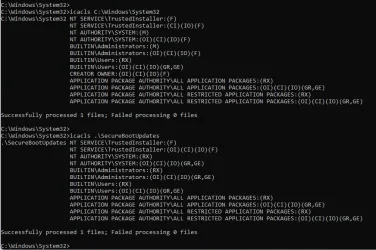
Not yet, but here's the current acls - is the problem clear to you?

C:\Windows\System32>icacls C:\Windows\System32
C:\Windows\System32 NT SERVICE\TrustedInstaller:(F)
NT SERVICE\TrustedInstaller:(CI)(IO)(F)
NT AUTHORITY\SYSTEM:(M)
NT AUTHORITY\SYSTEM:(OI)(CI)(IO)(F)
BUILTIN\Administrators:(M)
BUILTIN\Administrators:(OI)(CI)(IO)(F)
BUILTIN\Users:(RX)
BUILTIN\Users:(OI)(CI)(IO)(GR,GE)
CREATOR OWNER:(OI)(CI)(IO)(F)
APPLICATION PACKAGE AUTHORITY\ALL APPLICATION PACKAGES:(RX)
APPLICATION PACKAGE AUTHORITY\ALL APPLICATION PACKAGES:(OI)(CI)(IO)(GR,GE)
APPLICATION PACKAGE AUTHORITY\ALL RESTRICTED APPLICATION PACKAGES:(RX)
APPLICATION PACKAGE AUTHORITY\ALL RESTRICTED APPLICATION PACKAGES:(OI)(CI)(IO)(GR,GE)

Successfully processed 1 files; Failed processing 0 files

C:\Windows\System32>icacls .\SecureBootUpdates
.\SecureBootUpdates NT SERVICE\TrustedInstaller:(F)
NT SERVICE\TrustedInstaller:(OI)(CI)(IO)(F)
NT AUTHORITY\SYSTEM:(RX)
NT AUTHORITY\SYSTEM:(OI)(CI)(IO)(GR,GE)
BUILTIN\Administrators:(RX)
BUILTIN\Administrators:(OI)(CI)(IO)(GR,GE)
BUILTIN\Users:(RX)
BUILTIN\Users:(OI)(CI)(IO)(GR,GE)
APPLICATION PACKAGE AUTHORITY\ALL APPLICATION PACKAGES:(RX)
APPLICATION PACKAGE AUTHORITY\ALL APPLICATION PACKAGES:(OI)(CI)(IO)(GR,GE)
APPLICATION PACKAGE AUTHORITY\ALL RESTRICTED APPLICATION PACKAGES:(RX)
APPLICATION PACKAGE AUTHORITY\ALL RESTRICTED APPLICATION PACKAGES:(OI)(CI)(IO)(GR,GE)

Successfully processed 1 files; Failed processing 0 files

C:\Windows\System32>
 

My Computer My Computer

At a glance

Windows 11
OS
Windows 11
Let's try restoring the correct ACL's on the SecureBootUpdates folder.

1. Download PowerRun.

2. Save this attachment file ("RESTORE_ACL.txt") to your PC.

3. Open an elevated CMD shell window.

4. Run this command from the CMD:
Code:
icacls C:\Windows\System32 /restore RESTORE_ACL.txt

5. Close the CMD.

Do you mean run in a CMD shell (as admin)?
What is the PowerRun download for?
 

My Computer My Computer

At a glance

Windows 11
OS
Windows 11
i did the PowerShell scripts and now im updated on my surface pro 6
 

My Computer My Computer

At a glance

windows 10 2004 20h1
OS
windows 10 2004 20h1
Do you mean run in a CMD shell (as admin)?
What is the PowerRun download for?
If you are referring to this line, yes he means cmd as admin

3. Open an elevated CMD shell window.​
 

My Computer My Computer

At a glance

Windows 11
OS
Windows 11
PowerRun tool allows you to open an elevated CMD or PS session with SYSTEM (or TrustedInstaller) privileges. In order to modify SecureBootUpdates folder (which is protected), you need something more than just an Admin window.

Otherwise you will get "access denied" errors.
 

My Computer My Computer

At a glance

Windows 7
OS
Windows 7
PowerRun tool allows you to open an elevated CMD or PS session with SYSTEM (or TrustedInstaller) privileges. In order to modify SecureBootUpdates folder (which is protected), you need something more than just an Admin window.

Otherwise you will get "access denied" errors.

@garlin Didn't know that tool, PowerRun, but I'm not pretending to know all of them any way ;-)

Just out of curiosity...
Woudn't SysInternals (Microsoft) PSExec with "/s" do the same ?
Without a GUI but still allows running commands as system
 

My Computer My Computer

At a glance

Windows 11
OS
Windows 11
...I finally ran Windows Update to get the latest Preview Update (They fixed RDP, so we are alive lol) and did what the bat file told me when it audited the system, reboot, voila! SVN 8.0. I also updated my Macrium USB and tested, boots properly and no security violations...
Which Macrium are you using 8 or 10 ?
Macrium USB with WinRE ?
Did you have to patch the boot USB drive to fix certificates and SVN or did it work directly with the recovery drive created by Marcrium ?

Thanks in advance
 

My Computer My Computer

At a glance

Windows 11
OS
Windows 11
Woudn't SysInternals (Microsoft) PSExec with "/s" do the same ?
Without a GUI but still allows running commands as system
Sometimes psexec doesn't work for me. PowerRun always does.
 

My Computer My Computer

At a glance

Windows 7
OS
Windows 7
I see the latest version of Rufus has an option to "Use Windows CA 2023 signed bootloaders"
Interesting.
 

My Computer My Computer

At a glance

Win 11 ProAMD Ryzen 7 9700XG.Skill Trident Z5 Neo RGB 64GB Kit (2x32GB) ...PowerColor Radeon RX 9060 XT Reaper GDDR6 16GB
OS
Win 11 Pro
Computer type
PC/Desktop
Manufacturer/Model
N/A
CPU
AMD Ryzen 7 9700X
Motherboard
Asrock 870E Nova WiFi
Memory
G.Skill Trident Z5 Neo RGB 64GB Kit (2x32GB) DDR5-6000 C30
Graphics Card(s)
PowerColor Radeon RX 9060 XT Reaper GDDR6 16GB
Sound Card
USB Out NAD M51 DAC with Adams A8 powered speakers
Monitor(s) Displays
Dell 3219Q
Screen Resolution
3840 x 2160
Hard Drives
5 x WD_BLACK SN850x PCIe Gen4 NVMe M.2 SSD - 4TB
PSU
be quiet! DARK POWER 13 1000W Titanium PCIe 5.0 ATX Modular PSU
Case
Fractal Design Define 7 Full Tower Case (Black)
Cooling
Noctua NH-D15 G2 LBC - High Performance Multi-Socket PWM CPU Cooler
Keyboard
Razer Huntsman V2
Mouse
Razer Viper Ultimate
Internet Speed
Starlink 94Mbps down 20Mbps up
Browser
Brave
Antivirus
ESET
I see the latest version of Rufus has an option to "Use Windows CA 2023 signed bootloaders"
Interesting.
Even seems to handle SVN... nice !
Will need to test this once main pc is updated, waiting til May 12th to see if Microsoft will do it on it's own

Rufus Changelog​

  • Version 4.14(2026.04.30)
  • Add an option to copy SkuSiPolicy.p7b to the ESP on installation (please refer to KB5042562 for more info)
 

My Computer My Computer

At a glance

Windows 11
OS
Windows 11
Even seems to handle SVN... nice !
Will need to test this once main pc is updated, waiting til May 12th to see if Microsoft will do it on it's own
MS will never force the deployment of SkuSiPolicy. As you can conclude from previous comments, a dual-boot setup can lead to a possible mismatch where one side has the right files, and the other side doesn't. Once installed, SkuSiPolicy is a global policy for all Windows disks on the PC.

For a standalone Windows where nothing exotic happens, SkuSiPolicy is relatively safe. Except it might break Macrium and other boot media, because they're sourcing the "wrong" version of the boot image.

The policy itself isn't bad. What's bad is you don't have a good idea of predicting the results before a new policy is rolled out.

There is no "check this system for compatibility before I enable SkuSiPolicy". Technically you can enable auditing mode, but I don't know how many users are paying that much attention to their event logs. I'm writing a new script to flag instances where SkuSiPolicy will get you into trouble.
 

My Computer My Computer

At a glance

Windows 7
OS
Windows 7
MS will never force the deployment of SkuSiPolicy. As you can conclude from previous comments, a dual-boot setup can lead to a possible mismatch where one side has the right files, and the other side doesn't. Once installed, SkuSiPolicy is a global policy for all Windows disks on the PC.

For a standalone Windows where nothing exotic happens, SkuSiPolicy is relatively safe. Except it might break Macrium and other boot media, because they're sourcing the "wrong" version of the boot image.

The policy itself isn't bad. What's bad is you don't have a good idea of predicting the results before a new policy is rolled out.

There is no "check this system for compatibility before I enable SkuSiPolicy". Technically you can enable auditing mode, but I don't know how many users are paying that much attention to their event logs. Currently writing a script to flag instances where SkuSiPolicy will get you into trouble.
I am a normal user and I hardly ever re install windows or use software for backups.

In the future when all of this secure boot stuff is over. It is 2028 and I want to re install windows using the media creation tool on USB thumb drive will I have to worry about this stuff? When I say stuff I mean the SkuSiPolicy SVN Firmware etc, etc.
 

My Computers My Computers

  • At a glance

    Windows 11 ProIntel Core i5-12600K 3.7 GHz 10-Core ProcessorCorsair Vengeance LPX 64 GB (2 x 32 GB) DDR4-...Integrated Intel UHD Graphics 770
    OS
    Windows 11 Pro
    Computer type
    PC/Desktop
    Manufacturer/Model
    Self built PC by me.
    CPU
    Intel Core i5-12600K 3.7 GHz 10-Core Processor
    Motherboard
    Gigabyte B760M H DDR4 Micro ATX LGA1700 Motherboard
    Memory
    Corsair Vengeance LPX 64 GB (2 x 32 GB) DDR4-3200 CL16 Memory
    Graphics Card(s)
    Integrated Intel UHD Graphics 770
    Sound Card
    Realtek
    Monitor(s) Displays
    LG
    Hard Drives
    Samsung 990 Pro 1 TB M.2-2280 PCIe 4.0 X4 NVME Solid State Drive
    Samsung 990 Pro 2 TB M.2-2280 PCIe 4.0 X4 NVME Solid State Drive
    PSU
    NZXT 850w ATX 3.1 Gold Fully Modular Power Supply
    Case
    Thermaltake Versa H25 ATX Mid Tower Case
    Cooling
    CPU Cooler Thermalright Assassin Spirit 120 EVO ARGB (ARGB Disabled) - Case Fans BlackThermalright TL-C12C-S X3 66.17 CFM 120 mm Fans 3-Pack (ARGB disabled)
    Internet Speed
    1 Gbps
    Other Info
    I hate ARGB.
  • At a glance

    Windows 11 Pro
    Operating System
    Windows 11 Pro
    Computer type
    Laptop
    Manufacturer/Model
    Lenovo ThinkBook 14 G2 ITL

Latest Support Threads

Back
Top Bottom