Solved garlin's PowerShell scripts for updating Secure Boot CA 2023


v2026.01.18 released with fixes for:
1. Added error handling for when an invalid X509 certificate presented by UEFI variable. (@kelper)
2. Made the Get-UefiDatabaseSignatures function compatible with reading an UEFI bin file on PS 6 & 7. Without this change, you can't investigate the first bug.
3. Updated EDK2 Secure Boot binaries to v1.6.2. (@JohnSmith13)
4. Improved batch wrapper scripts to use -noexit, and fix typo "Update_UEFI-CA2023.ps" in Update-UEFI.bat. (@JohnSmith13, @krzemien)

Please download new versions from post #1 or the GitHub.
Release v2026.01.18 · garlin-cant-code/SecureBoot-CA-2023-Updates
 

My Computer

System One

  • OS
    Windows 7
I now get:-

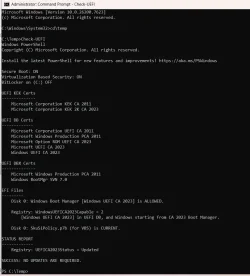
Secure Boot: ON
Virtualization Based Security: ON
BitLocker on (C:) OFF
Skipping an invalid Microsoft.SecureBoot.Commands.UEFIEnvironmentVariable X509 certificate.

UEFI KEK Certs
--------------
Microsoft Corporation KEK CA 2011
Microsoft Corporation KEK 2K CA 2023

UEFI DB Certs
-------------
Microsoft Corporation UEFI CA 2011
Microsoft Windows Production PCA 2011
Microsoft Option ROM UEFI CA 2023
Microsoft UEFI CA 2023
Windows UEFI CA 2023

UEFI DBX Certs
--------------
Microsoft Windows Production PCA 2011
Skipping an invalid Microsoft.SecureBoot.Commands.UEFIEnvironmentVariable X509 certificate.
Windows BootMgr SVN 7.0

EFI Files
---------
Disk 0: Windows Boot Manager [Windows UEFI CA 2023] is ALLOWED.

Registry: WindowsUEFICA2023Capable = 2
[Windows UEFI CA 2023] in UEFI DB, and Windows starting from CA 2023 Boot Manager.

Disk 0: SkuSiPolicy.p7b (for VBS) is NOT PRESENT.
Skipping an invalid Microsoft.SecureBoot.Commands.UEFIEnvironmentVariable X509 certificate.


REQUIRED ACTION
===============

To install SkuSiPolicy.p7b, run the command:
Update_UEFI-CA2023.ps1 -SkuSiPolicy
________________________________________________________________________________________________________________________________________________

Skipping an invalid Microsoft.SecureBoot.Commands.UEFIEnvironmentVariable X509 certificate.
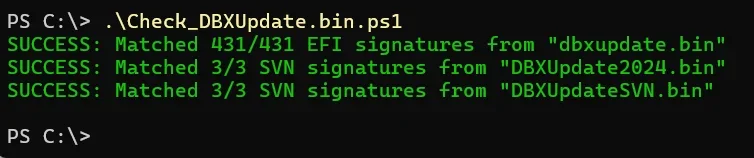
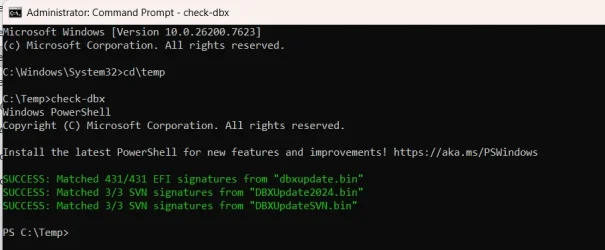
SUCCESS: Matched 431/431 EFI signatures from "dbxupdate.bin"
SUCCESS: Matched 3/3 SVN signatures from "DBXUpdate2024.bin"
SUCCESS: Matched 3/3 SVN signatures from "DBXUpdateSVN.bin"

________________________________________________________________________________________________________________________________________________

Skipping an invalid Microsoft.SecureBoot.Commands.UEFIEnvironmentVariable X509 certificate.
Deployed SkuSiPolicy.p7b (for VBS).

REQUIRED ACTION
---------------
Restart Windows, for UEFI updates to take effect.

looking good, thanks @garlin


__________________________________________________________________________________________________________________________________________________
 

My Computers

System One System Two

  • OS
    Windows 11 Pro 25H2 26200.8524
    Computer type
    Laptop
    Manufacturer/Model
    Acemagic LX15PRO
    CPU
    AMD Ryzen 7 5825U with Radeon Graphics
    Memory
    16GB
    Screen Resolution
    1920 x 1080
    Hard Drives
    SSD 2TB
    Internet Speed
    30 Mbps
    Browser
    Brave
    Antivirus
    Webroot Secure Anywhere
    Other Info
    System 3

    Acer Swift SF114-34 laptop
    OS Windows 11 Pro 26200.8524
    CPU Pentium Silver N6000
    RAM 4GB
    SSD Samsung 970 EVO Plus SSD 2TB (an upgrade)
  • Operating System
    Windows 11 Pro 23H2 22631.2506
    Computer type
    Laptop
    Manufacturer/Model
    HP Mini 210-1090NR PC (bought in late 2009!)
    CPU
    Atom N450 1.66GHz
    Memory
    2GB
    Browser
    Brave
    Antivirus
    Webroot
@Fracer:
Check the icacls for SecureBootUpdates folder.
You can have read/execute permissions for any file inside a folder, but not have folder permissions to navigate inside the folder.

@man00:
Everyone has a \Windows\System32\SecureBootUpdates folder if you're on W11 24H2/25H2, or have W10 22H2 and W11 21H2 thru 23H2 with the latest monthly updates. This folder has existed since April 2024.
Yes it is there, I booted to another drive and I could see Windows\System32\SecureBootUpdates on my main drive
 

My Computer

System One

  • OS
    windows 11
    Computer type
    PC/Desktop
    Manufacturer/Model
    Antec/Case
    CPU
    Intel i5-10600kf
    Motherboard
    GIGABYTE Z590 UD AC
    Memory
    32gb corsair vengerance pro
    Graphics Card(s)
    AMD RX 6500XT
    Sound Card
    onboard
    Monitor(s) Displays
    40" Hisense
    Hard Drives
    Samsung 850
    Samsung 870
    Seagate 2TB
    PSU
    EVGA GQ 750
I disabled UAC (Not Recommended), and Check_UEFI-CA2023.ps1 works fine for me.

But if I tried to copy the SkuSiPolicy.p7b, following the MS instructions, you'll get a permission error unless you're elevated to Admin. Try running the scripts from an Admin window.

Plain GARLIN (no UAC)
Code:
PS C:\Users\GARLIN\Downloads> mountvol S: /s
PS C:\Users\GARLIN\Downloads> copy C:\Windows\System32\SecureBootUpdates\SKUSiPolicy.P7b S:\EFI\Microsoft\Boot
Copy-Item: Access to the path 'S:\EFI\Microsoft\Boot\SKUSiPolicy.P7b' is denied.
PS C:\Users\GARLIN\Downloads> dir s:\efi\microsoft\boot
Get-ChildItem: Access to the path 'S:\efi\microsoft\boot' is denied.
PS C:\Users\GARLIN\Downloads> dir s:
Get-ChildItem: Access to the path 'S:\' is denied.

Admin
Code:
PS C:\Users\GARLIN\Downloads> mountvol S: /s
PS C:\Users\GARLIN\Downloads> dir s:

    Directory: s:\

Mode                 LastWriteTime         Length Name
----                 -------------         ------ ----
d----           1/13/2026 12:50 PM                EFI
Thanks.

Yes, works for me also!
D:\UTILS95\BR>mountvol S: /s
D:\UTILS95\BR>copy C:\Windows\System32\SecureBootUpdates\SKUSiPolicy.P7b S:\EFI\Microsoft\Boot
1 file(s) copied.

D:\UTILS95\BR>dir s:\efi\microsoft\boot\*.p7b
Volume in drive S has no label.
Volume Serial Number is D6F0-D6EC

Directory of s:\efi\microsoft\boot

Sat 11/08/2025 06:33 AM 6,544 SKUSiPolicy.P7b
Mon 04/01/2024 12:22 AM 10,341 winsipolicy.p7b
2 File(s) 16,885 bytes
0 Dir(s) 65,235,968 bytes free
 

My Computer

System One

  • OS
    Windows 11
    Computer type
    PC/Desktop
    Manufacturer/Model
    Lenovo
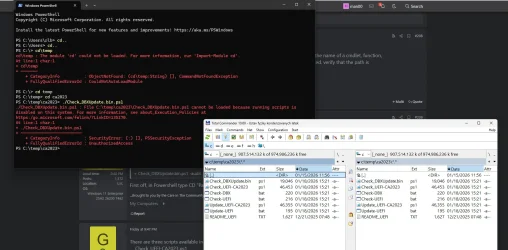
I tried every command still came up with same message
last attempt.webp
 

My Computer

System One

  • OS
    windows 11
    Computer type
    PC/Desktop
    Manufacturer/Model
    Antec/Case
    CPU
    Intel i5-10600kf
    Motherboard
    GIGABYTE Z590 UD AC
    Memory
    32gb corsair vengerance pro
    Graphics Card(s)
    AMD RX 6500XT
    Sound Card
    onboard
    Monitor(s) Displays
    40" Hisense
    Hard Drives
    Samsung 850
    Samsung 870
    Seagate 2TB
    PSU
    EVGA GQ 750
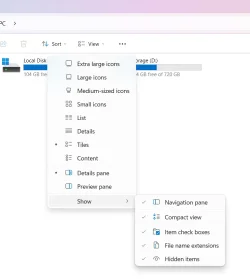
use .\ not ./

I suggest you check the option in Flie Manager options to show file name extensions. Then you can see which are PowerShell scripts and which are command prompt scripts.

The .cmd scripts are run by right-clicking on them and selecting Run as Administrator.

1768834319479.webp
 

My Computers

System One System Two

  • OS
    Windows 11 Pro 25H2 26200.8524
    Computer type
    Laptop
    Manufacturer/Model
    Acemagic LX15PRO
    CPU
    AMD Ryzen 7 5825U with Radeon Graphics
    Memory
    16GB
    Screen Resolution
    1920 x 1080
    Hard Drives
    SSD 2TB
    Internet Speed
    30 Mbps
    Browser
    Brave
    Antivirus
    Webroot Secure Anywhere
    Other Info
    System 3

    Acer Swift SF114-34 laptop
    OS Windows 11 Pro 26200.8524
    CPU Pentium Silver N6000
    RAM 4GB
    SSD Samsung 970 EVO Plus SSD 2TB (an upgrade)
  • Operating System
    Windows 11 Pro 23H2 22631.2506
    Computer type
    Laptop
    Manufacturer/Model
    HP Mini 210-1090NR PC (bought in late 2009!)
    CPU
    Atom N450 1.66GHz
    Memory
    2GB
    Browser
    Brave
    Antivirus
    Webroot
Running all three new .ps1 scripts under powershell.exe looks much much better! Thanks garlin for all thegood work.

Just a small warning, there was NO improvement seen running under pwsh.exe.
(See example comparison for Check-DBX.ps1 bellow.)
====================================
New script running under Powershell.exe looks good!

[Check-DBX]
Checking for Elevation...
OK
Running powershell...
Major Minor Build Revision
----- ----- ----- --------
5 1 26100 7462


SUCCESS: Matched 431/431 EFI signatures from "dbxupdate.bin"
FAILED: Missing 3/3 SVN signatures from "DBXUpdate2024.bin" [correct result]
FAILED: Missing 3/3 SVN signatures from "DBXUpdateSVN.bin" [correct result]

====================================
New script running under PWSH.exe did not output the above results, just what is shown below.

[Check-DBX]
Checking for Elevation...
OK
Running pwsh...
Major Minor Patch PreReleaseLabel BuildLabel
----- ----- ----- --------------- ----------
7 5 4


Resolve-Path: D:\UTILS95\UEFISecureBootVariables-garlin\Check_DBXUpdate.bin.ps1:547
Line |
547 | $Path = (Resolve-Path $item).Path
| ~~~~~~~~~~~~~~~~~~
| Cannot find path 'C:\WINDOWS\System32\SecureBootUpdates' because it does not
| exist.
Test-Path: D:\UTILS95\UEFISecureBootVariables-garlin\Check_DBXUpdate.bin.ps1:549
Line |
549 | if (Test-Path $Path -PathType Container) {
| ~~~~~~~~~~~~~~~~~~~~~~~~~~~~~~~~~~~
| Value cannot be null. (Parameter 'The provided Path argument was null or an
| empty collection.')
Get-Item: D:\UTILS95\UEFISecureBootVariables-garlin\Check_DBXUpdate.bin.ps1:563
Line |
563 | FullPath = (Get-Item $Path).FullName
| ~~~~~
| Cannot bind argument to parameter 'Path' because it is null.
====================================
 

My Computer

System One

  • OS
    Windows 11
    Computer type
    PC/Desktop
    Manufacturer/Model
    Lenovo

My Computers

System One System Two

  • OS
    Windows 11 Enterprise 25H2 26200 7462
    Computer type
    PC/Desktop
    Manufacturer/Model
    Custom Build
    CPU
    Intel XEON E5-2699 v3
    Motherboard
    ASUS X99-A
    Memory
    64GB Teamgroup UD4-3600
    Graphics Card(s)
    NVIDIA GeForce GTX 1080 Ti
    Sound Card
    Integrated
    Monitor(s) Displays
    ACER X34 Predator
    Screen Resolution
    3440 x 1440
    Hard Drives
    Crucial CT1000P 3P SSD8 1TB
    Crucial CT1000 BX500 SSD 1TB
    PSU
    GameMax Pro
    Case
    Fractal Design
    Cooling
    Corsair H110iGT + 6 140mm Fans
    Keyboard
    Corsair K4
    Mouse
    G-Skill G502
    Internet Speed
    300MBs
    Browser
    Chrome
    Antivirus
    OEM
    Other Info
    ASUS RT-AC87U Router
  • Operating System
    25H2 26200.5074
    Computer type
    Laptop
    Manufacturer/Model
    ASUS X555LA
    Memory
    8GB
    Browser
    Chrome
    Antivirus
    OEM
I just ran the latest scripts, everything looks fine to me.

1768852392370.webp

1768852508542.webp
 

My Computers

System One System Two

  • OS
    Win 11 Pro 25H2, Build 26200.8524
    Computer type
    PC/Desktop
    Manufacturer/Model
    Home Brew
    CPU
    Intel Core i5 14500
    Motherboard
    Gigabyte B760M G P WIFI
    Memory
    64GB DDR4
    Graphics Card(s)
    GeForce RTX 4060
    Sound Card
    Chipset Realtek
    Monitor(s) Displays
    LG 45" Ultragear, Acer 24" 1080p
    Screen Resolution
    5120x1440, 1920x1080
    Hard Drives
    Crucial P310 2TB 2280 PCIe Gen4 3D NAND NVMe M.2 SSD (O/S)
    Silicon Power 2TB US75 NVMe PCIe Gen4 M.2 2280 SSD (backup)
    Crucial BX500 2TB 3D NAND (2nd backup)
    Seagate 4TB Ironwolf, rotating HDD archive files
    External off-line backup Drives: 2 NVMe 4TB drives in external enclosures
    PSU
    Thermaltake Toughpower GF3 750W
    Case
    LIAN LI LANCOOL 216 E-ATX PC Case
    Cooling
    Lots of fans!
    Keyboard
    Microsoft Comfort Curve 2000
    Mouse
    Logitech G305
    Internet Speed
    Verizon FiOS 1GB
    Browser
    Firefox
    Antivirus
    Malware Bytes & Windows Defender Security
  • Operating System
    Win 11 Pro 25H2, Build 26200.8524
    Computer type
    PC/Desktop
    Manufacturer/Model
    Home Brew
    CPU
    Intel Core i5 14400
    Motherboard
    Gigabyte B760M DS3H AX
    Memory
    32GB DDR5
    Graphics card(s)
    Intel 700 Embedded GPU
    Sound Card
    Realtek Embedded
    Monitor(s) Displays
    27" HP 1080p
    Screen Resolution
    1920x1080
    Hard Drives
    Crucial P310 2TB 2280 PCIe Gen4 eD NAND PCIe SSD
    Samsung EVO 990 2TB NVMe Gen4 SSD
    Samsung 2TB SATA SSD
    PSU
    Thermaltake Smart BM3 650W
    Case
    Okinos Micro ATX Case
    Cooling
    Fans
    Keyboard
    Microsoft Comfort Curve 2000
    Mouse
    Logitech G305
    Internet Speed
    Verizon FiOS 1GB
    Browser
    Firefox
    Antivirus
    Malware Bytes & Windows Defender Security

My Computer

System One

  • OS
    Windows 11 Pro 25H2
    Computer type
    Laptop
    Manufacturer/Model
    HP 15s-fq5xxx
    CPU
    12th Gen Intel(R) Core(TM) i7-1255U (1.70 GHz
    Memory
    16.0 GB
    Graphics Card(s)
    Intel iRIS Xe
    Screen Resolution
    1920 x 1080
    Hard Drives
    Samsung SSD 512 GB
    Mouse
    Logitech Pebble
    Internet Speed
    500/50 Mb/sec
    Browser
    Chrome
    Antivirus
    Defender
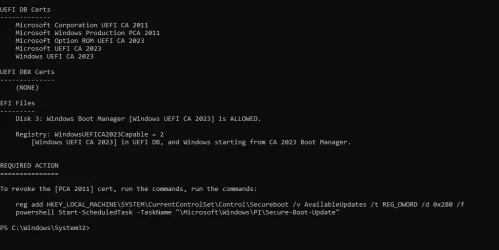
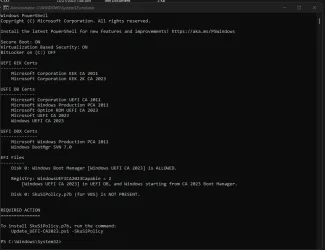
I think I finally got something to run, now to see if I need to do the required action.
I recall reading not to revoke the 2011 certs...maybe that has changed too?
finally.webp
 

My Computer

System One

  • OS
    windows 11
    Computer type
    PC/Desktop
    Manufacturer/Model
    Antec/Case
    CPU
    Intel i5-10600kf
    Motherboard
    GIGABYTE Z590 UD AC
    Memory
    32gb corsair vengerance pro
    Graphics Card(s)
    AMD RX 6500XT
    Sound Card
    onboard
    Monitor(s) Displays
    40" Hisense
    Hard Drives
    Samsung 850
    Samsung 870
    Seagate 2TB
    PSU
    EVGA GQ 750
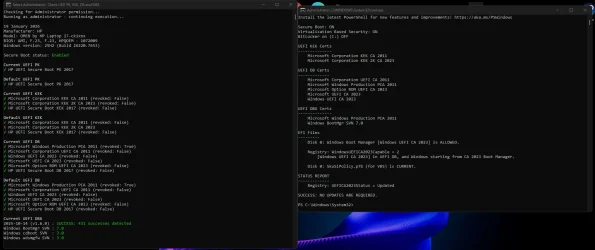
So, I recently did the 2023 Cert Updates yesterday and everything went mostly fine:

Check2023.webp

RegCert023.webp

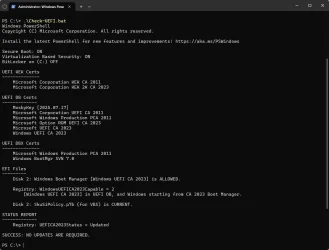
However, the caveat is that I decided to enroll in the Windows Insider Program and the Beta channel with Build 26220.7653 25H2. When I run the Check-UEFI I get this now:

Check2023UEFI.webp

However, when I run the command, I get this error:

"ERROR: Build 26220.7653 is unsupported."

Any ideas?
 

My Computer

System One

  • OS
    Windows 11 Home (Insider Preview Beta Channel)
    Computer type
    Laptop
    Manufacturer/Model
    OMEN by HP Laptop 17-ck1111nr
    CPU
    12th Gen Intel Core i7-12700H 14c/20t (Alder Lake) 130W
    Motherboard
    HP 8A17 BIOS/Firmware Version F.23 Rev.A
    Memory
    16GB SK Hynix DDR5 4800 MT/s
    Graphics Card(s)
    NVIDIA RTX 3060 Laptop GPU 6GB (GA106) 130W
    Monitor(s) Displays
    SANSUI ES-G27C1Q Adaptive-Sync G-Sync Compatible 1ms Panel
    Screen Resolution
    27" 2560x1440 180Hz
    Hard Drives
    Micron 3400 1TB PCIe Gen4 NVMe TLC M.2 SSD
    PSU
    330W Smart AC / CyberPowerSX650U 360W UPS
    Cooling
    llano V12 RGB Laptop Cooling Pad
    Keyboard
    onn. RGB Mechanical Gaming Keyboard MX Blue Switches
    Mouse
    Redragon NIX PRO M914P-RGB-KS 24,000 DPI
    Internet Speed
    Gigabit
    Browser
    Edge
    Other Info
    Cinebench R23 nT: 18,459 | Cinebench '26 nT: 3,851 | 3DMark Fire Strike: 21,639
However, when I run the command, I get this error:

"ERROR: Build 26220.7653 is unsupported."

Any ideas?
There's a check to confirm if you're running a Windows build with the latest version of the SecureBootUpdates folder.

Since I don't track Insider builds, I can't guarantee you're not behind. You would be mostly protected, but possibly behind on the latest DBXUpdate (EFI file revocations) or SkuSiPolicy file changes.

Here's an interim version, which allows the script run on 26220 & 28020 builds. It will warn you it can't confirm if you're running the latest beta.
 

Attachments

My Computer

System One

  • OS
    Windows 7
I think I finally got something to run, now to see if I need to do the required action.
I recall reading not to revoke the 2011 certs...maybe that has changed too?
Revocation at this time is still optional. It won't be for a few more months, but when isn't exactly known.

Assuming you don't use an image backup tool, like Macrium or another product, then you can follow the instructions and revoke the CA 2011 now.

The warning about backup apps is if you've prepared a boot USB drive for recovery, the boot file needs to be updated on it. You don't want to find out later that you didn't think about the recovery drive. Though you can always temporarily disable Secure Boot, fix the problem, and return to Secure Boot.
 

My Computer

System One

  • OS
    Windows 7
There's a check to confirm if you're running a Windows build with the latest version of the SecureBootUpdates folder.

Since I don't track Insider builds, I can't guarantee you're not behind. You would be mostly protected, but possibly behind on the latest DBXUpdate (EFI file revocations) or SkuSiPolicy file changes.

Here's an interim version, which allows the script run on 26220 & 28020 builds. It will warn you it can't confirm if you're running the latest beta.

Thanks, brother, worked flawlessly:

Check2023UEFI_insiderbuild.webp

Quick question, can I do anything about that one Red "x" under Default UEFI KEK (KEK 2K CA 2023)? Or I shouldn't worry about that?
 

My Computer

System One

  • OS
    Windows 11 Home (Insider Preview Beta Channel)
    Computer type
    Laptop
    Manufacturer/Model
    OMEN by HP Laptop 17-ck1111nr
    CPU
    12th Gen Intel Core i7-12700H 14c/20t (Alder Lake) 130W
    Motherboard
    HP 8A17 BIOS/Firmware Version F.23 Rev.A
    Memory
    16GB SK Hynix DDR5 4800 MT/s
    Graphics Card(s)
    NVIDIA RTX 3060 Laptop GPU 6GB (GA106) 130W
    Monitor(s) Displays
    SANSUI ES-G27C1Q Adaptive-Sync G-Sync Compatible 1ms Panel
    Screen Resolution
    27" 2560x1440 180Hz
    Hard Drives
    Micron 3400 1TB PCIe Gen4 NVMe TLC M.2 SSD
    PSU
    330W Smart AC / CyberPowerSX650U 360W UPS
    Cooling
    llano V12 RGB Laptop Cooling Pad
    Keyboard
    onn. RGB Mechanical Gaming Keyboard MX Blue Switches
    Mouse
    Redragon NIX PRO M914P-RGB-KS 24,000 DPI
    Internet Speed
    Gigabit
    Browser
    Edge
    Other Info
    Cinebench R23 nT: 18,459 | Cinebench '26 nT: 3,851 | 3DMark Fire Strike: 21,639
Quick question, can I do anything about that one Red "x" under Default UEFI KEK (KEK 2K CA 2023)? Or I shouldn't worry about that?
No, the default UEFI values represent the Factory Defaults hard-coded in the BIOS firmware. Only your vendor can rewrite the firmware so a Factory reset will copy the starting values back in.

The reason I wrote Check_UEFI-CA2023.ps1, is my disagreement about cjee21's script output.

While both scripts are technically accurate, the presentation of the Factory Defaults and the check marks leads to unnecessary confusion. If your vendor didn't provide a KEK CA 2023 in the factory default, that's their decision. I can't tell you if the vendor might fix it one day (we know they probably abandoned this model, but we can't be absolutely sure). Rather than guess the vendor's intention, I don't flag it.

Some vendors are still checking in KEK updates to MS!

The BootMgr SVN is the only SVN number you should care about. The other two are for actual CD/DVD's (are people still burning physical ISO's today?) and WDS (network boot from a MS deployment system). A single file DBXUpdateSVN.bin will update the SVN numbers as needed. There isn't a practical point to reporting CD or WDS SVN's.

If you want an output closer to cjee21's script, run Check_UEFI-CA2023.ps1 -Verbose

Verbose mode isn't the default, because most non-technical users don't need to review things like the factory defaults. The factory defaults are a "nice to know" detail, but doesn't help you do updates. It won't tell you if you can manually enroll the KEK CA 2023, or if you need to perform a Setup Mode upgrade.


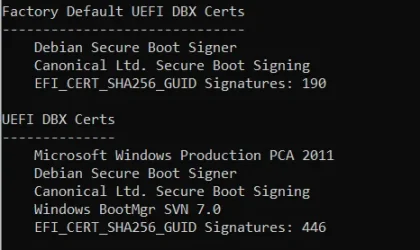
Next question would be: How many EFI_CERT_SHA256 signatures should I have in verbose mode?
Answer: At least 437.

The current DBXUpdate.bin has 431 signatures, DBXUpdate2024.bin (which bans CA 2011) adds 3 SVN's, and DBXUpdateSVN.bin adds 3 more SVN's.
431 + 3 + 3 = 437

Your factory default DBX may have a random number of banned EFI signatures as a baseline. They may or may not overlap with DBXUpdate.bin.

There isn't a "correct number" for the factory DBX entries since it represents a snapshot of what was going on when that version of the BIOS firmware was being written. Some number of non-overlapping factory DBX entries could bump your EFI_CERT_SHA256 count above 437.

A SVN is really a special form of EFI_CERT_SHA256 signature. It pretends to have a normal hash value, but it hides the SVN revision number inside the "hash" digits so they didn't have to invent a new data type for the UEFI spec.
 

My Computer

System One

  • OS
    Windows 7
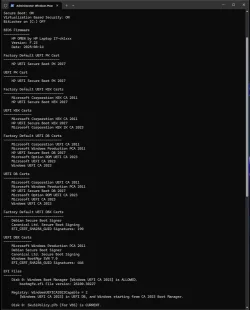
@garlin

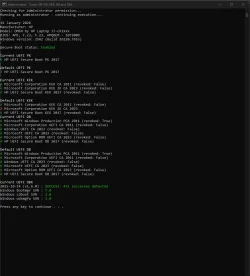
Appears I have above 437:

Check2023UEFIVerbose.webp
 

My Computer

System One

  • OS
    Windows 11 Home (Insider Preview Beta Channel)
    Computer type
    Laptop
    Manufacturer/Model
    OMEN by HP Laptop 17-ck1111nr
    CPU
    12th Gen Intel Core i7-12700H 14c/20t (Alder Lake) 130W
    Motherboard
    HP 8A17 BIOS/Firmware Version F.23 Rev.A
    Memory
    16GB SK Hynix DDR5 4800 MT/s
    Graphics Card(s)
    NVIDIA RTX 3060 Laptop GPU 6GB (GA106) 130W
    Monitor(s) Displays
    SANSUI ES-G27C1Q Adaptive-Sync G-Sync Compatible 1ms Panel
    Screen Resolution
    27" 2560x1440 180Hz
    Hard Drives
    Micron 3400 1TB PCIe Gen4 NVMe TLC M.2 SSD
    PSU
    330W Smart AC / CyberPowerSX650U 360W UPS
    Cooling
    llano V12 RGB Laptop Cooling Pad
    Keyboard
    onn. RGB Mechanical Gaming Keyboard MX Blue Switches
    Mouse
    Redragon NIX PRO M914P-RGB-KS 24,000 DPI
    Internet Speed
    Gigabit
    Browser
    Edge
    Other Info
    Cinebench R23 nT: 18,459 | Cinebench '26 nT: 3,851 | 3DMark Fire Strike: 21,639
For random comparison, the VMware "BIOS" ships with 77 factory hashes, but gets to 486 total.
The final count isn't as important as long as it's equal or greater to the MS-provided minimum of 437 (as of today).

Code:
Factory Default UEFI DBX Certs
------------------------------
    (NONE)
    EFI_CERT_SHA256_GUID Signatures: 77

UEFI DBX Certs
--------------
    Microsoft Windows Production PCA 2011
    Windows BootMgr SVN 7.0
    EFI_CERT_SHA256_GUID Signatures: 486
 

My Computer

System One

  • OS
    Windows 7
Resolve-Path: D:\UTILS95\UEFISecureBootVariables-garlin\Check_DBXUpdate.bin.ps1:547
Line |
547 | $Path = (Resolve-Path $item).Path
| ~~~~~~~~~~~~~~~~~~
| Cannot find path 'C:\WINDOWS\System32\SecureBootUpdates' because it does not
| exist.
Test-Path: D:\UTILS95\UEFISecureBootVariables-garlin\Check_DBXUpdate.bin.ps1:549
Line |
549 | if (Test-Path $Path -PathType Container) {
| ~~~~~~~~~~~~~~~~~~~~~~~~~~~~~~~~~~~
| Value cannot be null. (Parameter 'The provided Path argument was null or an
| empty collection.')
Get-Item: D:\UTILS95\UEFISecureBootVariables-garlin\Check_DBXUpdate.bin.ps1:563
Line |
563 | FullPath = (Get-Item $Path).FullName
| ~~~~~
| Cannot bind argument to parameter 'Path' because it is null.
I dunno what's different about your Windows. But run this test script for me, it tries to walk down the folder path.
 

Attachments

My Computer

System One

  • OS
    Windows 7

My Computer

System One

  • OS
    Windows 11 Pro 25H2
    Computer type
    Laptop
    Manufacturer/Model
    HP 15s-fq5xxx
    CPU
    12th Gen Intel(R) Core(TM) i7-1255U (1.70 GHz
    Memory
    16.0 GB
    Graphics Card(s)
    Intel iRIS Xe
    Screen Resolution
    1920 x 1080
    Hard Drives
    Samsung SSD 512 GB
    Mouse
    Logitech Pebble
    Internet Speed
    500/50 Mb/sec
    Browser
    Chrome
    Antivirus
    Defender

Latest Support Threads

Back
Top Bottom