Solved garlin's PowerShell scripts for updating Secure Boot CA 2023


The source file seems is non existent (or maybe hidden in another partition or something lol)

EDIT: Found the solution, my USB boots perfectly now!

Leaving it here in case somebody needs it.
 

My Computers

System One System Two

  • OS
    Windows 11 Pro 25H2
    Computer type
    PC/Desktop
    Manufacturer/Model
    Built PC
    CPU
    AMD Ryzen 5 5600G @ 3.9/4.4Ghz
    Motherboard
    MSI B550M-PRO-WiFi Ver. 1.4
    Memory
    2 x 16 GB DDR4 Kingston Fury Beast 3200 Mhz
    Graphics Card(s)
    AMD Radeon RX 6600 XT MSI Mech 2X OC Edition 8 GB
    Sound Card
    Realtek High Definition Audio (Integrated)
    Monitor(s) Displays
    Samsung C50Rx 27" LED / HP S2031 20" LCD
    Screen Resolution
    1920 x 1080 px / 1600 x 900 px
    Hard Drives
    WD Blue SN570 NVME M.2 SSD [1 TB] -- External Drives: - WD Scorpion Blue 250 GB 5400 RPM (Data Backup) - Hitachi 500 GB 5400 RPM (Software / ISOs Backup) - Toshiba MQ01ABD100 1 TB 5400 RPM (OS Images) - HGST TravelStar 7K1000 1 TB, 7200 RPM USB 3.0 - ADATA SU800 2TB SSD USB 3.0
    PSU
    Corsair RM750e 750W Fully Modular
    Case
    Naceb Hydra NA-1602
    Cooling
    Naceb Orpheus x 3 (Front) + Naceb Cepheus 1200 RPM Max (Rear) + ThemalRight Assasin X 90 SE (CPU)
    Keyboard
    Logitech MK470 Wireless
    Mouse
    Logitech MK470 Wireless
    Internet Speed
    120 MB Symetrical
    Browser
    Firefox / Brave / Edge
    Antivirus
    Windows Defender
    Other Info
    - VMs: WMware Player - Windows 8.1 Pro x64 / Windows 11 Pro
    - Wacom Intuos Pro Small Tablet PTH-460
  • Operating System
    Windows 11 Pro 25H2
    Computer type
    Laptop
    Manufacturer/Model
    HP Pavilion 15-eh3000la (80M53LA)
    CPU
    AMD Ryzen 7 7730U @ 2.0/4.5 Ghz
    Motherboard
    HP 8BC7
    Memory
    2 x 16 GB Kingston Fury Impact DDR4 3200 Mhz
    Graphics card(s)
    Radeon (tm) Graphics Vega 8 (512 MB)
    Sound Card
    Realtek High Definition Audio (Integrated)
    Monitor(s) Displays
    AU Optronics
    Screen Resolution
    1920 x 1080 px (125% size)
    Hard Drives
    WD Blue SN570 1TB NVME M.2 Drive
    PSU
    45 Watt Charger
    Cooling
    Laptop Cooling Pad
    Keyboard
    Free Wolf Foldable Portable Keyboard
    Mouse
    Free Wolf Wireless Mouse
    Internet Speed
    120 MB Symetrical
    Browser
    Firefox / Brave / Edge
    Antivirus
    Windows Defender
    Other Info
    - 41mWh battery.
    - Wacom Intuos Pro Small Tablet PTH-460
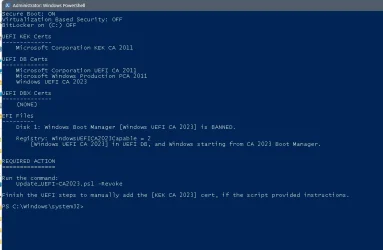
Please run the Check_UEFI-CA2023.ps1 script.

Nobody reads the raw byte values from the UEFI variables, because they need to be interpreted as real signing certificates. The script does the correct reporting for yo

Please run the Check_UEFI-CA2023.ps1 script.

Nobody reads the raw byte values from the UEFI variables, because they need to be interpreted as real signing certificates. The script does the correct reporting for you.
Thank you Garlin,
I runed the Check_UEFI-CA2023.ps1 script, below is the outcome.
The question is whether I still need to perform the REQUIRED ACTIONS or samething els?
thank you in advance
 

Attachments

  • Check-WindowsUEFICA2023.webp
    Check-WindowsUEFICA2023.webp
    39.6 KB · Views: 3

My Computer

System One

  • OS
    Windows 11 Home x64 Version 25H2 Build 26200.8457
    Computer type
    Laptop
    Manufacturer/Model
    ASUSTeK COMPUTER INC./N751JX
    CPU
    Intel® Core™ i7-4750HQ CPU @ 2.00GHz
    Motherboard
    ASUSTeK Computer INC., BIOS version AMI N751JX.211
    Memory
    16 GB
    Graphics Card(s)
    Intel® Iris™ Pro Graphics 5200
    Sound Card
    Realtek High Definition Audio
    Internet Speed
    250 Mbps
    Antivirus
    Safe Online (F-Secure)
Thank you Garlin,
I runed the Check_UEFI-CA2023.ps1 script, below is the outcome.
The question is whether I still need to perform the REQUIRED ACTIONS or samething els?
thank you in advance
Extra checked and the both of are true:
PS C:\Users\asimo> [System.Text.Encoding]::ASCII.GetString((Get-SecureBootUEFI db).bytes) -match 'Windows UEFI CA 2023'
True
PS C:\Users\asimo> Confirm-SecureBootUEFI
True
 

My Computer

System One

  • OS
    Windows 11 Home x64 Version 25H2 Build 26200.8457
    Computer type
    Laptop
    Manufacturer/Model
    ASUSTeK COMPUTER INC./N751JX
    CPU
    Intel® Core™ i7-4750HQ CPU @ 2.00GHz
    Motherboard
    ASUSTeK Computer INC., BIOS version AMI N751JX.211
    Memory
    16 GB
    Graphics Card(s)
    Intel® Iris™ Pro Graphics 5200
    Sound Card
    Realtek High Definition Audio
    Internet Speed
    250 Mbps
    Antivirus
    Safe Online (F-Secure)
Extra checked and the both of are true:
PS C:\Users\asimo> [System.Text.Encoding]::ASCII.GetString((Get-SecureBootUEFI db).bytes) -match 'Windows UEFI CA 2023'
True
PS C:\Users\asimo> Confirm-SecureBootUEFI
True
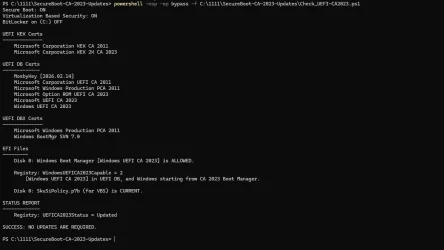
outcome runing Check_UEFI-CA2023.ps1 script:
powershell -nop -ep bypass -f "C:\temp\SecureBoot-CA-2023-Updates\Check_UEFI-CA2023.ps1”
Secure Boot: ON
Virtualization Based Security: OFF
BitLocker on (C:) OFF

UEFI KEK Certs
--------------
Microsoft Corporation KEK CA 2011
Microsoft Corporation KEK 2K CA 2023

UEFI DB Certs
-------------
Microsoft Corporation UEFI CA 2011
Microsoft Windows Production PCA 2011
Microsoft Option ROM UEFI CA 2023
Microsoft UEFI CA 2023
Windows UEFI CA 2023

UEFI DBX Certs
--------------
Microsoft Windows Production PCA 2011
Windows BootMgr SVN 7.0

EFI Files
---------
Disk 1: Windows Boot Manager [Windows UEFI CA 2023] is ALLOWED.

Registry: WindowsUEFICA2023Capable = 2
[Windows UEFI CA 2023] in UEFI DB, and Windows starting from CA 2023 Boot Manager.

STATUS REPORT
-------------
Registry: UEFICA2023Status = Updated

SUCCESS: NO UPDATES ARE REQUIRED.

PS C:\Users\asimo>
 

My Computer

System One

  • OS
    Windows 11 Home x64 Version 25H2 Build 26200.8457
    Computer type
    Laptop
    Manufacturer/Model
    ASUSTeK COMPUTER INC./N751JX
    CPU
    Intel® Core™ i7-4750HQ CPU @ 2.00GHz
    Motherboard
    ASUSTeK Computer INC., BIOS version AMI N751JX.211
    Memory
    16 GB
    Graphics Card(s)
    Intel® Iris™ Pro Graphics 5200
    Sound Card
    Realtek High Definition Audio
    Internet Speed
    250 Mbps
    Antivirus
    Safe Online (F-Secure)
The source file seems is non existent (or maybe hidden in another partition or something lol)

EDIT: Found the solution, my USB boots perfectly now!

Leaving it here in case somebody needs it.
I mentioned this on an earlier post, the update script needs a fix to account for when both bootfwmg.efi AND bootx64.efi are written to the USB. They're actually the same file in two different places. It depends on the method used to build a bootable USB.
 

My Computer

System One

  • OS
    Windows 7
I see Asus has a new BIOS update for my B650E motherboard today. None of the updates have ever said anything about certificates, including this one, and I'm wondering if applying it could have any effect on the update Microsoft pushed to me this week. The details of that are in this post, and does anyone have comments on my "REQUIRED_ACTIONs" question?

https://www.elevenforum.com/t/garli...pdating-secure-boot-ca-2023.43423/post-708496
 

My Computer

System One

  • OS
    Windows 11
The key to a successful CA 2023 update is getting the KEK CA 2023 installed. Without the KEK, the other CA 2023's aren't validated.

Two methods can work:
1. A new BIOS firmware with CA 2023 certs built-in. This is the best solution for users since it can restore them after a factory reset.

2. OEM signs the KEK CA 2023 with their PK, and submits it to MS. This is the second best solution, because MS can match your PK's thumbprint and push a specific KEK CA 2023 (because they're uniquely signed by someone's PK). If you factory reset this BIOS, the KEK CA 2023 disappears. But you (or MS) can easily restore it because it's sitting in MS's hands.

Windows Update probably pushed the KEK to you, based on your BIOS's PK.

In your specific case, the pending actions are to perform the CA 2011 revoke. Which you can do now, or wait until MS gets there (later this year).
 

My Computer

System One

  • OS
    Windows 7
garlin
I am using an old Dell Optiplex 3020 secure boot enabled.

3 months ago, I updated the Ca2023 certificate manually by selecting custom keys using bios .

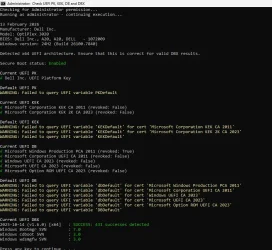
Here are my system results.
2026-02-13_235523.webp
 

My Computer

System One

  • OS
    Windows 11
    Computer type
    PC/Desktop
I guess the only way to find out if Asus added the CA2023 certs to their BIOS is to try it and see. It would kind of suck for them to release a new BIOS that doesn't include them if they had to sign the KEK CA 2023 cert for Microsoft to have pushed it to me.
 

My Computer

System One

  • OS
    Windows 11
garlin
I am using an old Dell Optiplex 3020 secure boot enabled.

3 months ago, I updated the Ca2023 certificate manually by selecting custom keys using bios .
Can you try running my check script? The ZIP file for both the check and update scripts are in post #1.

This thread (unlike the other 5-6 Secure Boot threads) is dedicated for questions about my scripts. I do think my script helps explain your PC's situation in a more understandable format, which also better helps you at the same time. IMO the other scripts out there are confusing to read.

Unfortunately, there's a lot of scripts floating out there. And some of them add a lot of noise to the discussion. Share your results, and I'll walk you through your situation. Thanks!
 

My Computer

System One

  • OS
    Windows 7
I guess you get the same results by running the bat files as admin as you would running the ps1 files?
No matter what I try I can not get the ps1 files to run
 

My Computer

System One

  • OS
    windows 11
    Computer type
    PC/Desktop
    Manufacturer/Model
    Antec/Case
    CPU
    Intel i5-10600kf
    Motherboard
    GIGABYTE Z590 UD AC
    Memory
    32gb corsair vengerance pro
    Graphics Card(s)
    AMD RX 6500XT
    Sound Card
    onboard
    Monitor(s) Displays
    40" Hisense
    Hard Drives
    Samsung 850
    Samsung 870
    Seagate 2TB
    PSU
    EVGA GQ 750
I guess the only way to find out if Asus added the CA2023 certs to their BIOS is to try it and see. It would kind of suck for them to release a new BIOS that doesn't include them if they had to sign the KEK CA 2023 cert for Microsoft to have pushed it to me.
Yes it would suck. But look at it from at ASUS's perspective:

1. To provide you a new firmware with built-in CA 2023 certs requires them to do the KEK signing process. But releasing a new firmware is a can of worms. People are going to complain well if you bothered to release new code, why didn't you fix known [XYZ] BIOS bug that's been there for years.

2. Providing just the signed KEK to MS is the lesser of two evils for the OEM. Functionally it gets the Secure Boot process done without having the risk of releasing a whole new BIOS. And the QA effort in testing the BIOS, if they're not going to fake testing.

If they have too many old BIOS'es right on the edge of support, only signing the KEK allows them to keep more models going.
 

My Computer

System One

  • OS
    Windows 7
I guess you get the same results by running the bat files as admin as you would running the ps1 files?
No matter what I try I can not get the ps1 files to run
They should, all the batch file does is call the PS scripts using a temporary execution policy bypass on scripts.
 

My Computer

System One

  • OS
    Windows 7
Can you try running my check script? The ZIP file for both the check and update scripts are in post #1.

This thread (unlike the other 5-6 Secure Boot threads) is dedicated for questions about my scripts. I do think my script helps explain your PC's situation in a more understandable format, which also better helps you at the same time. IMO the other scripts out there are confusing to read.

Unfortunately, there's a lot of scripts floating out there. And some of them add a lot of noise to the discussion. Share your results, and I'll walk you through your situation. Thanks!
14-02-2026.webp
After that, I rebuilt all the certs using the latest Mosby installer.
After that, all is OK, but the ISO booting problem with ca2023
Like
Macrium, Hasleo Backup Suite, easyuefi
iso booting error image
2026-02-14_035710.webp
 
Last edited:

My Computer

System One

  • OS
    Windows 11
    Computer type
    PC/Desktop
View attachment 163226
After that, I rebuilt all the certs using the latest Mosby installer.
After that, all is OK, but the ISO booting problem with ca2023
Like
Macrium, Hasleo Backup Suite, easyuefi
iso booting error image
View attachment 163230
When I run this command and reboot:

powershell -nop -ep bypass -f C:\Temp\Update_UEFI-CA2023.ps1 -SkuSiPolicy

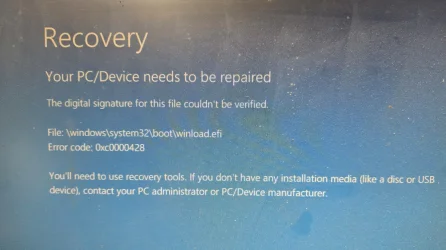
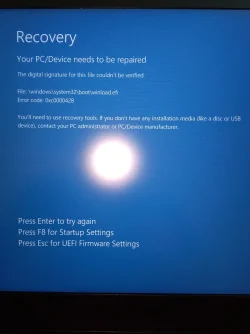
...this is what happens when I reboot to a USB 25H2 installer stick which booted up fine minutes before doing the above command:


This same thing happened a couple days ago. This was a test to confirm what triggered it.
Secure Boot.webp
 

My Computer

System One

  • OS
    Windows 11
If you're having EFI load errors, you can try removing the SkuSiPolicy file:
Code:
mountvol S: /s
del S:\EFI\Microsoft\Boot\SkuSiPolicy.p7b
mountvol S: /d

The SkuSiPolicy file adds restrictions on what files are permitted to execute. It may be this version of the SkuSiPolicy no longer matches the current winload.efi. One problem is the SkuSiPolicy is sort of a "black box", you can't (easily) decipher what are the restrictions.

In the early days before MS decided on its long-term Secure Boot solution, the SkuSiPolicy was released as a quick workaround for blocking unwanted boot files. It might be causing a boot conflict right now. In any event, you can always re-rerun the update script or copy it back to EFI partition.

UPDATED: After some investigation, all the SkuSiPolicy does is duplicate the eventual Secure Boot controls at the Windows execution level. It contains two certs (PCA 2011 and MS Root Authority 2010). So it's just the same net result as banning CA 2011 in the DBX.
 
Last edited:

My Computer

System One

  • OS
    Windows 7
Try this:
1. Run diskpart, do "list volume".
2. "select vol [N]" where [N] is the number of the Recovery partition
3. "assign letter=R"
4. exit diskpart

5. From Explorer, enter "R:\Windows\System32" in the folder path.
6. Scroll down to winload.efi
7. Open Properties -> Digital Signatures. Open the cert and view it. Does it say PCA 2011 or CA 2023?
 

My Computer

System One

  • OS
    Windows 7
If you're having EFI load errors, you can try removing the SkuSiPolicy file:
Code:
mountvol S: /s
del S:\EFI\Microsoft\Boot\SkuSiPolicy.p7b
mountvol S: /d

The SkuSiPolicy file adds restrictions on what files are permitted to execute. It may be this version of the SkuSiPolicy no longer matches the current winload.efi. One problem is the SkuSiPolicy is sort of a "black box", you can't (easily) decipher what are the restrictions.

In the early days before MS decided on its long-term Secure Boot solution, the SkuSiPolicy was released as a quick workaround for blocking unwanted boot files. It might be causing a boot conflict right now. In any event, you can always re-rerun the update script or copy it back to EFI partition.

UPDATED: After some investigation, all the SkuSiPolicy does is duplicate the eventual Secure Boot controls at the Windows execution level. It contains two certs (PCA 2011 and MS Root Authority 2010). So it's just the same net result as banning CA 2011 in the DBX.
Thanks @garlin for the explanation and tips, I found it interesting and very helpful. I have restored to my backup, so I'll have to leave the testing for some other time.

Ps. Where did you learn all this stuff?
 

My Computer

System One

  • OS
    Windows 11

Latest Support Threads

Back
Top Bottom