Solved garlin's PowerShell scripts for updating Secure Boot CA 2023


Hi @garlin,

The zip on post #1 is updated to v2026.04.17 but GitHub still has the v2026.04.08 as latest
Is the zip a quick fix and GitHub still the official latest version ?
Use the ZIP file (it includes other emergency fixes for DBX files). I haven't checked in the updates to GitHub, because I'm waiting to fix other bugs.
 

My Computer My Computer

At a glance

Windows 7
OS
Windows 7
So now I have to copy the updated boot file on my Macrium Free 8.0 Rescue boot drive as you instructed above, but I don't see anything that looks like a boot file in the Windows\System32\SecureBootUpdates folder after this last patch Tuesday. Which file(s) should am I looking for? Is it 1 or 2 files? Which folder do I put it/them in on the Macrium boot drive?
Please use the update script:
Code:
\your\folder\with script\Update-UEFI.bat -BootMedia

The current boot files are stored in a different folder, C:\Windows\Boot\EFI_EX. Both folders are updated by the Monthly Update, whenever required.
 

My Computer My Computer

At a glance

Windows 7
OS
Windows 7
Sorry @garlin I used your old script, I guess, because I haven't downloaded your zip folder at post #1 since January. I will download the current one. You are too fast at your work. I cannot follow you.
 

My Computers My Computers

  • At a glance

    Windows 11 Pro build 26200.8524Intel i7-4790Teams DDR3-1600 4x4 GBMSI Nvidia GeForce GTX 1050Ti
    OS
    Windows 11 Pro build 26200.8524
    Computer type
    PC/Desktop
    Manufacturer/Model
    Home Built
    CPU
    Intel i7-4790
    Motherboard
    Asus H97 Pro Gamer with add-on TPM1.2 module
    Memory
    Teams DDR3-1600 4x4 GB
    Graphics Card(s)
    MSI Nvidia GeForce GTX 1050Ti
    Sound Card
    Realtek ALC1150
    Monitor(s) Displays
    Dell P2425D
    Screen Resolution
    2560 by 1440 pixels
    Hard Drives
    Corsair NVMe M.2 Core XT 1000 GB (Windows 11 v.25H2); Samsung SATA Evo 870 500 GB (Windows 11 v.25H2);
    PSU
    Corsair HX850
    Case
    Gigabyte Solo 210
    Cooling
    Zalman CNPS7X Tower
    Keyboard
    Microsoft AIO Wireless (includes touchpad)
    Mouse
    HP S1000 Plus Wireless
    Internet Speed
    500 Mb fiber optic
    Browser
    Chrome; MS Edge
    Antivirus
    Windows Defender
  • At a glance

    MacOS 12 MontereyIntel Core i58 GBIntel integrated
    Operating System
    MacOS 12 Monterey
    Computer type
    Laptop
    Manufacturer/Model
    Apple Macbook Air
    CPU
    Intel Core i5
    Memory
    8 GB
    Graphics card(s)
    Intel integrated
    Screen Resolution
    1440 by 900 pixels
    Hard Drives
    128 GB
    Keyboard
    Built-in
    Mouse
    Microsoft Wireless
    Internet Speed
    802.11 ac
    Browser
    Chrome; Safari
    Antivirus
    N/A
Please use the update script:
Code:
\your\folder\with script\Update-UEFI.bat -BootMedia

The current boot files are stored in a different folder, C:\Windows\Boot\EFI_EX. Both folders are updated by the Monthly Update, whenever required.
I need classes in Powershell. I don't have much hair left to pull out. I copied your scripts to a shorter folder C:\UEFI but it still didn't work.

StillErrors.webp
 

My Computers My Computers

  • At a glance

    Windows 11 Pro 25H2i7-8565U16GBIntel UHD Graphics 620
    OS
    Windows 11 Pro 25H2
    Computer type
    Laptop
    Manufacturer/Model
    Lenovo T490 (2020 Hardware)
    CPU
    i7-8565U
    Motherboard
    20N20028US
    Memory
    16GB
    Graphics Card(s)
    Intel UHD Graphics 620
    Sound Card
    Realtec Audio
    Monitor(s) Displays
    ASUS VE248
    Screen Resolution
    1920 X 1080
    Hard Drives
    Samsung SSD 970 PRO 512GB NVMe
    Internet Speed
    Frontier fiber 1GB
    Browser
    Chrome, Firefox, Edge
    Antivirus
    Norton 360 Deluxe Plus
    Other Info
    Supported hardware, upgraded from Windows 10 Pro to Windows 11 Pro version 24H2 on 06/01/2025 using the Windows 11 ISO file. Used the enablement package to upgrade to version 25H2 on 10/07/2025. Secure boot enabled. Secure Boot CA 2023 updated.
  • At a glance

    Windows 11 Pro 25H2i7-4770 (with SSE4.2, and POPCNT)16GBIntel HD Graphics 4600
    Operating System
    Windows 11 Pro 25H2
    Computer type
    PC/Desktop
    Manufacturer/Model
    Lenovo ThinkCentre M83 (2014 Hardware)
    CPU
    i7-4770 (with SSE4.2, and POPCNT)
    Motherboard
    10AL000GUS
    Memory
    16GB
    Graphics card(s)
    Intel HD Graphics 4600
    Sound Card
    Realtec High Definition Audio
    Monitor(s) Displays
    ASUS VE248
    Screen Resolution
    1920 X 1080
    Hard Drives
    Samsung SSD 860 PRO 1TB SATA
    Internet Speed
    Frontier fiber 1GB
    Browser
    Chrome, Firefox, Edge
    Antivirus
    Norton 360 Deluxe Plus
    Other Info
    Unsupported hardware, upgraded from Windows 10 Pro (TPM 1.2 & unsupported CPU, but does have SSE4.2, and POPCNT) to Windows 11 Pro version 24H2 on 06/15/2025. Added Registry Key HKEY_LOCAL_MACHINE\SYSTEM\Setup\MoSetup – AllowUpgradesWithUnsupportedTPMOrCPU=1 to allow installation using the Windows 11 ISO file. Used the enablement package to upgrade to version 25H2 on 10/08/2025. Secure boot enabled. Secure Boot CA 2023 updated.
Ok
Got the newer Scripts from Post #1

Attempting to Update Macrium Reflect Boot Media and Windows Install Boot Drive, and unforuately keeps saying no updates are required

Code:
PS C:\Temp> .\Update-UEFI.bat -BootMedia
PowerShell 7.6.0

Bcdboot - Bcd boot file creation and repair tool.

The bcdboot.exe command-line tool is used to copy critical boot files to the
system partition and to create a new system BCD store.

bcdboot <source> [/l <locale>] [/s <volume-letter> [/f <firmware>]] [/v]
                 [/vbcd] [/m [{OS Loader ID}]] [/addlast] [/p] [/c]
                 [/nofirmwaresync] [/description <description>]

  source     Specifies the location of the windows system root.

  /l         Specifies an optional locale parameter to use when
             initializing the BCD store. The default is US English.

  /s         Specifies an optional volume letter parameter to designate
             the target system partition where boot environment files are
             copied.  The default is the system partition identified by
             the firmware.

  /v         Enables verbose mode.

  /vbcd      Enables BCD logging.

  /m         If an OS loader GUID is provided, this option merges the
             given loader object with the system template to produce a
             bootable entry. Otherwise, only global objects are merged.

  /d         Specifies that the existing default windows boot entry
             should be preserved.

  /f         Used with the /s command, specifies the firmware type of the
             target system partition. Options for <firmware> are 'UEFI',
             'BIOS', or 'ALL'.

  /t         Used with the /s and /f commands, specifies a target directory
             under the system partition where the boot environment files
             are to be copied. By default, the boot environment files are
             copied to the root of the target system partition.

  /addlast   Specifies that the windows boot manager firmware entry
             should be added last. The default behavior is to add it
             first.

  /nofirmwaresync Disable synchronization with firmware.

  /bcdclean  Clean the BCD Store. By default, simply removes any duplicate
             entries in the BCD. Can be followed by 'full'. In this case,
             each entry is scanned. If the corresponding device for that entry
             does not exist, the entry is deleted.

  /p         Specifies that the windows boot manager firmware entry
             position should be preserved. If entry does not exist,
             new entry will be added in the first position.

  /c         Specifies that any existing objects described by the template
             should not be migrated.

  /imageroot Specifies an image root under from the boot files originate. The bcd store of this
             image needs to be constructed with paths relative to the root of the image.

  /bootex    Use the bootex binaries for servicing if necessary conditions are met.

  /offline   Forces boot file servicing to be handled in an offline manner. Boot
             file selection is forced based on presence of 'bootex' switch.

Examples: bcdboot c:\windows /l en-us
          bcdboot c:\windows /s h:
          bcdboot c:\windows /s h: /f UEFI
          bcdboot c:\windows /s h: /f UEFI /t Configuration\Boot
          bcdboot c:\windows /m {d58d10c6-df53-11dc-878f-00064f4f4e08}
          bcdboot c:\windows /d /addlast
          bcdboot c:\windows /p
          bcdboot C:\Images\ImageRoot\Files\Windows /f UEFI /imageroot C:\Images\ImageRoot\Files
SUCCESS: NO UPDATES ARE REQUIRED.


Code:
PS C:\Temp> ./Check_UEFI-CA2023.ps1 -Bootmedia
Secure Boot: ON
Virtualization Based Security: ON
BitLocker on (C:) OFF

UEFI KEK Certs
--------------
    Microsoft Corporation KEK CA 2011
    Microsoft Corporation KEK 2K CA 2023

UEFI DB Certs
-------------
    Microsoft Corporation UEFI CA 2011
    Microsoft Windows Production PCA 2011
    Microsoft Option ROM UEFI CA 2023
    Microsoft UEFI CA 2023
    Windows UEFI CA 2023

UEFI DBX Certs
--------------
    Microsoft Windows Production PCA 2011
    Windows BootMgr SVN 8.0

EFI Files
---------
    Windows Boot Manager [Windows UEFI CA 2023] is ALLOWED.

    Registry: WindowsUEFICA2023Capable = 2
        [Windows UEFI CA 2023] in UEFI DB, and Windows starting from CA 2023 Boot Manager.

    SkuSiPolicy.p7b is CURRENT.

Bootable Media
--------------
    USB Drive E: "ESD-ISO"
        Boot File [Windows UEFI CA 2023] is ALLOWED.

        boot.wim:2    Boot Manager [Windows UEFI CA 2023] is PRESENT.
        install.esd:1 Boot Manager [Windows UEFI CA 2023] is PRESENT.
            Skipping checks on next 6 install.esd images.
    USB Drive F:
        Boot File [Production PCA 2011] is BANNED


STATUS REPORT
-------------
    Registry: UEFICA2023Status = Updated

SUCCESS: UPDATES ARE FINISHED.  UEFI CA 2023 certs are present, PCA 2011 cert is revoked.


**Willing to Redo the Macrium Reflect X Recovery USB from Windows RE to PE Mode if it makes any difference in this matter**
 

My Computers My Computers

  • At a glance

    Windows 11 Pro 25H2 26200.8037AMD Ryzen 7700X32GB DDR 5 RGB 5600MhzRadeon 7800XT
    OS
    Windows 11 Pro 25H2 26200.8037
    Computer type
    PC/Desktop
    Manufacturer/Model
    PreBuilt
    CPU
    AMD Ryzen 7700X
    Motherboard
    MSI B650 VC WIfi Rev 1.0
    Memory
    32GB DDR 5 RGB 5600Mhz
    Graphics Card(s)
    Radeon 7800XT
    Sound Card
    Onboard Audio
    Monitor(s) Displays
    Asus VG245H
    Screen Resolution
    1920x1080
    Hard Drives
    Samsung 990 Evo Plus NVMe Boot
    Samsung 990 Pro 1TB Game NVMe


    External
    Western Digital Elements 500GB
    Western Digital My Passport 2TB Blue
    Western Digital My Passport 2TB Red
    Toshiba 2TB in External Enclosure
    Seagate 8TB in External Enclosure
    Seagate 1TB Portable USB 3 External Drive
    Western Digital My Book 8TB (Primary Backup drive)
    Western Digital Black 4TB In External Enclosure
    PSU
    750 Watt High Power
    Case
    Lian Li Lan Cool 216 ARGB Airflow
    Cooling
    2 160MM Front, 1 140MM Rear Exhaust
    Keyboard
    Logitech G513
    Mouse
    Logitech G502 X
    Internet Speed
    Gigabit 1100Mb/35 Upload
    Browser
    MS Edge Chromium and Bing Search
    Antivirus
    Windows Defender, Malwarebytes Premium
    Other Info
    UEFI, Secure Boot, TPM 2.0, Macrium Reflect X
  • At a glance

    Windows 11 Pro 25H2 26200.8037Ryzen 7 7735HS16GB DDR 5AMD Radeon™ 680M & Radeon 7700S
    Operating System
    Windows 11 Pro 25H2 26200.8037
    Computer type
    Laptop
    Manufacturer/Model
    Asus TUF A16 Advantage Edition FA617NT.A16.R7700
    CPU
    Ryzen 7 7735HS
    Motherboard
    OEM Asus Motherboard
    Memory
    16GB DDR 5
    Graphics card(s)
    AMD Radeon™ 680M & Radeon 7700S
    Sound Card
    Onboard
    Monitor(s) Displays
    16inch FHD 165hz
    Screen Resolution
    1920x1080
    Hard Drives
    512GB NVMe Boot Drive
    PSU
    Laptop PSU
    Case
    Laptop Case
    Cooling
    OEM Cooling
    Keyboard
    OEM Laptop Keyboard
    Mouse
    Touchpad & G502 Hero
    Internet Speed
    Gigabit 1100 Download/35 Upload
    Browser
    MS Edge with Bing search
    Antivirus
    Windows Defender & Malwarebytes Premium
    Other Info
    Macrium Reflect X
I need classes in Powershell. I don't have much hair left to pull out. I copied your scripts to a shorter folder C:\UEFI but it still didn't work.

In PowerShell, you should be inside the same folder location as the script files. PowerShell can't guess where your script lives on the PC.
Code:
cd C:\Users\nikki\downloads\or\different\folder     <-  Replace with actual folder name
.\Update-UEFI.bat -BootMedia
 

My Computer My Computer

At a glance

Windows 7
OS
Windows 7
Got the newer Scripts from Post #1

Attempting to Update Macrium Reflect Boot Media and Windows Install Boot Drive, and unforuately keeps saying no updates are required

Code:
PS C:\Temp> .\Update-UEFI.bat -BootMedia
PowerShell 7.6.0

Bcdboot - Bcd boot file creation and repair tool.

The bcdboot.exe command-line tool is used to copy critical boot files to the
system partition and to create a new system BCD store.
[/QUOTE]
That's wrong, it's not running bcdboot.

I'll have to investigate.
 

My Computer My Computer

At a glance

Windows 7
OS
Windows 7
I need classes in Powershell. I don't have much hair left to pull out. I copied your scripts to a shorter folder C:\UEFI but it still didn't work.

View attachment 169220

Actually, powershell tries to resolve to a built-in command by default.
By adding ".\" before the name of the file, like ".\Update-UEFI.bat", tells the powershell interpreter that you are referencing a local file and not a built-in command.

;-)
 

My Computer My Computer

At a glance

Windows 11
OS
Windows 11
In PowerShell, you should be inside the same folder location as the script files. PowerShell can't guess where your script lives on the PC.
Code:
cd C:\Users\nikki\downloads\or\different\folder     <-  Replace with actual folder name
.\Update-UEFI.bat -BootMedia
Here are the scripts in C:\UEFI
Folder.webp

This is what I got when I ran it:

Microsoft Windows [Version 10.0.26200.8246]
(c) Microsoft Corporation. All rights reserved.

C:\Windows\System32>cd \UEFI

C:\UEFI>.\Update-UEFI.bat -BootMedia
PowerShell 7.6.0

Bcdboot - Bcd boot file creation and repair tool.

The bcdboot.exe command-line tool is used to copy critical boot files to the
system partition and to create a new system BCD store.

bcdboot <source> [/l <locale>] [/s <volume-letter> [/f <firmware>]] [/v]
[/vbcd] [/m [{OS Loader ID}]] [/addlast] [/p] [/c]
[/nofirmwaresync] [/description <description>]

source Specifies the location of the windows system root.

/l Specifies an optional locale parameter to use when
initializing the BCD store. The default is US English.

/s Specifies an optional volume letter parameter to designate
the target system partition where boot environment files are
copied. The default is the system partition identified by
the firmware.

/v Enables verbose mode.

/vbcd Enables BCD logging.

/m If an OS loader GUID is provided, this option merges the
given loader object with the system template to produce a
bootable entry. Otherwise, only global objects are merged.

/d Specifies that the existing default windows boot entry
should be preserved.

/f Used with the /s command, specifies the firmware type of the
target system partition. Options for <firmware> are 'UEFI',
'BIOS', or 'ALL'.

/t Used with the /s and /f commands, specifies a target directory
under the system partition where the boot environment files
are to be copied. By default, the boot environment files are
copied to the root of the target system partition.

/addlast Specifies that the windows boot manager firmware entry
should be added last. The default behavior is to add it
first.

/nofirmwaresync Disable synchronization with firmware.

/bcdclean Clean the BCD Store. By default, simply removes any duplicate
entries in the BCD. Can be followed by 'full'. In this case,
each entry is scanned. If the corresponding device for that entry
does not exist, the entry is deleted.

/p Specifies that the windows boot manager firmware entry
position should be preserved. If entry does not exist,
new entry will be added in the first position.

/c Specifies that any existing objects described by the template
should not be migrated.

/imageroot Specifies an image root under from the boot files originate. The bcd store of this
image needs to be constructed with paths relative to the root of the image.

/bootex Use the bootex binaries for servicing if necessary conditions are met.

/offline Forces boot file servicing to be handled in an offline manner. Boot
file selection is forced based on presence of 'bootex' switch.

Examples: bcdboot c:\windows /l en-us
bcdboot c:\windows /s h:
bcdboot c:\windows /s h: /f UEFI
bcdboot c:\windows /s h: /f UEFI /t Configuration\Boot
bcdboot c:\windows /m {d58d10c6-df53-11dc-878f-00064f4f4e08}
bcdboot c:\windows /d /addlast
bcdboot c:\windows /p
bcdboot C:\Images\ImageRoot\Files\Windows /f UEFI /imageroot C:\Images\ImageRoot\Files
SUCCESS: NO UPDATES ARE REQUIRED.

PS C:\UEFI>

***************************************

The Macrium boot drive will not boot.

 

My Computers My Computers

  • At a glance

    Windows 11 Pro 25H2i7-8565U16GBIntel UHD Graphics 620
    OS
    Windows 11 Pro 25H2
    Computer type
    Laptop
    Manufacturer/Model
    Lenovo T490 (2020 Hardware)
    CPU
    i7-8565U
    Motherboard
    20N20028US
    Memory
    16GB
    Graphics Card(s)
    Intel UHD Graphics 620
    Sound Card
    Realtec Audio
    Monitor(s) Displays
    ASUS VE248
    Screen Resolution
    1920 X 1080
    Hard Drives
    Samsung SSD 970 PRO 512GB NVMe
    Internet Speed
    Frontier fiber 1GB
    Browser
    Chrome, Firefox, Edge
    Antivirus
    Norton 360 Deluxe Plus
    Other Info
    Supported hardware, upgraded from Windows 10 Pro to Windows 11 Pro version 24H2 on 06/01/2025 using the Windows 11 ISO file. Used the enablement package to upgrade to version 25H2 on 10/07/2025. Secure boot enabled. Secure Boot CA 2023 updated.
  • At a glance

    Windows 11 Pro 25H2i7-4770 (with SSE4.2, and POPCNT)16GBIntel HD Graphics 4600
    Operating System
    Windows 11 Pro 25H2
    Computer type
    PC/Desktop
    Manufacturer/Model
    Lenovo ThinkCentre M83 (2014 Hardware)
    CPU
    i7-4770 (with SSE4.2, and POPCNT)
    Motherboard
    10AL000GUS
    Memory
    16GB
    Graphics card(s)
    Intel HD Graphics 4600
    Sound Card
    Realtec High Definition Audio
    Monitor(s) Displays
    ASUS VE248
    Screen Resolution
    1920 X 1080
    Hard Drives
    Samsung SSD 860 PRO 1TB SATA
    Internet Speed
    Frontier fiber 1GB
    Browser
    Chrome, Firefox, Edge
    Antivirus
    Norton 360 Deluxe Plus
    Other Info
    Unsupported hardware, upgraded from Windows 10 Pro (TPM 1.2 & unsupported CPU, but does have SSE4.2, and POPCNT) to Windows 11 Pro version 24H2 on 06/15/2025. Added Registry Key HKEY_LOCAL_MACHINE\SYSTEM\Setup\MoSetup – AllowUpgradesWithUnsupportedTPMOrCPU=1 to allow installation using the Windows 11 ISO file. Used the enablement package to upgrade to version 25H2 on 10/08/2025. Secure boot enabled. Secure Boot CA 2023 updated.
@garlin When I ran your check_uefi-CA2023.ps1 script in my already-updated desktop PC, I got the following warning in REQUIRED ACTION section:

To revoke the [PCA2011] cert, run the commands. But as can be seen from below screenshot of the .ps1 output, PCA 2011 was already in UEFI DBX certs list.

View attachment 169198

Anyway, I ran the commands and the warning disappeared. I don't know if this is of any importance. But I wanted to let you know anyway. I also updated the SkuSiPolicy.p7b and SVN got one step up from 7 to 8.
This happened to my Dell M4800 that had previoulsy reported successfull. Ran the new scripts and all is ok. I'm sure my M6800 will show the same. I have a Lenovo Laptop which I will check also.

PS C:\SecureBoot 4-18-26> .\Check_UEFI-CA2023.ps1 -verbose -audit
Windows 11 25H2 (26200.8246)

Secure Boot: ON
Virtualization Based Security: OFF
BitLocker on (C:) OFF

BIOS Firmware
-------------
Dell Inc. Precision M4800
Version: A26
Date: 2019-06-12

Factory Default UEFI PK Cert
----------------------------
(NONE)

UEFI PK Cert
------------
Windows OEM Devices PK

Factory Default UEFI KEK Certs
------------------------------
(NONE)

UEFI KEK Certs
--------------
Microsoft Corporation KEK CA 2011
Microsoft Corporation KEK 2K CA 2023

Factory Default UEFI DB Certs
-----------------------------
(NONE)

UEFI DB Certs
-------------
Microsoft Corporation UEFI CA 2011
Microsoft Windows Production PCA 2011
Microsoft Option ROM UEFI CA 2023
Microsoft UEFI CA 2023
Windows UEFI CA 2023

Factory Default UEFI DBX Certs
------------------------------
(NONE)
EFI_CERT_SHA256_GUID Signatures: 0

UEFI DBX Certs
--------------
Microsoft Windows Production PCA 2011
Windows BootMgr SVN 8.0
EFI_CERT_SHA256_GUID Signatures: 439

EFI Files
---------
Windows Boot Manager [Windows UEFI CA 2023] is ALLOWED.
\\.\HarddiskVolume2\EFI\Microsoft\Boot\bootmgfw.efi
File Version: 28000.322, SVN 8.0

Registry: WindowsUEFICA2023Capable = 2
[Windows UEFI CA 2023] in UEFI DB, and Windows starting from CA 2023 Boot Manager.


AUDIT REPORT
============


STATUS REPORT
-------------
Registry: UEFICA2023Status = Updated

SUCCESS: UPDATES ARE FINISHED. UEFI CA 2023 certs are present, PCA 2011 cert is revoked.

PS C:\SecureBoot 4-18-26> Check_DBXUpdate.bin.ps1
SUCCESS: Matched 278/278 EFI signatures from "dbxupdate.bin"
Skipping C:\Windows\System32\SecureBootUpdates\DBXUpdate2024.bin [April 2026 or later version]
SUCCESS: Matched 3/3 SVN signatures from "DBXUpdateSVN.bin"

PS C:\SecureBoot 4-18-26>
 

My Computer My Computer

At a glance

win 11Intell Core i7 4900 MQDDR3 16 GB
OS
win 11
Computer type
Laptop
Manufacturer/Model
Dell Precision M4800
CPU
Intell Core i7 4900 MQ
Motherboard
Dell QT3YTY A00
Memory
DDR3 16 GB
Wow, so much information ..... to the point I'm total confused.

I ran the Check_UEFI-CA2023.ps1 Script

Code:
Secure Boot: ON
Virtualization Based Security: ON
BitLocker on (C:) OFF

UEFI KEK Certs
--------------
    Microsoft Corporation KEK CA 2011

UEFI DB Certs
-------------
    Microsoft Corporation UEFI CA 2011
    Microsoft Windows Production PCA 2011

UEFI DBX Certs
--------------
    (NONE)

EFI Files
---------
    Disk 4: Windows Boot Manager [Production PCA 2011] is ALLOWED.

    Registry: WindowsUEFICA2023Capable = 0
        [Windows UEFI CA 2023] not in UEFI DB.

    Disk 4: SkuSiPolicy.p7b (for VBS) is NOT PRESENT.


REQUIRED ACTION
===============

OPTION 1:  DO NOTHING.  Windows will apply the UEFI updates in 2026 (supported BIOS).

OPTION 2:  To install [UEFI CA 2023] certs WITHOUT REVOKING the [PCA 2011] cert, run the commands:

    reg add HKEY_LOCAL_MACHINE\SYSTEM\CurrentControlSet\Control\Secureboot /v AvailableUpdates /t REG_DWORD /d 0x5944 /f
    powershell Start-ScheduledTask -TaskName "\Microsoft\Windows\PI\Secure-Boot-Update"

OPTION 3:  To install [UEFI CA 2023] certs and REVOKE the [PCA 2011] cert, run the commands:

    reg add HKEY_LOCAL_MACHINE\SYSTEM\CurrentControlSet\Control\Secureboot /v AvailableUpdates /t REG_DWORD /d 0x5bc4 /f
    powershell Start-ScheduledTask -TaskName "\Microsoft\Windows\PI\Secure-Boot-Update"

To install SkuSiPolicy.p7b, run the command:
    Update_UEFI-CA2023.ps1 -SkuSiPolicy

My current version of Windows 11 is 26200.8246

So according to script I can just wait but I thought the April updates were the ones to update things.

In Windows Security Secure Boot reports this.

1776530336708.webp

I really can't afford to crap this device out as it has all my critical data files / apps.

Would really appreciate any guidance that can be offered.
 

My Computer My Computer

At a glance

Windows 11 Pro x64 Version V23H2i7-8700KG.Skill Trident Z 3200MHz F4-3200C16D-16GTZ (...Intel UHD Graphics 630
OS
Windows 11 Pro x64 Version V23H2
Computer type
PC/Desktop
Manufacturer/Model
Custom
CPU
i7-8700K
Motherboard
Asus Maximus X Code - Z370
Memory
G.Skill Trident Z 3200MHz F4-3200C16D-16GTZ (2) 32GB
Graphics Card(s)
Intel UHD Graphics 630
Sound Card
Integrated ROG SupremeFX
Monitor(s) Displays
Asus VP279 27", Samsung BX2431 24"
Screen Resolution
1920 x 1080
Hard Drives
Samsung M.2 NVMe 960 EVO 500GB Boot,
Samsung 840 EVO 250GB (System Copy Drive),
Samsung 860 EVO 1TB (Primary Data Drive),
WD Black 500GB (Data Copy Drive)
ICY Dock 5.25 2.5/3.5 Bays MB971SP-B
PSU
Corsair RM 650i +Gold
Case
Phanteks Enthroo Primo
Cooling
Corsair Hydro H150i, 360mm Rad & Five Corsair 140mm Pro ML Case Fans
Keyboard
das Keyboard MX Brown Mechanical Switches Model DASKMKPROSIL-3G7-r1.0
Mouse
Logitech MX Master 3 Wireless & Bluetooth
Internet Speed
500Mb +
Browser
Chrome (Pri), Firefox (Sec)
Antivirus
Malwarebytes Premium, SuperAntiSpyware Pro (Licensed)
Other Info
Microsoft LifeCam HD,
APC Back-UPS Pro 1500,
Macrium (Licensed),
Microsoft 365,
Wise Disk Cleaner,
Crystal Disk Info,
Screenpresso (Licensed),
AnyDesk (Licensed),
How do you interpret the *Legacy.bin files in securebootupdates? DBXUpdateSVNLegacy contains the same SVNs but is signed with the 2011 cert?
Wrote a short script to extract the Auth2 header (Matthew Graeber's function skips over it since he's not interested in those details).

Confirmed they're re-signing the bin files, with KEK CA 2023.
Code:
DBXUpdate2024.bin

EnhancedKeyUsageList : {Code Signing (1.3.6.1.5.5.7.3.3)}
DnsNameList          : {Microsoft Windows UEFI Key Exchange Key}
SendAsTrustedIssuer  : False
Archived             : False
Extensions           : {System.Security.Cryptography.Oid, System.Security.Cryptography.Oid, System.Security.Cryptography.Oid, System.Security.Cryptography.Oid...}
FriendlyName         :
IssuerName           : System.Security.Cryptography.X509Certificates.X500DistinguishedName
NotAfter             : 5/12/2026 11:35:24 AM
NotBefore            : 5/15/2025 11:35:24 AM
HasPrivateKey        : False
PrivateKey           :
PublicKey            : System.Security.Cryptography.X509Certificates.PublicKey
RawData              : {48, 130, 5, 15...}
SerialNumber         : 330000000502BFCB15AC0D31B1000000000005
SubjectName          : System.Security.Cryptography.X509Certificates.X500DistinguishedName
SignatureAlgorithm   : System.Security.Cryptography.Oid
Thumbprint           : DBCACC3445D4BEFFE61EA7306AC4D1E884D3EBD8
Version              : 3
Handle               : 2847132220976
Issuer               : CN=Microsoft Corporation KEK 2K CA 2023, O=Microsoft Corporation, C=US
Subject              : CN=Microsoft Windows UEFI Key Exchange Key, O=Microsoft Corporation, L=Redmond, S=Washington, C=US


DBXUpdate2024Legacy.bin

EnhancedKeyUsageList : {1.3.6.1.4.1.311.79.1}
DnsNameList          : {Microsoft Windows UEFI Key Exchange Key}
SendAsTrustedIssuer  : False
Archived             : False
Extensions           : {System.Security.Cryptography.Oid, System.Security.Cryptography.Oid, System.Security.Cryptography.Oid, System.Security.Cryptography.Oid...}
FriendlyName         :
IssuerName           : System.Security.Cryptography.X509Certificates.X500DistinguishedName
NotAfter             : 5/15/2026 11:48:09 AM
NotBefore            : 5/15/2025 11:48:09 AM
HasPrivateKey        : False
PrivateKey           :
PublicKey            : System.Security.Cryptography.X509Certificates.PublicKey
RawData              : {48, 130, 5, 0...}
SerialNumber         : 330000003406BADC84D2FF683D000000000034
SubjectName          : System.Security.Cryptography.X509Certificates.X500DistinguishedName
SignatureAlgorithm   : System.Security.Cryptography.Oid
Thumbprint           : 2C181A475FB7E3D83A742D69B543D14BA0AC38AE
Version              : 3
Handle               : 2847132214064
Issuer               : CN=Microsoft Corporation KEK CA 2011, O=Microsoft Corporation, L=Redmond, S=Washington, C=US
Subject              : CN=Microsoft Windows UEFI Key Exchange Key, O=Microsoft Corporation, L=Redmond, S=Washington, C=US
 

My Computer My Computer

At a glance

Windows 7
OS
Windows 7
For older Powershell versions (5.1 on 2016 server and default on W10) Get-Volume_DevicePath seems not known:

1776530528836.webp

Otherwise I'm not completely sure if this is generally true, but the April updates updated the bootmanager to SVN 8 and updated the SVN binary in \securebootupdates to SVN 8 3 3 (and the legacy SVN binary too) but did not yet apply the SVN 7 revocation (for my W11 VM, W10 VM, the two W10 ESU PCs and the server ess 2016). I had to trigger it manually on all 5 installations.
 

My Computer My Computer

At a glance

W10
OS
W10
Wow, so much information ..... to the point I'm total confused.

I ran the Check_UEFI-CA2023.ps1 Script

Code:
Secure Boot: ON
Virtualization Based Security: ON
BitLocker on (C:) OFF

UEFI KEK Certs
--------------
    Microsoft Corporation KEK CA 2011

UEFI DB Certs
-------------
    Microsoft Corporation UEFI CA 2011
    Microsoft Windows Production PCA 2011

UEFI DBX Certs
--------------
    (NONE)

EFI Files
---------
    Disk 4: Windows Boot Manager [Production PCA 2011] is ALLOWED.

    Registry: WindowsUEFICA2023Capable = 0
        [Windows UEFI CA 2023] not in UEFI DB.

    Disk 4: SkuSiPolicy.p7b (for VBS) is NOT PRESENT.


REQUIRED ACTION
===============

OPTION 1:  DO NOTHING.  Windows will apply the UEFI updates in 2026 (supported BIOS).

OPTION 2:  To install [UEFI CA 2023] certs WITHOUT REVOKING the [PCA 2011] cert, run the commands:

    reg add HKEY_LOCAL_MACHINE\SYSTEM\CurrentControlSet\Control\Secureboot /v AvailableUpdates /t REG_DWORD /d 0x5944 /f
    powershell Start-ScheduledTask -TaskName "\Microsoft\Windows\PI\Secure-Boot-Update"

OPTION 3:  To install [UEFI CA 2023] certs and REVOKE the [PCA 2011] cert, run the commands:

    reg add HKEY_LOCAL_MACHINE\SYSTEM\CurrentControlSet\Control\Secureboot /v AvailableUpdates /t REG_DWORD /d 0x5bc4 /f
    powershell Start-ScheduledTask -TaskName "\Microsoft\Windows\PI\Secure-Boot-Update"

To install SkuSiPolicy.p7b, run the command:
    Update_UEFI-CA2023.ps1 -SkuSiPolicy

My current version of Windows 11 is 26200.8246

So according to script I can just wait but I thought the April updates were the ones to update things.

In Windows Security Secure Boot reports this.

View attachment 169225

I really can't afford to crap this device out as it has all my critical data files / apps.

Would really appreciate any guidance that can be offered.
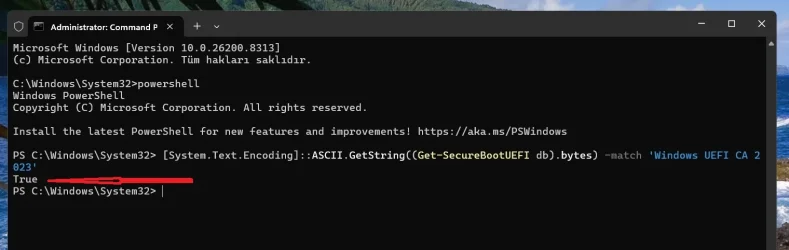
You can start with this:

Open a powershell command with admin rights and run the following commands one by one:

Set-ItemProperty -Path "HKLM:\SYSTEM\CurrentControlSet\Control\SecureBoot" -Name "AvailableUpdates" -Value 0x40

Start-ScheduledTask -TaskName "\Microsoft\Windows\PI\Secure-Boot-Update"

Restart your PC twice. A third restart may be helpful.

Then again in powershell opened as admin run this command:

[System.Text.Encoding]::ASCII.GetString((Get-SecureBootUEFI db).bytes) -match 'Windows UEFI CA 2023'

This command must return a "true" value. If you get a false value, you may have to do a lot of work to get your PC to accept.
 

Attachments

  • Screenshot 2026-04-18 195804.webp
    Screenshot 2026-04-18 195804.webp
    49.2 KB · Views: 1

My Computers My Computers

  • At a glance

    Windows 11 Pro build 26200.8524Intel i7-4790Teams DDR3-1600 4x4 GBMSI Nvidia GeForce GTX 1050Ti
    OS
    Windows 11 Pro build 26200.8524
    Computer type
    PC/Desktop
    Manufacturer/Model
    Home Built
    CPU
    Intel i7-4790
    Motherboard
    Asus H97 Pro Gamer with add-on TPM1.2 module
    Memory
    Teams DDR3-1600 4x4 GB
    Graphics Card(s)
    MSI Nvidia GeForce GTX 1050Ti
    Sound Card
    Realtek ALC1150
    Monitor(s) Displays
    Dell P2425D
    Screen Resolution
    2560 by 1440 pixels
    Hard Drives
    Corsair NVMe M.2 Core XT 1000 GB (Windows 11 v.25H2); Samsung SATA Evo 870 500 GB (Windows 11 v.25H2);
    PSU
    Corsair HX850
    Case
    Gigabyte Solo 210
    Cooling
    Zalman CNPS7X Tower
    Keyboard
    Microsoft AIO Wireless (includes touchpad)
    Mouse
    HP S1000 Plus Wireless
    Internet Speed
    500 Mb fiber optic
    Browser
    Chrome; MS Edge
    Antivirus
    Windows Defender
  • At a glance

    MacOS 12 MontereyIntel Core i58 GBIntel integrated
    Operating System
    MacOS 12 Monterey
    Computer type
    Laptop
    Manufacturer/Model
    Apple Macbook Air
    CPU
    Intel Core i5
    Memory
    8 GB
    Graphics card(s)
    Intel integrated
    Screen Resolution
    1440 by 900 pixels
    Hard Drives
    128 GB
    Keyboard
    Built-in
    Mouse
    Microsoft Wireless
    Internet Speed
    802.11 ac
    Browser
    Chrome; Safari
    Antivirus
    N/A
For older Powershell versions (5.1 on 2016 server and default on W10) Get-Volume_DevicePath seems not known:
It's a private script function. PS doesn't have a native method. 🤷‍♂️

I could pass you the UNC file path that was in my first version of the script, but everyone would freak out since they don't understand volume GUID's are always random numbers. The device path is nice because users can open that folder without mounting the EFI volume.
Code:
function Get-Volume_DevicePath {
    <#
        https://superuser.com/a/1401025
        Author: phant0m
        Modified By: garlin (@garlin-cant-code)
    #>

    param (
        [Parameter(Mandatory)]
        [string]$VolumeGUID
    )

    Add-Type -MemberDefinition @'
        [DllImport("kernel32.dll", SetLastError = true)]
        [return: MarshalAs(UnmanagedType.Bool)]
        public static extern bool GetVolumePathNamesForVolumeNameW([MarshalAs(UnmanagedType.LPWStr)] string lpszVolumeName,
            [MarshalAs(UnmanagedType.LPWStr)] [Out] StringBuilder lpszVolumeNamePaths, uint cchBuferLength, ref UInt32 lpcchReturnLength);

        [DllImport("kernel32.dll", SetLastError = true)]
        public static extern IntPtr FindFirstVolume([Out] StringBuilder lpszVolumeName, uint cchBufferLength);

        [DllImport("kernel32.dll", SetLastError = true)]
        public static extern bool FindNextVolume(IntPtr hFindVolume, [Out] StringBuilder lpszVolumeName, uint cchBufferLength);

        [DllImport("kernel32.dll", SetLastError = true)]
        public static extern uint QueryDosDevice(string lpDeviceName, StringBuilder lpTargetPath, int ucchMax);
'@ -Name Win32Utils -Namespace PInvoke -Using PInvoke,System.Text

    [UInt32]$Max = 65535

    $VolumeName = New-Object System.Text.StringBuilder($Max, $Max)
    $PathName = New-Object System.Text.StringBuilder($Max, $Max)
    $MountPoint = New-Object System.Text.StringBuilder($Max, $Max)
    [IntPtr]$VolumeHandle = [PInvoke.Win32Utils]::FindFirstVolume($VolumeName, $Max)

    do {
        $Volume = $VolumeName.toString()
        $ReturnLength = [PInvoke.Win32Utils]::QueryDosDevice($Volume.Substring(4, $Volume.Length - 5), $PathName, [UInt32]$Max)

        if ($ReturnLength) {
            if ($VolumeName -match $VolumeGUID) {
                $DevicePath = '\\.\{0}\' -f ($PathName -split '\\')[-1]
                return $DevicePath
            }
        }
    } while ([PInvoke.Win32Utils]::FindNextVolume([IntPtr] $VolumeHandle, $VolumeName, $Max))

    return $null
}

Otherwise I'm not completely sure if this is generally true, but the April updates updated the bootmanager to SVN 8 and updated the SVN binary in \securebootupdates to SVN 8 3 3 (and the legacy SVN binary too) but did not yet apply the SVN 7 revocation (for my W11 VM, W10 VM, the two W10 ESU PCs and the server ess 2016). I had to trigger it manually on all 5 installations.
It might be waiting for the next reboot? Here's my conjecture on the process moving forward:
- Windows Update rolls a new boot manager and SVN file​
- The update adds 0x300 to AvailableUpdates​
- Secure Boot task does the needful, and eventually we get there (after a reboot or two)​

Secure Boot task is super paranoid (that's a good thing). It probably wants to replace the boot manager, reboot and confirm it used the newer file. Then apply the SVN. And reboot again to know everything was done.

What I noticed with the April 2026 Security Center is they're using attestation. If you have an non-updated system, and dynamically apply the changes to UEFI certs and boot manager (but haven't rebooted), then Security Center doesn't recognize your changes. It's not until the next restart, does Security Center recognize the changes. Which leads me to believe they're only reading the attestation results from the boot logs.

Smart. But super annoying, because it requires more reboots to arrive at confirmation.
 
Last edited:

My Computer My Computer

At a glance

Windows 7
OS
Windows 7
I thought I would post the following result from the Check_UEFI-CA2023 script on my brother's old Lenovo laptop as it shows that, by doing absolutely nothing, it would appear the Secure Boot Certificates have been updated by Windows Update:
Windows 11 25H2 (26200.8117)

Secure Boot: ON
Virtualization Based Security: ON
BitLocker on (C:) OFF

BIOS Firmware
-------------
LENOVO 81N6
Version: AGCN24WW(V1.07)
Date: 2019-09-16

Factory Default UEFI PK Cert
----------------------------
Ideapad Products

UEFI PK Cert
------------
Ideapad Products

Factory Default UEFI KEK Certs
------------------------------
Microsoft Corporation KEK CA 2011

UEFI KEK Certs
--------------
Microsoft Corporation KEK CA 2011
Microsoft Corporation KEK 2K CA 2023

Factory Default UEFI DB Certs
-----------------------------
Microsoft Corporation UEFI CA 2011
Microsoft Windows Production PCA 2011
AGC340-14S540-14

UEFI DB Certs
-------------
Microsoft Corporation UEFI CA 2011
Microsoft Windows Production PCA 2011
Microsoft Option ROM UEFI CA 2023
Microsoft UEFI CA 2023
Windows UEFI CA 2023
AGC340-14S540-14

Factory Default UEFI DBX Certs
------------------------------
(NONE)
EFI_CERT_SHA256_GUID Signatures: 77

UEFI DBX Certs
--------------
(NONE)
Windows BootMgr SVN is MISSING.
EFI_CERT_SHA256_GUID Signatures: 483

EFI Files
---------
Windows Boot Manager [Windows UEFI CA 2023] is ALLOWED.
\\.\HarddiskVolume1\EFI\Microsoft\Boot\bootmgfw.efi
File Version: 26100.30227, SVN 7.0

Registry: WindowsUEFICA2023Capable = 2
[Windows UEFI CA 2023] in UEFI DB, and Windows starting from CA 2023 Boot Manager.

SkuSiPolicy.p7b (for VBS) is MISSING. [OPTIONAL]


REQUIRED ACTION
===============

To revoke the [PCA 2011] cert, run the commands:

reg add HKEY_LOCAL_MACHINE\SYSTEM\CurrentControlSet\Control\Secureboot /v AvailableUpdates /t REG_DWORD /d 0x280 /f
powershell Start-ScheduledTask -TaskName "\Microsoft\Windows\PI\Secure-Boot-Update"

The system Bios is old and will never be updated by Lenovo, but the current 2023 appear to be present, also after the last April Update, the Security Centre shows a Green Tick against the new Secure Boot entry.
 

My Computer My Computer

At a glance

Windows11Intel(R) N97, 2000 Mhz, 4 Core(s), 4 Logical16GbIntel(R) UHD Graphics
OS
Windows11
Computer type
PC/Desktop
Manufacturer/Model
Acemagic S1
CPU
Intel(R) N97, 2000 Mhz, 4 Core(s), 4 Logical
Memory
16Gb
Graphics Card(s)
Intel(R) UHD Graphics
Sound Card
(Generic USB Audio)
Monitor(s) Displays
2
Screen Resolution
2560 x 1440 x 59 hertz
Hard Drives
Model KPART512GBC2DVT 512Gb
I thought I would post the following result from the Check_UEFI-CA2023 script on my brother's old Lenovo laptop as it shows that, by doing absolutely nothing, it would appear the Secure Boot Certificates have been updated by Windows Update:
Windows 11 25H2 (26200.8117)

Secure Boot: ON
Virtualization Based Security: ON
BitLocker on (C:) OFF

BIOS Firmware
-------------
LENOVO 81N6
Version: AGCN24WW(V1.07)
Date: 2019-09-16

Factory Default UEFI PK Cert
----------------------------
Ideapad Products

UEFI PK Cert
------------
Ideapad Products

Factory Default UEFI KEK Certs
------------------------------
Microsoft Corporation KEK CA 2011

UEFI KEK Certs
--------------
Microsoft Corporation KEK CA 2011
Microsoft Corporation KEK 2K CA 2023

Factory Default UEFI DB Certs
-----------------------------
Microsoft Corporation UEFI CA 2011
Microsoft Windows Production PCA 2011
AGC340-14S540-14

UEFI DB Certs
-------------
Microsoft Corporation UEFI CA 2011
Microsoft Windows Production PCA 2011
Microsoft Option ROM UEFI CA 2023
Microsoft UEFI CA 2023
Windows UEFI CA 2023
AGC340-14S540-14

Factory Default UEFI DBX Certs
------------------------------
(NONE)
EFI_CERT_SHA256_GUID Signatures: 77

UEFI DBX Certs
--------------
(NONE)
Windows BootMgr SVN is MISSING.
EFI_CERT_SHA256_GUID Signatures: 483

EFI Files
---------
Windows Boot Manager [Windows UEFI CA 2023] is ALLOWED.
\\.\HarddiskVolume1\EFI\Microsoft\Boot\bootmgfw.efi
File Version: 26100.30227, SVN 7.0

Registry: WindowsUEFICA2023Capable = 2
[Windows UEFI CA 2023] in UEFI DB, and Windows starting from CA 2023 Boot Manager.

SkuSiPolicy.p7b (for VBS) is MISSING. [OPTIONAL]


REQUIRED ACTION
===============

To revoke the [PCA 2011] cert, run the commands:

reg add HKEY_LOCAL_MACHINE\SYSTEM\CurrentControlSet\Control\Secureboot /v AvailableUpdates /t REG_DWORD /d 0x280 /f
powershell Start-ScheduledTask -TaskName "\Microsoft\Windows\PI\Secure-Boot-Update"

The system Bios is old and will never be updated by Lenovo, but the current 2023 appear to be present, also after the last April Update, the Security Centre shows a Green Tick against the new Secure Boot entry.

Hmm, Googled your device and the latest BIOS version is v1.13 and your current one is v1.07. I'm thinking Lenovo signed the 2023 KEK for MS to distribute via GitHub:


My Computer My Computer

At a glance

Windows 11
OS
Windows 11
Thanks @suatcini54

If I run those commands and something goes south can I just disable secure boot and at least boot?
 

My Computer My Computer

At a glance

Windows 11 Pro x64 Version V23H2i7-8700KG.Skill Trident Z 3200MHz F4-3200C16D-16GTZ (...Intel UHD Graphics 630
OS
Windows 11 Pro x64 Version V23H2
Computer type
PC/Desktop
Manufacturer/Model
Custom
CPU
i7-8700K
Motherboard
Asus Maximus X Code - Z370
Memory
G.Skill Trident Z 3200MHz F4-3200C16D-16GTZ (2) 32GB
Graphics Card(s)
Intel UHD Graphics 630
Sound Card
Integrated ROG SupremeFX
Monitor(s) Displays
Asus VP279 27", Samsung BX2431 24"
Screen Resolution
1920 x 1080
Hard Drives
Samsung M.2 NVMe 960 EVO 500GB Boot,
Samsung 840 EVO 250GB (System Copy Drive),
Samsung 860 EVO 1TB (Primary Data Drive),
WD Black 500GB (Data Copy Drive)
ICY Dock 5.25 2.5/3.5 Bays MB971SP-B
PSU
Corsair RM 650i +Gold
Case
Phanteks Enthroo Primo
Cooling
Corsair Hydro H150i, 360mm Rad & Five Corsair 140mm Pro ML Case Fans
Keyboard
das Keyboard MX Brown Mechanical Switches Model DASKMKPROSIL-3G7-r1.0
Mouse
Logitech MX Master 3 Wireless & Bluetooth
Internet Speed
500Mb +
Browser
Chrome (Pri), Firefox (Sec)
Antivirus
Malwarebytes Premium, SuperAntiSpyware Pro (Licensed)
Other Info
Microsoft LifeCam HD,
APC Back-UPS Pro 1500,
Macrium (Licensed),
Microsoft 365,
Wise Disk Cleaner,
Crystal Disk Info,
Screenpresso (Licensed),
AnyDesk (Licensed),
Hmm, Googled your device and the latest BIOS version is v1.13 and your current one is v1.07. I'm thinking Lenovo signed the 2023 KEK for MS to distribute via GitHub:

Lenovo has an app called Lenovo Vantage and it can download and reflash the bios to the latest version as well as updating all the drivers
 

My Computer My Computer

At a glance

win 11Intell Core i7 4900 MQDDR3 16 GB
OS
win 11
Computer type
Laptop
Manufacturer/Model
Dell Precision M4800
CPU
Intell Core i7 4900 MQ
Motherboard
Dell QT3YTY A00
Memory
DDR3 16 GB
You can start with this:

Open a powershell command with admin rights and run the following commands one by one:

Set-ItemProperty -Path "HKLM:\SYSTEM\CurrentControlSet\Control\SecureBoot" -Name "AvailableUpdates" -Value 0x40

Start-ScheduledTask -TaskName "\Microsoft\Windows\PI\Secure-Boot-Update"

Restart your PC twice. A third restart may be helpful.

Then again in powershell opened as admin run this command:

[System.Text.Encoding]::ASCII.GetString((Get-SecureBootUEFI db).bytes) -match 'Windows UEFI CA 2023'

This command must return a "true" value. If you get a false value, you may have to do a lot of work to get your PC to accept.
I believe suatcini54 is offline at the moment.

Would anyone else know if I run these commands and things go south will I be able to boot with secure boot off. Can't afford to lose this machine. Thank you.
 

My Computer My Computer

At a glance

Windows 11 Pro x64 Version V23H2i7-8700KG.Skill Trident Z 3200MHz F4-3200C16D-16GTZ (...Intel UHD Graphics 630
OS
Windows 11 Pro x64 Version V23H2
Computer type
PC/Desktop
Manufacturer/Model
Custom
CPU
i7-8700K
Motherboard
Asus Maximus X Code - Z370
Memory
G.Skill Trident Z 3200MHz F4-3200C16D-16GTZ (2) 32GB
Graphics Card(s)
Intel UHD Graphics 630
Sound Card
Integrated ROG SupremeFX
Monitor(s) Displays
Asus VP279 27", Samsung BX2431 24"
Screen Resolution
1920 x 1080
Hard Drives
Samsung M.2 NVMe 960 EVO 500GB Boot,
Samsung 840 EVO 250GB (System Copy Drive),
Samsung 860 EVO 1TB (Primary Data Drive),
WD Black 500GB (Data Copy Drive)
ICY Dock 5.25 2.5/3.5 Bays MB971SP-B
PSU
Corsair RM 650i +Gold
Case
Phanteks Enthroo Primo
Cooling
Corsair Hydro H150i, 360mm Rad & Five Corsair 140mm Pro ML Case Fans
Keyboard
das Keyboard MX Brown Mechanical Switches Model DASKMKPROSIL-3G7-r1.0
Mouse
Logitech MX Master 3 Wireless & Bluetooth
Internet Speed
500Mb +
Browser
Chrome (Pri), Firefox (Sec)
Antivirus
Malwarebytes Premium, SuperAntiSpyware Pro (Licensed)
Other Info
Microsoft LifeCam HD,
APC Back-UPS Pro 1500,
Macrium (Licensed),
Microsoft 365,
Wise Disk Cleaner,
Crystal Disk Info,
Screenpresso (Licensed),
AnyDesk (Licensed),

Latest Support Threads

Back
Top Bottom