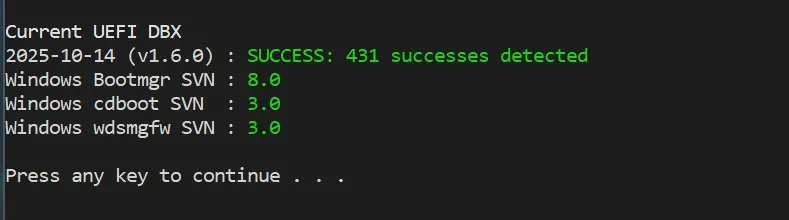
Solved garlin's PowerShell scripts for updating Secure Boot CA 2023


I also have Asus m/b from late 2014. I put the cert on a usb flash drive. It is readily available from the list when trying to append the certificate. My Asus accepted only certificates with .crt extension.
 

My Computers

System One System Two

  • OS
    Windows 11 Pro build 26200.8524
    Computer type
    PC/Desktop
    Manufacturer/Model
    Home Built
    CPU
    Intel i7-4790
    Motherboard
    Asus H97 Pro Gamer with add-on TPM1.2 module
    Memory
    Teams DDR3-1600 4x4 GB
    Graphics Card(s)
    MSI Nvidia GeForce GTX 1050Ti
    Sound Card
    Realtek ALC1150
    Monitor(s) Displays
    Dell P2425D
    Screen Resolution
    2560 by 1440 pixels
    Hard Drives
    Corsair NVMe M.2 Core XT 1000 GB (Windows 11 v.25H2); Samsung SATA Evo 870 500 GB (Windows 11 v.25H2);
    PSU
    Corsair HX850
    Case
    Gigabyte Solo 210
    Cooling
    Zalman CNPS7X Tower
    Keyboard
    Microsoft AIO Wireless (includes touchpad)
    Mouse
    HP S1000 Plus Wireless
    Internet Speed
    500 Mb fiber optic
    Browser
    Chrome; MS Edge
    Antivirus
    Windows Defender
  • Operating System
    MacOS 12 Monterey
    Computer type
    Laptop
    Manufacturer/Model
    Apple Macbook Air
    CPU
    Intel Core i5
    Memory
    8 GB
    Graphics card(s)
    Intel integrated
    Screen Resolution
    1440 by 900 pixels
    Hard Drives
    128 GB
    Keyboard
    Built-in
    Mouse
    Microsoft Wireless
    Internet Speed
    802.11 ac
    Browser
    Chrome; Safari
    Antivirus
    N/A
Thank you also Suatcini54.

More to follow unless I get to a point I can't boot. LOL
 

My Computer

System One

  • OS
    Windows 11 Pro x64 Version V23H2
    Computer type
    PC/Desktop
    Manufacturer/Model
    Custom
    CPU
    i7-8700K
    Motherboard
    Asus Maximus X Code - Z370
    Memory
    G.Skill Trident Z 3200MHz F4-3200C16D-16GTZ (2) 32GB
    Graphics Card(s)
    Intel UHD Graphics 630
    Sound Card
    Integrated ROG SupremeFX
    Monitor(s) Displays
    Asus VP279 27", Samsung BX2431 24"
    Screen Resolution
    1920 x 1080
    Hard Drives
    Samsung M.2 NVMe 960 EVO 500GB Boot,
    Samsung 840 EVO 250GB (System Copy Drive),
    Samsung 860 EVO 1TB (Primary Data Drive),
    WD Black 500GB (Data Copy Drive)
    ICY Dock 5.25 2.5/3.5 Bays MB971SP-B
    PSU
    Corsair RM 650i +Gold
    Case
    Phanteks Enthroo Primo
    Cooling
    Corsair Hydro H150i, 360mm Rad & Five Corsair 140mm Pro ML Case Fans
    Keyboard
    das Keyboard MX Brown Mechanical Switches Model DASKMKPROSIL-3G7-r1.0
    Mouse
    Logitech MX Master 3 Wireless & Bluetooth
    Internet Speed
    500Mb +
    Browser
    Chrome (Pri), Firefox (Sec)
    Antivirus
    Malwarebytes Premium, SuperAntiSpyware Pro (Licensed)
    Other Info
    Microsoft LifeCam HD,
    APC Back-UPS Pro 1500,
    Macrium (Licensed),
    Microsoft 365,
    Wise Disk Cleaner,
    Crystal Disk Info,
    Screenpresso (Licensed),
    AnyDesk (Licensed),
My M/B is a ASUS ROG XCode, 2018. The suppliers should have provide BIOS updates if your board meets the Win 11 requirements. They have known this train is coming for years.
 

My Computer

System One

  • OS
    Windows 11 Pro x64 Version V23H2
    Computer type
    PC/Desktop
    Manufacturer/Model
    Custom
    CPU
    i7-8700K
    Motherboard
    Asus Maximus X Code - Z370
    Memory
    G.Skill Trident Z 3200MHz F4-3200C16D-16GTZ (2) 32GB
    Graphics Card(s)
    Intel UHD Graphics 630
    Sound Card
    Integrated ROG SupremeFX
    Monitor(s) Displays
    Asus VP279 27", Samsung BX2431 24"
    Screen Resolution
    1920 x 1080
    Hard Drives
    Samsung M.2 NVMe 960 EVO 500GB Boot,
    Samsung 840 EVO 250GB (System Copy Drive),
    Samsung 860 EVO 1TB (Primary Data Drive),
    WD Black 500GB (Data Copy Drive)
    ICY Dock 5.25 2.5/3.5 Bays MB971SP-B
    PSU
    Corsair RM 650i +Gold
    Case
    Phanteks Enthroo Primo
    Cooling
    Corsair Hydro H150i, 360mm Rad & Five Corsair 140mm Pro ML Case Fans
    Keyboard
    das Keyboard MX Brown Mechanical Switches Model DASKMKPROSIL-3G7-r1.0
    Mouse
    Logitech MX Master 3 Wireless & Bluetooth
    Internet Speed
    500Mb +
    Browser
    Chrome (Pri), Firefox (Sec)
    Antivirus
    Malwarebytes Premium, SuperAntiSpyware Pro (Licensed)
    Other Info
    Microsoft LifeCam HD,
    APC Back-UPS Pro 1500,
    Macrium (Licensed),
    Microsoft 365,
    Wise Disk Cleaner,
    Crystal Disk Info,
    Screenpresso (Licensed),
    AnyDesk (Licensed),
@bikemanAMD & @Phil_C, I found my bug.

Previously I made a global replace on some of the script's variables, and it accidentally caught one line it shouldn't have touched. Therefore the bcdboot command failed because it wasn't given a working drive letter.

I think this version should work.
 

Attachments

My Computer

System One

  • OS
    Windows 7
For those folks having trouble with Macrium boot media, I have managed to get things working on my two systems.

Update_UEFI-CA2023.ps1 -BootMedia did not work, although it gave a "success" message.

I had to use a short script from elsewhere to copy the boot file. BUT, while Check-UEFI gave a successful result, the USB would NOT boot to Macrium.

The solution on both machines was to rebuild the WinRE boot media in Macrium. This reverted to the older boot file. Running the short script again copied the boot file. Now both machines boot properly into Macrium from the respective USB drives.

I don't know why @garlin's Update script does not work with the recent updates. This is the .bat file that worked. Change the .txt to .bat.
Used your solution on my 2 PCs and it worked! Macrium 8 Free now boots from the rescue media on both PCs. Thanks! I saved that script file for future use.
 

My Computers

System One System Two

  • OS
    Windows 11 Pro 25H2
    Computer type
    Laptop
    Manufacturer/Model
    Lenovo T490 (2020 Hardware)
    CPU
    i7-8565U
    Motherboard
    20N20028US
    Memory
    16GB
    Graphics Card(s)
    Intel UHD Graphics 620
    Sound Card
    Realtec Audio
    Monitor(s) Displays
    ASUS VE248
    Screen Resolution
    1920 X 1080
    Hard Drives
    Samsung SSD 970 PRO 512GB NVMe
    Internet Speed
    Frontier fiber 1GB
    Browser
    Chrome, Firefox, Edge
    Antivirus
    Norton 360 Deluxe Plus
    Other Info
    Supported hardware, upgraded from Windows 10 Pro to Windows 11 Pro version 24H2 on 06/01/2025 using the Windows 11 ISO file. Used the enablement package to upgrade to version 25H2 on 10/07/2025. Secure boot enabled. Secure Boot CA 2023 updated.
  • Operating System
    Windows 11 Pro 25H2
    Computer type
    PC/Desktop
    Manufacturer/Model
    Lenovo ThinkCentre M83 (2014 Hardware)
    CPU
    i7-4770 (with SSE4.2, and POPCNT)
    Motherboard
    10AL000GUS
    Memory
    16GB
    Graphics card(s)
    Intel HD Graphics 4600
    Sound Card
    Realtec High Definition Audio
    Monitor(s) Displays
    ASUS VE248
    Screen Resolution
    1920 X 1080
    Hard Drives
    Samsung SSD 860 PRO 1TB SATA
    Internet Speed
    Frontier fiber 1GB
    Browser
    Chrome, Firefox, Edge
    Antivirus
    Norton 360 Deluxe Plus
    Other Info
    Unsupported hardware, upgraded from Windows 10 Pro (TPM 1.2 & unsupported CPU, but does have SSE4.2, and POPCNT) to Windows 11 Pro version 24H2 on 06/15/2025. Added Registry Key HKEY_LOCAL_MACHINE\SYSTEM\Setup\MoSetup – AllowUpgradesWithUnsupportedTPMOrCPU=1 to allow installation using the Windows 11 ISO file. Used the enablement package to upgrade to version 25H2 on 10/08/2025. Secure boot enabled. Secure Boot CA 2023 updated.
:poop:. Why did they bother renaming the files?

You should be able to run "Update_UEFI-CA2023.ps1 -Revoke -SkuSiPolicy", and it should force SVN 8 and a newer SkuSiPolicy.
Hey Garlin,

I ran this command on the 14th (Patch Tuesday) to get the firmware to 8.0 and SkuSiPolicy updated aswell.

Is this included in your new update scripts? I can't check as I used that command on all 3 of my computers.

Thanks.
 

My Computers

System One System Two

  • OS
    Windows 11 Pro
    Computer type
    PC/Desktop
    Manufacturer/Model
    Self built PC by me.
    CPU
    Intel Core i5-12600K 3.7 GHz 10-Core Processor
    Motherboard
    Gigabyte B760M H DDR4 Micro ATX LGA1700 Motherboard
    Memory
    Corsair Vengeance LPX 64 GB (2 x 32 GB) DDR4-3200 CL16 Memory
    Graphics Card(s)
    Integrated Intel UHD Graphics 770
    Sound Card
    Realtek
    Monitor(s) Displays
    LG
    Hard Drives
    Samsung 990 Pro 1 TB M.2-2280 PCIe 4.0 X4 NVME Solid State Drive
    Samsung 990 Pro 2 TB M.2-2280 PCIe 4.0 X4 NVME Solid State Drive
    PSU
    NZXT 850w ATX 3.1 Gold Fully Modular Power Supply
    Case
    Thermaltake Versa H25 ATX Mid Tower Case
    Cooling
    CPU Cooler Thermalright Assassin Spirit 120 EVO ARGB (ARGB Disabled) - Case Fans BlackThermalright TL-C12C-S X3 66.17 CFM 120 mm Fans 3-Pack (ARGB disabled)
    Internet Speed
    1 Gbps
    Other Info
    I hate ARGB.
  • Operating System
    Windows 11 Pro
    Computer type
    Laptop
    Manufacturer/Model
    Lenovo ThinkBook 14 G2 ITL
The update script doesn't have any knowledge about a specific version of the boot manager, the DBX EFI signatures or the SVN.

Instead, it simply checks if you're running the latest "milestone" Monthly Update after a major Secure Boot update is released.
That used to be July 2025, then October 2025, and now it's April 2026. It will probably change again if MS fixes a new security bug.

If you run the update script in revoke mode, it will compare the SecureBootUpdates folder (where changes are staged) against the live system.

When there's a discrepancy, it will apply the missing changes. If there's nothing to update, then it does nothing. The script has no fixed version number that needs to be revised, it presumes the SecureBootUpdates folder is the final authority on things.

You could run it every month after a Monthly Update. Eventually Windows should be taking over this role. I assume MS is more focused on getting the CA 2023 certs on as many PC's as possible, and getting to full hands-free automation once everyone has a supported PC.
 

My Computer

System One

  • OS
    Windows 7
Hello,
based on the results, is everything okay for my PC?

Thank you:confus :
 

Attachments

My Computer

System One

  • OS
    windows 11 25H2
    Computer type
    Laptop
    Manufacturer/Model
    ASUS Vivobook 15 (X1504)
    Motherboard
    Intel Alder Lake-P PCH
    Memory
    24GB
    Graphics Card(s)
    iris xe
    Sound Card
    realtek
    Screen Resolution
    1920X1080
    Hard Drives
    Samsung SSD 990 PRO 1TB
    Browser
    edge
    Antivirus
    eset anti virus
Oh Wow... I'm late to the game I see.

I wrote a PowerShell 5.1 script to help with this too recently for some of my own systems. I see mine is not as complete as yours and for the most part just checks, but has information to help move it along. I don't want to step on any toes so I won't post the script created unless wanted.

Sample Output:

Code:
SECURE BOOT STATUS
RunTime: 2026-04-18 22:12:54
Computer: <redacted>
User: <redacted>
Admin: True

== Summary ==
OverallAssessment               : SecureBootEnabled_UpdateComplete
Interpretation                  : Secure Boot is enabled and the Microsoft 2023 Secure Boot certificate update appears complete.
RecommendedAction               : <none>
CompletionBasis                 : RegistryUpdated; Latest1808NewerThan1801; KEK2023Present; DB2023Present
SecureBoot_CurrentlyEnabled     : True
Certificates_2023_Present       : True
Windows_Update_Workflow_Seen    : True
Registry_Indicates_Complete     : True
Firmware_Indicates_KEK_2023     : True
Firmware_Indicates_DB_2023      : True
Events_Indicate_Complete        : True
Latest1801_Present              : False
Latest1808_Present              : True
Event1044_Present               : False
Event1045_Present               : False
Event1034_Present               : False
PublicSafeMode                  : True
HideUrlSections                 : True
ForumMode                       : True

== Platform audit ==
Manufacturer                    : <redacted>
Model                           : <redacted>
BIOSManufacturer                : <redacted>
BIOSVersion                     : <redacted>
IsVirtualMachine                : False
PEFirmwareType                  : <unknown>
PEFirmwareTypeText              : <unknown>
SecureBootRegistryBasePresent   : True

== Cmdlet availability ==
Confirm-SecureBootUEFI : True
Get-SecureBootUEFI     : True
Get-ScheduledTask      : True
Get-ScheduledTaskInfo  : True

== Secure Boot enabled ==
Status             : OK
SecureBootEnabled  : True
Error              : <none>

== SecureBoot main registry ==
AvailableUpdates_Dec        : 0
AvailableUpdates_Hex        : 0x00000000
MicrosoftUpdateManagedOptIn : <absent>
HighConfidenceOptOut        : <absent>

== SecureBoot servicing registry ==
UEFICA2023Status             : Updated
UEFICA2023Error              : <absent>
WindowsUEFICA2023Capable_Dec : 2
WindowsUEFICA2023Capable_Hex : 0x00000002
BucketHash                   : <redacted>
ConfidenceLevel              : High Confidence
LastAttemptTime              : <absent>
LastAttemptResult            : <absent>

== UEFI variable audit ==
KEK_QueryStatus                 : OK
KEK_QueryError                  : <none>
KEK_BytesLength                 : 3955
KEK_Has_MS_KEK_2011             : True
KEK_Has_MS_KEK_2023             : True
db_QueryStatus                  : OK
db_QueryError                   : <none>
db_BytesLength                  : 9691
db_Has_MS_WindowsUEFICA2023     : True
db_Has_MS_OptionROMUEFICA2023   : True
db_Has_MS_UEFICA2011            : True

== UEFI variable interesting fragments: KEK ==
  Microsoft Corporation KEK 2K CA 2023
  Microsoft Corporation KEK CA 2011
  Microsoft Corporation Third Party Marketplace Root
  Microsoft RSA Devices Root CA 2021

== UEFI variable interesting fragments: DB ==
  Microsoft Corporation Third Party Marketplace Root
  Microsoft Corporation UEFI CA 2011
  Microsoft Option ROM UEFI CA 2023
  Microsoft Root Certificate Authority 2010
  Microsoft RSA Devices Root CA 2021
  Microsoft UEFI CA 2023
  Microsoft Windows Production PCA 2011
  Windows UEFI CA 2023

== TPM-WMI events (latest per ID) ==
EventsQueryStatus : OK
EventsQueryError  : <none>

TimeCreated              Id LevelDisplayName ProviderName              Message                                                                                                                                                                                                                                                                                                                                                                                             
-----------              -- ---------------- ------------              -------                                                                                                                                                                                                                                                                                                                                                                                             
2026-04-18 12:33:35 PM 1808 Information      Microsoft-Windows-TPM-WMI This device has updated Secure Boot CA/keys. This device signature information is included here.                                                                                                                                                                                                                                                                                                   
                                                                       DeviceAttributes: <redacted>                                                                                                                                                                                                                                                                                                                                                                       
                                                                       BucketId: <redacted>                                                                                                                                                                                                                                                                                                                                                                               
                                                                       BucketConfidenceLevel: High Confidence                                                                                                                                                                                                                                                                                                                                                             
                                                                       UpdateType: Windows UEFI CA 2023 (DB), Option ROM CA 2023 (DB), 3P UEFI CA 2023 (DB), KEK 2023, Boot Manager (2023)                                                                                                                                                                                                                                                                                 
                                                                       For more information, please see https://go.microsoft.com/fwlink/?linkid=2301018.

== TPM-WMI completion check (latest 1801 vs 1808) ==
Latest1801_Time : <none>
Latest1808_Time : 2026-04-18 12:33:35 PM
Events_Indicate_Complete : True

== Scheduled task: \Microsoft\Windows\PI\Secure-Boot-Update ==
TaskQueryStatus      : OK
TaskQueryError       : <none>
LastRunTime          : 2026-04-18 12:33:35 PM
LastTaskResult       : 0
LastTaskResult_Hex   : 0x00000000
LastTaskResult_Text  : The operation completed successfully.
NextRunTime          :
NumberOfMissedRuns   : 0
TaskState            : Ready
TaskEnabled          : True

== Notes ==
This script is read-only.
It can be run repeatedly without changing Secure Boot variables, registry values, or scheduled tasks.
The Summary section is intentionally placed at the top for quick triage.
Completion should be based primarily on UEFICA2023Status=Updated and/or TPM-WMI 1808 newer than 1801.
TPM-WMI success events such as 1044, 1045, and 1034 are treated as supporting completion evidence.
The generic fragment list is for inspection only.
The direct Has_MS_* checks are supporting indicators for certificate presence, not sole proof of completion.
Unsupported Platform from Secure Boot cmdlets usually points to Legacy/CSM boot, missing UEFI Secure Boot support, or a VM/firmware that does not expose the interface correctly.
PublicSafe mode redacted: Computer, User, BucketHash/BucketId, detailed DeviceAttributes, and OEM-identifying UEFI fragment lines.
UEFI variable URL sections hidden by request.
ForumMode enabled: PublicSafe + HideUrlSections.

It can be run to not redact items if wanted.
 

My Computer

System One

  • OS
    Windows 10
    Computer type
    PC/Desktop
    Manufacturer/Model
    MSI Custom build
    CPU
    Intel i9-9900K
    Motherboard
    MSI MPG Z390 Gaming Edge AC
    Memory
    64GB
    Graphics Card(s)
    EVGA GeForce GTX 1070 TI
    Internet Speed
    1 Gbps
    Browser
    Firefox
    Antivirus
    Malwarebytes
Hello,
based on the results, is everything okay for my PC?

Thank you:confus :
You're almost done. But the latest SVN is now 8.0

1. Check you have the April 2026 Monthly Update.

2. Run these commands as Admin:
Code:
reg add HKEY_LOCAL_MACHINE\SYSTEM\CurrentControlSet\Control\Secureboot /v AvailableUpdates /t REG_DWORD /d 0x200 /f
powershell Start-ScheduledTask -TaskName "\Microsoft\Windows\PI\Secure-Boot-Update"

3. Please run the script from the ZIP file in post #1.
 

My Computer

System One

  • OS
    Windows 7
Thanks, but when I run the file as administrator I get thispowershell_tWgPbuVGM1.webp
 

My Computer

System One

  • OS
    windows 11 25H2
    Computer type
    Laptop
    Manufacturer/Model
    ASUS Vivobook 15 (X1504)
    Motherboard
    Intel Alder Lake-P PCH
    Memory
    24GB
    Graphics Card(s)
    iris xe
    Sound Card
    realtek
    Screen Resolution
    1920X1080
    Hard Drives
    Samsung SSD 990 PRO 1TB
    Browser
    edge
    Antivirus
    eset anti virus
Oh Wow... I'm late to the game I see.

I wrote a PowerShell 5.1 script to help with this too recently for some of my own systems. I see mine is not as complete as yours and for the most part just checks, but has information to help move it along. I don't want to step on any toes so I won't post the script created unless wanted.
Unfortunately, a check script can get rather geeky and include plenty of irrelevant reg keys and event ID messages. Many of the indicators are not directly useful to end users on how to debug the update process. They don't need a trace log of why the Secure Boot update task failed.

Every script needs to confirm:
- KEK CA 2023 is present (KEK2023Present key, or direct parsing the KEK variable)​
- Windows UEFI CA 2023, Microsoft UEFI CA 2023, Option ROM are present (parse the DB variable)​
- WindowsUEFICA2023Capable = 2​
- SVN is applied​

Here's a deeper dive for you geeks.
Confidence Bucket data reporting is mostly useless. It's a gating factor used to control MS's gradual deployment, all is does is to indicate whether Windows is waiting for more telemetry data before proceeding. There is no point in sitting there, just use the documented AvailableUpdates values (ie. 0x5944) and force the Secure Boot scheduled task. It'll either work or fail.

Confidence Buckets are useful to large sites with pools of identical PC's. They're less helpful to private individuals with more random HW permutations. I see a lot of IT admins chasing MS's advice but in the end you're not learning anything other than the update is delayed for "Needs more data". Only MS can change the bucket status to unblock the task. :confused:

If there's no KEK CA 2023 in the current BIOS, or the OEM hasn't provided one to MS, then your PC isn't going to get updated. The next available options all require manual effort from user. A KEK CA 2023 cert might be loaded from the UEFI menu, if that's supported. Once the KEK is installed, then the Secure Boot task has what it needs to finish, by itself.

Failing that, you have the nuclear option of wiping all Secure Boot keys and dropping a replacement set. My update script can do that, or Mosby.

The trick is not presenting the user with an overwhelming list of technical details. Because you're not going to be spending all day answering Secure Boot questions by yourself. You want to do that? (OK, maybe it actually is your job?)

Reduce and simplify. Non-technical users get into a bad habit of picking apart every worrying detail a report displays. For example, don't list every possible cert. Show out the ones which are relevant. Users are going to panic because their list is different from yours.

Where my scripts differ from some of the other scripts I've found, is most of them are not rules-based. They report a bunch of easily collected details without making an actionable conclusion for the user.

We have several other Secure Boot threads going on, where you can post your script.

But I prefer keeping this thread open for my script (it's in the thread's title). But if you got any technical questions on the Secure Boot update process, feel free to ask. I'll try to answer with whatever I know so far.
 
Last edited:

My Computer

System One

  • OS
    Windows 7
No problem. Understood.
 

My Computer

System One

  • OS
    Windows 10
    Computer type
    PC/Desktop
    Manufacturer/Model
    MSI Custom build
    CPU
    Intel i9-9900K
    Motherboard
    MSI MPG Z390 Gaming Edge AC
    Memory
    64GB
    Graphics Card(s)
    EVGA GeForce GTX 1070 TI
    Internet Speed
    1 Gbps
    Browser
    Firefox
    Antivirus
    Malwarebytes
the Update_UEFI-CA2023.ps1 script
 

My Computer

System One

  • OS
    windows 11 25H2
    Computer type
    Laptop
    Manufacturer/Model
    ASUS Vivobook 15 (X1504)
    Motherboard
    Intel Alder Lake-P PCH
    Memory
    24GB
    Graphics Card(s)
    iris xe
    Sound Card
    realtek
    Screen Resolution
    1920X1080
    Hard Drives
    Samsung SSD 990 PRO 1TB
    Browser
    edge
    Antivirus
    eset anti virus
I've noticed a problem with the April 2026 version of the files. Run these commands instead of the update script.
Code:
reg add HKEY_LOCAL_MACHINE\SYSTEM\CurrentControlSet\Control\Secureboot /v AvailableUpdates /t REG_DWORD /d 0x200 /f
powershell Start-ScheduledTask -TaskName "\Microsoft\Windows\PI\Secure-Boot-Update"

Wait a few seconds. Then run the check script again.
 

My Computer

System One

  • OS
    Windows 7
There's a leftover script line which uses Get-WMIObject to find SystemDrive (instead Get-CimInstance). This seems to break on Server and newer Enterprise releases (deprecated?).

Please download the fixed ZIP file in post #1 (not the GitHub link).
I downloaded the zip file from post 1 and same result. :(

Powershell:
Secure Boot: ON
Virtualization Based Security: ON
BitLocker on (C:) ON

UEFI KEK Certs
--------------
    Microsoft Corporation KEK CA 2011
    Microsoft Corporation KEK 2K CA 2023

UEFI DB Certs
-------------
    Microsoft Windows Production PCA 2011
    Microsoft Option ROM UEFI CA 2023
    Microsoft UEFI CA 2023
    Windows UEFI CA 2023

UEFI DBX Certs
--------------
    Microsoft Windows Production PCA 2011
    Windows BootMgr SVN 5.0
Get-Partition: C:\Users\RYSZARD\Desktop\ksas\Check_UEFI-CA2023.ps1:1447
Line |
1447 |      $GUID = (Get-Partition -DiskNumber $SystemDisk | Where-Object { $ …
     |                                         ~~~~~~~~~~~
     | Cannot validate argument on parameter 'DiskNumber'. The argument is null. Provide a valid value for the
     | argument, and then try running the command again.
Get-Volume_DevicePath: C:\Users\RYSZARD\Desktop\ksas\Check_UEFI-CA2023.ps1:1449
Line |
1449 |      $EFI_Path = '{0}EFI' -f (Get-Volume_DevicePath $GUID)
     |                                                     ~~~~~
     | Cannot bind argument to parameter 'VolumeGUID' because it is an empty string.
Command cannot find any of the specified files.
PS C:\Users\RYSZARD\Desktop\ksas>

I *THINK* Check-DBX.bat works though:


Powershell:
SUCCESS: Matched 278/278 EFI signatures from "dbxupdate.bin"
Skipping C:\Windows\System32\SecureBootUpdates\DBXUpdate2024.bin [April 2026 or later version]
FAILED: Missing 1/3 SVN signatures from "DBXUpdateSVN.bin"

PS C:\Users\RYSZARD\Desktop\ksas>


***EDIT*** I was able to fix the ps1, update the certs and update the SkuSiPolicy.p7b since it displayed 'WRONG VERSION'. :

Powershell:
PS C:\Users\RYSZARD\Desktop\ksas> .\Check_UEFI-CA2023-fixed.ps1
Secure Boot: ON
Virtualization Based Security: ON
BitLocker on (C:) ON

UEFI KEK Certs
--------------
    Microsoft Corporation KEK CA 2011
    Microsoft Corporation KEK 2K CA 2023

UEFI DB Certs
-------------
    Microsoft Windows Production PCA 2011
    Microsoft Option ROM UEFI CA 2023
    Microsoft UEFI CA 2023
    Windows UEFI CA 2023

UEFI DBX Certs
--------------
    Microsoft Windows Production PCA 2011
    Windows BootMgr SVN 8.0

EFI Files
---------
    Windows Boot Manager [Windows UEFI CA 2023] is ALLOWED.

    Registry: WindowsUEFICA2023Capable = 2
        [Windows UEFI CA 2023] in UEFI DB, and Windows starting from CA 2023 Boot Manager.

    SkuSiPolicy.p7b is CURRENT.

STATUS REPORT
-------------
    Registry: UEFICA2023Status = Updated

SUCCESS: UPDATES ARE FINISHED.  UEFI CA 2023 certs are present, PCA 2011 cert is revoked.

PS C:\Users\RYSZARD\Desktop\ksas>

Powershell:
PS C:\Users\RYSZARD\Desktop\ksas> .\Check_DBXUpdate.bin.ps1
SUCCESS: Matched 278/278 EFI signatures from "dbxupdate.bin"
Skipping C:\WINDOWS\System32\SecureBootUpdates\DBXUpdate2024.bin [April 2026 or later version]
SUCCESS: Matched 3/3 SVN signatures from "DBXUpdateSVN.bin"

PS C:\Users\RYSZARD\Desktop\ksas>

Thank you!!
 
Last edited:

My Computers

System One System Two

  • OS
    Windows 11 Enterprise 26H1
    Computer type
    Laptop
    Manufacturer/Model
    Lenovo ThinkPad X1 Carbon Gen 12
    CPU
    Intel Core Ultra 7 (Liquid Metal)
    Motherboard
    OEM
    Memory
    32GB DDR5
    Graphics Card(s)
    Intel Graphics (Integrated)
    Sound Card
    Realtek
    Monitor(s) Displays
    Lenovo OLED
    Screen Resolution
    2880x1800
    Hard Drives
    2TB Samsung 990 Pro
    PSU
    OEM
    Case
    OEM
    Cooling
    OEM
    Keyboard
    ru-RU
    Mouse
    Lenovo Haptic Touchpad
    Internet Speed
    2Gbps (Xfinity ISP)
    Browser
    Chromium, Firefox
    Antivirus
    Windows Security
  • Operating System
    Windows 11 Enterprise 26H1
    Computer type
    PC/Desktop
    Manufacturer/Model
    Lenovo P3 Ultra
    CPU
    Intel Core i9-13900 (Delidded, Liquid Metal)
    Motherboard
    OEM
    Memory
    64GB DDR5
    Graphics card(s)
    EVGA GeForce RTX 3090 FTW3 Ultra
    Sound Card
    Reaktek
    Monitor(s) Displays
    49" Odyssey OLED G9 (G95SC)
    Screen Resolution
    5120x1440
    Hard Drives
    512GB NVMe (OS), 4TB NVMe (Folders, Games)
    PSU
    Thermaltake Smart M 650W Bronze
    Case
    OEM
    Cooling
    OEM
    Keyboard
    Razer Huntsman V3 Pro 8KHz
    Mouse
    Razer Basilisk V3 Pro 35K
    Internet Speed
    2Gbps (Xfinity ISP)
    Browser
    Chromium, Firefox
    Antivirus
    Windows Security
I enabled SB, ran the reg change to 0x0282, rebooted and now see this. SVN 8.0 👍

SB disabled again unless I actually need it.
 

Attachments

  • Screenshot 2026-04-19 091851.webp
    Screenshot 2026-04-19 091851.webp
    15.4 KB · Views: 2
Last edited:

My Computer

System One

  • OS
    Windows 11 Pro 25H2 (RP channel)
    Computer type
    PC/Desktop
    Manufacturer/Model
    MSI
    CPU
    AMD Ryzen 7 9800X3D 8-core
    Motherboard
    MEG X870E Godlike
    Memory
    64GB Corsair Titanium 6000/CL30
    Graphics Card(s)
    MSI Suprim 5080 SOC
    Sound Card
    Soundblaster AE-9
    Monitor(s) Displays
    ASUS TUF Gaming VG289Q
    Screen Resolution
    3840x2160
    Hard Drives
    Samsung 9100 Pro 4TB (gen 5 x4, system drive/games)
    Samsung 990 Pro 2TB
    Samsung 980 Pro 2TB
    Samsung 870 Evo 4TB
    Samsung 870 Evo 2TB
    Samsung T9 4TB
    PSU
    Seasonic PX-2200
    Case
    Bequiet! Dark Base Pro 901
    Cooling
    Noctua NH-D15S Chromax black
    Keyboard
    Logitech G915 X (wired)
    Mouse
    Logitech G903 with PowerPlay charger
    Internet Speed
    900Mb/sec
    Browser
    Microsoft Edge
    Antivirus
    Windows Defender
@garlin
On Dev build 26300.8276, with the latest April certs updates installed,
and having previously updated and revoked the certs using your script, I' ve been trying out your new script.

Could you please take a look at this critical error:

Code:
Cannot convert value "System.Byte[]" to type "System.Guid". Error: "Byte array for Guid must be exactly 16 bytes long. (Parameter 'b')"

And advise on what to do next, based on this output:

Code:
Skipping C:\Windows\System32\SecureBootUpdates\DBXUpdate2024.bin [April 2026 or later version]
No EFI_CERT_SHA256 signatures in C:\Windows\System32\SecureBootUpdates\DBXUpdateSVN.bin

Code:
    SkuSiPolicy.p7b Version: 3.0.0.13 is WRONG VERSION.
        \\.\HarddiskVolume1\EFI\Microsoft\Boot\SkuSiPolicy.p7b
        Version: 3.0.0.13

    SkuSiPolicy.p7b is WRONG VERSION.

Thanks for all your hard work.

Code:
.\Check-DBX.bat -Verbose
PowerShell 7.6.0
SUCCESS: Matched 278/278 EFI signatures from "dbxupdate.bin"
Skipping C:\Windows\System32\SecureBootUpdates\DBXUpdate2024.bin [April 2026 or later version]
No EFI_CERT_SHA256 signatures in C:\Windows\System32\SecureBootUpdates\DBXUpdateSVN.bin

Code:
.\Check-UEFI.bat -Verbose -Audit
PowerShell 7.6.0
Windows 11 25H2 (26300.8276)

Secure Boot: ON
Virtualization Based Security: ON
BitLocker on (C:) ON

BIOS Firmware
-------------
    HP HP EliteBook 840 G5
    Version: Q78 Ver. 01.31.00
    Date: 2025-03-10

Factory Default UEFI PK Cert
----------------------------
    HP UEFI Secure Boot PK 2017

UEFI PK Cert
------------
    HP UEFI Secure Boot PK 2017

Factory Default UEFI KEK Certs
------------------------------
    Microsoft Corporation KEK CA 2011
    HP UEFI Secure Boot KEK 2017

UEFI KEK Certs
--------------
    Microsoft Corporation KEK CA 2011
    HP UEFI Secure Boot KEK 2017
    Microsoft Corporation KEK 2K CA 2023

Factory Default UEFI DB Certs
-----------------------------
    Microsoft Corporation UEFI CA 2011
    Microsoft Windows Production PCA 2011
    HP UEFI Secure Boot DB 2017

UEFI DB Certs
-------------
    Microsoft Corporation UEFI CA 2011
    Microsoft Windows Production PCA 2011
    HP UEFI Secure Boot DB 2017
    Microsoft Option ROM UEFI CA 2023
    Microsoft UEFI CA 2023
    Windows UEFI CA 2023

Factory Default UEFI DBX Certs
------------------------------
    (NONE)
    EFI_CERT_SHA256_GUID Signatures: 1

UEFI DBX Certs
--------------
    Microsoft Windows Production PCA 2011
    Windows BootMgr SVN 7.0
    EFI_CERT_SHA256_GUID Signatures: 491

EFI Files
---------
    Windows Boot Manager [Windows UEFI CA 2023] is ALLOWED.
        \\.\HarddiskVolume1\EFI\Microsoft\Boot\bootmgfw.efi
        File Version: 26100.30227, SVN 8.0

    Registry: WindowsUEFICA2023Capable = 2
        [Windows UEFI CA 2023] in UEFI DB, and Windows starting from CA 2023 Boot Manager.

    SkuSiPolicy.p7b Version: 3.0.0.13 is WRONG VERSION.
        \\.\HarddiskVolume1\EFI\Microsoft\Boot\SkuSiPolicy.p7b
        Version: 3.0.0.13

    SkuSiPolicy.p7b is WRONG VERSION.
Cannot convert value "System.Byte[]" to type "System.Guid". Error: "Byte array for Guid must be exactly 16 bytes long. (Parameter 'b')"

Code:
.\Update-UEFI.bat -Audit -Revoke -Latest -SkuSiPolicy -Verbose
PowerShell 7.6.0
VERBOSE: Perform operation 'Enumerate CimInstances' with following parameters, ''className' = Win32_OperatingSystem,'namespaceName' = root\cimv2'.
VERBOSE: Operation 'Enumerate CimInstances' complete.
WARNING: Cannot confirm if W11 25H2 (26300.8276) has the latest files.

VERBOSE: Perform operation 'Enumerate CimInstances' with following parameters, ''className' = Win32_DeviceGuard,'namespaceName' = root\Microsoft\Windows\DeviceGuard'.
VERBOSE: Operation 'Enumerate CimInstances' complete.
VERBOSE: Exporting function 'Get-Disk'.
VERBOSE: Exporting function 'Initialize-Disk'.
VERBOSE: Exporting function 'Clear-Disk'.
VERBOSE: Exporting function 'New-Partition'.
VERBOSE: Exporting function 'Update-Disk'.
VERBOSE: Exporting function 'Enable-StorageHighAvailability'.
VERBOSE: Exporting function 'Disable-StorageHighAvailability'.
VERBOSE: Exporting function 'Get-DiskImage'.
VERBOSE: Exporting function 'Mount-DiskImage'.
VERBOSE: Exporting function 'Dismount-DiskImage'.
VERBOSE: Exporting function 'Get-FileIntegrity'.
VERBOSE: Exporting function 'Set-FileIntegrity'.
VERBOSE: Exporting function 'Repair-FileIntegrity'.
VERBOSE: Exporting function 'Get-StorageFileServer'.
VERBOSE: Exporting function 'Remove-StorageFileServer'.
VERBOSE: Exporting function 'Set-StorageFileServer'.
VERBOSE: Exporting function 'New-FileShare'.
VERBOSE: Exporting function 'Get-FileShare'.
VERBOSE: Exporting function 'Remove-FileShare'.
VERBOSE: Exporting function 'Grant-FileShareAccess'.
VERBOSE: Exporting function 'Block-FileShareAccess'.
VERBOSE: Exporting function 'Revoke-FileShareAccess'.
VERBOSE: Exporting function 'Unblock-FileShareAccess'.
VERBOSE: Exporting function 'Get-FileShareAccessControlEntry'.
VERBOSE: Exporting function 'Get-FileStorageTier'.
VERBOSE: Exporting function 'Set-FileStorageTier'.
VERBOSE: Exporting function 'Clear-FileStorageTier'.
VERBOSE: Exporting function 'Get-InitiatorId'.
VERBOSE: Exporting function 'Remove-InitiatorId'.
VERBOSE: Exporting function 'Get-InitiatorPort'.
VERBOSE: Exporting function 'Set-InitiatorPort'.
VERBOSE: Exporting function 'Get-MaskingSet'.
VERBOSE: Exporting function 'Remove-MaskingSet'.
VERBOSE: Exporting function 'Rename-MaskingSet'.
VERBOSE: Exporting function 'Add-InitiatorIdToMaskingSet'.
VERBOSE: Exporting function 'Remove-InitiatorIdFromMaskingSet'.
VERBOSE: Exporting function 'Add-TargetPortToMaskingSet'.
VERBOSE: Exporting function 'Remove-TargetPortFromMaskingSet'.
VERBOSE: Exporting function 'Add-VirtualDiskToMaskingSet'.
VERBOSE: Exporting function 'Remove-VirtualDiskFromMaskingSet'.
VERBOSE: Exporting function 'Get-OffloadDataTransferSetting'.
VERBOSE: Exporting function 'Get-Partition'.
VERBOSE: Exporting function 'Remove-Partition'.
VERBOSE: Exporting function 'Resize-Partition'.
VERBOSE: Exporting function 'Get-PartitionSupportedSize'.
VERBOSE: Exporting function 'Add-PartitionAccessPath'.
VERBOSE: Exporting function 'Remove-PartitionAccessPath'.
VERBOSE: Exporting function 'Get-ResiliencySetting'.
VERBOSE: Exporting function 'Set-ResiliencySetting'.
VERBOSE: Exporting function 'Set-Disk'.
VERBOSE: Exporting function 'Set-Volume'.
VERBOSE: Exporting function 'Set-Partition'.
VERBOSE: Exporting function 'Set-PhysicalDisk'.
VERBOSE: Exporting function 'Set-StoragePool'.
VERBOSE: Exporting function 'Set-VirtualDisk'.
VERBOSE: Exporting function 'Set-StorageTier'.
VERBOSE: Exporting function 'Set-StorageSubSystem'.
VERBOSE: Exporting function 'Add-PhysicalDisk'.
VERBOSE: Exporting function 'Remove-PhysicalDisk'.
VERBOSE: Exporting function 'Set-FileShare'.
VERBOSE: Exporting function 'Get-StorageReliabilityCounter'.
VERBOSE: Exporting function 'Get-StorageEnclosure'.
VERBOSE: Exporting function 'Enable-StorageEnclosureIdentification'.
VERBOSE: Exporting function 'Disable-StorageEnclosureIdentification'.
VERBOSE: Exporting function 'Get-StorageEnclosureVendorData'.
VERBOSE: Exporting function 'Enable-StorageEnclosurePower'.
VERBOSE: Exporting function 'Disable-StorageEnclosurePower'.
VERBOSE: Exporting function 'Get-StorageJob'.
VERBOSE: Exporting function 'Stop-StorageJob'.
VERBOSE: Exporting function 'Get-StorageHealth'.
VERBOSE: Exporting function 'Get-StorageHealthSettingInternal'.
VERBOSE: Exporting function 'Set-StorageHealthSettingInternal'.
VERBOSE: Exporting function 'Remove-StorageHealthSettingInternal'.
VERBOSE: Exporting function 'Get-StorageNode'.
VERBOSE: Exporting function 'Get-StoragePool'.
VERBOSE: Exporting function 'New-VirtualDisk'.
VERBOSE: Exporting function 'New-StorageTier'.
VERBOSE: Exporting function 'Remove-StoragePool'.
VERBOSE: Exporting function 'Update-StoragePool'.
VERBOSE: Exporting function 'Optimize-StoragePool'.
VERBOSE: Exporting function 'Get-VirtualDiskSupportedSize'.
VERBOSE: Exporting function 'Get-StorageProvider'.
VERBOSE: Exporting function 'Update-StorageProviderCache'.
VERBOSE: Exporting function 'Register-StorageSubsystem'.
VERBOSE: Exporting function 'Unregister-StorageSubsystem'.
VERBOSE: Exporting function 'Set-StorageProvider'.
VERBOSE: Exporting function 'Get-StorageReliabilityCounterDeprecated'.
VERBOSE: Exporting function 'Reset-StorageReliabilityCounter'.
VERBOSE: Exporting function 'Get-StorageSetting'.
VERBOSE: Exporting function 'Set-StorageSetting'.
VERBOSE: Exporting function 'Update-HostStorageCache'.
VERBOSE: Exporting function 'Get-StorageSubSystem'.
VERBOSE: Exporting function 'New-StoragePool'.
VERBOSE: Exporting function 'New-StorageSubsystemVirtualDisk'.
VERBOSE: Exporting function 'New-MaskingSet'.
VERBOSE: Exporting function 'New-StorageFileServer'.
VERBOSE: Exporting function 'Get-StorageDiagnosticInfoInternal'.
VERBOSE: Exporting function 'Clear-StorageDiagnosticInfo'.
VERBOSE: Exporting function 'Start-StorageDiagnosticLog'.
VERBOSE: Exporting alias 'Enable-StorageDiagnosticLog'.
VERBOSE: Exporting function 'Stop-StorageDiagnosticLog'.
VERBOSE: Exporting alias 'Enable-StorageDiagnosticLog'.
VERBOSE: Exporting alias 'Disable-StorageDiagnosticLog'.
VERBOSE: Exporting function 'Get-StorageTier'.
VERBOSE: Exporting function 'Remove-StorageTier'.
VERBOSE: Exporting function 'Resize-StorageTier'.
VERBOSE: Exporting function 'Get-StorageTierSupportedSize'.
VERBOSE: Exporting function 'Get-TargetPort'.
VERBOSE: Exporting function 'Get-TargetPortal'.
VERBOSE: Exporting function 'Get-VirtualDisk'.
VERBOSE: Exporting function 'Remove-VirtualDisk'.
VERBOSE: Exporting function 'Show-VirtualDisk'.
VERBOSE: Exporting function 'Hide-VirtualDisk'.
VERBOSE: Exporting function 'New-VirtualDiskSnapshot'.
VERBOSE: Exporting function 'New-VirtualDiskClone'.
VERBOSE: Exporting function 'Resize-VirtualDisk'.
VERBOSE: Exporting function 'Repair-VirtualDisk'.
VERBOSE: Exporting function 'Connect-VirtualDisk'.
VERBOSE: Exporting function 'Disconnect-VirtualDisk'.
VERBOSE: Exporting function 'Get-Volume'.
VERBOSE: Exporting function 'Format-Volume'.
VERBOSE: Exporting alias 'Initialize-Volume'.
VERBOSE: Exporting function 'Repair-Volume'.
VERBOSE: Exporting alias 'Initialize-Volume'.
VERBOSE: Exporting function 'Optimize-Volume'.
VERBOSE: Exporting alias 'Initialize-Volume'.
VERBOSE: Exporting function 'Get-SupportedFileSystems'.
VERBOSE: Exporting alias 'Initialize-Volume'.
VERBOSE: Exporting function 'Get-SupportedClusterSizes'.
VERBOSE: Exporting alias 'Initialize-Volume'.
VERBOSE: Exporting function 'Get-VolumeCorruptionCount'.
VERBOSE: Exporting alias 'Initialize-Volume'.
VERBOSE: Exporting function 'Get-VolumeScrubPolicy'.
VERBOSE: Exporting alias 'Initialize-Volume'.
VERBOSE: Exporting function 'Set-VolumeScrubPolicy'.
VERBOSE: Exporting alias 'Initialize-Volume'.
VERBOSE: Exporting function 'Write-VolumeCache'.
VERBOSE: Exporting alias 'Initialize-Volume'.
VERBOSE: Exporting alias 'Write-FileSystemCache'.
VERBOSE: Exporting alias 'Flush-Volume'.
VERBOSE: Exporting function 'Get-DedupProperties'.
VERBOSE: Exporting alias 'Initialize-Volume'.
VERBOSE: Exporting alias 'Write-FileSystemCache'.
VERBOSE: Exporting alias 'Flush-Volume'.
VERBOSE: Importing function 'Get-StorageHealth'.
VERBOSE: Importing function 'Get-StorageHealthSettingInternal'.
VERBOSE: Importing function 'Remove-StorageHealthSettingInternal'.
VERBOSE: Importing function 'Set-StorageHealthSettingInternal'.
VERBOSE: Importing function 'Clear-StorageDiagnosticInfo'.
VERBOSE: Importing function 'Get-StorageDiagnosticInfoInternal'.
VERBOSE: Importing function 'Get-StorageSubSystem'.
VERBOSE: Importing function 'New-MaskingSet'.
VERBOSE: Importing function 'New-StorageFileServer'.
VERBOSE: Importing function 'New-StoragePool'.
VERBOSE: Importing function 'New-StorageSubsystemVirtualDisk'.
VERBOSE: Importing function 'Start-StorageDiagnosticLog'.
VERBOSE: Importing function 'Stop-StorageDiagnosticLog'.
VERBOSE: Importing alias 'Disable-StorageDiagnosticLog'.
VERBOSE: Importing alias 'Enable-StorageDiagnosticLog'.
VERBOSE: Exporting function 'Get-StorageHealth'.
VERBOSE: Exporting function 'Get-StorageHealthSettingInternal'.
VERBOSE: Exporting function 'Remove-StorageHealthSettingInternal'.
VERBOSE: Exporting function 'Set-StorageHealthSettingInternal'.
VERBOSE: Exporting function 'Clear-StorageDiagnosticInfo'.
VERBOSE: Exporting function 'Get-StorageDiagnosticInfoInternal'.
VERBOSE: Exporting function 'Get-StorageSubSystem'.
VERBOSE: Exporting function 'New-MaskingSet'.
VERBOSE: Exporting function 'New-StorageFileServer'.
VERBOSE: Exporting function 'New-StoragePool'.
VERBOSE: Exporting function 'New-StorageSubsystemVirtualDisk'.
VERBOSE: Exporting function 'Start-StorageDiagnosticLog'.
VERBOSE: Exporting function 'Stop-StorageDiagnosticLog'.
VERBOSE: Exporting function 'CreateErrorRecord'.
VERBOSE: Exporting function 'Get-StorageHistory'.
VERBOSE: Exporting function 'Show-StorageHistory'.
VERBOSE: Exporting function 'Enable-StorageDataCollection'.
VERBOSE: Exporting function 'Disable-StorageDataCollection'.
VERBOSE: Exporting function 'Save-StorageDataCollection'.
VERBOSE: Exporting function 'Get-StorageDataCollection'.
VERBOSE: Exporting function 'Get-PhysicalDisk'.
VERBOSE: Exporting function 'Get-PhysicalExtent'.
VERBOSE: Exporting function 'Convert-PhysicalDisk'.
VERBOSE: Exporting function 'Get-PhysicalExtentAssociation'.
VERBOSE: Exporting function 'Enable-PhysicalDiskIdentification'.
VERBOSE: Exporting function 'Disable-PhysicalDiskIdentification'.
VERBOSE: Exporting function 'Reset-PhysicalDisk'.
VERBOSE: Exporting function 'Get-StorageFirmwareInformation'.
VERBOSE: Exporting function 'Update-StorageFirmware'.
VERBOSE: Exporting function 'Get-PhysicalDiskStorageNodeView'.
VERBOSE: Exporting function 'Get-DiskStorageNodeView'.
VERBOSE: Exporting function 'Get-StorageEnclosureStorageNodeView'.
VERBOSE: Exporting function 'Get-StorageHealthAction'.
VERBOSE: Exporting function 'Get-StorageFaultDomain'.
VERBOSE: Exporting function 'Get-StorageScaleUnit'.
VERBOSE: Exporting function 'Get-StorageChassis'.
VERBOSE: Exporting function 'Get-StorageRack'.
VERBOSE: Exporting function 'Get-StorageSite'.
VERBOSE: Exporting function 'ValidateFaultDomainsExist'.
VERBOSE: Exporting function 'Add-StorageFaultDomain'.
VERBOSE: Exporting function 'Remove-StorageFaultDomain'.
VERBOSE: Exporting function 'New-Volume'.
VERBOSE: Exporting function 'Get-StorageExtendedStatus'.
VERBOSE: Exporting function 'Get-StorageAdvancedProperty'.
VERBOSE: Exporting function 'Get-StorageHealthReport'.
VERBOSE: Exporting function 'Get-StorageHealthSetting'.
VERBOSE: Exporting function 'Set-StorageHealthSetting'.
VERBOSE: Exporting function 'Remove-StorageHealthSetting'.
VERBOSE: Exporting function 'Debug-StorageSubSystem'.
VERBOSE: Exporting function 'Debug-FileShare'.
VERBOSE: Exporting function 'Debug-Volume'.
VERBOSE: Exporting function 'Enable-StorageMaintenanceMode'.
VERBOSE: Exporting function 'Disable-StorageMaintenanceMode'.
VERBOSE: Exporting function 'Get-StorageDiagnosticInfo'.
VERBOSE: Exporting function 'Remove-StorageHealthIntent'.
VERBOSE: Exporting alias 'Disable-StorageDiagnosticLog'.
VERBOSE: Exporting alias 'Enable-StorageDiagnosticLog'.
VERBOSE: Exporting alias 'Enable-PhysicalDiskIndication'.
VERBOSE: Exporting alias 'Disable-PhysicalDiskIndication'.
VERBOSE: Exporting alias 'Get-PhysicalDiskSNV'.
VERBOSE: Exporting alias 'Get-DiskSNV'.
VERBOSE: Exporting alias 'Get-StorageEnclosureSNV'.
Cannot convert value "System.Byte[]" to type "System.Guid". Error: "Byte array for Guid must be exactly 16 bytes long. (Parameter 'b')"
 
Last edited:

My Computer

System One

  • OS
    Windows 11
Hello, what command line should I use to update Windows Bootmgr SVN from 7.0 to 8.1? Thank you for your help.
Regards
 

My Computer

System One

  • OS
    windows 11 25H2
    Computer type
    Laptop
    Manufacturer/Model
    ASUS Vivobook 15 (X1504)
    Motherboard
    Intel Alder Lake-P PCH
    Memory
    24GB
    Graphics Card(s)
    iris xe
    Sound Card
    realtek
    Screen Resolution
    1920X1080
    Hard Drives
    Samsung SSD 990 PRO 1TB
    Browser
    edge
    Antivirus
    eset anti virus
Back
Top Bottom