
Solved garlin's PowerShell scripts for updating Secure Boot CA 2023


@garlin When I run your Check-UEFI.bat script file, how come I don't see the SkuSiPolicy.p7b status like I'm seeing in other members posts? I get the same result on both of my systems. This screen shot is from my Lenovo T490 laptop.

RunBAT.webp
 

My Computers My Computers

  • At a glance

    Windows 11 Pro 25H2i7-8565U16GBIntel UHD Graphics 620
    OS
    Windows 11 Pro 25H2
    Computer type
    Laptop
    Manufacturer/Model
    Lenovo T490 (2020 Hardware)
    CPU
    i7-8565U
    Motherboard
    20N20028US
    Memory
    16GB
    Graphics Card(s)
    Intel UHD Graphics 620
    Sound Card
    Realtec Audio
    Monitor(s) Displays
    ASUS VE248
    Screen Resolution
    1920 X 1080
    Hard Drives
    Samsung SSD 970 PRO 512GB NVMe
    Internet Speed
    Frontier fiber 1GB
    Browser
    Chrome, Firefox, Edge
    Antivirus
    Norton 360 Deluxe Plus
    Other Info
    Supported hardware, upgraded from Windows 10 Pro to Windows 11 Pro version 24H2 on 06/01/2025 using the Windows 11 ISO file. Used the enablement package to upgrade to version 25H2 on 10/07/2025. Secure boot enabled. Secure Boot CA 2023 updated.
  • At a glance

    Windows 11 Pro 25H2i7-4770 (with SSE4.2, and POPCNT)16GBIntel HD Graphics 4600
    Operating System
    Windows 11 Pro 25H2
    Computer type
    PC/Desktop
    Manufacturer/Model
    Lenovo ThinkCentre M83 (2014 Hardware)
    CPU
    i7-4770 (with SSE4.2, and POPCNT)
    Motherboard
    10AL000GUS
    Memory
    16GB
    Graphics card(s)
    Intel HD Graphics 4600
    Sound Card
    Realtec High Definition Audio
    Monitor(s) Displays
    ASUS VE248
    Screen Resolution
    1920 X 1080
    Hard Drives
    Samsung SSD 860 PRO 1TB SATA
    Internet Speed
    Frontier fiber 1GB
    Browser
    Chrome, Firefox, Edge
    Antivirus
    Norton 360 Deluxe Plus
    Other Info
    Unsupported hardware, upgraded from Windows 10 Pro (TPM 1.2 & unsupported CPU, but does have SSE4.2, and POPCNT) to Windows 11 Pro version 24H2 on 06/15/2025. Added Registry Key HKEY_LOCAL_MACHINE\SYSTEM\Setup\MoSetup – AllowUpgradesWithUnsupportedTPMOrCPU=1 to allow installation using the Windows 11 ISO file. Used the enablement package to upgrade to version 25H2 on 10/08/2025. Secure boot enabled. Secure Boot CA 2023 updated.
If your HW doesn't support Virtualization Based Security or it's disabled, then SkuSiPolicy is not needed.
On your PC, VBS is OFF.

Older PC's may not meet the HW requirements, or require older device drivers which fail the VBS security checks.
 

My Computer My Computer

At a glance

Windows 7
OS
Windows 7
If your HW doesn't support Virtualization Based Security or it's disabled, then SkuSiPolicy is not needed.
On your PC, VBS is OFF.

Older PC's may not meet the HW requirements, or require older device drivers which fail the VBS security checks.
Got it, thanks! The T490 has VBS, but as you say, it is disabled. I'll have to check the M83 to see if it has VBS or not. If it's available, is there any benefit to enabling it on either system?
 
Last edited:

My Computers My Computers

  • At a glance

    Windows 11 Pro 25H2i7-8565U16GBIntel UHD Graphics 620
    OS
    Windows 11 Pro 25H2
    Computer type
    Laptop
    Manufacturer/Model
    Lenovo T490 (2020 Hardware)
    CPU
    i7-8565U
    Motherboard
    20N20028US
    Memory
    16GB
    Graphics Card(s)
    Intel UHD Graphics 620
    Sound Card
    Realtec Audio
    Monitor(s) Displays
    ASUS VE248
    Screen Resolution
    1920 X 1080
    Hard Drives
    Samsung SSD 970 PRO 512GB NVMe
    Internet Speed
    Frontier fiber 1GB
    Browser
    Chrome, Firefox, Edge
    Antivirus
    Norton 360 Deluxe Plus
    Other Info
    Supported hardware, upgraded from Windows 10 Pro to Windows 11 Pro version 24H2 on 06/01/2025 using the Windows 11 ISO file. Used the enablement package to upgrade to version 25H2 on 10/07/2025. Secure boot enabled. Secure Boot CA 2023 updated.
  • At a glance

    Windows 11 Pro 25H2i7-4770 (with SSE4.2, and POPCNT)16GBIntel HD Graphics 4600
    Operating System
    Windows 11 Pro 25H2
    Computer type
    PC/Desktop
    Manufacturer/Model
    Lenovo ThinkCentre M83 (2014 Hardware)
    CPU
    i7-4770 (with SSE4.2, and POPCNT)
    Motherboard
    10AL000GUS
    Memory
    16GB
    Graphics card(s)
    Intel HD Graphics 4600
    Sound Card
    Realtec High Definition Audio
    Monitor(s) Displays
    ASUS VE248
    Screen Resolution
    1920 X 1080
    Hard Drives
    Samsung SSD 860 PRO 1TB SATA
    Internet Speed
    Frontier fiber 1GB
    Browser
    Chrome, Firefox, Edge
    Antivirus
    Norton 360 Deluxe Plus
    Other Info
    Unsupported hardware, upgraded from Windows 10 Pro (TPM 1.2 & unsupported CPU, but does have SSE4.2, and POPCNT) to Windows 11 Pro version 24H2 on 06/15/2025. Added Registry Key HKEY_LOCAL_MACHINE\SYSTEM\Setup\MoSetup – AllowUpgradesWithUnsupportedTPMOrCPU=1 to allow installation using the Windows 11 ISO file. Used the enablement package to upgrade to version 25H2 on 10/08/2025. Secure boot enabled. Secure Boot CA 2023 updated.
VBS increases kernel security by preventing certain non-authenticated processes from running. But on older PC's, it can be a performance hit.

From Windows Security Center, you can look in the Device Security tab and enable Core Isolation. Restart Windows.
If your PC complains about something, or feels sluggish, then disable it.
 

My Computer My Computer

At a glance

Windows 7
OS
Windows 7
.....
This change is utterly baffling. DBXUpdate2024 is primarily used to add PCA 2011 to the DBX, and you get 3 starting SVN's. Those initial values are irrelevant because the update process says we immediately apply DBXUpdateSVN (and forever in the future) to bump it up.
I'm sorry, but I don't understand what MS is doing here.

There has to be a meaning that the *2024 files exist, and now there's the legacy 'line' of dbx updates in addition. What would be the meaning of a line with PCA2011 signed updates with latest SVNs? One would still need a non- expired KEK for updating the dbx- or is this preparation for the latest SVN and latest dbx for machines that can't be updated?

I assume the 2024 dbx update sets a base SVN level together with revoking the PCA2011 cert and the latest SVN (only) update is applied at a later time. Unfortunately I updated all my machines manually so I can't confirm it, but I don't think it was a question of several reboots to get the SVN update applied.
If I understand correctly the PCA2011 cert revocation is not yet automatically applied during MS updates, too? I'd think this would be a first step that should be done before applying the SVN updates? Then it would seem in a way logical yo apply a somewhat lower SVN level at the same time.

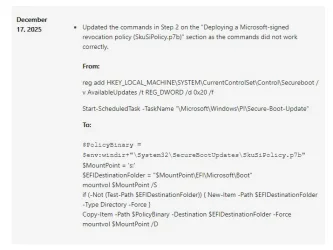
By the way: I think you mentioned 0x20 for AvailableUpdates for applying SkuSiPolicy.p7b. MS changed the documentation to manually copy the file in december, the way via registry key doesn't seem to work (Update_UEFI-CA2023.ps1 missing an option to install SkuSiPolicy.p7b (outside of a revoke) · Issue #3 · garlin-cant-code/SecureBoot-CA-2023-Updates):
0x20.webp

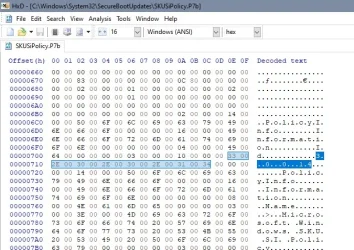
And not relevant for scripting but for a short check the SkuSiPolicy.p7b version can be read with a hex editor:
skusi.webp
 

My Computer My Computer

At a glance

W10
OS
W10
Asus X99A is a really old PC. Before you do anything, please check your BIOS menu.
Do you have an UEFI option for Custom mode, and Delete All Keys?
Yes i can delete all keys inside bios under UEFI Section!
Thx :)
 

My Computer My Computer

At a glance

Windows 11 Pro (Currently 25H2)Intel Core i7 5820k32GB RAMNvidia RTX 5090
OS
Windows 11 Pro (Currently 25H2)
Computer type
PC/Desktop
CPU
Intel Core i7 5820k
Motherboard
Asus X99A
Memory
32GB RAM
Graphics Card(s)
Nvidia RTX 5090
Sound Card
Intergraded
Monitor(s) Displays
Samsung OdysseyG7
Screen Resolution
4K HDR
Hard Drives
2x Samsung M2 990Pro 4TB
PSU
Corsair RM1000X
Case
Fractal Design
Cooling
In & Outtake Noctua 3000 RPMs
Keyboard
Razer Black widow
Mouse
Razer Naga Trinity
Internet Speed
1000Mbit
Browser
Edge
Antivirus
Custom
1. Check you don't have BitLocker or Windows Hello PIN enabled. Because updating the certs will make Windows ask for a recovery password for BitLocker or Windows Hello.

2. Delete all keys. Restart Windows.

3. Run the update script. Replace the folder path with the script's location.
Code:
powershell -ep bypass -f \your\folder\Update_UEFI-CA2023.ps1
 

My Computer My Computer

At a glance

Windows 7
OS
Windows 7
I didn't get any output after running that command:

PS C:\WINDOWS\system32> Get-Disk | Where-Object {$_.IsSystem -eq $true}
PS C:\WINDOWS\system32>


If you are interested, I have attached the ps1 file to this response.
Is the system volume on a Dynamic Disk?

Does this work?
Code:
(Get-CimInstance -Namespace "Root\CIMv2" -Query "SELECT * FROM Win32_DiskPartition" | where { $_.Type -eq 'GPT: System' }).DiskIndex
 
Last edited:

My Computer My Computer

At a glance

Windows 7
OS
Windows 7
Hi,
Today I updated the Windows Boot Mgr SVN to 8.0 from 7.0 using the registry "trick"
I'm unable to boot from my USB drive with Ventoy 1.1.11 (latest version). Ventoy worked with Windows Boot Mgr SVN 7.0 after enrolling a key from the MoK Key Manager. I tried deleting the key and enrolling it again without success:
1776779902062.webp
I've also tried Garlin's script to update the BootMedia
1776779959956.webp

1776779985845.webp
Unfortunately it doesn't work either, I get the following:
1776780094985.webp
After removing the USB drive, the pc boots into Windows as it should.

Any idea how to solve this issue?
Thanks
Nicolast
 

My Computer My Computer

At a glance

Windows 10 x64 PRO N with ESUi3-4005U8 GB DDR3Intel HD Graphics 4400 / NVIDIA GeForce 920M
OS
Windows 10 x64 PRO N with ESU
Computer type
Laptop
Manufacturer/Model
Acer
CPU
i3-4005U
Memory
8 GB DDR3
Graphics Card(s)
Intel HD Graphics 4400 / NVIDIA GeForce 920M
Hard Drives
512 GB SSD
Browser
Firefox
Other Info
10 years old, still running
Ventoy and non-Windows drives will use a MS-signed boot manager or a shim bootloader, but they're not restricted by the SVN.

SVN only applies to the Windows boot manager, as shims are restricted by the SBAT (their version of a SVN mechanism). When the SVN gets bumped, it doesn't change the signing certificate attached to the boot file. The signing cert is the authenticator, but the SVN or BAT is a versioning method.

I'm guessing the update script may not understand what happens with a Ventoy drive (never tested it). The error message indicates a mismatch between the BCD data.

Try the recovery commands in this post:
Computer won't boot and have code 0xc000000f - Microsoft Q&A
 

My Computer My Computer

At a glance

Windows 7
OS
Windows 7
Ventoy and non-Windows drives will use a MS-signed boot manager or a shim bootloader, but they're not restricted by the SVN.

SVN only applies to the Windows boot manager, as shims are restricted by the SBAT (their version of a SVN mechanism). When the SVN gets bumped, it doesn't change the signing certificate attached to the boot file. The signing cert is the authenticator, but the SVN or BAT is a versioning method.

I'm guessing the update script may not understand what happens with a Ventoy drive (never tested it). The error message indicates a mismatch between the BCD data.

Try the recovery commands in this post:
Computer won't boot and have code 0xc000000f - Microsoft Q&A
Thanks Garlin for your reply.
I managed to "fix" the error "Windows failed to start" by repairing the drive when pressing the update "button" in Ventoy.
I forgot to mention that the Windows ISO in Ventoy dates back from October 2025 with CA 2023 enabled using MS Powershell Script.
I'm updating Windows 10 iso to April 2026, then I'll use MS Powershell Script for CA 2023. I'll let you know if this works with Ventoy.
 

My Computer My Computer

At a glance

Windows 10 x64 PRO N with ESUi3-4005U8 GB DDR3Intel HD Graphics 4400 / NVIDIA GeForce 920M
OS
Windows 10 x64 PRO N with ESU
Computer type
Laptop
Manufacturer/Model
Acer
CPU
i3-4005U
Memory
8 GB DDR3
Graphics Card(s)
Intel HD Graphics 4400 / NVIDIA GeForce 920M
Hard Drives
512 GB SSD
Browser
Firefox
Other Info
10 years old, still running
After updating SVN to version 8.0, I didn't get the expected SVN 8.0 error message with Ventoy. I'm using Ventoy with MBR and exFAT, default settings.

Download the previous version of Ventoy and update to that version. If that works, update to the latest version of Ventoy.
 

My Computer My Computer

At a glance

windows 11
OS
windows 11
Edit previous post.: However, when the SVN is updated, some ISOs on the Ventoy USB drive must also be updated.
 

My Computer My Computer

At a glance

windows 11
OS
windows 11
After updating SVN to version 8.0, I didn't get the expected SVN 8.0 error message with Ventoy. I'm using Ventoy with MBR and exFAT, default settings.

Download the previous version of Ventoy and update to that version. If that works, update to the latest version of Ventoy.
That didn't work for me.

Edit previous post.: However, when the SVN is updated, some ISOs on the Ventoy USB drive must also be updated.
I think that's what I've got to do. But it's a pain to update iso images each time there's a new svn version. I've canceled updating windows 10 iso with April 2026 update, taking several hours to update the iso for 11 indexes, I'll try tomorrow with only 1. Can't find trusted ready made windows 10 iso post October 2025.
I'll use Rufus instead, there's only one file to update (bootx64.efi) on the USB drive.
Thanks
 

My Computer My Computer

At a glance

Windows 10 x64 PRO N with ESUi3-4005U8 GB DDR3Intel HD Graphics 4400 / NVIDIA GeForce 920M
OS
Windows 10 x64 PRO N with ESU
Computer type
Laptop
Manufacturer/Model
Acer
CPU
i3-4005U
Memory
8 GB DDR3
Graphics Card(s)
Intel HD Graphics 4400 / NVIDIA GeForce 920M
Hard Drives
512 GB SSD
Browser
Firefox
Other Info
10 years old, still running
One workaround is to temporarily disable Secure Boot during Windows installs. Then re-enable it when you're done.

It beats the game of trying to update your images every time a new boot manager drops.
 

My Computer My Computer

At a glance

Windows 7
OS
Windows 7
How do we know when a new boot manager is installed?
 

My Computers My Computers

  • At a glance

    Windows 11 Pro 25H2 26200.8655Intel® Core™ Ultra 7 265 1.8GHz to 5.3GHz (Ar...SK Hynix 32GB DDR5 5600 Desktop RAM UDIMM Non...Dell NVIDIA® GeForce RTX™ 4060 8GB GDDR6 & (i...
    OS
    Windows 11 Pro 25H2 26200.8655
    Computer type
    PC/Desktop
    Manufacturer/Model
    Dell Tower Plus EBT2250, DOB: 06/15/2025
    CPU
    Intel® Core™ Ultra 7 265 1.8GHz to 5.3GHz (Arrow Lake)
    Motherboard
    Dell Inc. 02D3NT A00 (U3E1)
    Memory
    SK Hynix 32GB DDR5 5600 Desktop RAM UDIMM Non-ECC PC5-5600B
    Graphics Card(s)
    Dell NVIDIA® GeForce RTX™ 4060 8GB GDDR6 & (iGPU) Integrated Intel® UHD Graphics
    Sound Card
    Chipset Realtek High-Definition Audio with Dolby Atmos
    Monitor(s) Displays
    Dell Ultra Sharp U2515H 25-Inch Screen LED-Lit
    Screen Resolution
    2560 X 1440
    Hard Drives
    Samsung (NVMe PM9C1a 1024GB) M.2 PCIe NVMe Solid State Drive (OS), with Samsung Piccolo (S4LY022) 6-Core 4 Channel Controller.

    Samsung T7 500GB SSD, USB-C External Drive
    PSU
    Dell 460W
    Case
    Dell Tower Plus EBT 2250
    Cooling
    Fan
    Keyboard
    Dell Wired Keyboard - KB216
    Mouse
    Logitech M510
    Internet Speed
    Intel Killer E3100G 2.5 Gigabit Ethernet Controller
    Browser
    Microsoft Edge
    Antivirus
    Microsoft Windows Security
    Other Info
    The Samsung NVMe PM9C1a 1024GB SSD does not use a Phison NAND controller. Instead, it uses Samsung's in-house developed Piccolo (S4LY022) 6-Core 4 Channel Controller. The PM9C1a utilizes a controller built using Samsung's 5-nanometer process and seventh-generation V-NAND technology. 🤔
  • At a glance

    Windows 11 Pro 25H2 26200.865510th Generation Intel Core i7-10510U Processo...16GB DDR4 RAMNVIDIA® GeForce® MX250 with 2GB GDDR5 graphic...
    Operating System
    Windows 11 Pro 25H2 26200.8655
    Computer type
    Laptop
    Manufacturer/Model
    Dell Inspiron 15 7000 (7591) 2-in-1, DOB: 11/30/2019
    CPU
    10th Generation Intel Core i7-10510U Processor (8MB Cache, up to 4.9 GHz) Comet Lake
    Motherboard
    Dell 0NNW5N
    Memory
    16GB DDR4 RAM
    Graphics card(s)
    NVIDIA® GeForce® MX250 with 2GB GDDR5 graphics memory
    Sound Card
    Chipset Realtek ALC3254 🤔
    Monitor(s) Displays
    Dell 15.6-inch UHD Truelife Touch Narrow Border WVA Display with Active Pen support
    Screen Resolution
    3840 x 2160
    Hard Drives
    Intel NVME 512GB SSD with 32GB Intel Optane Memory, M.2 80mm PCIe 3.0 RAID

    SanDisk 256GB Extreme microSDXC UHS-I Memory Card
    PSU
    Dell 4-Cell Battery, 68 Whr (Integrated), 90 Watt AC Adapter
    Case
    Dell Inspiron 15 7000 2-in-1 (7591)
    Cooling
    Standard Dell Case Fan & Havit HV-F2056 USB Powered (3 Fans) Laptop Cooling Pad.
    Keyboard
    Dell
    Mouse
    Logitech Wireless Mouse M650L
    Internet Speed
    Wireless/Wired connectivity (WiFi 6 - 802.11 ax)
    Browser
    Microsoft Edge
    Antivirus
    Microsoft Windows Security
    Other Info
    From Dell: 512GB NVME Solid State Drive accelerated by 32GB Intel Optane Memory are the fastest as compared to NAND SSDs. Intel Optane H10 with SSD offers speedy storage and accelerates opening your programs.
How do we know when a new boot manager is installed?
When the boot manager file version or SVN changes.

This whole thing suffers from poor visibility. Details about bug fixes to the boot manager are hidden in CVE's (standard security notifications), but the average user doesn't read them or even know they exist. The KB release notes don't always advertise these changes.

Try figuring out this page for yourself.
Security Update Guide - Microsoft Security Response Center

There's no current Security Center feature where you can insert a boot drive, and it gives you a health check for it. It would be nice for Windows Update to do something like an onscreen message suggesting you check all of your removable media, whenever the boot manager changes.

For now, you can run the check script after every Patch Tuesday.
 

My Computer My Computer

At a glance

Windows 7
OS
Windows 7
Thank you so much for your answer. I was fearing this was going to be the answer. This seems to make it somewhat difficult to keep the USB Image backup Boot Media up to date if I am reading this correctly - one is never going to know if the USB stick has the correct boot files. I guess the people with the paid Macrium X are okay but others that are using free programs, some of which are not getting updates to the software, are going to have to be updating their USB stick boot files all the time... and it may be hard to know when, so they will be doing it with every new windows update at the least.
 
Last edited:

My Computers My Computers

  • At a glance

    Windows 11 Pro 25H2 26200.8655Intel® Core™ Ultra 7 265 1.8GHz to 5.3GHz (Ar...SK Hynix 32GB DDR5 5600 Desktop RAM UDIMM Non...Dell NVIDIA® GeForce RTX™ 4060 8GB GDDR6 & (i...
    OS
    Windows 11 Pro 25H2 26200.8655
    Computer type
    PC/Desktop
    Manufacturer/Model
    Dell Tower Plus EBT2250, DOB: 06/15/2025
    CPU
    Intel® Core™ Ultra 7 265 1.8GHz to 5.3GHz (Arrow Lake)
    Motherboard
    Dell Inc. 02D3NT A00 (U3E1)
    Memory
    SK Hynix 32GB DDR5 5600 Desktop RAM UDIMM Non-ECC PC5-5600B
    Graphics Card(s)
    Dell NVIDIA® GeForce RTX™ 4060 8GB GDDR6 & (iGPU) Integrated Intel® UHD Graphics
    Sound Card
    Chipset Realtek High-Definition Audio with Dolby Atmos
    Monitor(s) Displays
    Dell Ultra Sharp U2515H 25-Inch Screen LED-Lit
    Screen Resolution
    2560 X 1440
    Hard Drives
    Samsung (NVMe PM9C1a 1024GB) M.2 PCIe NVMe Solid State Drive (OS), with Samsung Piccolo (S4LY022) 6-Core 4 Channel Controller.

    Samsung T7 500GB SSD, USB-C External Drive
    PSU
    Dell 460W
    Case
    Dell Tower Plus EBT 2250
    Cooling
    Fan
    Keyboard
    Dell Wired Keyboard - KB216
    Mouse
    Logitech M510
    Internet Speed
    Intel Killer E3100G 2.5 Gigabit Ethernet Controller
    Browser
    Microsoft Edge
    Antivirus
    Microsoft Windows Security
    Other Info
    The Samsung NVMe PM9C1a 1024GB SSD does not use a Phison NAND controller. Instead, it uses Samsung's in-house developed Piccolo (S4LY022) 6-Core 4 Channel Controller. The PM9C1a utilizes a controller built using Samsung's 5-nanometer process and seventh-generation V-NAND technology. 🤔
  • At a glance

    Windows 11 Pro 25H2 26200.865510th Generation Intel Core i7-10510U Processo...16GB DDR4 RAMNVIDIA® GeForce® MX250 with 2GB GDDR5 graphic...
    Operating System
    Windows 11 Pro 25H2 26200.8655
    Computer type
    Laptop
    Manufacturer/Model
    Dell Inspiron 15 7000 (7591) 2-in-1, DOB: 11/30/2019
    CPU
    10th Generation Intel Core i7-10510U Processor (8MB Cache, up to 4.9 GHz) Comet Lake
    Motherboard
    Dell 0NNW5N
    Memory
    16GB DDR4 RAM
    Graphics card(s)
    NVIDIA® GeForce® MX250 with 2GB GDDR5 graphics memory
    Sound Card
    Chipset Realtek ALC3254 🤔
    Monitor(s) Displays
    Dell 15.6-inch UHD Truelife Touch Narrow Border WVA Display with Active Pen support
    Screen Resolution
    3840 x 2160
    Hard Drives
    Intel NVME 512GB SSD with 32GB Intel Optane Memory, M.2 80mm PCIe 3.0 RAID

    SanDisk 256GB Extreme microSDXC UHS-I Memory Card
    PSU
    Dell 4-Cell Battery, 68 Whr (Integrated), 90 Watt AC Adapter
    Case
    Dell Inspiron 15 7000 2-in-1 (7591)
    Cooling
    Standard Dell Case Fan & Havit HV-F2056 USB Powered (3 Fans) Laptop Cooling Pad.
    Keyboard
    Dell
    Mouse
    Logitech Wireless Mouse M650L
    Internet Speed
    Wireless/Wired connectivity (WiFi 6 - 802.11 ax)
    Browser
    Microsoft Edge
    Antivirus
    Microsoft Windows Security
    Other Info
    From Dell: 512GB NVME Solid State Drive accelerated by 32GB Intel Optane Memory are the fastest as compared to NAND SSDs. Intel Optane H10 with SSD offers speedy storage and accelerates opening your programs.
For now, you can run the check script after every Patch Tuesday.
I found this out yesterday when I checked my USB stick for the fun of it and was banned. I ran your code to fix it.

Code:
copy C:\Windows\Boot\EFI_EX\bootmgfw_EX.efi D:\EFI\Boot\bootx64.efi
 
Last edited:

My Computers My Computers

  • At a glance

    Windows 11 Pro 25H2 26200.8655Intel® Core™ Ultra 7 265 1.8GHz to 5.3GHz (Ar...SK Hynix 32GB DDR5 5600 Desktop RAM UDIMM Non...Dell NVIDIA® GeForce RTX™ 4060 8GB GDDR6 & (i...
    OS
    Windows 11 Pro 25H2 26200.8655
    Computer type
    PC/Desktop
    Manufacturer/Model
    Dell Tower Plus EBT2250, DOB: 06/15/2025
    CPU
    Intel® Core™ Ultra 7 265 1.8GHz to 5.3GHz (Arrow Lake)
    Motherboard
    Dell Inc. 02D3NT A00 (U3E1)
    Memory
    SK Hynix 32GB DDR5 5600 Desktop RAM UDIMM Non-ECC PC5-5600B
    Graphics Card(s)
    Dell NVIDIA® GeForce RTX™ 4060 8GB GDDR6 & (iGPU) Integrated Intel® UHD Graphics
    Sound Card
    Chipset Realtek High-Definition Audio with Dolby Atmos
    Monitor(s) Displays
    Dell Ultra Sharp U2515H 25-Inch Screen LED-Lit
    Screen Resolution
    2560 X 1440
    Hard Drives
    Samsung (NVMe PM9C1a 1024GB) M.2 PCIe NVMe Solid State Drive (OS), with Samsung Piccolo (S4LY022) 6-Core 4 Channel Controller.

    Samsung T7 500GB SSD, USB-C External Drive
    PSU
    Dell 460W
    Case
    Dell Tower Plus EBT 2250
    Cooling
    Fan
    Keyboard
    Dell Wired Keyboard - KB216
    Mouse
    Logitech M510
    Internet Speed
    Intel Killer E3100G 2.5 Gigabit Ethernet Controller
    Browser
    Microsoft Edge
    Antivirus
    Microsoft Windows Security
    Other Info
    The Samsung NVMe PM9C1a 1024GB SSD does not use a Phison NAND controller. Instead, it uses Samsung's in-house developed Piccolo (S4LY022) 6-Core 4 Channel Controller. The PM9C1a utilizes a controller built using Samsung's 5-nanometer process and seventh-generation V-NAND technology. 🤔
  • At a glance

    Windows 11 Pro 25H2 26200.865510th Generation Intel Core i7-10510U Processo...16GB DDR4 RAMNVIDIA® GeForce® MX250 with 2GB GDDR5 graphic...
    Operating System
    Windows 11 Pro 25H2 26200.8655
    Computer type
    Laptop
    Manufacturer/Model
    Dell Inspiron 15 7000 (7591) 2-in-1, DOB: 11/30/2019
    CPU
    10th Generation Intel Core i7-10510U Processor (8MB Cache, up to 4.9 GHz) Comet Lake
    Motherboard
    Dell 0NNW5N
    Memory
    16GB DDR4 RAM
    Graphics card(s)
    NVIDIA® GeForce® MX250 with 2GB GDDR5 graphics memory
    Sound Card
    Chipset Realtek ALC3254 🤔
    Monitor(s) Displays
    Dell 15.6-inch UHD Truelife Touch Narrow Border WVA Display with Active Pen support
    Screen Resolution
    3840 x 2160
    Hard Drives
    Intel NVME 512GB SSD with 32GB Intel Optane Memory, M.2 80mm PCIe 3.0 RAID

    SanDisk 256GB Extreme microSDXC UHS-I Memory Card
    PSU
    Dell 4-Cell Battery, 68 Whr (Integrated), 90 Watt AC Adapter
    Case
    Dell Inspiron 15 7000 2-in-1 (7591)
    Cooling
    Standard Dell Case Fan & Havit HV-F2056 USB Powered (3 Fans) Laptop Cooling Pad.
    Keyboard
    Dell
    Mouse
    Logitech Wireless Mouse M650L
    Internet Speed
    Wireless/Wired connectivity (WiFi 6 - 802.11 ax)
    Browser
    Microsoft Edge
    Antivirus
    Microsoft Windows Security
    Other Info
    From Dell: 512GB NVME Solid State Drive accelerated by 32GB Intel Optane Memory are the fastest as compared to NAND SSDs. Intel Optane H10 with SSD offers speedy storage and accelerates opening your programs.
I'm not certain the paid Macrium users will have it any better, unless the backup vendors have some plan that resembles this:

1. When you first ask to create a recovery drive, it logs the current SVN number inside the backup software's config.

2. Every time the backup software wakes up to run, it checks the UEFI's SVN number again. If the SVN has changed from the recorded number, then inform the user that a new recovery drive is needed.

3. When the user creates a new recovery drive, log this SVN number to the software's config. Rinse and repeat.

Now because it requires new code, obviously your Macium 8 free users are stranded.

But in theory, a similar solution could be written as an outside script. You write the current SVN down into a file, and every day you check for changes. Every day, because we don't know if everyone installs their Monthly Update on the same day. When the SVN changes, alert the user and then keep nagging them until they run the script to acknowledge they've done the update.

Rinse and repeat.
 

My Computer My Computer

At a glance

Windows 7
OS
Windows 7

Latest Support Threads

Back
Top Bottom




