
Navigation
Install the app
How to install the app on iOS
Follow along with the video below to see how to install our site as a web app on your home screen.
Note: This feature may not be available in some browsers.
More options
Style variation
System
Light
Dark
You are using an out of date browser. It may not display this or other websites correctly.
You should upgrade or use an alternative browser.
You should upgrade or use an alternative browser.
Solved garlin's PowerShell scripts for updating Secure Boot CA 2023
- Thread starter garlin
- Start date

Okay, I was just teasing.
My Computers
-
At a glance
Windows 11 Pro 25H2 26200.9445Intel® Core™ Ultra 7 265 1.8GHz to 5.3GHz (Ar...SK Hynix 32GB DDR5 5600 Desktop RAM UDIMM Non...Dell NVIDIA® GeForce RTX™ 4060 8GB GDDR6 & (i...- OS
- Windows 11 Pro 25H2 26200.9445
- Computer type
- PC/Desktop
- Manufacturer/Model
- Dell Tower Plus EBT2250, DOB: 06/15/2025
- CPU
- Intel® Core™ Ultra 7 265 1.8GHz to 5.3GHz (Arrow Lake)
- Motherboard
- Dell Inc. 02D3NT A00 (U3E1)
- Memory
- SK Hynix 32GB DDR5 5600 Desktop RAM UDIMM Non-ECC PC5-5600B
- Graphics Card(s)
- Dell NVIDIA® GeForce RTX™ 4060 8GB GDDR6 & (iGPU) Integrated Intel® UHD Graphics
- Sound Card
- Chipset Realtek High-Definition Audio with Dolby Atmos
- Monitor(s) Displays
- Dell Ultra Sharp U2515H 25-Inch Screen LED-Lit
- Screen Resolution
- 2560 X 1440
- Hard Drives
- Samsung (NVMe PM9C1a 1024GB) M.2 PCIe NVMe Solid State Drive (OS), with Samsung Piccolo (S4LY022) 6-Core 4 Channel Controller.
Samsung T7 500GB SSD, USB-C External Drive
- PSU
- Dell 460W
- Case
- Dell Tower Plus EBT 2250
- Cooling
- Fan
- Keyboard
- Dell Wired Keyboard - KB216
- Mouse
- Logitech M510
- Internet Speed
- Intel Killer E3100G 2.5 Gigabit Ethernet Controller
- Browser
- Microsoft Edge
- Antivirus
- Microsoft Windows Security
-
At a glance
Windows 11 Pro 25H2 26200.944510th Generation Intel Core i7-10510U Processo...16GB DDR4 RAMNVIDIA® GeForce® MX250 with 2GB GDDR5 graphic...- Operating System
- Windows 11 Pro 25H2 26200.9445
- Computer type
- Laptop
- Manufacturer/Model
- Dell Inspiron 15 7000 (7591) 2-in-1, DOB: 11/30/2019
- CPU
- 10th Generation Intel Core i7-10510U Processor (8MB Cache, up to 4.9 GHz) Comet Lake
- Motherboard
- Dell 0NNW5N
- Memory
- 16GB DDR4 RAM
- Graphics card(s)
- NVIDIA® GeForce® MX250 with 2GB GDDR5 graphics memory
- Sound Card
- Chipset Realtek ALC3254
- Monitor(s) Displays
- Dell 15.6-inch UHD Truelife Touch Narrow Border WVA Display with Active Pen support
- Screen Resolution
- 3840 x 2160
- Hard Drives
- Intel NVME 512GB SSD with 32GB Intel Optane Memory, M.2 80mm PCIe 3.0 RAID
SanDisk 256GB Extreme microSDXC UHS-I Memory Card
- PSU
- Dell 4-Cell Battery, 68 Whr (Integrated), 90 Watt AC Adapter
- Case
- Dell Inspiron 15 7000 2-in-1 (7591)
- Cooling
- Standard Dell Case Fan & Havit HV-F2056 USB Powered (3 Fans) Laptop Cooling Pad.
- Keyboard
- Dell
- Mouse
- Logitech Wireless Mouse M650L
- Internet Speed
- Wireless/Wired connectivity (WiFi 6 - 802.11 ax)
- Browser
- Microsoft Edge
- Antivirus
- Microsoft Windows Security
- Local time
- 10:37 PM
- Posts
- 383
- OS
- Windows 11 Intel i5 10400 HD630 graphics chip
Okay, I admit I'm having trouble keeping up with all the new scripts. I last downloaded new scrips on 4/18 here is the output for the DBXbin:
PS C:\WINDOWS\system32> powershell -nop -ep bypass -f C:\temp3\secureboot-ca-2023-updates\check_dbxupdate.bin.ps1
SUCCESS: Matched 278/278 EFI signatures from "dbxupdate.bin"
Skipping C:\WINDOWS\System32\SecureBootUpdates\DBXUpdate2024.bin [April 2026 or later version]
SUCCESS: Matched 3/3 SVN signatures from "DBXUpdateSVN.bin"
Is this good or do I need look again for newer script.
PS C:\WINDOWS\system32> powershell -nop -ep bypass -f C:\temp3\secureboot-ca-2023-updates\check_dbxupdate.bin.ps1
SUCCESS: Matched 278/278 EFI signatures from "dbxupdate.bin"
Skipping C:\WINDOWS\System32\SecureBootUpdates\DBXUpdate2024.bin [April 2026 or later version]
SUCCESS: Matched 3/3 SVN signatures from "DBXUpdateSVN.bin"
Is this good or do I need look again for newer script.
My Computer
At a glance
Windows 11 Intel i5 10400 HD630 graphics chipi5-1040012 gbHD630 chipset
- OS
- Windows 11 Intel i5 10400 HD630 graphics chip
- Computer type
- PC/Desktop
- Manufacturer/Model
- HP
- CPU
- i5-10400
- Memory
- 12 gb
- Graphics Card(s)
- HD630 chipset
- Monitor(s) Displays
- LG 24inch
- Hard Drives
- SSD, external usb drive 1tb for files/backups
- Keyboard
- wireless Logi
- Mouse
- ms 4000 wireless mouse
- Internet Speed
- 10meg
- Browser
- Firefox
- Antivirus
- Defender
- Other Info
- Win11 Home 25h2 26200.9457 09/14/2026

So, means it's safe to wait for May and run your script to update the SVN I assume.UPDATE 2026-04-22:
MS replied and admitted they changed DBXUpdate2024.bin to a different file format. The Secure Boot scheduled task knows how to deal with it, but anyone who's writing scripts based on the "normal" format will have problems because they added extra bytes of unexpected data.
The next version of DBXUpdate2024.bin (in May) will return to the usual file format.
There's the explanation of why the scripts stopped working after April's Patch Tuesday. Workarounds have been put into the scripts, so remember to download the latest ZIP file so you don't get any errors.
Microsoft... even things like this are prone to be borked by them lol.
My Computers
-
At a glance
Windows 11 Pro 25H2AMD Ryzen 5 5600G @ 3.9/4.4Ghz2 x 16 GB DDR4 Kingston Fury Beast 3200 MhzAMD Radeon RX 6600 XT MSI Mech 2X OC Edition ...- OS
- Windows 11 Pro 25H2
- Computer type
- PC/Desktop
- Manufacturer/Model
- Built PC
- CPU
- AMD Ryzen 5 5600G @ 3.9/4.4Ghz
- Motherboard
- MSI B550M-PRO-WiFi Ver. 1.4
- Memory
- 2 x 16 GB DDR4 Kingston Fury Beast 3200 Mhz
- Graphics Card(s)
- AMD Radeon RX 6600 XT MSI Mech 2X OC Edition 8 GB
- Sound Card
- Realtek High Definition Audio (Integrated)
- Monitor(s) Displays
- Samsung C50Rx 27" LED / HP S2031 20" LCD
- Screen Resolution
- 1920 x 1080 px / 1600 x 900 px
- Hard Drives
- WD Blue SN570 NVME M.2 SSD [1 TB] -- External Drives: - WD Scorpion Blue 250 GB 5400 RPM (Data Backup) - Hitachi 500 GB 5400 RPM (Software / ISOs Backup) - Toshiba MQ01ABD100 1 TB 5400 RPM (OS Images) - HGST TravelStar 7K1000 1 TB, 7200 RPM USB 3.0 - ADATA SU800 2TB SSD USB 3.0
- PSU
- Corsair RM750e 750W Fully Modular
- Case
- Naceb Hydra NA-1602
- Cooling
- Naceb Orpheus x 3 (Front) + Naceb Cepheus 1200 RPM Max (Rear) + ThemalRight Assasin X 90 SE (CPU)
- Keyboard
- Logitech MK470 Wireless
- Mouse
- Logitech MK470 Wireless
- Internet Speed
- 120 MB Symetrical
- Browser
- Firefox / Brave / Edge
- Antivirus
- Windows Defender
- Other Info
- - VMs: WMware Player - Windows 8.1 Pro x64 / Windows 11 Pro
- Wacom Intuos Pro Small Tablet PTH-460
-
At a glance
Windows 11 Pro 25H2AMD Ryzen 7 7730U @ 2.0/4.5 Ghz2 x 16 GB Kingston Fury Impact DDR4 3200 MhzRadeon (tm) Graphics Vega 8 (512 MB)- Operating System
- Windows 11 Pro 25H2
- Computer type
- Laptop
- Manufacturer/Model
- HP Pavilion 15-eh3000la (80M53LA)
- CPU
- AMD Ryzen 7 7730U @ 2.0/4.5 Ghz
- Motherboard
- HP 8BC7
- Memory
- 2 x 16 GB Kingston Fury Impact DDR4 3200 Mhz
- Graphics card(s)
- Radeon (tm) Graphics Vega 8 (512 MB)
- Sound Card
- Realtek High Definition Audio (Integrated)
- Monitor(s) Displays
- AU Optronics
- Screen Resolution
- 1920 x 1080 px (125% size)
- Hard Drives
- WD Blue SN570 1TB NVME M.2 Drive
- PSU
- 45 Watt Charger
- Cooling
- Laptop Cooling Pad
- Keyboard
- Free Wolf Foldable Portable Keyboard
- Mouse
- Free Wolf Wireless Mouse
- Internet Speed
- 120 MB Symetrical
- Browser
- Firefox / Brave / Edge
- Antivirus
- Windows Defender
- Other Info
- - 41mWh battery.
- Wacom Intuos Pro Small Tablet PTH-460
A newer new script.Is this good or do I need look again for newer script.
Sorry I've had to rewrite it several times in response to the last week's update. It wasn't obvious why MS made unplanned changes.
The latest DBX script no longer skips over "bad" files. It can read all of them for what needs to be done.
My Computer
At a glance
Windows 7
- OS
- Windows 7
So, means it's safe to wait for May and run your script to update the SVN I assume.
Microsoft... even things like this are prone to be borked by them lol.
If you have the latest ZIP file (from today), then you can use the update script to copy the new boot manager and reach SVN 8.0.
Code:
Update_UEFI-CA2023.ps1 -RevokeTo update the boot files on your USB drives:
Code:
Update_UEFI-CA2023.ps1 -BootMediaMy Computer
At a glance
Windows 7
- OS
- Windows 7
- Local time
- 10:37 PM
- Posts
- 383
- OS
- Windows 11 Intel i5 10400 HD630 graphics chip
A newer new script.
Sorry I've had to rewrite it several times in response to the last week's update. It wasn't obvious why MS made unplanned changes.
The latest DBX script no longer skips over "bad" files. It can read all of them for what needs to be done.
Ok, I'm not finding the updated script from today. Guess I can wait till May. So confused.
My Computer
At a glance
Windows 11 Intel i5 10400 HD630 graphics chipi5-1040012 gbHD630 chipset
- OS
- Windows 11 Intel i5 10400 HD630 graphics chip
- Computer type
- PC/Desktop
- Manufacturer/Model
- HP
- CPU
- i5-10400
- Memory
- 12 gb
- Graphics Card(s)
- HD630 chipset
- Monitor(s) Displays
- LG 24inch
- Hard Drives
- SSD, external usb drive 1tb for files/backups
- Keyboard
- wireless Logi
- Mouse
- ms 4000 wireless mouse
- Internet Speed
- 10meg
- Browser
- Firefox
- Antivirus
- Defender
- Other Info
- Win11 Home 25h2 26200.9457 09/14/2026

Is the newest script on Github? Looks like the one there is from two weeks ago.If you have the latest ZIP file (from today), then you can use the update script to copy the new boot manager and reach SVN 8.0.
Code:Update_UEFI-CA2023.ps1 -Revoke
My Computers
-
At a glance
Win 11 Pro 25H2, Build 26200.9457Intel Core i5 14500, 14th Generation64GB DDR4GeForce RTX 4060- OS
- Win 11 Pro 25H2, Build 26200.9457
- Computer type
- PC/Desktop
- Manufacturer/Model
- Home Brew
- CPU
- Intel Core i5 14500, 14th Generation
- Motherboard
- Gigabyte B760M G P WIFI
- Memory
- 64GB DDR4
- Graphics Card(s)
- GeForce RTX 4060
- Sound Card
- Chipset Realtek
- Monitor(s) Displays
- LG 45" Ultragear & Acer 24" 1080p
- Screen Resolution
- 5120x1440 & 1920x1080
- Hard Drives
- Crucial P310 2TB 2280 PCIe Gen4 3D NAND NVMe M.2 SSD (O/S)
Silicon Power 2TB US75 NVMe PCIe Gen4 M.2 2280 SSD (backup)
Crucial BX500 2TB 3D NAND (2nd backup)
Seagate 4TB Ironwolf, rotating HDD secondary backup
External off-line backup Drives: 2 NVMe 4TB drives in external enclosures
- PSU
- Thermaltake Toughpower GF3 750W
- Case
- LIAN LI LANCOOL 216 E-ATX PC Case
- Cooling
- Lots of fans!
- Keyboard
- Microsoft Comfort Curve 2000
- Mouse
- Logitech G305
- Internet Speed
- Verizon FiOS 1GB
- Browser
- Firefox
- Antivirus
- Malware Bytes & Windows Defender Security
-
At a glance
Win 11 Pro 25H2, Build 26200.9168Intel Core i5 1440032GB DDR5Intel 700 Embedded GPU- Operating System
- Win 11 Pro 25H2, Build 26200.9168
- Computer type
- PC/Desktop
- Manufacturer/Model
- Home Brew
- CPU
- Intel Core i5 14400
- Motherboard
- Gigabyte B760M DS3H AX
- Memory
- 32GB DDR5
- Graphics card(s)
- Intel 700 Embedded GPU
- Sound Card
- Realtek Embedded
- Monitor(s) Displays
- 27" HP 1080p
- Screen Resolution
- 1920x1080
- Hard Drives
- Crucial P310 2TB NVMe Gen4 SSD
Samsung EVO 990 2TB NVMe Gen4 SSD
Samsung 2TB SATA SSD
Seagate 4TB Ironwolf, rotating HDD secondary backup
- PSU
- Thermaltake Smart BM3 650W
- Case
- Okinos Micro ATX Case
- Cooling
- Fans
- Keyboard
- Microsoft Comfort Curve 2000
- Mouse
- Logitech G305
- Internet Speed
- Verizon FiOS 1GB
- Browser
- Firefox
- Antivirus
- Malware Bytes & Windows Defender Security
-
Nimo N171 17" Laptop, (Intel i3-1215U, 16GB RAM, 2TB NVMe, Win11 Pro)
Acemagic Vista Mini PC V1 (Intel N150, 16GB RAM, 1TB NVMe, Win11 Pro)
HP ENVY h8-1540t, (24GB RAM, 2TB SSD, 2TB HDD, Win11 Pro)

Post #1,385 } IF YOU WANT TO PERFORM THE REVOCATION, BUT HAVE NOT STARTED, PLEASE DOWNLOAD THE LATEST ZIP FILE FROM POST #1.
Not the Github one !
Not the Github one !
My Computer
At a glance
Win11 24H2 IOT LTSC / Win11 Pro 25H2AMD Ryzen 7 8700G / Ryzen 7 8700G / Ryzen 8600GF5-6000J3636F16GX2-FX5 32GB / Lexar Ares RGB ...internal
- OS
- Win11 24H2 IOT LTSC / Win11 Pro 25H2
- Computer type
- PC/Desktop
- Manufacturer/Model
- Gigabyte x2 / Asus = Home builds
- CPU
- AMD Ryzen 7 8700G / Ryzen 7 8700G / Ryzen 8600G
- Motherboard
- Gigabyte B650 AORUS ELITE AX V2 / ASUS TUF GAMING B650-PLUS / B650 GAMING X AX V2
- Memory
- F5-6000J3636F16GX2-FX5 32GB / Lexar Ares RGB LD5BU016G-R6000GDLA 32GB / Kingston FURY Beast 32 GB DDR5-5600
- Graphics Card(s)
- internal
- Sound Card
- Realtek
- Monitor(s) Displays
- BenQ 27 L EW2780
- Screen Resolution
- 1920x1080
- Hard Drives
- Many M.2's (WD)
- PSU
- be quiet! Pure Power 13 M 550W
- Case
- Chieftec HC-10B-OP
- Cooling
- Gelid Solutions Tranquillo 5, many Noctua's 12x12
- Keyboard
- Microsoft
- Mouse
- Cherry
- Internet Speed
- 500 mbs
- Browser
- Vivaldi
- Antivirus
- Eset
- Other Info
- PC builder / repair / Trouble-shooter etc.
- Local time
- 8:37 PM
- Posts
- 503
- OS
- Windows 11
No disrespect, but like I said:
It most certainly is the latest version of the scripts, from the zip file, downloaded (again and again) moments ago.
Or, to be exact, it is the whatever version of the scripts in the zip file from the first post.
Once again, in the attachments you can see the contents and the hashes of the file downloaded from the first post.
I know you don't have time to waste. Well, neither do I.
I certainly do not have access to your file server or your personal test/dev rig, do I?
Have you checked the file that is been downloaded from the first post?
Have you tried downloading it yourself?
It's always easy to blame someone for incompetence, it is hard to admit we are wrong.
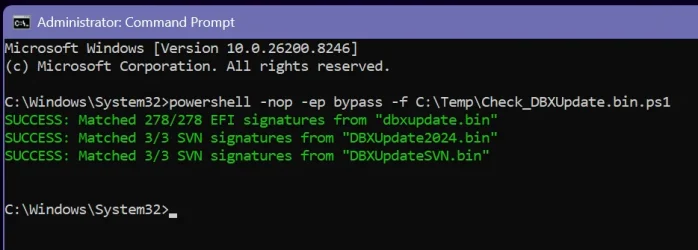
IDK, I downloaded the purported new scripts in post #1 and ran the Check_DBXUpdate.bin.ps1 and got this:
My Computer
At a glance
Windows 11
- OS
- Windows 11
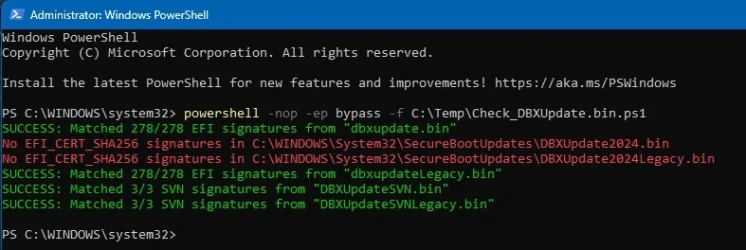
Old script:
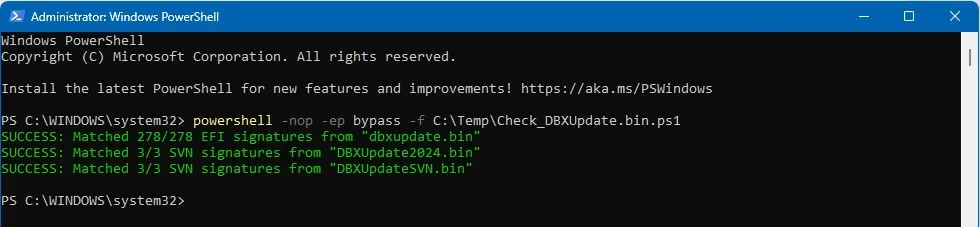
New script:
New script:
Last edited:
My Computer
At a glance
Win11 24H2 IOT LTSC / Win11 Pro 25H2AMD Ryzen 7 8700G / Ryzen 7 8700G / Ryzen 8600GF5-6000J3636F16GX2-FX5 32GB / Lexar Ares RGB ...internal
- OS
- Win11 24H2 IOT LTSC / Win11 Pro 25H2
- Computer type
- PC/Desktop
- Manufacturer/Model
- Gigabyte x2 / Asus = Home builds
- CPU
- AMD Ryzen 7 8700G / Ryzen 7 8700G / Ryzen 8600G
- Motherboard
- Gigabyte B650 AORUS ELITE AX V2 / ASUS TUF GAMING B650-PLUS / B650 GAMING X AX V2
- Memory
- F5-6000J3636F16GX2-FX5 32GB / Lexar Ares RGB LD5BU016G-R6000GDLA 32GB / Kingston FURY Beast 32 GB DDR5-5600
- Graphics Card(s)
- internal
- Sound Card
- Realtek
- Monitor(s) Displays
- BenQ 27 L EW2780
- Screen Resolution
- 1920x1080
- Hard Drives
- Many M.2's (WD)
- PSU
- be quiet! Pure Power 13 M 550W
- Case
- Chieftec HC-10B-OP
- Cooling
- Gelid Solutions Tranquillo 5, many Noctua's 12x12
- Keyboard
- Microsoft
- Mouse
- Cherry
- Internet Speed
- 500 mbs
- Browser
- Vivaldi
- Antivirus
- Eset
- Other Info
- PC builder / repair / Trouble-shooter etc.
This is a new entry for Check_UEFI-CA2023.ps1 -Verbose
UEFI Variable
-------------
SBAT (Linux only): sbat,1,2024010900 / shim,4 / grub,3 / grub.debian,4
:)
UEFI Variable
-------------
SBAT (Linux only): sbat,1,2024010900 / shim,4 / grub,3 / grub.debian,4
:)
My Computers
-
At a glance
Windows 11 ProIntel Core i5-12600K 3.7 GHz 10-Core ProcessorCorsair Vengeance LPX 64 GB (2 x 32 GB) DDR4-...Integrated Intel UHD Graphics 770- OS
- Windows 11 Pro
- Computer type
- PC/Desktop
- Manufacturer/Model
- Self built PC by me.
- CPU
- Intel Core i5-12600K 3.7 GHz 10-Core Processor
- Motherboard
- Gigabyte B760M H DDR4 Micro ATX LGA1700 Motherboard
- Memory
- Corsair Vengeance LPX 64 GB (2 x 32 GB) DDR4-3200 CL16 Memory
- Graphics Card(s)
- Integrated Intel UHD Graphics 770
- Sound Card
- Realtek
- Monitor(s) Displays
- LG
- Hard Drives
- Samsung 990 Pro 1 TB M.2-2280 PCIe 4.0 X4 NVME Solid State Drive
Samsung 990 Pro 2 TB M.2-2280 PCIe 4.0 X4 NVME Solid State Drive
- PSU
- NZXT 850w ATX 3.1 Gold Fully Modular Power Supply
- Case
- Thermaltake Versa H25 ATX Mid Tower Case
- Cooling
- CPU Cooler Thermalright Assassin Spirit 120 EVO ARGB (ARGB Disabled) - Case Fans BlackThermalright TL-C12C-S X3 66.17 CFM 120 mm Fans 3-Pack (ARGB disabled)
- Internet Speed
- 1 Gbps
- Other Info
- I hate ARGB.
-
At a glance
Windows 11 Pro- Operating System
- Windows 11 Pro
- Computer type
- Laptop
- Manufacturer/Model
- Lenovo ThinkBook 14 G2 ITL
- Local time
- 8:37 PM
- Posts
- 503
- OS
- Windows 11
This is a new entry for Check_UEFI-CA2023.ps1 -Verbose
UEFI Variable
-------------
SBAT (Linux only): sbat,1,2024010900 / shim,4 / grub,3 / grub.debian,4
:)
I only get that as part of the -Audit output.
My Computer
At a glance
Windows 11
- OS
- Windows 11

- Local time
- 10:37 PM
- Posts
- 258
- OS
- Windows 11
Guys, come on, Garlin is working hard to help all of us.No disrespect, but like I said:
It most certainly is the latest version of the scripts, from the zip file, downloaded (again and again) moments ago.
Or, to be exact, it is the whatever version of the scripts in the zip file from the first post.
Once again, in the attachments you can see the contents and the hashes of the file downloaded from the first post.
I know you don't have time to waste. Well, neither do I.
I certainly do not have access to your file server or your personal test/dev rig, do I?
Have you checked the file that is been downloaded from the first post?
Have you tried downloading it yourself?
It's always easy to blame someone for incompetence, it is hard to admit we are wrong.
Lets play nice and cut him some slack...
@garlin
I just downloaded the latest zip from post #1,
- Check_DBXUpdate.bin.ps1 shows "VERSION 2026.04.18"
- Check_UEFI-CA2023.ps1 shows "VERSION 2026.04.18"
- Update_UEFI-CA2023.ps1 shows "VERSION 2026.04.21"
Suggestion, maybe add the publish date to the zip file name on post #1
People can see if they have the latest and greatest more easily
And thanks for taking time to answer each and everyone

My Computers
-
At a glance
Windows 1132GB- OS
- Windows 11
- Computer type
- PC/Desktop
- Manufacturer/Model
- Dell 3910
- Memory
- 32GB
-
At a glance
Windows 1116GB- Operating System
- Windows 11
- Computer type
- Tablet
- Manufacturer/Model
- Surface Pro 9
- Memory
- 16GB
Not everyone has the SBAT variable. Windows uses the SVN to prevent older boot files from running. Microsoft (like Apple) benefits from being the only company in charge of their OS.I only get that as part of the -Audit output.
There are several Linux distros (prolly too many at this point), and sometimes they agree to share software bits and other times disagree. I think part of the Linux appeal is everyone enjoys fighting someone outside of their tribe.
Instead of a single number, SBAT is a config file which can contain any number of lines which instruct the different Linux boot managers on what versions are allowed. A line may change for one vendor and their friends, and it might not for someone else.
MS really doesn't care; but they see it as professional courtesy to push out a baseline SBAT for Linux users. Of course, your Linux can manage SBAT too. If your Linux fails to boot, it's not because of the SVN... the SBAT is blocking them.
I'm adding SBAT (only from -Verbose mode), just so you know it;s there. You don't need to understand what the individual lines mean unless you're a Linux user. Ventoy and Rufus use Linux-based boot loaders, so they fall under the SBAT's control. While their devs are careful, it's entirely possible that a bad SBAT fiile breaks Linux. It happened before, by accident Windows broke a bunch of Linux systems with SBAT.
You can opt out of SBAT by setting a reg key.
Code:
reg add HKEY_LOCAL_MACHINE\SYSTEM\CurrentControlSet\Control\SecureBoot\SBAT /v OptOut /d 1 /t REG_DWORDMy update script will never force SBAT, you have to specifically ask for it using the -SBAT option. It's because I have no way of predicting whether you will be using Linux or a tool like Rufus or Ventoy.
My Computer
At a glance
Windows 7
- OS
- Windows 7
I just look at the date modified of the files.Suggestion, maybe add the publish date to the zip file name on post #1
My Computer
At a glance
Windows 11 Pro
- OS
- Windows 11 Pro
Normally we don't go through so many script versions in a short time, but I'll add a VERSION.TXT in the next ZIP file.
I can't name the file "README.TXT" because GitHub uses that reserved file name to describe your project page.
I can't name the file "README.TXT" because GitHub uses that reserved file name to describe your project page.
My Computer
At a glance
Windows 7
- OS
- Windows 7
- Local time
- 8:37 PM
- Posts
- 503
- OS
- Windows 11
@garlin thank you again for the extraordinary project. I been following this thread from inception. I can't believe how much time and effort you've put into helping others. As I said to you before; ' you're a saint ' and it's appreciated, as can be seen by the many acknowledgements.
My Computer
At a glance
Windows 11
- OS
- Windows 11

666pierog
Member
- Local time
- 4:37 AM
- Posts
- 61
- OS
- Windows 11
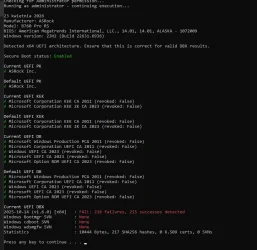
Okay, i got new bios version for all certificates (before the update the certificate was missing Option ROM UEFI CA 2023)
What about that Failures? what does that mean?
"This device has updated Secure Boot CA/keys. This device signature information is included here.
DeviceAttributes: BaseBoardManufacturer:ASRock;FirmwareManufacturer:American Megatrends International, LLC.;FirmwareVersion:14.01;OEMModelNumber:B760 Pro RS;OEMModelBaseBoard:B760 Pro RS;OEMModelSystemFamily:To Be Filled By O.E.M.;OEMManufacturerName:ASRock;OEMModelSKU:To Be Filled By O.E.M.;OSArchitecture:amd64;
BucketId: a84d412c9164001d30a05e6c7bdccc21ecb4f809b11ae561f3da754e4fd282ea
BucketConfidenceLevel: No Data Observed - Action Required
UpdateType: Windows UEFI CA 2023 (DB), Option ROM CA 2023 (DB), 3P UEFI CA 2023 (DB), KEK 2023, Boot Manager (2023)
For more information, please see Windows Secure Boot certificate expiration and CA updates - Microsoft Support."
What about that Failures? what does that mean?
"This device has updated Secure Boot CA/keys. This device signature information is included here.
DeviceAttributes: BaseBoardManufacturer:ASRock;FirmwareManufacturer:American Megatrends International, LLC.;FirmwareVersion:14.01;OEMModelNumber:B760 Pro RS;OEMModelBaseBoard:B760 Pro RS;OEMModelSystemFamily:To Be Filled By O.E.M.;OEMManufacturerName:ASRock;OEMModelSKU:To Be Filled By O.E.M.;OSArchitecture:amd64;
BucketId: a84d412c9164001d30a05e6c7bdccc21ecb4f809b11ae561f3da754e4fd282ea
BucketConfidenceLevel: No Data Observed - Action Required
UpdateType: Windows UEFI CA 2023 (DB), Option ROM CA 2023 (DB), 3P UEFI CA 2023 (DB), KEK 2023, Boot Manager (2023)
For more information, please see Windows Secure Boot certificate expiration and CA updates - Microsoft Support."
Attachments
My Computer
At a glance
Windows 11
- OS
- Windows 11
- Computer type
- PC/Desktop
- Manufacturer/Model
- Asrock b760 pro rs
Similar threads


Latest Support Threads
-
My Waterfox browser setting keeps resetting after reboot.
- Started by malcheeleng
- Replies: 0
-
Bit-Locker protected Flash drive becomes read only
- Started by Anibor_11
- Replies: 1
-
 Widgets blank and unresponsive after running Windows System Restore
- Started by Number42
- Replies: 4
-
 Downloading from DriveThruRPG (DTRPG) causes open tabs to be closed on MS Edge
- Started by iko22
- Replies: 1
-
Hyperlinks and Embedded Controls sometimes not working on MS Edge
- Started by iko22
- Replies: 1
Latest Tutorials
-
 Accessibility Change Mouse Indicator Activation Method in Windows 11
- Started by Brink
- Replies: 0
-
 Accessibility Enable or Disable Include Screen Reader Audio in Live Captions on Windows 11
- Started by Brink
- Replies: 0
-
 Accessibility Change Lock View Shortcut for Magnifier Zoom on Multiple Displays in Windows 11
- Started by Brink
- Replies: 0
-
 Personalization Enable or Disable "Customize menu" Tip in Windows 11
- Started by Brink
- Replies: 0
-
 Personalization Add or Remove "Customize menu" on Context Menu in Windows 11
- Started by Brink
- Replies: 0