Solved garlin's PowerShell scripts for updating Secure Boot CA 2023


I don't have this problem. You're on 26H1 (28000). Does your system have another language installed? This looks like Cyrillic -> Диск#0, раздел…
Yes, I have the Russian version of Windows 11 26H1 :LOL:
 

My Computers My Computers

  • At a glance

    Windows 11 Enterprise 26H1Intel Core Ultra 7 (Liquid Metal)32GB DDR5Intel Graphics (Integrated)
    OS
    Windows 11 Enterprise 26H1
    Computer type
    Laptop
    Manufacturer/Model
    Lenovo ThinkPad X1 Carbon Gen 12
    CPU
    Intel Core Ultra 7 (Liquid Metal)
    Motherboard
    OEM
    Memory
    32GB DDR5
    Graphics Card(s)
    Intel Graphics (Integrated)
    Sound Card
    Realtek
    Monitor(s) Displays
    Lenovo OLED
    Screen Resolution
    2880x1800
    Hard Drives
    2TB Samsung 990 Pro
    PSU
    OEM
    Case
    OEM
    Cooling
    OEM
    Keyboard
    ru-RU
    Mouse
    Lenovo Haptic Touchpad
    Internet Speed
    2Gbps (Xfinity ISP)
    Browser
    Chromium, Firefox
    Antivirus
    Windows Security
  • At a glance

    Windows 11 Enterprise 26H1Intel Core i9-13900 (Delidded, Liquid Metal)64GB DDR5EVGA GeForce RTX 3090 FTW3 Ultra
    Operating System
    Windows 11 Enterprise 26H1
    Computer type
    PC/Desktop
    Manufacturer/Model
    Lenovo P3 Ultra
    CPU
    Intel Core i9-13900 (Delidded, Liquid Metal)
    Motherboard
    OEM
    Memory
    64GB DDR5
    Graphics card(s)
    EVGA GeForce RTX 3090 FTW3 Ultra
    Sound Card
    Reaktek
    Monitor(s) Displays
    49" Odyssey OLED G9 (G95SC)
    Screen Resolution
    5120x1440
    Hard Drives
    512GB NVMe (OS), 4TB NVMe (Folders, Games)
    PSU
    Thermaltake Smart M 650W Bronze
    Case
    OEM
    Cooling
    OEM
    Keyboard
    Razer Huntsman V3 Pro 8KHz
    Mouse
    Razer Basilisk V3 Pro 35K
    Internet Speed
    2Gbps (Xfinity ISP)
    Browser
    Chromium, Firefox
    Antivirus
    Windows Security
Could have mentioned that the first time. I'm guessing string matching isn't portable.
 

My Computer My Computer

At a glance

Windows 7
OS
Windows 7
Could have mentioned that the first time. I'm guessing string matching isn't portable.
My bad, I should’ve mentioned that earlier. That probably explains the Cyrillic strings and why any string matching would get weird.

That also explains why this worked for me:
Code:
mountvol Z: /S
mountvol Z: /L
dir Z:\EFI\Microsoft\Boot
mountvol Z: /D

Using mountvol /S let me access the ESP directly without depending on the localized Disk/Partition text output.
 

My Computers My Computers

  • At a glance

    Windows 11 Enterprise 26H1Intel Core Ultra 7 (Liquid Metal)32GB DDR5Intel Graphics (Integrated)
    OS
    Windows 11 Enterprise 26H1
    Computer type
    Laptop
    Manufacturer/Model
    Lenovo ThinkPad X1 Carbon Gen 12
    CPU
    Intel Core Ultra 7 (Liquid Metal)
    Motherboard
    OEM
    Memory
    32GB DDR5
    Graphics Card(s)
    Intel Graphics (Integrated)
    Sound Card
    Realtek
    Monitor(s) Displays
    Lenovo OLED
    Screen Resolution
    2880x1800
    Hard Drives
    2TB Samsung 990 Pro
    PSU
    OEM
    Case
    OEM
    Cooling
    OEM
    Keyboard
    ru-RU
    Mouse
    Lenovo Haptic Touchpad
    Internet Speed
    2Gbps (Xfinity ISP)
    Browser
    Chromium, Firefox
    Antivirus
    Windows Security
  • At a glance

    Windows 11 Enterprise 26H1Intel Core i9-13900 (Delidded, Liquid Metal)64GB DDR5EVGA GeForce RTX 3090 FTW3 Ultra
    Operating System
    Windows 11 Enterprise 26H1
    Computer type
    PC/Desktop
    Manufacturer/Model
    Lenovo P3 Ultra
    CPU
    Intel Core i9-13900 (Delidded, Liquid Metal)
    Motherboard
    OEM
    Memory
    64GB DDR5
    Graphics card(s)
    EVGA GeForce RTX 3090 FTW3 Ultra
    Sound Card
    Reaktek
    Monitor(s) Displays
    49" Odyssey OLED G9 (G95SC)
    Screen Resolution
    5120x1440
    Hard Drives
    512GB NVMe (OS), 4TB NVMe (Folders, Games)
    PSU
    Thermaltake Smart M 650W Bronze
    Case
    OEM
    Cooling
    OEM
    Keyboard
    Razer Huntsman V3 Pro 8KHz
    Mouse
    Razer Basilisk V3 Pro 35K
    Internet Speed
    2Gbps (Xfinity ISP)
    Browser
    Chromium, Firefox
    Antivirus
    Windows Security
Is this $true or $false?
Code:
[regex]::Match((Get-CimInstance -ClassName Win32_BootConfiguration).Caption,'\d+').Groups[0].Value -eq [char]48
 

My Computer My Computer

At a glance

Windows 7
OS
Windows 7
Is this $true or $false?
Code:
[regex]::Match((Get-CimInstance -ClassName Win32_BootConfiguration).Caption,'\d+').Groups[0].Value -eq [char]48
This comes up as True:

Powershell:
PS C:\Windows\System32> [regex]::Match((Get-CimInstance -ClassName Win32_BootConfiguration).Caption,'\d+').Groups[0].Value -eq [char]48
True
PS C:\Windows\System32>
 

My Computers My Computers

  • At a glance

    Windows 11 Enterprise 26H1Intel Core Ultra 7 (Liquid Metal)32GB DDR5Intel Graphics (Integrated)
    OS
    Windows 11 Enterprise 26H1
    Computer type
    Laptop
    Manufacturer/Model
    Lenovo ThinkPad X1 Carbon Gen 12
    CPU
    Intel Core Ultra 7 (Liquid Metal)
    Motherboard
    OEM
    Memory
    32GB DDR5
    Graphics Card(s)
    Intel Graphics (Integrated)
    Sound Card
    Realtek
    Monitor(s) Displays
    Lenovo OLED
    Screen Resolution
    2880x1800
    Hard Drives
    2TB Samsung 990 Pro
    PSU
    OEM
    Case
    OEM
    Cooling
    OEM
    Keyboard
    ru-RU
    Mouse
    Lenovo Haptic Touchpad
    Internet Speed
    2Gbps (Xfinity ISP)
    Browser
    Chromium, Firefox
    Antivirus
    Windows Security
  • At a glance

    Windows 11 Enterprise 26H1Intel Core i9-13900 (Delidded, Liquid Metal)64GB DDR5EVGA GeForce RTX 3090 FTW3 Ultra
    Operating System
    Windows 11 Enterprise 26H1
    Computer type
    PC/Desktop
    Manufacturer/Model
    Lenovo P3 Ultra
    CPU
    Intel Core i9-13900 (Delidded, Liquid Metal)
    Motherboard
    OEM
    Memory
    64GB DDR5
    Graphics card(s)
    EVGA GeForce RTX 3090 FTW3 Ultra
    Sound Card
    Reaktek
    Monitor(s) Displays
    49" Odyssey OLED G9 (G95SC)
    Screen Resolution
    5120x1440
    Hard Drives
    512GB NVMe (OS), 4TB NVMe (Folders, Games)
    PSU
    Thermaltake Smart M 650W Bronze
    Case
    OEM
    Cooling
    OEM
    Keyboard
    Razer Huntsman V3 Pro 8KHz
    Mouse
    Razer Basilisk V3 Pro 35K
    Internet Speed
    2Gbps (Xfinity ISP)
    Browser
    Chromium, Firefox
    Antivirus
    Windows Security
Different method:
Code:
$GUID = (Get-Partition -Number ((Get-CimInstance -ClassName Win32_BootConfiguration).Caption -replace '\\Device\\Harddisk' -replace '\\Partition',',')).Guid
Get-Childitem -LiteralPath ('\\?\Volume{0}\' -f $GUID)
 

My Computer My Computer

At a glance

Windows 7
OS
Windows 7
Let's try restoring the correct ACL's on the SecureBootUpdates folder.

1. Download PowerRun.

2. Save this attachment file ("RESTORE_ACL.txt") to your PC.

3. Open an elevated CMD shell window.

4. Run this command from the CMD:
Code:
icacls C:\Windows\System32 /restore RESTORE_ACL.txt

5. Close the CMD.

I found the problem causing my dbxupdate.bin not found when running your Check_UEFI-CA2023.ps1 script (VERSION 2026.04.24).

I was running PowerShell (x86) [32 bit] on Windows 11 as Administrator, and ran the CHECK script from this window. This always gave me an error trying to access dbxupdate.bin.

When I use the default PowerShell [64 bit], your Check_UEFI-CA2023.ps1 script runs to completion (output below).

I also checked that I could "cd" into C:\Windows\System32\SecureBootUpdates\ from a 64-bit PS session, but not from 32-bit PS.

So I didn't need to change the ACLs of SecureBootUpdates to fix my problem.

I'm not sure if I still have a problem with my Windows 11, but given that your script runs successfully, it's possible all is OK.

Garlin, thanks for your time and help, and maybe spell out the obvious for people like me to use the default [64-bit] PowerShell on Windows 11.

Here is the output from Check_UEFI-CA2023.ps1 (VERSION 2026.04.24). Please let me know if all is OK with the details. Do I need to revoke manually?

1777799871471.webp

1777799959150.webp

Thanks
 

My Computer My Computer

At a glance

Windows 11
OS
Windows 11
Thanks for identifying the problem!

1. 32-bit processes can't read all of the folders and files under "C:\Windows\System32", because it' a mapped (or virtual) folder. Instead they're supposed to use "C:\Windows\SysNative" in place of System32.

I've tweaked all the scripts to recognize which folders are needed for 32 or 64-bit execution.

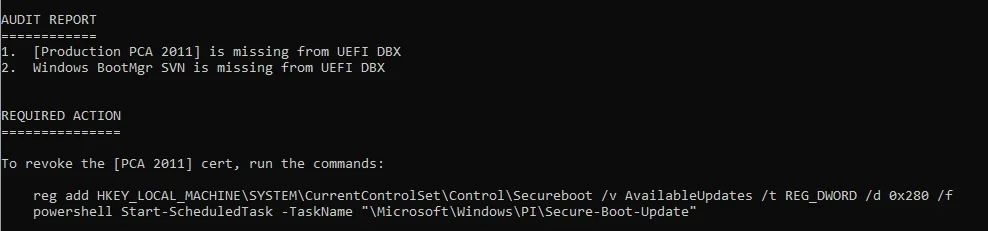
2. Your UEFI has the CA 2023 certs added, but CA 2011 hasn't been revoked (still optional for now).
 
Last edited:

My Computer My Computer

At a glance

Windows 7
OS
Windows 7
Different method:
Code:
$GUID = (Get-Partition -Number ((Get-CimInstance -ClassName Win32_BootConfiguration).Caption -replace '\\Device\\Harddisk' -replace '\\Partition',',')).Guid
Get-Childitem -LiteralPath ('\\?\Volume{0}\' -f $GUID)
Powershell:
PowerShell 7.6.1
PS C:\Users\RYSZARD> $GUID = (Get-Partition -Number ((Get-CimInstance -ClassName Win32_BootConfiguration).Caption -replace '\\Device\\Harddisk' -replace '\\Partition',',')).Guid
Get-Partition: No MSFT_Partition objects found with property 'PartitionNumber' equal to '1'.  Verify the value of the property and retry.
PS C:\Users\RYSZARD> Get-Childitem -LiteralPath ('\\?\Volume{0}\' -f $GUID)
Get-ChildItem: Cannot find path '\\?\Volume\' because it does not exist.
PS C:\Users\RYSZARD>
 

My Computers My Computers

  • At a glance

    Windows 11 Enterprise 26H1Intel Core Ultra 7 (Liquid Metal)32GB DDR5Intel Graphics (Integrated)
    OS
    Windows 11 Enterprise 26H1
    Computer type
    Laptop
    Manufacturer/Model
    Lenovo ThinkPad X1 Carbon Gen 12
    CPU
    Intel Core Ultra 7 (Liquid Metal)
    Motherboard
    OEM
    Memory
    32GB DDR5
    Graphics Card(s)
    Intel Graphics (Integrated)
    Sound Card
    Realtek
    Monitor(s) Displays
    Lenovo OLED
    Screen Resolution
    2880x1800
    Hard Drives
    2TB Samsung 990 Pro
    PSU
    OEM
    Case
    OEM
    Cooling
    OEM
    Keyboard
    ru-RU
    Mouse
    Lenovo Haptic Touchpad
    Internet Speed
    2Gbps (Xfinity ISP)
    Browser
    Chromium, Firefox
    Antivirus
    Windows Security
  • At a glance

    Windows 11 Enterprise 26H1Intel Core i9-13900 (Delidded, Liquid Metal)64GB DDR5EVGA GeForce RTX 3090 FTW3 Ultra
    Operating System
    Windows 11 Enterprise 26H1
    Computer type
    PC/Desktop
    Manufacturer/Model
    Lenovo P3 Ultra
    CPU
    Intel Core i9-13900 (Delidded, Liquid Metal)
    Motherboard
    OEM
    Memory
    64GB DDR5
    Graphics card(s)
    EVGA GeForce RTX 3090 FTW3 Ultra
    Sound Card
    Reaktek
    Monitor(s) Displays
    49" Odyssey OLED G9 (G95SC)
    Screen Resolution
    5120x1440
    Hard Drives
    512GB NVMe (OS), 4TB NVMe (Folders, Games)
    PSU
    Thermaltake Smart M 650W Bronze
    Case
    OEM
    Cooling
    OEM
    Keyboard
    Razer Huntsman V3 Pro 8KHz
    Mouse
    Razer Basilisk V3 Pro 35K
    Internet Speed
    2Gbps (Xfinity ISP)
    Browser
    Chromium, Firefox
    Antivirus
    Windows Security
There's something weird about your PS...

Get-Partition is complaining that PartitionNumber has the string value "1", and not integer 1. A normal PS session would convert that value, without you needing to perform any magic. I can duplicate the warning by explicitly casting the value 1 to a string, as the Number parameter.

The script works for almost everyone, so it's gotta be local to your PC. I'd rather not be calling mountvol to get around this problem, because it points to a more serious failure which isn't being handled.
 

My Computer My Computer

At a glance

Windows 7
OS
Windows 7
There's something weird about your PS...

Get-Partition is complaining that PartitionNumber has the string value "1", and not integer 1. A normal PS session would convert that value, without you needing to perform any magic. I can duplicate the warning by explicitly casting the value 1 to a string, as the Number parameter.

The script works for almost everyone, so it's gotta be local to your PC. I'd rather not be calling mountvol to get around this problem, because it points to a more serious failure which isn't being handled.
No problem, friend. I figured I’d mention it in case anyone else runs into the same issue, but if it looks specific to my local setup, I’ll just stick with the workaround on my end.

Appreciate you taking a look!
 

My Computers My Computers

  • At a glance

    Windows 11 Enterprise 26H1Intel Core Ultra 7 (Liquid Metal)32GB DDR5Intel Graphics (Integrated)
    OS
    Windows 11 Enterprise 26H1
    Computer type
    Laptop
    Manufacturer/Model
    Lenovo ThinkPad X1 Carbon Gen 12
    CPU
    Intel Core Ultra 7 (Liquid Metal)
    Motherboard
    OEM
    Memory
    32GB DDR5
    Graphics Card(s)
    Intel Graphics (Integrated)
    Sound Card
    Realtek
    Monitor(s) Displays
    Lenovo OLED
    Screen Resolution
    2880x1800
    Hard Drives
    2TB Samsung 990 Pro
    PSU
    OEM
    Case
    OEM
    Cooling
    OEM
    Keyboard
    ru-RU
    Mouse
    Lenovo Haptic Touchpad
    Internet Speed
    2Gbps (Xfinity ISP)
    Browser
    Chromium, Firefox
    Antivirus
    Windows Security
  • At a glance

    Windows 11 Enterprise 26H1Intel Core i9-13900 (Delidded, Liquid Metal)64GB DDR5EVGA GeForce RTX 3090 FTW3 Ultra
    Operating System
    Windows 11 Enterprise 26H1
    Computer type
    PC/Desktop
    Manufacturer/Model
    Lenovo P3 Ultra
    CPU
    Intel Core i9-13900 (Delidded, Liquid Metal)
    Motherboard
    OEM
    Memory
    64GB DDR5
    Graphics card(s)
    EVGA GeForce RTX 3090 FTW3 Ultra
    Sound Card
    Reaktek
    Monitor(s) Displays
    49" Odyssey OLED G9 (G95SC)
    Screen Resolution
    5120x1440
    Hard Drives
    512GB NVMe (OS), 4TB NVMe (Folders, Games)
    PSU
    Thermaltake Smart M 650W Bronze
    Case
    OEM
    Cooling
    OEM
    Keyboard
    Razer Huntsman V3 Pro 8KHz
    Mouse
    Razer Basilisk V3 Pro 35K
    Internet Speed
    2Gbps (Xfinity ISP)
    Browser
    Chromium, Firefox
    Antivirus
    Windows Security
I tried that script you posted just a few back and received this:
*update: is it because i am launching from D: drive ? I have all my utilities on that.


UEFI DBX Certs
--------------
(NONE)
Windows BootMgr SVN
Get-Partition: D:\AdminTools\CheckCA2023\Check_UEFI-CA2023.ps1:1591
Line |
1591 | $GUID = (Get-Partition -Number $Number).Guid
| ~~~~~~~~~~~~~~~~~~~~~~~~~~~~~
| No MSFT_Partition objects found with property 'PartitionNumber' equal to '221'. Verify the value of the property and retry.
Get-HarddiskVolume: D:\AdminTools\CheckCA2023\Check_UEFI-CA2023.ps1:1593
Line |
1593 | $EFI_Path = '{0}\EFI' -f (Get-HarddiskVolume $GUID)
| ~~~~~
| Cannot bind argument to parameter 'VolumeGUID' because it is an empty string.
Command cannot find any of the specified files.
 

My Computer My Computer

At a glance

Windows 10
OS
Windows 10
What's the response from this command?
Code:
powershell -C (Get-CimInstance -ClassName Win32_BootConfiguration).Caption
 

My Computer My Computer

At a glance

Windows 7
OS
Windows 7
What's the response from this command?
Code:
powershell -C (Get-CimInstance -ClassName Win32_BootConfiguration).Caption
\Device\Harddisk22\Partition1 : The term '\Device\Harddisk22\Partition1' is not recognized as the name of a cmdlet, function, script file, or operable
program. Check the spelling of the name, or if a path was included, verify that the path is correct and try again.
At line:1 char:1
+ \Device\Harddisk22\Partition1
+ ~~~~~~~~~~~~~~~~~~~~~~~~~~~~~
+ CategoryInfo : ObjectNotFound: (\Device\Harddisk22\Partition1:String) [], CommandNotFoundException
+ FullyQualifiedErrorId : CommandNotFoundException


My drive list is kinda odd. the NVME is the last drive on the system. I have lots of drives and raids.

DISKPART> list disk

Disk ### Status Size Free Dyn Gpt
-------- ------------- ------- ------- --- ---
Disk 0 Online 9 TB 0 B *
Disk 1 Online 1863 GB 0 B * *
Disk 2 Online 1863 GB 0 B * *
Disk 3 Online 1863 GB 0 B * *
Disk 4 Online 1863 GB 0 B * *
Disk 5 Online 1863 GB 0 B * *
Disk 6 Online 1863 GB 1024 KB * *
Disk 7 Online 1863 GB 1024 KB * *
Disk 8 Online 1863 GB 1024 KB * *
Disk 9 Online 1863 GB 1024 KB * *
Disk 10 Online 1863 GB 1024 KB * *
Disk 11 Online 3726 GB 0 B *
Disk 12 Online 931 GB 1024 KB * *
Disk 13 Online 931 GB 1024 KB * *
Disk 14 Online 931 GB 1024 KB * *
Disk 15 Online 931 GB 1024 KB * *
Disk 16 Online 1863 GB 0 B *
Disk 17 Online 1863 GB 0 B *
Disk 18 Online 167 GB 0 B *
Disk 19 Online 111 GB 0 B *
Disk 20 Online 931 GB 0 B *
Disk 21 Online 465 GB 1024 KB *
Disk 22 Online 465 GB 5120 KB *
 

My Computer My Computer

At a glance

Windows 10
OS
Windows 10
v2026.04.24 operates as normal without any messages, i will just stick with that release.
 

My Computer My Computer

At a glance

Windows 10
OS
Windows 10
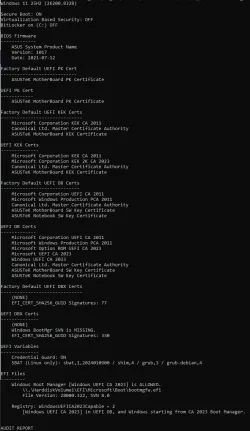
@garlin I just downloaded the recent updates from your first post. Now there is something wrong with the script Check_uefi-CA2023.ps1

I run the script with verbose and audit command and I get this (between equality-sign lines):
=================================================================
Windows 11 25H2 (26200.8328)

Secure Boot: ON
Virtualization Based Security: ON
BitLocker on (C:) OFF

BIOS Firmware
-------------
ASUS All Series
Version: 2503
Date: 2016-02-26

Factory Default UEFI PK Cert
----------------------------
(NONE)

UEFI PK Cert
------------
ASUSTeK MotherBoard PK Certificate

Factory Default UEFI KEK Certs
------------------------------
(NONE)

UEFI KEK Certs
--------------
Microsoft Corporation KEK CA 2011
Microsoft Corporation KEK 2K CA 2023
Canonical Ltd. Master Certificate Authority
ASUSTeK MotherBoard KEK Certificate

Factory Default UEFI DB Certs
-----------------------------
(NONE)

UEFI DB Certs
-------------
Microsoft Corporation UEFI CA 2011
Microsoft Windows Production PCA 2011
Microsoft Option ROM UEFI CA 2023
Microsoft UEFI CA 2023
Windows UEFI CA 2023
Canonical Ltd. Master Certificate Authority
ASUSTeK MotherBoard SW Key Certificate
ASUSTeK Notebook SW Key Certificate

Factory Default UEFI DBX Certs
------------------------------
(NONE)
EFI_CERT_SHA256_GUID Signatures: 0

UEFI DBX Certs
--------------
Microsoft Corporation UEFI CA 2011
Microsoft Windows Production PCA 2011
Windows BootMgr SVN 8.0
EFI_CERT_SHA256_GUID Signatures: 440

UEFI Variable
-------------
SBAT (Linux only): sbat,1,2024010900 / shim,4 / grub,3 / grub.debian,4
[31;1mGet-Volume_DevicePath: [0mI:\MiCROSOFT\CERT\SecureBoot-CA-2023-Updates\Check_UEFI-CA2023.ps1:1395[0m
[31;1m[0m[36;1mLine |[0m
[31;1m[0m[36;1m[36;1m1395 | [0m $EFI_Path = '{0}EFI' -f (Get-Volume_DevicePath [36;1m$GUID[0m)[0m
[31;1m[0m[36;1m[36;1m[0m[36;1m[0m[36;1m | [31;1m ~~~~~[0m
[31;1m[0m[36;1m[36;1m[0m[36;1m[0m[36;1m[31;1m[31;1m[36;1m | [31;1mCannot process argument transformation on parameter 'VolumeGUID'. Cannot convert value to type System.String.[0m
Command cannot find any of the specified files.
=====================================================================

The script stops at UEFI Variable section and never completes to the end.

What is wrong ? Is the script wrong not suitable for the BIOS firmware of my PC or is it my PC that is acting wrong in other ways ? I had never seen SBAT (Linux only) grub,3, etc. in the output before.

 
Last edited:

My Computers My Computers

  • At a glance

    Windows 11 Pro build 26200.8524Intel i7-4790Teams DDR3-1600 4x4 GBMSI Nvidia GeForce GTX 1050Ti
    OS
    Windows 11 Pro build 26200.8524
    Computer type
    PC/Desktop
    Manufacturer/Model
    Home Built
    CPU
    Intel i7-4790
    Motherboard
    Asus H97 Pro Gamer with add-on TPM1.2 module
    Memory
    Teams DDR3-1600 4x4 GB
    Graphics Card(s)
    MSI Nvidia GeForce GTX 1050Ti
    Sound Card
    Realtek ALC1150
    Monitor(s) Displays
    Dell P2425D
    Screen Resolution
    2560 by 1440 pixels
    Hard Drives
    Corsair NVMe M.2 Core XT 1000 GB (Windows 11 v.25H2); Samsung SATA Evo 870 500 GB (Windows 11 v.25H2);
    PSU
    Corsair HX850
    Case
    Gigabyte Solo 210
    Cooling
    Zalman CNPS7X Tower
    Keyboard
    Microsoft AIO Wireless (includes touchpad)
    Mouse
    HP S1000 Plus Wireless
    Internet Speed
    500 Mb fiber optic
    Browser
    Chrome; MS Edge
    Antivirus
    Windows Defender
  • At a glance

    MacOS 12 MontereyIntel Core i58 GBIntel integrated
    Operating System
    MacOS 12 Monterey
    Computer type
    Laptop
    Manufacturer/Model
    Apple Macbook Air
    CPU
    Intel Core i5
    Memory
    8 GB
    Graphics card(s)
    Intel integrated
    Screen Resolution
    1440 by 900 pixels
    Hard Drives
    128 GB
    Keyboard
    Built-in
    Mouse
    Microsoft Wireless
    Internet Speed
    802.11 ac
    Browser
    Chrome; Safari
    Antivirus
    N/A
The script is done with UEFI Variable. It's stuck on checking out your EFI's Boot Manager file.

I don't know if you're using the most recent, work-in-progress script. The new script reports on UEFI variables, which is a new feature. SBAT is an UEFI security setting for Linux systems, but Windows writes it for everyone unless you opted out.
 

Attachments

My Computer My Computer

At a glance

Windows 7
OS
Windows 7
I downloaded your script at the time I wrote my issue. So I think it should be the latest if you update your first post at page 1.

I never had this issue before. This issue is not important to me because I know my secure boot certificate update status is O.K. I sometimes re-check in order to see what improvements you make in your scripts. Your scripts seem too complicated to me, though. I just like to see the improved output.

Thanks for all the tedious work you undertake to do to help people make a smooth transition to secure computing.
 

My Computers My Computers

  • At a glance

    Windows 11 Pro build 26200.8524Intel i7-4790Teams DDR3-1600 4x4 GBMSI Nvidia GeForce GTX 1050Ti
    OS
    Windows 11 Pro build 26200.8524
    Computer type
    PC/Desktop
    Manufacturer/Model
    Home Built
    CPU
    Intel i7-4790
    Motherboard
    Asus H97 Pro Gamer with add-on TPM1.2 module
    Memory
    Teams DDR3-1600 4x4 GB
    Graphics Card(s)
    MSI Nvidia GeForce GTX 1050Ti
    Sound Card
    Realtek ALC1150
    Monitor(s) Displays
    Dell P2425D
    Screen Resolution
    2560 by 1440 pixels
    Hard Drives
    Corsair NVMe M.2 Core XT 1000 GB (Windows 11 v.25H2); Samsung SATA Evo 870 500 GB (Windows 11 v.25H2);
    PSU
    Corsair HX850
    Case
    Gigabyte Solo 210
    Cooling
    Zalman CNPS7X Tower
    Keyboard
    Microsoft AIO Wireless (includes touchpad)
    Mouse
    HP S1000 Plus Wireless
    Internet Speed
    500 Mb fiber optic
    Browser
    Chrome; MS Edge
    Antivirus
    Windows Defender
  • At a glance

    MacOS 12 MontereyIntel Core i58 GBIntel integrated
    Operating System
    MacOS 12 Monterey
    Computer type
    Laptop
    Manufacturer/Model
    Apple Macbook Air
    CPU
    Intel Core i5
    Memory
    8 GB
    Graphics card(s)
    Intel integrated
    Screen Resolution
    1440 by 900 pixels
    Hard Drives
    128 GB
    Keyboard
    Built-in
    Mouse
    Microsoft Wireless
    Internet Speed
    802.11 ac
    Browser
    Chrome; Safari
    Antivirus
    N/A
I don't update post #1 until a new script is nearing official release, because the work-in-progress versions might have bugs, or add fixes for a recently reported problem.

The reason for adding UEFI variables is mostly to track "UEFI lock" where a Windows policy has added new UEFI variables to enforce SkuSiPolicy or LSA even if the Windows setting for enforcement has been disabled. Otherwise you might complain that a setting is "off", but Windows is ignoring the reg value and using the UEFI variable for the same setting.

I'm also pairing it with a new script to automate the clearing of UEFI locks. And another script to predict if SkuSiPolicy will block certain versions of winload.efi.

The first half of my script was dedicated to applying Secure Boot certs. Now the second half has to follow all the revocation (or enforcement) steps since those can block booting of WinRE-based USB drives.
 

My Computer My Computer

At a glance

Windows 7
OS
Windows 7
@garlin I'm pretty sure MS is following this thread and often asking themselves: " Why didn't we think of that? ".
 

My Computer My Computer

At a glance

Windows 11
OS
Windows 11

Latest Support Threads

Back
Top Bottom