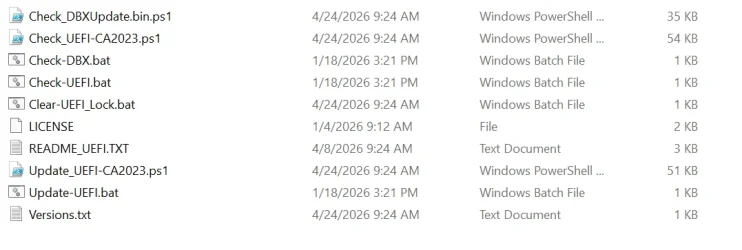
Solved garlin's PowerShell scripts for updating Secure Boot CA 2023


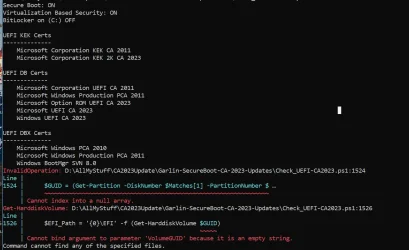
new script gives me this:
1778265609069.webp

but even after running those commands and reboot it still gives me same result.
 

My Computer My Computer

At a glance

Windows 11 Pro 64bit (release preview channel)i5 840016 GB DDR4RTX 3060 Ti
OS
Windows 11 Pro 64bit (release preview channel)
Computer type
PC/Desktop
Manufacturer/Model
Asus
CPU
i5 8400
Motherboard
ROG STRIX Z370-H GAMING
Memory
16 GB DDR4
Graphics Card(s)
RTX 3060 Ti
Sound Card
On Board
Monitor(s) Displays
Acer VG242Y P
Screen Resolution
1080p
Hard Drives
Intel 660p SSD
PSU
800w
Internet Speed
1000 Mbps
Forgot to change two more lines. Try this version.
 

Attachments

My Computer My Computer

At a glance

Windows 7
OS
Windows 7

My Computer My Computer

At a glance

Windows 11 Pro 64bit (release preview channel)i5 840016 GB DDR4RTX 3060 Ti
OS
Windows 11 Pro 64bit (release preview channel)
Computer type
PC/Desktop
Manufacturer/Model
Asus
CPU
i5 8400
Motherboard
ROG STRIX Z370-H GAMING
Memory
16 GB DDR4
Graphics Card(s)
RTX 3060 Ti
Sound Card
On Board
Monitor(s) Displays
Acer VG242Y P
Screen Resolution
1080p
Hard Drives
Intel 660p SSD
PSU
800w
Internet Speed
1000 Mbps
Thanks for finding it. I'll push a revised ZIP file in a moment.
 

My Computer My Computer

At a glance

Windows 7
OS
Windows 7
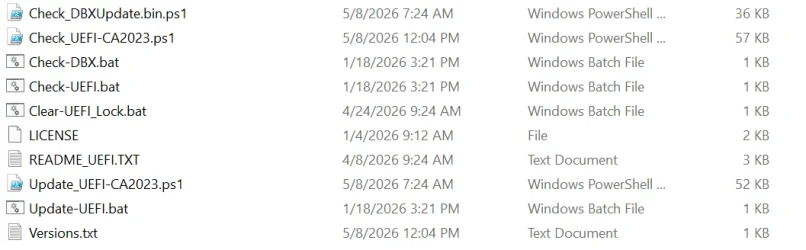
UPDATE: 2026-05-08

Pushed version v2026.05.08.01 to ZIP file, and GitHub. Fixed @Warre1's reported bug with wrong ranking of SVN.
 

My Computer My Computer

At a glance

Windows 7
OS
Windows 7
Garlin,

I was having issues with your Check-UEFI-CA2023.ps1 script not being able to find the EFI partition on my home server. I ended up changing this code:


Powershell:
$null = (Get-CimInstance -ClassName Win32_BootConfiguration).Caption -match '(\d+)(.*)(\d+)'
$GUID = (Get-Partition -DiskNumber $Matches[1] -PartitionNumber $Matches[3]).Guid

$EFI_Path = '{0}\EFI' -f (Get-HarddiskVolume $GUID)

To this and it worked:


Code:
#Find EFI System Partition
$EFIPartition = Get-Partition |
    Where-Object {
        $_.GptType -eq '{C12A7328-F81F-11D2-BA4B-00A0C93EC93B}' -or
        $_.Type -eq 'System' -or
        $_.IsSystem -eq $true
    } |
    Select-Object -First 1

if (-not $EFIPartition)
{
    $EFIPartition = Get-Partition |
        Where-Object {
            $_.Size -ge 100MB -and
            $_.Size -le 600MB
        } |
        ForEach-Object {
            $Partition = $_
            $Volume = $Partition | Get-Volume -ErrorAction SilentlyContinue

            if ($Volume.FileSystem -eq 'FAT32')
            {
                $Partition
            }
        } |
        Select-Object -First 1
}

if (-not $EFIPartition)
{
    Write-Host 'ERROR: Unable to locate EFI System Partition.' -ForegroundColor Red
    exit 1
}

$EFIMountPath = 'C:\Windows\Temp\EFI_Mount'

if (-not (Test-Path -LiteralPath $EFIMountPath))
{
    New-Item -Path $EFIMountPath -ItemType Directory -Force | Out-Null
}

$CurrentAccessPath = $EFIPartition.AccessPaths |
    Where-Object {
        $_ -match '^.:\\$'
    } |
    Select-Object -First 1

if ($CurrentAccessPath)
{
    $EFI_Path = '{0}EFI' -f $CurrentAccessPath
}
else
{
    Add-PartitionAccessPath -DiskNumber $EFIPartition.DiskNumber -PartitionNumber $EFIPartition.PartitionNumber -AccessPath $EFIMountPath -ErrorAction Stop
    $EFI_Path = Join-Path $EFIMountPath 'EFI'
}

if (-not (Test-Path -LiteralPath $EFI_Path))
{
    Write-Host "ERROR: EFI path not found: $EFI_Path" -ForegroundColor Red
    exit 1
}


Great job on these scripts. They're super helpful.
 

My Computer My Computer

At a glance

Windows 11
OS
Windows 11
Computer type
PC/Desktop
Manufacturer/Model
Dell
I was having issues with your Check-UEFI-CA2023.ps1 script not being able to find the EFI partition on my home server. I ended up changing this code:
Thanks. This section of the code has evolved at least 3 times with entirely different methods to determine the (active) EFI's location.

I can't seem to find a solution which fits all disk layouts, because some folks have disk mirrors or clones. So a careful dev would say "Select -First 1" is a risky assumption to make. The current method of "Get-CimInstance -ClassName Win32_BootConfiguration" is supposed to ask Windows which volume was used for booting.

Does this work for listing the "\EFI\Microsoft\Boot" folder?
Code:
Get-ChildItem (bcdedit /enum '{bootmgr}' | foreach { if ($_ -match '(HarddiskVolume(\d+))') { '\\.\{0}\EFI\Microsoft\Boot' -f $Matches[0] } })
 

My Computer My Computer

At a glance

Windows 7
OS
Windows 7
Thanks. This section of the code has evolved at least 3 times with entirely different methods to determine the (active) EFI's location.

I can't seem to find a solution which fits all disk layouts, because some folks have disk mirrors or clones. So a careful dev would say "Select -First 1" is a risky assumption to make. The current method of "Get-CimInstance -ClassName Win32_BootConfiguration" is supposed to ask Windows which volume was used for booting.

Does this work for listing the "\EFI\Microsoft\Boot" folder?
Code:
Get-ChildItem (bcdedit /enum '{bootmgr}' | foreach { if ($_ -match '(HarddiskVolume(\d+))') { '\\.\{0}\EFI\Microsoft\Boot' -f $Matches[0] } })


Your Get-ChildItem returned this:

Code:
PS C:\Users\Administrator> Get-ChildItem (bcdedit /enum '{bootmgr}' | foreach { if ($_ -match '(HarddiskVolume(\d+))') {
 '\\.\{0}\EFI\Microsoft\Boot' -f $Matches[0] } })


    Directory: C:\Users\Administrator


Mode                 LastWriteTime         Length Name
----                 -------------         ------ ----
d-----         9/23/2023     07:49                .vscode
d-r---          8/1/2024     13:12                3D Objects
d-r---         11/4/2024     14:33                Contacts
d-r---         3/27/2026     10:24                Desktop
d-r---         11/9/2025     18:05                Documents
d-r---          5/3/2026     11:56                Downloads
d-r---         11/4/2024     14:33                Favorites
d-----         8/10/2025     09:35                Intel
d-r---         11/4/2024     14:33                Links
d-r---         11/4/2024     14:33                Music
d-r---         11/4/2024     14:33                Pictures
d-r---         11/4/2024     14:33                Saved Games
d-r---         11/4/2024     14:33                Searches
d-----         11/4/2024     17:01                Ubiquiti UniFi
d-r---         11/4/2024     14:33                Videos

For two of your scripts, I ended up needing to change more code in both the check and update scripts b/c I was getting errors with Add-PartitionAccessPath

I can attach the two updated script files for you to check out.

Here's a summary of what changed - Both scripts were failing around EFI System Partition access.

Check-UEFI-CA2023.ps1
  • Replaced fragile EFI partition detection based on Win32_BootConfiguration.Caption
  • Removed the Add-PartitionAccessPath dependency because it was failing with: The requested access path is already in use.
  • Changed EFI access logic to avoid remounting the ESP when it is already mounted/reserved.
  • Added validation before checking bootmgfw.efi .
Update-UEFI-CA2023.ps1

  • Replaced the original EFI path logic that built paths like \\?\Volume$GUID\EFI
  • Removed Add-PartitionAccessPath because it failed when the mount path was already in use.
  • Tried mountvol /s but that also failed on this system with The parameter is incorrect.
  • Final fix avoids mounting entirely and accesses the EFI partition through the volume GUID path returned by Get-Volume.
  • Moved the bootmgfw.efi validation until after $BootMgr_File is actually defined.
  • Added explicit checks so the script exits cleanly if EFI or bootmgfw.efi cannot be resolved.
 

Attachments

My Computer My Computer

At a glance

Windows 11
OS
Windows 11
Computer type
PC/Desktop
Manufacturer/Model
Dell
Let's back up a bit and retrace the script's history with the ESP path.

Regardless of the method used to "determine" the active EFI, the original version used Get-Partition to find the UNC path "\\?\Volume{GUID}\", so we didn't have to mount the ESP (assign a drive letter). You can perfectly access the volume's files using the Volume{GUID} notation.

The problem is we can't present this path to the user, because volume GUID's are random.

Everyone would complain "my [XYZ] doesnt look like your [ABC]". Thus Harddiskvolume[N] notation suits the display better, and also avoids the need to mount the ESP to a drive letter if the user wants to copy a new boot file file by hand.

To update the boot manager in the ESP, we still don't need a drive letter using the original Volume{GUID} or the HarddiskVolume[N] methods. Where a drive letter is finally needed is to update WinRE-based boot media. bcdboot is a convenient (and proven) method, but it demands a drive letter. So that logic checks to see if someone has already mounted our ESP, or we're free to hunt for an unassigned drive letter.

We could avoid bcdboot entirely by just copying the specific required boot files from EFI_EX to the target media. But I'm following MS's lead and using bcdboot for consistency. Make2023BootableMedia.ps1 doesn't appear to use bcdboot, in contradiction to the Secure Boot guidance which says use bcdboot. When in doubt, follow MS because you won't be more wrong than what MS performed.

Ultimately the question becomes: Why do the other methods of "determining" the ESP not work? I suspect if you have a dual-boot setup, depending on how everything was done, it's possible to get multiple hits on a "system" partition based on whatever detection criteria. How bulletproof do we need to make this for the user?

OK. What does "bcdedit /enum" look in your system?
 

My Computer My Computer

At a glance

Windows 7
OS
Windows 7
I get this:

PS C:\WINDOWS\system32> Get-ChildItem (bcdedit /enum '{bootmgr}' | foreach { if ($_ -match '(HarddiskVolume(\d+))') { '\\.\{0}\EFI\Microsoft\Boot' -f $Matches[0] } })


Directory: \\.\HarddiskVolume1\EFI\Microsoft\Boot


Mode LastWriteTime Length Name
---- ------------- ------ ----
d----- 8/2/2025 5:43 AM bg-BG
d----- 8/2/2025 5:43 AM CIPolicies
d----- 8/2/2025 5:43 AM cs-CZ
d----- 8/2/2025 5:43 AM da-DK
d----- 8/2/2025 5:43 AM de-DE
d----- 8/2/2025 5:43 AM el-GR
d----- 8/2/2025 5:43 AM en-GB
d----- 8/2/2025 5:43 AM en-US
d----- 8/2/2025 5:43 AM es-ES
d----- 8/2/2025 5:43 AM es-MX
d----- 8/2/2025 5:43 AM et-EE
d----- 8/2/2025 5:43 AM fi-FI
d----- 8/2/2025 5:43 AM fr-CA
d----- 8/2/2025 5:43 AM fr-FR
d----- 8/2/2025 5:43 AM hr-HR
d----- 8/2/2025 5:43 AM hu-HU
d----- 8/2/2025 5:43 AM it-IT
d----- 8/2/2025 5:43 AM ja-JP
d----- 8/2/2025 5:43 AM ko-KR
d----- 8/2/2025 5:43 AM lt-LT
d----- 8/2/2025 5:43 AM lv-LV
d----- 8/2/2025 5:43 AM nb-NO
d----- 8/2/2025 5:43 AM nl-NL
d----- 8/2/2025 5:43 AM pl-PL
d----- 8/2/2025 5:43 AM pt-BR
d----- 8/2/2025 5:43 AM pt-PT
d----- 8/2/2025 5:43 AM qps-ploc
d----- 8/2/2025 5:43 AM qps-plocm
d----- 8/2/2025 5:43 AM ro-RO
d----- 8/2/2025 5:43 AM ru-RU
d----- 8/2/2025 5:43 AM sk-SK
d----- 8/2/2025 5:43 AM sl-SI
d----- 8/2/2025 5:43 AM sr-Latn-RS
d----- 8/2/2025 5:43 AM sv-SE
d----- 8/2/2025 5:43 AM tr-TR
d----- 8/2/2025 5:43 AM uk-UA
d----- 8/2/2025 5:43 AM zh-CN
d----- 8/2/2025 5:43 AM zh-TW
d----- 8/2/2025 5:43 AM Fonts
d----- 8/2/2025 5:43 AM Resources
-a---- 4/1/2024 9:22 AM 11030 boot.stl
-a---- 4/15/2026 2:26 AM 2610664 memtest.efi
-a---- 4/15/2026 2:26 AM 3010352 bootmgfw.efi
-a---- 12/9/2025 7:47 PM 58776 kdnet_uart16550.dll
-a---- 12/9/2025 7:47 PM 71072 kd_02_10df.dll
-a---- 12/9/2025 7:47 PM 562592 kd_02_10ec.dll
-a---- 12/9/2025 7:47 PM 71064 kd_02_1137.dll
-a---- 12/9/2025 7:47 PM 99752 kd_02_1414.dll
-a---- 12/9/2025 7:47 PM 284048 kd_02_14e4.dll
-a---- 12/9/2025 7:47 PM 58792 kd_02_15ad.dll
-a---- 12/9/2025 7:47 PM 91552 kd_02_15b3.dll
-a---- 12/9/2025 7:47 PM 83328 kd_02_1969.dll
-a---- 12/9/2025 7:47 PM 71056 kd_02_19a2.dll
-a---- 12/9/2025 7:47 PM 62864 kd_02_1af4.dll
-a---- 12/9/2025 7:47 PM 361872 kd_02_8086.dll
-a---- 12/9/2025 7:47 PM 58784 kd_07_1415.dll
-a---- 12/9/2025 7:47 PM 87440 kd_0C_8086.dll
-a---- 4/15/2026 2:26 AM 2994080 bootmgr.efi
-a---- 4/15/2026 2:26 AM 87552 kdstub.dll
-a---- 4/15/2026 2:26 AM 174496 SecureBootRecovery.efi
-a---- 4/1/2024 9:22 AM 10341 winsipolicy.p7b
-a---- 5/9/2026 12:43 AM 28672 BCD
-a---- 12/9/2025 7:47 PM 83328 kd_02_1d0f.dll
-a---- 8/2/2025 7:12 AM 11733 boot.pnd.stl
-a---- 4/15/2026 2:26 AM 6776 SkuSiPolicy.p7b
-a---- 3/21/2026 4:03 AM 24576 BCD_old


PS C:\WINDOWS\system32>
 

My Computer My Computer

At a glance

Win11 24H2 IOT LTSC / Win11 Pro 25H2AMD Ryzen 7 8700G / AMD Ryzen 7 8700GF5-6000J3636F16GX2-FX5 32GB / Lexar Ares RGB ...internal
OS
Win11 24H2 IOT LTSC / Win11 Pro 25H2
Computer type
PC/Desktop
Manufacturer/Model
Gigabyte / Asus Home build
CPU
AMD Ryzen 7 8700G / AMD Ryzen 7 8700G
Motherboard
Gigabyte B650 AORUS ELITE AX V2 / ASUS TUF GAMING B650-PLUS
Memory
F5-6000J3636F16GX2-FX5 32GB / Lexar Ares RGB LD5BU016G-R6000GDLA 32GB
Graphics Card(s)
internal
Sound Card
Realtek
Monitor(s) Displays
BenQ 27 L EW2780
Screen Resolution
1920x1080
Hard Drives
Many M.2's
Internet Speed
400 mbs
Browser
Vivaldi
Antivirus
Eset
its not dual boot. just windows server 2025


Code:
PS C:\Scripts> bcdedit /enum

Windows Boot Manager
--------------------
identifier              {bootmgr}
device                  partition=S:
path                    \EFI\Microsoft\Boot\bootmgfw.efi
description             Windows Boot Manager
locale                  en-us
inherit                 {globalsettings}
bootshutdowndisabled    Yes
default                 {current}
resumeobject            {6a5393ab-c40b-11ef-8e26-c0ddb966135f}
displayorder            {current}
toolsdisplayorder       {memdiag}
timeout                 30

Windows Boot Loader
-------------------
identifier              {current}
device                  partition=C:
path                    \Windows\system32\winload.efi
description             Windows Server
locale                  en-us
inherit                 {bootloadersettings}
isolatedcontext         Yes
allowedinmemorysettings 0x15000075
osdevice                partition=C:
systemroot              \Windows
resumeobject            {6a5393ab-c40b-11ef-8e26-c0ddb966135f}
nx                      OptOut
 

My Computer My Computer

At a glance

Windows 11
OS
Windows 11
Computer type
PC/Desktop
Manufacturer/Model
Dell
{bootmgr} is on "partition=S:", which means I can't assume it's HarddiskVolume. Interesting. I'll have to think about it.
 

My Computer My Computer

At a glance

Windows 7
OS
Windows 7
garlin i'm a dummy. i forgot i had my efi mounted to S to run some other commands and test. I never unmounted it!
 

My Computer My Computer

At a glance

Windows 11
OS
Windows 11
Computer type
PC/Desktop
Manufacturer/Model
Dell
Code:
PS C:\Scripts> bcdedit /enum

Windows Boot Manager
--------------------
identifier              {bootmgr}
device                  partition=\Device\HarddiskVolume1
path                    \EFI\Microsoft\Boot\bootmgfw.efi
description             Windows Boot Manager
locale                  en-us
inherit                 {globalsettings}
bootshutdowndisabled    Yes
default                 {current}
resumeobject            {6a5393ab-c40b-11ef-8e26-c0ddb966135f}
displayorder            {current}
toolsdisplayorder       {memdiag}
timeout                 30

Windows Boot Loader
-------------------
identifier              {current}
device                  partition=C:
path                    \Windows\system32\winload.efi
description             Windows Server
locale                  en-us
inherit                 {bootloadersettings}
isolatedcontext         Yes
allowedinmemorysettings 0x15000075
osdevice                partition=C:
systemroot              \Windows
resumeobject            {6a5393ab-c40b-11ef-8e26-c0ddb966135f}
nx                      OptOut
 

My Computer My Computer

At a glance

Windows 11
OS
Windows 11
Computer type
PC/Desktop
Manufacturer/Model
Dell
v2026.05.08.01

PS D:\AdminTools\CheckCA2023> .\check_UEFI-CA2023.ps1 -Audit
Secure Boot: ON
Virtualization Based Security: ON
BitLocker on (C:) OFF

UEFI KEK Certs
--------------
Microsoft Corporation KEK CA 2011
Microsoft Corporation KEK 2K CA 2023

UEFI DB Certs
-------------
Microsoft Corporation UEFI CA 2011
Microsoft Windows Production PCA 2011
Microsoft Option ROM UEFI CA 2023
Microsoft UEFI CA 2023
Windows UEFI CA 2023

UEFI DBX Certs
--------------
(NONE)
Windows BootMgr SVN
Command cannot find any of the specified files.

Is something wrong at the end here?
 

My Computer My Computer

At a glance

Windows 10
OS
Windows 10
Try running this command for me:
Code:
(Get-CimInstance -ClassName Win32_BootConfiguration)
 

My Computer My Computer

At a glance

Windows 7
OS
Windows 7
Try running this command for me:
Code:
(Get-CimInstance -ClassName Win32_BootConfiguration)
BootDirectory Name SettingID Caption
------------- ---- --------- -------
C:\Windows BootConfiguration \Device\Harddisk22\Partition1
 

My Computer My Computer

At a glance

Windows 10
OS
Windows 10
OK. Try this test script.
 

Attachments

My Computer My Computer

At a glance

Windows 7
OS
Windows 7
OK. Try this test script.
Changed to moving the script to C: and launched it with Powershel ISE. Result:

PS C:\> C:\EFI_Path.ps1
UpdatesFolder: C:\Windows\System32\SecureBootUpdates


BootDirectory : C:\Windows
Name : BootConfiguration
SettingID :
Caption : \Device\Harddisk22\Partition1


Disk 22 Part 1
GUID: {c97b8ac4-b094-437a-ab94-59661a13ea48}
EFI Path: \EFI
Get-Item : Cannot find path 'C:\EFI' because it does not exist.
At C:\EFI_Path.ps1:70 char:1
+ Get-Item $EFI_Path
+ ~~~~~~~~~~~~~~~~~~
+ CategoryInfo : ObjectNotFound: (C:\EFI:String) [Get-Item], ItemNotFoundException
+ FullyQualifiedErrorId : PathNotFound,Microsoft.PowerShell.Commands.GetItemCommand


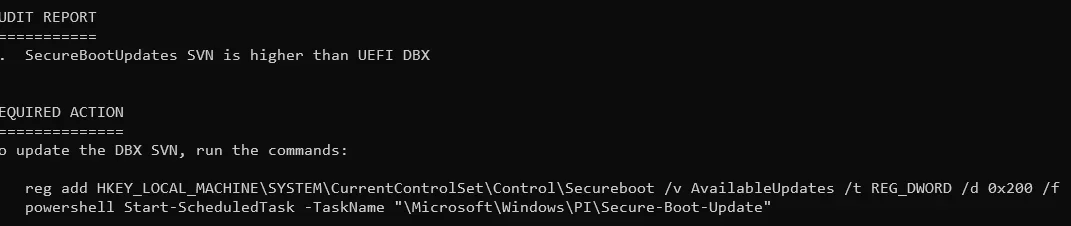
Directory: C:\Windows\Boot\EFI_EX


Mode LastWriteTime Length Name
---- ------------- ------ ----
-a---- 01-May-2026 6:29 PM 3010440 bootmgfw_EX.efi


Directory: C:\Windows\System32\SecureBootUpdates


Mode LastWriteTime Length Name
---- ------------- ------ ----
-a---- 15-April-2026 3:55 PM 6776 SkuSiPolicy.p7b
Get-Item : Cannot find path 'C:\EFI\Microsoft\Boot\bootmgfw.efi' because it does not exist.
At C:\EFI_Path.ps1:75 char:1
+ Get-Item "$EFI_Path\Microsoft\Boot\bootmgfw.efi"
+ ~~~~~~~~~~~~~~~~~~~~~~~~~~~~~~~~~~~~~~~~~~~~~~~~
+ CategoryInfo : ObjectNotFound: (C:\EFI\Microsoft\Boot\bootmgfw.efi:String) [Get-Item], ItemNotFoundException
+ FullyQualifiedErrorId : PathNotFound,Microsoft.PowerShell.Commands.GetItemCommand
Get-Item : Cannot find path 'C:\EFI\Microsoft\Boot\SkuSiPolicy.p7b' because it does not exist.
At C:\EFI_Path.ps1:76 char:1
+ Get-Item "$EFI_Path\Microsoft\Boot\SkuSiPolicy.p7b"
+ ~~~~~~~~~~~~~~~~~~~~~~~~~~~~~~~~~~~~~~~~~~~~~~~~~~~
+ CategoryInfo : ObjectNotFound: (C:\EFI\Microsoft\Boot\SkuSiPolicy.p7b:String) [Get-Item], ItemNotFoundException
+ FullyQualifiedErrorId : PathNotFound,Microsoft.PowerShell.Commands.GetItemCommand
 

My Computer My Computer

At a glance

Windows 10
OS
Windows 10
Reserved for (future) FAQ.
@garlin,
I downloaded the .zip file as suggested in post #1, looks like it has a problem if I run it on a multiboot machine. In this case it was booted with a Dev Build 26300.8376.

1778315997301.webp

1778317050814.webp

New script dated 5/8/2026.
1778317321547.webp


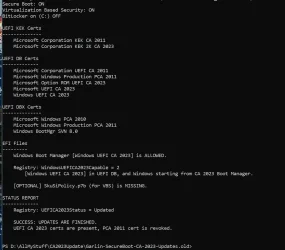
If I run the older script dated 4/24/2026 using the same Build 26300.8376 I don't get those red messages.
Could you please explain what was changed in Check_UEFI-CA2023.ps1 that cause these new messages?
Thanks.

1778317503702.webp
Old script dated 4/24/2026
1778317428697.webp
 

My Computer My Computer

At a glance

Windows 11 Pro 25H2Intel I9-9900K64GBNVIDIA RTX 2060
OS
Windows 11 Pro 25H2
Computer type
PC/Desktop
Manufacturer/Model
Dell XPS 8930
CPU
Intel I9-9900K
Memory
64GB
Graphics Card(s)
NVIDIA RTX 2060
Sound Card
NVIDIA High Definition Audio
Monitor(s) Displays
4k Samsung
Screen Resolution
3840 x 2160
Hard Drives
512GB NVMe, ADATA SU 800, 2TB HDD

Latest Support Threads

Back
Top Bottom