OK. Try this test script.
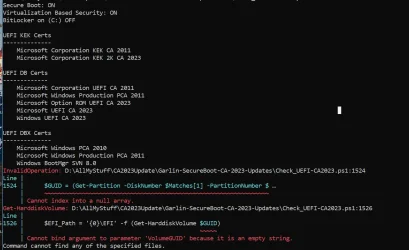
Changed to moving the script to C: and launched it with Powershel ISE. Result:
PS C:\> C:\EFI_Path.ps1
UpdatesFolder: C:\Windows\System32\SecureBootUpdates
BootDirectory : C:\Windows
Name : BootConfiguration
SettingID :
Caption : \Device\Harddisk22\Partition1
Disk 22 Part 1
GUID: {c97b8ac4-b094-437a-ab94-59661a13ea48}
EFI Path: \EFI
Get-Item : Cannot find path 'C:\EFI' because it does not exist.
At C:\EFI_Path.ps1:70 char:1
+ Get-Item $EFI_Path
+ ~~~~~~~~~~~~~~~~~~
+ CategoryInfo : ObjectNotFound: (C:\EFI:String) [Get-Item], ItemNotFoundException
+ FullyQualifiedErrorId : PathNotFound,Microsoft.PowerShell.Commands.GetItemCommand
Directory: C:\Windows\Boot\EFI_EX
Mode LastWriteTime Length Name
---- ------------- ------ ----
-a---- 01-May-2026 6:29 PM 3010440 bootmgfw_EX.efi
Directory: C:\Windows\System32\SecureBootUpdates
Mode LastWriteTime Length Name
---- ------------- ------ ----
-a---- 15-April-2026 3:55 PM 6776 SkuSiPolicy.p7b
Get-Item : Cannot find path 'C:\EFI\Microsoft\Boot\bootmgfw.efi' because it does not exist.
At C:\EFI_Path.ps1:75 char:1
+ Get-Item "$EFI_Path\Microsoft\Boot\bootmgfw.efi"
+ ~~~~~~~~~~~~~~~~~~~~~~~~~~~~~~~~~~~~~~~~~~~~~~~~
+ CategoryInfo : ObjectNotFound: (C:\EFI\Microsoft\Boot\bootmgfw.efi:String) [Get-Item], ItemNotFoundException
+ FullyQualifiedErrorId : PathNotFound,Microsoft.PowerShell.Commands.GetItemCommand
Get-Item : Cannot find path 'C:\EFI\Microsoft\Boot\SkuSiPolicy.p7b' because it does not exist.
At C:\EFI_Path.ps1:76 char:1
+ Get-Item "$EFI_Path\Microsoft\Boot\SkuSiPolicy.p7b"
+ ~~~~~~~~~~~~~~~~~~~~~~~~~~~~~~~~~~~~~~~~~~~~~~~~~~~
+ CategoryInfo : ObjectNotFound: (C:\EFI\Microsoft\Boot\SkuSiPolicy.p7b:String) [Get-Item], ItemNotFoundException
+ FullyQualifiedErrorId : PathNotFound,Microsoft.PowerShell.Commands.GetItemCommand