Solved garlin's PowerShell scripts for updating Secure Boot CA 2023


@GunnzAkimbo, @fg2001gf11F

Please run this test script. I think the function that converts Harddisk is failing on some disk layouts.
 

Attachments

My Computer My Computer

At a glance

Windows 7
OS
Windows 7
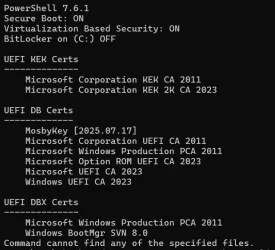
Previous check scripts showed no errors, however the latest version gives me an error on the last line. Something seems to have gone amiss.

Any idea what I'm doing that might change things? AFAIK, I haven't changed anything about the secure boot certs.

1778344293027.webp
 

My Computers My Computers

  • At a glance

    Win 11 Pro 25H2, Build 26200.8737Intel Core i5 1450064GB DDR4GeForce RTX 4060
    OS
    Win 11 Pro 25H2, Build 26200.8737
    Computer type
    PC/Desktop
    Manufacturer/Model
    Home Brew
    CPU
    Intel Core i5 14500
    Motherboard
    Gigabyte B760M G P WIFI
    Memory
    64GB DDR4
    Graphics Card(s)
    GeForce RTX 4060
    Sound Card
    Chipset Realtek
    Monitor(s) Displays
    LG 45" Ultragear, Acer 24" 1080p
    Screen Resolution
    5120x1440, 1920x1080
    Hard Drives
    Crucial P310 2TB 2280 PCIe Gen4 3D NAND NVMe M.2 SSD (O/S)
    Silicon Power 2TB US75 NVMe PCIe Gen4 M.2 2280 SSD (backup)
    Crucial BX500 2TB 3D NAND (2nd backup)
    Seagate 4TB Ironwolf, rotating HDD archive files
    External off-line backup Drives: 2 NVMe 4TB drives in external enclosures
    PSU
    Thermaltake Toughpower GF3 750W
    Case
    LIAN LI LANCOOL 216 E-ATX PC Case
    Cooling
    Lots of fans!
    Keyboard
    Microsoft Comfort Curve 2000
    Mouse
    Logitech G305
    Internet Speed
    Verizon FiOS 1GB
    Browser
    Firefox
    Antivirus
    Malware Bytes & Windows Defender Security
  • At a glance

    Win 11 Pro 25H2, Build 26200.8655Intel Core i5 1440032GB DDR5Intel 700 Embedded GPU
    Operating System
    Win 11 Pro 25H2, Build 26200.8655
    Computer type
    PC/Desktop
    Manufacturer/Model
    Home Brew
    CPU
    Intel Core i5 14400
    Motherboard
    Gigabyte B760M DS3H AX
    Memory
    32GB DDR5
    Graphics card(s)
    Intel 700 Embedded GPU
    Sound Card
    Realtek Embedded
    Monitor(s) Displays
    27" HP 1080p
    Screen Resolution
    1920x1080
    Hard Drives
    Crucial P310 2TB 2280 PCIe Gen4 eD NAND PCIe SSD
    Samsung EVO 990 2TB NVMe Gen4 SSD
    Samsung 2TB SATA SSD
    PSU
    Thermaltake Smart BM3 650W
    Case
    Okinos Micro ATX Case
    Cooling
    Fans
    Keyboard
    Microsoft Comfort Curve 2000
    Mouse
    Logitech G305
    Internet Speed
    Verizon FiOS 1GB
    Browser
    Firefox
    Antivirus
    Malware Bytes & Windows Defender Security
  • Nimo N171 17" Laptop, (Intel i3-1215U, 16GB RAM, 2TB NVMe, Win11 Pro)
    Acemagic Vista Mini PC V1 (Intel N150, 16GB RAM, 1TB NVMe, Win11 Pro)
    HP ENVY h8-1540t, (24GB RAM, 2TB SSD, 2TB HDD, Win11 Pro)
Can you run the EFI_Path.ps1 script? (above)
 

My Computer My Computer

At a glance

Windows 7
OS
Windows 7
v2026.05.08.01 = no errors on 2 PC's on my end, act. none of them have from previous versions.
 

My Computer My Computer

At a glance

Win11 24H2 IOT LTSC / Win11 Pro 25H2AMD Ryzen 7 8700G / AMD Ryzen 7 8700GF5-6000J3636F16GX2-FX5 32GB / Lexar Ares RGB ...internal
OS
Win11 24H2 IOT LTSC / Win11 Pro 25H2
Computer type
PC/Desktop
Manufacturer/Model
Gigabyte / Asus Home build
CPU
AMD Ryzen 7 8700G / AMD Ryzen 7 8700G
Motherboard
Gigabyte B650 AORUS ELITE AX V2 / ASUS TUF GAMING B650-PLUS
Memory
F5-6000J3636F16GX2-FX5 32GB / Lexar Ares RGB LD5BU016G-R6000GDLA 32GB
Graphics Card(s)
internal
Sound Card
Realtek
Monitor(s) Displays
BenQ 27 L EW2780
Screen Resolution
1920x1080
Hard Drives
Many M.2's
Internet Speed
400 mbs
Browser
Vivaldi
Antivirus
Eset
I ran the above script because I also got "Cannot find any of the specified files." on one of my three laptops. The other two are fine.


PS C:\Users\JimSa\Downloads> .\EFI_Path.ps1

BootDirectory : C:\WINDOWS
Name : BootConfiguration
SettingID :
Caption : \Device\Harddisk0\Partition3

Disk 0 Part 3


DiskPath: \\?\scsi#disk&ven_liteon&prod_cv1-8b256#4&bbeb324&0&000200#{53f56307-b6bf-11d0-94f2-00a0c91efb8b}

PartitionNumber DriveLetter Offset Size Type
--------------- ----------- ------ ---- ----
3 W 108538101760 44.26 GB Basic
GUID: {7c06e27b-70fb-47e4-98b8-c7cdd2dd70cd}

Volume: \\?\Volume{7c06e27b-70fb-47e4-98b8-c7cdd2dd70cd}\
PathName: \Device\HarddiskVolume3
ReturnLength: 25
DevicePath: \\.\HarddiskVolume3

EFI Path: \\.\HarddiskVolume3\EFI

PS C:\Users\JimSa\Downloads>
 

My Computer My Computer

At a glance

Windows 11AMD Ryzen 3 3200U with Radeon Vega Mobile Gfx...8.00 GB (5.94 GB usable), DDR4 SDRAMGraphics AMD Radeon(TM) Vega 3 Graphics
OS
Windows 11
Computer type
Laptop
Manufacturer/Model
Acer Aspire A515-43
CPU
AMD Ryzen 3 3200U with Radeon Vega Mobile Gfx (2.60 G)
Motherboard
EH5LP LA-H801P
Memory
8.00 GB (5.94 GB usable), DDR4 SDRAM
Graphics Card(s)
Graphics AMD Radeon(TM) Vega 3 Graphics
Sound Card
Realtek Audio
Monitor(s) Displays
15.6" Full HD (1920 x 1080) 16:9 IPS, ComfyView (Matte)
Screen Resolution
1920 X 1080 60Hz
Hard Drives
128 GB SSD
Keyboard
Backlit Keyboard
Mouse
M325 Logitech
Internet Speed
Download Mbps 322.88 Upload Mbps 38.73
Browser
Edge
Can you run the EFI_Path.ps1 script? (above)
Not sure what it all means. :-)


BootDirectory : C:\WINDOWS
Name : BootConfiguration
SettingID :
Caption : \Device\Harddisk2\Partition1

Disk 2 Part 1


DiskPath: \\?\scsi#disk&ven_nvme&prod_ct2000p310ssd8#5&2979f10d&0&000000#{53f56307-b6bf-11d0-94f2-00a0c91efb8b}

PartitionNumber DriveLetter Offset Size Type
--------------- ----------- ------ ---- ----
1 17408 15.98 MB Reserved
GUID: {5c0c20b7-a98e-4779-bf40-2e3ad09610e6}

Volume: \\?\Volume{36da7a0d-ac9f-48ae-8535-83a115485301}\
PathName: \Device\HarddiskVolume10
ReturnLength: 26

Volume: \\?\Volume{8630ee3b-5a81-431d-85f3-786a3558a958}\
PathName: \Device\HarddiskVolume12
ReturnLength: 26

Volume: \\?\Volume{46e36f46-a7c2-4cec-b3ac-26bb4cdaa68d}\
PathName: \Device\HarddiskVolume3
ReturnLength: 25

Volume: \\?\Volume{a20a38cd-3e80-4d44-994a-81198c459b98}\
PathName: \Device\HarddiskVolume4
ReturnLength: 25

Volume: \\?\Volume{b1b95897-ca7c-4727-b61e-0b82ece9a3f3}\
PathName: \Device\HarddiskVolume5
ReturnLength: 25

Volume: \\?\Volume{f797f0b8-6d8e-4cfd-8f97-b67faae25e72}\
PathName: \Device\HarddiskVolume6
ReturnLength: 25

Volume: \\?\Volume{0dc6becb-3cac-4d08-8417-c97d8bce0175}\
PathName: \Device\HarddiskVolume7
ReturnLength: 25

Volume: \\?\Volume{9575112a-e38a-427d-8058-120b145365fa}\
PathName: \Device\HarddiskVolume8
ReturnLength: 25

Volume: \\?\Volume{58d95123-8ae8-49ee-89ed-f4117a5c755b}\
PathName: \Device\HarddiskVolume14
ReturnLength: 26

Volume: \\?\Volume{c25c7d28-8451-45d5-8aab-1045796207bb}\
PathName: \Device\HarddiskVolume2
ReturnLength: 25
do-while ended
EFI Path: \EFI

 

My Computers My Computers

  • At a glance

    Win 11 Pro 25H2, Build 26200.8737Intel Core i5 1450064GB DDR4GeForce RTX 4060
    OS
    Win 11 Pro 25H2, Build 26200.8737
    Computer type
    PC/Desktop
    Manufacturer/Model
    Home Brew
    CPU
    Intel Core i5 14500
    Motherboard
    Gigabyte B760M G P WIFI
    Memory
    64GB DDR4
    Graphics Card(s)
    GeForce RTX 4060
    Sound Card
    Chipset Realtek
    Monitor(s) Displays
    LG 45" Ultragear, Acer 24" 1080p
    Screen Resolution
    5120x1440, 1920x1080
    Hard Drives
    Crucial P310 2TB 2280 PCIe Gen4 3D NAND NVMe M.2 SSD (O/S)
    Silicon Power 2TB US75 NVMe PCIe Gen4 M.2 2280 SSD (backup)
    Crucial BX500 2TB 3D NAND (2nd backup)
    Seagate 4TB Ironwolf, rotating HDD archive files
    External off-line backup Drives: 2 NVMe 4TB drives in external enclosures
    PSU
    Thermaltake Toughpower GF3 750W
    Case
    LIAN LI LANCOOL 216 E-ATX PC Case
    Cooling
    Lots of fans!
    Keyboard
    Microsoft Comfort Curve 2000
    Mouse
    Logitech G305
    Internet Speed
    Verizon FiOS 1GB
    Browser
    Firefox
    Antivirus
    Malware Bytes & Windows Defender Security
  • At a glance

    Win 11 Pro 25H2, Build 26200.8655Intel Core i5 1440032GB DDR5Intel 700 Embedded GPU
    Operating System
    Win 11 Pro 25H2, Build 26200.8655
    Computer type
    PC/Desktop
    Manufacturer/Model
    Home Brew
    CPU
    Intel Core i5 14400
    Motherboard
    Gigabyte B760M DS3H AX
    Memory
    32GB DDR5
    Graphics card(s)
    Intel 700 Embedded GPU
    Sound Card
    Realtek Embedded
    Monitor(s) Displays
    27" HP 1080p
    Screen Resolution
    1920x1080
    Hard Drives
    Crucial P310 2TB 2280 PCIe Gen4 eD NAND PCIe SSD
    Samsung EVO 990 2TB NVMe Gen4 SSD
    Samsung 2TB SATA SSD
    PSU
    Thermaltake Smart BM3 650W
    Case
    Okinos Micro ATX Case
    Cooling
    Fans
    Keyboard
    Microsoft Comfort Curve 2000
    Mouse
    Logitech G305
    Internet Speed
    Verizon FiOS 1GB
    Browser
    Firefox
    Antivirus
    Malware Bytes & Windows Defender Security
  • Nimo N171 17" Laptop, (Intel i3-1215U, 16GB RAM, 2TB NVMe, Win11 Pro)
    Acemagic Vista Mini PC V1 (Intel N150, 16GB RAM, 1TB NVMe, Win11 Pro)
    HP ENVY h8-1540t, (24GB RAM, 2TB SSD, 2TB HDD, Win11 Pro)
If it helps, here is what diskpart says:

DISKPART> lis dis

Disk ### Status Size Free Dyn Gpt
-------- ------------- ------- ------- --- ---
* Disk 0 Online 238 GB 2048 KB *
Disk 1 Online 59 GB 15 MB

DISKPART> lis par

Partition ### Type Size Offset
------------- ---------------- ------- -------
Partition 1 System 512 MB 1024 KB
Partition 2 Unknown 100 GB 513 MB
Partition 3 Primary 44 GB 101 GB
Partition 4 Reserved 16 MB 145 GB
Partition 5 Primary 92 GB 145 GB
Partition 6 Recovery 780 MB 237 GB

DISKPART> lis vol

Volume ### Ltr Label Fs Type Size Status Info
---------- --- ----------- ----- ---------- ------- --------- --------
Volume 0 D DVD-ROM 0 B No Media
Volume 1 W W-NTFS NTFS Partition 44 GB Healthy
Volume 2 C C-NTFS NTFS Partition 92 GB Healthy Boot
Volume 3 FAT32 Partition 512 MB Healthy System
Volume 4 NTFS Partition 780 MB Healthy Hidden
Volume 5 Y Acer-SD_Car NTFS Removable 59 GB Healthy

DISKPART>

Partition 2 is EXT4 Linux Mint.
 

My Computer My Computer

At a glance

Windows 11AMD Ryzen 3 3200U with Radeon Vega Mobile Gfx...8.00 GB (5.94 GB usable), DDR4 SDRAMGraphics AMD Radeon(TM) Vega 3 Graphics
OS
Windows 11
Computer type
Laptop
Manufacturer/Model
Acer Aspire A515-43
CPU
AMD Ryzen 3 3200U with Radeon Vega Mobile Gfx (2.60 G)
Motherboard
EH5LP LA-H801P
Memory
8.00 GB (5.94 GB usable), DDR4 SDRAM
Graphics Card(s)
Graphics AMD Radeon(TM) Vega 3 Graphics
Sound Card
Realtek Audio
Monitor(s) Displays
15.6" Full HD (1920 x 1080) 16:9 IPS, ComfyView (Matte)
Screen Resolution
1920 X 1080 60Hz
Hard Drives
128 GB SSD
Keyboard
Backlit Keyboard
Mouse
M325 Logitech
Internet Speed
Download Mbps 322.88 Upload Mbps 38.73
Browser
Edge
BootDirectory : C:\WINDOWS
Name : BootConfiguration
SettingID :
Caption : \Device\Harddisk2\Partition1

Disk 2 Part 1

PartitionNumber DriveLetter Offset Size Type
--------------- ----------- ------ ---- ----
1 17408 15.98 MB Reserved
BootConfiguration is returning the Reserved partition, instead of System (EFI).

GUID: {5c0c20b7-a98e-4779-bf40-2e3ad09610e6}
None of these volume GUID's match. Let's try this version. Maybe BootConfiguration is untrustworthy on some setups.
Is there any special about that disk? MBR? RAID disk?
 

Attachments

My Computer My Computer

At a glance

Windows 7
OS
Windows 7
BootConfiguration is returning the Reserved partition, instead of System (EFI).


None of these volume GUID's match. Let's try this version. Maybe BootConfiguration is untrustworthy on some setups.
Is there any special about that disk? MBR? RAID disk?
Nothing special about the disk, it's not MBR or RAID, just a plain GUID disk.
1778364179335.webp

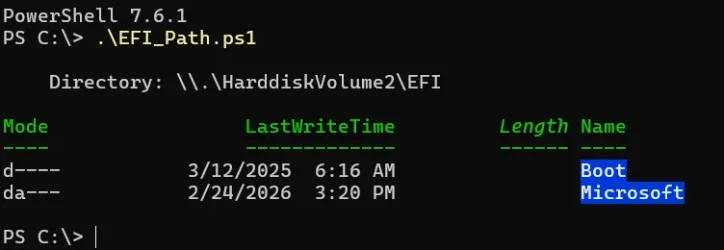
Well, that display is a lot shorter! 🤣

1778364062179.webp
 

My Computers My Computers

  • At a glance

    Win 11 Pro 25H2, Build 26200.8737Intel Core i5 1450064GB DDR4GeForce RTX 4060
    OS
    Win 11 Pro 25H2, Build 26200.8737
    Computer type
    PC/Desktop
    Manufacturer/Model
    Home Brew
    CPU
    Intel Core i5 14500
    Motherboard
    Gigabyte B760M G P WIFI
    Memory
    64GB DDR4
    Graphics Card(s)
    GeForce RTX 4060
    Sound Card
    Chipset Realtek
    Monitor(s) Displays
    LG 45" Ultragear, Acer 24" 1080p
    Screen Resolution
    5120x1440, 1920x1080
    Hard Drives
    Crucial P310 2TB 2280 PCIe Gen4 3D NAND NVMe M.2 SSD (O/S)
    Silicon Power 2TB US75 NVMe PCIe Gen4 M.2 2280 SSD (backup)
    Crucial BX500 2TB 3D NAND (2nd backup)
    Seagate 4TB Ironwolf, rotating HDD archive files
    External off-line backup Drives: 2 NVMe 4TB drives in external enclosures
    PSU
    Thermaltake Toughpower GF3 750W
    Case
    LIAN LI LANCOOL 216 E-ATX PC Case
    Cooling
    Lots of fans!
    Keyboard
    Microsoft Comfort Curve 2000
    Mouse
    Logitech G305
    Internet Speed
    Verizon FiOS 1GB
    Browser
    Firefox
    Antivirus
    Malware Bytes & Windows Defender Security
  • At a glance

    Win 11 Pro 25H2, Build 26200.8655Intel Core i5 1440032GB DDR5Intel 700 Embedded GPU
    Operating System
    Win 11 Pro 25H2, Build 26200.8655
    Computer type
    PC/Desktop
    Manufacturer/Model
    Home Brew
    CPU
    Intel Core i5 14400
    Motherboard
    Gigabyte B760M DS3H AX
    Memory
    32GB DDR5
    Graphics card(s)
    Intel 700 Embedded GPU
    Sound Card
    Realtek Embedded
    Monitor(s) Displays
    27" HP 1080p
    Screen Resolution
    1920x1080
    Hard Drives
    Crucial P310 2TB 2280 PCIe Gen4 eD NAND PCIe SSD
    Samsung EVO 990 2TB NVMe Gen4 SSD
    Samsung 2TB SATA SSD
    PSU
    Thermaltake Smart BM3 650W
    Case
    Okinos Micro ATX Case
    Cooling
    Fans
    Keyboard
    Microsoft Comfort Curve 2000
    Mouse
    Logitech G305
    Internet Speed
    Verizon FiOS 1GB
    Browser
    Firefox
    Antivirus
    Malware Bytes & Windows Defender Security
  • Nimo N171 17" Laptop, (Intel i3-1215U, 16GB RAM, 2TB NVMe, Win11 Pro)
    Acemagic Vista Mini PC V1 (Intel N150, 16GB RAM, 1TB NVMe, Win11 Pro)
    HP ENVY h8-1540t, (24GB RAM, 2TB SSD, 2TB HDD, Win11 Pro)
I went out on a limb and tried using "bcdedit enum {bootmgr}" to determine the active EFI.

- When it reports HarddiskVolume, we're done.
- When it reports an assigned drive letter, we use "mountvol [letter] /l" to return the volume GUID. I feed that into my old function.

Admittedly there's a shortage of really useful docs on this. The problem is a lot of people make bad assumptions on just "find the volume marked System" or some variant of it. That's bad when for some reason, you have multiple EFI's on different disks. If you only have one bootable Windows drive, and everything else looks like a data drive, the problem is trivial to solve.

The UEFI knows through the {bootmgr} entry where it's pulling the current boot manager from. It's one of those "works for me, but you must have something weird/different, because it also works for most other people". But I have inadequate data on what's different about your disk setup.
 

My Computer My Computer

At a glance

Windows 7
OS
Windows 7
I went out on a limb and tried using "bcdedit enum {bootmgr}" to determine the active EFI.

- When it reports HarddiskVolume, we're done.
- When it reports an assigned drive letter, we use "mountvol [letter] /l" to return the volume GUID. I feed that into my old function.

Admittedly there's a shortage of really useful docs on this. The problem is a lot of people make bad assumptions on just "find the volume marked System" or some variant of it. That's bad when for some reason, you have multiple EFI's on different disks. If you only have one bootable Windows drive, and everything else looks like a data drive, the problem is trivial to solve.

The UEFI knows through the {bootmgr} entry where it's pulling the current boot manager from. It's one of those "works for me, but you must have something weird/different, because it also works for most other people". But I have inadequate data on what's different about your disk setup.
I don't know of anything "unique" about my disk setup. It was a clean Win11 Pro install last year. What would help you determine if there is something odd?

1778374690017.webp
 

My Computers My Computers

  • At a glance

    Win 11 Pro 25H2, Build 26200.8737Intel Core i5 1450064GB DDR4GeForce RTX 4060
    OS
    Win 11 Pro 25H2, Build 26200.8737
    Computer type
    PC/Desktop
    Manufacturer/Model
    Home Brew
    CPU
    Intel Core i5 14500
    Motherboard
    Gigabyte B760M G P WIFI
    Memory
    64GB DDR4
    Graphics Card(s)
    GeForce RTX 4060
    Sound Card
    Chipset Realtek
    Monitor(s) Displays
    LG 45" Ultragear, Acer 24" 1080p
    Screen Resolution
    5120x1440, 1920x1080
    Hard Drives
    Crucial P310 2TB 2280 PCIe Gen4 3D NAND NVMe M.2 SSD (O/S)
    Silicon Power 2TB US75 NVMe PCIe Gen4 M.2 2280 SSD (backup)
    Crucial BX500 2TB 3D NAND (2nd backup)
    Seagate 4TB Ironwolf, rotating HDD archive files
    External off-line backup Drives: 2 NVMe 4TB drives in external enclosures
    PSU
    Thermaltake Toughpower GF3 750W
    Case
    LIAN LI LANCOOL 216 E-ATX PC Case
    Cooling
    Lots of fans!
    Keyboard
    Microsoft Comfort Curve 2000
    Mouse
    Logitech G305
    Internet Speed
    Verizon FiOS 1GB
    Browser
    Firefox
    Antivirus
    Malware Bytes & Windows Defender Security
  • At a glance

    Win 11 Pro 25H2, Build 26200.8655Intel Core i5 1440032GB DDR5Intel 700 Embedded GPU
    Operating System
    Win 11 Pro 25H2, Build 26200.8655
    Computer type
    PC/Desktop
    Manufacturer/Model
    Home Brew
    CPU
    Intel Core i5 14400
    Motherboard
    Gigabyte B760M DS3H AX
    Memory
    32GB DDR5
    Graphics card(s)
    Intel 700 Embedded GPU
    Sound Card
    Realtek Embedded
    Monitor(s) Displays
    27" HP 1080p
    Screen Resolution
    1920x1080
    Hard Drives
    Crucial P310 2TB 2280 PCIe Gen4 eD NAND PCIe SSD
    Samsung EVO 990 2TB NVMe Gen4 SSD
    Samsung 2TB SATA SSD
    PSU
    Thermaltake Smart BM3 650W
    Case
    Okinos Micro ATX Case
    Cooling
    Fans
    Keyboard
    Microsoft Comfort Curve 2000
    Mouse
    Logitech G305
    Internet Speed
    Verizon FiOS 1GB
    Browser
    Firefox
    Antivirus
    Malware Bytes & Windows Defender Security
  • Nimo N171 17" Laptop, (Intel i3-1215U, 16GB RAM, 2TB NVMe, Win11 Pro)
    Acemagic Vista Mini PC V1 (Intel N150, 16GB RAM, 1TB NVMe, Win11 Pro)
    HP ENVY h8-1540t, (24GB RAM, 2TB SSD, 2TB HDD, Win11 Pro)
Are there other disks with Windows installed on them?
 

My Computer My Computer

At a glance

Windows 7
OS
Windows 7
@garlin

I have a question about EFI, disks, volumes and partitions on my system.
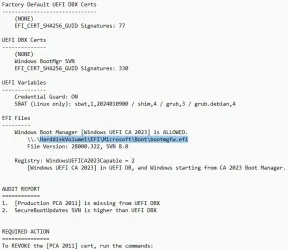
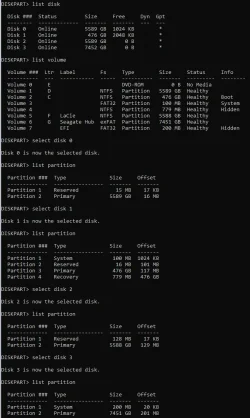
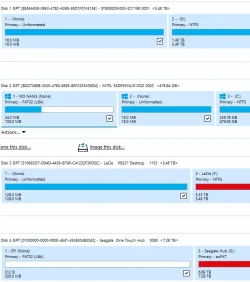
Below is output from Check_UEFI, and details from diskpart and Macrium.
Diskpart notes:

Volume 2 is the Boot partition (diskpart disk 1, partition 3, mountpoint "C", internal SSD)

Volume 3 is a 100 Mb System partition, (diskpart disk 1, partition 1, internal SSD)
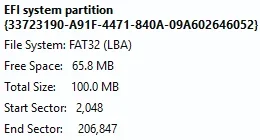
Macrium calls Volume 3 the "EFI system partition"

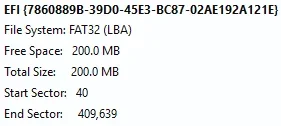
Volume 7 is a 200Mb EFI partition which lives on diskpart disk 3, partition 1 (external USB Seagate disk)
Macrium labels Volume 7 as an "EFI" partition

[Garlin, is Volume 7 an old unused EFI leftover?]

Your Check script says Boot Manager is: HarddiskVolume1\EFI\Microsoft\Boot\bootmgfw.efi
BUT ... Diskpart Volume 1 is partition 1 on diskpart disk 0, which is an internal hard drive for data, NOT a system disk ???

[Garlin, is this OK and correct, or am I misunderstanding something?]

Thanks again for your help !!!

===========
Check_UEFI says:
===========

1778407450779.webp

=========
Diskpart says:
=========

1778407697058.webp

=========
Macrium says:
=========

1778407828649.webp

... and:

1778407934870.webp

1778407984130.webp
 

My Computer My Computer

At a glance

Windows 11
OS
Windows 11
Volume 7 is a 200Mb EFI partition which lives on diskpart disk 3, partition 1 (external USB Seagate disk)
Macrium labels Volume 7 as an "EFI" partition
Your screenshot shows:
- a 200 MB FAT32 EFI partition
- the main 7.28 TB exFAT data partition

The Seagate One Touch series is designed to be plug-and-play on both Windows and macOS.

I found this on a forum via Google: "a new Seagate Expansion which came installed with a 200MB fat32 EFI partition and the remaining space allocated to an exfat partition."

If the drive is working normally on your computer, the safest option is simply to leave it alone.


Edit:

I couldn't find any definitive information about why the external drive comes preinstalled with a 200 MB FAT32 EFI partition.

Edit:

Google Gemini:

In macOS, when you format a drive as exFAT, Disk Utility typically defaults to the GUID Partition Map (GPT) scheme. If you use GPT, macOS will automatically create a hidden 200 MB EFI (Extensible Firmware Interface) partition at the beginning of the drive. For drives larger than 2 TB, you must use GUID Partition Map, meaning you'll have to live with the 200 MB EFI partition.

If you are seeing the EFI partition on a Windows machine and find it annoying, you can usually ignore it; it won't interfere with your ability to read or write to the main exFAT portion of the drive.
 
Last edited:

My Computers My Computers

  • At a glance

    Windows 11 ProAMD Ryzen 9 9950X3DKingston FURY Beast 64GB (2x32GB) DDR5 6000MT/sASUS TUF Gaming Radeon RX 9070 OC Edition 16G...
    OS
    Windows 11 Pro
    Computer type
    PC/Desktop
    CPU
    AMD Ryzen 9 9950X3D
    Motherboard
    ASRock B650E Taichi Lite
    Memory
    Kingston FURY Beast 64GB (2x32GB) DDR5 6000MT/s
    Graphics Card(s)
    ASUS TUF Gaming Radeon RX 9070 OC Edition 16GB GDDR6
    Hard Drives
    Solidigm P44 Pro 2TB M.2 NVMe SSD
  • At a glance

    Windows 11 HomeIntel Core Ultra 9 275HX64GB (2x 32GB) DDR5-6400NVIDIA GeForce RTX 5080 16GB GDDR7 Laptop GPU
    Operating System
    Windows 11 Home
    Computer type
    Laptop
    Manufacturer/Model
    Lenovo Legion Pro 7i Gen 10 16"
    CPU
    Intel Core Ultra 9 275HX
    Memory
    64GB (2x 32GB) DDR5-6400
    Graphics card(s)
    NVIDIA GeForce RTX 5080 16GB GDDR7 Laptop GPU
    Hard Drives
    2x 1TB M.2 NVMe SSD (SK Hynix)
Are there other disks with Windows installed on them?
Nope, no other disks with any O/S on them, just that one has a plain clean Win11 Pro installation.
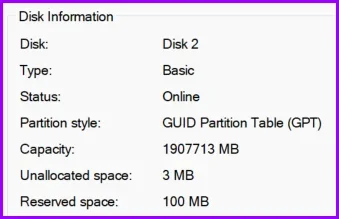
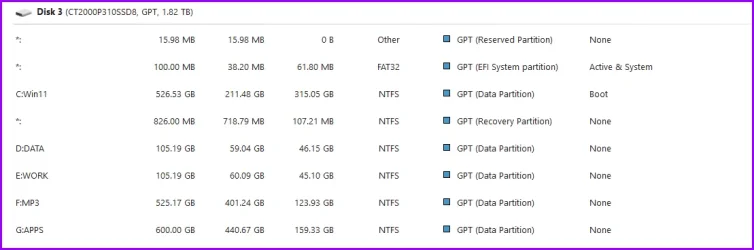
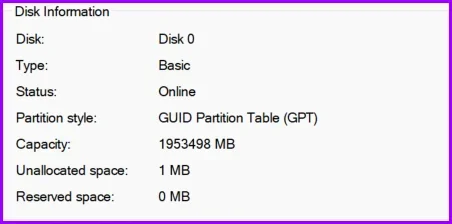
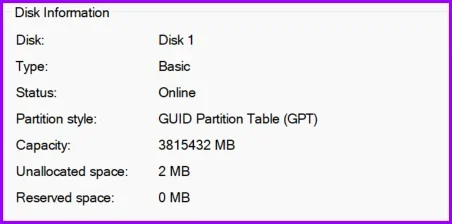
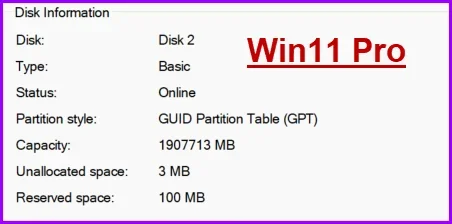
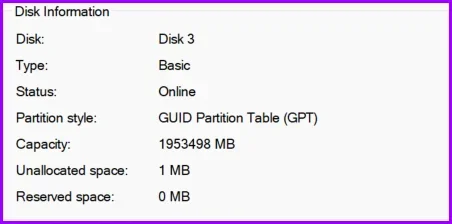
Here are all the disk properties.

Disks 0 & 1 are SATA drives, and disks 2 & 3 are NVMe drives.

1778424451758.webp

1778424462429.webp

1778424631633.webp

1778424484996.webp
 

My Computers My Computers

  • At a glance

    Win 11 Pro 25H2, Build 26200.8737Intel Core i5 1450064GB DDR4GeForce RTX 4060
    OS
    Win 11 Pro 25H2, Build 26200.8737
    Computer type
    PC/Desktop
    Manufacturer/Model
    Home Brew
    CPU
    Intel Core i5 14500
    Motherboard
    Gigabyte B760M G P WIFI
    Memory
    64GB DDR4
    Graphics Card(s)
    GeForce RTX 4060
    Sound Card
    Chipset Realtek
    Monitor(s) Displays
    LG 45" Ultragear, Acer 24" 1080p
    Screen Resolution
    5120x1440, 1920x1080
    Hard Drives
    Crucial P310 2TB 2280 PCIe Gen4 3D NAND NVMe M.2 SSD (O/S)
    Silicon Power 2TB US75 NVMe PCIe Gen4 M.2 2280 SSD (backup)
    Crucial BX500 2TB 3D NAND (2nd backup)
    Seagate 4TB Ironwolf, rotating HDD archive files
    External off-line backup Drives: 2 NVMe 4TB drives in external enclosures
    PSU
    Thermaltake Toughpower GF3 750W
    Case
    LIAN LI LANCOOL 216 E-ATX PC Case
    Cooling
    Lots of fans!
    Keyboard
    Microsoft Comfort Curve 2000
    Mouse
    Logitech G305
    Internet Speed
    Verizon FiOS 1GB
    Browser
    Firefox
    Antivirus
    Malware Bytes & Windows Defender Security
  • At a glance

    Win 11 Pro 25H2, Build 26200.8655Intel Core i5 1440032GB DDR5Intel 700 Embedded GPU
    Operating System
    Win 11 Pro 25H2, Build 26200.8655
    Computer type
    PC/Desktop
    Manufacturer/Model
    Home Brew
    CPU
    Intel Core i5 14400
    Motherboard
    Gigabyte B760M DS3H AX
    Memory
    32GB DDR5
    Graphics card(s)
    Intel 700 Embedded GPU
    Sound Card
    Realtek Embedded
    Monitor(s) Displays
    27" HP 1080p
    Screen Resolution
    1920x1080
    Hard Drives
    Crucial P310 2TB 2280 PCIe Gen4 eD NAND PCIe SSD
    Samsung EVO 990 2TB NVMe Gen4 SSD
    Samsung 2TB SATA SSD
    PSU
    Thermaltake Smart BM3 650W
    Case
    Okinos Micro ATX Case
    Cooling
    Fans
    Keyboard
    Microsoft Comfort Curve 2000
    Mouse
    Logitech G305
    Internet Speed
    Verizon FiOS 1GB
    Browser
    Firefox
    Antivirus
    Malware Bytes & Windows Defender Security
  • Nimo N171 17" Laptop, (Intel i3-1215U, 16GB RAM, 2TB NVMe, Win11 Pro)
    Acemagic Vista Mini PC V1 (Intel N150, 16GB RAM, 1TB NVMe, Win11 Pro)
    HP ENVY h8-1540t, (24GB RAM, 2TB SSD, 2TB HDD, Win11 Pro)
I have a question about EFI, disks, volumes and partitions on my system.
Below is output from Check_UEFI, and details from diskpart and Macrium.
Diskpart notes:

Volume 2 is the Boot partition (diskpart disk 1, partition 3, mountpoint "C", internal SSD)

Volume 3 is a 100 Mb System partition, (diskpart disk 1, partition 1, internal SSD)
Macrium calls Volume 3 the "EFI system partition"

Volume 7 is a 200Mb EFI partition which lives on diskpart disk 3, partition 1 (external USB Seagate disk)
Macrium labels Volume 7 as an "EFI" partition

[Garlin, is Volume 7 an old unused EFI leftover?]

Your Check script says Boot Manager is: HarddiskVolume1\EFI\Microsoft\Boot\bootmgfw.efi
BUT ... Diskpart Volume 1 is partition 1 on diskpart disk 0, which is an internal hard drive for data, NOT a system disk ???
So your disk setup is exactly the situation my script needs to be concerned about. A lot of over-simplified advice for determining your EFI partition is simply take partitions marked SYSTEM (or EFI), and arbitrarily select the lowest one. That assumes your UEFI's boot order (which an user can change in the BIOS menu) goes the same ascending order as the physical drive numbering.

Without knowing your PC's history, or even what was the intent behind this setup, it's possible to pick the wrong EFI partition and update its boot manager. And we end up not fixing it for Secure Boot purposes.

The "HarddiskVolume" notation doesn't represent a physical drive, but a numbering scheme for disk volumes. Windows boots up and inventories all of the drives it sees, and all recognizable volumes (ignoring volumes which aren't Windows). Based on the arbitrary order collected by the list, Windows assigns each volume an increasing number. HarddiskVolume1 is the always lowest (or first) volume, but it might not represent the EFI you booted from. Say you have a dual-boot system, and recently booted from a higher numbered drive.

I don't provide the HarddiskVolume address as a means to identifying where the active EFI partition. But it's a working folder address. If you didn't want to mount the EFI volume before reading it (mountvol S: /s) or assign a drive letter from diskpart, then you can see the EFI's files using:
Code:
dir \\.\HarddiskVolume1\EFI\

This is a folder pathname shortcut that Windows provides. Mounting the EFI to read it might disturb something you have already done with drive letters, or confuse a tool because now the EFI has changed its mount state.

If you were given the disk and partition number of the EFI, would that make it easier to know where the boot manager lives? Not really. "mountvol /s" doesn't take any disk or partition numbers. If you're using diskpart, you can only assign drive letters to a volume so disk/partition is not always a direct mapping to the right volume.

My goal isn't to figure out all the possible EFI's to be found, or what's in them. Who knows, some of them might be "empty" of boot files or you don't want me tampering with them because they have a specific purpose for staying on that version. I'm trying to report the current boot manager's status, and gently identify where it can be found (by an accessible folder name, and not by disk/partition).
 

My Computer My Computer

At a glance

Windows 7
OS
Windows 7
@garlin
Question for you, not explicitly on Secure Boot pour related...
Might be so obvious for certain people, but hey, I'm new to this Secure Boot and boot manager stuf
In fact, with all you've explained in this thread I now better understand why some recovery drives from different imaging tools weren't booting ;-)

The question...

I have a Surface Pro 9 and a Dell Inspiron 3910 that I always keep updated (Windows Update) at the latest available updates, but without activating the "Get the latest updates as soon as they're available". And I use Macrium 10 on both.

If Macrium WinRE Recovery Disk is not booting because of wrong boot manager, can I use BCDEDIT to update both USB drives (SP9 & 3910) on the Dell 3910 or it's not recommended to use BCDEDIT to patch a USB drive that will later be used to boot a different computer ?

Let's say USB drive is on letter X

copy X:\EFI\MICROSOFT\BOOT\BCD X:\EFI\MICROSOFT\BOOT\BCD.BAK
bcdboot c:\windows /f UEFI /s X: /bootex
copy X:\EFI\MICROSOFT\BOOT\BCD.BAK X:\EFI\MICROSOFT\BOOT\BCD


I know your script with -bootmedia would also work, but your kinda teaching us to fish, so I'm trying to do it on my own without relying on someone elses work... :-)

Thanks in advance
 

My Computer My Computer

At a glance

Windows 11
OS
Windows 11
In order to boot from disk media, the process passes thru many steps:

1. Check if Secure Boot is enabled. When Secure Boot is off, any version of the boot file is allowed.

2. Check if the boot file's signed certificate (Windows UEFI CA 2023) is allowed. It must be present in the DB, and not be pn the DBX at the same time. For the UEFI CA 2023 to be valid, a matching KEK CA 2023 must also be present.

3. If a SVN number has been added to the DBX, the boot manager or boot file (it's the same executable) will check if the boot manager's own SVN is equal or higher than the DBX's SVN. Otherwise the boot manager exits the boot process.

A WinPE-style boot drive uses less boot files because it's a more "primitive" environment. Which is fine, since WinPE's job is to boot from the drive and get everything configured so Windows Setup can run. To update WinPE, more or less you can replace the \EFI\Boot\bootx64.efi file.

A WinRE-style boot drive has more boot files since it has additional features. WinRE is WinPE + more stuff. To update WinRE, you have to copy a folder of files to the \EFI\Microsoft\Boot including font files. "bcdboot /ex" is more convenient way of using one command to copy the files instead of individually copying the list of files.

We backup the BCD file because a side effect of running bcdboot is it will try to update the BCD store. Since we don't want that happening, the BCD is backed up and copied back after bcdboot finishes. If bcdboot didn't try to update the BCD, then we would not have to perform these extra steps.

MS does document the exact steps, but they don't share any explanation of why it needs to be done this way.
 

My Computer My Computer

At a glance

Windows 7
OS
Windows 7
............ MS does document the exact steps, but they don't share any explanation of why it needs to be done this way. ..................
Thanks for the explanation, but for my question...

Can I use BCDEDIT to update both USB drives (SP9 & 3910) on the Dell 3910 or it's not recommended to use BCDEDIT to patch a USB drive that will later be used to boot a different computer ?
 

My Computer My Computer

At a glance

Windows 11
OS
Windows 11
It depends on what kind of boot drive type, WinPE or WinRE.

WinRE should be updated using bcdboot. WinPE should have a new bootx64.efi copied over. If your \EFI\Microsoft\Boot only has a handful of files, then it's WInPE style.
 

My Computer My Computer

At a glance

Windows 7
OS
Windows 7

Latest Support Threads

Back
Top Bottom