Solved garlin's PowerShell scripts for updating Secure Boot CA 2023


If you have an unsupported PC, meaning the vendor will never provide a working KEK CA 2023 (because the PC is too old), then you must delete all of the Secure Boot keys first. You have to do whatever it takes to be able to get that BIOS menu option.

Or just live with Secure Boot being disabled.
 

My Computer

System One

  • OS
    Windows 7
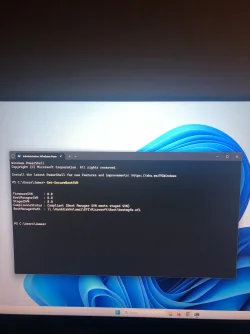
Just ran windows update for May. Microsoft didn’t mess with your script.
 

Attachments

  • IMG_3773.webp
    IMG_3773.webp
    1.3 MB · Views: 3
  • IMG_3774.webp
    IMG_3774.webp
    1.4 MB · Views: 4
  • IMG_3775.webp
    IMG_3775.webp
    1.6 MB · Views: 2
  • IMG_3776.webp
    IMG_3776.webp
    1.5 MB · Views: 2
  • IMG_3777.webp
    IMG_3777.webp
    1.1 MB · Views: 3

My Computers

System One System Two

  • OS
    Windows 11 Pro
    Computer type
    PC/Desktop
    Manufacturer/Model
    Me
    CPU
    Intel Core i5-12600K 3.7 GHz 10-Core Processor
    Motherboard
    Gigabyte B760M H DDR4 Micro ATX LGA1700 Motherboard
    Memory
    Corsair Vengeance LPX 64 GB (2 x 32 GB) DDR4-3200 CL16 Memory
    Graphics Card(s)
    Integrated Intel UHD Graphics 770
    Sound Card
    Realtek
    Monitor(s) Displays
    LG
    Hard Drives
    Samsung 990 Pro 1 TB M.2-2280 PCIe 4.0 X4 NVME Solid State Drive
    Samsung 990 Pro 2 TB M.2-2280 PCIe 4.0 X4 NVME Solid State Drive
    PSU
    NZXT 850w ATX 3.1 Gold Fully Modular Power Supply
    Case
    Thermaltake Versa H25 ATX Mid Tower Case
    Cooling
    CPU Cooler Thermalright Assassin Spirit 120 EVO ARGB (ARGB Disabled) - Case Fans BlackThermalright TL-C12C-S X3 66.17 CFM 120 mm Fans 3-Pack (ARGB disabled)
    Internet Speed
    1 Gbps
    Other Info
    I hate ARGB.
  • Operating System
    Windows 11 Pro
    Computer type
    Laptop
    Manufacturer/Model
    Lenovo ThinkBook 14 G2 ITL
They should thank him !
 

My Computer

System One

  • OS
    Win11 24H2 IOT LTSC / Win11 Pro 25H2
    Computer type
    PC/Desktop
    Manufacturer/Model
    Gigabyte / Asus Home build
    CPU
    AMD Ryzen 7 8700G / AMD Ryzen 7 8700G
    Motherboard
    Gigabyte B650 AORUS ELITE AX V2 / ASUS TUF GAMING B650-PLUS
    Memory
    F5-6000J3636F16GX2-FX5 32GB / Lexar Ares RGB LD5BU016G-R6000GDLA 32GB
    Graphics Card(s)
    internal
    Sound Card
    Realtec
    Monitor(s) Displays
    BenQ 27 L EW2780
    Screen Resolution
    1920x1080
    Hard Drives
    Many M.2's
    Internet Speed
    400 mbs
    Browser
    Vivaldi
    Antivirus
    Eset
They should thank him !
Or pay him a good amount. He's fixing their mess for free for everyone. That is much more than just "Thank you for being more efficient than us..." :V
 

My Computers

System One System Two

  • OS
    Windows 11 Pro 25H2
    Computer type
    PC/Desktop
    Manufacturer/Model
    Built PC
    CPU
    AMD Ryzen 5 5600G @ 3.9/4.4Ghz
    Motherboard
    MSI B550M-PRO-WiFi Ver. 1.4
    Memory
    2 x 16 GB DDR4 Kingston Fury Beast 3200 Mhz
    Graphics Card(s)
    AMD Radeon RX 6600 XT MSI Mech 2X OC Edition 8 GB
    Sound Card
    Realtek High Definition Audio (Integrated)
    Monitor(s) Displays
    Samsung C50Rx 27" LED / HP S2031 20" LCD
    Screen Resolution
    1920 x 1080 px / 1600 x 900 px
    Hard Drives
    WD Blue SN570 NVME M.2 SSD [1 TB] -- External Drives: - WD Scorpion Blue 250 GB 5400 RPM (Data Backup) - Hitachi 500 GB 5400 RPM (Software / ISOs Backup) - Toshiba MQ01ABD100 1 TB 5400 RPM (OS Images) - HGST TravelStar 7K1000 1 TB, 7200 RPM USB 3.0 - ADATA SU800 2TB SSD USB 3.0
    PSU
    Corsair RM750e 750W Fully Modular
    Case
    Naceb Hydra NA-1602
    Cooling
    Naceb Orpheus x 3 (Front) + Naceb Cepheus 1200 RPM Max (Rear) + ThemalRight Assasin X 90 SE (CPU)
    Keyboard
    Logitech MK470 Wireless
    Mouse
    Logitech MK470 Wireless
    Internet Speed
    120 MB Symetrical
    Browser
    Firefox / Brave / Edge
    Antivirus
    Windows Defender
    Other Info
    - VMs: WMware Player - Windows 8.1 Pro x64 / Windows 11 Pro
    - Wacom Intuos Pro Small Tablet PTH-460
  • Operating System
    Windows 11 Pro 25H2
    Computer type
    Laptop
    Manufacturer/Model
    HP Pavilion 15-eh3000la (80M53LA)
    CPU
    AMD Ryzen 7 7730U @ 2.0/4.5 Ghz
    Motherboard
    HP 8BC7
    Memory
    2 x 16 GB Kingston Fury Impact DDR4 3200 Mhz
    Graphics card(s)
    Radeon (tm) Graphics Vega 8 (512 MB)
    Sound Card
    Realtek High Definition Audio (Integrated)
    Monitor(s) Displays
    AU Optronics
    Screen Resolution
    1920 x 1080 px (125% size)
    Hard Drives
    WD Blue SN570 1TB NVME M.2 Drive
    PSU
    45 Watt Charger
    Cooling
    Laptop Cooling Pad
    Keyboard
    Free Wolf Foldable Portable Keyboard
    Mouse
    Free Wolf Wireless Mouse
    Internet Speed
    120 MB Symetrical
    Browser
    Firefox / Brave / Edge
    Antivirus
    Windows Defender
    Other Info
    - 41mWh battery.
    - Wacom Intuos Pro Small Tablet PTH-460
The boot manager (and SVN) only changes in response to recent Windows security fixes. Sometimes you will get several months in between changes (April 2025, July 2025, October 2025, April 2026).

Don't go expecting every month to have exciting news. The only difference is some users will finally get updates because their assigned Confidence Level changed from "More Data Needed" to "High Confidence" (based on telemetry data).
 

My Computer

System One

  • OS
    Windows 7
I mean, I'm trying not to be a fanboy, but is not about having exciting news, this isn't exciting at all given we are all "messing" with the boot manager and UEFI certs for Secure Boot, which has been meaning updating many crucial files and even our BIOS (A thing I absolutely hate unless I really need to, one false step and you have an expensive brick sitting on your desk), and you are the only person that has been actively helping others with all this, giving information, a script easy to understand and use and assistance.

This is much more than what we get from Microsoft and the OEM vendors themselves.

At least they didn't push another update for the SVN this last cumulative update... I can live in peace for now lol.

But again, thank you for your help, coding and everything. You are making this much easier than it is in fact.

 

My Computers

System One System Two

  • OS
    Windows 11 Pro 25H2
    Computer type
    PC/Desktop
    Manufacturer/Model
    Built PC
    CPU
    AMD Ryzen 5 5600G @ 3.9/4.4Ghz
    Motherboard
    MSI B550M-PRO-WiFi Ver. 1.4
    Memory
    2 x 16 GB DDR4 Kingston Fury Beast 3200 Mhz
    Graphics Card(s)
    AMD Radeon RX 6600 XT MSI Mech 2X OC Edition 8 GB
    Sound Card
    Realtek High Definition Audio (Integrated)
    Monitor(s) Displays
    Samsung C50Rx 27" LED / HP S2031 20" LCD
    Screen Resolution
    1920 x 1080 px / 1600 x 900 px
    Hard Drives
    WD Blue SN570 NVME M.2 SSD [1 TB] -- External Drives: - WD Scorpion Blue 250 GB 5400 RPM (Data Backup) - Hitachi 500 GB 5400 RPM (Software / ISOs Backup) - Toshiba MQ01ABD100 1 TB 5400 RPM (OS Images) - HGST TravelStar 7K1000 1 TB, 7200 RPM USB 3.0 - ADATA SU800 2TB SSD USB 3.0
    PSU
    Corsair RM750e 750W Fully Modular
    Case
    Naceb Hydra NA-1602
    Cooling
    Naceb Orpheus x 3 (Front) + Naceb Cepheus 1200 RPM Max (Rear) + ThemalRight Assasin X 90 SE (CPU)
    Keyboard
    Logitech MK470 Wireless
    Mouse
    Logitech MK470 Wireless
    Internet Speed
    120 MB Symetrical
    Browser
    Firefox / Brave / Edge
    Antivirus
    Windows Defender
    Other Info
    - VMs: WMware Player - Windows 8.1 Pro x64 / Windows 11 Pro
    - Wacom Intuos Pro Small Tablet PTH-460
  • Operating System
    Windows 11 Pro 25H2
    Computer type
    Laptop
    Manufacturer/Model
    HP Pavilion 15-eh3000la (80M53LA)
    CPU
    AMD Ryzen 7 7730U @ 2.0/4.5 Ghz
    Motherboard
    HP 8BC7
    Memory
    2 x 16 GB Kingston Fury Impact DDR4 3200 Mhz
    Graphics card(s)
    Radeon (tm) Graphics Vega 8 (512 MB)
    Sound Card
    Realtek High Definition Audio (Integrated)
    Monitor(s) Displays
    AU Optronics
    Screen Resolution
    1920 x 1080 px (125% size)
    Hard Drives
    WD Blue SN570 1TB NVME M.2 Drive
    PSU
    45 Watt Charger
    Cooling
    Laptop Cooling Pad
    Keyboard
    Free Wolf Foldable Portable Keyboard
    Mouse
    Free Wolf Wireless Mouse
    Internet Speed
    120 MB Symetrical
    Browser
    Firefox / Brave / Edge
    Antivirus
    Windows Defender
    Other Info
    - 41mWh battery.
    - Wacom Intuos Pro Small Tablet PTH-460
Ever since last month’s windows update that added new files and script had to be changed to account for this. I have been a little nervous on patch Tuesday.

Thankfully we have Garlin on hand to help guide the way. No extra work for you it seems I think you should maybe take a short holiday :)

Thanks again.
 

My Computers

System One System Two

  • OS
    Windows 11 Pro
    Computer type
    PC/Desktop
    Manufacturer/Model
    Me
    CPU
    Intel Core i5-12600K 3.7 GHz 10-Core Processor
    Motherboard
    Gigabyte B760M H DDR4 Micro ATX LGA1700 Motherboard
    Memory
    Corsair Vengeance LPX 64 GB (2 x 32 GB) DDR4-3200 CL16 Memory
    Graphics Card(s)
    Integrated Intel UHD Graphics 770
    Sound Card
    Realtek
    Monitor(s) Displays
    LG
    Hard Drives
    Samsung 990 Pro 1 TB M.2-2280 PCIe 4.0 X4 NVME Solid State Drive
    Samsung 990 Pro 2 TB M.2-2280 PCIe 4.0 X4 NVME Solid State Drive
    PSU
    NZXT 850w ATX 3.1 Gold Fully Modular Power Supply
    Case
    Thermaltake Versa H25 ATX Mid Tower Case
    Cooling
    CPU Cooler Thermalright Assassin Spirit 120 EVO ARGB (ARGB Disabled) - Case Fans BlackThermalright TL-C12C-S X3 66.17 CFM 120 mm Fans 3-Pack (ARGB disabled)
    Internet Speed
    1 Gbps
    Other Info
    I hate ARGB.
  • Operating System
    Windows 11 Pro
    Computer type
    Laptop
    Manufacturer/Model
    Lenovo ThinkBook 14 G2 ITL
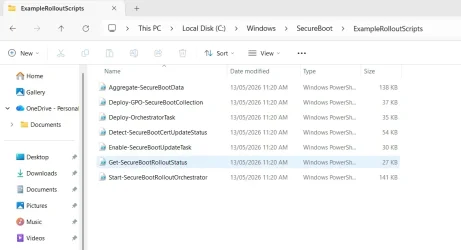
C:\Windows\SecureBoot\ExampleRolloutScriptsI

don't know when this showed up but I found it today after the updates.
 

My Computer

System One

  • OS
    windows 11 Home
    Computer type
    PC/Desktop
    Manufacturer/Model
    Lenovo All In One
    CPU
    13 Gen I7
    Memory
    32Gig
    Graphics Card(s)
    Intel UHD
    Screen Resolution
    1920 1080
    Hard Drives
    1TB
    Antivirus
    Defender
Last step done with PCA 2011 revoked. So, I should be good to go. all set.webp
 

My Computer

System One

  • OS
    Windows 11 25H2
    Computer type
    PC/Desktop
    Manufacturer/Model
    EVGA home brew
    CPU
    Broadwell-e 6850K 4.5ghz @1.36v
    Motherboard
    EVGA X99 FTW K
    Memory
    32GB Corsair LPM 3600 C16
    Graphics Card(s)
    EVGA RTX 3080Ti FTW
    Sound Card
    Asus Centurion true 7.1 headset. (5 speakers in each earpeice)
    Monitor(s) Displays
    LG C4 55"
    Screen Resolution
    4K 144hz
    Hard Drives
    Various models of SSDs ~10TB No HDDs installed.
    PSU
    be quiet! BN516 Straight Power 12-1000w 80 Plus Platinum
    Case
    Corsair 780T modified to dual 200mm intake fans
    Cooling
    Corsair H110i
    Keyboard
    Corsair K95 Platinum
    Mouse
    Corsair M65 RGB Elite
    Internet Speed
    50Mbs
Untitled2.webp
 

My Computers

System One System Two

  • OS
    Windows 11 Pro
    Computer type
    PC/Desktop
    Manufacturer/Model
    Me
    CPU
    Intel Core i5-12600K 3.7 GHz 10-Core Processor
    Motherboard
    Gigabyte B760M H DDR4 Micro ATX LGA1700 Motherboard
    Memory
    Corsair Vengeance LPX 64 GB (2 x 32 GB) DDR4-3200 CL16 Memory
    Graphics Card(s)
    Integrated Intel UHD Graphics 770
    Sound Card
    Realtek
    Monitor(s) Displays
    LG
    Hard Drives
    Samsung 990 Pro 1 TB M.2-2280 PCIe 4.0 X4 NVME Solid State Drive
    Samsung 990 Pro 2 TB M.2-2280 PCIe 4.0 X4 NVME Solid State Drive
    PSU
    NZXT 850w ATX 3.1 Gold Fully Modular Power Supply
    Case
    Thermaltake Versa H25 ATX Mid Tower Case
    Cooling
    CPU Cooler Thermalright Assassin Spirit 120 EVO ARGB (ARGB Disabled) - Case Fans BlackThermalright TL-C12C-S X3 66.17 CFM 120 mm Fans 3-Pack (ARGB disabled)
    Internet Speed
    1 Gbps
    Other Info
    I hate ARGB.
  • Operating System
    Windows 11 Pro
    Computer type
    Laptop
    Manufacturer/Model
    Lenovo ThinkBook 14 G2 ITL
I wouldn't trust Microsoft handling this tbh. I wouldn't be surprised if they just took Garlin's stuff and vibe coded this into AI slop.
Dunno... XD
 

My Computers

System One System Two

  • OS
    Windows 11 Pro 25H2
    Computer type
    PC/Desktop
    Manufacturer/Model
    Built PC
    CPU
    AMD Ryzen 5 5600G @ 3.9/4.4Ghz
    Motherboard
    MSI B550M-PRO-WiFi Ver. 1.4
    Memory
    2 x 16 GB DDR4 Kingston Fury Beast 3200 Mhz
    Graphics Card(s)
    AMD Radeon RX 6600 XT MSI Mech 2X OC Edition 8 GB
    Sound Card
    Realtek High Definition Audio (Integrated)
    Monitor(s) Displays
    Samsung C50Rx 27" LED / HP S2031 20" LCD
    Screen Resolution
    1920 x 1080 px / 1600 x 900 px
    Hard Drives
    WD Blue SN570 NVME M.2 SSD [1 TB] -- External Drives: - WD Scorpion Blue 250 GB 5400 RPM (Data Backup) - Hitachi 500 GB 5400 RPM (Software / ISOs Backup) - Toshiba MQ01ABD100 1 TB 5400 RPM (OS Images) - HGST TravelStar 7K1000 1 TB, 7200 RPM USB 3.0 - ADATA SU800 2TB SSD USB 3.0
    PSU
    Corsair RM750e 750W Fully Modular
    Case
    Naceb Hydra NA-1602
    Cooling
    Naceb Orpheus x 3 (Front) + Naceb Cepheus 1200 RPM Max (Rear) + ThemalRight Assasin X 90 SE (CPU)
    Keyboard
    Logitech MK470 Wireless
    Mouse
    Logitech MK470 Wireless
    Internet Speed
    120 MB Symetrical
    Browser
    Firefox / Brave / Edge
    Antivirus
    Windows Defender
    Other Info
    - VMs: WMware Player - Windows 8.1 Pro x64 / Windows 11 Pro
    - Wacom Intuos Pro Small Tablet PTH-460
  • Operating System
    Windows 11 Pro 25H2
    Computer type
    Laptop
    Manufacturer/Model
    HP Pavilion 15-eh3000la (80M53LA)
    CPU
    AMD Ryzen 7 7730U @ 2.0/4.5 Ghz
    Motherboard
    HP 8BC7
    Memory
    2 x 16 GB Kingston Fury Impact DDR4 3200 Mhz
    Graphics card(s)
    Radeon (tm) Graphics Vega 8 (512 MB)
    Sound Card
    Realtek High Definition Audio (Integrated)
    Monitor(s) Displays
    AU Optronics
    Screen Resolution
    1920 x 1080 px (125% size)
    Hard Drives
    WD Blue SN570 1TB NVME M.2 Drive
    PSU
    45 Watt Charger
    Cooling
    Laptop Cooling Pad
    Keyboard
    Free Wolf Foldable Portable Keyboard
    Mouse
    Free Wolf Wireless Mouse
    Internet Speed
    120 MB Symetrical
    Browser
    Firefox / Brave / Edge
    Antivirus
    Windows Defender
    Other Info
    - 41mWh battery.
    - Wacom Intuos Pro Small Tablet PTH-460
I took a look at the scripts and the documentation
I'm no Powershell expert, but they seem to be designed for domain joined computers
No idea why we're seing these scrips on standalone computers

Side note, @garlin, May updates/patches have not updated Secure Boot on either my SP9 or Dell Inspiron 3910
Pretty sure it's related to the fact that on those 2 computers telemetry is completly disabled

Your scripts it will be in the next few days... ;-)
 

My Computer

System One

  • OS
    Windows 11
Change date
Change description

May 12, 2026

Previously, each sample script file was published as individual articles from which you would copy-and-paste the script. Starting with the Windows updates released on and after May 12, 2026, the sample scripts are located in the %systemroot%\SecureBoot\ExampleRolloutScripts folder on your device.


There’s 15 pages of documentation. I believe this is for enterprise purposes? The change log leads me to believe MS is making it easier to access the files. I assume nothing further is needed to be done. But I’ll wait for Garlin to chime in on this as I am not a secure boot expert.
 
Last edited:

My Computers

System One System Two

  • OS
    Windows 11 Pro
    Computer type
    PC/Desktop
    Manufacturer/Model
    Me
    CPU
    Intel Core i5-12600K 3.7 GHz 10-Core Processor
    Motherboard
    Gigabyte B760M H DDR4 Micro ATX LGA1700 Motherboard
    Memory
    Corsair Vengeance LPX 64 GB (2 x 32 GB) DDR4-3200 CL16 Memory
    Graphics Card(s)
    Integrated Intel UHD Graphics 770
    Sound Card
    Realtek
    Monitor(s) Displays
    LG
    Hard Drives
    Samsung 990 Pro 1 TB M.2-2280 PCIe 4.0 X4 NVME Solid State Drive
    Samsung 990 Pro 2 TB M.2-2280 PCIe 4.0 X4 NVME Solid State Drive
    PSU
    NZXT 850w ATX 3.1 Gold Fully Modular Power Supply
    Case
    Thermaltake Versa H25 ATX Mid Tower Case
    Cooling
    CPU Cooler Thermalright Assassin Spirit 120 EVO ARGB (ARGB Disabled) - Case Fans BlackThermalright TL-C12C-S X3 66.17 CFM 120 mm Fans 3-Pack (ARGB disabled)
    Internet Speed
    1 Gbps
    Other Info
    I hate ARGB.
  • Operating System
    Windows 11 Pro
    Computer type
    Laptop
    Manufacturer/Model
    Lenovo ThinkBook 14 G2 ITL
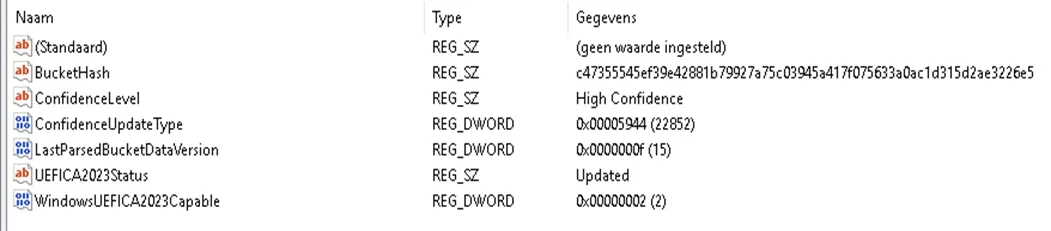
After update build 262000.8457 I checked the Register and below is an overview regarding SecureBoot confidence device targeting data before en after: Computer\HKEY_LOCAL_MACHINE\SYSTEM\CurrentControlSet\Control\SecureBoot\Servicing
before:
ConfidenceLevel - Under Observation-More Data Needed
ConfideceUpdateType -(0)

After update build 262000.8457:
ConfidenceLevel - High Confidence
ConfideceUpdateType -(22852)
1778672739740.webp
 

My Computer

System One

  • OS
    Windows 11 Home x64 Version 25H2 Build 26200.8457
    Computer type
    Laptop
    Manufacturer/Model
    ASUSTeK COMPUTER INC./N751JX
    CPU
    Intel® Core™ i7-4750HQ CPU @ 2.00GHz
    Motherboard
    ASUSTeK Computer INC., BIOS version AMI N751JX.211
    Memory
    16 GB
    Graphics Card(s)
    Intel® Iris™ Pro Graphics 5200
    Sound Card
    Realtek High Definition Audio
    Internet Speed
    250 Mbps
    Antivirus
    Safe Online (F-Secure)
Run the update script. It should copy the KEK CA 2023 cert as both a .der and .crt file to the EFI partition.

Select Append Key / Load from file...
Browse the disks, see if there's a folder view with \EFI folder. Search under that folder for "Certs" folder.
Find the the KEK CA 2023 file, and import it.

If that works fine, restart Windows. Run the update script one more time, it should now add the CA 2023 certs.
While I actually did not follow these instructions, I'm decided to wait a little, I wanted to say thank you again Garlin for the work you are doing.

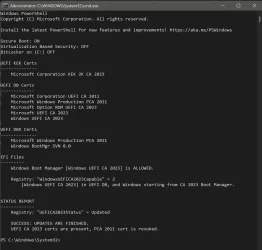
This Patch Tuesday my UEFI was updated by MS as part of their rollout.

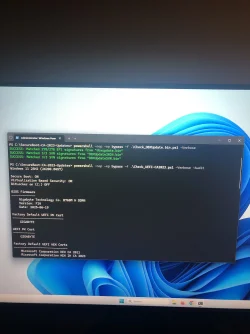
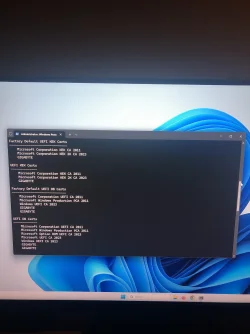
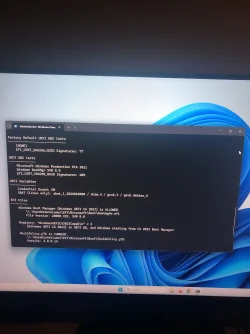
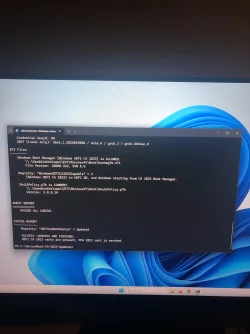
Secure Boot: ON Virtualization Based Security: ON BitLocker on (C:) OFF UEFI KEK Certs -------------- Microsoft Corporation KEK CA 2011 Microsoft Corporation KEK 2K CA 2023 UEFI DB Certs ------------- Microsoft Corporation UEFI CA 2011 Microsoft Windows Production PCA 2011 Microsoft Option ROM UEFI CA 2023 Microsoft UEFI CA 2023 Windows UEFI CA 2023 UEFI DBX Certs -------------- (NONE) Windows BootMgr SVN is MISSING. EFI Files --------- Windows Boot Manager [Production PCA 2011] is ALLOWED. Registry: "WindowsUEFICA2023Capable" = 1 [Windows UEFI CA 2023] in UEFI DB. [OPTIONAL] SkuSiPolicy.p7b (for VBS) is MISSING. NOT RECOMMENDED for dual-boot setups.

I will likely be back, I'm a Macrium user, using the older V8.1 and I see lots of posts in this thread related to Macrium boot media. I need to upgrade Macrium, create new boot media and test.

Thanks again for your efforts, you've help countless people.
 

My Computer

System One

  • OS
    Windows 11 Pro x64 Version V23H2
    Computer type
    PC/Desktop
    Manufacturer/Model
    Custom
    CPU
    i7-8700K
    Motherboard
    Asus Maximus X Code - Z370
    Memory
    G.Skill Trident Z 3200MHz F4-3200C16D-16GTZ (2) 32GB
    Graphics Card(s)
    Intel UHD Graphics 630
    Sound Card
    Integrated ROG SupremeFX
    Monitor(s) Displays
    Asus VP279 27", Samsung BX2431 24"
    Screen Resolution
    1920 x 1080
    Hard Drives
    Samsung M.2 NVMe 960 EVO 500GB Boot,
    Samsung 840 EVO 250GB (System Copy Drive),
    Samsung 860 EVO 1TB (Primary Data Drive),
    WD Black 500GB (Data Copy Drive)
    ICY Dock 5.25 2.5/3.5 Bays MB971SP-B
    PSU
    Corsair RM 650i +Gold
    Case
    Phanteks Enthroo Primo
    Cooling
    Corsair Hydro H150i, 360mm Rad & Five Corsair 140mm Pro ML Case Fans
    Keyboard
    das Keyboard MX Brown Mechanical Switches Model DASKMKPROSIL-3G7-r1.0
    Mouse
    Logitech MX Master 3 Wireless & Bluetooth
    Internet Speed
    500Mb +
    Browser
    Chrome (Pri), Firefox (Sec)
    Antivirus
    Malwarebytes Premium, SuperAntiSpyware Pro (Licensed)
    Other Info
    Microsoft LifeCam HD,
    APC Back-UPS Pro 1500,
    Macrium (Licensed),
    Microsoft 365,
    Wise Disk Cleaner,
    Crystal Disk Info,
    Screenpresso (Licensed),
    AnyDesk (Licensed),
After update build 262000.8457 I checked the Register and below is an overview regarding SecureBoot confidence device targeting data before en after: Computer\HKEY_LOCAL_MACHINE\SYSTEM\CurrentControlSet\Control\SecureBoot\Servicing
before:
ConfidenceLevel - Under Observation-More Data Needed
ConfideceUpdateType -(0)

After update build 262000.8457:
ConfidenceLevel - High Confidence
ConfideceUpdateType -(22852)
View attachment 171396

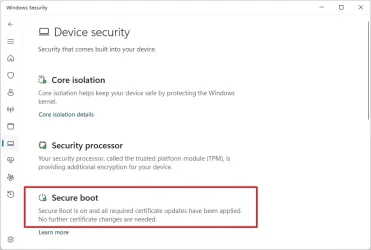
A few weeks ago, Garlin had explained that the only registry key that really matters is "UEFICA2023Status" and if it's set to "Updated" your done. The other keys (buckethash, confidencelevel, confidenceupdatetype) are not always updated by Microsoft once the 2023 certificates are applied.

So, if UEFICA2023Status says "Updated" and Windows Security shows the following under Device security, Secure Boot, your all done.
Even Garlin's check script should tell you your done, maybe not for revoking CA 2021, but like Garlin also mentioned multiple times, this is not mandatory for now.

1778683855637.webp
 

My Computer

System One

  • OS
    Windows 11
Not really needed. The documented advice from OEMs and Microsoft is to keep secure boot turned on. If your OEM isn't going to patch your BIOS, all that will happen is you won't receive new secure boot level protections in the future.

Live with the secure boot certificate installed with your last BIOS update.
 

My Computers

System One System Two

  • OS
    Windows 11 Education For 25H2
    Computer type
    Laptop
    Manufacturer/Model
    HP ZBook G2
    CPU
    Intel® Core i7 5500u
    Motherboard
    HP
    Memory
    8 GB
    Graphics Card(s)
    Intel HD Family Graphics 5500 AMD Firepro 4150M
    Sound Card
    Realtek High Audio
    Hard Drives
    1 TB SSD
    Mouse
    HP USB Mouse
    Antivirus
    Windows Defender
  • Operating System
    Windows 11 Pro For Workstations 25H2
    Computer type
    Laptop
    Manufacturer/Model
    HP Zbook G4
    CPU
    Xeon 1535m v6
    Motherboard
    HP
    Memory
    32 GB
    Graphics card(s)
    AMD Quadro Pro 4100
    Sound Card
    Bang and Olufson Audio
    Hard Drives
    1TB SSD
    Mouse
    HP USB Mouse
    Antivirus
    Windows Defender
Not really needed. The documented advice from OEMs and Microsoft is to keep secure boot turned on. If your OEM isn't going to patch your BIOS, all that will happen is you won't receive new secure boot level protections in the future.

Live with the secure boot certificate installed with your last BIOS update.
who are you replying to ?
not sure...
 

My Computer

System One

  • OS
    Windows 11

Latest Support Threads

Back
Top Bottom