Solved garlin's PowerShell scripts for updating Secure Boot CA 2023


@garlin:

A propos of the various scripts inside the new C:/Windows/SecureBoot/ExampleRolloutScripts folder --
see, for example: "C:\Windows\SecureBoot\ExampleRolloutScripts\Detect-SecureBootCertUpdateStatus.ps1" -- have you had a chance to check these out?

Most of them are HUGE (thousands of lines in Notepad++). Having scanned them briefly, I can see why WindowsLatest says "this folder is meant for IT admins or enterprises" even though all updated Windows 11 OSes will now include the folder.

Love to hear your thoughts and impressions on what's in that collection when you find some "free time" to form them. Reading and absorbing the copious and helpful content on this thread has been the most fun I've had on ElevenForums since it came into being with the OS. Keep up the great work!

Thanks a million!
--Ed--
 

My Computers

System One System Two

  • OS
    Windows 11
    Computer type
    Laptop
    Manufacturer/Model
    Lenovo X380 Yoga
    CPU
    i7-8650U (8th Gen/Kaby Lake)
    Motherboard
    20LH000MUS (U3E1)
    Memory
    16 GB
    Graphics Card(s)
    Intel UHD Graphics 620
    Sound Card
    Integrated Conexant SmartAudio HD
    Monitor(s) Displays
    FlexView Display
    Screen Resolution
    1920x1080
    Hard Drives
    Toshiba 1 TB PCIe x3 NVMe SSD
    external 5TB Seagate USB-C attached HDD
    PSU
    Lenovo integrated 65W power brick
    Case
    Laptop
    Cooling
    Laptop
    Keyboard
    Integrated Lenovo ThinkPad keyboard
    Mouse
    touchscreen, touchpad
    Internet Speed
    GbE (Spectrum/Charter)
    Browser
    all of em
    Antivirus
    Defender
    Other Info
    Purchased early 2019 as Windows Insider test PC
  • Operating System
    Windows 11
    Computer type
    PC/Desktop
    Manufacturer/Model
    DIY
    CPU
    Ryzen 5800X
    Motherboard
    Asrock B550 Extreme4
    Memory
    128 GB (4x32 DDR5-5600)
    Graphics card(s)
    NVIDIA 3070Ti
    Sound Card
    built-in
    Monitor(s) Displays
    2xDell 2707
    Screen Resolution
    1980x1200
    Hard Drives
    2XNVMe, multiple HDDs from 3 to 12 TB
    PSU
    Seasonic 650
    Case
    NZXT Flo 6
    Cooling
    dual-fan air cooler
    Keyboard
    Logitech Wave
    Mouse
    Logitech Logi
    Internet Speed
    GbE
    Browser
    all of 'em
    Antivirus
    Defender
    Other Info
    temperamental UEFI
This is because you were using an old version of Mosby. This is evidenced by Mosby not reporting its version from the log, whereas all the latest versions do (precisely so that we can tell if you are not using the latest).

As you have seen, once you used the latest version your results improved.

And the reason why you may get duplicates is probably because you didn't clear your Secure Boot database after the first operation failed. Mosby always try to clear any existing Secure Boot variables before it installs the new ones, but depending on the machine, that might not always work as this is left to the OEM implementation of EDK2. I'll try to validate that and see if there's anything I should do about it, but this really only is a problem because you used an old version prior to using the latest, and your machine doesn't honour DeleteSecureBootVariables(), which I believe is a very uncommon scenario.

Oh and if you look at the chronology of the reports for the T460, you will have seen that the report of success was after the report of failure, precisely because, 5 month ago, Mosby was fixed to work on the T460 (which is why you really should have tried to locate the latest version of Mosby -- when dealing with security matters, always strive to use the latest!), so the report of the failure is moot.

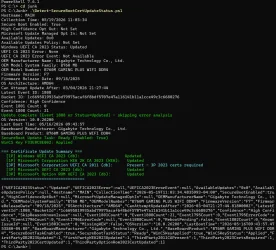
Finally, since this is a topic related to running PowerShell scripts, and in case this hasn't already been mentioned here, please be aware that mandatory Windows Update KB5089549 from May 12th installs a new C:\Windows\SecureBoot\ directory where you will find multiple official scripts for the validation and updating of your platform when it comes to the 2023 certs. For instance, running .\Detect-SecureBootCertUpdateStatus.ps1 (elevated) on an updated platform will yield (with nicer colours than this output):
Code:
PS C:\Windows\SecureBoot\ExampleRolloutScripts> .\Detect-SecureBootCertUpdateStatus.ps1
Hostname: ########
Collection Time: 05/19/2026 12:28:05
Secure Boot Enabled: True
High Confidence Opt Out: Not Set
Microsoft Update Managed Opt In: Not Set
Available Updates: 0x0
Available Updates Policy: Not Set
Windows UEFI CA 2023 Status: Updated
UEFI CA 2023 Error: None
UEFI CA 2023 Error Event: Not Available
OEM Manufacturer Name: ########
OEM Model System Family: ########
OEM Model Number: ########
Firmware Version: ########
Firmware Release Date: ######
OS Architecture: AMD64
Can Attempt Update After: 05/15/2026 20:23:26
Latest Event ID: 1808
Bucket ID: 9489562971cbe3e065d354545b88d3f9763e43e0f0541e53ffc49250f3a75ef8
Confidence: Under Observation - More Data Needed
Event 1801 Count: 0
Event 1808 Count: 50
Update complete (Event 1808 or Status=Updated) - skipping error analysis
OS Version: 10.0.26200
Last Boot Time: 05/19/2026 09:28:42
Baseboard Manufacturer: ########
Baseboard Product: ########
SecureBoot Update Task: Ready (Enabled: True)
WinCS Key F33E0C8E002: Applied

=== Certificate Update Summary ===
  [1P] Windows UEFI CA 2023 (db):                   Updated
  [1P] Microsoft Corporation KEK 2K CA 2023 (KEK):   Updated
  [3P] Microsoft Corporation UEFI CA 2011 (db):      Present - 3P 2023 certs required
  [3P] Microsoft UEFI CA 2023 (db):                  Updated
  [3P] Microsoft Option ROM UEFI CA 2023 (db):       Updated
===================================

The interesting part is that you can see your "Confidence" bucket, along with the earliest date at which Microsoft plans to update your certs.
It was my mistake that the first attempt using Mosby failed. Where the menu shows UEFI 2.2 releases to pick, it lists 26H1, 25H2, 25H1, as choices. Without any written direction, I picked the version 25H2 that matches the installed version of Windows 11 on my Lenovo T460 (25H2). My mistake, but if the list showed something like 2.2, 2.0 or something like 260414, 251120, then I would not have made my mistake.

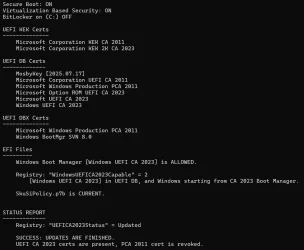
A few minutes ago, I went into BIOS and clicked Clear All Secure Boot Keys and then booted from USB flash drive and ran Mosby again. It looks to me like the duplicates are removed. And the Lenovo is still saying in Windows Security that Secure Boot is enabled, and all required certificate updates have been applied.

Thanks!

Code:
Secure Boot: ON
Virtualization Based Security: OFF
BitLocker on (C:) OFF

UEFI KEK Certs
--------------
    Microsoft Corporation KEK CA 2011
    Microsoft Corporation KEK 2K CA 2023

UEFI DB Certs
-------------
    MosbyKey [2026.05.19]
    Microsoft Corporation UEFI CA 2011
    Microsoft Windows Production PCA 2011
    Microsoft Option ROM UEFI CA 2023
    Microsoft UEFI CA 2023
    Windows UEFI CA 2023

UEFI DBX Certs
--------------
    (NONE)
    Windows BootMgr SVN 7.0

EFI Files
---------
    Windows Boot Manager [Windows UEFI CA 2023] is ALLOWED.
    Registry: "WindowsUEFICA2023Capable" = 2
        [Windows UEFI CA 2023] in UEFI DB, and Windows starting from CA 2023 Boot Manager.


REQUIRED ACTION
===============
To REVOKE the [PCA 2011] cert, run the commands:

    reg add HKEY_LOCAL_MACHINE\SYSTEM\CurrentControlSet\Control\Secureboot /v AvailableUpdates /t REG_DWORD /d 0x282 /f
    powershell Start-ScheduledTask -TaskName "\Microsoft\Windows\PI\Secure-Boot-Update"
 

My Computers

System One System Two

  • OS
    Windows 11
    Computer type
    Laptop
    Manufacturer/Model
    Lenovo T460
  • Operating System
    Windows 11
    Computer type
    PC/Desktop
    Manufacturer/Model
    HP EliteDesk 800 G1 SFF
@garlin:

A propos of the various scripts inside the new C:/Windows/SecureBoot/ExampleRolloutScripts folder --
see, for example: "C:\Windows\SecureBoot\ExampleRolloutScripts\Detect-SecureBootCertUpdateStatus.ps1" -- have you had a chance to check these out?

Most of them are HUGE (thousands of lines in Notepad++). Having scanned them briefly, I can see why WindowsLatest says "this folder is meant for IT admins or enterprises" even though all updated Windows 11 OSes will now include the folder.

Love to hear your thoughts and impressions on what's in that collection when you find some "free time" to form them. Reading and absorbing the copious and helpful content on this thread has been the most fun I've had on ElevenForums since it came into being with the OS. Keep up the great work!

Thanks a million!
--Ed--

Garlin already answered this in the following posts: #1703, #1704, #1705
And once again, he was kind enough to share is knowledge...
 

My Computer

System One

  • OS
    Windows 11
A propos of the various scripts inside the new C:/Windows/SecureBoot/ExampleRolloutScripts folder --
see, for example: "C:\Windows\SecureBoot\ExampleRolloutScripts\Detect-SecureBootCertUpdateStatus.ps1" -- have you had a chance to check these out?
Those scripts were released in March 2026 as reference examples, (but originally not included in the Monthly Update):

Most of them are HUGE (thousands of lines in Notepad++). Having scanned them briefly, I can see why WindowsLatest says "this folder is meant for IT admins or enterprises" even though all updated Windows 11 OSes will now include the folder.

Love to hear your thoughts and impressions on what's in that collection when you find some "free time" to form them.
The primary audience for the scripts are IT admins, who don't have an existing framework for collecting Secure Boot data across hundreds or thousands of PC's. Not every organization runs InTune, or a high-level enterprise management framework. The scripts represent a baseline for smaller admins to do their own reporting and deployment.

While you can run the Detect-SecureBootCertUpdateStatus.ps1, most non-technical users who aren't following instructions to manually update the Secure Boot using AvailableUpdates won't find too many extra details to benefit them.

Let's break down the report (items that matter to you in Green):

Hostname: ########
Collection Time: 05/19/2026 12:28:05
Secure Boot Enabled: True <-- BIOS setting for Secure Boot
High Confidence Opt Out: Not Set <-- Did you set the reg key to opt out of sending telemetry to MS? (for enterprises)
Microsoft Update Managed Opt In: Not Set <-- Did you set the reg key to opt in of having MS proactively push the Secure Boot update? (for enterprises)
Available Updates: 0x0 <-- Did you follow instructions to manually run the Secure Boot task? This is the pending (unfinished) actions.
Available Updates Policy: Not Set <-- Did you set the optional Group Policy to force updates? (for enterprises) Same effect as setting AvailableUpdates=0x5944
Windows UEFI CA 2023 Status: Updated <-- Are you done adding the CA 2023 certs?
UEFI CA 2023 Error: None <-- Does Windows know why adding your cert failed? Mostly likely because you don't have a supported KEK CA 2023
UEFI CA 2023 Error Event: Not Available
OEM Manufacturer Name: ########
OEM Model System Family: ########
OEM Model Number: ########
Firmware Version: ########
Firmware Release Date: ######

OS Architecture: AMD64
Can Attempt Update After: 05/15/2026 20:23:26
Latest Event ID: 1808
Bucket ID: 9489562971cbe3e065d354545b88d3f9763e43e0f0541e53ffc49250f3a75ef8 <-- MS has assigned your PC/BIOS combination to a group pool for allowing or blocking automatic updates.
Confidence: Under Observation - More Data Needed <-- MS still hasn't decided they're going to update you right now (blocked). Not enough telemetry collected on MS's end to decide for now.
Event 1801 Count: 0
Event 1808 Count: 50
Update complete (Event 1808 or Status=Updated) - skipping error analysis
OS Version: 10.0.26200
Last Boot Time: 05/19/2026 09:28:42
Baseboard Manufacturer: ########
Baseboard Product: ########
SecureBoot Update Task: Ready (Enabled: True) <-- Did you tamper with the Secure Boot task, so it can't run?
WinCS Key F33E0C8E002: Applied <-- Only enterprises care about the WinCS tool

=== Certificate Update Summary ===
[1P] Windows UEFI CA 2023 (db): Updated
[1P] Microsoft Corporation KEK 2K CA 2023 (KEK): Updated
[3P] Microsoft Corporation UEFI CA 2011 (db): Present - 3P 2023 certs required
[3P] Microsoft UEFI CA 2023 (db): Updated
[3P] Microsoft Option ROM UEFI CA 2023 (db): Updated

===================================
 

My Computer

System One

  • OS
    Windows 7
Hi. I’ve used the update 2023 certs script to apply the 2023 certificates to HP models that do not have official 2023 certificate support (G4 models). The 2011 certificate is revoked. The bootloader says it’s using the 2023 certificates and the kek etc is installed. I know there’s no crystal ball but is that enough to report back that older workstations that were in danger of becoming e-waste can be deemed as compliant from a security perspective or will the next secure boot windows update cause issues again?

Great work on the scripts btw. They’ve been really useful.
 

My Computer

System One

  • OS
    win11
    Computer type
    PC/Desktop
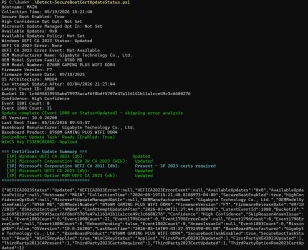
I'm personally unimpressed with the Microsoft scripts! I ran the Detect script, but it looks like it took a dump at the end. It would also be useful to know why it's saying Present - 3P 2023 certs required. It seems to say they're present and then tells me they're required? Then it looks like it had a blowout right after that. :lmao:

1779203362122.webp
 

My Computers

System One System Two

  • OS
    Win 11 Pro 25H2, Build 26200.8524
    Computer type
    PC/Desktop
    Manufacturer/Model
    Home Brew
    CPU
    Intel Core i5 14500
    Motherboard
    Gigabyte B760M G P WIFI
    Memory
    64GB DDR4
    Graphics Card(s)
    GeForce RTX 4060
    Sound Card
    Chipset Realtek
    Monitor(s) Displays
    LG 45" Ultragear, Acer 24" 1080p
    Screen Resolution
    5120x1440, 1920x1080
    Hard Drives
    Crucial P310 2TB 2280 PCIe Gen4 3D NAND NVMe M.2 SSD (O/S)
    Silicon Power 2TB US75 NVMe PCIe Gen4 M.2 2280 SSD (backup)
    Crucial BX500 2TB 3D NAND (2nd backup)
    Seagate 4TB Ironwolf, rotating HDD archive files
    External off-line backup Drives: 2 NVMe 4TB drives in external enclosures
    PSU
    Thermaltake Toughpower GF3 750W
    Case
    LIAN LI LANCOOL 216 E-ATX PC Case
    Cooling
    Lots of fans!
    Keyboard
    Microsoft Comfort Curve 2000
    Mouse
    Logitech G305
    Internet Speed
    Verizon FiOS 1GB
    Browser
    Firefox
    Antivirus
    Malware Bytes & Windows Defender Security
  • Operating System
    Win 11 Pro 25H2, Build 26200.8524
    Computer type
    PC/Desktop
    Manufacturer/Model
    Home Brew
    CPU
    Intel Core i5 14400
    Motherboard
    Gigabyte B760M DS3H AX
    Memory
    32GB DDR5
    Graphics card(s)
    Intel 700 Embedded GPU
    Sound Card
    Realtek Embedded
    Monitor(s) Displays
    27" HP 1080p
    Screen Resolution
    1920x1080
    Hard Drives
    Crucial P310 2TB 2280 PCIe Gen4 eD NAND PCIe SSD
    Samsung EVO 990 2TB NVMe Gen4 SSD
    Samsung 2TB SATA SSD
    PSU
    Thermaltake Smart BM3 650W
    Case
    Okinos Micro ATX Case
    Cooling
    Fans
    Keyboard
    Microsoft Comfort Curve 2000
    Mouse
    Logitech G305
    Internet Speed
    Verizon FiOS 1GB
    Browser
    Firefox
    Antivirus
    Malware Bytes & Windows Defender Security
It does more or less the same things, but with some catches.
..........................

Thanks for your explanations

I read your answer last night but it was late, so waited until this morning to read it again and reply.
SBAT, yup, I'm seeing it on the output of your check script on both my SP9 and Dell Inspiron 3910

UEFI Variables
--------------
Credential Guard: ON
SBAT (Linux only): sbat,1,2024010900 / shim,4 / grub,3 / grub.debian,4

So your update script with the "-revoke" flag adds the following to the DBX:
  • PCA 2011 revocation
  • Makes sure revocation listed in DBXUpdate.bin are all applied
  • Makes sure that SVN lower then what the PC is using is revoked
As for SkuSiPolicy, it's to prevent booting PC from boot manager or boot media that does not comply to the policy.
I use Macrium X so could be an issue in my case but wouldn't the following fix the Macrium X recovery drive ?
Or is bcdboot not copying SKuSiPolicy at the same time ?

COPY X:\EFI\MICROSOFT\BOOT\BCD X:\EFI\MICROSOFT\BOOT\BCD.BAK
bcdboot c:\windows /f UEFI /s X: /bootex
COPY X:\EFI\MICROSOFT\BOOT\BCD.BAK X:\EFI\MICROSOFT\BOOT\BCD
Where "X:" would be my Macrium X recovery drive.​

Thanks in advance...
 

My Computer

System One

  • OS
    Windows 11
Hi. I’ve used the update 2023 certs script to apply the 2023 certificates to HP models that do not have official 2023 certificate support (G4 models). The 2011 certificate is revoked. The bootloader says it’s using the 2023 certificates and the kek etc is installed. I know there’s no crystal ball but is that enough to report back that older workstations that were in danger of becoming e-waste can be deemed as compliant from a security perspective or will the next secure boot windows update cause issues again?

Great work on the scripts btw. They’ve been really useful.
The major hurdle in the CA 2023 migration is you need to have a valid KEK CA 2023 in order to install the other CA 2023 certs. Your vendor (HP) owns responsibility for providing a signed KEK (provided in a BIOS update) or submitting a signed file to MS (for Windows to install).

After you get all of the CA 2023 certs installed, the PC is now compliant. It will support all security changes moving forward.

Future updates may include a newer boot manager (whenever MS closes security holes) and its matching SVN. But since you have the CA 2023 certs installed, your PC won't be obsoleted (at least for Secure Boot reasons). Don't have to recycle a PC if you can make KEK CA 2023 to work in the first place.
 

My Computer

System One

  • OS
    Windows 7
I'm personally unimpressed with the Microsoft scripts! I ran the Detect script, but it looks like it took a dump at the end. It would also be useful to know why it's saying Present - 3P 2023 certs required. It seems to say they're present and then tells me they're required? Then it looks like it had a blowout right after that. :lmao:
That's not a "dump", but a JSON-formatted string that's to be imported into the other example scripts for digesting.

I have no idea why the script flags "3P 2023" which is the Microsoft UEFI CA 2023. Clearly on the next line as "Updated". 🤷‍♂️
 

My Computer

System One

  • OS
    Windows 7
That's not a "dump", but a JSON-formatted string that's to be imported into the other example scripts for digesting.

I have no idea why the script flags "3P 2023" which is the Microsoft UEFI CA 2023. Clearly on the next line as "Updated". 🤷‍♂️
Coudl it be that the UEFI CA 2011 is not yet revoked ?
Because I'm getting the exact same thing on 2 PC where I haven't yet revoked it...

Booting another PC that I've done the revoke and will report back when Windows Update is ran so I get the scripts and on it
 

My Computer

System One

  • OS
    Windows 11
UEFI Variables
--------------
Credential Guard: ON
SBAT (Linux only): sbat,1,2024010900 / shim,4 / grub,3 / grub.debian,4
Credential Guard indicates that LSA is enabled at the UEFI level. You can no longer disable LSA using the reg keys, Windows will only obey the UEFI setting (LSA is enforced). This prevents an attacker from disabling it by hacking the reg keys. LSA is to protect you against "MimiKatz" attacks.

I provide the SBAT for reference (to prove it's there). Otherwise don't obsess over the contents unless you're a Linux user.

So your update script with the "-revoke" flag adds the following to the DBX:
  • PCA 2011 revocation
  • Makes sure revocation listed in DBXUpdate.bin are all applied
  • Makes sure that SVN lower then what the PC is using is revoked
As for SkuSiPolicy, it's to prevent booting PC from boot manager or boot media that does not comply to the policy.
I use Macrium X so could be an issue in my case but wouldn't the following fix the Macrium X recovery drive ?
Or is bcdboot not copying SKuSiPolicy at the same time ?

COPY X:\EFI\MICROSOFT\BOOT\BCD X:\EFI\MICROSOFT\BOOT\BCD.BAK
bcdboot c:\windows /f UEFI /s X: /bootex
COPY X:\EFI\MICROSOFT\BOOT\BCD.BAK X:\EFI\MICROSOFT\BOOT\BCD
Where "X:" would be my Macrium X recovery drive.​
bcdboot only replaces the boot files (which is the boot manager/file is ALLOWED or BANNED).

SkuSiPolicy.p7b restricts the winload.efi file inside Windows or the boot.wim file that your Macrium uses. bcdboot can't touch that, you must find (or Macrium) finds a boot.wim version which passes the restrictions. That's the harder part. You don't normally just replace the one winload.efi file, the proper fix is to find another boot.wim that includes a passing winload.efi.

Which is why I don't automatically copy SkuSiPolicy to the EFI any more. Because I can't control what Macrium does, and the script shouldn't cause you grief since there's enough Macrium users in this forum.

Coudl it be that the UEFI CA 2011 is not yet revoked ?
Because I'm getting the exact same thing on 2 PC where I haven't yet revoked it...
I dunno, because so far MS is pretending like revocation doesn't exist in their reporting. They don't explicitly have a "CA 2011 is revoked" reg value. Windows has UEFICA2023Status, but that only checks that you have the CA 2023 certs installed.
 

My Computer

System One

  • OS
    Windows 7
In Post #1736 I posted that I could not get my HP Z440 workstation to revoke, as I got an error.
Today, having read this article Windows 11's Secure Boot 2023 updates are failing across some PCs, exposing a wider firmware problem what caught my attention in the article was this part:
Some ASUS boards refused to apply DBX updates unless Secure Boot was temporarily disabled — a paradoxical requirement. Others applied updates but left systems in a “half‑revoked” state. The CA-2011 certificate might still be used (or not) even if the CA-2023 certificate was present.

So, I thought: what if I disable my secure boot and try to revoke again, using .\Update_UEFI-CA2023.ps1 -Revoke.
I restarted my HP Z440 workstation, set the UEFI to "disable legacy support and disable secure boot".
Once win 11 had started, I ran .\Update_UEFI-CA2023.ps1 -Revoke and lo and behold, it ran this time without errors. And appended the dbx2024bin file without problem, and another bin file. It then asked to reboot. Which I did, but with the secure boot still OFF. When win 11 had restarted, I ran
.\Check_UEFI-CA2023.ps1 -Verbose

Windows 11 25H2 (26200.8457)

Secure Boot: OFF
Virtualization Based Security: ON
BitLocker on (C:) OFF

BIOS Firmware
-------------
Hewlett-Packard HP Z440 Workstation
Version: M60 v02.62
Date: 2024-01-04

Factory Default UEFI PK Cert
----------------------------
Hewlett-Packard UEFI Secure Boot Platform Key

UEFI PK Cert
------------
Hewlett-Packard UEFI Secure Boot Platform Key

Factory Default UEFI KEK Certs
------------------------------
Microsoft Corporation KEK CA 2011
Hewlett-Packard UEFI Secure Boot Key Exchange Key

UEFI KEK Certs
--------------
Microsoft Corporation KEK CA 2011
Microsoft Corporation KEK 2K CA 2023
Hewlett-Packard UEFI Secure Boot Key Exchange Key

Factory Default UEFI DB Certs
-----------------------------
Microsoft Corporation UEFI CA 2011
Microsoft Windows Production PCA 2011
Hewlett-Packard UEFI Secure Boot DB Key

UEFI DB Certs
-------------
Microsoft Corporation UEFI CA 2011
Microsoft Windows Production PCA 2011
Microsoft Option ROM UEFI CA 2023
Microsoft UEFI CA 2023
Windows UEFI CA 2023
Hewlett-Packard UEFI Secure Boot DB Key
HP UEFI Secure Boot 2013 DB key

Factory Default UEFI DBX Certs
------------------------------
(NONE)
EFI_CERT_SHA256_GUID Signatures: 14

UEFI DBX Certs
--------------
Microsoft Windows Production PCA 2011
Windows BootMgr SVN 8.0
EFI_CERT_SHA256_GUID Signatures: 816

UEFI Variables
--------------
Credential Guard: ON
SBAT (Linux only): sbat,1,2024010900 / shim,4 / grub,3 / grub.debian,4

EFI Files
---------
Windows Boot Manager [Windows UEFI CA 2023] is ALLOWED.
\\.\HarddiskVolume1\EFI\Microsoft\Boot\bootmgfw.efi
File Version: 28000.322, SVN 8.0

Registry: "WindowsUEFICA2023Capable" = 2
[Windows UEFI CA 2023] in UEFI DB, and Windows starting from CA 2023 Boot Manager.

SkuSiPolicy.p7b is CURRENT.
\\.\HarddiskVolume1\EFI\Microsoft\Boot\SkuSiPolicy.p7b
Version: 3.0.0.14


STATUS REPORT
-------------
Registry: "UEFICA2023Status" = Updated

SUCCESS: UPDATES ARE FINISHED.
UEFI CA 2023 certs are present, PCA 2011 cert is revoked.


That looked good. So I rebooted again, but now set the secure boot to ON.
The Endresult is the same, but with secure boot active:

.\Check_UEFI-CA2023.ps1 -Verbose
Windows 11 25H2 (26200.8457)

Secure Boot: ON
Virtualization Based Security: ON
BitLocker on (C:) OFF

BIOS Firmware
-------------
Hewlett-Packard HP Z440 Workstation
Version: M60 v02.62
Date: 2024-01-04

Factory Default UEFI PK Cert
----------------------------
Hewlett-Packard UEFI Secure Boot Platform Key

UEFI PK Cert
------------
Hewlett-Packard UEFI Secure Boot Platform Key

Factory Default UEFI KEK Certs
------------------------------
Microsoft Corporation KEK CA 2011
Hewlett-Packard UEFI Secure Boot Key Exchange Key

UEFI KEK Certs
--------------
Microsoft Corporation KEK CA 2011
Microsoft Corporation KEK 2K CA 2023
Hewlett-Packard UEFI Secure Boot Key Exchange Key

Factory Default UEFI DB Certs
-----------------------------
Microsoft Corporation UEFI CA 2011
Microsoft Windows Production PCA 2011
Hewlett-Packard UEFI Secure Boot DB Key

UEFI DB Certs
-------------
Microsoft Corporation UEFI CA 2011
Microsoft Windows Production PCA 2011
Microsoft Option ROM UEFI CA 2023
Microsoft UEFI CA 2023
Windows UEFI CA 2023
Hewlett-Packard UEFI Secure Boot DB Key
HP UEFI Secure Boot 2013 DB key

Factory Default UEFI DBX Certs
------------------------------
(NONE)
EFI_CERT_SHA256_GUID Signatures: 14

UEFI DBX Certs
--------------
Microsoft Windows Production PCA 2011
Windows BootMgr SVN 8.0
EFI_CERT_SHA256_GUID Signatures: 816

UEFI Variables
--------------
Credential Guard: ON
SBAT (Linux only): sbat,1,2024010900 / shim,4 / grub,3 / grub.debian,4

EFI Files
---------
Windows Boot Manager [Windows UEFI CA 2023] is ALLOWED.
\\.\HarddiskVolume1\EFI\Microsoft\Boot\bootmgfw.efi
File Version: 28000.322, SVN 8.0

Registry: "WindowsUEFICA2023Capable" = 2
[Windows UEFI CA 2023] in UEFI DB, and Windows starting from CA 2023 Boot Manager.

SkuSiPolicy.p7b is CURRENT.
\\.\HarddiskVolume1\EFI\Microsoft\Boot\SkuSiPolicy.p7b
Version: 3.0.0.14


STATUS REPORT
-------------
Registry: "UEFICA2023Status" = Updated

SUCCESS: UPDATES ARE FINISHED.
UEFI CA 2023 certs are present, PCA 2011 cert is revoked.

So, I have now a HP Z440 that has been updated and the old cert revoked. No errors anymore, and remember what I wrote before: Win 11 indicated originally in the device security that sec boot cert updates had been paused because of a know issue. It reminds me of what Garlin has written in one of his many posts: Microsoft hesitates to do anything, but unless they try, they can never collect the right data.

Again, huge thanks go to Garlin for his scripts and his continued explanations.
 

My Computer

System One

  • OS
    windows 11
Credential Guard indicates that LSA is enabled at the UEFI level. You can no longer disable LSA using the reg keys, Windows will only obey the UEFI setting (LSA is enforced). This prevents an attacker from disabling it by hacking the reg keys. LSA is to protect you against "MimiKatz" attacks.

I provide the SBAT for reference (to prove it's there). Otherwise don't obsess over the contents unless you're a Linux user.


bcdboot only replaces the boot files (which is the boot manager/file is ALLOWED or BANNED).

SkuSiPolicy.p7b restricts the winload.efi file inside Windows or the boot.wim file that your Macrium uses. bcdboot can't touch that, you must find (or Macrium) finds a boot.wim version which passes the restrictions. That's the harder part. You don't normally just replace the one winload.efi file, the proper fix is to find another boot.wim that includes a passing winload.efi.

Which is why I don't automatically copy SkuSiPolicy to the EFI any more. Because I can't control what Macrium does, and the script shouldn't cause you grief since there's enough Macrium users in this forum.
Understood
So in my case, no SkuSiPolicy if I do not want to have problems with Macrium
Also, SP9 and Dell 3910 are home computer and never leave home and I'm the only one using does, so risk is low

Thanks
 

My Computer

System One

  • OS
    Windows 11
In Post #1736 I posted that I could not get my HP Z440 workstation to revoke, as I got an error.
Today, having read this article Windows 11's Secure Boot 2023 updates are failing across some PCs, exposing a wider firmware problem what caught my attention in the article was this part:
Some ASUS boards refused to apply DBX updates unless Secure Boot was temporarily disabled — a paradoxical requirement. Others applied updates but left systems in a “half‑revoked” state. The CA-2011 certificate might still be used (or not) even if the CA-2023 certificate was present.
Wow, that is one messed up BIOS. Thanks for bringing this up for other PC owners.

On paper, there's nothing in the UEFI spec that says in order to apply Secure Boot certs, you must have Secure Boot mode enabled or disabled. All the spec requires is you properly authenticate (sign) the key data whenever a working PK is installed.

I've seen weird TPM-WMI errors from Windows like "can't install the SBAT because you have Secure Boot disabled".
 

My Computer

System One

  • OS
    Windows 7
Coudl it be that the UEFI CA 2011 is not yet revoked ?
Because I'm getting the exact same thing on 2 PC where I haven't yet revoked it...

Booting another PC that I've done the revoke and will report back when Windows Update is ran so I get the scripts and on it

I dunno, because so far MS is pretending like revocation doesn't exist in their reporting. They don't explicitly have a "CA 2011 is revoked" reg value. Windows has UEFICA2023Status, but that only checks that you have the CA 2023 certs installed.

Hypothesis of revoke not applied is not good
Old Lenovo L440 with revoke applied has the same line in the output of MS detect script
 

My Computer

System One

  • OS
    Windows 11
Reading and absorbing the copious and helpful content on this thread has been the most fun I've had on ElevenForums since it came into being with the OS. Keep up the great work!

Thanks a million!
--Ed--
Even a relative noob like myself agrees with this sentiment, AAMOF the most fun (and gained the most knowledge from) since I've been on any of Shawn's superb Forums dating back to 7 Forums at Windows 7's RTM.
 

My Computer

System One

  • OS
    Win10 Pro lx64 19045.7184 (extended sec updts)
    Computer type
    Laptop
    Manufacturer/Model
    MSI PE60 6QE
    CPU
    Intel Core i7-6700HQ CPU @ 2.60GHz
    Motherboard
    MSI MS-16J5
    Memory
    16gb DDR4
    Graphics Card(s)
    Intel HD Graphics 530 (Skylake-H GT2) RealTek ALC899
    Sound Card
    Intel Skylake PCH-H - High Definition Audio
    Screen Resolution
    1920x1080
    Hard Drives
    Samsung SSD 850 EVO M.2 250GB
    HGST HTS721010A9E6301TB 7200 RPM
    Samsung PSSD T9 USB SSD
    Browser
    Chrome
    Antivirus
    Defender
    Other Info
    Intel Dual Band Wireless-AC 3165
    Qualcomm/Atheros AR8161/8165 PCI-E Gigabit Ethernet Controller
Understood
So in my case, no SkuSiPolicy if I do not want to have problems with Macrium
Also, SP9 and Dell 3910 are home computer and never leave home and I'm the only one using does, so risk is low
Having SkuSiPolicy can work out for some users. But not everyone is knowledgeable about the risks.

I'm working on a separate script to predict if SkuSiPolicy is compatible with your dual-boot setup or USB recovery drive. The script searches for the winload.efi (or extracts it from a boot.wim or WinRE.wim), and compares it against SkuSiPolicy's allowed versions list.

This would give users a clue whether it's safe to roll out SkuSiPolicy.
 

My Computer

System One

  • OS
    Windows 7
garlin, you're a bloody champ doing all this work.
Your stamina to keep processing all these queries is admirable.
Well done!
 

My Computer

System One

  • OS
    Win 11 Pro
    Computer type
    PC/Desktop
    Manufacturer/Model
    N/A
    CPU
    AMD Ryzen 7 9700X
    Motherboard
    ASUS Crosshair Viii Hero Wi Fi
    Memory
    G.Skill Trident Z5 Neo RGB 64GB Kit (2x32GB) DDR5-6000 C30
    Graphics Card(s)
    PowerColor Radeon RX 9060 XT Reaper GDDR6 16GB
    Sound Card
    USB Out NAD M51 DAC with Adams A8 powered speakers
    Monitor(s) Displays
    Dell 3219Q
    Screen Resolution
    3840 x 2160
    Hard Drives
    5 x WD_BLACK SN850x PCIe Gen4 NVMe M.2 SSD - 4TB
    PSU
    be quiet! DARK POWER 13 1000W Titanium PCIe 5.0 ATX Modular PSU
    Case
    Fractal Design Define 7 Full Tower Case (Black)
    Cooling
    Noctua NH-D15 G2 LBC - High Performance Multi-Socket PWM CPU Cooler
    Keyboard
    Razer Huntsman V2
    Mouse
    Razer Viper Ultimate
    Internet Speed
    Starlink 94Mbps down 20Mbps up
    Browser
    Brave
    Antivirus
    ESET
I dunno, because so far MS is pretending like revocation doesn't exist in their reporting. They don't explicitly have a "CA 2011 is revoked" reg value. Windows has UEFICA2023Status, but that only checks that you have the CA 2023 certs installed.
I was curious about that as well, I did notice no CA 2011 status in the printout. Clearly, I have no business in the \Windows\SecureBoot folder. 🤣
Coudl it be that the UEFI CA 2011 is not yet revoked ?
Because I'm getting the exact same thing on 2 PC where I haven't yet revoked it...

Booting another PC that I've done the revoke and will report back when Windows Update is ran so I get the scripts and on it
Not in my case, I have revoked the 2011 cert.

1779218425397.webp

Microsoft's script still says the same thing, it seems to be complaining about the 2011 cert. Of course, the 2323 certs are already installed!

1779218677154.webp
 

My Computers

System One System Two

  • OS
    Win 11 Pro 25H2, Build 26200.8524
    Computer type
    PC/Desktop
    Manufacturer/Model
    Home Brew
    CPU
    Intel Core i5 14500
    Motherboard
    Gigabyte B760M G P WIFI
    Memory
    64GB DDR4
    Graphics Card(s)
    GeForce RTX 4060
    Sound Card
    Chipset Realtek
    Monitor(s) Displays
    LG 45" Ultragear, Acer 24" 1080p
    Screen Resolution
    5120x1440, 1920x1080
    Hard Drives
    Crucial P310 2TB 2280 PCIe Gen4 3D NAND NVMe M.2 SSD (O/S)
    Silicon Power 2TB US75 NVMe PCIe Gen4 M.2 2280 SSD (backup)
    Crucial BX500 2TB 3D NAND (2nd backup)
    Seagate 4TB Ironwolf, rotating HDD archive files
    External off-line backup Drives: 2 NVMe 4TB drives in external enclosures
    PSU
    Thermaltake Toughpower GF3 750W
    Case
    LIAN LI LANCOOL 216 E-ATX PC Case
    Cooling
    Lots of fans!
    Keyboard
    Microsoft Comfort Curve 2000
    Mouse
    Logitech G305
    Internet Speed
    Verizon FiOS 1GB
    Browser
    Firefox
    Antivirus
    Malware Bytes & Windows Defender Security
  • Operating System
    Win 11 Pro 25H2, Build 26200.8524
    Computer type
    PC/Desktop
    Manufacturer/Model
    Home Brew
    CPU
    Intel Core i5 14400
    Motherboard
    Gigabyte B760M DS3H AX
    Memory
    32GB DDR5
    Graphics card(s)
    Intel 700 Embedded GPU
    Sound Card
    Realtek Embedded
    Monitor(s) Displays
    27" HP 1080p
    Screen Resolution
    1920x1080
    Hard Drives
    Crucial P310 2TB 2280 PCIe Gen4 eD NAND PCIe SSD
    Samsung EVO 990 2TB NVMe Gen4 SSD
    Samsung 2TB SATA SSD
    PSU
    Thermaltake Smart BM3 650W
    Case
    Okinos Micro ATX Case
    Cooling
    Fans
    Keyboard
    Microsoft Comfort Curve 2000
    Mouse
    Logitech G305
    Internet Speed
    Verizon FiOS 1GB
    Browser
    Firefox
    Antivirus
    Malware Bytes & Windows Defender Security
I was curious about that as well, I did notice no CA 2011 status in the printout.
The closest feature I've found to Windows recognizing you've revoked CA 2011 is Security Center reporting "No further updates are required".

Microsoft's script still says the same thing, it seems to be complaining about the 2011 cert. Of course, the 2323 certs are already installed!
3P is the MS shorthand for Third Party cert (Microsoft UEFI CA 2023 for Linux). MS informs the OEM's that 3P is optional, but why does their script flag it as required?
 

My Computer

System One

  • OS
    Windows 7
Back
Top Bottom