Solved garlin's PowerShell scripts for updating Secure Boot CA 2023


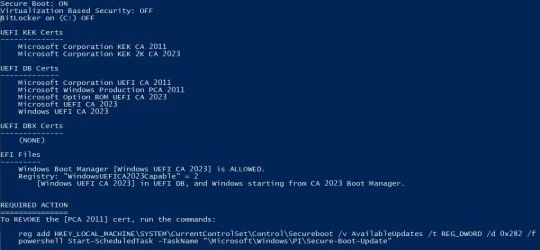
CA_2011_nuts.webp

I get the same result, not woried
 

My Computer

System One

  • OS
    Win11 24H2 IOT LTSC / Win11 Pro 25H2
    Computer type
    PC/Desktop
    Manufacturer/Model
    Gigabyte / Asus Home build
    CPU
    AMD Ryzen 7 8700G / AMD Ryzen 7 8700G
    Motherboard
    Gigabyte B650 AORUS ELITE AX V2 / ASUS TUF GAMING B650-PLUS
    Memory
    F5-6000J3636F16GX2-FX5 32GB / Lexar Ares RGB LD5BU016G-R6000GDLA 32GB
    Graphics Card(s)
    internal
    Sound Card
    Realtec
    Monitor(s) Displays
    BenQ 27 L EW2780
    Screen Resolution
    1920x1080
    Hard Drives
    Many M.2's
    Internet Speed
    400 mbs
    Browser
    Vivaldi
    Antivirus
    Eset
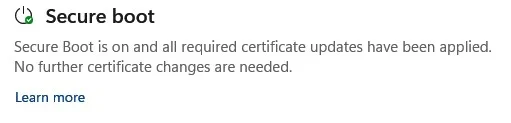
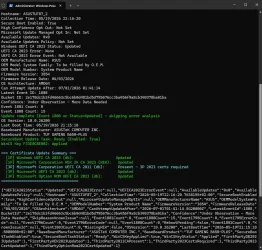
The closest feature I've found to Windows recognizing you've revoked CA 2011 is Security Center reporting "No further updates are required".
Yep, the security center seems happy with all my updates.

1779228105660.webp

3P is the MS shorthand for Third Party cert (Microsoft UEFI CA 2023 for Linux). MS informs the OEM's that 3P is optional, but why does their script flag it as required?
OK, that makes sense, I was confused about 3P, that clears a lot of that up. I agree that I don't see how that's required, I sure don't require the 2011 cert for anything I'm doing.
 

My Computers

System One System Two

  • OS
    Win 11 Pro 25H2, Build 26200.8524
    Computer type
    PC/Desktop
    Manufacturer/Model
    Home Brew
    CPU
    Intel Core i5 14500
    Motherboard
    Gigabyte B760M G P WIFI
    Memory
    64GB DDR4
    Graphics Card(s)
    GeForce RTX 4060
    Sound Card
    Chipset Realtek
    Monitor(s) Displays
    LG 45" Ultragear, Acer 24" 1080p
    Screen Resolution
    5120x1440, 1920x1080
    Hard Drives
    Crucial P310 2TB 2280 PCIe Gen4 3D NAND NVMe M.2 SSD (O/S)
    Silicon Power 2TB US75 NVMe PCIe Gen4 M.2 2280 SSD (backup)
    Crucial BX500 2TB 3D NAND (2nd backup)
    Seagate 4TB Ironwolf, rotating HDD archive files
    External off-line backup Drives: 2 NVMe 4TB drives in external enclosures
    PSU
    Thermaltake Toughpower GF3 750W
    Case
    LIAN LI LANCOOL 216 E-ATX PC Case
    Cooling
    Lots of fans!
    Keyboard
    Microsoft Comfort Curve 2000
    Mouse
    Logitech G305
    Internet Speed
    Verizon FiOS 1GB
    Browser
    Firefox
    Antivirus
    Malware Bytes & Windows Defender Security
  • Operating System
    Win 11 Pro 25H2, Build 26200.8524
    Computer type
    PC/Desktop
    Manufacturer/Model
    Home Brew
    CPU
    Intel Core i5 14400
    Motherboard
    Gigabyte B760M DS3H AX
    Memory
    32GB DDR5
    Graphics card(s)
    Intel 700 Embedded GPU
    Sound Card
    Realtek Embedded
    Monitor(s) Displays
    27" HP 1080p
    Screen Resolution
    1920x1080
    Hard Drives
    Crucial P310 2TB 2280 PCIe Gen4 eD NAND PCIe SSD
    Samsung EVO 990 2TB NVMe Gen4 SSD
    Samsung 2TB SATA SSD
    PSU
    Thermaltake Smart BM3 650W
    Case
    Okinos Micro ATX Case
    Cooling
    Fans
    Keyboard
    Microsoft Comfort Curve 2000
    Mouse
    Logitech G305
    Internet Speed
    Verizon FiOS 1GB
    Browser
    Firefox
    Antivirus
    Malware Bytes & Windows Defender Security
The closest feature I've found to Windows recognizing you've revoked CA 2011 is Security Center reporting "No further updates are required".

Yep, the security center seems happy with all my updates.

I don't think Security center is reporting that 2011 is revoked as I have not revoked 2011 but security center says nothing more needed.
Unless "no further certificate changes are needed and "No further updates are required" are not the same thing.

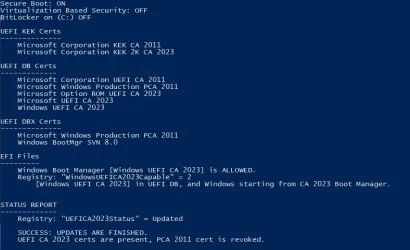
1.webp


2.webp
 

My Computer

System One

  • OS
    Windows 11 Pro
This one line of PS code explains why MS is calling out the Microsoft UEFI CA 2011 cert:
Code:
Write-Host "  [3P] Microsoft Corporation UEFI CA 2011 (db):      $(if ($ThirdParty2011CAPresent) { 'Present - 3P 2023 certs required' } else { 'Not Present - 3P 2023 certs not required' })" -ForegroundColor $(if ($ThirdParty2011CAPresent) { 'Cyan' } else { 'Green' })

Translation:
Windows found the Microsoft UEFI CA 2011 cert in your DB, and therefore the Secure Boot task must install the matching CA 2023 version of the same cert(s).

I would have changed the report summary to read:
Code:
=== Certificate Update Summary ===
  [1P] Microsoft Corporation KEK 2K CA 2023 (KEK):   Updated
  [1P] Windows UEFI CA 2023 (db):                    Updated
  [3P] Microsoft Corporation UEFI CA 2011 (db):      Present
  [3P] Microsoft UEFI CA 2023 (db):                  Updated - required by [3P] 2011 cert
  [3P] Microsoft Option ROM UEFI CA 2023 (db):       Updated - required by [3P] 2011 cert
===================================
 

My Computer

System One

  • OS
    Windows 7
Can you boot with Secure Disabled, and run the check script to see what's going on?
Code:
Check-UEFI.bat -Verbose

Sorry about the delay, I was away from home yesterday. So the only way to disable SB in my bios is to turn Boot Mode from "Windows UEFI" to "Other OS".

So I did that and then ran the check script, then the update script, then added the PK per the readme, rebooted (still in "Other OS") then ran the check script again. See all those results below. Hope this helps.

I think if I turn Boot Mode back to "Windows UEFI" to turn SB back on again it will probably crash as it did before. Would clearing the TPM be necessary?

BEFORE:
Code:
 .\Check_UEFI-CA2023.ps1 -Verbose
Windows 11 25H2 (26200.8457)

Secure Boot: OFF
Virtualization Based Security: OFF
BitLocker on (C:) OFF

BIOS Firmware
-------------
    PC Specialist LTD Intel Z370
    Version: 2101
    Date: 2024-01-19

Factory Default UEFI PK Cert
----------------------------
    ASUSTeK MotherBoard PK Certificate

UEFI PK Cert
------------
    (NONE)

Factory Default UEFI KEK Certs
------------------------------
    Microsoft Corporation KEK CA 2011
    Canonical Ltd. Master Certificate Authority
    ASUSTeK MotherBoard KEK Certificate

UEFI KEK Certs
--------------
    (NONE)

Factory Default UEFI DB Certs
-----------------------------
    Microsoft Corporation UEFI CA 2011
    Microsoft Windows Production PCA 2011
    Canonical Ltd. Master Certificate Authority
    ASUSTeK MotherBoard SW Key Certificate
    ASUSTeK Notebook SW Key Certificate

UEFI DB Certs
-------------
    (NONE)

Factory Default UEFI DBX Certs
------------------------------
    (NONE)
    EFI_CERT_SHA256_GUID Signatures: 77

UEFI DBX Certs
--------------
    (NONE)
    Windows BootMgr SVN is MISSING.
    EFI_CERT_SHA256_GUID Signatures: 0

UEFI Variables
--------------
    Credential Guard: ON
    SBAT (Linux only): sbat,1,2025051000 / shim,4 / grub,5 / grub.proxmox,2

EFI Files
---------
    Windows Boot Manager [Windows UEFI CA 2023] is ALLOWED.
        \\.\HarddiskVolume4\EFI\Microsoft\Boot\bootmgfw.efi
        File Version: 28000.322

    Registry: "WindowsUEFICA2023Capable" = 0
        [Windows UEFI CA 2023] not in UEFI DB.


REQUIRED ACTION
===============

OPTION 1:  To install [UEFI CA 2023] certs

        Update_UEFI-CA2023.ps1


OPTION 2:  To install [UEFI CA 2023] certs and REVOKE the [PCA 2011] cert

        Update_UEFI-CA2023.ps1 -Revoke


PS C:\Users\james\Downloads\SecureBoot-CA-2023-Updates> .\Update_UEFI-CA2023.ps1
Downloading "edk2-x64-secureboot-binaries.zip" from GitHub.
Successfully wrote "Default3PDb.bin" to UEFI db.
Successfully wrote "DefaultDbx.bin" to UEFI dbx.
Successfully wrote "DefaultKek.bin" to UEFI KEK.
Successfully wrote "DefaultPk.bin" to UEFI PK.

REQUIRED ACTION
---------------
Please follow the README_UEFI.TXT instructions, for installing the PK cert from BIOS.

Restart Windows, for UEFI updates to take effect.

Then AFTER:

Code:
.\check_UEFI-CA2023.ps1 -Verbose
Windows 11 25H2 (26200.8457)

Secure Boot: OFF
Virtualization Based Security: OFF
BitLocker on (C:) OFF

BIOS Firmware
-------------
    PC Specialist LTD Intel Z370
    Version: 2101
    Date: 2024-01-19

Factory Default UEFI PK Cert
----------------------------
    ASUSTeK MotherBoard PK Certificate

UEFI PK Cert
------------
    Windows OEM Devices PK

Factory Default UEFI KEK Certs
------------------------------
    Microsoft Corporation KEK CA 2011
    Canonical Ltd. Master Certificate Authority
    ASUSTeK MotherBoard KEK Certificate

UEFI KEK Certs
--------------
    Microsoft Corporation KEK CA 2011
    Microsoft Corporation KEK 2K CA 2023

Factory Default UEFI DB Certs
-----------------------------
    Microsoft Corporation UEFI CA 2011
    Microsoft Windows Production PCA 2011
    Canonical Ltd. Master Certificate Authority
    ASUSTeK MotherBoard SW Key Certificate
    ASUSTeK Notebook SW Key Certificate

UEFI DB Certs
-------------
    Microsoft Corporation UEFI CA 2011
    Microsoft Windows Production PCA 2011
    Microsoft Option ROM UEFI CA 2023
    Microsoft UEFI CA 2023
    Windows UEFI CA 2023

Factory Default UEFI DBX Certs
------------------------------
    (NONE)
    EFI_CERT_SHA256_GUID Signatures: 77

UEFI DBX Certs
--------------
    (NONE)
    Windows BootMgr SVN is MISSING.
    EFI_CERT_SHA256_GUID Signatures: 431

UEFI Variables
--------------
    Credential Guard: ON
    SBAT (Linux only): sbat,1,2025051000 / shim,4 / grub,5 / grub.proxmox,2

EFI Files
---------
    Windows Boot Manager [Windows UEFI CA 2023] is ALLOWED.
        \\.\HarddiskVolume4\EFI\Microsoft\Boot\bootmgfw.efi
        File Version: 28000.322, SVN 8.0

    Registry: "WindowsUEFICA2023Capable" = 2
        [Windows UEFI CA 2023] in UEFI DB, and Windows starting from CA 2023 Boot Manager.


REQUIRED ACTION
===============
To REVOKE the [PCA 2011] cert, run the commands:

    reg add HKEY_LOCAL_MACHINE\SYSTEM\CurrentControlSet\Control\Secureboot /v AvailableUpdates /t REG_DWORD /d 0x282 /f
    powershell Start-ScheduledTask -TaskName "\Microsoft\Windows\PI\Secure-Boot-Update"
 

My Computer

System One

  • OS
    Windows 11
    Computer type
    PC/Desktop
    Manufacturer/Model
    Asus
Sorry about the delay, I was away from home yesterday. So the only way to disable SB in my bios is to turn Boot Mode from "Windows UEFI" to "Other OS".

So I did that and then ran the check script, then the update script, then added the PK per the readme, rebooted (still in "Other OS") then ran the check script again. See all those results below. Hope this helps.

I think if I turn Boot Mode back to "Windows UEFI" to turn SB back on again it will probably crash as it did before.
A few really old BIOS'es don't have a "Custom Mode", instead they provide "Other OS". Which is intended for Linux users to install a non-factory set of keys. We're installed the Windows OEM Devices keys, which are official (from MS), but non-factory.

The solution is to leave the system in "Other OS" and not worry about it. Move on to the revocation steps, or wait for Windows to do it later this year.
 

My Computer

System One

  • OS
    Windows 7
A few really old BIOS'es don't have a "Custom Mode", instead they provide "Other OS". Which is intended for Linux users to install a non-factory set of keys. We're installed the Windows OEM Devices keys, which are official (from MS), but non-factory.

The solution is to leave the system in "Other OS" and not worry about it. Move on to the revocation steps, or wait for Windows to do it later this year.

But if I leave it in "Other OS" mode then Secure Boot is not enabled, which is the point of updating the keys. The BIOS is from early 2024, not mega old.
 

My Computer

System One

  • OS
    Windows 11
    Computer type
    PC/Desktop
    Manufacturer/Model
    Asus
If I understand this ASUS chart, you need to end up in row #5.

Secure Boot State in BIOSOS TypeSecure Boot ModeKey ManagementSecure Boot State in operating system
UserOther OSCustomerDefaultOff
UserOther OSStandardN/AOff
SetupOther OSCustomerClear Secure Boot KeysOff
SetupWindows UEFI modeCustomerClear Secure Boot KeysOff
User <--Windows UEFI modeCustomer <--DefaultOn <--
UserWindows UEFI modeStandardN/AOn
 

My Computer

System One

  • OS
    Windows 7
If I understand this ASUS chart, you need to end up in row #5.

Secure Boot State in BIOSOS TypeSecure Boot ModeKey ManagementSecure Boot State in operating system
UserOther OSCustomerDefaultOff
UserOther OSStandardN/AOff
SetupOther OSCustomerClear Secure Boot KeysOff
SetupWindows UEFI modeCustomerClear Secure Boot KeysOff
User <--Windows UEFI modeCustomer <--DefaultOn <--
UserWindows UEFI modeStandardN/AOn

Err, yes, I guess so. How? (The state is User automatically if Keys are present it seems. OS type in UEFI mode will not boot with keys. There is no Customer/Standard setting, Key Management is per your scripts and there is no separate SB on/off setting).

(And also thank you so much for your time and effort, really appreciated).
 
Last edited:

My Computer

System One

  • OS
    Windows 11
    Computer type
    PC/Desktop
    Manufacturer/Model
    Asus
Err, yes, I guess so. How? (The state is User automatically if Keys are present it seems. OS type in UEFI mode will not boot with keys. There is no Customer/Standard setting, Key Management is per your scripts and there is no separate SB on/off setting).

(And also thank you so much for your time and effort, really appreciated).
If possible, take pictures with your cell phone of the screens and available options in the BIOS and post them here

Because the chart Garlin gave you I beleive is from this Asus web page of 2023: How to enable or disable Secure Boot
Your BIOS is probably older then the screen shots provided on the web page
Yes the BIOS version shows 2024, but your CPU, Intel Z370 is from late 2017
So Asus motherboard is probably just as old
Therefore, factory installed BIOS and options are of the year the motherboard was built
With an update of 2024 applied, but the options of the factory BIOS mostly stay the same over the year
Manufacturer make their BIOS evolve over the years so screens in the BIOS change over the years

PS: you might know all of this, if so, sorry, just trying to help :-)
 

My Computer

System One

  • OS
    Windows 11
If possible, take pictures with your cell phone of the screens and available options in the BIOS and post them here

Because the chart Garlin gave you I beleive is from this Asus web page of 2023: How to enable or disable Secure Boot
Your BIOS is probably older then the screen shots provided on the web page
Yes the BIOS version shows 2024, but your CPU, Intel Z370 is from late 2017
So Asus motherboard is probably just as old
Therefore, factory installed BIOS and options are of the year the motherboard was built
With an update of 2024 applied, but the options of the factory BIOS mostly stay the same over the year
Manufacturer make their BIOS evolve over the years so screens in the BIOS change over the years

PS: you might know all of this, if so, sorry, just trying to help :-)
Thanks. My bios is identical in appearance to the link you provided. Mine is a Z390E Gaming so maybe a little later but the bios looks the same. And from that link I can tell that my secure boot mode is "Customer" so SB should be ON, basically I have tried all those settings to turn on Secure boot and it fails to boot when it's on. Does this help at all:

Code:
.\Detect-SecureBootCertUpdateStatus.ps1
Hostname: *******
Collection Time: 05/20/2026 22:49:57
Secure Boot Enabled: False
High Confidence Opt Out: Not Set
Microsoft Update Managed Opt In: Not Set
Available Updates: 0x0
Available Updates Policy: Not Set
Windows UEFI CA 2023 Status: Updated
UEFI CA 2023 Error: None
UEFI CA 2023 Error Event: Not Available
OEM Manufacturer Name: PC Specialist LTD
OEM Model System Family: Intel Z370 Systems
OEM Model Number: Intel Z370
Firmware Version: 2101
Firmware Release Date: 01/19/2024
OS Architecture: AMD64
Can Attempt Update After: 04/03/2026 10:23:10
Latest Event ID: 1808
Bucket ID: f276b099f95015f705b3a59929920b9967094a55404fcd69935a6458a43b3536
Confidence: High Confidence
Event 1801 Count: 0
Event 1808 Count: 30
Update complete (Event 1808 or Status=Updated) - skipping error analysis
OS Version: 10.0.26200
Last Boot Time: 05/20/2026 21:42:52
Baseboard Manufacturer: ASUSTeK COMPUTER INC.
Baseboard Product: ROG STRIX Z390-E GAMING
SecureBoot Update Task: Ready (Enabled: True)
WinCS Key F3*******02: Applied

=== Certificate Update Summary ===
  [1P] Windows UEFI CA 2023 (db):                   Updated
  [1P] Microsoft Corporation KEK 2K CA 2023 (KEK):   Updated
  [3P] Microsoft Corporation UEFI CA 2011 (db):      Present - 3P 2023 certs required
  [3P] Microsoft UEFI CA 2023 (db):                  Updated
  [3P] Microsoft Option ROM UEFI CA 2023 (db):       Updated
===================================
 

My Computer

System One

  • OS
    Windows 11
    Computer type
    PC/Desktop
    Manufacturer/Model
    Asus
Thank you sir, got my 2023 certs back with your scripts
 

My Computer

System One

  • OS
    11
    Computer type
    PC/Desktop
    Manufacturer/Model
    dell
    CPU
    Intel I7 8700
    Memory
    32gb DDR4
    Graphics Card(s)
    Nvidia 1060
    Monitor(s) Displays
    Asus 28" 4k
    Screen Resolution
    3840 x 2160
    Hard Drives
    1tb Samsung 990 Pro
    Internet Speed
    gigabit
    Browser
    Edge
    Antivirus
    Bitdender
Thanks. My bios is identical in appearance to the link you provided. Mine is a Z390E Gaming so maybe a little later but the bios looks the same. And from that link I can tell that my secure boot mode is "Customer" so SB should be ON, basically I have tried all those settings to turn on Secure boot and it fails to boot when it's on. Does this help at all:

Sorry for insisting, can you provide screen shots from BIOS:
  • Current settings
  • Secure Boot Mode options when Other OS is selected
  • Secure Boos Mode options when Windows UEFI mode is selected
  • Key Management options when Windows UEFI mode is selected
Also, do you remember what BIOS version you had before updating it to the 01/19/2024 ?
Or at least tell us if it was from many years prior do 2024...

@garlin let's wait for these answers, but I'm starting to lean towards a BIOS that might have some attributes that have changed over time and now some setting(s) is/are stuck to a certain value and no way of changing it because latest BIOS version has changed how this attribute is configured. I've seen this a few times in the past if BIOS upgrade skipped multiple versions. So maybe another case of resetting BIOS to factory defaults.
 

My Computer

System One

  • OS
    Windows 11
Thanks. My bios is identical in appearance to the link you provided. Mine is a Z390E Gaming so maybe a little later but the bios looks the same. And from that link I can tell that my secure boot mode is "Customer" so SB should be ON, basically I have tried all those settings to turn on Secure boot and it fails to boot when it's on.
Maybe it's never going to be properly supported if you believe this post:
https://zentalk.asus.com/t5/motherb...-update-for-rog-strix-z390-e-bios/td-p/498418

Does this help at all:
No. There's nothing in the MS script that helps you fix this problem.
 

My Computer

System One

  • OS
    Windows 7
Maybe it's never going to be properly supported if you believe this post:
https://zentalk.asus.com/t5/motherb...-update-for-rog-strix-z390-e-bios/td-p/498418
Yup, not too promising !

But I still want to see what he sees in the BIOS and how many versions were skipped
Depending on what he comes back with, maybe a factory reset of the BIOS could get it unstuck
Even with that thread you found, that Asus BIOS is capable of key management, so there might still be hope

@hottroc If Secure Boot is absolutely impossible to acheive with certs 2023, then disabling Secure Boot and blocking boot from other then the current Windows boot disk and adding a BIOS password complexe enought will prevent booting from USB or CD (if any CD Slot present). Not ideal, but still more secure when Secure Boot can't be used.

Secure Boot only makes the boot process more secure and has not effect on your security level once into Windows.
@garlin correct me if I'm wrong here on Secure Boot having no effect once boot process if complete.
 
Last edited:

My Computer

System One

  • OS
    Windows 11
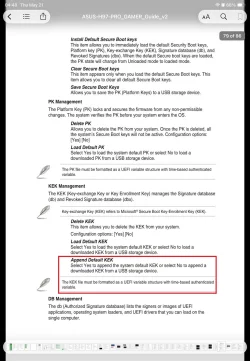
@hottroc My Asus M/B BIOS (from late 2014) has the APPEND function to add certificates manually. Did you try it if you have it ?

ASUS.webp

Prepare a USB flash disk formatted in FAT32 file system. Place Microsoft KEK 2K CA 2023 certificate with .crt extension on it and insert it to a USB 2.0 port. You can put the other certificates on the USB, too. My M/B did not accept .der extension certificate.

Go to KEK Management page in BIOS and select Append Default KEK. Select No when asked. You will get a list of drives to choose from. USB drive is the easiest to find among other drives listed. Select the MS KEK certificate and O.K. the selection.

You may install all the certificates in any section including the DBX certificates section as long as you have the APPEND function.

No need to say: Whatever you do, do it at your own risk.

Hope this helps.
 

My Computers

System One System Two

  • OS
    Windows 11 Pro build 26200.8524
    Computer type
    PC/Desktop
    Manufacturer/Model
    Home Built
    CPU
    Intel i7-4790
    Motherboard
    Asus H97 Pro Gamer with add-on TPM1.2 module
    Memory
    Teams DDR3-1600 4x4 GB
    Graphics Card(s)
    MSI Nvidia GeForce GTX 1050Ti
    Sound Card
    Realtek ALC1150
    Monitor(s) Displays
    Dell P2425D
    Screen Resolution
    2560 by 1440 pixels
    Hard Drives
    Corsair NVMe M.2 Core XT 1000 GB (Windows 11 v.25H2); Samsung SATA Evo 870 500 GB (Windows 11 v.25H2);
    PSU
    Corsair HX850
    Case
    Gigabyte Solo 210
    Cooling
    Zalman CNPS7X Tower
    Keyboard
    Microsoft AIO Wireless (includes touchpad)
    Mouse
    HP S1000 Plus Wireless
    Internet Speed
    500 Mb fiber optic
    Browser
    Chrome; MS Edge
    Antivirus
    Windows Defender
  • Operating System
    MacOS 12 Monterey
    Computer type
    Laptop
    Manufacturer/Model
    Apple Macbook Air
    CPU
    Intel Core i5
    Memory
    8 GB
    Graphics card(s)
    Intel integrated
    Screen Resolution
    1440 by 900 pixels
    Hard Drives
    128 GB
    Keyboard
    Built-in
    Mouse
    Microsoft Wireless
    Internet Speed
    802.11 ac
    Browser
    Chrome; Safari
    Antivirus
    N/A
Secure Boot only makes the boot process more secure and has not effect on your security level once into Windows.
@garlin correct me if I'm wrong here on Secure Boot having no effect once boot process if complete.
No. The point of Secure Boot is only allowing boot files by trusted signers to work. For Black Lotus, MS discovered the old boot manager allowed a specific exploit to work. They closed the security hole, but that didn't prevent unpatched versions from being secretly installed on your Windows. The boot manager exists as a ordinary file on the EFI partition.

The unpatched boot files are still valid, but not the ones you want to authorize. MS's solution was to ban the PCA 2011 cert, and stop trusting an entire generation of Windows boot files dating back several years. The fixed boot managers would only be signed by CA 2023.

The boot manager is the program that launches winload.efi. So it could be possible to launch another program in winload's place or a tainted version that corrupts the startup environment. If you can't confirm the first link in a chain is good, then the entire security chain is suspect.
 

My Computer

System One

  • OS
    Windows 7
No. The point of Secure Boot is only allowing boot files by trusted signers to work. For Black Lotus, MS discovered the old boot manager allowed a specific exploit to work. They closed the security hole, but that didn't prevent unpatched versions from being secretly installed on your Windows. The boot manager exists as a ordinary file on the EFI partition.

The unpatched boot files are still valid, but not the ones you want to authorize. MS's solution was to ban the PCA 2011 cert, and stop trusting an entire generation of Windows boot files dating back several years. The fixed boot managers would only be signed by CA 2023.

The boot manager is the program that launches winload.efi. So it could be possible to launch another program in winload's place or a tainted version that corrupts the startup environment. If you can't confirm the first link in a chain is good, then the entire security chain is suspect.

So, yes, the whole Secure Boot process only happens during the boot process.

But your point is that if the computer becomes compromised by either a security hole discovered in the official MS boot files, or by an attack that can come from many sources (download, click bate, email, corrupted software, etc...) then the computer is no longer booting reliably if Secure Boot was disabled.

And therefore, if Secure Boot is disabled, user could be blindly booting to an unreliable OS.

Basically, it's like going back to times before Secure Boot ever existed, but in a world where sources of getting a computer compromised has increased tenfold.

Thanks for further explaining it
 

My Computer

System One

  • OS
    Windows 11
UPDATE: 2026-05-21

1. Remove illegal characters from log filenames
2. Report DB/DBX certs missing their validated KEK as "UNTRUSTED" instead of "BANNED"
3. Check_UEFI-CA2023.ps1 should report FileVersion using the FileVersionRaw attribute

Updated README_UEFI.TXT with @suatcini54's instructions on temporarily disabling HP Sure Start
Renamed the ZIP file with a version number, per @Ed Tittel.
 

My Computer

System One

  • OS
    Windows 7
Back
Top Bottom