Solved garlin's PowerShell scripts for updating Secure Boot CA 2023


This is the one that still works:
 

Attachments

My Computer My Computer

At a glance

Windows 11 Pro 25H2Gen 11 Core i516GB
OS
Windows 11 Pro 25H2
Computer type
Laptop
Manufacturer/Model
HP
CPU
Gen 11 Core i5
Memory
16GB
Did you install the May 2026 Preview Update? There is no longer \SecureBoot\SBAT in my registry :unsure:
On an HP laptop I recently bought, it doesn't show \secureBoot\SBAT in the registry either. The system has the May 26 preview update. After I got this laptop, it got the latest bios update from HP. Apparently, the system has the required CA 2023 certs. My other 2 systems have the latest preview update and both have the \SecureBoot\SBAT in the registry. Strange?
 

My Computers My Computers

  • At a glance

    Windows 11 Pro 25H2AMD Ryzen 9 7940HS32 GBRadeon 780M Graphics
    OS
    Windows 11 Pro 25H2
    Computer type
    PC/Desktop
    Manufacturer/Model
    Geekom AX7 Pro
    CPU
    AMD Ryzen 9 7940HS
    Memory
    32 GB
    Graphics Card(s)
    Radeon 780M Graphics
    Monitor(s) Displays
    Dell S2425H 24"
    Screen Resolution
    1920 x 1080
    Hard Drives
    2 TB NVMe SSD
    Internet Speed
    100 Mbs
    Browser
    Microsoft Edge / Firefox
    Antivirus
    F-Secure Security Suite
    Other Info
    All secure boot certificates updated to CA 2023
    Windows Production PCA 2011 certificate has been revoked.
  • At a glance

    Windows 11 Pro 25H212th Gen Intel Core i7-12700 processor (12-Co...16 GBIntel(R) UHD Graphics 770 with shared graphic...
    Operating System
    Windows 11 Pro 25H2
    Computer type
    PC/Desktop
    Manufacturer/Model
    Dell Inspiron 3910
    CPU
    12th Gen Intel Core i7-12700 processor (12-Core, 25M Cache, 2.1GHz to 4.8GHz)
    Motherboard
    Dell 0KHP4K
    Memory
    16 GB
    Graphics card(s)
    Intel(R) UHD Graphics 770 with shared graphics memory
    Monitor(s) Displays
    Dell 27" Monitor S2721DS,
    Screen Resolution
    QHD 2560 x 1440 @ 75 Hz
    Hard Drives
    1TB M.2, PCIe NVMe, SSD
    Internet Speed
    100 Mbps
    Browser
    Edge
    Antivirus
    F-Secure Security Suite
    Other Info
    All secure boot certificates updated to CA 2023
    Windows Production PCA 2011 certificate has been revoked.
  • HP Laptop 15-fd0xxx
    OS: Windows 11 Home 25H2
    Processor: 13th Gen Intel(R) Core(TM) i7-1355U (1.70 GHz), 10 Cores, 12 Logical Processors
    BIOS Version: AMI F.26 4/22/2026
    RAM: 16 GB
    SSD: 1 TB
    Screen Resolution: 1920 x 1080
    All secure boot certificates updated to CA 2023 by factory.
I downloaded #2157, and it doesn't have the "foreach |...|"

The "working" version you keep bringing up has a bug. Get-ItemPropertyValue doesn't correctly support "-ErrorAction SilentlyContinue". You can Google that topic, it will silently fail in the wrong way.
 

My Computer My Computer

At a glance

Windows 7
OS
Windows 7
So is there something wrong with my system then?
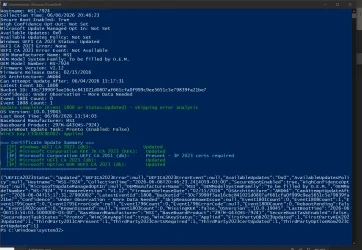
 

My Computer My Computer

At a glance

Windows 11 Pro 25H2Gen 11 Core i516GB
OS
Windows 11 Pro 25H2
Computer type
Laptop
Manufacturer/Model
HP
CPU
Gen 11 Core i5
Memory
16GB
On an HP laptop I recently bought, it doesn't show \secureBoot\SBAT in the registry either. The system has the May 26 preview update. After I got this laptop, it got the latest bios update from HP. Apparently, the system has the required CA 2023 certs. My other 2 systems have the latest preview update and both have the \SecureBoot\SBAT in the registry. Strange?
It's been there for months. If you don't have it configured, the SBatLevel reg variable is filled with fake data ("!SBATnotfound").
 

My Computer My Computer

At a glance

Windows 7
OS
Windows 7
So is there something wrong with my system then?
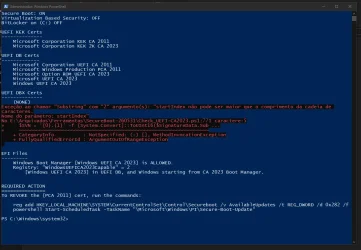
I dunno, is your browser caching the file downloads? I'll rename it, so there's no chance it's picking up the file from somewhere else.
 

Attachments

My Computer My Computer

At a glance

Windows 7
OS
Windows 7
Ok this is the RENAMED output now:
Secure Boot: ON
Virtualization Based Security: ON
BitLocker on (C:) ON

UEFI KEK Certs
--------------
Microsoft Corporation KEK CA 2011
Microsoft Corporation KEK 2K CA 2023

UEFI DB Certs
-------------
Microsoft Corporation UEFI CA 2011
Microsoft Windows Production PCA 2011
Microsoft Option ROM UEFI CA 2023
Microsoft UEFI CA 2023
Windows UEFI CA 2023

UEFI DBX Certs
--------------
Microsoft Windows Production PCA 2011
Windows BootMgr SVN 8.0

EFI Files
---------
Windows Boot Manager [Windows UEFI CA 2023] is ALLOWED.

Registry: "WindowsUEFICA2023Capable" = 2
[Windows UEFI CA 2023] in UEFI DB, and Windows starting from CA 2023 Boot Manager.

SkuSiPolicy.p7b is CURRENT.


STATUS REPORT
-------------
Registry: "UEFICA2023Status" = Updated

SUCCESS: UPDATES ARE FINISHED.
UEFI CA 2023 certs are present, PCA 2011 cert is revoked.

PS C:\WINDOWS\system32>
 

My Computer My Computer

At a glance

Windows 11 Pro 25H2Gen 11 Core i516GB
OS
Windows 11 Pro 25H2
Computer type
Laptop
Manufacturer/Model
HP
CPU
Gen 11 Core i5
Memory
16GB
And I have no SBAT in the Registry either.
 

My Computer My Computer

At a glance

Windows 11 Pro 25H2Gen 11 Core i516GB
OS
Windows 11 Pro 25H2
Computer type
Laptop
Manufacturer/Model
HP
CPU
Gen 11 Core i5
Memory
16GB
Script Detect-SecureBootCertUpdateStatus.ps1 of MS
1780790366716.webp

The last one you sent me

1780790549172.webp
 

My Computer My Computer

At a glance

Windows 10i7-4790K@ 4000MHz32GB DDR3 @1600MHZXFX RS RX 480 8GB
OS
Windows 10
Computer type
PC/Desktop
Manufacturer/Model
MSI/Z97M-G43(MS-7924)
CPU
i7-4790K@ 4000MHz
Motherboard
MSI Z97M-G43
Memory
32GB DDR3 @1600MHZ
Graphics Card(s)
XFX RS RX 480 8GB
Sound Card
Onboard
Monitor(s) Displays
Samsung
Screen Resolution
1920x1080
Hard Drives
2xSSD 1TB, 2x HDD 1TB
PSU
OCZ 700W
Case
Corsair Carbide
Cooling
Corsair 120mm
Keyboard
Philips Mecanic Blue Keys
Mouse
Generic
Internet Speed
500Mb
Browser
Chrome
Antivirus
Defender
PS C:\> ./Detect-SecureBootCertUpdateStatus.ps1
Hostname: PHIREVIXEN-PC
Collection Time: 06/06/2026 19:10:52
Secure Boot Enabled: True
High Confidence Opt Out: 0
Microsoft Update Managed Opt In: Not Set
Available Updates: 0x0
Available Updates Policy: 0x0
Windows UEFI CA 2023 Status: Updated
UEFI CA 2023 Error: None
UEFI CA 2023 Error Event: Not Available
OEM Manufacturer Name: HP
OEM Model System Family: 103C_5335KV HP Pavilion
OEM Model Number: HP Pavilion Laptop 15-eg0xxx
Firmware Version: F.52
Firmware Release Date: 04/29/2026
OS Architecture: AMD64
Can Attempt Update After: 06/10/2026 22:16:09
Latest Event ID: 1808
Bucket ID: c784d440667d3d075e8ca81cdf7706ade0e570666830984100973316c80adcdc
Confidence: No Data Observed - Action Required
Event 1801 Count: 0
Event 1808 Count: 1
Update complete (Event 1808 or Status=Updated) - skipping error analysis
OS Version: 10.0.26200
Last Boot Time: 06/04/2026 22:33:55
Baseboard Manufacturer: HP
Baseboard Product: 87CB
SecureBoot Update Task: Ready (Enabled: True)
WinCS Key F33E0C8E002: Applied
{"UEFICA2023Status":"Updated","UEFICA2023Error":null,"UEFICA2023ErrorEvent":null,"AvailableUpdates":"0x0","AvailableUpdatesPolicy":"0x0","Hostname":"PHIREVIXEN-PC","CollectionTime":"2026-06-06T19:10:52.1498982-05:00","SecureBootEnabled":true,"HighConfidenceOptOut":0,"MicrosoftUpdateManagedOptIn":null,"OEMManufacturerName":"HP","OEMModelSystemFamily":"103C_5335KV HP Pavilion","OEMModelNumber":"HP Pavilion Laptop 15-eg0xxx","FirmwareVersion":"F.52","FirmwareReleaseDate":"04/29/2026","OSArchitecture":"AMD64","CanAttemptUpdateAfter":"2026-06-10T22:16:09.0090000Z","LatestEventId":1808,"BucketId":"c784d440667d3d075e8ca81cdf7706ade0e570666830984100973316c80adcdc","Confidence":"No Data Observed - Action Required","SkipReasonKnownIssue":null,"Event1801Count":0,"Event1808Count":1,"Event1795Count":0,"Event1795ErrorCode":null,"Event1796Count":0,"Event1796ErrorCode":null,"Event1800Count":0,"RebootPending":false,"Event1802Count":0,"KnownIssueId":null,"Event1803Count":0,"MissingKEK":false,"OSVersion":"10.0.26200","LastBootTime":"2026-06-04T22:33:55.5007970-05:00","BaseBoardManufacturer":"HP","BaseBoardProduct":"87CB","SecureBootTaskEnabled":true,"SecureBootTaskStatus":"Ready","WinCSKeyApplied":true,"WinCSKeyStatus":"Applied"}
 

My Computer My Computer

At a glance

Windows 11 Pro 25H2Gen 11 Core i516GB
OS
Windows 11 Pro 25H2
Computer type
Laptop
Manufacturer/Model
HP
CPU
Gen 11 Core i5
Memory
16GB
The real issue is finding what is passing a non-string value to the function. This code has been in place for months and has never failed before. Which points to something different about your UEFI data.

Try this version.
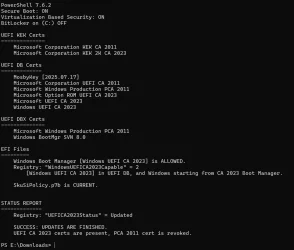
I just ran the script you posted in the above post. No errors at all and I'm running build 26200.8524.

1780793148501.webp
 

My Computers My Computers

  • At a glance

    Win 11 Pro 25H2, Build 26200.8894Intel Core i5 1450064GB DDR4GeForce RTX 4060
    OS
    Win 11 Pro 25H2, Build 26200.8894
    Computer type
    PC/Desktop
    Manufacturer/Model
    Home Brew
    CPU
    Intel Core i5 14500
    Motherboard
    Gigabyte B760M G P WIFI
    Memory
    64GB DDR4
    Graphics Card(s)
    GeForce RTX 4060
    Sound Card
    Chipset Realtek
    Monitor(s) Displays
    LG 45" Ultragear, Acer 24" 1080p
    Screen Resolution
    5120x1440, 1920x1080
    Hard Drives
    Crucial P310 2TB 2280 PCIe Gen4 3D NAND NVMe M.2 SSD (O/S)
    Silicon Power 2TB US75 NVMe PCIe Gen4 M.2 2280 SSD (backup)
    Crucial BX500 2TB 3D NAND (2nd backup)
    Seagate 4TB Ironwolf, rotating HDD archive files
    External off-line backup Drives: 2 NVMe 4TB drives in external enclosures
    PSU
    Thermaltake Toughpower GF3 750W
    Case
    LIAN LI LANCOOL 216 E-ATX PC Case
    Cooling
    Lots of fans!
    Keyboard
    Microsoft Comfort Curve 2000
    Mouse
    Logitech G305
    Internet Speed
    Verizon FiOS 1GB
    Browser
    Firefox
    Antivirus
    Malware Bytes & Windows Defender Security
  • At a glance

    Win 11 Pro 25H2, Build 26200.8894Intel Core i5 1440032GB DDR5Intel 700 Embedded GPU
    Operating System
    Win 11 Pro 25H2, Build 26200.8894
    Computer type
    PC/Desktop
    Manufacturer/Model
    Home Brew
    CPU
    Intel Core i5 14400
    Motherboard
    Gigabyte B760M DS3H AX
    Memory
    32GB DDR5
    Graphics card(s)
    Intel 700 Embedded GPU
    Sound Card
    Realtek Embedded
    Monitor(s) Displays
    27" HP 1080p
    Screen Resolution
    1920x1080
    Hard Drives
    Crucial P310 2TB 2280 PCIe Gen4 eD NAND PCIe SSD
    Samsung EVO 990 2TB NVMe Gen4 SSD
    Samsung 2TB SATA SSD
    PSU
    Thermaltake Smart BM3 650W
    Case
    Okinos Micro ATX Case
    Cooling
    Fans
    Keyboard
    Microsoft Comfort Curve 2000
    Mouse
    Logitech G305
    Internet Speed
    Verizon FiOS 1GB
    Browser
    Firefox
    Antivirus
    Malware Bytes & Windows Defender Security
  • Nimo N171 17" Laptop, (Intel i3-1215U, 16GB RAM, 2TB NVMe, Win11 Pro)
    Acemagic Vista Mini PC V1 (Intel N150, 16GB RAM, 1TB NVMe, Win11 Pro)
    HP ENVY h8-1540t, (24GB RAM, 2TB SSD, 2TB HDD, Win11 Pro)
I just ran the script you posted in the above post. No errors at all and I'm running build 26200.8524.
Yes, but in your case you revoked the certificates from 2011 and earlier versions, which I didn't do because I don't want to have problems with my backup media. Perhaps by revoking the old certificates, the UEFI will have the signatures that the script expects to read.
 

My Computer My Computer

At a glance

Windows 10i7-4790K@ 4000MHz32GB DDR3 @1600MHZXFX RS RX 480 8GB
OS
Windows 10
Computer type
PC/Desktop
Manufacturer/Model
MSI/Z97M-G43(MS-7924)
CPU
i7-4790K@ 4000MHz
Motherboard
MSI Z97M-G43
Memory
32GB DDR3 @1600MHZ
Graphics Card(s)
XFX RS RX 480 8GB
Sound Card
Onboard
Monitor(s) Displays
Samsung
Screen Resolution
1920x1080
Hard Drives
2xSSD 1TB, 2x HDD 1TB
PSU
OCZ 700W
Case
Corsair Carbide
Cooling
Corsair 120mm
Keyboard
Philips Mecanic Blue Keys
Mouse
Generic
Internet Speed
500Mb
Browser
Chrome
Antivirus
Defender
So the script is looking for SVN numbers to report. If you have NOT revoked CA 2011, in theory you don't have any SVN's.

It is possible to install the SVN update file in the wrong order (by manually calling the Secure Boot task with specific AvailableUpdate values).

I went back and reset my test VM to CA 2011 (no SVN's) and can't duplicate the error. But I have cleaned up the check script a bit.
 

Attachments

My Computer My Computer

At a glance

Windows 7
OS
Windows 7
Code:
PS C:\Users\jwdav> powershell -nop -ep bypass -f E:\Z_c2023\Check_UEFI-CA2023.ps1 -Verbose
Windows 11 25H2 (26200.8457)

Secure Boot: ON
Virtualization Based Security: ON
BitLocker on (C:) OFF

BIOS Firmware
-------------
    ASUS System Product Name
    Version: 3854
    Date: 2026-04-03

Factory Default UEFI PK Cert
----------------------------
    ASUSTeK MotherBoard PK Certificate

UEFI PK Cert
------------
    ASUSTeK MotherBoard PK Certificate

Factory Default UEFI KEK Certs
------------------------------
    Microsoft Corporation KEK CA 2011
    Microsoft Corporation KEK 2K CA 2023
    ASUSTeK MotherBoard KEK Certificate

UEFI KEK Certs
--------------
    Microsoft Corporation KEK CA 2011
    Microsoft Corporation KEK 2K CA 2023
    ASUSTeK MotherBoard KEK Certificate

Factory Default UEFI DB Certs
-----------------------------
    Microsoft Corporation UEFI CA 2011
    Microsoft Windows Production PCA 2011
    Microsoft Option ROM UEFI CA 2023
    Microsoft UEFI CA 2023
    Windows UEFI CA 2023
    ASUSTeK MotherBoard SW Key Certificate
    ASUSTeK Notebook SW Key Certificate

UEFI DB Certs
-------------
    Microsoft Corporation UEFI CA 2011
    Microsoft Windows Production PCA 2011
    Microsoft Option ROM UEFI CA 2023
    Microsoft UEFI CA 2023
    Windows UEFI CA 2023
    ASUSTeK MotherBoard SW Key Certificate
    ASUSTeK Notebook SW Key Certificate

Factory Default UEFI DBX Certs
------------------------------
    (NONE)
    EFI_CERT_SHA256_GUID Signatures: 430

UEFI DBX Certs
--------------
    Microsoft Windows Production PCA 2011
foreach |01612B139DD5598843AB1C185C3CB2EB92000005000000000000000000000000|
foreach |01612B139DD5598843AB1C185C3CB2EB92000008000000000000000000000000|
    Windows BootMgr SVN 8.0
    EFI_CERT_SHA256_GUID Signatures: 436

UEFI Variables
--------------
    Credential Guard: ON
    SBAT (Linux only): sbat,1,2024010900 / shim,4 / grub,3 / grub.debian,4

EFI Files
---------
    Windows Boot Manager [Windows UEFI CA 2023] is ALLOWED.
        \\.\HarddiskVolume1\EFI\Microsoft\Boot\bootmgfw.efi
        File Version: 28000.326, SVN 8.0

    Registry: "WindowsUEFICA2023Capable" = 2
        [Windows UEFI CA 2023] in UEFI DB, and Windows starting from CA 2023 Boot Manager.

    SkuSiPolicy.p7b is CURRENT.
        \\.\HarddiskVolume1\EFI\Microsoft\Boot\SkuSiPolicy.p7b
        Version: 3.0.0.14


STATUS REPORT
-------------
    Registry: "UEFICA2023Status" = Updated

    SUCCESS: UPDATES ARE FINISHED.
    UEFI CA 2023 certs are present, PCA 2011 cert is revoked.

PS C:\Users\jwdav>

Something New ?
I am on 26200.8457
 
Last edited:

My Computer My Computer

At a glance

Win11 24H2 IOT LTSC / Win11 Pro 25H2AMD Ryzen 7 8700G / AMD Ryzen 7 8700GF5-6000J3636F16GX2-FX5 32GB / Lexar Ares RGB ...internal
OS
Win11 24H2 IOT LTSC / Win11 Pro 25H2
Computer type
PC/Desktop
Manufacturer/Model
Gigabyte / Asus Home build
CPU
AMD Ryzen 7 8700G / AMD Ryzen 7 8700G
Motherboard
Gigabyte B650 AORUS ELITE AX V2 / ASUS TUF GAMING B650-PLUS
Memory
F5-6000J3636F16GX2-FX5 32GB / Lexar Ares RGB LD5BU016G-R6000GDLA 32GB
Graphics Card(s)
internal
Sound Card
Realtek
Monitor(s) Displays
BenQ 27 L EW2780
Screen Resolution
1920x1080
Hard Drives
Many M.2's
Internet Speed
400 mbs
Browser
Vivaldi
Antivirus
Eset
Extra debugging output when the script is looking up the UEFI's SVN number.

You still have a SBAT. Have you installed the May 2026 Preview?
 

My Computer My Computer

At a glance

Windows 7
OS
Windows 7
Looks like this now:


Secure Boot: ON
Virtualization Based Security: ON
BitLocker on (C:) ON

UEFI KEK Certs
--------------
Microsoft Corporation KEK CA 2011
Microsoft Corporation KEK 2K CA 2023

UEFI DB Certs
-------------
Microsoft Corporation UEFI CA 2011
Microsoft Windows Production PCA 2011
Microsoft Option ROM UEFI CA 2023
Microsoft UEFI CA 2023
Windows UEFI CA 2023

UEFI DBX Certs
--------------
Microsoft Windows Production PCA 2011
foreach |01612B139DD5598843AB1C185C3CB2EB92000007000000000000000000000000|
foreach |01612B139DD5598843AB1C185C3CB2EB92000002000000000000000000000000|
foreach |01612B139DD5598843AB1C185C3CB2EB92000008000000000000000000000000|
Windows BootMgr SVN 8.0

EFI Files
---------
Windows Boot Manager [Windows UEFI CA 2023] is ALLOWED.

Registry: "WindowsUEFICA2023Capable" = 2
[Windows UEFI CA 2023] in UEFI DB, and Windows starting from CA 2023 Boot Manager.

SkuSiPolicy.p7b is CURRENT.


STATUS REPORT
-------------
Registry: "UEFICA2023Status" = Updated

SUCCESS: UPDATES ARE FINISHED.
UEFI CA 2023 certs are present, PCA 2011 cert is revoked.

PS C:\WINDOWS\system32>
 

My Computer My Computer

At a glance

Windows 11 Pro 25H2Gen 11 Core i516GB
OS
Windows 11 Pro 25H2
Computer type
Laptop
Manufacturer/Model
HP
CPU
Gen 11 Core i5
Memory
16GB
All you folks are normal. SVN's of 2.0, 7.0, and 8.0

Your story is you first installed the DBXUpdate2024.bin to ban PCA 2011. This added the base SVN of 2.0.
DBXUpdateSVN.bin (pre-April 2026) bumped you to 7.0, and then April 2026's DBXUpdateSVN.bin bumped you to 8.0.

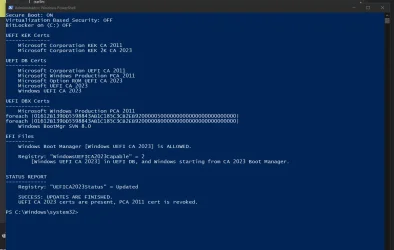
What I don't understand is why @CristianSsam's PC gets "false" as a returned signature data value. Unless that PC has some weird issues.
 

My Computer My Computer

At a glance

Windows 7
OS
Windows 7
All you folks are normal. SVN's of 2.0, 7.0, and 8.0

Your story is you first installed the DBXUpdate2024.bin to ban PCA 2011. This added the base SVN of 2.0.
DBXUpdateSVN.bin (pre-April 2026) bumped you to 7.0, and then April 2026's DBXUpdateSVN.bin bumped you to 8.0.

What I don't understand is why @CristianSsam's PC gets "false" as a returned signature data value. Unless that PC has some weird issues.
I went back into the BIOS, deleted all the keys, disabled secure boot, and entered Windows to reapply the updates with your script. Check-UEFI now reported no errors updating, showing that the BIOS was in configuration mode.
I applied the Update-UEFI - revoke script and these were the outputs:
Downloading "edk2-x64-secureboot-binaries.zip" from GitHub.
Successfully wrote "Default3PDb.bin" to UEFI db.
Successfully wrote "DefaultDbx.bin" to UEFI dbx.
Successfully wrote "DefaultKek.bin" to UEFI KEK.
Successfully wrote "DefaultPk.bin" to UEFI PK.
Successfully appended "dbxupdate.bin" to UEFI DBX.
Successfully appended "DBXUpdate2024.bin" to UEFI DBX.

Successfully appended "DBXUpdateSVN.bin" (SVN 8.0) to UEFI DBX.

REQUIRED ACTION
---------------
Please follow the README_UEFI.TXT instructions for installing the PK certificate from BIOS.

Restart Windows for UEFI updates to take effect.

I restarted, entered the BIOS, checked and all keys are applied, re-enabled secure boot and restarted, and look how the status of your check script changed:

1780805039988.webp

So, an empty DBX certificates will generate errors in your checker script if it's trying to read a signature that doesn't exist.
 

My Computer My Computer

At a glance

Windows 10i7-4790K@ 4000MHz32GB DDR3 @1600MHZXFX RS RX 480 8GB
OS
Windows 10
Computer type
PC/Desktop
Manufacturer/Model
MSI/Z97M-G43(MS-7924)
CPU
i7-4790K@ 4000MHz
Motherboard
MSI Z97M-G43
Memory
32GB DDR3 @1600MHZ
Graphics Card(s)
XFX RS RX 480 8GB
Sound Card
Onboard
Monitor(s) Displays
Samsung
Screen Resolution
1920x1080
Hard Drives
2xSSD 1TB, 2x HDD 1TB
PSU
OCZ 700W
Case
Corsair Carbide
Cooling
Corsair 120mm
Keyboard
Philips Mecanic Blue Keys
Mouse
Generic
Internet Speed
500Mb
Browser
Chrome
Antivirus
Defender
My standard test procedure is to shut down my VM and erase the NVRAM. This resets the "UEFI" to the factory defaults, with 77 EFI signatures and none of those are SVN's. I test the check script, run the updates and then check again.

In the 6 months I've been working on this project, I've never had something return "False" for the signature data. It's some valid string, or a null value.

Now that you've reset and re-applied the certs, it looks like whatever condition has cleared up. I dunno, my gut feeling is it was some weird NVRAM corruption. The good news is this exercise forced me to clean up some older parts of the code.
 

My Computer My Computer

At a glance

Windows 7
OS
Windows 7
My standard test procedure is to shut down my VM and erase the NVRAM. This resets the "UEFI" to the factory defaults, with 77 EFI signatures and none of those are SVN's. I test the check script, run the updates and then check again.

In the 6 months I've been working on this project, I've never had something return "False" for the signature data. It's some valid string, or a null value.

Now that you've reset and re-applied the certs, it looks like whatever condition has cleared up. I dunno, my gut feeling is it was some weird NVRAM corruption. The good news is this exercise forced me to clean up some older parts of the code.
I can only imagine how trying to make this script handle all the varied situations that come up has yielded some interesting issues to solve! :LOL: All the different environments have to create some oddball issues to deal with.
 

My Computers My Computers

  • At a glance

    Win 11 Pro 25H2, Build 26200.8894Intel Core i5 1450064GB DDR4GeForce RTX 4060
    OS
    Win 11 Pro 25H2, Build 26200.8894
    Computer type
    PC/Desktop
    Manufacturer/Model
    Home Brew
    CPU
    Intel Core i5 14500
    Motherboard
    Gigabyte B760M G P WIFI
    Memory
    64GB DDR4
    Graphics Card(s)
    GeForce RTX 4060
    Sound Card
    Chipset Realtek
    Monitor(s) Displays
    LG 45" Ultragear, Acer 24" 1080p
    Screen Resolution
    5120x1440, 1920x1080
    Hard Drives
    Crucial P310 2TB 2280 PCIe Gen4 3D NAND NVMe M.2 SSD (O/S)
    Silicon Power 2TB US75 NVMe PCIe Gen4 M.2 2280 SSD (backup)
    Crucial BX500 2TB 3D NAND (2nd backup)
    Seagate 4TB Ironwolf, rotating HDD archive files
    External off-line backup Drives: 2 NVMe 4TB drives in external enclosures
    PSU
    Thermaltake Toughpower GF3 750W
    Case
    LIAN LI LANCOOL 216 E-ATX PC Case
    Cooling
    Lots of fans!
    Keyboard
    Microsoft Comfort Curve 2000
    Mouse
    Logitech G305
    Internet Speed
    Verizon FiOS 1GB
    Browser
    Firefox
    Antivirus
    Malware Bytes & Windows Defender Security
  • At a glance

    Win 11 Pro 25H2, Build 26200.8894Intel Core i5 1440032GB DDR5Intel 700 Embedded GPU
    Operating System
    Win 11 Pro 25H2, Build 26200.8894
    Computer type
    PC/Desktop
    Manufacturer/Model
    Home Brew
    CPU
    Intel Core i5 14400
    Motherboard
    Gigabyte B760M DS3H AX
    Memory
    32GB DDR5
    Graphics card(s)
    Intel 700 Embedded GPU
    Sound Card
    Realtek Embedded
    Monitor(s) Displays
    27" HP 1080p
    Screen Resolution
    1920x1080
    Hard Drives
    Crucial P310 2TB 2280 PCIe Gen4 eD NAND PCIe SSD
    Samsung EVO 990 2TB NVMe Gen4 SSD
    Samsung 2TB SATA SSD
    PSU
    Thermaltake Smart BM3 650W
    Case
    Okinos Micro ATX Case
    Cooling
    Fans
    Keyboard
    Microsoft Comfort Curve 2000
    Mouse
    Logitech G305
    Internet Speed
    Verizon FiOS 1GB
    Browser
    Firefox
    Antivirus
    Malware Bytes & Windows Defender Security
  • Nimo N171 17" Laptop, (Intel i3-1215U, 16GB RAM, 2TB NVMe, Win11 Pro)
    Acemagic Vista Mini PC V1 (Intel N150, 16GB RAM, 1TB NVMe, Win11 Pro)
    HP ENVY h8-1540t, (24GB RAM, 2TB SSD, 2TB HDD, Win11 Pro)

Latest Support Threads

Back
Top Bottom





