- Local time
- 5:21 PM
- Posts
- 152
- OS
- Windows 11 Pro 25H2
My Computer
At a glance
Windows 11 Pro 25H2Gen 11 Core i516GB
- OS
- Windows 11 Pro 25H2
- Computer type
- Laptop
- Manufacturer/Model
- HP
- CPU
- Gen 11 Core i5
- Memory
- 16GB

Follow along with the video below to see how to install our site as a web app on your home screen.
Note: This feature may not be available in some browsers.

On an HP laptop I recently bought, it doesn't show \secureBoot\SBAT in the registry either. The system has the May 26 preview update. After I got this laptop, it got the latest bios update from HP. Apparently, the system has the required CA 2023 certs. My other 2 systems have the latest preview update and both have the \SecureBoot\SBAT in the registry. Strange?Did you install the May 2026 Preview Update? There is no longer \SecureBoot\SBAT in my registry
It's been there for months. If you don't have it configured, the SBatLevel reg variable is filled with fake data ("!SBATnotfound").On an HP laptop I recently bought, it doesn't show \secureBoot\SBAT in the registry either. The system has the May 26 preview update. After I got this laptop, it got the latest bios update from HP. Apparently, the system has the required CA 2023 certs. My other 2 systems have the latest preview update and both have the \SecureBoot\SBAT in the registry. Strange?
I dunno, is your browser caching the file downloads? I'll rename it, so there's no chance it's picking up the file from somewhere else.So is there something wrong with my system then?
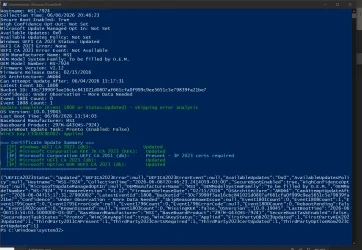
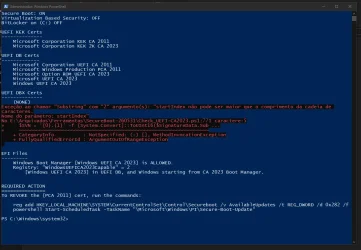

I just ran the script you posted in the above post. No errors at all and I'm running build 26200.8524.The real issue is finding what is passing a non-string value to the function. This code has been in place for months and has never failed before. Which points to something different about your UEFI data.
Try this version.
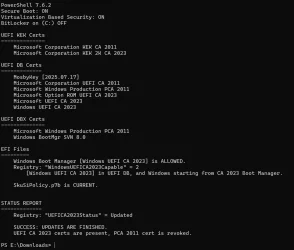
Yes, but in your case you revoked the certificates from 2011 and earlier versions, which I didn't do because I don't want to have problems with my backup media. Perhaps by revoking the old certificates, the UEFI will have the signatures that the script expects to read.I just ran the script you posted in the above post. No errors at all and I'm running build 26200.8524.

PS C:\Users\jwdav> powershell -nop -ep bypass -f E:\Z_c2023\Check_UEFI-CA2023.ps1 -Verbose
Windows 11 25H2 (26200.8457)

Secure Boot: ON
Virtualization Based Security: ON
BitLocker on (C:) OFF

BIOS Firmware
-------------
    ASUS System Product Name
    Version: 3854
    Date: 2026-04-03

Factory Default UEFI PK Cert
----------------------------
    ASUSTeK MotherBoard PK Certificate

UEFI PK Cert
------------
    ASUSTeK MotherBoard PK Certificate

Factory Default UEFI KEK Certs
------------------------------
    Microsoft Corporation KEK CA 2011
    Microsoft Corporation KEK 2K CA 2023
    ASUSTeK MotherBoard KEK Certificate

UEFI KEK Certs
--------------
    Microsoft Corporation KEK CA 2011
    Microsoft Corporation KEK 2K CA 2023
    ASUSTeK MotherBoard KEK Certificate

Factory Default UEFI DB Certs
-----------------------------
    Microsoft Corporation UEFI CA 2011
    Microsoft Windows Production PCA 2011
    Microsoft Option ROM UEFI CA 2023
    Microsoft UEFI CA 2023
    Windows UEFI CA 2023
    ASUSTeK MotherBoard SW Key Certificate
    ASUSTeK Notebook SW Key Certificate

UEFI DB Certs
-------------
    Microsoft Corporation UEFI CA 2011
    Microsoft Windows Production PCA 2011
    Microsoft Option ROM UEFI CA 2023
    Microsoft UEFI CA 2023
    Windows UEFI CA 2023
    ASUSTeK MotherBoard SW Key Certificate
    ASUSTeK Notebook SW Key Certificate

Factory Default UEFI DBX Certs
------------------------------
    (NONE)
    EFI_CERT_SHA256_GUID Signatures: 430

UEFI DBX Certs
--------------
    Microsoft Windows Production PCA 2011
foreach |01612B139DD5598843AB1C185C3CB2EB92000005000000000000000000000000|
foreach |01612B139DD5598843AB1C185C3CB2EB92000008000000000000000000000000|
    Windows BootMgr SVN 8.0
    EFI_CERT_SHA256_GUID Signatures: 436

UEFI Variables
--------------
    Credential Guard: ON
    SBAT (Linux only): sbat,1,2024010900 / shim,4 / grub,3 / grub.debian,4

EFI Files
---------
    Windows Boot Manager [Windows UEFI CA 2023] is ALLOWED.
        \\.\HarddiskVolume1\EFI\Microsoft\Boot\bootmgfw.efi
        File Version: 28000.326, SVN 8.0

    Registry: "WindowsUEFICA2023Capable" = 2
        [Windows UEFI CA 2023] in UEFI DB, and Windows starting from CA 2023 Boot Manager.

    SkuSiPolicy.p7b is CURRENT.
        \\.\HarddiskVolume1\EFI\Microsoft\Boot\SkuSiPolicy.p7b
        Version: 3.0.0.14


STATUS REPORT
-------------
    Registry: "UEFICA2023Status" = Updated

    SUCCESS: UPDATES ARE FINISHED.
    UEFI CA 2023 certs are present, PCA 2011 cert is revoked.

PS C:\Users\jwdav>I went back into the BIOS, deleted all the keys, disabled secure boot, and entered Windows to reapply the updates with your script. Check-UEFI now reported no errors updating, showing that the BIOS was in configuration mode.All you folks are normal. SVN's of 2.0, 7.0, and 8.0
Your story is you first installed the DBXUpdate2024.bin to ban PCA 2011. This added the base SVN of 2.0.
DBXUpdateSVN.bin (pre-April 2026) bumped you to 7.0, and then April 2026's DBXUpdateSVN.bin bumped you to 8.0.
What I don't understand is why @CristianSsam's PC gets "false" as a returned signature data value. Unless that PC has some weird issues.
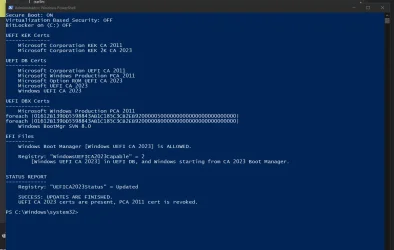
I can only imagine how trying to make this script handle all the varied situations that come up has yielded some interesting issues to solve!My standard test procedure is to shut down my VM and erase the NVRAM. This resets the "UEFI" to the factory defaults, with 77 EFI signatures and none of those are SVN's. I test the check script, run the updates and then check again.
In the 6 months I've been working on this project, I've never had something return "False" for the signature data. It's some valid string, or a null value.
Now that you've reset and re-applied the certs, it looks like whatever condition has cleared up. I dunno, my gut feeling is it was some weird NVRAM corruption. The good news is this exercise forced me to clean up some older parts of the code.
 All the different environments have to create some oddball issues to deal with.








