Solved garlin's PowerShell scripts for updating Secure Boot CA 2023


Where do you show the PK, or do you just assume it's there? It's obviously there or the other stuff wouldn't work, is that the working assumption?
When you run the check script in non-verbose mode, it doesn't bother reporting the PK. That's because it would distract most non-technical users,

By the UEFI standards, you can only have one cert for the PK or none. Once a PK is installed, you can't append another cert to the variable. You're allowed multiple KEK's, DB's and DBX's as much as you want (or actually until you run out of free NVRAM).
 

My Computer

System One

  • OS
    Windows 7
Where do you show the PK, or do you just assume it's there? It's obviously there or the other stuff wouldn't work, is that the working assumption?
I noticed the same thing
If you run the check script without any parameters, PK is not listed
But if you add "-verbose" as parameter, then it shows the PK section

@garlin, I think a few versions back, you did show the PK section without having to supply the "-verbose" parameter
UPDATE: I went back to your v2026.04.08 and it did not show the PK unless you provide the "-verbose" parameter
 
Last edited:

My Computer

System One

  • OS
    Windows 11
Here's my experience as a former IT admin: Sometimes providing more details up front doesn't really help the user. They get distracted or overwhelmed when those details don't get them closer to the finish line. Which is why they're moved to verbose mode.

In the the best cases:
1. OEM provides an updated BIOS which solves everyone's problems. Knowing the PK's name wouldn't have mattered.
2. OEM provides a signed KEK file to MS. Knowing the PK doesn't matter.
3. You can perform manual KEK enrollment. Knowing the PK doesn't matter.

4. In the worst case, we have to enter Setup Mode (delete all keys) and replace all keys. Knowing the old PK doesn't matter. Since we're replacing the complete set of certs from the Windows OEM Devices bundle, we know what the final PK will be. Knowing the new PK doesn't matter.

If you put too many non-critical details onscreen, someone will get fixated and ask too many questions which don't move the ball forward. Which is why I chose not to report the PK outside of verbose mode.
 

My Computer

System One

  • OS
    Windows 7
I don't bring up Mosby on my own, but other people ask me about it. The fundamental difference is you strongly believe in self-signing, and it's a great tool for that but I'm offering an alternative that doesn't go that far to solve the same problem.

You're interpreting my comments as FUD. Have I ever written no one should use Mosby? No. I share my thoughts on its approach and why my script does it differently. It's not to disparage your project, it's more to explain why I chose my direction. Do I get tired of deflecting Mosby questions on a thread dedicated to my scripts, and maybe that tone shows up? Yes.

We can solve this problem if you provide me your preferred contact method for engaging with users when they ask me about Mosby in passing. I will redirect them to where you can directly address their questions and concerns.
Well put Garlin! You are a gentleman and a scholar!
 

My Computer

System One

  • OS
    win 11
    Computer type
    Laptop
    Manufacturer/Model
    Dell Precision M4800
    CPU
    Intell Core i7 4900 MQ
    Motherboard
    Dell QT3YTY A00
    Memory
    DDR3 16 GB
@garlin ,

First of all, thank you for helping me. I do really appreciate it!

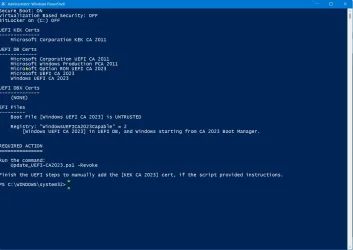
I tried with, and without, adding "verbose", but the output was the same (image attached), but I could have been doing something wrong ... 😢

It would appear that I don't have the 2023 KEK installed ... ?

The computer does not have active Bitlocker on any of its three drives, but I do use Windows PIN to log in, which I understand I must disable until the Certificate Update process completes successfully.

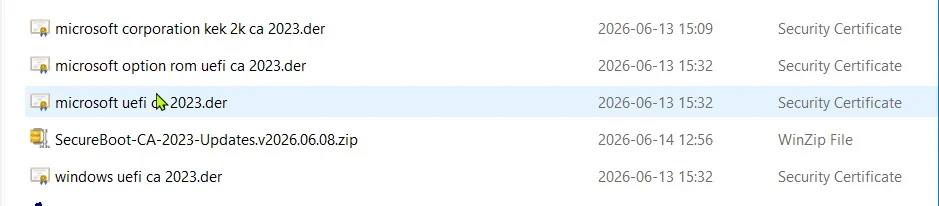
I do have the 2023 KEK file from GitHub, and three other related .der files that were listed as available for other 2023 certificates (image attached). All of the files have been "unblocked."

What is the next step?

Thank you again, and have a great day.

Regards,
Phil
 

Attachments

  • garioch7 - Check UEFI-bat Results.webp
    garioch7 - Check UEFI-bat Results.webp
    66.2 KB · Views: 1
  • garioch7 - downloaded 2023 certificate files.webp
    garioch7 - downloaded 2023 certificate files.webp
    20.9 KB · Views: 1

My Computers

System One System Two

  • OS
    Windows 11 Pro Version 25H2 (Build 26200.8655
    Computer type
    PC/Desktop
    Manufacturer/Model
    Dell XPS8930 SE
    CPU
    Intel i7-9700K 4700 MHz
    Motherboard
    Dell XPS 8930
    Memory
    32 GB (4 x 8GB SK Hynix DDR4 @1333 MHz) (2666 MHz)
    Graphics Card(s)
    NVIDIA GeForce RTX 2060 (6 GB) GDDR6 300 MHz
    Sound Card
    None
    Monitor(s) Displays
    Dell UltraSharp U2518D 25"
    Screen Resolution
    2560 x 1440
    Hard Drives
    NVMe Intel 1024 TB
    Seagate 2 TB, SATA-III
    Western Digital Black 4TB
    PSU
    850 W Gold Standard
    Case
    Dell XPS 8930 Base (Special Edition)
    Cooling
    Air
    Keyboard
    Dell 0G4D2W
    Mouse
    Dell MOCZUL
    Internet Speed
    Download 553 Mbps, Upload 686 Mbps
    Browser
    Google Chrome
    Antivirus
    ESET Smart Security Premium, plus Malwarebytes Premium
    Other Info
    BIOS Version 1.1.31
  • Operating System
    Windows 11 Pro Version 25H2 (Build 26200.8655)
    Computer type
    Laptop
    Manufacturer/Model
    Dell XPS 15 7590
    CPU
    i7-9750H 4.5 GHz
    Motherboard
    Dell XPS 15 7590
    Memory
    16 GB (2 x 8GB @ 1333 MHz) DDR4-2666 MHz
    Graphics card(s)
    NVIDIA GeForce 1650 4 GB GDDR5
    Sound Card
    None
    Monitor(s) Displays
    Dell XPS 15 7590, 15.6" InfinityEdge Anti-Glare, Non-Touch
    Screen Resolution
    1920 x 1080
    Hard Drives
    512 GB M.2 PCle NVMe SK Hynix
    PSU
    130W Power Adapter
    Case
    Dell XPS 15 7590
    Cooling
    Air
    Keyboard
    Laptop
    Mouse
    Logitech M510
    Internet Speed
    Download: 400 Mbps, Upload: 203 Mbps
    Browser
    Google Chrome
    Antivirus
    ESET Smart Security Premium, plus Malwarebytes Premium
    Other Info
    BIOS Version 1.35.0
@garlin ,

First of all, thank you for helping me. I do really appreciate it!

I tried with, and without, adding "verbose", but the output was the same (image attached), but I could have been doing something wrong ... 😢
Did you add "-verbose"
The minus is important so that the parameter is correctly interpreted inside the powershell script
 

My Computer

System One

  • OS
    Windows 11
I tried with, and without, adding "verbose", but the output was the same (image attached), but I could have been doing something wrong ... 😢

It would appear that I don't have the 2023 KEK installed ... ?
All the KEK certs are reported, regardless of using the -Verbose option.

What's established is your BIOS doesn't have KEK CA 2023. Barring the OEM stepping up with a BIOS update or signed file submitted to MS, then the only alternative is manual key enrollment or wiping the current key (Setup Mode). This requires unlocking the BIOS advance features, which may be different for this model. That's the hard part where you're stuck at the moment.
 

My Computer

System One

  • OS
    Windows 7
When you run the check script in non-verbose mode, it doesn't bother reporting the PK. That's because it would distract most non-technical users,

By the UEFI standards, you can only have one cert for the PK or none. Once a PK is installed, you can't append another cert to the variable. You're allowed multiple KEK's, DB's and DBX's as much as you want (or actually until you run out of free NVRAM).
Makes sense, I know at one point I saw it, perhaps that was when I ran with -verbose. I ran it again with -verbose and sure enough, lots more detail, including the PK.

Thanks again for the great support here. (y)
 

My Computers

System One System Two

  • OS
    Win 11 Pro 25H2, Build 26200.8655
    Computer type
    PC/Desktop
    Manufacturer/Model
    Home Brew
    CPU
    Intel Core i5 14500
    Motherboard
    Gigabyte B760M G P WIFI
    Memory
    64GB DDR4
    Graphics Card(s)
    GeForce RTX 4060
    Sound Card
    Chipset Realtek
    Monitor(s) Displays
    LG 45" Ultragear, Acer 24" 1080p
    Screen Resolution
    5120x1440, 1920x1080
    Hard Drives
    Crucial P310 2TB 2280 PCIe Gen4 3D NAND NVMe M.2 SSD (O/S)
    Silicon Power 2TB US75 NVMe PCIe Gen4 M.2 2280 SSD (backup)
    Crucial BX500 2TB 3D NAND (2nd backup)
    Seagate 4TB Ironwolf, rotating HDD archive files
    External off-line backup Drives: 2 NVMe 4TB drives in external enclosures
    PSU
    Thermaltake Toughpower GF3 750W
    Case
    LIAN LI LANCOOL 216 E-ATX PC Case
    Cooling
    Lots of fans!
    Keyboard
    Microsoft Comfort Curve 2000
    Mouse
    Logitech G305
    Internet Speed
    Verizon FiOS 1GB
    Browser
    Firefox
    Antivirus
    Malware Bytes & Windows Defender Security
  • Operating System
    Win 11 Pro 25H2, Build 26200.8524
    Computer type
    PC/Desktop
    Manufacturer/Model
    Home Brew
    CPU
    Intel Core i5 14400
    Motherboard
    Gigabyte B760M DS3H AX
    Memory
    32GB DDR5
    Graphics card(s)
    Intel 700 Embedded GPU
    Sound Card
    Realtek Embedded
    Monitor(s) Displays
    27" HP 1080p
    Screen Resolution
    1920x1080
    Hard Drives
    Crucial P310 2TB 2280 PCIe Gen4 eD NAND PCIe SSD
    Samsung EVO 990 2TB NVMe Gen4 SSD
    Samsung 2TB SATA SSD
    PSU
    Thermaltake Smart BM3 650W
    Case
    Okinos Micro ATX Case
    Cooling
    Fans
    Keyboard
    Microsoft Comfort Curve 2000
    Mouse
    Logitech G305
    Internet Speed
    Verizon FiOS 1GB
    Browser
    Firefox
    Antivirus
    Malware Bytes & Windows Defender Security
@anchamp65 ,

Thank you for your reply. No I did not include the dash. I re-ran it again with the "-Verbose" Output was too long to get a screen capture, so I have copied it.


Windows 11 25H2 (26200.8655)

Secure Boot: ON
Virtualization Based Security: OFF
BitLocker on (C:) OFF

BIOS Firmware
-------------
Dell Inc. XPS 8930
Version: 1.1.31
Date: 2023-11-20

Factory Default UEFI PK Cert
----------------------------
Pegatron PK

UEFI PK Cert
------------
Pegatron PK
Manual update of [KEK CA 2023] is REQUIRED.

Factory Default UEFI KEK Certs
------------------------------
Microsoft Corporation KEK CA 2011

UEFI KEK Certs
--------------
Microsoft Corporation KEK CA 2011

Factory Default UEFI DB Certs
-----------------------------
Microsoft Corporation UEFI CA 2011
Microsoft Windows Production PCA 2011

UEFI DB Certs
-------------
Microsoft Corporation UEFI CA 2011
Microsoft Windows Production PCA 2011
Microsoft Option ROM UEFI CA 2023
Microsoft UEFI CA 2023
Windows UEFI CA 2023

Factory Default UEFI DBX Certs
------------------------------
(NONE)
EFI_CERT_SHA256_GUID Signatures: 77

UEFI DBX Certs
--------------
(NONE)
Windows BootMgr SVN is MISSING.
EFI_CERT_SHA256_GUID Signatures: 495

UEFI Variables
--------------
Credential Guard: ON
SBAT (Linux only): sbat,1,2024010900 / shim,4 / grub,3 / grub.debian,4

EFI Files
---------
Boot File [Windows UEFI CA 2023] is UNTRUSTED
\\.\HarddiskVolume4\EFI\Microsoft\Boot\bootmgfw.efi
File Version: 28000.342, SVN 9.0

Registry: "WindowsUEFICA2023Capable" = 2
[Windows UEFI CA 2023] in UEFI DB, and Windows starting from CA 2023 Boot Manager.


REQUIRED ACTION
===============

Run the command:
Update_UEFI-CA2023.ps1 -Revoke

Finish the UEFI steps to manually add the [KEK CA 2023] cert, if the script provided instructions.

Thank you. I thought I was doing something wrong! Mea culpa.

Have a great day.

Regards,
Phil
 

My Computers

System One System Two

  • OS
    Windows 11 Pro Version 25H2 (Build 26200.8655
    Computer type
    PC/Desktop
    Manufacturer/Model
    Dell XPS8930 SE
    CPU
    Intel i7-9700K 4700 MHz
    Motherboard
    Dell XPS 8930
    Memory
    32 GB (4 x 8GB SK Hynix DDR4 @1333 MHz) (2666 MHz)
    Graphics Card(s)
    NVIDIA GeForce RTX 2060 (6 GB) GDDR6 300 MHz
    Sound Card
    None
    Monitor(s) Displays
    Dell UltraSharp U2518D 25"
    Screen Resolution
    2560 x 1440
    Hard Drives
    NVMe Intel 1024 TB
    Seagate 2 TB, SATA-III
    Western Digital Black 4TB
    PSU
    850 W Gold Standard
    Case
    Dell XPS 8930 Base (Special Edition)
    Cooling
    Air
    Keyboard
    Dell 0G4D2W
    Mouse
    Dell MOCZUL
    Internet Speed
    Download 553 Mbps, Upload 686 Mbps
    Browser
    Google Chrome
    Antivirus
    ESET Smart Security Premium, plus Malwarebytes Premium
    Other Info
    BIOS Version 1.1.31
  • Operating System
    Windows 11 Pro Version 25H2 (Build 26200.8655)
    Computer type
    Laptop
    Manufacturer/Model
    Dell XPS 15 7590
    CPU
    i7-9750H 4.5 GHz
    Motherboard
    Dell XPS 15 7590
    Memory
    16 GB (2 x 8GB @ 1333 MHz) DDR4-2666 MHz
    Graphics card(s)
    NVIDIA GeForce 1650 4 GB GDDR5
    Sound Card
    None
    Monitor(s) Displays
    Dell XPS 15 7590, 15.6" InfinityEdge Anti-Glare, Non-Touch
    Screen Resolution
    1920 x 1080
    Hard Drives
    512 GB M.2 PCle NVMe SK Hynix
    PSU
    130W Power Adapter
    Case
    Dell XPS 15 7590
    Cooling
    Air
    Keyboard
    Laptop
    Mouse
    Logitech M510
    Internet Speed
    Download: 400 Mbps, Upload: 203 Mbps
    Browser
    Google Chrome
    Antivirus
    ESET Smart Security Premium, plus Malwarebytes Premium
    Other Info
    BIOS Version 1.35.0
@garlin ,

Dell is not going to do anything from what I read on their Dell XPS Desktop Forum for the XPS 8930 and XPS 8940 models, where I am a "Tech Expert", primarily because of my malware expertise, not because I have any great knowledge of the intracacies of Dell computers. There are instructions there for doing it manually, I trust you more, and I don't "double doctor". You can find some of what is being recommended there at the link below:

XPS 8930, purchased 2018, 2023 Secure Boot Certificates | DELL Technologies

I will await your advice. Thank you again for helping me.

Regards,
Phil
 

My Computers

System One System Two

  • OS
    Windows 11 Pro Version 25H2 (Build 26200.8655
    Computer type
    PC/Desktop
    Manufacturer/Model
    Dell XPS8930 SE
    CPU
    Intel i7-9700K 4700 MHz
    Motherboard
    Dell XPS 8930
    Memory
    32 GB (4 x 8GB SK Hynix DDR4 @1333 MHz) (2666 MHz)
    Graphics Card(s)
    NVIDIA GeForce RTX 2060 (6 GB) GDDR6 300 MHz
    Sound Card
    None
    Monitor(s) Displays
    Dell UltraSharp U2518D 25"
    Screen Resolution
    2560 x 1440
    Hard Drives
    NVMe Intel 1024 TB
    Seagate 2 TB, SATA-III
    Western Digital Black 4TB
    PSU
    850 W Gold Standard
    Case
    Dell XPS 8930 Base (Special Edition)
    Cooling
    Air
    Keyboard
    Dell 0G4D2W
    Mouse
    Dell MOCZUL
    Internet Speed
    Download 553 Mbps, Upload 686 Mbps
    Browser
    Google Chrome
    Antivirus
    ESET Smart Security Premium, plus Malwarebytes Premium
    Other Info
    BIOS Version 1.1.31
  • Operating System
    Windows 11 Pro Version 25H2 (Build 26200.8655)
    Computer type
    Laptop
    Manufacturer/Model
    Dell XPS 15 7590
    CPU
    i7-9750H 4.5 GHz
    Motherboard
    Dell XPS 15 7590
    Memory
    16 GB (2 x 8GB @ 1333 MHz) DDR4-2666 MHz
    Graphics card(s)
    NVIDIA GeForce 1650 4 GB GDDR5
    Sound Card
    None
    Monitor(s) Displays
    Dell XPS 15 7590, 15.6" InfinityEdge Anti-Glare, Non-Touch
    Screen Resolution
    1920 x 1080
    Hard Drives
    512 GB M.2 PCle NVMe SK Hynix
    PSU
    130W Power Adapter
    Case
    Dell XPS 15 7590
    Cooling
    Air
    Keyboard
    Laptop
    Mouse
    Logitech M510
    Internet Speed
    Download: 400 Mbps, Upload: 203 Mbps
    Browser
    Google Chrome
    Antivirus
    ESET Smart Security Premium, plus Malwarebytes Premium
    Other Info
    BIOS Version 1.35.0
@garlin ,

Dell is not going to do anything from what I read on their Dell XPS Desktop Forum for the XPS 8930 and XPS 8940 models, where I am a "Tech Expert", primarily because of my malware expertise, not because I have any great knowledge of the intracacies of Dell computers. There are instructions there for doing it manually, I trust you more, and I don't "double doctor". You can find some of what is being recommended there at the link below:

XPS 8930, purchased 2018, 2023 Secure Boot Certificates | DELL Technologies

I will await your advice. Thank you again for helping me.

Regards,
Phil
I read the post you shared and it's the samething that Garlin will have you do

UEFI PK Cert​
------------​
Pegatron PK​
Manual update of [KEK CA 2023] is REQUIRED.

Except the post gives you the steps inside the BIOS to do it which Garlin can't give to everyone because everyone have different BIOS
For the download part, Garlin downloads it for you and puts it on the EFI partition under the "\EFI\Certs" folder.

So, you won't have to this part
Code:
Download the updated certificate from the GitHub Repository, you need..
'Microsoft Corporation kek 2k ca 2023.der'
Go to File-Properties and unblock the downloaded file.
Save this file to a FAT32 formatted memory stick and insert into a free USB port.

And instead of this

Code:
Selected the USB key from the media list.

Find the disk that has the "\EFI\Certs" folder and the "Microsoft Corporation kek 2k ca 2023" will be in it

EDIT: you need to run Garlin's update script first so it put the certs on the EFI partion
 
Last edited:

My Computer

System One

  • OS
    Windows 11
For the XPS 8930, manual KEK enrollment works as from this recent thread:
Successful manual update of Secure Boot on Dell XPS8930 with older BIOS that will never update.

1. Run the update script, it should copy the KEK cert file to your EFI volume.

2. Shutdown. Enter the BIOS menus, you may have to switch from Standard to User Mode.

3. Look for Key Enrollment for KEK. Select Append, and it should bring up a list of devices. Browse the devices until you see an "EFI" folder. Select the subfolder "Certs" underneath it. Find the KEK CA 2023 cert file.

4. Select the file, and apply.

5. Restart Windows. Run the update script again to finish the rest of the CA 2023 certs.
 

My Computer

System One

  • OS
    Windows 7
I don't bring up Mosby on my own, but other people ask me about it.

Yes. And what I'm seeing is that every time that happens, you invent some bullshit about it, such as strongly insinuating as you have done here, that maybe the tool is not as secure as yours. There are not many way to interpret what you tried to aim at here, with your allegation that somehow my Open Source code might somehow be less secure than yours.

It doesn't matter if people bring Mosby up. That doesn't give you a license to invent fallacies to try to discredit it.

The fundamental difference is you strongly believe in self-signing, and it's a great tool for that but I'm offering an alternative that doesn't go that far to solve the same problem.

It's not a belief problem. I am trying to solve an issue (trusting that the PK from OEM will always be safe, whereas we have concrete examples that this is not always the case) that only self signing can solve, and the other part of self-signing derives from using Setup Mode and the limitations we have found from platforms that should accept unsigned but don't, so, since we obviously don't want to remotely pre-sign stuff to have people question our trustworthiness, self-signing is the logical solution.

It's not a crusade and you are not seeing me advocating that my solution is better. It's just different usage scenario according to what people want.

You're interpreting my comments as FUD.

I'm relating what you explicitly insinuated about my code somehow being less trustworthy than yours on the grounds that it is written in C instead of PowerShell, and therefore calling it what it is.

Have I ever written no one should use Mosby? No.

Not directly.

But, from the way you insinuated multiple types that Mosby should be considered less trustworthy than your tool, first because it self-signs, and second because it is written in oh-so-obtuse C, you might as well have.

I share my thoughts on its approach and why my script does it differently.

No. You use bullshit arguments to deprecate what Mosby does. I've caught you multiple times doing that now.

It's not to disparage your project, it's more to explain why I chose my direction.

Which shouldn't matter when out end goal is the same. And I already explained how Mosby is aimed at more than Windows users whereas your script caters for Windows only. If I didn't care about the possibility of OEM playing fast an lose with their PKs, as they have done in the past, or being coerced into disclosing their private signing keys, and if I didn't care about serving all OSes equally, I'd probably have chosen the same direction as you did. But somehow, that narrative never seems to quite make it to your remarks about the differences between Mosby and your script.

Do I get tired of deflecting Mosby questions on a thread dedicated to my scripts, and maybe that tone shows up? Yes.

Not my fault if we happen to have 2 competing means of accomplishing something that users want. Personally, I believe that providing people with choice is what matters at the end of the day, and that one has to appreciate that competition is good, especially if this or that solution may not quite happen to meet the user's needs.

We can solve this problem if you provide me your preferred contact method for engaging with users when they ask me about Mosby in passing.

Issue tracker. I have hammered it over and over again. If people have a problem with Mosby, they should head to Issues · pbatard/Mosby.
Or if people want to see the pros/cons of Mosby, they can have a look at the README that details our approach and has a mini-FAQ. My e-mail is also all over the place.

Remember however that, because you chose a discussion forum, rather than an issue tracker to address your script support, then of course people will be inclined to discuss. But I would say that's on you for choosing that mode of support.

 

My Computer

System One

  • OS
    Windows 11
    Computer type
    PC/Desktop
    Manufacturer/Model
    Home Built
    Screen Resolution
    4k
why do i get "Windows Boot Manager [Windows UEFI CA 2023] is BANNED.", if i try the required action nothing changes ?
what i do see is with the verbose option is,

i see here SVN 8.0 instead of 9.0, don't know if that has something to do with.
Powershell or cmd as admin:
Code:
mountvol S: /S
xcopy "c:\Windows\Boot\EFI_EX\bootmgfw_EX.efi" "S:\EFI\Microsoft\Boot\bootmgfw.efi" /Y
mountvol S: /D
Note: If you don't have the Windows 11 June Cumulative Update installed, update Windows 11 first.
 

My Computer

System One

  • OS
    Windows 11
    Computer type
    PC/Desktop
    Manufacturer/Model
    Gigabyte
    CPU
    AMD
    Motherboard
    Gigabyte
    Memory
    32 GB
Yes. And what I'm seeing is that every time that happens, you invent some bullshit about it, such as strongly insinuating as you have done here, that maybe the tool is not as secure as yours. There are not many way to interpret what you tried to aim at here, with your allegation that somehow my Open Source code might somehow be less secure than yours.
I have read this whole thread and I never felt like your tool was being put down by any of Garlin's comments

Remember however that, because you chose a discussion forum, rather than an issue tracker to address your script support, then of course people will be inclined to discuss. But I would say that's on you for choosing that mode of support.
Has he stated, provide a prefered contact method so this discussion forum can refer people to you support mecanism when they ask about Mosby

And I have absolutely nohting against you, I have been using your Rufus tool for many years and love it

EDIT:
Is this where people should be refered to when they have questions about Mosby ?
GitHub pbatard Mosby issue tracker
 
Last edited:

My Computer

System One

  • OS
    Windows 11
Back
Top Bottom