Solved garlin's PowerShell scripts for updating Secure Boot CA 2023


Someone at MS just submitted KEK files for (7) Surface models. It's mid-June 2026! Sometimes the factory takes forever to make a new sausage. :sleep:
And Surface is their hardware brand
Hilarious !!!
 

My Computer My Computer

At a glance

Windows 11
OS
Windows 11
Hello,

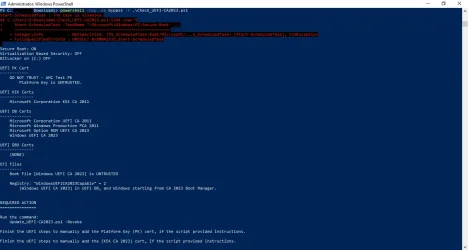
Running an old Dell XPS 8700. Right now, it's Windows 10, but will be upgrading eventually to Windows 11 for compatibility with my main computer. Had some real problems when Microsoft released the Secure Boot update task back in early December (froze the system on every boot until I did a fresh install). Then, when it started running every 11 hours; well, the system files kept getting shredded. I finally disabled the task and started looking at your Powershell scripts. No joy with these, I'm afraid. I get a partial update, but not KEK or PK. I had a couple of questions.
1) I have disabled the Microsoft task. When I run the Update_UEFI-CA2023.ps1 script, it just hangs -- actually the system freezes and I have to do a hard shutdown. I'm pretty sure this is for a different reason (see question #2), but I wanted to double-check that your script would not have issues with the Microsoft Secure-Boot task being disabled in Task Scheduler.

2) The freeze/hang issue has been documented in other forums as being caused by the old NVIDIA graphics cards that these systems came with. Apparently, they are 'signed' with 2011 certificates. I still have to remove the card and test your script again, but wondered if you had any thoughts on this?

Other than that, I agree with the others who have posted. While I have not been able to update, your script has not shredded the system files in the way that the Microsoft task has. And while my system did 'freeze', there was no damage to the system files upon restart after the hard shutdown.

Again, any thoughts on the above would be appreciated.
 

Attachments

  • Check_UEFI-CA2023-Script.webp
    Check_UEFI-CA2023-Script.webp
    58.6 KB · Views: 1
Last edited:

My Computer My Computer

At a glance

Windows 11
OS
Windows 11
Computer type
PC/Desktop
Manufacturer/Model
Dell XPS 8700
1) I have disabled the Microsoft task. When I run the Update_UEFI-CA2023.ps1 script, it just hangs -- actually the system freezes and I have to do a hard shutdown. I'm pretty sure this is for a different reason (see question #2), but I wanted to double-check that your script would not have issues with the Microsoft Secure-Boot task being disabled in Task Scheduler.
For applying the certs and updating the boot manager, my script doesn't need the Secure Boot task. But for enabling the SBAT and UEFI lock on SkuSkiSpolicy, it calls the task since those are reserved security operations that only the task can do.

2) The freeze/hang issue has been documented in other forums as being caused by the old NVIDIA graphics cards that these systems came with. Apparently, they are 'signed' with 2011 certificates. I still have to remove the card and test your script again, but wondered if you had any thoughts on this?
You're probably hitting the very serious bug with your GPU having an older signed ROM, and it's not authorized once CA 2011 is banned. This is a known issue in the NVIDIA community, you will find lots of threads on this exact problem.

There's no real good answer, except to hope someone has figured out how to hack your GPU's ROM to re-sign them. Or you will have to swap out the GPU (unless you're stuck with integrated graphics). It's one of those problems where nobody thought about this possibility 15 years ago.

Everyone was thinking about the motherboard's security, and not considering it for GPU's. If you can't find a workaround from the NVIDIA forums, you're screwed and need to leave Secure Boot disabled. It's not ideal, but you have to balance which is more important to you, running this PC or having less system protection.

 

My Computer My Computer

At a glance

Windows 7
OS
Windows 7
For applying the certs and updating the boot manager, my script doesn't need the Secure Boot task. But for enabling the SBAT and UEFI lock on SkuSkiSpolicy, it calls the task since those are reserved security operations that only the task can do.


You're probably hitting the very serious bug with your GPU having an older signed ROM, and it's not authorized once CA 2011 is banned. This is a known issue in the NVIDIA community, you will find lots of threads on this exact problem.

There's no real good answer, except to hope someone has figured out how to hack your GPU's ROM to re-sign them. Or you will have to swap out the GPU (unless you're stuck with integrated graphics). It's one of those problems where nobody thought about this possibility 15 years ago.

Everyone was thinking about the motherboard's security, and not considering it for GPU's. If you can't find a workaround from the NVIDIA forums, you're screwed and need to leave Secure Boot disabled. It's not ideal, but you have to balance which is more important to you, running this PC or having less system protection.
Thanks for the quick response. Good to know about the SBAT and "UEFI lock". As it turns out, I can run quite comfortably on the Intel i7's graphic, so I'll be trying to maintain the Secure Boot, but remove the graphics card. After I've done that, I'll give your script a go again with the Microsoft task enabled.

Now that I am retired, I hate to throw out stuff that still works, when I have time to keep it humming. I plan to turn the XPS into my 'graphics' machine for creating genealogical pictures and watching my old movies. So, ultimately, it needn't be internet secure, and I can consider going back to the legacy boot instead of UEFI if need be; or consider spending the money on a supported graphics card.

It's all good. Thanks again.
 

My Computer My Computer

At a glance

Windows 11
OS
Windows 11
Computer type
PC/Desktop
Manufacturer/Model
Dell XPS 8700
@garlin Thx for the quick response, for leaving the system in custom mode do I have to leave secure boot disabled? And then once I run the script and it applies the replacement certs, I reboot and turn secure boot back on right?
 

My Computer My Computer

At a glance

Windows 11
OS
Windows 11
Computer type
PC/Desktop
Standard Mode will use the factory defaults, you can't make manual changes and keep it in Standard Mode. Leave it in Custom mode.

You can temporarily leave Secure Boot disabled and restart Windows, so you can run the update & check scripts. If you see the extra certs properly recognized, then you can re-enable Secure Boot. Remember: you can always disable Secure Boot if Windows doesn't boot.
 

My Computer My Computer

At a glance

Windows 7
OS
Windows 7
Successfully removed old certs and SecureBootSVN shows 9.0 for all 3 entries. Running Update -BootMedia reports "No Updates are Required". However Windows complains when booting from the USB with the message "Secure boot version check failed... Current version 7.0, minimum allowed 9.0".

The USB will boot if Secure Boot is turned off in the BIOS, but this is not ideal. Can anything be done to get the USB updated? The same situation happens with some .ISO files on a Ventory USB.
 

My Computer My Computer

At a glance

Windows 11 ProIntel Core Ultra16GBIntel(R) Arc Graphics
OS
Windows 11 Pro
Computer type
Laptop
Manufacturer/Model
ASUS Zenbook 14 OLED
CPU
Intel Core Ultra
Memory
16GB
Graphics Card(s)
Intel(R) Arc Graphics
Sound Card
Realtek High Definition Audio(SST)
Screen Resolution
2880 x 1800
Hard Drives
500 GB NVMe SSD
Internet Speed
1,500Mbps
Browser
Firefox, Edge
Antivirus
Windows Defender
I also have a Dell 8700 it doesn't have TPM 2.0 or 1.2. It has PTT (Platform Trust Technology). I'm leaving mine on Windows 10 and will use it as a local server on my WiFi but not connected to the internet.
 

My Computer My Computer

At a glance

Windows 11 & Zorin ProIntel® Core™ Ultra 9 Processor 275HX 2.7 GHz32 gbNVIDIA® GeForce RTX™ 5060 Laptop GPU
OS
Windows 11 & Zorin Pro
Computer type
Laptop
Manufacturer/Model
Asus Rog Strix G16
CPU
Intel® Core™ Ultra 9 Processor 275HX 2.7 GHz
Motherboard
AsusteK Computer
Memory
32 gb
Graphics Card(s)
NVIDIA® GeForce RTX™ 5060 Laptop GPU
Sound Card
Realtek High Definition Audio
Monitor(s) Displays
Laptop 16 inch
Screen Resolution
2560 X 1600
Hard Drives
Boot: Samsung 9100 NVME 2 TB Microsoft Storage Controller: Standard NVM Express Driver: Microsoft 6/21/2006. No SATA/AHCI on my motherboard or in bios
Mouse
Pad
Browser
Google Chrome
Antivirus
Microsoft
Other Info
Printer: HP Color LaserJet MFP M477dw
Successfully removed old certs and SecureBootSVN shows 9.0 for all 3 entries. Running Update -BootMedia reports "No Updates are Required". However Windows complains when booting from the USB with the message "Secure boot version check failed... Current version 7.0, minimum allowed 9.0".

The USB will boot if Secure Boot is turned off in the BIOS, but this is not ideal. Can anything be done to get the USB updated? The same situation happens with some .ISO files on a Ventory USB.

Run the update script:
Code:
Update-UEFI.bat -BootMedia

The Secure Boot task will handle updating the boot manager after any Monthly Update for Windows itself. But MS doesn't do anything for USB boot media which may have been created before the boot manager was switched. It's just a matter of swapping out the boot file(s) again.

It's annoying that you have to do this, but get used to it. MS is protecting you from security holes.
 

My Computer My Computer

At a glance

Windows 7
OS
Windows 7
me or you?

new one is dated 2026.06.08 (earlier) and has no extras ?

I'm going to have to bail for today - thanks again for your support

Hi garlin

I'm still lost on this verbose check ?
 

My Computer My Computer

At a glance

Win11
OS
Win11
Hi garlin

I'm still lost on this verbose check ?
Hi
Have you ever used cmd.exe, powershell or terminal ?
Just want to know what you are familiar with...
 

My Computer My Computer

At a glance

Windows 11
OS
Windows 11
Hi garlin

I'm still lost on this verbose check ?
The verbose mode is triggered by adding "-Verbose" to the end of whatever you used to run the check script in the first place.

Either:
.\Check_UEFI-CA2023.ps1 -Verbose
.\Check-UEFI.bat -Verbose

Both the GitHub and post #1 version of the ZIP file should have the full set of both .ps1 and .bat scripts.
 

My Computer My Computer

At a glance

Windows 7
OS
Windows 7
The verbose mode is triggered by adding "-Verbose" to the end of whatever you used to run the check script in the first place.

Either:
.\Check_UEFI-CA2023.ps1 -Verbose
.\Check-UEFI.bat -Verbose

Both the GitHub and post #1 version of the ZIP file should have the full set of both .ps1 and .bat scripts.
I think he just double clicked on the bat from explorer and never used cmd or powershell windows on his own
That's what I was trying to figure out with my post

@botus you don't have to feel like an idiot, you just have different knowledge...
 

My Computer My Computer

At a glance

Windows 11
OS
Windows 11
I also have a Dell 8700 it doesn't have TPM 2.0 or 1.2. It has PTT (Platform Trust Technology). I'm leaving mine on Windows 10 and will use it as a local server on my WiFi but not connected to the internet.
Hey there Asus272; like-minded people putting their old tech to good use.
Dell XPS 8700 does not have TPM but I do have the UEFI secure boot enabled on mine.

Not to go too far on this (since this is a thread for the garlin scripts), did you run into the freezing issues due to the Microsoft Secure-Boot Certificate update task? or have you successfully installed the new 2023 certificates somehow?
 

My Computer My Computer

At a glance

Windows 11
OS
Windows 11
Computer type
PC/Desktop
Manufacturer/Model
Dell XPS 8700
Back
Top Bottom