Solved garlin's PowerShell scripts for updating Secure Boot CA 2023


I'm guessing when the NVRAM is exhausted, that's time to install a new motherboard. :D

I thought this was an interesting feature in the latest version:

Mosby v3.2 x64
UEFI v2.40 (Lenovo, 0x00001450)
LENOVO R06ET71W (1.45 )
LENOVO 20FN002JUS
NVRAM: 11.10/153.9 KB used (141.9 KB free)
System SBAT is 2025051000, Embedded SBAT is 2025051000
Not installing SBAT since this system's SBAT is either the same or newer
Generating Secure Boot DB signing credentials...
Saved Secure Boot DB signing credentials as 'MosbyKey'
Generating PK certificate...
Installing DBX: 'DBX for x86 (64 bit) [2025.10.16]'
Installing DBX: 'Windows Bootmgr SVN 8.0 DBX update [2026-04-10]'
Installing DB: 'Microsoft Windows Production PCA 2011'
Installing DB: 'Microsoft Corporation UEFI CA 2011'
Installing DB: 'Windows UEFI CA 2023'
Installing DB: 'Microsoft UEFI CA 2023'
Installing DB: 'Microsoft Option ROM UEFI CA 2023'
Installing DB: 'MosbyKey [2026.06.11]'
Installing KEK: 'Microsoft Corporation KEK CA 2011'
Installing KEK: 'Microsoft Corporation KEK 2K CA 2023'
Installing PK: 'Mosby Generated PK [2026.06.11]'
NVRAM: 44.7/153.9 KB used (109.1 KB free)
 

My Computer My Computer

At a glance

Windows 11
OS
Windows 11
Exhaustion of available NVRAM space is huge concern with older BIOS'es. Back then, Secure Boot was relatively new and not that much thinking was placed on how fast the DBX (banned list) would grow over time.
[...]
Suppose you are concerned about NVRAM space, you would need to perform one of two options:

1. If your BIOS supports deleting all of DBX (just the DBX), delete the current entries. Re-run the update script, and it will repopulate the DBX but without the 151 retired hashes.

2. Delete all keys, and repeat the whole update process. Since you wiped everything and applied the April 2026 (or later) changes, you don't have those extra 151 entries.

[...]
Thanks Garlin for this detailed explanation. The laptop was purchased late 2015, and was updated to the latest BIOS dating back from December 2015. I revoked the CA 2011 in March 2026.
The Desktop was purchased early 2020 and was updated to the latest BIOS dating back from October 2020. The CA 2011 hasn't been revoked on this PC yet.
Is my laptop using one of the older BIOS?
Anyway, I know how to "fix" the problem, if ever the NRAM is running out of space. I'll have to go with option 2.
 

My Computer My Computer

At a glance

Windows 10 x64 PRO N with ESUi3-4005U8 GB DDR3Intel HD Graphics 4400 / NVIDIA GeForce 920M
OS
Windows 10 x64 PRO N with ESU
Computer type
Laptop
Manufacturer/Model
Acer
CPU
i3-4005U
Memory
8 GB DDR3
Graphics Card(s)
Intel HD Graphics 4400 / NVIDIA GeForce 920M
Hard Drives
512 GB SSD
Browser
Firefox
Other Info
10 years old, still running
It's not so much a problem of an older BIOS, as how much physical memory is in the chip where the NVRAM is stored. A lot of this is implementation dependent, meaning every vendor knows the overall specs for how to handle Secure Boot variables but how each BIOS is written can vary.

The specific Acer concern is their BIOS implementation artificially limits the assigned variables space, even if the total (shared) space left in the NVRAM is still enough to fit new updates. The concerned thread in their support forums was pleading for Acer to make that fix.

Someone else's BIOS might come from a different vendor (they're mostly licensed from a handful of BIOS companies). That same concern may not apply to everyone's PC. Unfortunately, BIOS'es are treated as highly proprietary and for security reasons, very few details are shared outside of the HW vendors. What you will get are from BIOS modders and security researchers trying to reverse engineer this knowledge.

Should you panic? For most users, if your BIOS looks like it's friendly to adding or deleting keys through a well-organized UI, I wouldn't worry. It's probably sized well enough and done correctly that you shouldn't be concerned you'll hit a wall if you keep it for a few more years. The pace of adding banned EFI files has slowed down because the major players (Windows and Linux) have moved away from DBX signatures as a blocking mechanism.

There will still be a few files that pop up, but the rate of increase has dropped. It's stabilized to probably a handful of new banned files every year.

It's the super ancient PC's from before the 2020's which are more concerning. The further back in time, it's less likely those BIOS implementations were giving major thought to what happens with the DBX's list size. If you hit that wall where you can't add more DBX entries, then you'll have to disable Secure Boot or finally retire that PC. At this point, a 10 year-old PC has already had a good run.
 

My Computer My Computer

At a glance

Windows 7
OS
Windows 7
I thought this was an interesting feature in the latest version:

...snip...
NVRAM: 44.7/153.9 KB used (109.1 KB free)
It is interesting he checks the NVRAM, I wonder if there's more capability coming?
 

My Computers My Computers

  • At a glance

    Win 11 Pro 25H2, Build 26200.8737Intel Core i5 1450064GB DDR4GeForce RTX 4060
    OS
    Win 11 Pro 25H2, Build 26200.8737
    Computer type
    PC/Desktop
    Manufacturer/Model
    Home Brew
    CPU
    Intel Core i5 14500
    Motherboard
    Gigabyte B760M G P WIFI
    Memory
    64GB DDR4
    Graphics Card(s)
    GeForce RTX 4060
    Sound Card
    Chipset Realtek
    Monitor(s) Displays
    LG 45" Ultragear, Acer 24" 1080p
    Screen Resolution
    5120x1440, 1920x1080
    Hard Drives
    Crucial P310 2TB 2280 PCIe Gen4 3D NAND NVMe M.2 SSD (O/S)
    Silicon Power 2TB US75 NVMe PCIe Gen4 M.2 2280 SSD (backup)
    Crucial BX500 2TB 3D NAND (2nd backup)
    Seagate 4TB Ironwolf, rotating HDD archive files
    External off-line backup Drives: 2 NVMe 4TB drives in external enclosures
    PSU
    Thermaltake Toughpower GF3 750W
    Case
    LIAN LI LANCOOL 216 E-ATX PC Case
    Cooling
    Lots of fans!
    Keyboard
    Microsoft Comfort Curve 2000
    Mouse
    Logitech G305
    Internet Speed
    Verizon FiOS 1GB
    Browser
    Firefox
    Antivirus
    Malware Bytes & Windows Defender Security
  • At a glance

    Win 11 Pro 25H2, Build 26200.8655Intel Core i5 1440032GB DDR5Intel 700 Embedded GPU
    Operating System
    Win 11 Pro 25H2, Build 26200.8655
    Computer type
    PC/Desktop
    Manufacturer/Model
    Home Brew
    CPU
    Intel Core i5 14400
    Motherboard
    Gigabyte B760M DS3H AX
    Memory
    32GB DDR5
    Graphics card(s)
    Intel 700 Embedded GPU
    Sound Card
    Realtek Embedded
    Monitor(s) Displays
    27" HP 1080p
    Screen Resolution
    1920x1080
    Hard Drives
    Crucial P310 2TB 2280 PCIe Gen4 eD NAND PCIe SSD
    Samsung EVO 990 2TB NVMe Gen4 SSD
    Samsung 2TB SATA SSD
    PSU
    Thermaltake Smart BM3 650W
    Case
    Okinos Micro ATX Case
    Cooling
    Fans
    Keyboard
    Microsoft Comfort Curve 2000
    Mouse
    Logitech G305
    Internet Speed
    Verizon FiOS 1GB
    Browser
    Firefox
    Antivirus
    Malware Bytes & Windows Defender Security
  • Nimo N171 17" Laptop, (Intel i3-1215U, 16GB RAM, 2TB NVMe, Win11 Pro)
    Acemagic Vista Mini PC V1 (Intel N150, 16GB RAM, 1TB NVMe, Win11 Pro)
    HP ENVY h8-1540t, (24GB RAM, 2TB SSD, 2TB HDD, Win11 Pro)
You know there's always room on ElevenForum to spin off this discussion to its own dedicated thread. Thanks.
 

My Computer My Computer

At a glance

Windows 7
OS
Windows 7
On some BIOS'es, after deleting all the keys it will report as "Setup Mode" (or no certs).
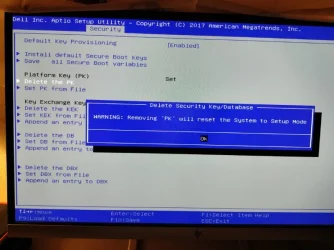
Yeah, it just says 'no set' for me too. I spent the night messing around with the BIOS to figure out where it would show 'setup mode.' I discovered that I had to manually clear the PK. The 'setup mode' warning popped up, so I proceeded that way. I manually loaded the KEK using 'Set the KEK from file,' it was successful, and then I rebooted.

PS C:\WINDOWS\system32> powershell -nop -ep bypass -f C:\temp\Check_UEFI-CA2023.ps1 -Verbose
>>
Windows 11 25H2 (26200.8457)

Secure Boot: OFF
Virtualization Based Security: OFF
BitLocker on (C:) OFF

BIOS Firmware
-------------
Dell Inc. Inspiron 3650
Version: 3.12.1
Date: 2020-12-24

Factory Default UEFI PK Cert
----------------------------
DO NOT SHIP - PK

UEFI PK Cert
------------
Windows OEM Devices PK

Factory Default UEFI KEK Certs
------------------------------
Microsoft Corporation KEK CA 2011

UEFI KEK Certs
--------------
Microsoft Corporation KEK 2K CA 2023

Factory Default UEFI DB Certs
-----------------------------
Microsoft Corporation UEFI CA 2011
Microsoft Windows Production PCA 2011

UEFI DB Certs
-------------
Microsoft Option ROM UEFI CA 2023
Microsoft UEFI CA 2023
Windows UEFI CA 2023

Factory Default UEFI DBX Certs
------------------------------
(NONE)
EFI_CERT_SHA256_GUID Signatures: 13

UEFI DBX Certs
--------------
(NONE)
Windows BootMgr SVN is MISSING.
EFI_CERT_SHA256_GUID Signatures: 0

UEFI Variables
--------------
Credential Guard: ON
SBAT (Linux only): sbat,1,2024010900 / shim,4 / grub,3 / grub.debian,4

EFI Files
---------
Windows Boot Manager [Windows UEFI CA 2023] is ALLOWED.
\\.\HarddiskVolume1\EFI\Microsoft\Boot\bootmgfw.efi
File Version: 28000.326

Registry: "WindowsUEFICA2023Capable" = 2
[Windows UEFI CA 2023] in UEFI DB, and Windows starting from CA 2023 Boot Manager.


REQUIRED ACTION
===============
To REVOKE the [PCA 2011] cert, run the commands:

reg add HKEY_LOCAL_MACHINE\SYSTEM\CurrentControlSet\Control\Secureboot /v AvailableUpdates /t REG_DWORD /d 0x282 /f
powershell Start-ScheduledTask -TaskName "\Microsoft\Windows\PI\Secure-Boot-Update"

PS C:\WINDOWS\system32>
 

Attachments

  • Set up Mode (Custom).webp
    Set up Mode (Custom).webp
    55.7 KB · Views: 1
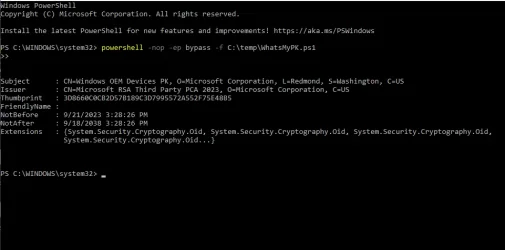
  • WhatsMyPK.ps1.webp
    WhatsMyPK.ps1.webp
    34.6 KB · Views: 1

My Computer My Computer

At a glance

Edition Windows 11 Home Version 25H2 InstalledIntel(R) Core(TM) i7-8700 CPU @ 3.20GHz (3.19...24.0 GB (23.8 GB usable)NVIDIA GeForce GT 1030 (2 GB) Intel(R) UHD Gr...
OS
Edition Windows 11 Home Version 25H2 Installed
Computer type
PC/Desktop
Manufacturer/Model
DELL XPS 8930
CPU
Intel(R) Core(TM) i7-8700 CPU @ 3.20GHz (3.19 GHz)
Motherboard
Dell Inc. 0DF42J (U3E1) %1 Chipset
Memory
24.0 GB (23.8 GB usable)
Graphics Card(s)
NVIDIA GeForce GT 1030 (2 GB) Intel(R) UHD Graphics 630 (128 MB)
Sound Card
Intel Display Audio Realtek Audio, NVIDIA High Definition Audio
Screen Resolution
Current Resolution 1920x1080 pixels Work Resolution 1920x1032 pixels
Hard Drives
Samsung SSD 860 QVO 2TB
ST1000DM003-9YN162
Keyboard
Device Kind Keyboard Device Name HID Keyboard Device Vendor Unknown Location USB Input Device
Mouse
Device Kind Mouse Device Name HID-compliant mouse Vendor Primax Electronics Location USB Input Device
Browser
Firefox
Antivirus
McAfee
is this the issue I found - the Delete All Keys is a single box around the entire set of 4 different cert types. But is doesn't go in each and delete them, it only deletes keys in which ever is the currently selected 1 to 4 cert type. So you need to do 4 steps, to delete all keys
Thank you for informing me about the 4 steps, I will go ahead and do that.
 

My Computer My Computer

At a glance

Edition Windows 11 Home Version 25H2 InstalledIntel(R) Core(TM) i7-8700 CPU @ 3.20GHz (3.19...24.0 GB (23.8 GB usable)NVIDIA GeForce GT 1030 (2 GB) Intel(R) UHD Gr...
OS
Edition Windows 11 Home Version 25H2 Installed
Computer type
PC/Desktop
Manufacturer/Model
DELL XPS 8930
CPU
Intel(R) Core(TM) i7-8700 CPU @ 3.20GHz (3.19 GHz)
Motherboard
Dell Inc. 0DF42J (U3E1) %1 Chipset
Memory
24.0 GB (23.8 GB usable)
Graphics Card(s)
NVIDIA GeForce GT 1030 (2 GB) Intel(R) UHD Graphics 630 (128 MB)
Sound Card
Intel Display Audio Realtek Audio, NVIDIA High Definition Audio
Screen Resolution
Current Resolution 1920x1080 pixels Work Resolution 1920x1032 pixels
Hard Drives
Samsung SSD 860 QVO 2TB
ST1000DM003-9YN162
Keyboard
Device Kind Keyboard Device Name HID Keyboard Device Vendor Unknown Location USB Input Device
Mouse
Device Kind Mouse Device Name HID-compliant mouse Vendor Primax Electronics Location USB Input Device
Browser
Firefox
Antivirus
McAfee
I had some troubles to update at the beginning, at some point I've restored to default certificates values in my motherboard secureboot settings and then there was about 250 less dbx revocations and after running the update and revoke script there is still about 150 less dbx revocations than at the beginning , i have read somewhere on github that's because these older revocations aren't needed anymore because they are blocked already by the pca 2011 revocation, is that right? Can't be this be used to solve the nvram space issue of some people?
 
Last edited:

My Computer My Computer

At a glance

windows 10 22H2 ENT ESUINTEL32NVIDIA
OS
windows 10 22H2 ENT ESU
Computer type
PC/Desktop
CPU
INTEL
Memory
32
Graphics Card(s)
NVIDIA
Hard Drives
NVME
I had some troubles to update at the beginning, at some point I've reset my motherboard to default certificates and there was 151 dbx less revocations from uefi even after running script , i have read somewhere that it's because these older revocations aren't needed anymore because they are blocked already by the pca 2011 revokation, is that right? Can't be this be used to solve the nvram space issue of some people?
Correct. MS removed 154 EFI signatures from the DBXupdate.bin file in the April 2026 Monthly Update. The goal was to save NVRAM space, since the "retired" signatures are all covered by later changes, like having PCA 2011 banned.

151 of the removed signatures belong to older Windows boot files which are signed by PCA 2011. If you eventually banned PCA 2011, then we have an overlap since the same file is banned by both having its specific signature listed and being signed by the banned cert. We only need one method, and using the banned PCA 2011, frees up 151 entries.

3 retired entries belong to Canonical (Ubuntu) boot files. Why they're retired is a little murky to me. The Secure Boot people in Linux know about it, but I can't find the exact explanation why MS cleaned them up as duplicates.

But again, it only helps if you reset your Secure Boot keys or just reset the DBX variable. If you didn't reset DBX, then you don't save any space because the 151 entries have already be written and cannot be cleaned up by normal methods. In the UEFI security model, we prefer to keep appending new entries instead of allowing old entries to be deleted (because we can't track what's been deleted after it's been removed).
 

My Computer My Computer

At a glance

Windows 7
OS
Windows 7
I had some troubles to update at the beginning, at some point I've restored to default certificates values in my motherboard secureboot settings and then there was about 250 less dbx revocations and after running the update and revoke script there is still about 150 less dbx revocations than at the beginning , i have read somewhere on github that's because these older revocations aren't needed anymore because they are blocked already by the pca 2011 revocation, is that right? Can't be this be used to solve the nvram space issue of some people?
I only have the "Windows UEFI CA 2023" certificate in DB and I have 0 revocations in DBX. I only have SVN in DBX :-)
 

My Computer My Computer

At a glance

Windows 11AMD32 GB
OS
Windows 11
Computer type
PC/Desktop
Manufacturer/Model
Gigabyte
CPU
AMD
Motherboard
Gigabyte
Memory
32 GB
UPDATE: 2026-06-24

1. "Update_UEFI-CA2023.ps1 -BootMedia" should not update non-Windows boot media
2. "Check_UEFI-CA2023.ps1 -BootMedia" should recognize boot media with a 3rd-party boot manager
3. June 2026 LCU introduced SVN 9.0, requiring a new minimum UBR for supported releases

The scripts will recognize when a 3rd-party (non-MS) boot file is used by an USB drive. MCT and ADK-based methods will use a Windows boot manager, whereas Rufus and Ventoy use a non-MS file. I doubt that many people were using the update script with Rufus or Ventoy-created drives, but now it will avoid overwriting them since they're using a different boot file by design.
 

My Computer My Computer

At a glance

Windows 7
OS
Windows 7
UPDATE: 2026-06-24

1. "Update_UEFI-CA2023.ps1 -BootMedia" should not update non-Windows boot media
2. "Check_UEFI-CA2023.ps1 -BootMedia" should recognize boot media with a 3rd-party boot manager
3. June 2026 LCU introduced SVN 9.0, requiring a new minimum UBR for supported releases

The scripts will recognize when a 3rd-party (non-MS) boot file is used by an USB drive. MCT and ADK-based methods will use a Windows boot manager, whereas Rufus and Ventoy use a non-MS file. I doubt that many people were using the update script with Rufus or Ventoy-created drives, but now it will avoid overwriting them since they're using a different boot file by design.
I did try updating a Rufus made window 11 usb. using the update script, just to see what happens. Rufus already added the latest CA 2023 bootloader to the main ntfs partition of the usb. The 1 MB FAT rufus-boot partition could not be written to because that partition was write protected.
 

My Computers My Computers

  • At a glance

    Windows 11 Pro 25H2AMD Ryzen 9 7940HS32 GBRadeon 780M Graphics
    OS
    Windows 11 Pro 25H2
    Computer type
    PC/Desktop
    Manufacturer/Model
    Geekom AX7 Pro
    CPU
    AMD Ryzen 9 7940HS
    Memory
    32 GB
    Graphics Card(s)
    Radeon 780M Graphics
    Monitor(s) Displays
    Dell S2425H 24"
    Screen Resolution
    1920 x 1080
    Hard Drives
    2 TB NVMe SSD
    Internet Speed
    100 Mbs
    Browser
    Microsoft Edge / Firefox
    Antivirus
    F-Secure Security Suite
  • At a glance

    Windows 11 Pro 25H212th Gen Intel Core i7-12700 processor (12-Co...16 GBIntel(R) UHD Graphics 770 with shared graphic...
    Operating System
    Windows 11 Pro 25H2
    Computer type
    PC/Desktop
    Manufacturer/Model
    Dell Inspiron 3910
    CPU
    12th Gen Intel Core i7-12700 processor (12-Core, 25M Cache, 2.1GHz to 4.8GHz)
    Motherboard
    Dell 0KHP4K
    Memory
    16 GB
    Graphics card(s)
    Intel(R) UHD Graphics 770 with shared graphics memory
    Monitor(s) Displays
    Dell 27" Monitor S2721DS,
    Screen Resolution
    QHD 2560 x 1440 @ 75 Hz
    Hard Drives
    1TB M.2, PCIe NVMe, SSD
    Internet Speed
    100 Mbps
    Browser
    Edge
    Antivirus
    F-Secure Security Suite
I did try updating a Rufus made window 11 usb. using the update script, just to see what happens. Rufus already added the latest CA 2023 bootloader to the main ntfs partition of the usb. The 1 MB FAT rufus-boot partition could not be written to because that partition was write protected.
The point is for the update script to not interfere when it finds a non-MS boot file.

Windows boot files are written with VersionInfo tags, which don't exist for boot files written for other OS'es. I noticed a few people shared script outputs where the FileVersion was reported as 0.0, and realized I wasn't looking out for 3rd-party boot files.
 

My Computer My Computer

At a glance

Windows 7
OS
Windows 7
@garlin, this is more for your information than it is for mine. I understand you do not have an an example of an InsydeH20 UEFI BIOS to test.

This was my System One below, earlier today...

Code:
Windows 11 25H2 (26200.8655)

Secure Boot: ON
Virtualization Based Security: ON
BitLocker on (C:) OFF

BIOS Firmware
-------------
    Acer Aspire A315-23
    Version: V1.21
    Date: 2022-09-08

Factory Default UEFI PK Cert
----------------------------
    Acer Platform Key

UEFI PK Cert
------------
    Acer Platform Key
        Manual update of [KEK CA 2023] is REQUIRED.

Factory Default UEFI KEK Certs
------------------------------
    Microsoft Corporation KEK CA 2011
    Acer Key Exchange Key

UEFI KEK Certs
--------------
    Microsoft Corporation KEK CA 2011
    Acer Key Exchange Key

Factory Default UEFI DB Certs
-----------------------------
    Microsoft Corporation UEFI CA 2011
    Microsoft Windows Production PCA 2011
    Acer Database
    LINPUS
    linpus.com
    Quanta NB4

UEFI DB Certs
-------------
    Microsoft Corporation UEFI CA 2011
    Microsoft Windows Production PCA 2011
    Microsoft Option ROM UEFI CA 2023
    Microsoft UEFI CA 2023
    Windows UEFI CA 2023
    Acer Database
    LINPUS
    linpus.com
    Quanta NB4

Factory Default UEFI DBX Certs
------------------------------
    Acer Database Forbidden
    EFI_CERT_SHA256_GUID Signatures: 77

UEFI DBX Certs
--------------
    Acer Database Forbidden
    Windows BootMgr SVN is MISSING.
    EFI_CERT_SHA256_GUID Signatures: 495

UEFI Variables
--------------
    Credential Guard: ON
    SBAT (Linux only): sbat,1,2024010900 / shim,4 / grub,3 / grub.debian,4

EFI Files
---------
    Boot File [Windows UEFI CA 2023] is UNTRUSTED
        \\.\HarddiskVolume1\EFI\Microsoft\Boot\bootmgfw.efi
        File Version: 28000.342, SVN 9.0

    Registry: "WindowsUEFICA2023Capable" = 2
        [Windows UEFI CA 2023] in UEFI DB, and Windows starting from CA 2023 Boot Manager.

    [OPTIONAL] SkuSiPolicy.p7b (for VBS) is MISSING.


REQUIRED ACTION
===============

Run the command:
    Update_UEFI-CA2023.ps1 -Revoke

Finish the UEFI steps to manually add the [KEK CA 2023] cert, if the script provided instructions.

PS C:\WINDOWS\system32>

The Secure Boot Mode settings are greyed out until the Supervisor Password is set. The only option is to delete all keys.

1782318826091.webp

This is my System One now, after following all your instructions. I believe that counts as 'a win' - thanks :thumbsup: :D

Code:
Secure Boot: ON
Virtualization Based Security: ON
BitLocker on (C:) OFF

UEFI KEK Certs
--------------
    Microsoft Corporation KEK CA 2011
    Microsoft Corporation KEK 2K CA 2023

UEFI DB Certs
-------------
    Microsoft Corporation UEFI CA 2011
    Microsoft Windows Production PCA 2011
    Microsoft Option ROM UEFI CA 2023
    Microsoft UEFI CA 2023
    Windows UEFI CA 2023

UEFI DBX Certs
--------------
    Microsoft Windows Production PCA 2011
    Windows BootMgr SVN 9.0

EFI Files
---------
    Windows Boot Manager [Windows UEFI CA 2023] is ALLOWED.

    Registry: "WindowsUEFICA2023Capable" = 2
        [Windows UEFI CA 2023] in UEFI DB, and Windows starting from CA 2023 Boot Manager.

    [OPTIONAL] SkuSiPolicy.p7b (for VBS) is MISSING.


STATUS REPORT
-------------
    Registry: "UEFICA2023Status" = Updated

    SUCCESS: UPDATES ARE FINISHED.
    UEFI CA 2023 certs are present, PCA 2011 cert is revoked.

PS C:\WINDOWS\system32>
 

My Computers My Computers

  • At a glance

    Windows 11 HomeAMD Athlon Silver 3050U8GBRadeon Graphics
    OS
    Windows 11 Home
    Computer type
    Laptop
    Manufacturer/Model
    Acer Aspire 3 A315-23-R9VY
    CPU
    AMD Athlon Silver 3050U
    Memory
    8GB
    Graphics Card(s)
    Radeon Graphics
    Monitor(s) Displays
    laptop screen
    Screen Resolution
    1366x768 native resolution, up to 2560x1440 with Radeon Virtual Super Resolution
    Hard Drives
    1TB Samsung EVO 870 SSD (from April 2026: 250GB EVO 850)
    Internet Speed
    150 Mbps
    Browser
    Edge, Firefox
    Antivirus
    Defender
    Other Info
    fully 'Windows 11 ready' laptop. Windows 10 C: partition migrated from my old unsupported 'main machine' then upgraded to 11. A test migration ran Insider builds for 2 months. When 11 was released on 5th October 2021 it was re-imaged back to 10 and was offered the upgrade in Windows Update on 20th October. Windows Update offered the 22H2 Feature Update on 20th September 2022. It got the 23H2 Feature Update on 4th November 2023 through Windows Update, 24H2 on 3rd October 2024 through Windows Update by setting the Target Release Version for 24H2, and 25H2 on 30th September 2025 through Windows Update by setting the Target Release Version for 25H2.

    UPDATE - 11 April 2026: due to mechanical deterioration this PC has been retired from active duty. The OS with all software and files has been migrated to my System Seven in 'Other systems' to carry on as my general purpose 'main machine'.
  • At a glance

    Windows 11 ProIntel® Core™ i5-520M8GB(integrated graphics) Intel HD Graphics
    Operating System
    Windows 11 Pro
    Computer type
    Laptop
    Manufacturer/Model
    Dell Latitude E4310
    CPU
    Intel® Core™ i5-520M
    Motherboard
    0T6M8G
    Memory
    8GB
    Graphics card(s)
    (integrated graphics) Intel HD Graphics
    Screen Resolution
    1366x768
    Hard Drives
    500GB Crucial MX500 SSD
    Browser
    Firefox, Edge
    Antivirus
    Defender
    Other Info
    unsupported machine: Legacy bios, MBR, TPM 1.2, upgraded from W10 to W11 using W10/W11 hybrid install media workaround.

    In-place upgrade to 22H2 using ISO and a workaround.
    Feature Update to 23H2 by manually installing the Enablement Package.
    In-place upgrade to 24H2 using hybrid 23H2/24H2 install media.
    Upgraded to 25H2 by Enablement Package.

    Also running Insider Dev, and Canary builds and Windows 10 as native boot .vhdx.
  • My SYSTEM THREE is a Dell Latitude 5410, i7-10610U, 32GB RAM, 512GB NVMe ssd, supported device running Windows 11 Pro.

    My SYSTEM FOUR is a 2-in-1 convertible Lenovo Yoga 11e 20DA, Celeron N2930, 8GB RAM, 256GB ssd. Unsupported device: currently running Win10 Pro, plus Win11 Pro RTM and Insider Dev, Beta, and RP 24H2 as native boot vhdx.

    My SYSTEM FIVE is a Dell Latitude 3190 2-in-1, Pentium Silver N5030, 8GB RAM, 1TB NVMe ssd, supported device running Windows 11 Pro, plus Insider Beta, Dev, and Canary builds (and a few others) as a native boot .vhdx.

    My SYSTEM SIX is a Dell Latitude 5550, Core Ultra 7 165H, 64GB RAM, 1TB NVMe SSD, supported device, Windows 11 Pro 24H2, Hyper-V host machine. Updated to 25H2 on 30th September 2025.

    My SYSTEM SEVEN is a Lenovo Thinkpad T580, Intel Core i7-8650U, 16GB RAM, 512GB NVMe SSD + 2nd 512GB NVMe SSD, a supported device for Windows 11. This is my current general purpose 'main machine'. The installed Windows 11 Home from my System One has been migrated to this machine.
I am a sucker for punishment. So far have revoked CA 2011 and have dealt with the fallout (actually positive activity that uncovered some issues). Now what about deleting/revoking the old KEK, DB, and DBX certs
Microsoft Corporation KEK CA 2011
Microsoft Corporation UEFI CA 2011
Microsoft Windows Production PCA 2011

Will MS remove them later this year, and can they be removed now? Implications?
 

My Computer My Computer

At a glance

Windows 11 ProIntel Core Ultra16GBIntel(R) Arc Graphics
OS
Windows 11 Pro
Computer type
Laptop
Manufacturer/Model
ASUS Zenbook 14 OLED
CPU
Intel Core Ultra
Memory
16GB
Graphics Card(s)
Intel(R) Arc Graphics
Sound Card
Realtek High Definition Audio(SST)
Screen Resolution
2880 x 1800
Hard Drives
500 GB NVMe SSD
Internet Speed
1,500Mbps
Browser
Firefox, Edge
Antivirus
Windows Defender
I am a sucker for punishment. So far have revoked CA 2011 and have dealt with the fallout (actually positive activity that uncovered some issues). Now what about deleting/revoking the old KEK, DB, and DBX certs
Microsoft Corporation KEK CA 2011
Microsoft Corporation UEFI CA 2011
Microsoft Windows Production PCA 2011

Will MS remove them later this year, and can they be removed now? Implications?
In the UEFI security model, you don't go backwards and delete expired certs from the NVRAM.

You leave them alone as proof of what happened to the system, and append changes to the DBX, since the boot file is only signed by a DB cert. It's a compliance strategy that was agreed upon by the UEFI standards group.

The boot file is never signed by the KEK. It delegates trust authority to UEFI CA 2011 & PCA 2011. You can ban the delegated DB certs, but you don't ban the parent KEK above them. The KEK cert was never compromised, so there's no need to ban it.

MS wants you to add PCA 2011 to DBX (banning it) because it controls which Windows boot files are allowed to boot.

In theory, MS cannot make the decision on the user's behalf to ban UEFI CA 2011 since older Linux distros may use it. Linux isn't MS's problem, so it's not going to issue a blanket directive to ban UEFI CA 2011. That could still upset affected PC owners.

Suppose one day in the future, we have another Black Lotus-level disaster and we have to repeat the fire drill... What would happen is we add the Windows UEFI CA 2023 to DBX (banning it, and all existing boot files signed by it), and MS issues a new DB cert which signs a new boot manager.

There is a strategy to how keys are supposed to be managed. It might not make sense to you, but it's how the UEFI industry wanted it done. In the security world, it's better (for auditing purposes) to strictly follow the published model, rather than trying to carefully figure out if every [XYZ] permutation complies with the exact rules or not.
 

My Computer My Computer

At a glance

Windows 7
OS
Windows 7
I only have the "Windows UEFI CA 2023" certificate in DB and I have 0 revocations in DBX. I only have SVN in DBX :-)
Let's take your cheeky example to better explain for everyone how Secure Boot really works.

The minimum set of certs required to have CA 2023 to boot in Secure Mode are:
- Platform Key (PK)
- KEK CA 2023, properly signed by the PK or manually added from the BIOS screens​
- Windows UEFI CA 2023 in the DB, but also not added to the DBX (which would ban it)​
- Current boot manager in the EFI volume (or an USB boot device) signed with CA 2023, and has a SVN equal or higher than the DBX's SVN​

When a boot file wants to load in Secure Boot mode, the UEFI checks its signing cert and works backwards.

Boot manager is signed by Windows UEFI CA 2023. Which must be found in DB. For Windows UEFI CA 2023 to be validated, its KEK (CA 2023) must also be found. KEK CA 2023 must be signed or trusted by the PK.

By having only Windows UEFI CA 2023, your UEFI will only allow MS-signed CA 2023 boot files to work. Since you're missing both Production PCA 2011 and UEFI CA 2011, both CA 2011 boot files and older Linux distros can't be booted. Which is fine if you want it that way, or have a security rule that you don't want to make it possible to boot those OS'es.

For example, I don't want someone walking up to a PC and rebooting a live Linux USB drive to hack into my Windows system. So I enable Secure Boot mode and don't add Microsoft UEFI CA 2011 or Microsoft UEFI CA 2023 certs. (Along with setting a BIOS password.)

You can mix & match other DB certs, depending on what your needs are.

Now, will Windows work with this specific setup? Yes.

Will Windows be annoyed? Yes. The Secure Boot task will be throwing TPM-WMI errors (actually warnings but everything is classified as an "error"), simply because it's programmed to expect to see more certs. It's not so smart. You can ignore those events, but some users get afraid when they see Event Log errors...

Windows Security Center will not give you a good score under the Secure Boot tab. Again, it's looking for a specific set of certs.

If you know what you're doing, this setup works fine. But parts of Windows are designed to keep nagging you that it's "wrong". The major reason why I encourage most users to install the complete set of certs is because they get scared by the Windows notifications that something is amiss.
 

My Computer My Computer

At a glance

Windows 7
OS
Windows 7
Back
Top Bottom