Solved garlin's PowerShell scripts for updating Secure Boot CA 2023


Why is it that after every Windows Update I get this SBAT 1796 Event Error even though I am good to go according to the script?
 

My Computer My Computer

At a glance

Windows 11 Pro 25H2Gen 11 Core i516GB
OS
Windows 11 Pro 25H2
Computer type
Laptop
Manufacturer/Model
HP
CPU
Gen 11 Core i5
Memory
16GB
Why is it that after every Windows Update I get this SBAT 1796 Event Error even though I am good to go according to the script?
It's been reported that HP's BIOS doesn't like having the SBAT written to, unlike other vendors' BIOS. The Secure Boot task can't write the SBAT unless Secure Boot mode is enabled. Other than that, I think it's a HP bug that's annoying but doesn't impact your Secure Boot functionality.
 

My Computer My Computer

At a glance

Windows 7
OS
Windows 7
Yeh, just ignore it, doesn't even prevent linux USBs from booting, I've tested on my HP myself.
 

My Computers My Computers

  • At a glance

    Windows 11 Pro 25H2AMD Ryzen 5 5600G @ 3.9/4.4Ghz2 x 16 GB DDR4 Kingston Fury Beast 3200 MhzAMD Radeon RX 6600 XT MSI Mech 2X OC Edition ...
    OS
    Windows 11 Pro 25H2
    Computer type
    PC/Desktop
    Manufacturer/Model
    Built PC
    CPU
    AMD Ryzen 5 5600G @ 3.9/4.4Ghz
    Motherboard
    MSI B550M-PRO-WiFi Ver. 1.4
    Memory
    2 x 16 GB DDR4 Kingston Fury Beast 3200 Mhz
    Graphics Card(s)
    AMD Radeon RX 6600 XT MSI Mech 2X OC Edition 8 GB
    Sound Card
    Realtek High Definition Audio (Integrated)
    Monitor(s) Displays
    Samsung C50Rx 27" LED / HP S2031 20" LCD
    Screen Resolution
    1920 x 1080 px / 1600 x 900 px
    Hard Drives
    WD Blue SN570 NVME M.2 SSD [1 TB] -- External Drives: - WD Scorpion Blue 250 GB 5400 RPM (Data Backup) - Hitachi 500 GB 5400 RPM (Software / ISOs Backup) - Toshiba MQ01ABD100 1 TB 5400 RPM (OS Images) - HGST TravelStar 7K1000 1 TB, 7200 RPM USB 3.0 - ADATA SU800 2TB SSD USB 3.0
    PSU
    Corsair RM750e 750W Fully Modular
    Case
    Naceb Hydra NA-1602
    Cooling
    Naceb Orpheus x 3 (Front) + Naceb Cepheus 1200 RPM Max (Rear) + ThemalRight Assasin X 90 SE (CPU)
    Keyboard
    Logitech MK470 Wireless
    Mouse
    Logitech MK470 Wireless
    Internet Speed
    120 MB Symetrical
    Browser
    Firefox / Brave / Edge
    Antivirus
    Windows Defender
    Other Info
    - VMs: WMware Player - Windows 8.1 Pro x64 / Windows 11 Pro
    - Wacom Intuos Pro Small Tablet PTH-460
  • At a glance

    Windows 11 Pro 25H2AMD Ryzen 7 7730U @ 2.0/4.5 Ghz2 x 16 GB Kingston Fury Impact DDR4 3200 MhzRadeon (tm) Graphics Vega 8 (512 MB)
    Operating System
    Windows 11 Pro 25H2
    Computer type
    Laptop
    Manufacturer/Model
    HP Pavilion 15-eh3000la (80M53LA)
    CPU
    AMD Ryzen 7 7730U @ 2.0/4.5 Ghz
    Motherboard
    HP 8BC7
    Memory
    2 x 16 GB Kingston Fury Impact DDR4 3200 Mhz
    Graphics card(s)
    Radeon (tm) Graphics Vega 8 (512 MB)
    Sound Card
    Realtek High Definition Audio (Integrated)
    Monitor(s) Displays
    AU Optronics
    Screen Resolution
    1920 x 1080 px (125% size)
    Hard Drives
    WD Blue SN570 1TB NVME M.2 Drive
    PSU
    45 Watt Charger
    Cooling
    Laptop Cooling Pad
    Keyboard
    Free Wolf Foldable Portable Keyboard
    Mouse
    Free Wolf Wireless Mouse
    Internet Speed
    120 MB Symetrical
    Browser
    Firefox / Brave / Edge
    Antivirus
    Windows Defender
    Other Info
    - 41mWh battery.
    - Wacom Intuos Pro Small Tablet PTH-460
Latest Linux Mint USB booted in weekend normally.
 

My Computer My Computer

At a glance

Windows 11 Pro 64bit (release preview channel)i5 840016 GB DDR4RTX 3060 Ti
OS
Windows 11 Pro 64bit (release preview channel)
Computer type
PC/Desktop
Manufacturer/Model
Asus
CPU
i5 8400
Motherboard
ROG STRIX Z370-H GAMING
Memory
16 GB DDR4
Graphics Card(s)
RTX 3060 Ti
Sound Card
On Board
Monitor(s) Displays
Acer VG242Y P
Screen Resolution
1080p
Hard Drives
Intel 660p SSD
PSU
800w
Internet Speed
1000 Mbps
hello from Spain,
looking for advice about updating the MS certs in my "old" ASUS from 2016--------
here is the result of the Check_UEFI-CA2023.psi -Verbose script:

Windows 10 21H2 (19044.7417)

Secure Boot: ON
Virtualization Based Security: OFF
BitLocker on (C:) OFF

BIOS Firmware
-------------
ASUSTeK COMPUTER INC. M32CD_A_F_K20CD_K31CD
Version: 1102
Date: 2018-04-12

Factory Default UEFI PK Cert
----------------------------
ASUSTeK MotherBoard PK Certificate

UEFI PK Cert
------------
ASUSTeK MotherBoard PK Certificate
[KEK CA 2023] Update is available from ASUS or Microsoft.

Factory Default UEFI KEK Certs
------------------------------
Microsoft Corporation KEK CA 2011
Canonical Ltd. Master Certificate Authority
ASUSTeK MotherBoard KEK Certificate

UEFI KEK Certs
--------------
Microsoft Corporation KEK CA 2011
Canonical Ltd. Master Certificate Authority
ASUSTeK MotherBoard KEK Certificate

Factory Default UEFI DB Certs
-----------------------------
Microsoft Corporation UEFI CA 2011
Microsoft Windows Production PCA 2011
Canonical Ltd. Master Certificate Authority
ASUSTeK MotherBoard SW Key Certificate
ASUSTeK Notebook SW Key Certificate

UEFI DB Certs
-------------
Microsoft Corporation UEFI CA 2011
Microsoft Windows Production PCA 2011
Microsoft Option ROM UEFI CA 2023
Microsoft UEFI CA 2023
Windows UEFI CA 2023
Canonical Ltd. Master Certificate Authority
ASUSTeK MotherBoard SW Key Certificate
ASUSTeK Notebook SW Key Certificate

Factory Default UEFI DBX Certs
------------------------------
(NONE)
EFI_CERT_SHA256_GUID Signatures: 77

UEFI DBX Certs
--------------
(NONE)
Windows BootMgr SVN is MISSING.
EFI_CERT_SHA256_GUID Signatures: 339

UEFI Variables
--------------
SBAT (Linux only): sbat,1,2024010900 / shim,4 / grub,3 / grub.debian,4

EFI Files
---------
Boot File [Windows UEFI CA 2023] is UNTRUSTED
\\.\HarddiskVolume6\EFI\Microsoft\Boot\bootmgfw.efi
File Version: 28000.342, SVN 9.0

Registry: "WindowsUEFICA2023Capable" = 2
[Windows UEFI CA 2023] in UEFI DB, and Windows starting from CA 2023 Boot Manager.


REQUIRED ACTION
===============

Run the command:
Update_UEFI-CA2023.ps1 -Revoke

Finish the UEFI steps to manually add the [KEK CA 2023] cert, if the script provided instructions.

-i am constantly receiving TPM-WMI 1795 errors; it keeps trying to apply the KEK 2023 but refuses it due to "firmware unknown"
-the desktop works just fine, very fine indeed after i installed the Windows 10 Enterprise IoT LTSC and a new SSD hard disk; for my needs is more than enough...
-any advice would be much appreciated,
fernando
 

My Computer My Computer

At a glance

windows 10 Enterprise IoT LTSCIntel(R) Core(TM) i5-6400 CPU @ 2.70GHz16GBNVIDIA GeForce GT 720 2GB
OS
windows 10 Enterprise IoT LTSC
Computer type
PC/Desktop
Manufacturer/Model
ASUS/ K31CD
CPU
Intel(R) Core(TM) i5-6400 CPU @ 2.70GHz
Memory
16GB
Graphics Card(s)
NVIDIA GeForce GT 720 2GB
Other Info
BIOS: American Megatrends Inc.
v. 1102 (12-2018)
UEFI KEK Certs
--------------
Microsoft Corporation KEK CA 2011
Canonical Ltd. Master Certificate Authority
ASUSTeK MotherBoard KEK Certificate
The last BIOS update was 2018, it's an unsupported PC because it's too old.

-i am constantly receiving TPM-WMI 1795 errors; it keeps trying to apply the KEK 2023 but refuses it due to "firmware unknown"
-the desktop works just fine, very fine indeed after i installed the Windows 10 Enterprise IoT LTSC and a new SSD hard disk; for my needs is more than enough...
-any advice would be much appreciated,
1. Check the Secure Boot menus in the BIOS setup. Do you have an option to switch from Standard to User (or Custom) mode?
2. Do you have the option for manual Secure Boot key enrollment?
3. If not, do you have the option to Delete All Keys?

The first step would be to manually add the missing KEK CA 2023 key if you have a menu option for manual KEK key enrollment. On some BIOS'es, you may have to create an Admin password before unlocking the advanced Secure Boot menus.

Please report what options do you see in your BIOS setup menus.
 

My Computer My Computer

At a glance

Windows 7
OS
Windows 7
The last BIOS update was 2018, it's an unsupported PC because it's too old.


1. Check the Secure Boot menus in the BIOS setup. Do you have an option to switch from Standard to User (or Custom) mode?
2. Do you have the option for manual Secure Boot key enrollment?
3. If not, do you have the option to Delete All Keys?

The first step would be to manually add the missing KEK CA 2023 key if you have a menu option for manual KEK key enrollment. On some BIOS'es, you may have to create an Admin password before unlocking the advanced Secure Boot menus.

Please report what options do you see in your BIOS setup menus.
**********
-if for user mode, you mean deleting all secureboot keys, i´m pretty sure i can make it
-i have tried, through a USB flash drive and the ASUS EZ Flash facility, to "insert" into the BIOS the microsoft corporation kek 2k ca 2023.crt and it resulted in a little disaster (see photo); i reset the CMOS battery and reinstalled the last BIOS version and, happily, everything went back to normal
-so, should i try the Update_UEFI-CA2023.ps1 script previous deleting of the secureboot keys and after, if indicated, try to manually add the KEK CA 2023?
i hope you understand what i mean; i am not an skilled "software" man...,
fernando
 

Attachments

  • DSC_1078.webp
    DSC_1078.webp
    1.2 MB · Views: 1

My Computer My Computer

At a glance

windows 10 Enterprise IoT LTSCIntel(R) Core(TM) i5-6400 CPU @ 2.70GHz16GBNVIDIA GeForce GT 720 2GB
OS
windows 10 Enterprise IoT LTSC
Computer type
PC/Desktop
Manufacturer/Model
ASUS/ K31CD
CPU
Intel(R) Core(TM) i5-6400 CPU @ 2.70GHz
Memory
16GB
Graphics Card(s)
NVIDIA GeForce GT 720 2GB
Other Info
BIOS: American Megatrends Inc.
v. 1102 (12-2018)
The cert file isn't a BIOS firmware image, you cannot use it with the ASUS flash tool.

1. Disable Secure Boot.
2. Delete all keys.
3. Restart Windows. Run the update script, it should recognize you are in Setup Mode (no certs).
4. Run the check script again. You should see KEK CA 2023 listed.
5. Re-enable Secure Boot.
 

My Computer My Computer

At a glance

Windows 7
OS
Windows 7

ok, garlin, i will try as you advise and report the results
thank you very much for your help,
fernando
 

My Computer My Computer

At a glance

windows 10 Enterprise IoT LTSCIntel(R) Core(TM) i5-6400 CPU @ 2.70GHz16GBNVIDIA GeForce GT 720 2GB
OS
windows 10 Enterprise IoT LTSC
Computer type
PC/Desktop
Manufacturer/Model
ASUS/ K31CD
CPU
Intel(R) Core(TM) i5-6400 CPU @ 2.70GHz
Memory
16GB
Graphics Card(s)
NVIDIA GeForce GT 720 2GB
Other Info
BIOS: American Megatrends Inc.
v. 1102 (12-2018)
1. Keep the BIOS in Custom mode.
2. Delete All Keys.
3. Restart Windows. Run the update script without the -Revoke option (just to simplify it). It should recognize the UEFI is in Setup Mode (no certs).
4. Run the check script, assuming you see a KEK CA 2023 listed; then you can re-run the update script with a revoke.
I came here to thank you for your infinite patience :-)with us users who aren't tech-savvy when it comes to updating the 2023 certificates through the BIOS. Thanks, man.

 

Attachments

  • Many Thanks.webp
    Many Thanks.webp
    5.2 KB · Views: 1

My Computer My Computer

At a glance

Edition Windows 11 Home Version 25H2 InstalledIntel(R) Core(TM) i7-8700 CPU @ 3.20GHz (3.19...24.0 GB (23.8 GB usable)NVIDIA GeForce GT 1030 (2 GB) Intel(R) UHD Gr...
OS
Edition Windows 11 Home Version 25H2 Installed
Computer type
PC/Desktop
Manufacturer/Model
DELL XPS 8930
CPU
Intel(R) Core(TM) i7-8700 CPU @ 3.20GHz (3.19 GHz)
Motherboard
Dell Inc. 0DF42J (U3E1) %1 Chipset
Memory
24.0 GB (23.8 GB usable)
Graphics Card(s)
NVIDIA GeForce GT 1030 (2 GB) Intel(R) UHD Graphics 630 (128 MB)
Sound Card
Intel Display Audio Realtek Audio, NVIDIA High Definition Audio
Screen Resolution
Current Resolution 1920x1080 pixels Work Resolution 1920x1032 pixels
Hard Drives
Samsung SSD 860 QVO 2TB
ST1000DM003-9YN162
Keyboard
Device Kind Keyboard Device Name HID Keyboard Device Vendor Unknown Location USB Input Device
Mouse
Device Kind Mouse Device Name HID-compliant mouse Vendor Primax Electronics Location USB Input Device
Browser
Firefox
Antivirus
McAfee
Id like to thank Garlin for maintaining this nifty little tool.

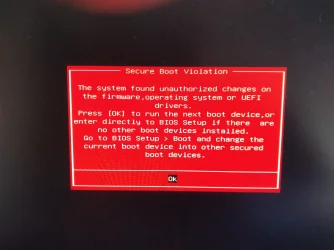
Im having a little issue now, I have updated the certs and verified that they are updated and also updated my usb windows 11 25h2 install drive. Trying to reinstall windows im hitting a problem where it goes through the initial install phase where you select language, version and drive and after it copies the files on reboot im getting a secure boot validation error where its saying minimum expected version is 9.0 and 7.0 is detected. The shouldn't be the expected behaviour since the certs are all updated. Or am I missing something? Have I missed a step?

Short of disabling secure boot, is there a proper fix for this? Im assuming id have to disable secure boot, install windows fresh, run the script again, then re-enable secure boot... is there a way that I can install windows fresh without all that and maintaining secure boot enabled through this process?

I appreciate your insights
 
Last edited:

My Computer My Computer

At a glance

Windows 11
OS
Windows 11
Computer type
PC/Desktop
Id like to thank Garlin for maintaining this nifty little tool.
Thanks.

Im having a little issue now, I have updated the certs and verified thag they are updated and also updated my usb windows 11 install drivem. Trying to reinstall windows im hitting a problem where it goes through the initial install phase and on reboot im getting a secure boot validation error where its saying minimum expected version is 9.0 and 7.0 is detected. Short of disabling secure boot, is there a proper fix for this? Im assuming id have to disable secure boot, install windows fresh, run the script again, then re-enable secure boot... is there a way that I can install windows fresh without all that and maintaining secure boot enabled?
Whenever the Windows boot manager is patched for a security hole, it's replaced by a newer file version and the DBX SVN is bumped at the same time. This security feature guarantees that you cannot go back, and use an older version of the boot manager (which has a known security issue).

The simple fix is to update the USB boot drive's boot manager with a later version that matches the current SVN. You can run the update script with the bootable USB drive plugged in:
Code:
Update-UEFI.bat -BootMedia

The last few instances of when the SVN was changed:
- Oct 2025 (SVN 7.0)​
- April 2026 (SVN 8.0)​
- June 2026 (SVN 9.0)​

To check if your USB media is out of date:
Code:
Check-UEFI.bat -BootMedia

Just remember: there is no fixed schedule for when the boot manager gets updated. It gets replaced whenever a new security bug is reported. So you have to get used to periodically updating the boot file on all of your USB media (Windows ISO or recovery USB). This is the new "normal" so you're better protected from new low-level threats.
 

My Computer My Computer

At a glance

Windows 7
OS
Windows 7
  • Great Support
Reactions: x_1
The simple fix is to update the USB boot drive's boot manager with a later version that matches the current SVN. You can run the update script with the bootable USB drive plugged in:
Code:
Update-UEFI.bat -BootMedia

The last few instances of when the SVN was changed:
- Oct 2025 (SVN 7.0)​
- April 2026 (SVN 8.0)​
- June 2026 (SVN 9.0)​

To check if your USB media is out of date:
Code:
Check-UEFI.bat -BootMedia

Just remember: there is no fixed schedule for when the boot manager gets updated. It gets replaced whenever a new security bug is reported. So you have to get used to periodically updating the boot file on all of your USB media (Windows ISO or recovery USB). This is the new "normal" so you're better protected from new low-level threats.

Hi,

Thanks for the quick reply. DEfinitely good to know that information, if its the new norm, we will deal with it I guess...

I ran those scripts on my other pc with my windows USB install drive. This is what came up.

Code:
Bootable Media
--------------
    USB Drive G: "CCCOMA_X64FRE_EN-GB_DV9"
        Boot File [Windows UEFI CA 2023] is ALLOWED.

        boot.wim:2    Boot Manager [Windows UEFI CA 2023] is PRESENT.
        install.wim:1 Boot Manager [Windows UEFI CA 2023] is PRESENT.
            Skipping checks on next 10 install.wim images.

    USB Drive H: "RUFUS_BOOT"
        Boot File [Microsoft Corporation UEFI CA 2011] is ALLOWED.


REQUIRED ACTION
===============
To REVOKE the [PCA 2011] cert, run the commands:

    manage-bde -Protectors -Disable C: -RebootCount 1
    reg add HKEY_LOCAL_MACHINE\SYSTEM\CurrentControlSet\Control\Secureboot /v AvailableUpdates /t REG_DWORD /d 0x280 /f
    powershell Start-ScheduledTask -TaskName "\Microsoft\Windows\PI\Secure-Boot-Update"

PS C:\zy> .\Update-UEFI.bat -BootMedia
Windows PowerShell
Copyright (C) Microsoft Corporation. All rights reserved.

Install the latest PowerShell for new features and improvements! https://aka.ms/PSWindows

Skipping Third-Party boot media on USB Drive H: "RUFUS_BOOT"
SUCCESS: NO UPDATES ARE REQUIRED.

Just to try and clarify whats happening. I can enable secure boot, and boot to the usb windows installer, after I chose all configuration options and allow the file copy to my SSD to happen, its on the reboot where everything goes south and I get the version error. Is this something to do with the bootable drive, or an issue with the system based on what I copied and pasted above?

Thanks again for your help
 

My Computer My Computer

At a glance

Windows 11
OS
Windows 11
Computer type
PC/Desktop
In this case, both Rufus and Ventoy choose to use their own boot files, and recreating the USB drive again with the use CA 2023 option should replace the older file.

Unlike Media Creation Tool or the Windows ADK process, Rufus and Ventoy do chain booting, they first boot into their own loader, which mounts the ISO volume and calls the normal Windows boot manager in sequence.

I recent changed the update script to skip drives using a non-MS boot file, because I din’t want to incorrectly guess what type of USB tool created the drive.
 

My Computer My Computer

At a glance

Windows 7
OS
Windows 7
In this case, both Rufus and Ventoy choose to use their own boot files, and recreating the USB drive again with the use CA 2023 option should replace the older file.

Unlike Media Creation Tool or the Windows ADK process, Rufus and Ventoy do chain booting, they first boot into their own loader, which mounts the ISO volume and calls the normal Windows boot manager in sequence.

I recent changed the update script to skip drives using a non-MS boot file, because I din’t want to incorrectly guess what type of USB tool created the drive.
Interesting, that might be the problem...

I am using the CA 2023 option in rufus, I can try it again to confirm. I have the following checked off as user experience options in rufus

- Remove 4 gb+ ram, secure boot and tpm 2.0
- Remove requirement for online microsoft account
- Create local account with user name _____
- disable data collection
- QoL improvements
-Use windows ca 2023 signed bootloaders

I use rufus because I need the tpm bypass for this system as its a gigabyte ga-x99-ud5 with i7-6900k.

Is there a way around this?
 

My Computer My Computer

At a glance

Windows 11
OS
Windows 11
Computer type
PC/Desktop
It's been reported that HP's BIOS doesn't like having the SBAT written to, unlike other vendors' BIOS. The Secure Boot task can't write the SBAT unless Secure Boot mode is enabled. Other than that, I think it's a HP bug that's annoying but doesn't impact your Secure Boot functionality.
my mum's HP machine got a new bios offered late Jan 2026 - actual date was 19/Dec/2025 and they just released another claiming they released it in April (but they didn't) its now on F.52 Rev A 29/Apr/2026
 

My Computer My Computer

At a glance

Win11
OS
Win11
Interesting, that might be the problem...

I am using the CA 2023 option in rufus, I can try it again to confirm. I have the following checked off as user experience options in rufus

- Remove 4 gb+ ram, secure boot and tpm 2.0
- Remove requirement for online microsoft account
- Create local account with user name _____
- disable data collection
- QoL improvements
-Use windows ca 2023 signed bootloaders

I use rufus because I need the tpm bypass for this system as its a gigabyte ga-x99-ud5 with i7-6900k.

Is there a way around this?
Bypass

When selecting languages: Shift + F10 = CMD
regedit
HKLM\SYSTEM\Setup\
New key LabConfig
In the LabConfig key, new DWORD values:
BypassCPUCheck 1
BypassRAMCheck 1
BypassTPMCheck 1
BypassSecureBootCheck 1
BypassStorageCheck 1
BypassDiskCheck 1

Local account

HideOnlineAccountScreens method
in OOBE when selecting language SHIFT + F10 (cmd) and:
reg add HKLM\SOFTWARE\Microsoft\Windows\CurrentVersion\OOBE /v HideOnlineAccountScreens /t REG_DWORD /d 1 /f
If the device is without internet then:
reg add HKLM\SOFTWARE\Microsoft\Windows\CurrentVersion\OOBE /v HideWirelessSetupInOOBE /t REG_DWORD /d 1 /f

BypassNRO method
when the internet is disconnected and when selecting language in OOBE (or if it is impossible to continue) SHIFT + F10 (cmd) and:
OOBE\BypassNRO
or
reg add HKLM\SOFTWARE\Microsoft\Windows\CurrentVersion\OOBE /v BypassNRO /t REG_DWORD /d 1 /f
shutdown /r /t 0
 
Last edited:

My Computer My Computer

At a glance

Windows 11AMD32 GB
OS
Windows 11
Computer type
PC/Desktop
Manufacturer/Model
Gigabyte
CPU
AMD
Motherboard
Gigabyte
Memory
32 GB
Bypass

When selecting languages: Shift + F10 = CMD
regedit
HKLM\SYSTEM\Setup\
New key LabConfig
In the LabConfig key, new DWORD values:
BypassCPUCheck 1
BypassRAMCheck 1
BypassTPMCheck 1
BypassSecureBootCheck 1
BypassStorageCheck 1
BypassDiskCheck 1

You can bypass the Windows 11 system requirements check during a clean installation as follows.

Create a .reg file with the following content:

Code:
Windows Registry Editor Version 5.00

[HKEY_LOCAL_MACHINE\SYSTEM\Setup\LabConfig]
"BypassTPMCheck"=dword:00000001
"BypassSecureBootCheck"=dword:00000001
"BypassRAMCheck"=dword:00000001

- Copy this file to your Windows 11 installation USB flash drive.
- Boot from a Windows 11 installation USB flash drive.
- When you reach the "Select setup option" screen, press Shift + F10 to open Command Prompt. On some laptops, you may need to press Shift + Fn + F10.
- Type regedit and press Enter to open the Registry Editor.
- In Registry Editor, click File > Import, locate your .reg file on the USB flash drive, and select it.
- Close the Registry Editor and the Command Prompt.

Local account

HideOnlineAccountScreens method
in OOBE when selecting language SHIFT + F10 (cmd) and:
reg add HKLM\SOFTWARE\Microsoft\Windows\CurrentVersion\OOBE /v HideOnlineAccountScreens /t REG_DWORD /d 1 /f
If the device is without internet then:
reg add HKLM\SOFTWARE\Microsoft\Windows\CurrentVersion\OOBE /v HideWirelessSetupInOOBE /t REG_DWORD /d 1 /f

BypassNRO method
when the internet is disconnected and when selecting language in OOBE (or if it is impossible to continue) SHIFT + F10 (cmd) and:
OOBE\BypassNRO
or
reg add HKLM\SOFTWARE\Microsoft\Windows\CurrentVersion\OOBE /v BypassNRO /t REG_DWORD /d 1 /f
shutdown /r /t 0

If you want to set up a local account, run the start ms-cxh:localonly command on the "Want to add a second keyboard layout?" screen. It works regardless of whether you're connected to the internet.


My Computers My Computers

  • At a glance

    Windows 11 ProAMD Ryzen 9 9950X3DKingston FURY Beast 64GB (2x32GB) DDR5 6000MT/sASUS TUF Gaming Radeon RX 9070 OC Edition 16G...
    OS
    Windows 11 Pro
    Computer type
    PC/Desktop
    CPU
    AMD Ryzen 9 9950X3D
    Motherboard
    ASRock B650E Taichi Lite
    Memory
    Kingston FURY Beast 64GB (2x32GB) DDR5 6000MT/s
    Graphics Card(s)
    ASUS TUF Gaming Radeon RX 9070 OC Edition 16GB GDDR6
    Hard Drives
    Solidigm P44 Pro 2TB M.2 NVMe SSD
  • At a glance

    Windows 11 HomeIntel Core Ultra 9 275HX64GB (2x 32GB) DDR5-6400NVIDIA GeForce RTX 5080 16GB GDDR7 Laptop GPU
    Operating System
    Windows 11 Home
    Computer type
    Laptop
    Manufacturer/Model
    Lenovo Legion Pro 7i Gen 10 16"
    CPU
    Intel Core Ultra 9 275HX
    Memory
    64GB (2x 32GB) DDR5-6400
    Graphics card(s)
    NVIDIA GeForce RTX 5080 16GB GDDR7 Laptop GPU
    Hard Drives
    2x 1TB M.2 NVMe SSD (SK Hynix)
To check if your USB media is out of date:
Code:
Check-UEFI.bat -BootMedia

Just remember: there is no fixed schedule for when the boot manager gets updated. It gets replaced whenever a new security bug is reported. So you have to get used to periodically updating the boot file on all of your USB media (Windows ISO or recovery USB). This is the new "normal" so you're better protected from new low-level threats.
Thanks for the reminder, my Acronis and Windows Recovery disk were indeed out of date!
 

My Computers My Computers

  • At a glance

    Win 11 Pro 25H2, Build 26200.8737Intel Core i5 1450064GB DDR4GeForce RTX 4060
    OS
    Win 11 Pro 25H2, Build 26200.8737
    Computer type
    PC/Desktop
    Manufacturer/Model
    Home Brew
    CPU
    Intel Core i5 14500
    Motherboard
    Gigabyte B760M G P WIFI
    Memory
    64GB DDR4
    Graphics Card(s)
    GeForce RTX 4060
    Sound Card
    Chipset Realtek
    Monitor(s) Displays
    LG 45" Ultragear, Acer 24" 1080p
    Screen Resolution
    5120x1440, 1920x1080
    Hard Drives
    Crucial P310 2TB 2280 PCIe Gen4 3D NAND NVMe M.2 SSD (O/S)
    Silicon Power 2TB US75 NVMe PCIe Gen4 M.2 2280 SSD (backup)
    Crucial BX500 2TB 3D NAND (2nd backup)
    Seagate 4TB Ironwolf, rotating HDD archive files
    External off-line backup Drives: 2 NVMe 4TB drives in external enclosures
    PSU
    Thermaltake Toughpower GF3 750W
    Case
    LIAN LI LANCOOL 216 E-ATX PC Case
    Cooling
    Lots of fans!
    Keyboard
    Microsoft Comfort Curve 2000
    Mouse
    Logitech G305
    Internet Speed
    Verizon FiOS 1GB
    Browser
    Firefox
    Antivirus
    Malware Bytes & Windows Defender Security
  • At a glance

    Win 11 Pro 25H2, Build 26200.8655Intel Core i5 1440032GB DDR5Intel 700 Embedded GPU
    Operating System
    Win 11 Pro 25H2, Build 26200.8655
    Computer type
    PC/Desktop
    Manufacturer/Model
    Home Brew
    CPU
    Intel Core i5 14400
    Motherboard
    Gigabyte B760M DS3H AX
    Memory
    32GB DDR5
    Graphics card(s)
    Intel 700 Embedded GPU
    Sound Card
    Realtek Embedded
    Monitor(s) Displays
    27" HP 1080p
    Screen Resolution
    1920x1080
    Hard Drives
    Crucial P310 2TB 2280 PCIe Gen4 eD NAND PCIe SSD
    Samsung EVO 990 2TB NVMe Gen4 SSD
    Samsung 2TB SATA SSD
    PSU
    Thermaltake Smart BM3 650W
    Case
    Okinos Micro ATX Case
    Cooling
    Fans
    Keyboard
    Microsoft Comfort Curve 2000
    Mouse
    Logitech G305
    Internet Speed
    Verizon FiOS 1GB
    Browser
    Firefox
    Antivirus
    Malware Bytes & Windows Defender Security
  • Nimo N171 17" Laptop, (Intel i3-1215U, 16GB RAM, 2TB NVMe, Win11 Pro)
    Acemagic Vista Mini PC V1 (Intel N150, 16GB RAM, 1TB NVMe, Win11 Pro)
    HP ENVY h8-1540t, (24GB RAM, 2TB SSD, 2TB HDD, Win11 Pro)

Latest Support Threads

Back
Top Bottom